
Work Flow or Workflow: Correct Spelling Explained
Work Flow or Workflow: Correct Spelling Explained


Workflow is the standard one-word spelling for both the noun and the adjective. You only write work flow as two words when work is the subject and flows is the verb, as in the work flows from intake to review.
Why do sharp teams burn ten minutes debating whether to type work flow or workflow in a client deck, then lose half their week because nobody mapped the actual steps behind the word? Most grammar guides toss you a dictionary entry and send you back to your draft. That fixes one typo, sure, yet the rule still slips your mind next Tuesday when you're racing to ship a proposal or clean up a messy ad account. Putting the spelling right inside the sentences you draft, and then watching how a real Google Ads search-term review moves from start to finish, makes both the grammar and the daily practice stick.
Workflow Is One Word and Here Is Why
Major dictionaries and editorial style guides agree on this one: workflow is a single closed word whenever you use it as a noun, an adjective, or a plural (workflows). You don't need a space, and you don't need a hyphen.
So why does the two-word version keep sneaking into emails and slide titles? Your brain sees work and flow separately all day long in normal speech, like saying someone found a good flow at work or that work flows smoothly on Fridays. When you're typing fast, your fingers split the compound out of habit.
The table below sorts every common form you'll run into while editing, along with the verdict for each one.
| Form | Part of speech | Example | Verdict |
|---|---|---|---|
| Workflow | Noun | The approval workflow runs in three stages. | Standard spelling |
| Workflow | Adjective | Use a workflow tool to track approvals. | Standard spelling |
| Workflows | Plural noun | Our two workflows overlap at review. | Standard plural |
| Work flows | Verb with a noun subject | The work flows from intake to review. | Two words, because flows is the verb |
| Work-flow | Hyphenated noun | The approval work-flow stalled at legal. | Avoid, not standard in edited text |
Notice how clean the verb test is. In the work flows from intake to review, you could swap flows for moves or travels and the sentence still makes sense. You can't do that when the word names a system.
Five Draft Mistakes and Quick Fixes
Even careful editors trip over this term when a deadline is looming. Watch for these five habits in your own drafts:
- Splitting the noun into two words. If you typed our onboarding work flow takes three days, close the gap immediately so it reads our onboarding workflow takes three days.
- Adding an apostrophe to make it plural. Writing our team manages three workflow's is a possessive error, not a plural. Drop the apostrophe to get workflows, and save workflow's strictly for ownership, like the workflow's second stage.
- Hyphenating it in headings or navigation menus. Old documentation sometimes used work-flow in bold titles, which now just looks dated. Cut the hyphen and keep it one solid word.
- Pairing the noun with the verb flows. A phrase like the workflow flows cleanly sounds clunky out loud because of the repeat. Swap the verb to runs, moves, or operates instead, such as the workflow runs cleanly.
- Treating the spelling like a style preference. Some teams leave work flow on one slide and workflow on the next as if both are fine. Commit to the standard one-word form across your whole document, and run a quick search for work flow right before you publish.
If the word names the process, write workflow. If work is the subject doing the flowing, split it into two words.
Keep that check in your back pocket and you won't second-guess the spelling again. Those who type the two-word version aren't breaking some obscure grammar code; they're just writing an ordinary sentence where a stray space snuck in.
What a Workflow Means and Where the Idea Came From
A workflow is the sequence of steps a piece of work moves through, who owns each step, and the exact order those steps happen in. Say you're watching a busy restaurant kitchen during Friday dinner service. A ticket prints, moves to the prep station for chopping and portioning, shifts to the grill for cooking, lands at the pass for plating, and heads out to the dining room. Every single handoff is where dinner either stays hot or dies under a heat lamp.
Here is how those four kitchen handoffs line up from left to right.
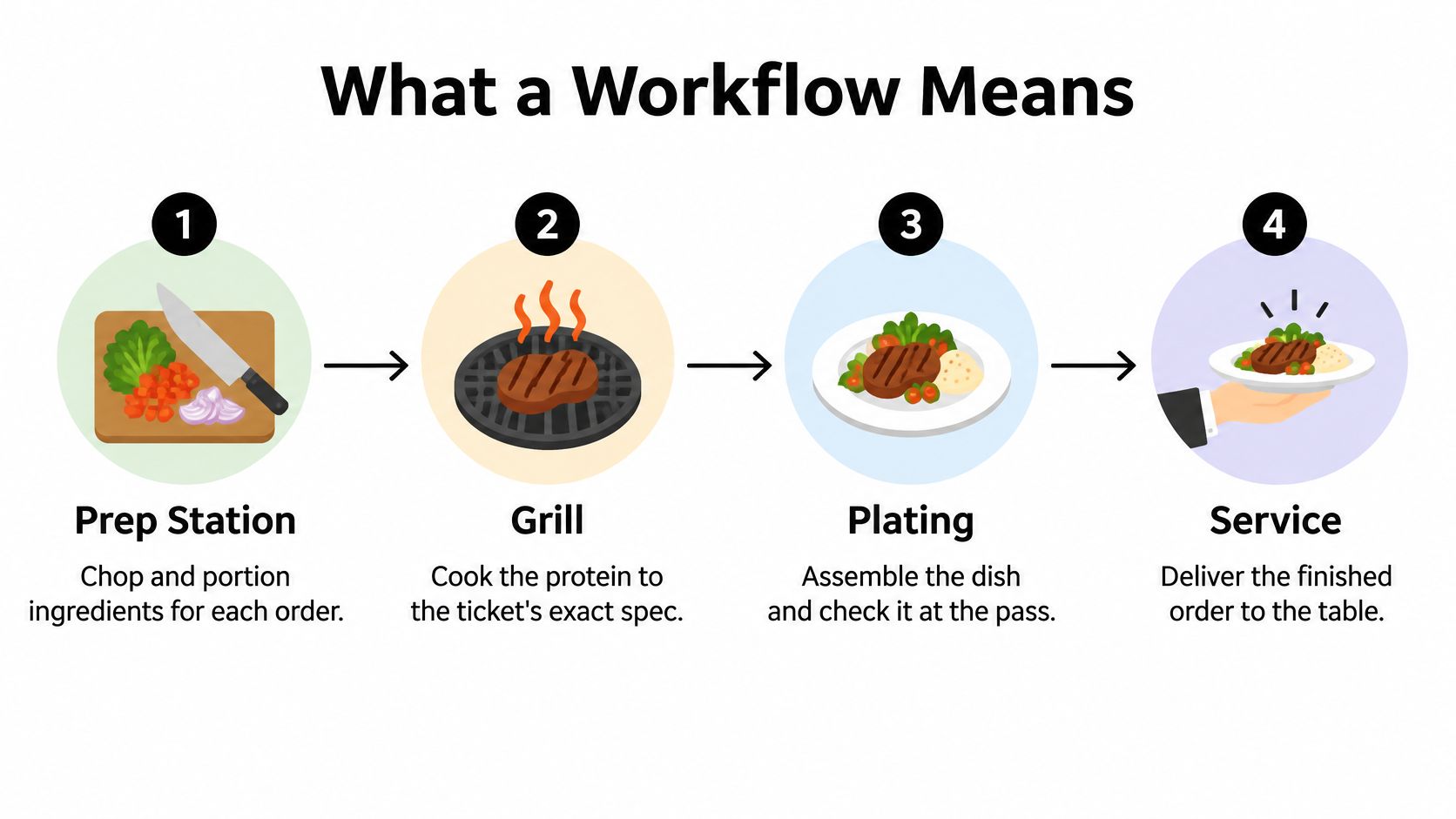
Nothing about that kitchen example is complicated, which is exactly why the word stuck. It describes how work travels rather than who happens to be on shift, so it applies just as neatly to software bugs and marketing approvals as it does to steaks and fries.
Three Milestones Behind the Word
The modern concept grew out of factory floors more than a century ago. According to the TinyMCE guide to workflow management, two early thinkers laid the groundwork during the Industrial Revolution: Frederick Winslow Taylor, who measured individual tasks to find the most efficient method for each one, and Henry Gantt, whose scheduling charts showed managers task dependencies and timing so they could see what had to finish before the next stage began.
Ford Motor Company pulled those ideas together in 1913 by introducing a moving assembly line for the Model T. Before the moving line, building one Model T took roughly 12 hours, and reorganizing the floor into specialized stations with continuous material flow dropped assembly time to about 93 minutes, an improvement of roughly 87%, while lifting output from around 100 cars per day to about 1,000.
The lesson from 1913 wasn't that workers suddenly swung wrenches faster. Productivity jumped because Ford redesigned sequence, specialization, and handoffs. Whether you're routing contract approvals, handling support tickets, or maintaining paid search accounts today, the goal stays identical: map recurring work, strip out extra steps, standardize routine decisions, and make bottlenecks impossible to ignore.
Where You Will Meet Workflow in Everyday Work
A proposal sits unread for two days, then legal sends it back with one comment. That stall is the handoff. The sentence that fixes it is short: we need a clearer approval workflow, written as one word, because the steps only count once they run as a single sequence.
You will meet that pattern in three places almost every week.
Office approvals move a draft from a copywriter to a marketing manager and then to legal. The writing is often quick. The file waiting between desks is what blows the deadline.
Software tickets follow a longer chain. Support logs the bug, an engineer ranks how bad it is, a developer writes the fix, QA checks it in staging, and someone closes the ticket after deployment. Drop one handoff and the same bug gets reported twice.
Paid search is the same idea with live queries. During routine Google Ads account management, a specialist pulls recent search terms, flags wasted clicks, adds exclusions, and promotes phrases that already convert. Call that pass a search-term review workflow and the order is obvious: queries first, waste out, winners in. Split it into "work flow" and people treat the pull, the exclusions, and the promotions as three loose chores instead of one review.

Why Coordination Steals More Time Than Execution
Those gaps cost more than the task itself. A 2024 Time Doctor workplace productivity summary reports that employees spend about 60% of their time on "work about work" (status updates, coordination, and searching for information), which on a 40-hour week is about 24 hours of coordination and 16 hours of focused execution, and that 77% of employees say automating routine tasks would significantly lift productivity.
Firms are answering that drag by locking repetitive searching, formatting, and routing into fixed steps. Strategy and creative calls stay with the people who can judge the result.
Analytics teams already split the work that way when they set up steps for reliable attribution data from Trackingplan. Structured routing catches broken tracking tags so analysts spend their hours on campaign performance.
For a quick visual breakdown of how modern teams put these pieces together, watch this short overview.
Next time a recurring project slows down, skip the vague status meeting. Say it so everyone can act: We need to tighten the review workflow before the next budget cycle. In a Google Ads account, that means one pass over live queries, keep the terms that convert, exclude the junk, and hand the cleaned list to the next person without another meeting.
Workflow Compared With Process, Pipeline and Procedure
People swap workflow, process, pipeline, and procedure in meetings all day, and nobody stops the call to hand out grammar tickets. You'll still get understood if you mix them up in casual chat.
The trouble starts when you write operating docs, train new hires, or figure out how to document processes across a growing team. Calling a high-level policy a workflow or calling a single checklist a pipeline muddies who owns what. Here is where each term draws its line.
| Term | What it describes | Typical example |
|---|---|---|
| Workflow | The order of steps and handoffs in a repeatable sequence | Search-term review, then negatives, then reporting |
| Process | The defined way to reach an outcome, often with rules and standards | Hiring process from application to offer |
| Pipeline | Stages work moves through, tracked as a stream of items | Sales pipeline of deals by stage |
| Procedure | A written step-by-step method for one task | Steps for exporting a report |
| Task | One unit of work with a single owner | Adding one negative keyword |
How These Five Terms Nest Together
Rather than competing with each other, these words operate at different zoom levels. A workflow frequently sits inside a broader process, while a procedure zooms right into one step of that workflow.
Take hiring as a quick example. Your hiring process covers the big-picture rules: budget approval, salary bands, legal compliance, and final offer sign-off. Inside that process sits your interview workflow, which spells out how a resume moves from recruiter screen to hiring manager review to panel interviews. Zoom in one level closer, and a procedure gives the written step-by-step instructions for a single task inside that chain, like how a coordinator exports interview scorecards from your applicant tracking system.
A pipeline looks at the same movement through a volume lens. Sales leaders check a pipeline to see how many deals sit in discovery versus negotiation, rather than to map how one rep hands a contract to legal.
Quick naming test: If your question is who hands what to whom and in what order, you're describing a workflow.
Use process for the overarching rules, pipeline when you're counting items moving through stages, procedure for a written how-to on one specific task, and workflow whenever the handoffs between steps are the main event.
Search Term Review as a Real Workflow
Write the sentence the way it should land in your audit note: “The weekly search-term review workflow protects spend.” Workflow is one word there because it names the connected sequence, and Google Ads gives you a clean way to prove that sequence with real queries.
Run the sequence in this exact order each week:
- Pull the Search terms report. Start inside Google Ads with the Google Ads Search terms report guide and inspect the actual queries that triggered your ads alongside the Match type column, which shows how closely each search matched your target keyword. This is the input stage: no report, no workflow.
- Flag irrelevant queries. Scan for searches carrying the wrong buyer intent, job seekers, DIY researchers, or mismatched product terms that soak up clicks without converting.
- Add exclusions as negative keywords. When you add negatives from search terms, choose the negative match type based on how broadly you want to block traffic: exact for one precise query, phrase when the terms stay in the same order, broad when every term is present even if the order changes. If you're processing large batches, the Google Ads Editor search terms documentation shows how to filter the Search terms window by keyword, match type, or search term and apply selected entries directly at the campaign or ad-group level.
- Promote winning search phrases. Grab converting queries that you aren't bidding on directly and add them to your active keyword lists so you can write tighter ad copy and control bids cleanly.
- Document why you made each call. Write a quick note explaining why a query was blocked or promoted rather than logging only the final change. A University of Rochester study of workflow continuity across 338 workers found that temporal interruptions can increase task-completion time by up to 102%, while switching between different task types slows completion by 57%. Treat the note as part of the handoff: the next specialist should see the reason, not just the edit.
Match Types and Account Limits Shape Your Setup
Negative keywords don't behave like positive keywords, so match type decides how much traffic you block. The Google Ads negative keyword reference details that Search campaigns support broad, phrase, and exact negative match types, and each one filters queries differently.
| Match type | Blocks an ad when | Example with negative cheap shoes |
|---|---|---|
| Broad | The search contains all the negative terms in any order | Blocks shoes on cheap sale |
| Phrase | The search contains the terms in the same order | Blocks cheap shoes online, not shoes cheap |
| Exact | Only the exact terms in the same order with no extra words | Blocks cheap shoes, not cheap shoes online |
Watch one sharp edge here: negative keywords don't match close variants the way positive keywords do. If you want to block misspellings, plurals, or reordered phrasing, add those specific forms on their own. A plural can keep spending even after the singular is blocked.
Account ceilings also force you to treat list maintenance as a planned stage rather than an afterthought. Per the Google Ads account limits documentation, a manager account can hold up to 20 negative-keyword lists, each child account can hold up to 20 lists of its own, every list maxes out at 5,000 keywords, a single campaign allows up to 10,000 negative keywords, and Display and Video campaigns cap at 1,000. Build cleanup into the workflow before you hit those ceilings: merge duplicate lists, retire negatives tied to dead offers, and keep campaign-level exclusions close to the ad groups they protect.
Pick One Spelling and Map Your Own Workflow
The spelling decision takes two seconds: write workflow as one word for the noun, the adjective, and the plural, and save work flows strictly for the occasional sentence where flows is your verb.
Now put the word to work on your actual calendar. Pick the one recurring task you repeat every single week and write its steps in order on a blank page, just like a search-term review. Circle every handoff between people or tools, because those seams are where teams bleed hours and start hunting for how to improve marketing efficiency without spotting the bottleneck.
Three Questions to Audit Every Step
Walk through your list and test each stage against three plain questions:
- Who hands it off? Assign a single named owner so work never floats in a shared inbox nobody claims.
- What do they need to finish it? Write down the exact files, login access, or decision notes required before that step can move.
- What gets stuck when they're away? Flag single points of failure today so one person's vacation doesn't freeze the whole queue.
Once your sequence is clear on paper, the right tool can take the grunt work out of the repetitive stages. At Keywordme, users can bulk paste keyword lists into the tool, apply match types, and then copy, download, or paste the lists wherever needed, which trims the manual formatting step for busy agencies and small teams. Still, the map matters more than any piece of software.
Before you close your draft today: Run a quick search for work flow, fix every noun and adjective hit to workflow, and check your headings and captions so one clean spelling runs from start to finish.
If your weekly PPC cleanup still means bouncing between spreadsheets, match-type brackets, and Google Ads tabs, our Chrome plugin puts search-term cleanup, negative keyword lists, and campaign expansion right inside the Search Terms Report. You can apply exact, phrase, or broad match types in one click and spend more time on campaign strategy instead of manual formatting. Take a look at Keywordme and try our seven-day free trial on your next search-term review.
