
How to Document Processes That Actually Get Used
How to Document Processes That Actually Get Used


A campaign breaks at 9 p.m. The playbook link leads to a dead folder, the screenshots show an interface that no longer exists, and the person who knows the workaround is somewhere over the Atlantic. By morning, the client wants an explanation, the account manager wants a timeline, and the rest of the team is reconstructing a process from scattered Slack messages.
That's the practical test of how to document processes. A document isn't useful because it exists. It's useful because someone can open it during a stressful handoff and complete the work without guessing. The strongest documentation captures reality, gives people the right level of detail, and has an owner who keeps it current.
Why Most Process Documentation Never Gets Opened
I've seen agencies write beautiful operating manuals that nobody touches after the author shares the link. They contain polished introductions, broad principles, and screenshots arranged with care. They still fail when a paid search specialist needs to know which checks happen before a campaign goes live or what to do when a client's conversion data suddenly changes.
The problem usually isn't a shortage of templates. It's the gap between having a file on a drive and having a reference people trust. If the document describes an ideal workflow rather than the one the team follows, users quickly learn that the fastest route is asking a colleague. Every unanswered exception weakens the document a little more.
That creates familiar operational pain:
- Onboarding slows down: New hires depend on senior staff for steps that should be self-serve.
- Handoffs become fragile: Important context stays in private messages, personal notes, or memory.
- Tribal knowledge leaves: When a senior marketer changes roles, their workarounds may disappear with them.
- Quality varies: Two people complete the same task using different assumptions.
A widely cited 2015 benchmark found that 96% of companies had at least some business processes documented, but only 23% documented them frequently and just 2% always documented processes. The same source reported that only 4% measured and managed their documented processes, which shows why a folder full of files doesn't automatically create control or consistency. The historical process documentation benchmark helps explain why documentation can be widespread while mature documentation habits remain rare.
Practical rule: Treat every process document as a product with users, maintenance, and feedback, not as a writing assignment.
The labor cost is easy to overlook. Knowledge workers spend about 50% of their time creating and preparing documents, while employees spend about 2 hours per day searching for documents, or roughly 10 hours per week per worker. Those figures come from an industry summary of documentation research, which also notes that approximately 25% of documents can be lost without a document management strategy. The documentation statistics summary makes the operational point clearly: poor information handling consumes time that teams could spend executing campaigns, analyzing performance, or serving clients.
Documentation also belongs in the broader productivity conversation, alongside sensible folder structures, clear ownership, and fewer avoidable handoffs. Teams rebuilding those habits can use this guide to improve team productivity without pretending that another generic template will solve the underlying problem. Resources on how Halo AI fixes doc underuse are useful for the same reason, they focus on helping people find and use support knowledge rather than merely producing more of it.
Decide Which Processes Are Worth Documenting First
Don't start by documenting everything. That approach creates a large backlog, delays useful results, and encourages the team to write low-value procedures while urgent, failure-prone work remains undocumented.
Start with a short triage meeting. Put every candidate process on a board, then assess it through four filters: impact, frequency, complexity, and risk. You don't need a complicated scoring system. A simple high, medium, or low rating is enough to expose the work that deserves attention first.
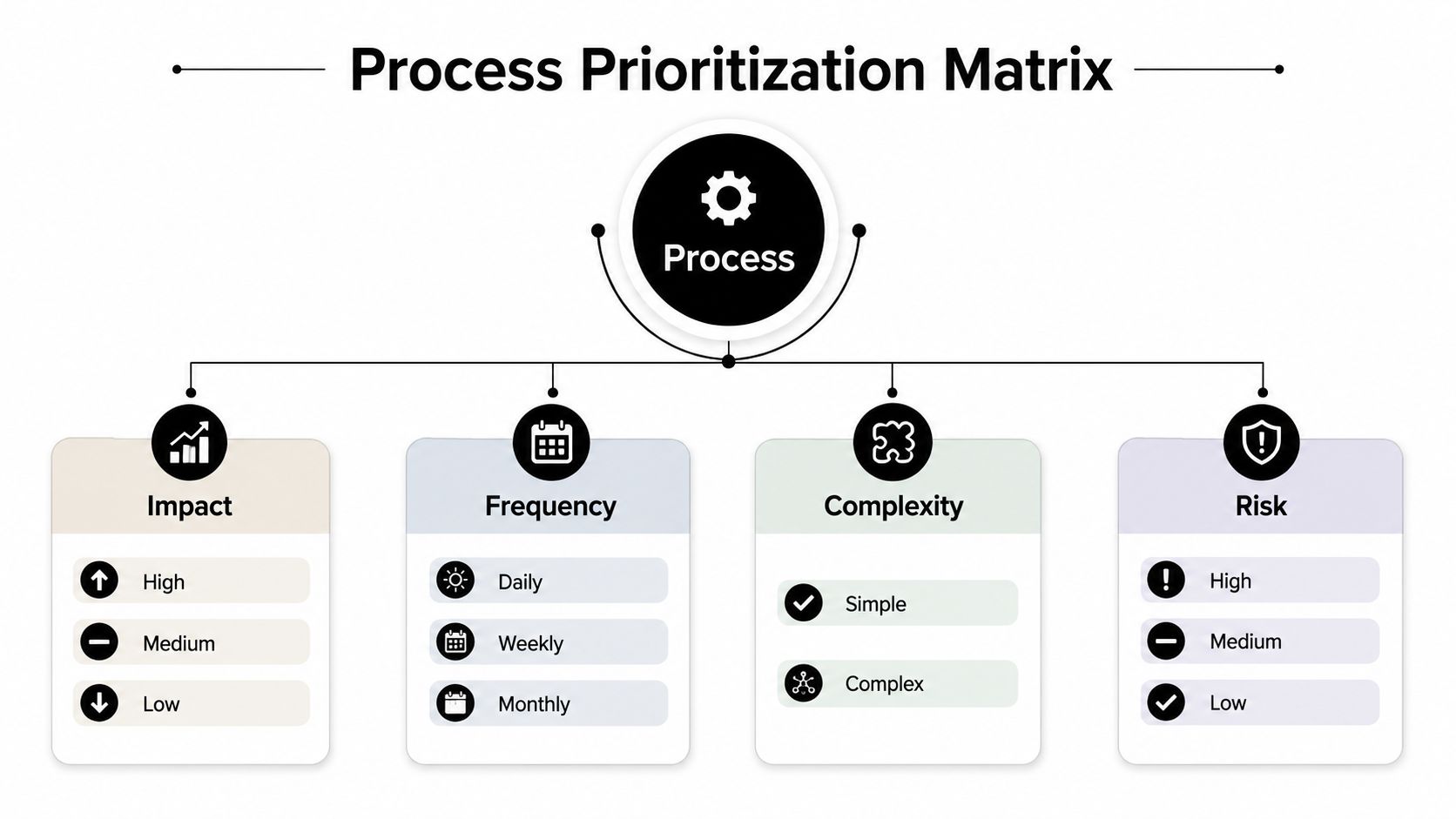
Use four filters instead of instinct
Impact asks what happens when the process fails. A broken client onboarding workflow can affect trust, timelines, and revenue. A delayed internal naming convention may be irritating but less urgent.
Frequency identifies repetition. A weekly search-term review deserves attention sooner than a rare administrative task because small inefficiencies recur and new staff encounter the workflow often.
Complexity measures how much judgment, sequencing, or system knowledge the work requires. A task with several branches, tools, and approval points needs more than a short checklist.
Risk covers financial, compliance, client, and reputational consequences. Creative QA before launch may rank highly even if it happens less often than routine reporting, because a missed policy issue or incorrect budget can create serious problems.
Try this rough prioritization grid:
| Process | Impact | Frequency | Complexity | Risk | First action |
|---|---|---|---|---|---|
| Weekly search-term review | High | High | Medium | Medium | Document now |
| Creative QA before launch | High | Medium | High | High | Document now |
| Client onboarding | High | Low | High | High | Document now |
| Internal file naming | Low | High | Low | Low | Use a short rule |
| Rare historical export | Low | Low | Medium | Low | Defer or skip |
A process should move to the front when it affects important outcomes, repeats regularly, contains hidden judgment, or creates meaningful exposure when done incorrectly. You don't have to document a task merely because someone mentioned it in a meeting.
A process that nobody repeats, owns, or depends on probably doesn't need an SOP.
For low-impact work, a sentence in a team handbook may be enough. For high-impact work, create a durable artifact and test it with someone who didn't write it. That test often reveals whether you've documented an operating process or just described what the author already knows.
Capture How the Work Actually Happens
Most documentation fails before the first sentence is drafted. The author asks a subject-matter expert, “How should this work?” The expert describes the clean version, skips familiar clicks, and leaves out the workarounds that make the task possible in the actual account.
Document the current state first. You can improve it later, but you can't improve a fictional workflow.

Observe before you interview
Ask an experienced operator to complete the task while you watch. Screen recording is particularly useful for PPC work because the details are visual and easy to omit in conversation. Record the actual clicks, filters, naming choices, file locations, approval messages, and moments where the operator pauses to make a judgment.
Don't interrupt every few seconds. Let the person work normally, then ask focused questions at natural breaks:
- What were you checking before this step?
- What tells you the result is correct?
- What do you do when the expected option isn't available?
- Which step would a new teammate most likely miss?
- What changed the last time this process went wrong?
SMEs skip “obvious” details because those details are automatic to them. They may not mention which browser tab contains the data, which toggle must be enabled, or how a platform handles a match-type decision in one click. Real-time observation exposes those gaps more reliably than an interview alone.
Record exceptions as part of the process
Workarounds aren't embarrassing defects to hide. They're evidence about where the formal workflow doesn't match the operating environment.
Use a small exception note while observing:
- Trigger: What condition creates the exception?
- Observed action: What does the operator do?
- Reason: Why doesn't the standard step work?
- Decision owner: Who decides whether the workaround remains?
- Future fix: Should the system or process change?
Then build the first map from the messy version. Mark uncertain steps rather than filling them with assumptions. A rough current-state map is more valuable than a polished SOP that omits the part everyone relies on.
The capture process can also include a short screen recording for training and a written flow for reference. Place the recording near the relevant instructions, not as a substitute for them.
Once the workflow is visible, separate required actions, judgment calls, and exceptions. That distinction keeps the final document readable. High-risk or high-volume tasks deserve deeper detail, while routine steps can stay concise.
Expert guidance also recommends naming processes with a verb-noun structure, assigning a named owner, recording created and last-reviewed dates, and keeping version history. These process documentation best practices are practical because they turn a document into an accountable operating asset rather than an anonymous file.
Pick the Right Format for Each Process
A ten-page SOP isn't automatically more useful than a one-page checklist. Format should follow the work. Paragraphs help when someone needs context and precise instructions, while visual or responsibility-based formats work better when the main problem is branching or ownership.
| Process Type | Best Format | Why It Works | Example Use |
|---|---|---|---|
| Sequential task with detailed actions | Written SOP | Preserves context, settings, and verification steps | Search-term cleanup using bulk match-type assignment |
| Branching workflow | Flowchart | Makes decisions and next actions visible | Campaign-launch approvals |
| Multi-person handoff | RACI chart | Clarifies who is responsible, accountable, consulted, and informed | Client reporting |
| Repetitive quality check | Checklist | Reduces memory load and makes completion visible | Weekly campaign QA |
Written SOPs
Use an SOP when the operator needs to perform a repeatable sequence inside a tool. Include the purpose, trigger, prerequisites, steps, expected result, exception handling, and escalation path. Keep each SOP focused on one process. Combining campaign setup, reporting, billing, and optimization in one document creates a reference nobody can scan under pressure.
Flowcharts
A flowchart wins when the next step depends on an answer. For campaign approvals, the path might branch based on budget status, tracking readiness, policy review, or client sign-off. A paragraph can describe those branches, but a diagram lets the operator see the route before taking it.
RACI charts
RACI is useful when the work itself is clear but handoffs fail. A client report may involve an analyst preparing data, an account manager reviewing the narrative, a strategist approving recommendations, and a client receiving the final version. The chart prevents every participant from assuming someone else owns the decision.
Checklists
A checklist is enough when the task is familiar and the main risk is omission. Weekly QA often needs a short list of tracking, budget, search-term, ad-status, and landing-page checks, with space to record issues. Don't bury a checklist inside a long explanation. Put the action and completion signal where the operator can see them.
Choose the smallest format that prevents the likely mistake.
For teams turning SOPs into practical, visible aids, this guide to designing job aids for SOPs offers useful thinking on reducing cognitive load. Tool selection matters too, especially when agencies are comparing the best tools for digital marketing agencies, but the artifact still needs a clear user, trigger, and outcome before software can help.
The Mistakes That Make Documentation Dead on Arrival
Bad documentation can be worse than no documentation because it gives people false confidence. They follow an outdated instruction, assume the process is sound, and only discover the problem after a campaign, approval, or client handoff has failed.
Weak documentation is associated with 30–40% longer onboarding times and 20–30% higher operational error rates, according to industry reporting on process documentation mistakes. The documentation failure analysis also reports that 66% of businesses struggle with document approvals and reviews, while 83% of workers lose time to document versioning issues every day. Those figures point to governance failures, not a lack of writing talent.
The giant shared document
One master manual feels efficient at first. In practice, users search through unrelated material, authors overwrite one another's instructions, and a change to one process becomes difficult to review.
Fix: Create one process per document, then connect related documents through clear links. A search-term SOP should not contain the entire account-management lifecycle.
The unnamed owner
A document without an owner has no reliable path for correction. When a platform changes or a team member spots an error, everyone assumes someone else will update the page.
Fix: Add an owner, created date, last-reviewed date, and escalation contact near the top. Ownership means monitoring accuracy, not personally performing every step.
The missing version history
If users can't tell which revision is current, they'll compare copies or use the one in an old message. That creates exactly the versioning friction the benchmark data describes.
Fix: Keep a short change log. Record what changed, why it changed, and who approved it. Link archived versions only when there's a genuine audit or training need.
The idealized procedure
Authors often remove exceptions to make a workflow look clean. Operators then encounter the first unusual case and abandon the document.
Fix: Include a decision box for common exceptions and label unresolved workarounds truthfully. A visible limitation is safer than an implied guarantee.
The one-time launch
Publishing is not completion. A document can become inaccurate as soon as a form, permission, interface, or approval rule changes.
Fix: Add review scheduling to the team's existing operating rhythm. Use a quarterly freshness check for important documents, with earlier review after material system changes. The date is a control, not decoration.
Keep Documentation Alive as Tools and Teams Change
PPC documentation needs maintenance because platforms, permissions, reporting views, and automation routines change. AI-assisted workflows add another layer. They can help draft instructions, detect changed screens, retrieve related knowledge, or produce multilingual versions, but they don't remove the need for a human owner.
Recent discussion of 2026 process documentation trends describes a move toward AI-assisted authoring, change detection, retrieval, and multilingual output. The emerging documentation trend analysis is useful context, but the operational question remains simple: who confirms that the instructions still match the account?
Give every document a maintenance path
Put four fields at the top of every important process:
- Owner: The person accountable for accuracy.
- Last reviewed: The most recent human check.
- Next review: The scheduled date for another check.
- Version: The current revision identifier.
Use a lightweight change log below the title. A line such as “Updated approval step after new client review route” tells users why the page changed without forcing them to compare entire versions.
Attach reviews to existing meetings
Don't create a separate bureaucracy around documentation. During a weekly standup, ask whether any process changed. During a monthly retrospective, select documents affected by recurring defects or handoff confusion. After a tool migration, require owners to confirm the relevant pages before the new workflow becomes standard.
AI can help identify likely updates by comparing a recording, interface capture, or source note with the current document. It can suggest edits and surface related pages. A person still needs to approve the change, test the instructions, and publish the revision.
Automation can detect change. Accountability decides whether the process changed.
Retire documents that no longer describe active work. Archive them with a clear status rather than leaving them in search results beside the current version. A smaller, trusted knowledge base beats a large library filled with contradictory instructions.
Reusable Checklist and Sample SOP for Your Next Sprint
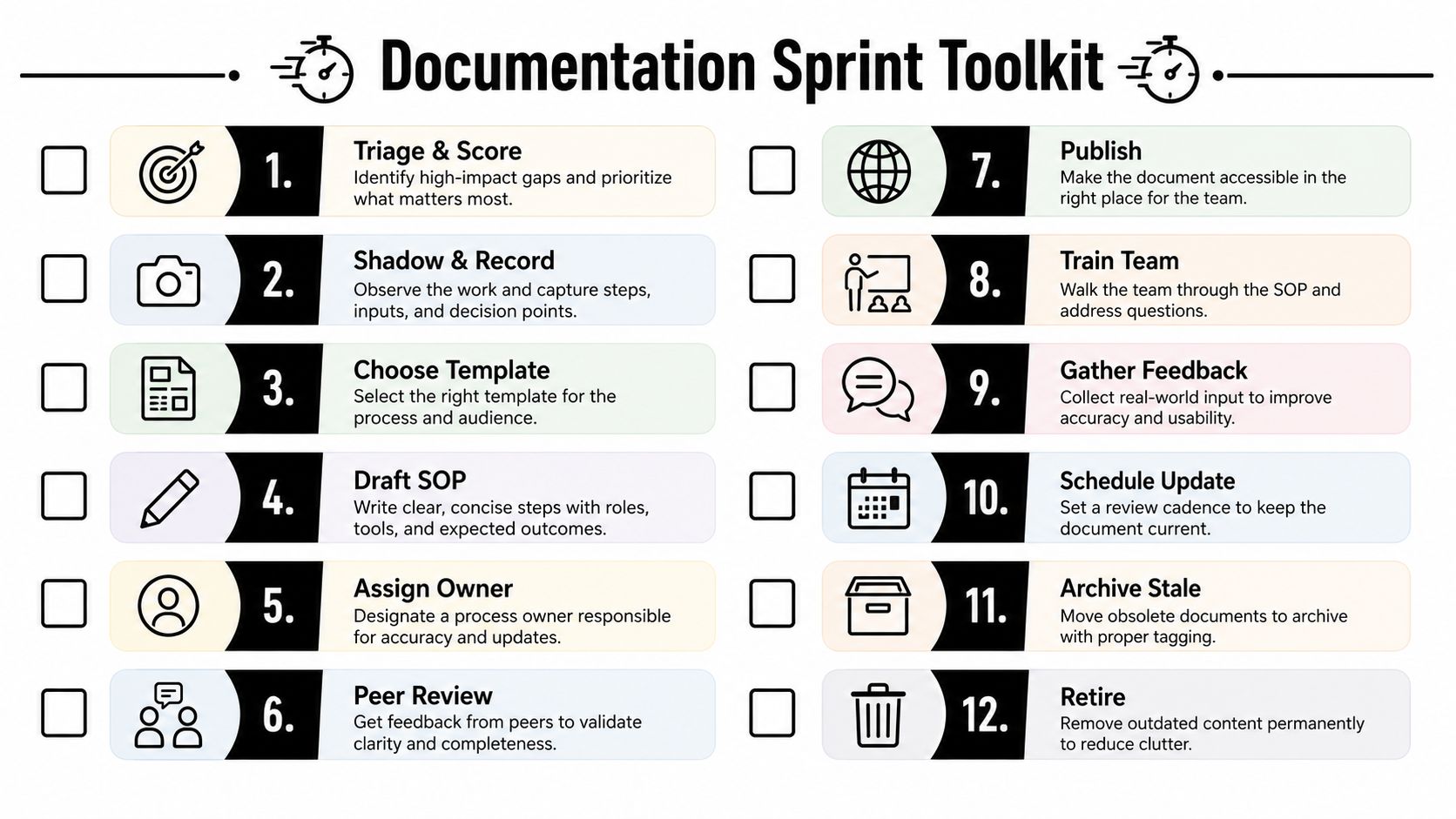
Use this 12-point documentation sprint checklist:
- Triage and score: Rank impact, frequency, complexity, and risk.
- Shadow and record: Capture the workflow.
- Choose the template: Select an SOP, flowchart, RACI, or checklist.
- Draft the SOP: Write from observed behavior.
- Assign the owner: Name one accountable person.
- Peer review: Ask a non-author to test it.
- Publish: Put it where the team already works.
- Train the team: Run the process with the document open.
- Gather feedback: Record missing steps and confusing language.
- Schedule an update: Set the next review date.
- Archive stale versions: Remove obsolete copies from active search.
- Retire: Delete or archive processes the team no longer uses.
Sample SOP skeleton
Process: Run weekly search-term cleanup
Owner: Paid search specialist
Trigger: Weekly optimization review
Prerequisites: Account access, search-term data, approved negative-keyword rules
Steps: Review terms, classify intent, assign exact, phrase, or broad match types where appropriate, add irrelevant terms to negative-keyword workflows, and record unresolved decisions.
Verification: Confirm changes in the account and log exceptions.
Escalation: Send ambiguous or client-sensitive terms to the account lead.
Review fields: Created date, last-reviewed date, next review date, version, change log.
For broader operational planning, connect the SOP to an implementation plan framework. Re-document when users report missing steps, the same exception appears repeatedly, a tool changes, ownership moves, or the process produces avoidable rework. The target isn't a perfect binder. It's a reference someone opens on an ordinary Tuesday and trusts enough to act.
Keywordme helps PPC teams turn messy search-term work into a repeatable workflow, including bulk match-type assignment and negative-keyword handling. Visit Keywordme to simplify the optimization steps your team documents, trains, and reviews.
.svg)