
What Is Cross Network in Google Analytics? A Simple Guide
What Is Cross Network in Google Analytics? A Simple Guide


You open GA4, head to Traffic acquisition, and there it is. Cross-network. No clean breakdown. No obvious answer. Just a channel line that looks important enough to care about and vague enough to be annoying.
If you run Google Ads, especially Performance Max, this usually shows up right when you’re trying to answer a basic question from a client, your boss, or yourself: what’s working? Search? YouTube? Discover? Gmail? GA4 shrugs and hands you one blended bucket.
That doesn’t mean the data is useless. It means Google made the reporting match the way its automated campaigns work, and that creates a trade-off. You get a unified view of multi-network campaign traffic, but you lose a lot of the clean, network-level visibility PPC managers need to optimize spend. If you've been trying to understand what is cross network in Google Analytics, this is the practical version.
That Confusing 'Cross Network' Line in Your GA4 Report
A lot of PPC managers hit the same moment. You’re checking acquisition data, trying to compare channels, and one row starts eating a noticeable share of paid traffic. It’s not Paid Search. It’s not Display. It’s not Paid Video. It’s just Cross-network.
At first glance, it looks like a labeling issue. Maybe auto-tagging is weird. Maybe GA4 is doing GA4 things again. But this one usually isn’t a bug. It’s a reporting consequence of how Google now pushes advertisers toward campaigns that run across several properties at once.
That’s why this line tends to show up more often in accounts using automated campaign types. Google is blending placements across Search, Display, YouTube, Gmail, Discover, Shopping, and other inventory. GA4 follows that logic and groups those sessions into a single channel when it can’t cleanly assign one dominant network.
What trips people up: the label sounds temporary or accidental, but it’s actually a default reporting category.
The frustration is fair. If you’re responsible for budget, “cross-network” isn’t a satisfying answer. You can’t defend spend with a shrug and a mystery bucket. You need to know whether the campaign is finding valuable search intent or just spraying impressions into lower-quality placements.
A good way to think about it is this:
- GA4 is reporting the campaign design: one campaign can serve across multiple Google properties.
- You need reporting for optimization: which placements, paths, and terms deserve more money or less.
- Those are not the same thing: that gap is where most of the pain lives.
Once you accept that, the channel starts making more sense. It stops being a random nuisance and starts reading like a signal that you need to investigate campaign structure, attribution, and platform mix more carefully.
Decoding the Cross Network Channel in GA4
Cross-network in GA4 is a default channel grouping for traffic from Google Ads campaigns that run across multiple Google networks. In plain English, it’s GA4’s catch-all bucket for campaign types that don’t belong neatly to just Search, or just Display, or just YouTube.
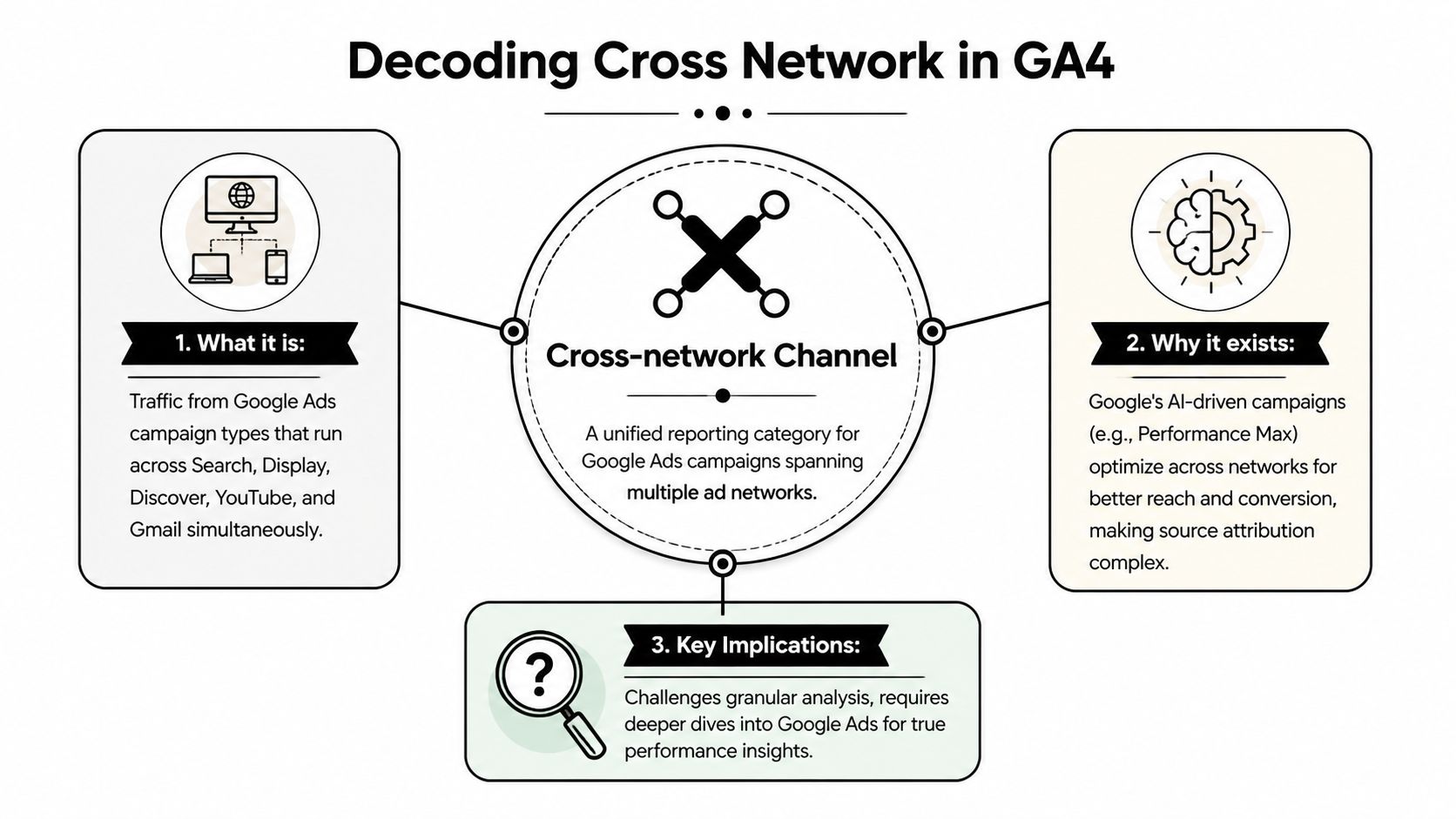
What GA4 is actually grouping
The main drivers are campaigns like Performance Max and other Google Ads campaign types that can serve across multiple properties. Depending on the campaign setup and available signals, that can include Search, Display, YouTube, Gmail, Discover, Shopping, and Maps.
Consider a mixed bag from one vending machine. You paid for one bag, but inside are several types of candy. GA4 tells you the bag performed. It often doesn’t tell you which candy carried the result.
According to Analytify’s write-up on cross-network in GA4, a 2023 analysis showed that for sites running Performance Max, Cross-network accounted for 18–22% of all Google Ads traffic in GA4. The same analysis reported that this channel drove 12–15% of total Google Ads conversions for e-commerce sites. That’s why ignoring it is a mistake. It may be annoying, but it isn’t small.
Why GA4 uses this bucket
GA4 is built around an event-based model, and Google Ads campaigns increasingly rely on automation that shifts placements dynamically. A user may first encounter an ad on YouTube, later search the brand, and then convert after another touchpoint. When GA4 can’t cleanly isolate one primary network from the campaign data and clickstream behavior, it groups the session under Cross-network.
That’s not especially marketer-friendly, but it is consistent with how Google now structures campaign delivery.
Here’s the practical version of what is cross network in Google Analytics:
| GA4 label | What it usually means | Why it happens |
|---|---|---|
| Cross-network | Traffic from Google Ads campaigns spanning multiple networks | One campaign serves across several Google properties |
| Paid Search | Search-led ad traffic | GA4 can identify Search as the primary channel |
| Display | Display-led ad traffic | GA4 can isolate display-specific traffic |
| Paid Video | YouTube or video-led traffic | GA4 can map the traffic more directly |
Cross-network usually tells you less about one placement and more about how Google wants you to evaluate the campaign as a system.
The important mindset shift
If you still think in old-school, one-network-per-campaign reporting terms, Cross-network feels broken. If you think in terms of automated, blended delivery, it makes sense. The problem is that advertisers still have to make budget decisions, and blended reporting doesn’t help much when a client asks where the money went.
That’s why the actual work starts after the label appears.
Why Cross Network Exists and Why It's Frustrating
Google wants advertisers to buy outcomes, not placements. That’s the whole pitch behind campaigns like Performance Max. Give the system assets, audience signals, budget, and conversion goals, and let the algorithm decide where to serve ads across the Google ecosystem.
From Google’s point of view, that’s efficient. From a PPC manager’s point of view, it often means less control and thinner reporting.

The trade-off behind the label
Cross-network exists because Google’s automated campaign products are designed to move across channels fluidly. That flexibility is supposed to improve performance by letting the system chase conversions wherever the opportunity appears.
The catch is obvious. Once one campaign can spend across several networks, the reporting also gets blended. You get the result, but not the clean path. That makes attribution fuzzier and optimization slower.
SEOTesting’s explanation of Cross-network in GA4 puts the core problem plainly: credit attribution becomes less precise and platform-level ROAS becomes difficult to measure. If you need to justify Performance Max spend, that’s the part that hurts.
Why PPC managers get cynical fast
You can’t manage budget well if the reporting hides where value came from. That’s not just a preference issue. It changes day-to-day decision-making.
A few examples:
- Search might be carrying intent, while lower-intent placements assist lightly but consume more spend than you’d like.
- YouTube might help early-funnel discovery, but that doesn’t mean every video placement deserves the same trust.
- Gmail and Discover can look helpful in aggregate, while still being hard to defend at a platform level.
That’s why Cross-network often creates awkward conversations. The campaign may be producing conversions, but the reporting doesn’t make it easy to explain which inventory contributed most or where waste is hiding.
If you work in an agency or in-house team that needs a cleaner attribution framework, this is also where a broader view of cross-channel attribution strategy becomes useful. GA4’s channel label is only one layer of the story. Budget decisions need a wider lens than the default report gives you.
Practical reality: automation reduces manual campaign management, but it often increases manual analysis.
What doesn’t work
A lot of marketers respond by either trusting Cross-network blindly or dismissing it completely. Both are bad habits.
Blind trust leads to lazy budget retention. Blanket skepticism leads to cutting campaigns that may be helping. The better approach is uglier but more effective. Accept that default GA4 reporting won’t answer the question by itself, then use additional dimensions and segmentation to force more clarity out of the data.
Finding and Analyzing Your Cross Network Traffic
The first useful move is simple. Don’t stare at the Cross-network row as if it will become more detailed on its own. Open the report and start breaking it apart.

Where to find it in GA4
Go to Reports > Acquisition > Traffic acquisition. In the primary dimension, you’ll usually be looking at Session default channel group. That’s where Cross-network appears as one of the standard rows.
Don’t stop there. The default channel line tells you that blended traffic exists. It doesn’t tell you enough to make budget calls.
Start with these secondary dimensions:
- Session campaign to see which campaign names are driving the Cross-network traffic
- Session source / medium to confirm the traffic is tied to Google Ads traffic patterns
- Source platform if it’s available in your property, because that can start revealing where traffic is showing up
If your campaign naming is sloppy, this is the moment it punishes you. Neat naming conventions make Cross-network analysis much easier because Session campaign becomes your first clue, not another mess to sort through.
A practical workflow that works
Use this sequence when you review the channel:
- Filter for Cross-network in the traffic acquisition report.
- Add Session campaign as a secondary dimension.
- Compare conversions, engaged sessions, and landing pages for the campaigns showing there.
- Check your Google Ads campaign settings and placement-related reporting to validate what GA4 is hinting at.
- Document what appears repeatedly, especially campaigns that keep surfacing with strong or weak downstream behavior.
If you rely on tagged URLs heavily, it also helps to keep your tracking structure clean. A messy setup makes already-blended reporting even harder to interpret. This is one reason teams should stay disciplined with Google tracking URL setup and naming consistency.
Later in the analysis process, this walkthrough can help if you want a visual explanation:
What you’re looking for
You’re not trying to make GA4 magically show perfect network-level attribution. You’re looking for patterns.
If one or two campaign names dominate Cross-network, that’s a clue. If certain landing pages convert well from those campaigns, that’s another clue.
Those clues matter because they narrow the problem. Instead of “Cross-network is confusing,” you get closer to “these specific campaigns and landing pages deserve a deeper check inside Google Ads.”
That’s enough to move from vague annoyance to usable analysis.
Actionable Strategies for Managing Cross Network Data
You can stop complaining about the black box and start prying it open. You won’t get total transparency. Google is not in a rush to give you that. But you can get enough structure back to make better decisions.

Use Source platform before you do anything fancier
If your GA4 property exposes Source platform, use it. It’s one of the fastest ways to get beyond the giant Cross-network blob and start seeing how traffic relates to specific Google surfaces.
This isn’t perfect. It won’t suddenly turn Performance Max into a fully transparent campaign type. But it gives you a more useful slice than the default channel line alone.
The key is to compare that dimension against actual business outcomes, not vanity metrics. Sessions are fine. Conversions are better. Revenue or qualified lead events are better still.
A simple review rhythm helps:
- Check platform patterns weekly: Look for recurring traffic and conversion behavior tied to the same source platforms.
- Compare landing page quality: Some platforms send users who browse. Others send users who act.
- Watch for false comfort: A platform can assist volume without producing much final value.
Build custom channel groups for cleaner reporting
This is one of the few workarounds that consistently helps. Rather than accepting GA4’s default grouping forever, create custom channel groups in Admin so you can split hidden traffic into something more useful.
A practical example, pulled from MRS Digital’s guidance on Cross-network in GA4, is creating a rule such as Session campaign contains "PMax" AND Source platform = YouTube. That’s the kind of rule that starts turning mush into reporting you can use.
That same source notes that agencies using this kind of split and reallocating budget away from weaker networks have reported ROAS uplifts of 15-25%. That’s not a promise for every account, but it does show why the exercise matters.
Here’s the kind of logic worth building:
| Custom group idea | Example rule | Why it helps |
|---|---|---|
| PMax YouTube | Session campaign contains PMax and Source platform = YouTube | Separates awareness-heavy traffic |
| PMax Search-like traffic | Session campaign contains PMax and Google Ads-linked campaign naming indicates search intent | Highlights stronger intent segments |
| Demand Gen split | Campaign naming plus source platform rules | Prevents all upper-funnel traffic from blending together |
Use visual reporting that people can actually read
This part gets ignored more than it should. Once you’ve split Cross-network traffic into something cleaner, present it well. Teams make bad budget decisions when reports are cluttered or overloaded.
If you need a refresher, these essential data visualization practices are worth applying to GA4 exports and stakeholder dashboards. Clean labels, consistent comparisons, and fewer junk charts make Cross-network reporting less argumentative and more actionable.
A messy report makes an opaque channel look even more opaque.
Cross-check GA4 against Google Ads, not instead of it
GA4 is useful, but it should not be your only source for understanding Cross-network campaigns. Pair what you see in acquisition reports with campaign-level details in Google Ads.
That means reviewing:
- Campaign names and asset groups
- Search term behavior where available
- Placement and audience signals
- Landing page performance by campaign
- Conversion actions and attribution settings
This cross-check matters because GA4 tells you how traffic is grouped, while Google Ads gives you more of the campaign context behind the grouping.
Turn findings into account changes
Analysis has to end in action or it’s just a prettier form of frustration.
When you start seeing a pattern, act on it. Tighten asset groups. Exclude weak themes. Improve landing pages for the traffic source you think is driving the better sessions. Review negatives more aggressively when lower-quality intent starts bleeding into campaign performance.
What usually does not work is making giant account changes off one report view. Cross-network demands a slower hand. Small, repeated corrections beat dramatic reactions.
A good PPC manager’s edge here isn’t secret data. It’s discipline. Most of the win comes from turning blurry reporting into a repeatable operating process.
Turning Confusion into Clear Campaign Wins
Cross-network is annoying, but it isn’t random. It’s GA4’s way of reflecting how Google Ads now pushes multi-network automation into the center of account management.
That’s why the right response isn’t panic and it isn’t blind trust. It’s investigation. Once you stop expecting the default channel report to do all the work, the label becomes more useful. It tells you where to dig.
The pattern is pretty consistent. First, identify which campaigns are feeding Cross-network. Then break those sessions apart with secondary dimensions. After that, create cleaner reporting views with custom channel groups and compare your findings against Google Ads. That won’t remove all the opacity, but it does restore enough visibility to make better calls.
What this changes in practice
When teams handle Cross-network well, they stop asking vague questions like “is PMax good?” and start asking better ones:
- Which campaign names keep surfacing in Cross-network?
- Which landing pages hold up once that traffic arrives?
- Which source platforms appear tied to stronger conversion behavior?
- Which segments deserve budget protection, and which need tighter control?
That shift matters. It turns the channel from a reporting headache into a diagnostic tool.
Cross-network is not a dead end. It’s usually the first sign that your campaign analysis needs another layer.
If you’re building recurring reviews for clients or your internal team, it also helps to standardize how you report this channel over time. Using consistent Google Analytics report templates makes it easier to compare Cross-network patterns without reinventing the same analysis every month.
The core lesson is simple. What is cross network in Google Analytics? It’s a default GA4 bucket for Google Ads traffic that spans multiple networks. The label is broad, the reporting is imperfect, and the optimization work is still yours. But if you approach it with a clear workflow, it stops being a black box and starts becoming one more lever you can manage.
Keyword clutter and weak search terms make Cross-network campaigns even harder to control. Keywordme helps you clean up junk queries, build negative keyword lists faster, expand winning terms, and handle match types without the usual copy-paste grind. If you want a faster way to turn messy Google Ads data into actual account changes, it’s worth a look.
.svg)