
Google tracking url: Essentials for UTMs & GCLID (google tracking url tips)
Google tracking url: Essentials for UTMs & GCLID (google tracking url tips)


At its core, a Google tracking URL is just a regular web address with some extra information tacked onto the end. These little additions, called parameters, act like a digital breadcrumb trail, telling you exactly where each visitor came from.
What Is a Google Tracking URL Anyway?
Ever wonder how a business knows for sure that a specific TikTok ad led to a sale, while their latest email blast brought in a totally different crowd? The magic behind that is the tracking URL. Without it, your website traffic just looks like a big, anonymous mass of people, making it impossible to tell which of your marketing dollars are actually doing the heavy lifting.
Think about it like throwing a party. If you send out the exact same invitation to everyone, you'll have no clue whether the folks who show up are from work, your book club, or your neighborhood.
But what if you put a unique sticker on each batch of invites? A blue one for coworkers, red for the book club, and green for your neighbors. As people arrive, you could instantly see which group turned out in force.
The Power of Digital Nametags
That’s precisely how a Google tracking URL works. The "stickers" are just small bits of code, or parameters, added to your link. They don't change the destination page at all, but they carry incredibly valuable information for your analytics tools, like Google Analytics.
This simple tweak turns a standard link into a data-collecting powerhouse. It lets you trace every single click, conversion, and dollar earned right back to its source.
When you start tagging all your marketing links, you stop guessing what works and start knowing. It's the first real step toward making smart, data-driven decisions that cut wasted ad spend and crank up your ROI.
So, what does this actually do for your marketing?
- Clear Attribution: You can finally draw a straight line from the money you spent on a specific ad campaign to the revenue it generated.
- Smarter Budgeting: Pinpoint your rockstar channels and confidently pour more resources into what’s delivering real results.
- Campaign Optimization: Get a clear picture of which ad copy, email subject line, or social media post is actually getting people to click and buy.
In short, a Google tracking URL is your key to unlocking granular insights. It’s the difference between flying blind and having a crystal-clear dashboard showing you exactly how every piece of your marketing is performing.
Decoding UTMs: The Building Blocks of Tracking

If a Google tracking URL is the full story of how a visitor found you, then Urchin Tracking Module (UTM) parameters are the individual words that make up that story. Think of them as little descriptive tags you attach to the end of your links.
Without these tags, your analytics can get pretty messy. Traffic from an email newsletter, a paid social ad, and a guest post might all get lumped together under "referral traffic." This leaves you completely in the dark about what’s actually working. With UTMs, you get crystal-clear answers.
These little snippets of code are added to the end of a URL, starting with a question mark (?). This tells the browser, "Hey, this part is just for tracking," so it doesn't actually change the page the user lands on. It’s a simple but powerful system that’s become the go-to standard for manually tracking campaign performance across the web. If you want to dive deeper into how they work, the team at funnel.io has a great breakdown.
The 5 Essential UTM Parameters Explained
You've got five parameters in your toolkit. While you technically only need to use a few, using all five gives you the richest, most detailed data possible.
Let's break down what each parameter does and what it looks like in a real URL.
By combining these, you turn a simple link into a data-gathering powerhouse. You stop just getting traffic and start getting real marketing intelligence.
A well-structured UTM strategy is like having a perfectly organized filing cabinet for your marketing data. You can instantly pull the exact report you need instead of digging through a messy pile of unsorted traffic.
Putting It All Together in a Real-World Example
Let's say you're running a Facebook ad campaign for a big summer sale. You decide to A/B test two different ad images to see which one performs better: one with a beach photo and one with a product photo.
The tracking URL for the first ad would look something like this:
https://www.yourwebsite.com/summer-sale?utm_source=facebook&utm_medium=cpc&utm_campaign=summer-sale-2024&utm_content=beach-photo
When someone clicks that link, Google Analytics instantly knows the full story. This visitor came from Facebook (source), through a paid ad (medium), as part of your summer sale campaign (campaign), and they clicked on the specific ad with the beach photo (content).
That’s the kind of granular detail you need to truly optimize your ad spend and creative strategy, making sure every single dollar is working as hard as it possibly can.
UTM vs. GCLID: Manual vs. Automated Tracking
When you're trying to figure out which ads are working and which are duds, you have two main ways to tag your URLs: the manual way and the automated way.
Think of UTM parameters as the manual approach. It’s like putting a custom-made, hand-written label on every single one of your marketing efforts. You decide exactly what goes on the label.
Then there's the automated route with GCLID (Google Click Identifier). This is Google’s own system, and it’s like having a high-tech machine that automatically slaps a unique, data-rich barcode on every ad click. Both methods get your tracking data where it needs to go, but they're built for different jobs.
UTMs are all about control and flexibility. You can cook them up for literally anything—a Facebook ad, a link in an email newsletter, a banner on a partner’s blog. Because you create them, you can track campaigns from anywhere, not just Google.
GCLID, on the other hand, is a Google Ads exclusive. When you flip on the "auto-tagging" feature in your Google Ads account, Google automatically tacks a unique GCLID onto your URLs every time someone clicks an ad. This little string of code is the key that unlocks a ton of incredibly detailed campaign data that UTMs just can't match.
The Trade-Off: Control vs. Detail
The real difference boils down to this: UTMs are the universal translator, while GCLID is the native speaker.
UTMs (Manual): You build these yourself, defining the source, medium, and campaign. This is your go-to for tracking anything outside of the Google Ads universe, helping you build a full picture of all your marketing channels. We dive deep into how this works for cross-channel attribution in our guide on the topic.
GCLID (Automated): You turn it on, and Google does all the heavy lifting. This is a must-have if you're serious about Google Ads. It automatically pipes rich data straight into Google Analytics, including the ad group, keyword, ad placement, and even the exact search query that brought someone to your site. Trying to capture that level of detail with manual UTMs is nearly impossible.
Here's a simple way to think about it: UTMs are your trusty multi-tool, handy for all sorts of jobs across any platform you can think of. GCLID is a specialized power tool, designed to work flawlessly inside the Google Ads workshop.
So, Which One Should You Use?
For any campaign running outside of Google Ads, the choice is simple: UTMs are your only option, and they're the clear winner. They provide the consistent structure you need to track everything from social media posts to influencer shout-outs.
But when it comes to Google Ads, the answer is almost always GCLID.
By enabling auto-tagging, you get so much more granular data flowing into Google Analytics without lifting a finger. This detailed info is what you need to really optimize your ad spend, figure out which keywords are making you money, and get an honest read on your return on investment. The best practice is to let GCLID do its thing for Google Ads and use your manually crafted UTMs for everything else.
Setting Up Google Ads Tracking Templates
Alright, enough theory. Let's get our hands dirty and actually set up a proper Google tracking system using tracking templates inside Google Ads. This is where we graduate from basic tracking and start building an automated data-collection machine that works for you.
Think of tracking templates as a rulebook for your URLs. Instead of painstakingly adding UTMs to every single ad's destination link, you create a template just once. You can set it at the account, campaign, or ad group level, and Google automatically applies it to all the ads below. This is a massive time-saver and, more importantly, it helps you avoid those tiny manual errors that can completely tank your data integrity.
The Magic of ValueTrack Parameters
The secret sauce that makes tracking templates so powerful is something called ValueTrack parameters. These are basically little placeholders that Google Ads automatically fills in with real data the moment someone clicks your ad. It's like a mail merge, but for your URLs.
You can use them to automatically pull in all sorts of useful info, like:
{keyword}: The exact keyword that someone searched for to see your ad.{matchtype}: The match type of that keyword (broad, phrase, or exact).{device}: What kind of device they were using (mobile, tablet, or computer).{campaignid}: The unique ID number for the campaign.
When you string a few of these together in a template, you start getting incredibly detailed data without lifting a finger.
This image really drives home the difference between clunky manual UTM tagging and the automated GCLID tracking that powers this whole system in Google Ads.
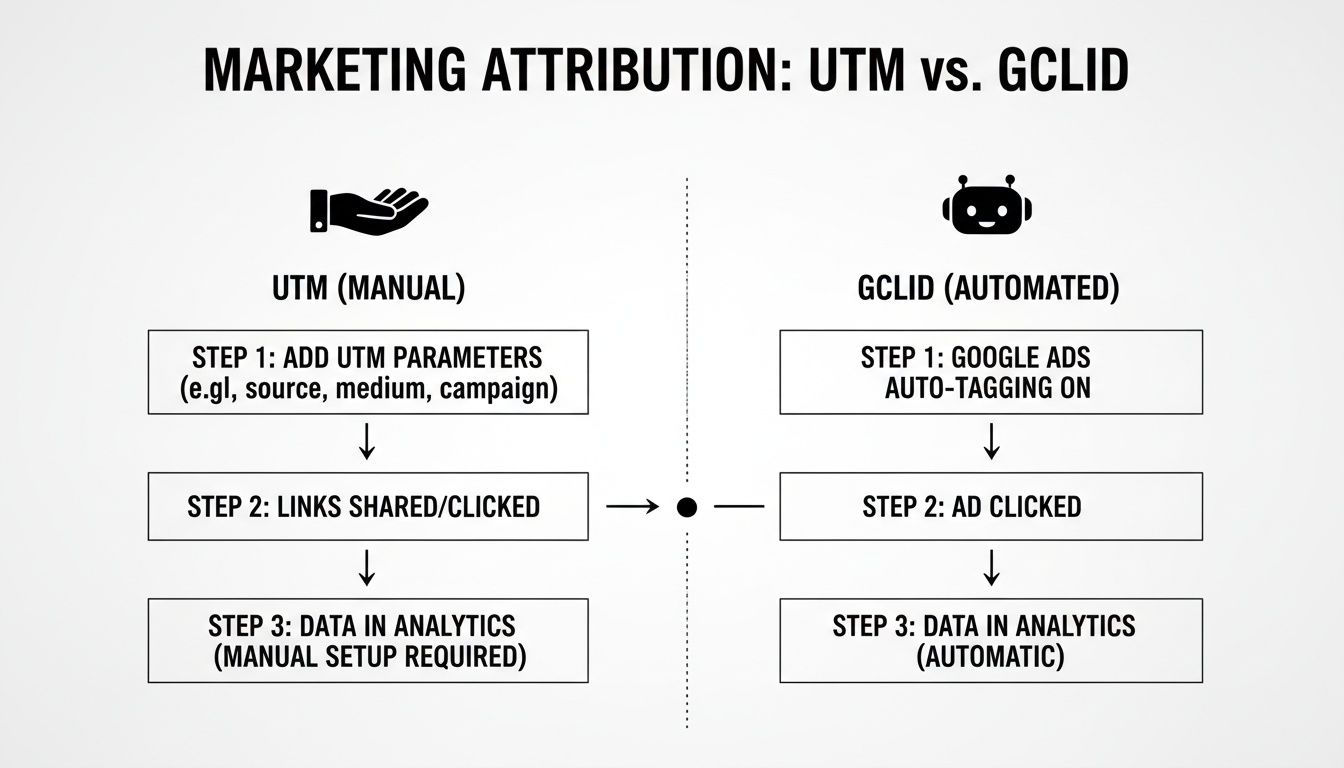
As you can see, GCLID handles all the complex data connections automatically, which would be a huge headache to manage manually with just UTMs.
Building Your First Tracking Template
Let's walk through a real-world example. Say you want to track the campaign, ad group, and the specific keyword for every single click. You could build a tracking template at the campaign level that looks just like this:
{lpurl}?utm_campaign={campaignid}&utm_adgroup={adgroupid}&utm_term={keyword}
Let’s quickly break that down:
{lpurl}: This is just a placeholder for your final landing page URL.?: This little symbol is the universal sign for "hey, the tracking stuff starts here."utm_campaign={campaignid}: This dynamically grabs the campaign’s unique ID and sticks it in the URL.utm_adgroup={adgroupid}: This does the same thing, but for the ad group’s unique ID.utm_term={keyword}: And this one captures the exact keyword that triggered the click.
Once you hit save on that template, every ad in that campaign automatically gets these super-detailed tracking parameters tacked on. Getting this right is absolutely fundamental for running successful Pay Per Click (PPC) campaigns.
If you're just starting out, we've put together a step-by-step guide on how to set up conversion tracking in Google Ads that will walk you through everything from the ground up.
Google knows how critical this is, which is why they're constantly tweaking and improving these features. The platform is always evolving because marketing itself is getting more complex, and having accurate tracking is what separates guessing from making smart, data-backed decisions. When you implement this correctly, you can slice and dice your campaign data by source, medium, and pretty much anything else you can think of.
Best Practices for Clean and Consistent Data
You can have the most advanced Google tracking URL setup on the planet, but it's worthless if your data is a complete mess. Inconsistent tagging is the fastest way to get unreliable reports, which always leads to bad marketing decisions and wasted ad spend. This is where truly professional marketers separate themselves from the amateurs.
It really just comes down to a few simple habits. Getting your data clean, consistent, and actionable isn't about complex tools; it’s about creating a system and sticking to it.
The biggest mistake in tracking isn't a technical error—it's inconsistency. Treating
FBas different sources will fracture your data, making it impossible to see the big picture. Consistency is non-negotiable for accurate insights.
The very first step is to create a standardized naming convention document. This simple guide becomes the single source of truth for your entire team on how every single link should be tagged. It kills the guesswork and prevents messy data before it even has a chance to happen.
Establish Your Rulebook
Think of your naming convention document as a style guide for your data. It should have clear, non-negotiable rules for every UTM parameter you use.
Here are the absolute essentials to include:
- Always Use Lowercase: Seriously, always. In Google Analytics,
utm_source=facebookandutm_source=Facebookwill show up as two separate traffic sources. Forcing everything to be lowercase keeps your data neatly grouped together. - Use Underscores or Dashes, Not Spaces: URLs and spaces don't mix. Always replace them with underscores (
summer_sale) or dashes (summer-sale). Just pick one and be consistent. - Keep It Simple and Clear: Your campaign names should tell a story at a glance. A name like
us-summer-sale-24-cpc-beach-adis infinitely more useful thanCampaign_1_Final_Version. Be descriptive, but keep it concise.
Use a Centralized Link Management System
Once you've got the rules, you need a way to enforce them. A shared spreadsheet or a dedicated tool is a game-changer for managing every Google tracking URL your team creates. This central hub stops people from creating "rogue" links on the fly and ensures every campaign follows your new rules.
Also, be mindful of platform-specific settings. A classic mistake is running manual UTMs on your Google Ads campaigns while auto-tagging (gclid) is still turned on. This can create conflicting data and a reporting headache. The best approach is to let gclid handle all of your Google Ads tracking and save your manual UTMs for everything else—social media, email newsletters, and affiliate links.
These habits are the bedrock of a marketing engine that doesn’t just run, but actually learns and gets smarter with every single click.
Let Keywordme Handle the Heavy Lifting
Let's be real. Managing tracking parameters for hundreds of ads and keywords can quickly turn into a soul-crushing, error-filled mess. No matter how careful you are, the sheer tedium of copy-pasting URLs and triple-checking every parameter is a recipe for mistakes.
This is exactly where a tool like Keywordme comes in and saves the day.
We designed our campaign and keyword management workflow to make the entire tracking process practically invisible. By letting you manage negative keywords, match types, and ad group structures all in one spot, Keywordme cuts out the clumsy manual steps where tracking so often goes wrong.
Think about how much faster you could optimize your campaigns if you weren't constantly buried in spreadsheets and clunky URL builders. Instead of burning hours on mind-numbing setup, you could be focusing on the big-picture strategy that actually grows your business.
Keywordme turns tracking from a tedious chore into an automated process humming along in the background. This frees up your time and mental energy for what truly matters: strategic thinking and scaling your success.
Once you have that solid foundation in place, you can start exploring even more advanced techniques. If you're curious, we have a great guide on alternatives to manual keyword tracking that can help you automate even more.
At the end of the day, a smarter tool lets you focus on what really moves the needle.
Common Questions About Google Tracking URLs
Even when you feel like you've got a handle on building Google tracking URLs, a few tricky questions always seem to pop up. Let's tackle some of the most common ones that marketers bump into once they start getting serious about campaign tracking.
Can You Mix UTMs and GCLID?
Yes, you absolutely can use both Google's automated GCLID and your own manual UTMs, but there's a small catch you need to be aware of. Inside Google Analytics, there’s a setting that lets manual tagging (your UTM values) override the auto-tagging (GCLID values).
If you turn this on, Google Analytics will prioritize your custom UTM data for any link that happens to have both. For your Google Ads traffic, though, it’s almost always better to let GCLID do its thing. The auto-tagging provides way richer data—like the specific search query someone used or the exact ad placement—that you just can't replicate with manual tags alone.
Think of it like this: for your Google Ads campaigns, let the specialist (GCLID) do its job. For everything else you're tracking, your trusty universal tool (UTMs) is perfect. This approach gives you the best of both worlds: maximum detail from Google Ads and broad, consistent tracking everywhere else.
Do Tracking URLs Hurt SEO?
This is a big one, but I can give you a clear answer: no. Search engines like Google are incredibly sophisticated and have been dealing with tracking parameters for well over a decade. They immediately recognize standard tags like utm_source and know that the URL with these parameters points to the exact same page as the URL without them.
Because of this, you won't get hit with any duplicate content penalties or see a negative impact on your SEO rankings. These parameters are built for marketing analytics, and search engine crawlers are programmed to ignore them when indexing your site. Your core URL's authority remains completely untouched.
The real danger isn't with search engines, but with your own data. The most damaging mistake is simply being inconsistent. If one person on your team uses "Facebook" and another uses "facebook," your data gets split, making it impossible to get a clear picture of performance. Establishing and enforcing a strict, lowercase-only naming convention is the single most important rule for keeping your analytics data clean and actually useful.
Stop drowning in spreadsheets and start optimizing smarter. Keywordme cuts out the tedious manual work of managing your Google Ads keywords and tracking, so you can focus on strategy that drives real results. Discover how much faster you can work with Keywordme.
.svg)