
Search Query Analysis: Find High-ROI Keywords & Cut Junk
Search Query Analysis: Find High-ROI Keywords & Cut Junk


Search query analysis is all about looking at the actual words and phrases people type into Google before they see—and click—your ads. It's the secret to figuring out what your customers are really looking for. This lets you stop wasting money on clicks that go nowhere and put your budget behind the searches that actually convert.
Frankly, it's the single most important thing you can do to improve your Google Ads performance.
What Is Search Query Analysis and Why It Matters

If you've ever felt like your Google Ads budget is a leaky bucket, search query analysis is how you find and plug the holes. It’s the simple act of digging into your search terms report to see the raw, unfiltered language your potential customers use. Doing this consistently turns blind guessing into a data-backed strategy.
To really get it, you've got to understand the difference between the keywords you bid on and the search terms people actually type. While they sound similar, they are worlds apart in practice. This is a foundational concept in Search Engine Marketing that trips up even experienced marketers.
Search Term vs Keyword: The Critical Difference
The distinction between a search term and a keyword is everything. Think of your keywords as the fishing net you cast, while the search terms are the actual fish you catch. You need to know the difference to see if you're catching prize-winners or just old boots.
Here’s a quick breakdown to make it crystal clear:
| Attribute | Search Term (User Query) | Keyword (Your Bid) |
|---|---|---|
| Who Controls It | The user. It's exactly what they typed. | You (the advertiser). It's what you bid on. |
| Origin | Raw, messy, and unpredictable user input. | A calculated bet on what a user might search for. |
| Purpose | To find an answer or solution on Google. | To trigger your ad for relevant searches. |
| Example | "red running shoes for women size 8" | [women's running shoes] (Broad Match) |
Understanding this difference is the first step. You can dive deeper into this topic in our guide on what a search term is versus a keyword. Once you get this, the entire practice of search query analysis clicks into place.
The Core of PPC Success
The whole point is to close the gap between what you think your customers are searching for (your keywords) and what they actually search for (the queries). This isn't just a small detail; it’s the fundamental difference between a profitable campaign and a money pit.
At its heart, search query analysis is your Rosetta Stone. It translates the messy, unpredictable language of real people into clear, profitable actions for your ad campaigns.
This process gives you the power to make three critical decisions on a regular basis:
- Expand: You'll spot new, high-performing queries that are bringing in sales. By adding them as exact match keywords, you can bid on them directly, control their budget, and scale what’s already working.
- Negate: You’ll find all the irrelevant, budget-wasting searches that generate clicks but zero conversions. Adding these as negative keywords stops your ads from showing for those terms ever again. Pure budget protection.
- Refine: By seeing the user's true intent, you can tweak your ad copy and bids. You can tailor your message to better match what they’re looking for, which boosts click-through rates and improves your Quality Score.
More Than Just Paid Search Insights
The good news doesn't stop with your ad campaigns. Your search terms report is a goldmine for your entire marketing strategy, especially SEO. It’s a direct feed of the topics your audience is obsessed with and the exact long-tail phrases they use when they're ready to buy.
By analyzing these queries, you can uncover an endless stream of blog post ideas, optimize your landing pages with language you know resonates, and build content that solves your customers' most urgent problems.
Ultimately, running a regular search query analysis isn’t just another task to check off a list. It’s the core activity that separates the marketers who react to problems from the ones who proactively drive growth and ROI.
Alright, let's stop the guesswork and build a real process for wrangling your search queries. A solid analysis framework isn't some mythical, complicated beast. It’s just a repeatable system for turning that messy spreadsheet of search terms into a goldmine of actionable insights.
It all starts with knowing where to look and what to measure.
Your home base for all this is the Google Ads Search Terms Report. Think of it as your direct line to your customers—it shows you the exact, unfiltered phrases people typed into Google right before they saw and clicked on your ad.
But just having the data isn't enough. The real work begins when you know which metrics actually tell you the full story.
Going Beyond Clicks and Conversions
Clicks and conversions are your headline numbers, but they don't give you the whole picture. To really understand what’s going on, you have to look at a handful of key performance indicators (KPIs) together. This is how you find the "why" behind the "what."
Here are the core metrics I always have open for every query:
- Click-Through Rate (CTR): This tells you flat out if your ad is hitting the mark. A high CTR means your message is resonating with what the user is looking for. A low one? It’s a clear signal of a mismatch.
- Conversion Rate (CVR): This is the ultimate gut check. A high CVR shows that the query didn't just get a click, it got you what you wanted—a sale, a lead, a sign-up. It confirms true relevance.
- Cost Per Conversion (CPA): This is where you connect your spending to actual results. A query might be bringing in conversions left and right, but if the CPA is through the roof, it's not a win. It's a liability.
- Impression Share (IS): This metric shows you how often your ads were shown for a query versus how often they could have been shown. Finding a high-converting query with a low impression share is like striking oil—it's a massive, untapped opportunity.
Looking at these metrics together stops you from making costly mistakes. For example, a query with tons of clicks but zero conversions is just a money pit. On the flip side, a term with just a few impressions but a fantastic conversion rate is a hidden gem you need to go all-in on.
The Power of Smart Segmentation
Staring at a raw, endless list of search queries is a recipe for a headache. The real breakthroughs happen when you start segmenting—slicing and dicing your data to spot the patterns hiding in plain sight.
It's no surprise we need a system for this. Google handles a mind-boggling 5 trillion searches a year, which breaks down to about 9.5 million searches every single minute. What's even wilder is that 15-20% of those are queries Google has never seen before. That constant churn is exactly why a dynamic analysis framework is non-negotiable. If you want to go deeper down that rabbit hole, check out these Google search statistics on kartikahuja.com.
To get a handle on this volume, you need to break it down. Start by segmenting your search terms report by:
- Campaign and Ad Group: This is a basic health check. Are queries ending up in the right place? You might be surprised to find your "brand" ad groups are pulling in a ton of expensive, non-brand searches.
- Device Type: People search differently on their phones versus their desktops. A query might convert like crazy on a desktop but fall flat on mobile. That could signal the need for a mobile-specific landing page or a totally different bid strategy.
- Match Type: This one is crucial. Analyzing which queries came from Broad, Phrase, or Exact match often tells a story. More often than not, it's your Broad Match keywords that are pulling in a truckload of irrelevant traffic that needs to be cut off.
This kind of structured approach is what turns that chaotic list of terms into an organized dashboard. Suddenly, you have the clarity to spot trends, flag outliers, and make smart decisions fast. Instead of feeling like you're drowning in data, you have a framework that shows you exactly what to fix and where to win.
Alright, you've got your hands on a mountain of data—a spreadsheet filled with search queries, clicks, and conversion numbers. Now what? Raw data is just noise until you turn it into action. This is the moment you switch from being an analyst to a strategist, transforming those numbers into smart moves that actually make you money.
Think of it this way: every single query that spent your ad budget needs a verdict. You're the judge, and your job is to decide if it's a winner to double down on, a loser to cut loose, or something in between that needs a closer look.
This whole process is about making a choice for each query. This decision tree lays out the basic flow: data comes in, you sort it out, and then you decide what to do next.
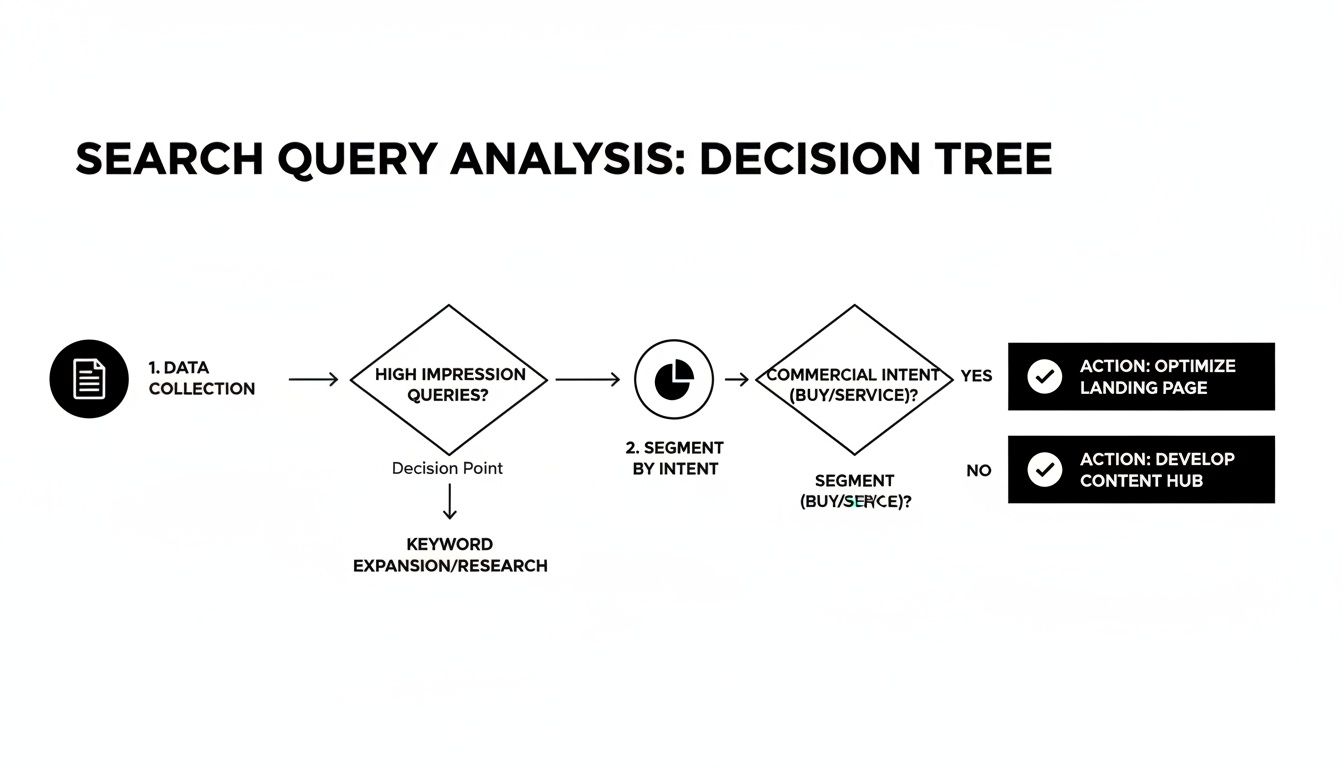
The big idea here is that every query demands a decision. You either expand on it, block it, or keep an eye on it. This is the heart and soul of active campaign management.
The Art of Keyword Harvesting
Let's start with the fun part—finding the gold. This is often called keyword harvesting, and it's one of the quickest ways to give your campaigns a serious boost. You're basically panning for search terms that are already bringing in sales, even though you’re not bidding on them directly yet.
These are your hidden gems, typically triggered by your broad match keywords. As soon as you find a query that’s led to a conversion or two at a cost-per-acquisition (CPA) you're happy with, it's time to act. You "harvest" it by adding it as a new, specific keyword—usually as phrase or exact match—in its own ad group.
So, why go to all this trouble?
- Total Control: When a proven query gets its own ad group, you can set a specific bid for it. This means you can be much more aggressive with the terms you know make you money.
- Hyper-Relevant Ads: You can write ad copy that speaks directly to that harvested query. If someone searched for "emergency plumber near me," your ad can now scream, "Emergency Plumber Near You," which is a surefire way to lift your click-through rate (CTR) and Quality Score.
- Smarter Budgeting: It lets you funnel more of your budget toward your star performers, making sure they get the attention they deserve instead of getting lost in a noisy, broad ad group.
Neutralizing the Budget-Draining Queries
Just as crucial as finding your winners is getting rid of the losers. I'm talking about those queries that just eat your budget for breakfast with absolutely nothing to show for it. They are the silent killers of your ROI, and a good search query analysis will put them right in the spotlight.
You've got to be ruthless here. If a query has spent a significant chunk of your budget—say, more than your target CPA—without a single conversion, it’s a prime candidate for your negative keyword list. Don’t fall into the trap of thinking, "Oh, but maybe it'll convert next time." The data is telling you a story; it’s time to listen.
Adding a money-wasting query to your negative keyword list is one of the most satisfying clicks in all of PPC. It's the digital equivalent of plugging a hole in a leaky bucket—you can almost feel your ROI going up.
To make this less emotional and more systematic, set some ground rules. For example, a simple rule could be: any query that spends 1.5x my target CPA with zero conversions gets immediately added to the negative list. This takes the guesswork out and turns your analysis into a repeatable, efficient process. For a deeper dive, check out our guide on how to get the most out of your Google Ads Search Terms Report.
A Quick Triage Framework
To make these decisions on the fly, it helps to have a simple "cheat sheet." Think of this table as a quick reference guide you can use while digging through your search terms report to decide what to do with each query.
Query Triage Criteria: When to Expand vs. Negate
Use this table as a cheat sheet to quickly decide the fate of any search query based on its performance metrics.
| Performance Metric | Action: Add as Keyword (Expand) | Action: Add as Negative Keyword (Negate) |
|---|---|---|
| High CVR & Good CPA | Absolutely. Add as an exact or phrase match keyword to scale it. | Never. This is a top performer. |
| High CTR & No Conversions | No. This is a classic "window shopper." The ad is relevant, but the intent is wrong. | Yes, if it has spent a significant amount of your budget. |
| Low Impressions & High CVR | Yes! This is a hidden gem. Add it as a keyword and increase the bid to get more impression share. | Definitely not. Protect this query. |
| Clearly Irrelevant Query | No, regardless of performance. It doesn't align with your business. | Immediately. Don't wait for it to spend more money. |
By consistently applying these kinds of rules, you methodically sculpt your campaigns over time. You’re systematically pushing more budget toward what works and building a defensive wall against what doesn’t. This isn't a one-and-done fix; it’s the ongoing discipline that separates truly great PPC accounts from the merely average ones.
Putting Match Types and Negatives to Work
Alright, you've done the hard work of separating the gold from the garbage in your search query reports. Now what? It’s time to take the wheel and actually control where your money goes. This is where two of the most powerful tools in your PPC arsenal come into play: keyword match types and negative keywords.
Think of match types as the gas pedal and steering, telling Google exactly how aggressively and in what direction you want to go. Negative keywords are your brakes, stopping you from veering into irrelevant, money-wasting traffic. Using them together is how you build a campaign that’s lean, mean, and incredibly profitable.
Mapping Winners to the Right Match Types
Kicking things off with broad match isn't a bad move—in fact, it's a great way to discover how people are really searching for what you offer. But just letting those broad match keywords run wild is a classic rookie mistake that burns through budgets fast. Your search query analysis is the playbook that prevents this.
When you find a "winner" query with a fantastic conversion rate and a cost-per-acquisition (CPA) that makes you smile, it's time to promote it. You're essentially taking it out of the chaotic "discovery" phase and giving it a VIP spot in a tightly controlled ad group.
Here's how I think about graduating your queries:
- Broad Match: This is purely for exploration. It casts a wide net to find new search terms and get a feel for customer language. Think of it as your R&D department—full of potential but needs a watchful eye.
- Phrase Match: This is for when you want more control. If a query looks promising but comes with a lot of weird variations, adding it as a phrase match keyword strikes a great balance. It captures the relevant searches you want while filtering out most of the nonsense.
- Exact Match: This is for your all-stars. For the queries that consistently deliver high-value conversions, lock them down as exact match keywords. This gives you absolute control over your bids and ensures your best ads show up for those proven, money-making terms.
By moving your top performers into stricter match types, you gain an incredible amount of control. You can now confidently bid higher on the exact terms you know work, gobbling up impression share where it counts the most.
Building a Bulletproof Negative Keyword Strategy
If you ignore your negative keywords, you're basically setting a pile of money on fire. They are just as crucial as the keywords you're bidding on—maybe even more so. A smart negative keyword strategy doesn't just block bad traffic; it surgically removes it without touching the valuable leads.
And in today's search environment, that precision is everything.
The game is changing. Recent studies show Google’s complete dominance is being challenged, with AI assistants exploding to 45 billion monthly sessions. In this new world, where top organic results get a 27% CTR and AI Overviews snag 13.14%, being precise isn’t just a good idea—it’s critical for survival. You can read more about how AI is changing the search volume landscape on searchengineland.com.
This is exactly why a layered approach to negative keywords works so well. Instead of just randomly adding negatives whenever you see a bad search, you organize them strategically.
Advanced Negative Keyword Tiers
Organizing your negatives into lists makes them way easier to manage and a whole lot more effective. Think of it as setting up different security perimeters around your account.
- Account-Level Negatives: This is your master "never show my ads for these" list. It should be filled with universal deal-breakers you want nothing to do with, no matter the campaign. Common examples are "free," "jobs," "careers," "download," or the names of competitors you've decided not to target.
- Campaign-Level Negatives: These lists are for specific campaigns. For instance, in a campaign selling high-end "running shoes," you might add brands like "walmart" or "cheap" to the campaign-level list to keep the traffic quality high.
- Ad Group-Level Negatives: This is where you get surgical. You use these to prevent your own ad groups from competing with each other. If you have an ad group for "men's running shoes" and another for "women's running shoes," you'd add "women's" as a negative to the men's ad group and "men's" as a negative to the women's. This ensures the right searcher sees the right ad every time.
This structured approach is a core pillar of good search query analysis. It stops you from showing the wrong ad to the right person, which is a huge waste of money. For a deeper dive, check out our guide on how to properly add negative keywords. Getting this level of organization right is what separates an average account from a true performance machine.
How to Make Your Analysis Workflow Actually Work

Let's be real. If you've ever had to do a search query analysis for a decent-sized account, you know the pain. It starts with that massive search terms download, and before you know it, you're lost in a sea of pivot tables, copy-pasting, and VLOOKUPs. It's a soul-crushing slog that burns hours you should be spending on actual strategy.
Most marketers are stuck in this spreadsheet trap. You manually hunt for bad search terms, build negative keyword lists in a separate file, and then go through the tedious process of uploading it all back into Google Ads. It’s slow, clunky, and a perfect recipe for making mistakes. This old-school method just can't keep up with modern PPC.
The Problem with Doing It by Hand
The manual workflow is just plain broken. It's a clunky, multi-step process that looks a little something like this:
- Step 1: The Export. You pull the search terms report from Google Ads. Simple enough.
- Step 2: The Spreadsheet Wrestle. You fight with filters to find those high-cost, zero-conversion queries.
- Step 3: The Copy-Paste Grind. You manually copy those terms into a separate "negatives.txt" file.
- Step 4: The Treasure Hunt. You try to spot good keywords in the chaos and copy them into another list for new campaigns.
- Step 5: The Upload Crawl. You import your new lists back into the Google Ads Editor or web interface, praying you didn't mess anything up.
This whole routine is a massive bottleneck. It takes so long that most people only bother with it once a month. That means budget-wasting queries can run wild for weeks on end.
A Modern Fix for an Old Headache
What if you could just ditch the spreadsheets altogether? That's where dedicated tools come in. A platform like Keywordme is built to turn this multi-hour headache into a few simple clicks. Instead of juggling a half-dozen files, you can do your entire search query analysis right where you work.
This is how query analysis should be. It stops being a chore you dread and becomes a quick, efficient, and—dare I say—even satisfying task.
When you automate the tedious parts of search query analysis, you get to stop being a data entry clerk and start being a strategist. Your time is spent making smart, data-backed decisions, not fighting with spreadsheet formulas.
With a tool like Keywordme, you can sift through thousands of queries in a tiny fraction of the time. The platform flags the junk terms for you, so you can add them to a negative list with a single click.
From Hours of Work to Minutes of Action
Imagine seeing a fantastic, high-performing query in your report. Instead of that five-step manual dance, you just click a button. The tool instantly adds it as an exact match keyword to the right ad group. Done.
The same magic applies to bad queries. See a term that’s just burning cash? One click adds it as a negative keyword, and the bleeding stops immediately. This completely changes the game:
- Build negative lists instantly. Find and block dozens of junk terms in minutes, not hours.
- Expand campaigns on the fly. Grab winning queries and add them with the right match type without ever leaving your report.
- Work faster and smarter. The whole process is built for speed, letting you optimize your campaigns in a way that’s impossible to do manually.
Ultimately, tools like this give you back your most valuable asset: time. That speed means you can optimize more often, which leads directly to less wasted ad spend, higher ROI, and campaigns that are always running at their best. You finally have the breathing room to focus on what really matters—growing the business.
A Few Common Questions About Search Query Analysis
Alright, let's tackle some of the questions that always pop up when people start digging into their search query reports.
How Often Should I Really Be Doing This?
Honestly, it comes down to your ad spend and traffic. If you're managing a high-spend account, you should be in there at least once a week. Things move fast, and a few days of wasted spend can really add up.
For smaller accounts with less data trickling in, checking every other week or even once a month is perfectly fine. The real key is just being consistent. When you use a tool like Keywordme, you can make it a quick daily habit. It turns what used to be a massive monthly chore into a two-minute check-in, letting you spot problems long before they do any real damage to your budget.
What's the Biggest Mistake People Make Here?
The single biggest mistake? Not doing it. I see it all the time—marketers pull up the report, glance at it, and then close the tab without taking any action. They don't add negative keywords, and they don't look for new, high-performing terms to expand on. It's a huge source of wasted ad spend and missed opportunities.
The second-biggest blunder is running broad match keywords without a rock-solid negative keyword strategy. That's like setting your budget on fire. You're just asking for irrelevant searches to gobble up your ad spend with zero results to show for it.
Your search query report is basically an alarm system for your account. Ignoring the data it gives you is like hearing the smoke alarm go off and just turning up the TV. The insights are right there to protect your ROI, but you've got to actually use them.
Can This Help My SEO Efforts, Too?
Absolutely. Your Google Ads search terms report is an SEO goldmine, plain and simple. It shows you the exact words and phrases people are using right before they're ready to buy something or find a solution. It's not theoretical—it’s based on real user behavior that led to clicks and conversions.
You can take these high-intent queries and put them to work right away:
- Supercharge On-Page SEO: Weave those proven, converting phrases directly into your landing page copy, title tags, and meta descriptions.
- Find New Content Ideas: You'll uncover tons of long-tail keywords that are perfect for new blog posts or guides that answer real questions your audience is asking.
- Refine Your Content Strategy: This is one of the most reliable forms of keyword research because you already know these terms work.
What Do I Do With Queries That Get Tons of Clicks but No Conversions?
This is a classic PPC problem. You see a query driving a ton of traffic, but it has zero conversions and is obviously not a fit (like someone searching for 'free software' when you sell a paid tool).
The answer is simple: add it as a negative keyword. Immediately.
Don't get distracted by the high traffic volume. Those are just vanity clicks that are tanking your Quality Score and burning through your budget. Add the term as a phrase or exact match negative to block it without accidentally cutting off other, more relevant searches. It might feel weird to intentionally cut off traffic, but what you're really doing is saving your money for the clicks that actually matter.
Ready to stop wrestling with spreadsheets and start optimizing your campaigns in a fraction of the time? Keywordme automates the entire search query analysis process, helping you cut waste and scale winners with just a few clicks. Take control of your Google Ads and see what a difference a streamlined workflow can make. Start your 7-day free trial today!
.svg)