
Boost Your quality score google ads for Lower CPCs
Boost Your quality score google ads for Lower CPCs


Let's cut right to the chase: your Quality Score is one of the most powerful levers you can pull to win at Google Ads. The easiest way to think of it is like a credit score for your ads. A high score tells Google your ads are relevant and helpful, and in return, you're rewarded with lower costs and better ad placements.
What Is Quality Score in Google Ads and Why It Matters
At its heart, your Google Ads Quality Score is a diagnostic tool—not a direct KPI—that gives you a sense of how your ad quality stacks up against other advertisers. It's a simple rating from 1 to 10 that Google assigns to each of your keywords. Think of it as Google's internal report card grading how well your keywords, ad copy, and landing pages all work together.
This score is far from just a vanity metric. It has a direct, and often dramatic, impact on your campaign's budget and overall return on investment (ROI). A high score is a clear signal that you're delivering a great experience for the user, and Google absolutely rewards you for it.
The Financial Impact of a Good Score
So, why should you care so much about this number? It's simple: a low score means you'll pay more just to get your ad seen. A high score, on the other hand, is like getting a discount on every single click. You can actually secure a better ad position for a lower cost-per-click (CPC) than a competitor with a lower score, even if they're bidding higher than you.
Quality Score is the ultimate tie-breaker in the Google Ads auction. It’s the difference between overpaying for mediocre results and achieving top visibility while protecting your budget.
This direct influence on your ad spend is precisely why improving your Quality Score is one of the smartest things any PPC manager can do. It’s how you stop wasting money and start getting the most out of every dollar.
The Scale and Its Significance
Google’s Quality Score operates on a straightforward 1-10 scale. Hitting a 7 or higher is widely considered the gold standard. In fact, reaching this benchmark can drop your cost per click by as much as 400% compared to what you'd pay with a dismal score of 1 or 2. Nailing a 9/10 or a perfect 10/10 tells Google's algorithm that your keyword, ad, and landing page are a perfect match for what the user wants, earning you those coveted top ad positions.
A strong score proves you're meeting user intent, which is always Google’s number one priority. It shows you're not just another advertiser, but a genuine solution for the searcher. To get a broader view of optimization, check out these Google Ads best practices.
The Three Pillars of Your Google Ads Quality Score
So, how does Google actually figure out your score? It’s not just some random number pulled from a hat. The whole Quality Score system is built on three core pillars that measure the experience you're giving someone who just typed in a search.
Getting a handle on these components is the first real step to mastering your campaigns. Each one gets a simple rating from Google—Above Average, Average, or Below Average—and those three ratings combine to create your final 1-10 score.
This diagram lays it out perfectly. A high score gets you lower costs and better visibility, while a low score means you're paying a penalty for every single click.
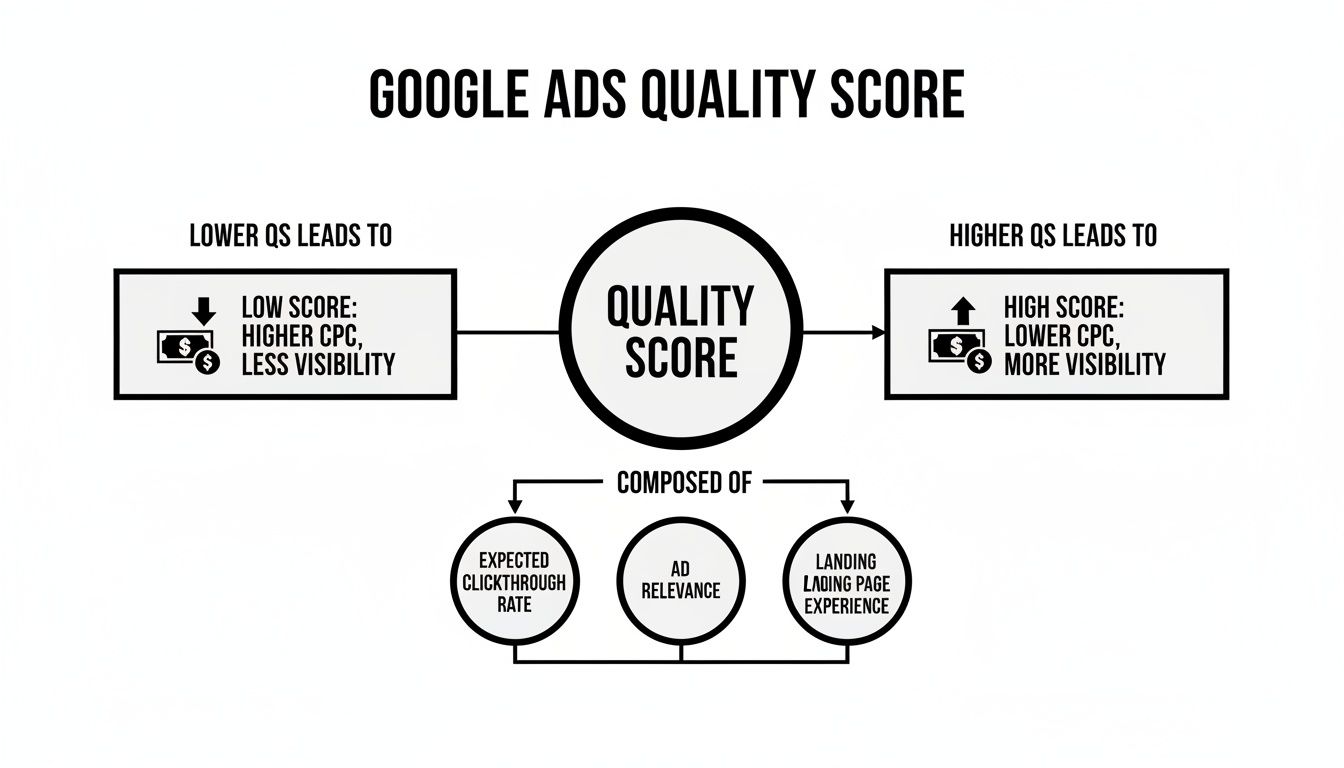
It’s pretty clear: a better Quality Score leads directly to a healthier ad budget and a much better return on your investment.
Expected Click-Through Rate (CTR)
This one is all about prediction. Expected CTR is Google's best guess on how likely someone is to click your ad when it shows up for a specific keyword. It’s not the same as your account's actual CTR; think of it more as Google comparing your ad's potential to all the other ads competing for that same search.
Here’s a simple way to look at it: if your ad is shown 100 times, is it going to get more or fewer clicks than the competition? An 'Above Average' rating means Google’s algorithm thinks your ad is more enticing. A 'Below Average' rating is a huge red flag—it’s Google telling you that your ad copy is probably weak, irrelevant, or just not grabbing anyone's attention.
Ad Relevance
This pillar measures how tightly your ad’s message connects to what the user actually searched for. It answers the fundamental question: “Does this ad even match what I was looking for?” High relevance isn't just nice to have; it's a non-negotiable for a good score.
For example, if someone searches for "men's waterproof running shoes" and your ad just says "great athletic footwear," your relevance is going to be in the tank. A much better ad would have a headline like "Durable Waterproof Running Shoes for Men" and quickly mention benefits a runner actually cares about.
A 'Below Average' Ad Relevance score is often a symptom of messy ad groups where dozens of unrelated keywords are all crammed together. When Google can't see a clear, logical thread connecting the search term, your ad, and your landing page, it penalizes you.
Making sure there's a super-strong link between your keywords and ad copy is absolutely critical. We dive much deeper into this in our article on Google Ads quality score and keyword relevance. It's a foundational concept that directly hits your score and your wallet.
Landing Page Experience
The user’s journey doesn’t stop after they click. Landing Page Experience looks at what happens next. Google’s system checks to see if your landing page is genuinely helpful, relevant to the ad they just clicked, easy to use, and trustworthy.
Here are the key things it looks for:
- Content Relevance: Does the page continue the conversation your ad started? If your ad promised a "50% off sale," that sale had better be front and center on the page they land on.
- Ease of Navigation: Can people find what they need right away, or is the page a confusing mess? This is especially critical on mobile.
- Trustworthiness: Does your site look professional? Do you have clear contact info and a privacy policy?
- Page Load Speed: A slow-loading page is one of the fastest ways to get someone to leave. It's a killer for your landing page experience rating.
Thankfully, figuring out which of these pillars is dragging you down has gotten way easier. Back in 2017, Google finally gave us historical Quality Score data, which was a game-changer for advertisers who felt like they were flying blind. Now, you can add columns like 'Qual. Score (hist.)' and 'Landing page exper. (hist.)' to see exactly when and why your performance dipped, helping you pinpoint the real problem.
How to Diagnose and Fix a Low Quality Score
Think of a low Quality Score like a warning light on your car's dashboard. It's not the disease itself, just a symptom. To fix it, you have to pop the hood and figure out what’s actually broken. So, let’s put on our detective hats and diagnose what’s really going on with your quality score google ads.

Guessing what’s wrong is a fantastic way to burn through your budget. A much better approach is to use the tools already inside your Google Ads account to see which of the three main components is dragging your score down.
Pinpointing the Problem in Google Ads
First things first, let's get the right data in front of you. If you haven't done this already, you need to add the Quality Score columns to your keyword report. It's a simple step, but absolutely crucial.
Here’s how you do it:
- Head over to the Search keywords report in your campaign.
- Click the "Columns" icon just above your keyword table.
- Choose "Modify columns".
- Find the "Quality Score" section and click to expand it.
- Tick the boxes for Quality Score, Expected CTR, Ad Relevance, and Landing Page Experience.
Apply those changes, and voilà! You now have a diagnosis for every single keyword in your account. The guesswork is over; it's time to look at the facts.
A low score isn't just a single problem. It's a specific issue with either your CTR, relevance, or landing page. Viewing these columns is like getting a detailed diagnostic report instead of a simple pass/fail grade.
This detailed view is the only real starting point for making improvements. You can instantly spot which keywords have a "Below Average" status on a specific component, which tells you exactly where to focus your efforts.
Decoding the Diagnosis
With your new columns in place, you can start playing campaign doctor. Scan your keyword list for any scores below a 7/10 and then look at the component ratings to understand why they’re low.
Here’s a quick diagnostic checklist based on what you’ll likely see:
"Below Average" Expected CTR: This is a huge red flag that your ad copy just isn't cutting it. Your ads aren't grabbing attention or giving people a good enough reason to click when compared to your competitors. Maybe your headlines are too generic, or you're missing a strong call-to-action.
"Below Average" Ad Relevance: This is a classic symptom of messy ad groups. It usually means you’ve crammed too many different keywords together, all triggering the same generic ad. The link between what someone searched for and the ad they saw is just too weak.
"Below Average" Landing Page Experience: If this is your weak link, the problem isn't in your Google Ads account—it's on your website. Your page might be painfully slow, a nightmare to use on a phone, or the content might not deliver on the promise your ad made. A high bounce rate is almost always a sign of a poor landing page experience.
By seeing which of these three pillars is consistently "Below Average," you can go from a vague complaint like "my Quality Score is low" to a specific, actionable problem like, "My ad relevance for the 'blue running shoes' ad group needs work, stat." This targeted approach is so much more effective. For example, if you see Landing Page Experience is a common problem, your next step should be diving into creating better PPC landing pages.
Actionable Tactics to Boost Your Ad Relevance
If you want the fastest way to improve your Quality Score, start with Ad Relevance. It's the most straightforward component to influence. Think of it as a logical chain connecting three things: the keyword someone types, the ad you show them, and the page they land on after they click.

When Google sees this perfect alignment, it rewards you. Why? Because your ad is a genuinely helpful answer to the user’s question. This is where we get practical. Let's look at some real-world strategies you can use right now to make your ads more relevant.
Create Tightly Themed Ad Groups
What’s the number one cause of a "Below Average" Ad Relevance score? A messy ad group structure. So many advertisers make the mistake of stuffing dozens of loosely related keywords into a single ad group, then pointing them all to the same generic ad. It’s a recipe for failure.
Put yourself in the searcher's shoes. If you search for "men's size 11 trail running shoes" and see an ad for "General Athletic Footwear," that's a huge disconnect. And that's exactly what Google penalizes.
The fix is to build hyper-focused, tightly themed ad groups. Each ad group should be a small cluster of keywords that are incredibly similar and share the exact same intent. Some people call this the Single Keyword Ad Group (SKAG) method, and it works because it lets you write ad copy that speaks directly to the search.
For instance, instead of one giant ad group for "running shoes," you’d create separate ones:
- Ad Group 1: "men's trail running shoes"
- Ad Group 2: "women's marathon running shoes"
- Ad Group 3: "waterproof running shoes sale"
This tight organization is the foundation of high Ad Relevance. Get this right, and every other tactic becomes ten times more effective.
Write Ad Copy That Mirrors User Intent
Once you have your ad groups neatly organized, writing amazing ad copy gets so much easier. The whole point is to make the user feel like your ad was written just for them.
Your headline and description should feature the core keywords from that specific ad group. If the ad group is for "blue suede shoes," your headline should be something like "Stylish Blue Suede Shoes," not "Great Shoes Here." This immediate recognition creates a sense of trust and signals relevance to both the user and Google.
An ad that perfectly mirrors the search query doesn't just improve your Ad Relevance score; it also dramatically increases your Expected CTR. People are way more likely to click on an ad that looks like the exact answer they were searching for.
Let's look at a quick example.
Before (Poor Relevance):
- Keyword:
emergency plumber near me - Headline: Bob's Plumbing Services
- Description: We offer plumbing, heating, and drain cleaning. Call us for a quote today. Reliable and affordable services for your home.
After (High Relevance):
- Keyword:
emergency plumber near me - Headline: 24/7 Emergency Plumber Nearby
- Description: Burst pipe or major leak? Get a licensed plumber to your door in under an hour. Fast, reliable emergency service. Call now!
See the difference? The "After" version speaks directly to the user's urgent problem, uses the keyword, and promises a specific, fast solution. That's what boosts your relevance score.
Use Dynamic Keyword Insertion (DKI) Wisely
Dynamic Keyword Insertion (DKI) is a clever Google Ads feature that automatically plugs the user's search query right into your ad copy. It can be a fantastic shortcut for boosting relevance, but you have to be careful with it, or your ads can end up sounding strange and robotic. We've got a full breakdown in our guide on how to use Dynamic Keyword Insertion in Google Ads.
DKI is most effective when used in those tightly themed ad groups we talked about, where all the keywords are grammatically similar and make sense when dropped into your ad text. Used strategically, it lets you create thousands of "custom" ads without writing them by hand, making your ad feel incredibly personal to every searcher.
Supercharge Your Quality Score with Keywordme
Let's be honest. Trying to manually optimize your Quality Score across thousands of keywords is a fast track to burnout. It's a soul-crushing, repetitive grind of digging through search term reports, building out negative keyword lists, and restructuring ad groups. All while your ad budget is getting torched by irrelevant clicks.
This is exactly where automation stops being a "nice-to-have" and becomes your secret weapon.
Keywordme turns this painstaking work into just a few clicks, completely changing how you approach campaign optimization. It's time to ditch the endless spreadsheets and manual copy-pasting. Here’s how you can systematically raise your Quality Scores using a smarter, automated workflow.
Instantly Eliminate Budget-Wasting Keywords
The very first step to a better Quality Score is to stop hemorrhaging cash on irrelevant search terms. These junk clicks absolutely destroy your click-through rate (CTR) and scream to Google Ads that your ads aren't a good match, which directly tanks your score. Manually hunting for these terms in a massive search query report is painfully slow work.
With the Keywordme Chrome plugin, you can spot and wipe out these junk terms right inside your Google Ads account.
- One-Click Cleanup: Immediately see which search terms are just noise and have zero relevance to your business.
- Build Negative Lists Fast: Just select all the junk terms and add them to your negative keyword list in a single click.
- Prevent Future Waste: Stop your ads from ever showing up again for queries that will never, ever convert.
This is about more than just saving a few bucks. It's about tightening the focus of your campaigns. Doing this sends a powerful signal to Google that you're serious about relevance. A cleaner campaign is the first domino that needs to fall to start raising your Quality Score.
Automate Tightly Themed Ad Groups
We’ve already talked about how messy, disorganized ad groups are a leading cause of a "Below Average" Ad Relevance score. But creating dozens of Single Keyword Ad Groups (SKAGs) or other tightly themed structures by hand is an administrative nightmare. It means exporting data, segmenting keywords, creating new ad groups one by one, and then writing unique ad copy for each.
Keywordme automates this entire headache using your actual search term data. This is where the real magic happens for your Quality Score.
The GIF below shows just how simple it is. Keywordme flags new, relevant search terms and lets you add them to new or existing ad groups—with the correct match type—in a single click.
This workflow directly builds the kind of hyper-relevant ad group structures that Google rewards with higher Ad Relevance scores. You're essentially creating a perfect, unbreakable link between search intent, your keyword, and your ad group almost effortlessly.
By using real search data to build your campaigns, you're no longer guessing what users are looking for. You're responding directly to their behavior, creating an unbreakable link between their search and your ad—the very definition of high relevance.
This doesn't just save you time; it helps you make smarter, data-backed decisions that systematically improve the very foundation of a good Quality Score.
Manual vs. Keywordme Optimization Workflow
The difference between the old, manual way and the Keywordme way is night and day. This isn't just a small improvement; it's a total shift in how you work, giving you back time and delivering better results.
Just look at the difference in the typical workflow:
Ultimately, Keywordme bridges the huge gap between knowing what you need to do to improve your Quality Score and actually having the time and tools to do it. It removes all the manual friction, freeing you up to focus on strategy instead of being buried in repetitive tasks.
The result is a more relevant campaign, a higher Quality Score, and a much, much better return on your ad spend.
Your Quality Score Questions, Answered
We’ve dug deep into the world of Quality Score in Google Ads, but let's be real—it’s a tricky subject with a lot of "what ifs." To help tie up any loose ends, here are the most common questions we get from advertisers, along with some straight-to-the-point answers.
How Long Does It Take to See Changes in My Quality Score?
Patience is a virtue here. Changes to your Quality Score definitely don't happen in a flash. While Google calculates a real-time score for every single ad auction, the score you actually see in your account only gets updated about once a day.
So, after you’ve put in the work—maybe you’ve totally restructured your ad groups or given your landing pages a much-needed facelift—you have to give Google time to catch up. It usually takes anywhere from a few days to a week for your score to really start reflecting those improvements.
Think of it this way: Google’s system needs to collect enough fresh data (clicks, impressions, and all that good stuff) to be confident that your changes are actually working. Keep an eye on the historical data columns in your account; they’ll tell you if you're trending in the right direction.
Does My Bid Amount Affect My Quality Score?
This is a huge one, so let’s clear it up right now: nope. Your bid amount has zero direct effect on your Quality Score. Google bases the score purely on the relevance and quality of your ads, keywords, and landing pages. It's a measure of user experience, not a reflection of how deep your pockets are.
But, and this is a big but, your bid and your Quality Score are partners in crime when it comes to determining your Ad Rank.
It all comes down to this simple formula: Ad Rank = Quality Score x Max CPC Bid. A high Quality Score is a superpower because it lets you achieve the same ad position as a competitor while bidding way less. This is how you win better spots and actually lower your costs.
So, while your bid won’t change your score, your score absolutely changes how far your bid can take you.
Can I Have a High Quality Score with a Low Click-Through Rate?
It's unusual, but technically, yes. It's possible in certain situations. Remember, your score isn't just about your raw CTR; it's about your Expected Click-Through Rate (eCTR). This component is all about how your CTR compares to your direct competitors on that exact keyword.
For instance, say you're advertising a highly specialized B2B product where the average CTR is naturally super low, like 0.5%. If your ad consistently pulls in a 0.7% CTR, Google might see that as 'Average' or even 'Above Average' because you're beating the curve.
That said, this is definitely the exception, not the rule. In most markets, a low actual CTR is a major red flag for Google. It almost always results in a 'Below Average' eCTR rating, which will tank your overall Quality Score. It’s a clear signal that users just aren’t connecting with your ad.
Is a 10 Out of 10 Quality Score Always the Goal?
It feels amazing to see a perfect 10/10, but chasing it for every single keyword is often a waste of time and energy. It’s a classic case of diminishing returns and can distract you from work that would make a much bigger difference.
The truth is, your biggest wins come from fixing your worst-performing keywords.
Think of it like this:
- Improving a keyword from an 8/10 to a 10/10 might get you a tiny discount on your CPC. Nice, but not life-changing.
- Improving a keyword from a 3/10 to a 7/10 can be a total game-changer. We're talking about potentially slashing your CPC in half and getting way more eyes on your ads.
Instead of obsessing over perfection, be strategic. Focus on your important, high-volume keywords that are stuck with low scores (anything from 1 to 4). Fixing these "problem children" will have a far greater impact on your campaign's health and budget. Smart optimization is all about knowing where to put your effort for the biggest payoff.
Ready to stop the manual grind and start systematically improving your Quality Score in Google Ads? Keywordme turns hours of tedious optimization into a few simple clicks. Clean up wasted spend, build hyper-relevant ad groups, and boost your ROI without getting buried in spreadsheets. Start your free trial and see the difference for yourself.
.svg)