
Philadelphia Pay Per Click: Costs, Targeting and Tips
Philadelphia Pay Per Click: Costs, Targeting and Tips


Philadelphia counted 1,603,797 people in the 2020 Census and an estimated 1,574,281 on July 1, 2025, a decline of roughly 29,500 residents, or about 1.8% (NetEmbark city profile). Flat markets punish lazy targeting. When the audience isn't growing, the only way to get more out of paid search is to stop paying for clicks that were never going to convert.
That's the whole game in Philadelphia pay per click. The city isn't one audience. It's a stack of neighborhood and language markets sitting shoulder to shoulder, each with its own click price, its own competitors, and its own idea of what a lead is worth.
A rowhouse block in Fishtown and a commercial corridor near University City don't behave the same way in the auction. Neither does an English roofing search and the Russian version three streets over. The method that works is unglamorous: test small, read the numbers, scale only what pays.
What a Local Click Costs in Philadelphia
Start with the numbers, because they decide how you spend. A Philadelphia keyword study put insurance searches at roughly 6,190 a month and $65 a click, while dental searches ran about 19,080 a month at $9.02 (iVitskiy's Philadelphia keyword data). Same city, same auction, same ad format. The price of attention differs by a factor of seven.
Here's the spread across six service lines.
Philadelphia cost per click by industry (monthly search volume and estimated cost per click, from one Philadelphia keyword study)
| Industry | Monthly searches | Cost per click |
|---|---|---|
| Real estate services | 27,830 | $11 |
| Dental | 19,080 | $9.02 |
| Roofing | 3,470 | $21 |
| Electrical services | 2,770 | $18 |
| Plumbing | 6,830 | $39 |
| Insurance | 6,190 | $65 |
The gap that funds your whole budget
Look at dental and plumbing. The two sit about $29.98 apart, which means a plumbing click costs more than four times as much as a dental one. That's not a rounding error in your monthly plan. It's the difference between a campaign that scales and one that burns through its budget by the 12th of the month.
Why the gap? Urgency. A burst pipe at 11pm doesn't comparison shop, and every plumber in the city knows it. A routine cleaning can wait a week, so dental bidders can afford to be patient.
Run the math on a hundred clicks. At the insurance estimate, 100 clicks run about $6,500 in media cost before you've spent a dollar on conversion work. At the plumbing estimate, the same volume lands near $3,900. Neither number means anything until you know what a signed customer is worth in that line.
That's where CPL tracking for service businesses earns its keep, because a $65 click is a bargain if a policyholder is worth thousands and a disaster if your form gets three submissions a month.
Get your own numbers before the first invoice
These are estimates from one study, not a forecast for your account. Pull your own figures from Keyword Planner, then sanity check them against the bid simulator inside Google Ads before you commit a monthly budget.
The quick test I'd run on every service line: divide your daily budget by the cost per click. Say you've set $40 a day for plumbing. At $39 a click, that buys one visit. At $9.02 for dental, it buys four. Now ask whether one visit a day is enough data to optimize anything. Usually it isn't, and that tells you to widen the budget, narrow the geography, or pick a different entry point.
Each service line needs its own budget and its own bid target. One blended Philadelphia number hides exactly the thing you need to see.
How Pay Per Click Auctions Work in Philly
Every search in Philadelphia runs through a small, fast auction, and the diagram below maps the three parts that decide who shows up and what they pay.
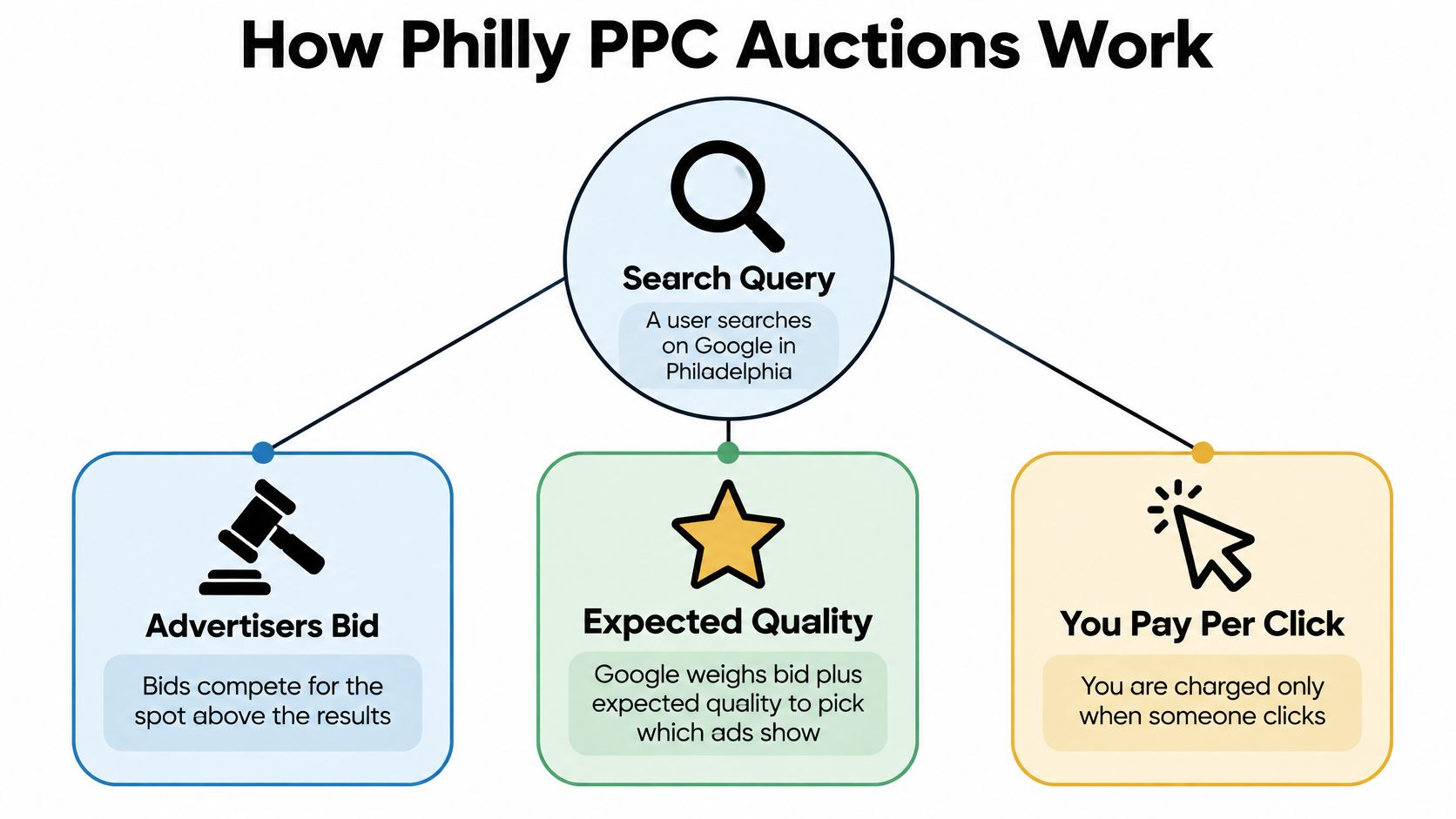
Think of it as renting a shop window. A corner spot on Market Street costs more than a side-street door two blocks away, and foot traffic is the reason. Search behaves the same way: a query like "emergency plumber" draws every contractor in the city with budget to spend, while a quieter research query draws a handful of bidders and costs pennies.
Three moving parts decide your outcome.
- Keywords set eligibility. If the query doesn't match, nothing else matters, which is why match type and negatives carry so much weight.
- Your bid is the ceiling you'll pay for a click, not a guarantee of position. Google weighs bid against expected quality when it picks which ads show.
- The ad and the landing page decide whether the click turns into a call, a form fill, or a bounce that taught you nothing.
Put those together and you get a loop rather than a one-time setup. A search happens, the auction runs, someone clicks, a conversion happens or it doesn't, and that result feeds your next bid and your next keyword decision. Each pass through the loop should make the next click cheaper for the right customer and pricier for the wrong one.
The test that matters: if your landing page doesn't give a first-time visitor a clear next step on a phone screen, the click price was never the problem.
A cheap click onto a page with no visible phone number and a form that breaks on mobile is the most expensive click in the account. Fix the page before you bid harder.
Building Campaigns Around Neighborhoods and Services
Structure beats cleverness in local PPC. The screenshot below is the kind of desk where this gets built, one service line at a time.
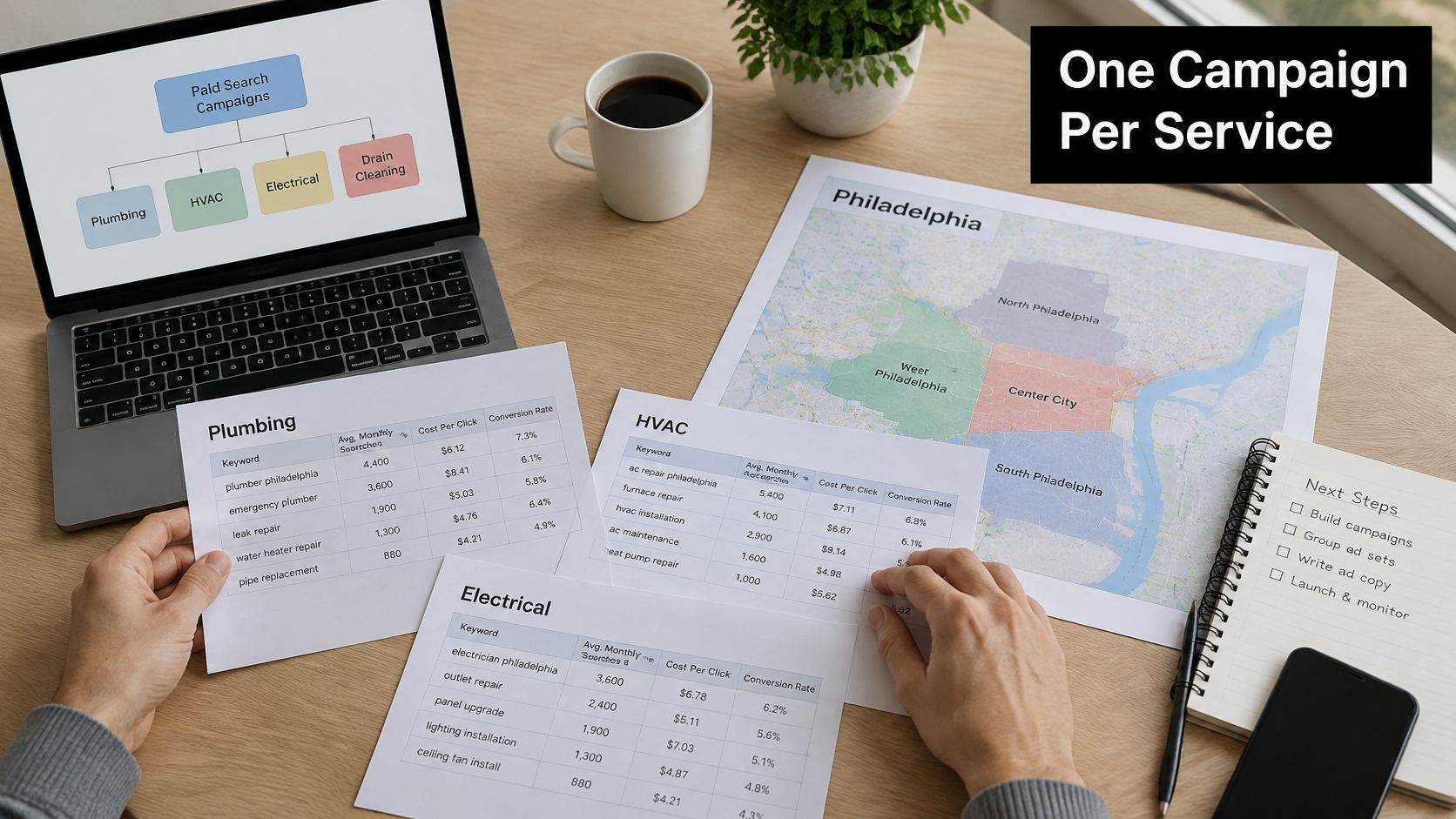
Build from the top down. One account holds one campaign per service line, so roofing, legal, and dental each get their own home. Under each campaign, build ad groups around neighborhood clusters or service-plus-area pairs: "roof repair Fishtown," "divorce lawyer South Philly," "emergency electrician Northern Liberties." That structure lets you read performance by area without exporting anything.
Location targeting is the next decision, and it's where most accounts leak money. Targeting the whole city catches broad demand but pays for clicks from people who will never drive to you. A tight radius around your shop feels safer until you realize it cuts off Main Line or Bucks County customers who happily make the trip for the right service. Match the setting to the area you cover, and understand the difference between drawing a circle and listing ZIP codes with radius targeting versus ZIP code targeting in Google Ads.
Then keep the money separate. A shared budget across service lines lets the expensive line eat the cheap one by Tuesday, and you'll blame the cheap line for "not working."
Write neighborhood names into your ad copy where they fit naturally. Center City, Northern Liberties, Fishtown, University City, and South Philly should each read as your local answer, not a generic citywide pitch. Intent varies by block, so a dense rowhouse area and a commercial corridor will rarely convert at the same rate even when the keyword looks identical.
Add call extensions for mobile searches. Plenty of local customers would rather tap a number than fill out a form. Then pull the location report every two weeks and pause the areas that spend without earning. Two neighborhoods can look alike on a map and behave nothing alike in the auction.
Reading Quality Score and Auction Insights
Two reports explain why a campaign is losing, and neither is the one many advertisers open first. Open them before you touch a bid.
Quality Score is a 1 to 10 diagnostic built from expected click-through rate, ad relevance, and landing-page experience. Google explicitly positions it as a comparative diagnostic rather than the auction-time Ad Rank itself, so treat it as a smoke detector, not a scoreboard (Google Ads Quality Score guide).
The fix ladder
Work the components in order instead of guessing.
- Ad relevance is low. Split the ad group by intent. A group mixing "roof repair" with "roof replacement cost" will always score badly because it can't speak to both.
- Landing-page experience is weak. Put the neighborhood and the service in the headline and in the first line of the page. Map tightly grouped local intent, service plus neighborhood or municipality, to matching copy and a page that echoes it.
- Expected click-through rate is low. Test headlines. Two variants, one change each, enough impressions to mean something.
That order matters because relevance fixes are free and bid increases are not.
Six numbers in Auction Insights
Auction Insights gives you six competitive dimensions for Search campaigns: impression share, overlap rate, outranking share, position-above rate, top-of-page rate, and absolute-top-of-page rate. Read them as a cause-and-effect chain, not a leaderboard.
If impression share is low because of budget, raise the budget. If it's low because of rank, fix relevance first and see whether the number moves before you spend. That sequence separates genuine competitive pressure from sloppy query-to-ad-to-page alignment, which matters when you're juggling several Philadelphia areas at once.
Then compare impression share and rank changes against qualified conversions, never clicks. An agency can double its top-of-page rate and lose money doing it. The Auction Insights walkthrough for Google Ads is worth reading end to end if you've never built that comparison.
Cleaning Search Terms and Negative Keywords
Broad local terms pull in job seekers, DIY researchers, and price shoppers who will never book. Negative keywords are how you tell Google to stop serving those searches, and they behave differently from positive keywords. They don't automatically expand to close variants or related searches, so you'll often need to add synonyms and singular or plural forms yourself, while capitalization and certain misspellings are handled automatically (Google Ads negative keyword help).
The six-step routine
Do this on a schedule, not when the budget looks weird.
- Pull the search terms report for the last 14 to 30 days, filtered to a single campaign.
- Sort by cost and flag queries with clicks but no conversions. Watch for "free," "jobs," "DIY," "how to," and "near me" queries that resolve to a different service.
- Add them as negatives. When you add a negative from the search terms report, Google adds it as negative exact match by default (Google Ads Editor match types), so check what you created.
- Check synonyms and plurals by hand. Excluding "free consultation" may not block "free legal consult."
- Move high-converting queries into exact or phrase ad groups so you can bid on them deliberately.
- Log every change, with the date and the reason. Otherwise the next review repeats the last one.
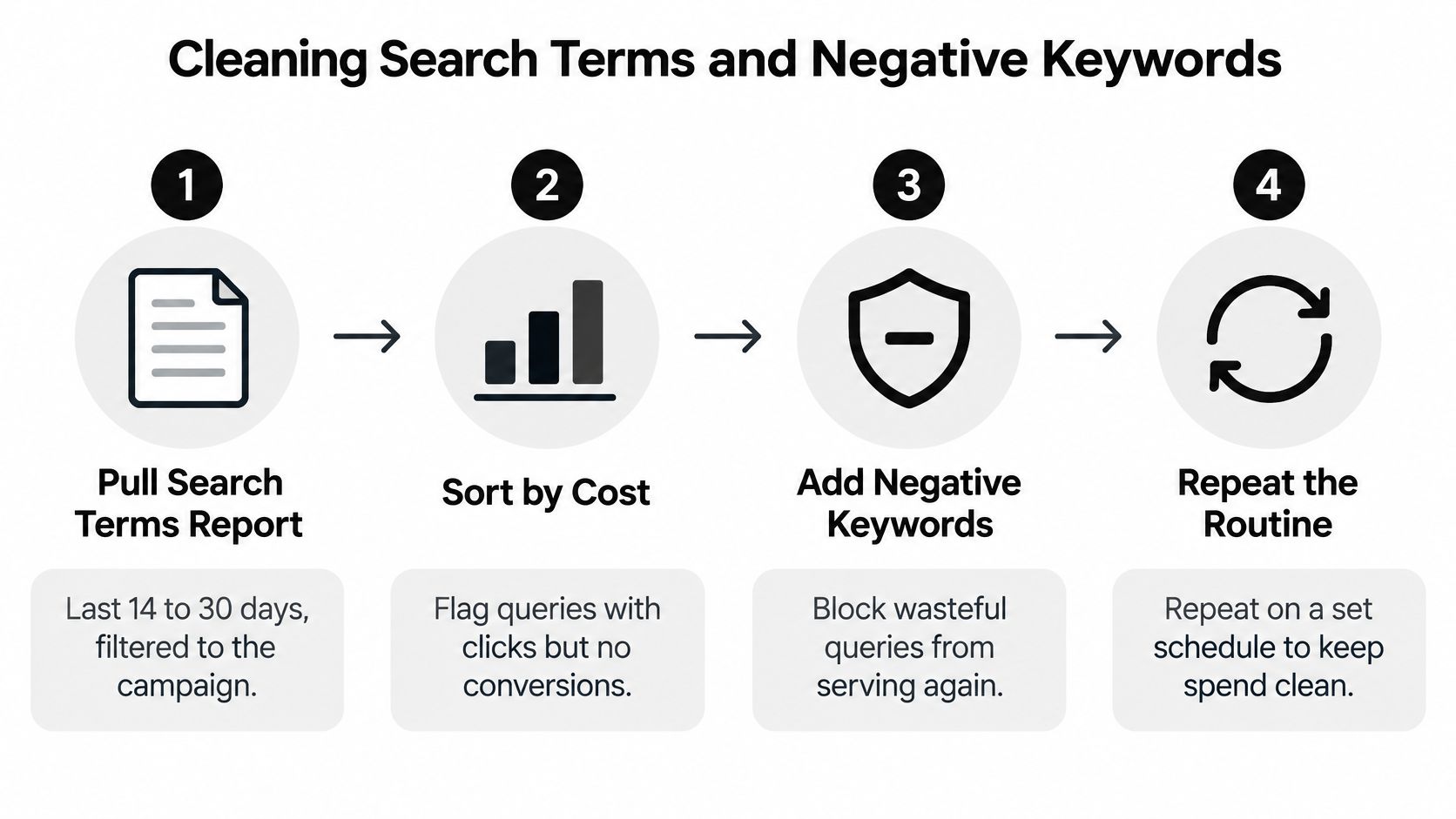
The routine above compresses to four moves in practice: pull the data, sort by cost, block the waste, repeat.
Account list or campaign list
Where a negative lives matters as much as what it says.
Account-level versus campaign-level negative lists
| Setting | Account-level list | Campaign-level list |
|---|---|---|
| Where it applies | Eligible campaigns across the account, including Search, Shopping, Performance Max, App, Smart and Local | One campaign only |
| Capacity | Up to 1,000 negative keywords per account-level list | Maintained per campaign |
| Best for | Exclusions that should always apply, such as job seekers or brand terms you never want | Terms tied to one service, neighborhood or offer |
Account-level lists are capped at 1,000 negative keywords and apply across eligible campaigns and inventory, so one edit can affect several campaign types at once (Google Ads account-level negative lists). Keep that list for exclusions that are always true, and push neighborhood-specific or service-specific terms down to the campaign.
Weekly for accounts spending real money, monthly for small budgets. The review is the job. The negative list is just where the work gets stored.
If your account is large enough to need faster cleanup, Keywordme runs AI scans to extract negative keywords and builds the lists in one click. When you want to mine more candidates before you start excluding, this guide to finding negative keywords covers how to build the list from search terms and competitor gaps.
Reaching Multilingual Neighborhoods Without Wasting Budget
The instinct is to translate everything and hope. The opposite mistake is ignoring a cluster because a keyword tool shows almost no volume. Both cost money.
A roofing estimate for the city finds roughly 30 monthly searches in Russian and Ukrainian against a far larger English pool, and notes more than 100 competing businesses in Google Maps. The same estimate cites ACS 2020–2024 data showing about 24,221 Philadelphia residents speak Russian, Polish, or another Slavic language at home (iVitskiy roofing data for Philadelphia). A demographic presence doesn't prove a PPC opportunity, but it does tell you where to look.
A three-step test before you commit
Run it small and let the data argue.
- Build one language-specific ad group, not a translated copy of the whole account, and only in the ZIP codes or neighborhoods where location data shows that community lives.
- Point it at a landing page and a phone line that can answer in that language. A translated ad that lands on an English-only page wastes the click and annoys the customer.
- Compare after enough clicks. Use language-specific search term reports, call recordings, and conversion rates by ZIP code before you scale anything.
Translate a broad English campaign and you usually buy ambiguous queries and cheap, low-quality traffic. Keep translated groups tight, and build negatives separately for each language, because an English negative won't block the Russian version of the same unwanted query.
Small segments can be worth more than their reported volume, but only when the phone gets answered in that language and the forms come back clean.
Scale the groups where calls and form fills arrive. Kill the rest without sentiment.
Confirm Your Philly Setup Before You Spend
Before you raise a budget, walk the account once with this checklist open.
- A budget per service line, checked against its click cost. Divide the daily number by the cost per click and confirm it buys enough visits to learn from.
- Location settings that match the area you serve. Not the whole city by default, and not a radius so tight it locks out paying customers.
- A seed negative list from your first 14 days of search terms. Broad, phrase, and exact, with synonyms added by hand.
- Ad groups with neighborhood copy and landing pages that match. The page should repeat the promise the ad made.
- Conversion tracking that counts calls and form fills, not just page views.
Start with a small daily budget and hold it steady until you have two weeks of search-term and conversion data. Changing budgets and bids mid-stream just muddies the read.
One more check worth keeping. When a landing page changes and sessions jump, an Expressify AI traffic checker helps you see whether the lift came from paid, organic, or neither before you credit the redesign.
If maintaining negative lists by hand is the step that keeps slipping, Keywordme's plugin runs inside Google Ads so you never leave the account, and the free trial gives you instant access to the Chrome plugin.
The single move for this week: pick one service line, run those five checks, and set a reminder to review its search terms in two weeks.
Keywordme builds negative keyword lists from live search terms in one click, sets match types on the spot, and expands ad groups using the queries that already convert, all without leaving Google Ads. That's the cleanup work that keeps a Philadelphia account from funding the wrong clicks month after month. Start the free trial and run your first search-term cleanup on one campaign at Keywordme.
