
Paid Search for Ecommerce: The 2026 Playbook
Paid Search for Ecommerce: The 2026 Playbook


In 2026, ecommerce Google Ads Search campaigns averaged a $1.42 CPC, 3.8% click-through rate, 2.8% conversion rate, and 4.2x ROAS, while Shopping campaigns averaged $0.68 CPC and a 1.4% conversion rate according to Webtonic's ecommerce Google Ads benchmarks. Those averages are useful, but they hide a significant performance gap. The strongest accounts don't win by bidding more. They win because their product feeds, search terms, landing pages, conversion signals, and margin targets work together.
Paid search for ecommerce remains one of the few acquisition channels where a shopper's query reveals commercial intent before the click. That makes the channel measurable, but not automatic. A poorly structured campaign can still spend heavily on irrelevant searches, weak products, and unprofitable orders.
Why Paid Search Still Wins for Ecommerce
Search catches shoppers while they're making a decision. Someone looking for a specific product, model, size, or solution has already supplied useful context through the query. Social advertising can create demand, but paid search often captures demand that already exists.
The 2026 ecommerce benchmark cited above places Search at 3.8% CTR and 2.8% conversion rate, with performance ranging from 0.9% conversion rate at the 25th percentile to 4.5% at the 75th percentile. That spread matters more than the average. It shows that account structure, product selection, query quality, and landing-page relevance can move results considerably. Core PPC's 2026 ecommerce benchmark reports the same practical baseline of 3.8% CTR, 2.8% conversion rate, $1.42 CPC, and 4.2x ROAS for Search.
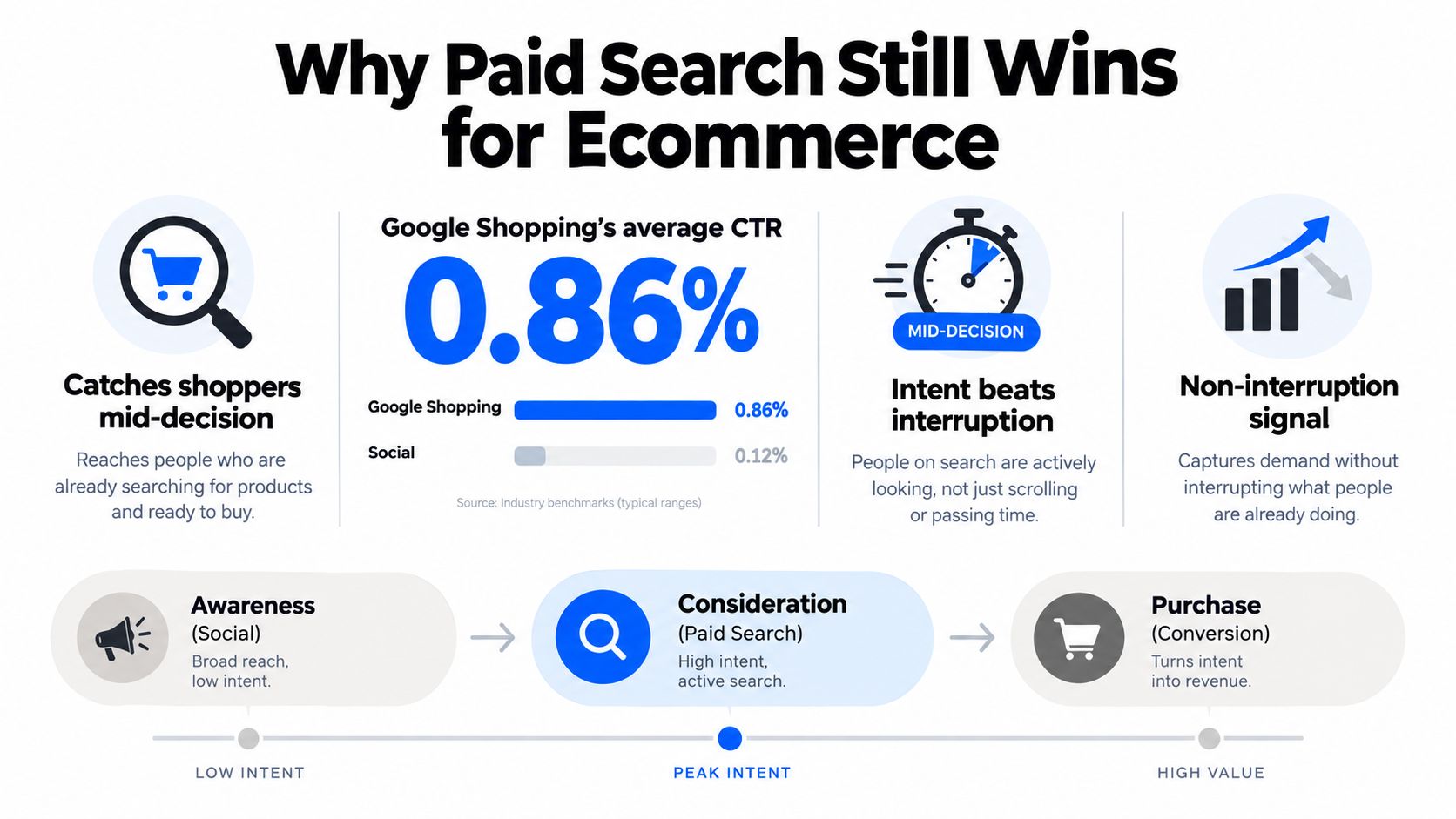
Intent creates the advantage
Google Ads began with AdWords in October 2000, introducing an auction-based way to buy visibility for keyword queries. The format has since expanded into Shopping, remarketing, and automated bidding, but the central advantage hasn't changed. A retailer can reach a person searching for a product at the moment that product is relevant.
Google's auction also rewards relevance. Ad Rank is influenced by the maximum CPC bid, Quality Score, and the expected effect of ad assets, while actual CPC is based on the next competitor's Ad Rank divided by your Quality Score, plus $0.01, as explained in this breakdown of the Google Ads auction. Better keyword-to-ad-to-landing-page alignment can therefore protect visibility without relying solely on a higher bid.
Shopping deserves special attention. A separate 2026 industry benchmark reported that Shopping ads represented 76% of retail search ad spend and 85% of retail search clicks, with global PPC spend estimated at $306 billion in 2026, up 11% year over year, according to Whatagraph's PPC benchmarks. The implication is straightforward: ecommerce teams need both query control and feed control.
Practical rule: Treat channel averages as a diagnostic range, not a target. Your category mix and query intent determine whether the account can support the average.
For a broader foundation, the paid search for ecommerce guide from Rebus is a useful companion. The execution work comes down to turning these benchmarks into decisions about campaign type, feed quality, negative keywords, bidding, and measurement.
Choosing the Right Campaign Type
Search, Shopping, and Performance Max aren't interchangeable versions of the same campaign. Each one earns budget under different conditions.
Standard Search gives the clearest control over queries, ad messaging, landing pages, and branded versus non-branded demand. It usually deserves priority for a store with a small catalog, especially when the business needs to protect brand demand or capture high-intent category terms.
Shopping works from the product feed. It can expose multiple SKUs to shoppers who may not know the exact product name, making it useful for discovery and product comparison. Its efficiency depends heavily on titles, attributes, availability, price competitiveness, and product eligibility.
Performance Max can extend reach across Google's inventory, but it gives the system broader control over placements and combinations. It makes more sense after the feed is clean and the account has enough reliable conversion history to guide automation. Without those signals, PMax can spend toward easy but low-value conversions, branded demand, or products that don't support the required margin.
| Dimension | Standard Search | Google Shopping | Performance Max |
|---|---|---|---|
| Primary job | Capture explicit query intent | Match products to shopping demand | Expand across Google inventory |
| Best starting point | Small catalogs and branded or category terms | Structured catalogs with competitive products | Clean feeds and dependable conversion data |
| Main control | Keywords, ads, landing pages | Product data and campaign segmentation | Asset groups, feed inputs, audience signals |
| Main risk | Query waste and expensive broad targeting | Weak titles, disapprovals, poor SKU economics | Limited query and placement visibility |
| Margin fit | Strong control by intent and product | Strong when product-level economics are clear | Requires disciplined exclusions and value rules |
Catalog depth also changes the answer. A store with under 50 SKUs can often build a focused Search structure around its most valuable products and categories. A catalog with 500 or more SKUs has more opportunity to scale Shopping campaigns, provided the feed is accurate and the products have enough demand.
A practical budget decision
Start with Search when the catalog is narrow, average order value is high, or margins are under pressure and query control matters most. Add Shopping when product discovery and SKU coverage create incremental demand. Test Performance Max only after conversion tracking and feed data are trustworthy, then judge it by incremental profit rather than reported revenue alone.
Teams evaluating automation can also review how to optimize PPC with AI tools from Crescade. For Performance Max-specific planning, use the Performance Max campaigns resource to think through structure, signals, and control boundaries.
Building a Product Feed That Actually Converts
A Shopping campaign can't compensate for vague product data. Google needs enough information to match a product with a query, and shoppers need enough information to decide whether the click is worth taking.
Start with product_type taxonomy. Build a clear parent-child structure rather than placing every product under a broad category. A useful hierarchy might move from footwear to men's footwear, then running shoes, then a specific product family. This gives you cleaner reporting and makes it easier to separate products by intent, margin, or lifecycle stage.
Improve the fields shoppers and Google use
Titles carry substantial matching context. “Red Shoes” says almost nothing about brand, product family, use case, or fit. “Nike Air Max 90 Men's Running Shoes, Red, Size 10” gives the system and shopper substantially more useful information.
Use a repeatable title order:
- Brand: Include the manufacturer or retailer brand where it matters.
- Key attribute: Add the model, material, feature, or product family.
- Use case: State whether the item is for running, hiking, gifting, or another clear purpose.
- Size or variant: Include size, capacity, color, or other differentiating detail when relevant.
Add custom attributes such as color, material, season, and lifecycle stage. Supplemental feeds can apply promotional labels such as new_arrival or clearance, allowing campaigns to isolate products that need different bids or budgets.

Keep eligibility and availability clean
Check GTINs, MPNs, brand values, pricing, images, shipping details, and availability. Branded products with missing or incorrect identifiers can face Merchant Center problems, reducing eligible exposure. Don't let out-of-stock SKUs remain active and collect clicks. Use suppression rules to remove unavailable products quickly, then restore them when inventory returns.
Feed work should run on a 30-day audit cadence, with faster checks during promotions or inventory changes. Review disapprovals, sudden impression losses, title patterns, variant mismatches, and products attracting clicks without profitable sales.
The practical connection between feed quality and performance is clear. Better attributes can improve matching, better titles can improve relevance, accurate availability can prevent wasted clicks, and lifecycle labels can keep promotional products from competing with evergreen inventory. A useful ROAS optimization playbook from Wojo Media offers additional context for connecting product-level decisions to account economics. You can also use the Google Shopping optimization resource when turning feed findings into campaign changes.
Keywords, Match Types, and Negative Mining
Keyword strategy shouldn't end when campaigns launch. The useful work starts after real shoppers reveal the language they use, including the irrelevant language that drains budget.
Separate campaigns or ad groups by intent:
- Brand: Protect branded demand and keep reporting distinct.
- Non-brand core: Capture category and product searches that introduce new demand.
- Competitor: Test competitor terms cautiously, usually with tightly controlled targeting.
- Long-tail: Reach specific searches where the query describes a product, use case, or variant clearly.
Build the initial list from keyword research, Merchant Center search insights, competitor gap analysis, and existing account data. Then use Search terms reporting as a recurring operating habit. Google Ads shows the actual queries that triggered ads, so sort by cost and inspect high-spend, low-return terms. Search-term review guidance commonly uses a 7-day, 14-day, or 30-day window, depending on account volume, as outlined in this Search terms reporting workflow.
Match deliberately, mine aggressively
Exact match is useful for proven converters and strategically important terms. It isn't restricted to one character-for-character query. Google says exact match can include close variants with the same meaning, including spelling, grammar, synonyms, paraphrases, and some reordering. Phrase match has also broadened beyond the old exact-string model, allowing close variations with words before or after the phrase, but not every reordered or inserted-word version. These behaviors are documented in Google's Search Ads 360 keyword matching guidance.
Use phrase match for controlled expansion. Use broad match only when conversion signals, budgets, exclusions, and Smart Bidding are strong enough to absorb exploration.
Negative keywords provide the counterweight. Google Ads supports broad, phrase, and exact negative match types, with broad negative match blocking searches that contain all the negative terms in any order, including extra words around them, as described in Google Ads negative keyword documentation.
Create shared lists for obvious non-buying themes such as jobs, free, used, repair, or informational research, then keep campaign-specific negatives separate. Review terms with two or more clicks and zero conversions, sort by spend, and add the worst offenders after checking whether the issue is query quality, landing-page mismatch, or insufficient data. Don't apply Shopping negatives blindly to Search, because the same word can represent different intent in each campaign type.

Bidding Strategies and ROAS Targets
Bidding should begin with contribution margin, not a revenue target copied from another account. If the order value looks healthy but fulfillment, payment processing, returns, discounts, and product costs consume the margin, a strong reported ROAS can still represent a weak business outcome.
A practical starting equation is:
Target ROAS = 1 / (maximum allowable CPA / average order value)
The allowable CPA should reflect what the business can spend after contribution margin is understood. If that number is wrong, Google can optimize perfectly toward an economically bad objective.
| Bidding Strategy | Min Conversions/30d | Best For | Key Trade-off |
|---|---|---|---|
| Manual CPC | Under 15 to 30 | Low-volume SKUs and controlled testing | More control, more operational work |
| Maximize Conversions | New or learning campaigns | Retargeting and early data collection | Can spend without enough value discipline |
| Target CPA | 30 or more | Stable conversion-focused campaigns | Needs a reliable conversion signal |
| Target ROAS | 30 or more | Revenue or value optimization | Can restrict volume when the target is too aggressive |
| Portfolio bidding | Depends on combined portfolio data | Balancing Search and Shopping economics | Strong campaigns can subsidize weaker ones |
The conversion threshold in the table is a practical operating guideline, not a guarantee. A campaign with very different products, long sales delays, or unreliable tracking may need more history before automated bidding becomes trustworthy.
Match strategy to evidence
Manual CPC still has a place when individual SKUs convert infrequently and the system has little useful data. Maximize Conversions can help a new campaign collect signals, but it shouldn't become a permanent excuse for ignoring margin. Target CPA and Target ROAS become more useful once campaigns have dependable conversion volume and aligned feeds, ads, and landing pages.
Portfolio strategies can balance Search and Shopping when one captures demand efficiently while the other creates broader product discovery. Watch for diminishing returns as budgets expand, especially when the account begins buying less qualified traffic. Raise targets gradually rather than changing them every week. Large, frequent changes make it difficult to tell whether performance moved because of the target, demand, inventory, or tracking.
Margin beats dashboard ROAS: If a product can't support the allowable acquisition cost after fulfillment and returns, better bidding won't make it a good product to advertise.
Measurement, Attribution, and Conversion Tracking
Scaling without trustworthy measurement is just accelerating uncertainty. Ecommerce teams need to know not only whether a purchase occurred, but also which revenue signal Google received, when it received it, and whether the reported value reflects the business's actual economics.
Begin with server-side or enhanced conversions. Use first-party data, hashed customer information, and conversion timestamps where appropriate so conversion signals remain useful despite browser restrictions and privacy changes. Import offline conversions when a support interaction, phone order, or fulfillment delay leads to a later purchase. Delayed revenue is still valuable feedback if the system receives it consistently.
Build a dependable event layer
GA4 should receive a consistent ecommerce event stream, including:
- view_item: Product detail engagement.
- add_to_cart: Shopping intent before checkout.
- begin_checkout: Progress toward purchase.
- purchase: Final transaction value, currency, and transaction ID.
Keep currency and transaction IDs consistent, prevent duplicate purchase events, and test tags across devices and checkout paths. Define macro conversions separately from micro conversions so bidding doesn't treat a product view as equivalent to a completed order.
Attribution deserves skepticism. Data-driven attribution can be useful, but it shouldn't be accepted as proof of incrementality. Compare it with other models, such as linear, position-based, or time-decay approaches, then test important assumptions with controlled experiments where possible. Import Google Ads cost data into GA4 so assisted interactions and last-click outcomes can be reviewed in the same reporting environment.
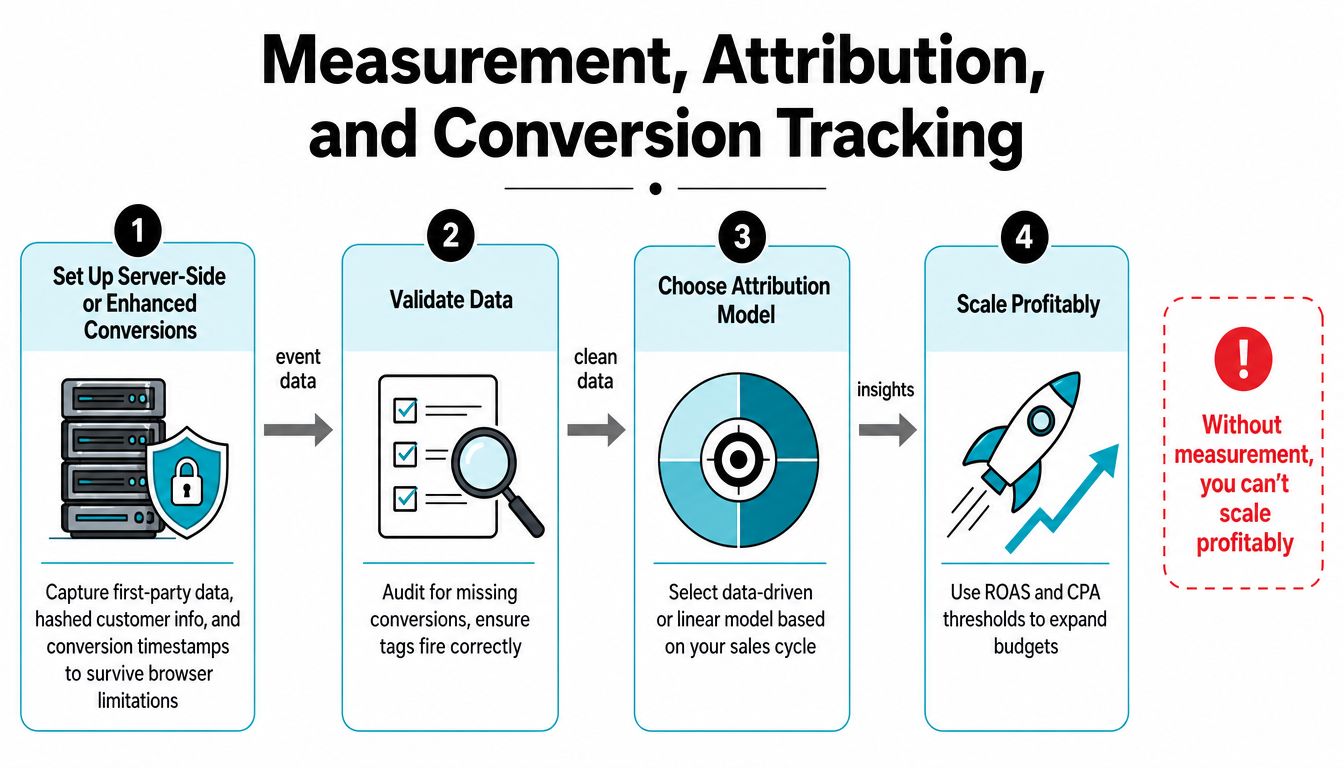
Make the data usable for decisions
Standardize UTM naming across campaigns, record promotion and inventory changes, and document which conversion actions feed bidding. BigQuery exports become useful when catalog size, customer journeys, or reporting requirements outgrow the standard interface.
The cross-channel attribution resource is useful when paid search appears to receive too much or too little credit. The key operational point is simple: today's measurement setup determines which signals tomorrow's bidding system learns to pursue.
Scaling Paid Search Without Breaking Profitability
A realistic scaling path starts with a controlled account, not an unlimited budget. At $5K per month, the priority is to establish clean conversion tracking, identify profitable products, and remove obvious query waste. The account can usually grow by improving structure and feed quality before adding more campaign complexity.
Around $10K to $15K per month, the first plateau often appears. The highest-intent searches may already have strong coverage, so additional spend reaches broader queries, more expensive auctions, or repeated audiences. At this stage, refresh the feed, expand carefully into adjacent keyword themes, improve landing-page speed, and review negative keywords before raising bids.
| Monthly Spend | Primary Constraint | Priority Action |
|---|---|---|
| $5K | Unclear economics and noisy data | Validate tracking, margins, products, and query quality |
| $10K to $15K | Saturation and weaker incremental traffic | Refresh feed, expand intent coverage, improve landing pages |
| $20K to $30K | Misaligned category economics | Recalibrate ROAS targets and reallocate by product group |
| $40K to $50K | Flattening incremental returns | Add geographies, product lines, or stronger audience signals |
At $20K to $30K monthly, category-level economics become harder to ignore. One product group may support aggressive acquisition while another needs a stricter target or no paid coverage. Reallocate between Search, Shopping, and Performance Max based on contribution margin and incremental demand, not on a blended account average.
The second ceiling often appears around $40K to $50K monthly. More budget won't create more profitable demand if the same products, queries, audiences, and landing pages are already saturated. Growth then depends on new geographies, product lines, promotional calendars, creative refreshes, and better audience inputs.
Avoid three expensive mistakes:
- Scaling unprofitable SKUs: Revenue growth doesn't justify advertising products that lose money after fulfillment and returns.
- Ignoring non-biddable levers: Feed freshness, page speed, offer strength, creative, and promotion timing can matter as much as bid changes.
- Overtrusting automation: Smart Bidding can't repair missing conversions, weak product data, or a target built on revenue instead of margin.
Keywordme works directly inside the Google Ads Search Terms Report to remove junk queries, add negative keywords, build high-intent lists, and apply match types without repeated manual formatting. If search-term cleanup is slowing your ecommerce workflow, visit Keywordme to review how it can support faster query mining, tighter exclusions, and more disciplined campaign expansion.
.svg)