
Performance Max Campaigns: A Practical Guide for 2026
Performance Max Campaigns: A Practical Guide for 2026


You launch a Performance Max campaign, set a budget, upload creative, and wait. Then the questions start: Where are the ads showing? Which searches triggered them? Is Google spending on valuable prospects or just finding the easiest conversions?
That uncertainty is understandable. Performance Max campaigns combine multiple Google advertising surfaces in one automated system, so the campaign can feel less like a set of familiar Search ad groups and more like a machine with hidden controls. But “automated” doesn't mean “untouchable.” You still shape the inputs, define the business goal, inspect search intent, remove waste, and decide how much of your account should rely on the format.
The useful mindset is simple: Performance Max is an automation engine, not a replacement for strategy. Give it vague goals and weak creative, and you'll make diagnosis harder. Give it clear conversion signals, organized assets, disciplined search-term review, and sensible budget boundaries, and you can use its reach without abandoning keyword control.
Introduction to Performance Max Campaigns
A marketer launches a new Performance Max campaign for an online store. The product feed is connected, the assets are uploaded, and the campaign starts serving. A few days later, the marketer opens the account and asks the question everyone asks first: “Where did my ads appear?”
The answer isn't one network. Google designed Performance Max as a single-campaign format spanning YouTube, Display, Search, Discover, Gmail, and Maps, with the format launched to all advertisers worldwide on November 2, 2021. Google also said Smart Shopping and Local campaigns would upgrade to Performance Max in 2022, making 2021 to 2022 the key rollout milestone for the campaign type. You can review that rollout context in this overview of Google Ads and Performance Max developments.
That breadth creates the campaign's appeal and its frustration. One setup can help Google find demand across several environments, but the marketer has to evaluate performance differently from a traditional Search campaign. A click from a high-intent query, a product interaction on Shopping, and a video-assisted conversion may all sit inside the same campaign while serving different roles in the customer journey.
Practical rule: Don't judge Performance Max by whether it looks like Search. Judge it by whether its inputs, traffic quality, conversion data, and budget role support your business objective.
This guide treats PMax as something you can steer. You'll learn what the format is, how assets and audience signals work together, when it fits your account, how to improve creative coverage, and how to use search-term data for tighter control. You'll also see where reporting has improved, where gaps remain, and why a mixed campaign portfolio usually makes more sense than moving every euro or dollar into one automated campaign.
What Performance Max Campaigns Are and Why They Matter Now
Think of a traditional campaign as hiring separate specialists. Your Search campaign handles active queries, Shopping handles product discovery, Display supports visual reach, and YouTube handles video. Performance Max is closer to hiring one operations manager who can assign work across all those teams, using your goal, budget, assets, feed data, and conversion signals to decide where opportunities exist.
That distinction matters because PMax is goal-based and automation-first. You tell Google what counts as success, provide the material needed to advertise, and set the commercial boundaries. The system then chooses combinations of creative, audiences, bids, and placements across Google inventory. You're giving up some manual control in exchange for broader automated decision-making.
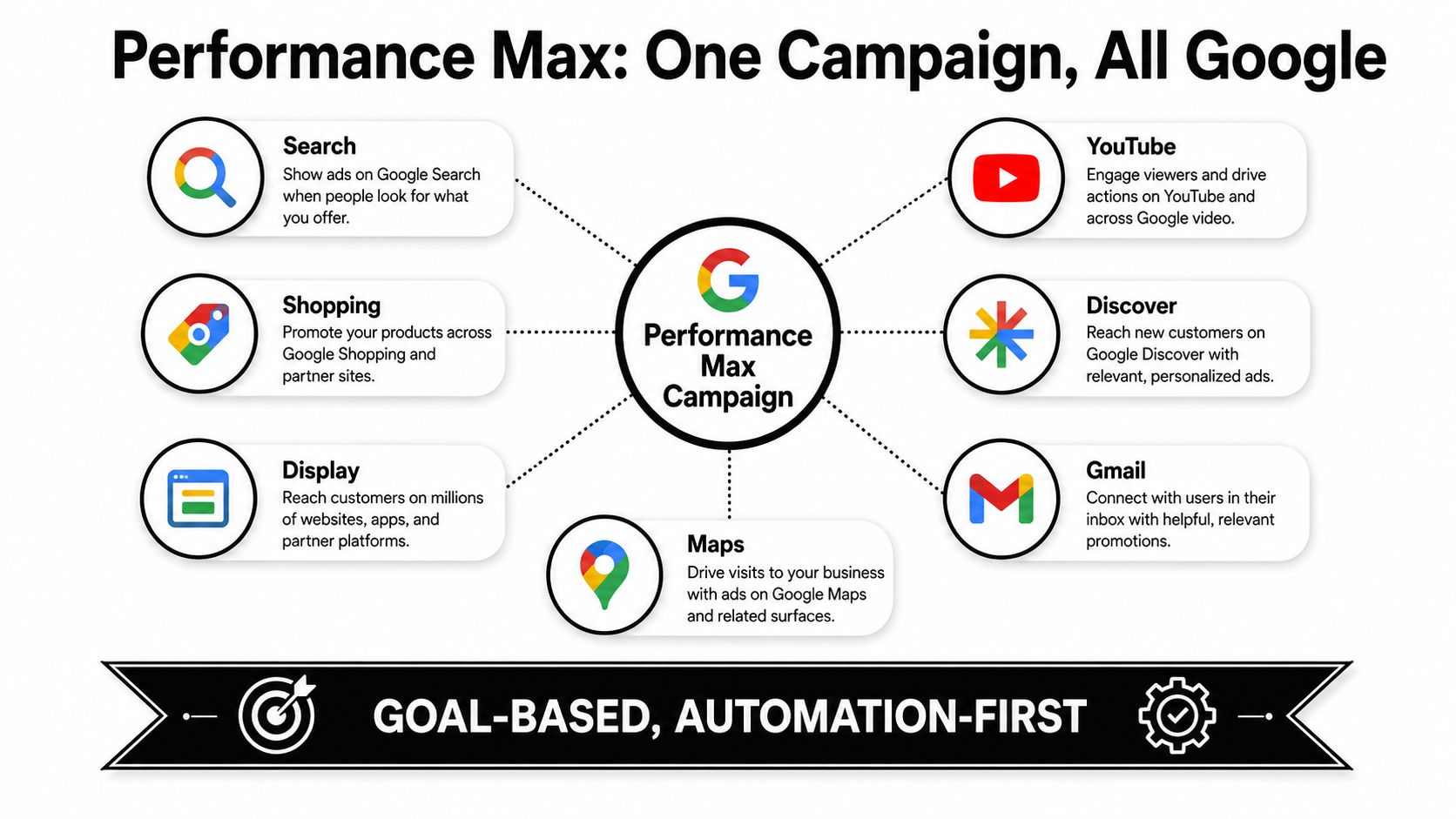
The format has moved from experiment to a significant part of many accounts. A 2026 benchmark survey of 170+ agency and in-house advertisers found that adoption rose from 60% in 2024 to 71% in 2025, an 18% year-over-year rise. The same dataset reported that PMax represented 19.9% of total Google Ads spend in 2025, compared with 6.7% in 2024, according to this Performance Max benchmark and trends report.
The practical difference from other campaign types
Standard Search gives you closer control over keywords, ad groups, queries, and landing pages. Standard Shopping centers on product data and feed structure. Display focuses on visual placements and audience reach. Performance Max connects those jobs, which can simplify management but makes poor inputs harder to isolate.
That's why campaign quality starts before the first bid. A conversion action that counts low-value events, an asset group with one narrow message, or a product feed with weak titles can send the system in the wrong direction. For a more detailed setup perspective, see this guide to what Performance Max optimization involves.
The right question isn't “Does PMax replace Search?” It's “Which part of my account should PMax handle, and which parts still need deliberate keyword and campaign structure?”
How Performance Max Campaigns Work Behind the Scenes
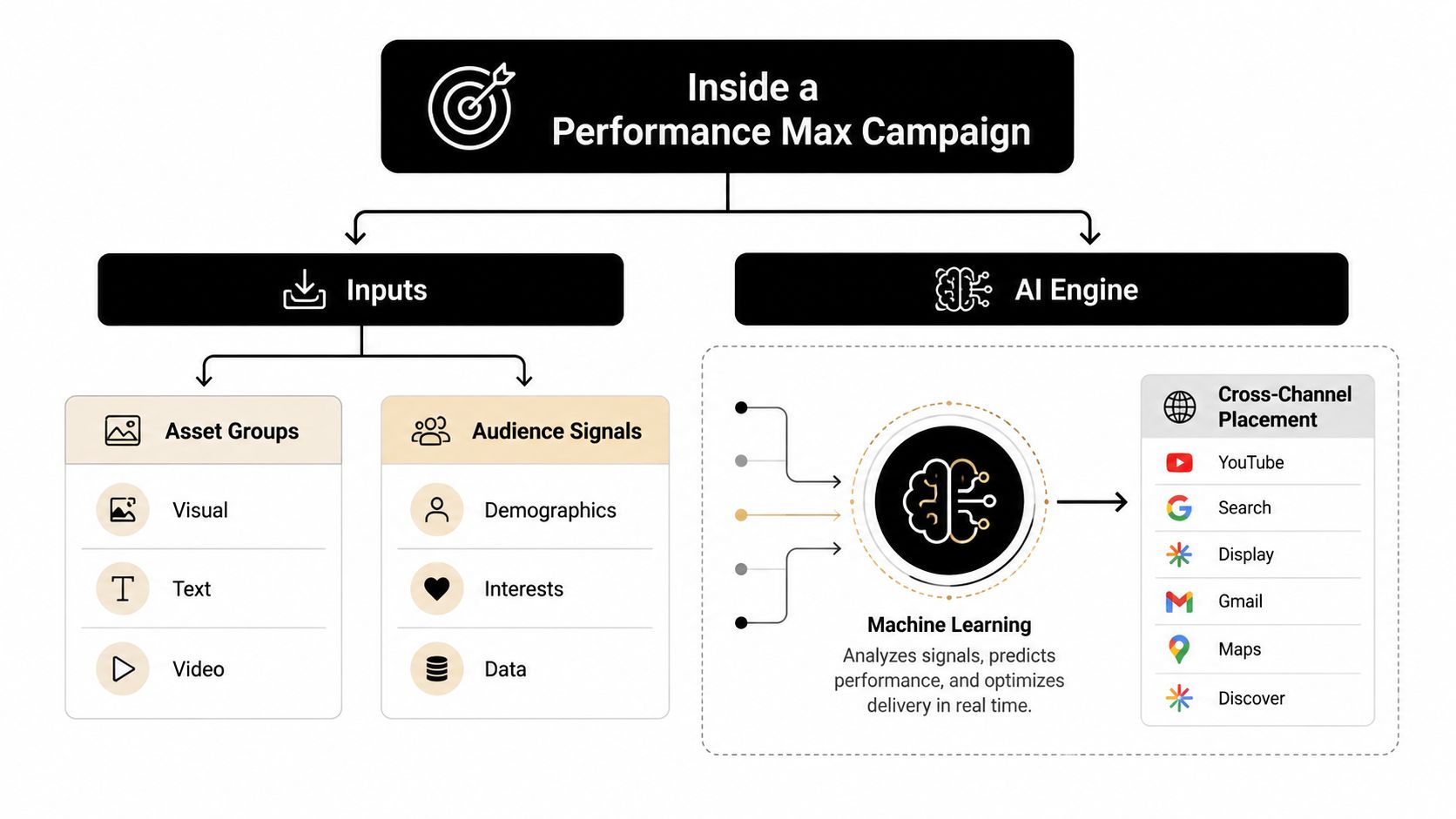
Performance Max works through a feedback loop. You supply assets, asset groups, audience signals, conversion goals, and often product-feed information. Google's automated system uses those inputs to assemble ads, estimate likely outcomes, and distribute opportunities across eligible channels.
Assets give the system something to work with
An asset group is a themed collection of marketing material. It can include headlines, long headlines, descriptions, images, logos, and video. Google can combine those elements differently depending on the placement and the user's likely intent.
Suppose an outdoor retailer creates one asset group around waterproof hiking jackets. The headlines might emphasize weather protection, the images might show the jacket in use, and the landing page might focus on that product category. A separate group for trail footwear should use its own message and destination. The clearer the theme, the easier it is to diagnose which offer and creative idea are earning attention.
Signals guide discovery, but they aren't rigid targeting
Audience signals can include customer data, interests, demographics, and other indications of who might convert. They're useful starting clues, not a promise that Google will serve ads only to those people.
That difference often confuses new advertisers. If you add a list of previous customers, you're helping the system understand a valuable audience. You aren't building a sealed audience segment in the same way you might in a manually controlled campaign. Google can use the signal to discover additional users who appear likely to complete the selected conversion action.
Conversion goals determine what the machine learns
Automation follows the objective you give it. If the campaign optimizes toward qualified purchases, the system has a clearer commercial destination than if it optimizes toward every form completion, page view, or weak engagement event.
Bidding and budget allocation then work from that feedback. The system may shift attention between Search, YouTube, Display, Discover, Gmail, and Maps as it looks for conversions that fit the campaign goal. That flexibility is the engine's advantage, but it also explains why tracking quality and asset quality matter so much.
Google recommends reviewing each asset group through Ad Strength and Asset Coverage. Its API guidance says those reports can identify missing creative coverage and the actions needed to improve an asset group. You can use the Google Ads API optimization guidance as a technical reference.
A short visual explanation can help connect the pieces:
The core lesson is that PMax doesn't create strategy from nothing. It amplifies the quality and clarity of what you give it.
When Performance Max Campaigns Shine and When They Struggle
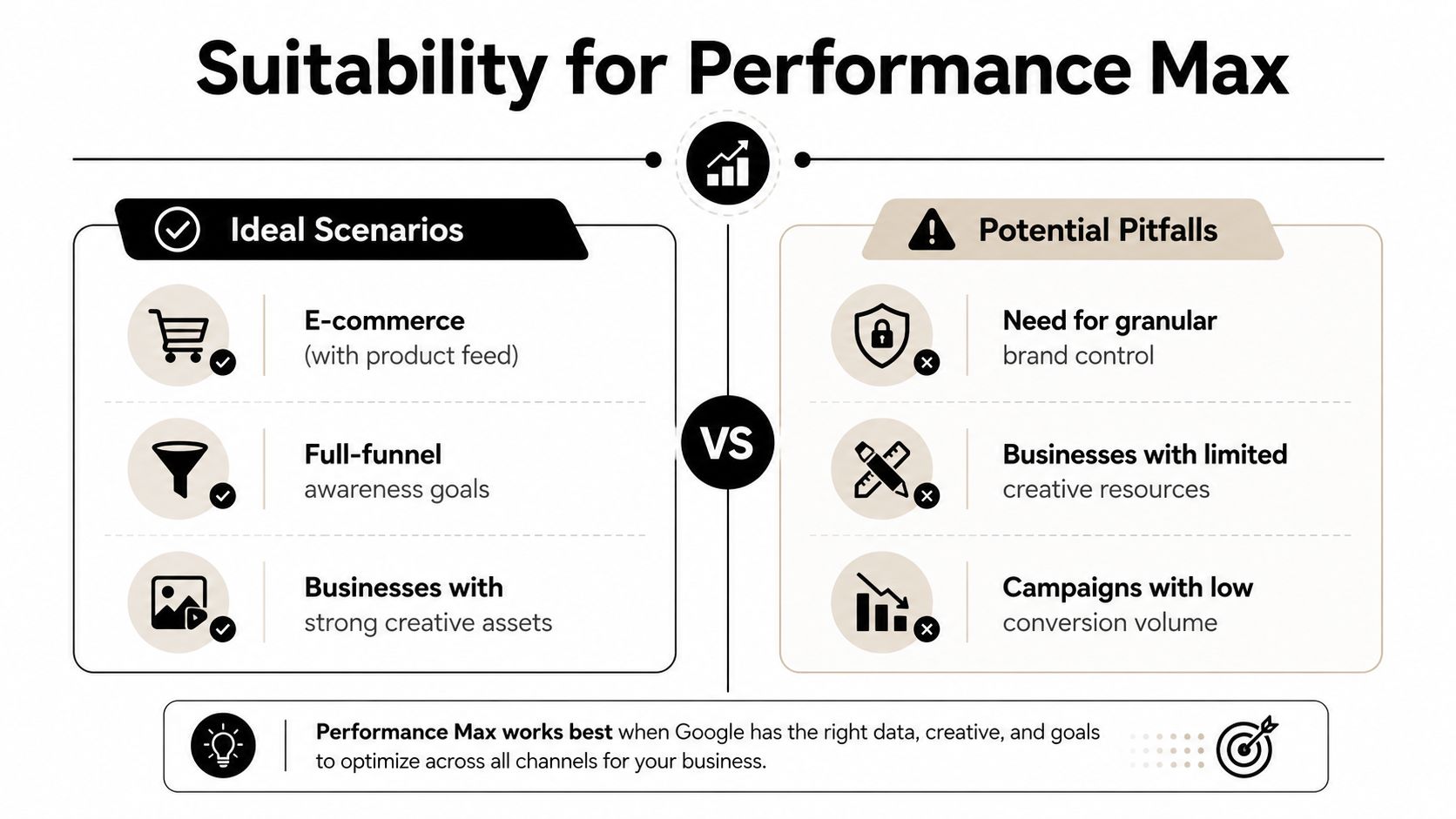
Performance Max tends to fit best when the business can give Google rich inputs and a clear outcome. E-commerce accounts with a reliable product feed are an obvious example. The system can connect product information with Search, Shopping, Display, YouTube, Discover, Gmail, and Maps opportunities while the advertiser manages one broader campaign structure.
It can also suit teams that want incremental reach without building and maintaining separate campaigns for every surface. Businesses with strong creative libraries have another advantage because PMax can test more combinations than a small team might assemble manually.
A side-by-side decision
| PMax may be a strong fit | Another campaign may deserve priority |
|---|---|
| E-commerce with a well-maintained product feed | Highly specific keyword control is central to the strategy |
| Full-funnel goals that include discovery and conversion | A niche B2B offer has limited conversion feedback |
| Teams with varied, tested creative assets | The account has little usable image or video material |
| An advertiser wants consolidated cross-channel management | Brand protection requires close query and placement oversight |
PMax can struggle when the account depends on narrow B2B intent, has weak conversion tracking, or needs granular control over every search theme. Standard Search may remain more useful for high-value terms where the advertiser wants dedicated copy, landing pages, budgets, and negatives.
The same caution appears in recent benchmark content. Reported top-performing accounts allocate 35% to 55% of spend to PMax rather than moving 100% of spend into it. That dataset also reported average ROAS of 4.2x for e-commerce, 2.8x for B2B SaaS, and 5.6x for retail, showing how sharply results can vary by business model. See the cross-industry Performance Max strategy analysis for that comparison.
Creative production can be a limiting factor too. If your campaign needs more video variation, a resource on creating AI video ads may help you explore production workflows without treating automation as a substitute for a clear offer.
The sensible approach is portfolio thinking. Keep campaigns that provide valuable control, then let PMax handle the areas where its cross-channel reach and automated allocation add something your existing structure can't.
Best Practices to Optimize Performance Max Campaigns
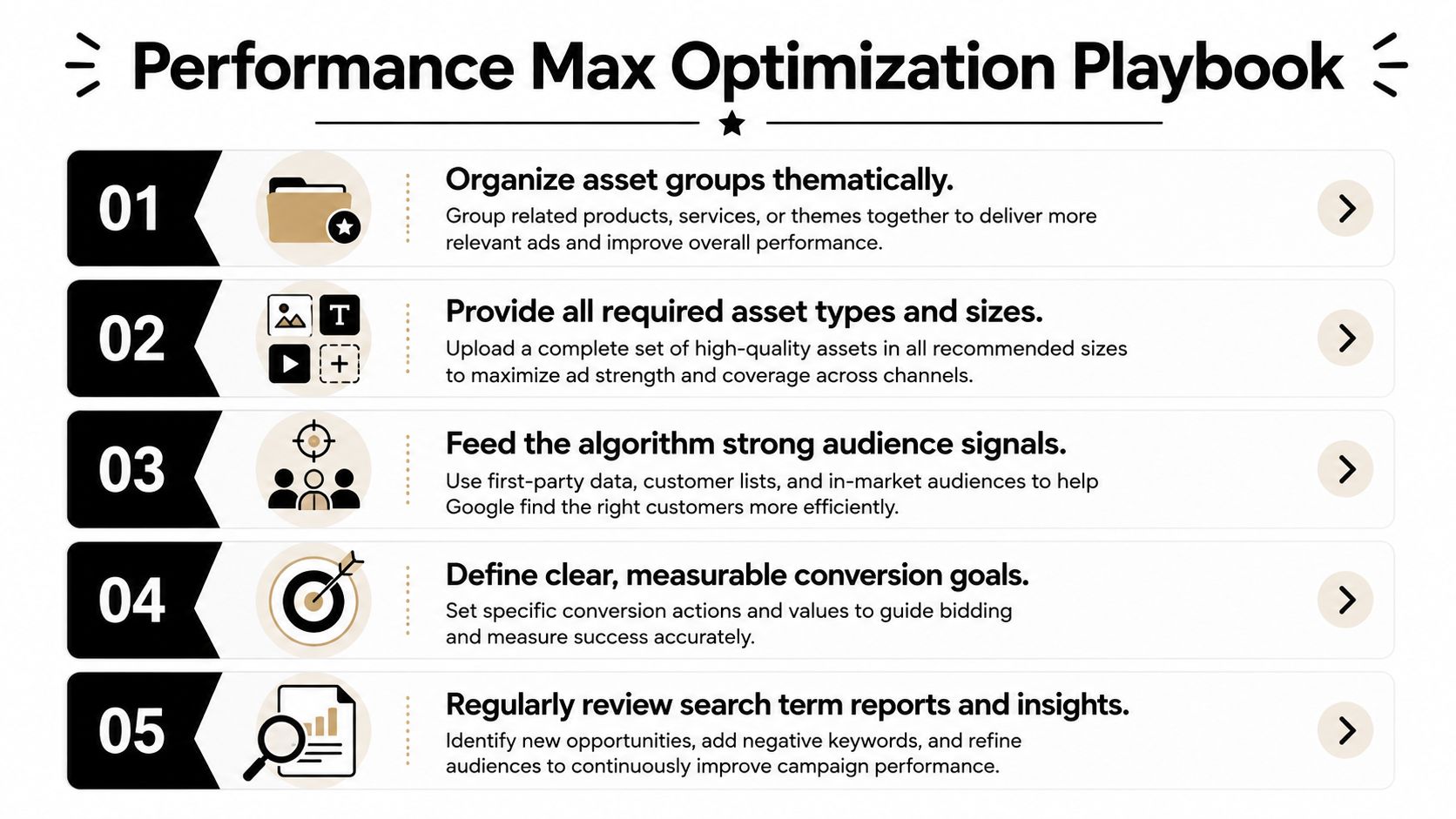
Optimization starts with the inputs, not with frantic bid changes. Give each asset group a clear job, make the creative broad enough to support different placements, and use search-term evidence to keep the system aligned with commercial intent.
Build asset groups around meaningful themes
Avoid placing unrelated products, audiences, and promises into one group. A furniture retailer might separate “compact desks” from “executive desks” because the buyer motivation, imagery, and landing page experience differ.
Name groups clearly enough that another person can understand the intended theme without opening every asset. Then check whether the final URL supports the same promise. A headline about ergonomic office furniture shouldn't lead to a general homepage if a focused category page exists.
Meet the requirements, then add useful variation
For non-retail campaigns, Google's API documentation requires at least 3 headlines, 1 long headline, and 2 descriptions. Headlines have a 30-character limit, while long headlines and descriptions have a 90-character limit. An asset group can include up to 15 headlines, 5 long headlines, and 5 descriptions, as documented in Google's Performance Max asset requirements.
Minimums prevent an incomplete setup. They don't guarantee strong coverage. Use variation with purpose:
- Message variation: Test the problem, the benefit, the proof point, and the offer.
- Visual variation: Include product detail, product-in-use, context, and brand-led imagery.
- Intent variation: Write for discovery as well as users who already know the product category.
Retail campaigns have an important technical nuance. Google says standard retail PMax campaigns can initially create asset groups without the usual minimum assets, but linking any asset through an AssetGroupAsset activates the full requirements. GLS Performance Max campaigns bypass standard asset requirements entirely. The Google Ads API asset-group documentation explains those exceptions.
Treat keyword discipline as steering
Search themes and audience signals help Google discover demand, but they shouldn't replace query review. Examine the actual language people use, separate useful themes from irrelevant ones, and add negatives where the traffic clearly conflicts with your offer. For a practical workflow, use this guide on how to use negative keywords in Performance Max.
Conversion goals deserve the same attention. Count the action that represents business value, not every action that looks active in an analytics report. Set bidding targets only when the campaign has enough trustworthy feedback to make those targets meaningful, and avoid changing several major inputs at once.
Optimization habit: Change one important lever, record why you changed it, and give the campaign enough time to produce interpretable evidence.
Finally, review feed titles, descriptions, product categories, availability, pricing, and landing-page relevance. A polished asset group can't compensate for product data that fails to describe what the buyer is searching for.
Troubleshooting Common Performance Max Campaign Issues
The black-box label is now too broad to be useful. Performance Max still automates decisions, but advertisers have more practical visibility than they had during the early rollout, especially around search terms and channel-level analysis.
Google's Performance Max search-term report exposes actual query text and is available from March 2023 onward. That lets account teams connect query intent with impressions, clicks, and conversions instead of relying only on category-level insights. Google documents this capability in its Performance Max search-term reporting guidance.
When traffic looks irrelevant
Start with the query, not the placement. Group search terms into useful themes, investigate whether the wording matches your offer, and add negative keywords for clearly irrelevant intent. A campaign selling commercial software shouldn't keep paying for searches that indicate free templates, employment queries, education, or unrelated consumer products.
Search terms insights add another layer. Google says the report groups queries into themes and subthemes and shows key metrics for the selected date range. It can also indicate whether queries came from keywordless targeting or added search themes, as explained in Google's search terms insights documentation.
When spend appears to favor weak inventory
Don't cut a channel because it has a high impression count or a low click-through rate alone. Compare conversion quality, value, landing-page behavior, and assisted contribution where your measurement setup supports it. If one channel or asset group consistently attracts low-value activity, investigate the creative, audience signal, conversion action, and landing page before making a blunt exclusion.
Channel-level reporting adds useful detail, but the full picture isn't equally available everywhere. Campaign, asset group, and asset reporting across Search, Shopping, Display, YouTube, Discover, Gmail, and Maps can be accessed through the API, while asset-group data remains a technical reporting task rather than a simple core-interface view. That gap is why teams often need a reporting workflow that combines the web interface with API data.
When conversions look weak, audit tracking before changing bids. Confirm that the primary conversion action fires correctly, values are sensible, duplicate actions aren't inflating results, and lead quality is represented as closely as possible. If the campaign still isn't converting, this guide to why Performance Max may not be converting can help organize the diagnosis.
Smarter Performance Max Campaigns With Keywordme
Performance Max works best when automation and human judgment divide the work sensibly. Google can test combinations, find cross-channel opportunities, and adjust delivery toward the conversion goal. You should still decide which conversions matter, which themes fit the business, which queries waste money, and how much budget belongs in PMax rather than Search, Shopping, Display, or other campaign types.
That creates a practical hybrid workflow. Let PMax discover demand, then use search-term reporting to harvest useful language for your broader account. Add strong queries to appropriate Search ad groups, develop new creative around recurring intent, and exclude traffic that falls outside the offer. This turns automation into a source of structured insights instead of a reason to stop managing keywords.
Keywordme can support that workflow by helping build negative keyword lists, assign exact, phrase, and broad match types in bulk, and expand ad groups from real search-term data. It's designed to reduce manual formatting and copy-and-paste work while keeping keyword decisions visible to the person managing the account.
The goal isn't to force every account into the same PMax structure. It's to create a feedback loop: PMax discovers, your team interprets, your keyword structure captures, and negative controls protect the budget. That approach gives automation room to work without surrendering commercial discipline.
Use Keywordme to turn Performance Max search-term insights into organized negative keyword lists, match-type updates, and ad-group expansion workflows. Start with the seven-day free trial, review the queries consuming budget, and build a cleaner hybrid PPC process without juggling multiple keyword tools.
.svg)