
Negative Keywords Blocking Good Traffic: Your 2026 Guide
Negative Keywords Blocking Good Traffic: Your 2026 Guide


You clean up junk queries, add a few negatives, maybe apply a shared list, and feel good about tightening the account. Then a week later, volume slips. Impressions are softer. A high-intent ad group that used to pull steady leads suddenly looks flat.
That's usually the moment negative keywords blocking good traffic stops being a theory and becomes a real account problem.
Most PPC managers don't break accounts with one obviously bad decision. They do it with reasonable decisions stacked on top of each other. A broad negative added at the account level. A phrase negative copied into the wrong campaign. A shared list that made sense six months ago but now conflicts with what the business wants to sell. The fix isn't “use fewer negatives.” The fix is using them with more discipline.
Why Your Good Negative Keywords Are Hurting You
You add a negative after seeing junk come through the search terms report. Costs tighten for a few days. Then a valuable query stops triggering, lead volume dips, and nothing looks obviously broken inside Google Ads. That is what makes negative keyword mistakes expensive. They usually hide inside decisions that looked reasonable at the time.
Negative keywords are still one of the best control tools in Google Ads. They cut waste, protect budgets, and help separate intent across campaigns. But a “good” negative can still hurt performance if it is applied at the wrong scope, uses the wrong match type, or stays in place after the account has changed.
Google Ads rewards caution here. Before adding exclusions, review the actual queries that triggered ads and compare them against conversions, assisted conversions, and current campaign intent. A word that looks irrelevant in one search can be part of a high-intent search somewhere else. If your process for reviewing search terms is loose, start with a tighter search terms report analysis workflow before you expand any negative list.
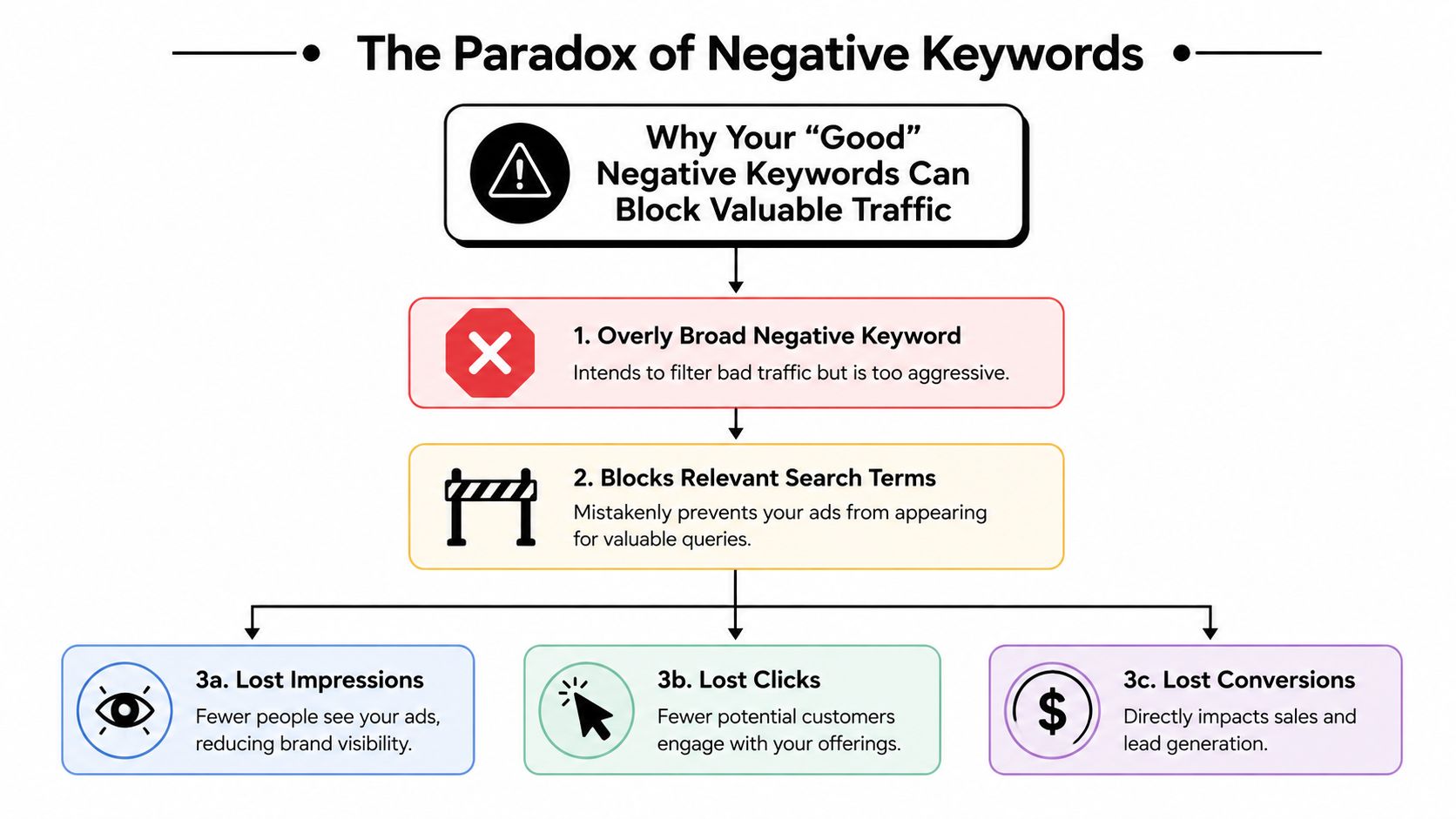
Scope is where good intent gets lost
Scope causes more damage than the negative itself.
An ad group negative can filter one narrow pocket of bad intent without affecting the rest of the account. The same term added at the campaign or account level can shut off traffic across branded, non-brand, competitor, and product-specific campaigns at once. In mature accounts with overlapping themes, that kind of conflict is easy to miss because impressions usually decline gradually, not all at once.
A common example is adding “free” as a campaign-level negative because a services campaign keeps matching to low-value research terms. That might be fine if the campaign only sells premium consulting. It becomes a problem if another ad group in the same campaign targets searches like “free consultation” and that offer drives qualified leads.
Shared lists create the same issue at a bigger scale. They save time, but they also let outdated decisions spread fast. A list built six months ago for lead quality control can block terms tied to a new product launch today.
Practical rule: If a term is only bad in one campaign or ad group, keep the negative there. Broadening scope should require proof, not convenience.
Match type determines how much useful traffic you risk
The trade-off is simple. Tighter negatives take more work. Broader negatives save time but raise the chance of collateral damage.
Broad negatives are where I find the biggest mistakes in live accounts. PPC managers use them because they clean up repeated junk quickly. The risk is obvious once you look at real queries. A broad negative like training, jobs, software, or template can block poor-fit searches and commercially useful ones in the same sweep, depending on the account.
Phrase and exact negatives usually give better control. Exact negatives work well for isolated junk queries that are unlikely to signal a larger pattern. Phrase negatives are stronger when the same unwanted wording repeats across multiple searches. Broad negatives still have a place, but only when the topic is clearly outside the business model and there is little chance it overlaps with converting intent.
This matters even more in accounts using Smart Bidding. If negatives cut off too much high-intent query variation, the bidding model gets a narrower set of auctions to learn from. The result is not always a dramatic collapse. Sometimes it shows up as weaker lead quality, less reach into profitable long-tail searches, or slower recovery after a structure change.
Good lists go stale
A negative keyword list is not “done” because it worked last quarter.
Businesses add services. Inventory changes. Offers change. Match behavior changes. A negative that protected spend during one phase of the account can become a blocker later. I see this often after campaign restructures, new landing pages, or a shift in lead qualification criteria. The account evolves. The list does not.
That is why strong negative management is really an operations habit, not a cleanup task. The goal is not just to stop bad traffic today. The goal is to keep exclusions aligned with current campaign intent, current offers, and how Google Ads is matching queries now.
Your Step-by-Step Search Term Audit Process
A common failure pattern looks like this. Lead volume softens after a cleanup round, CPCs look stable, and nothing obvious is broken in ads or landing pages. Then change history shows a new shared negative list went live three days earlier. That is the point to audit.
When I check whether negatives are blocking good traffic, I start with what changed in search behavior, not with the negative list itself. The job is to find the gap between queries the account used to capture and queries it can no longer enter. After that, trace the gap back to the specific negative, scope, and match type responsible.

Export enough history to spot a real shift
Pull enough Search Terms data to compare before and after the suspected change. In most accounts, that means a time range long enough to catch repeat query patterns, not just a noisy day or two. I also pull change history for the same period so I can line up performance dips with negative-list edits, campaign launches, or structure changes.
Sort the export into three working groups:
- Queries that have converted, or clearly signal the same intent as past converters
- Queries that spent money without business value
- Queries or ad groups that lost impressions, clicks, or conversions after a negative update
That third group is where blocked good traffic usually shows up. If an ad group was healthy last month and then thinned out right after a list update, demand is only one possible explanation. Your own exclusions are often the faster check.
If you want to speed up the reporting side, use a repeatable process for analyzing the Search Terms report efficiently.
Compare excluded language to converting language
This is the step many managers skip. They inspect the negative list on its own, decide the terms look reasonable, and move on. That misses the actual conflict.
Lay the negatives beside the queries that convert or assist conversions. Then look for overlap in stems, modifiers, and recurring phrases. In Google Ads, the problem is often not a clearly bad negative. It is a reasonable negative placed at the wrong scope.
A few patterns show up all the time:
- Single-word negatives like "cheap" or "free" that also appear in qualified searches, such as "cheap emergency plumber" for a price-sensitive local account that still closes well
- Phrase negatives meant to block research intent, but also catching high-intent product searches because the phrase sits inside both
- Shared-list negatives added for non-brand prospecting, then applied to branded, competitor, or high-intent campaigns where the intent is different
Use a spreadsheet if needed. The columns that matter are simple: negative term, match type, level applied, blocked query theme, campaigns affected, and whether the blocked traffic had conversions, assisted conversions, or qualified leads.
Review negatives against actual query intent, not against how tidy the list looks.
Run a conflict check before you remove anything
Do not start deleting negatives the moment you spot overlap. Some exclusions still save money in part of the account. The question is whether they are harmful everywhere, or only harmful where they are currently applied.
Check conflicts in this order:
- Scope first: account, shared list, campaign, then ad group
- Match type next: broad negatives usually deserve the first hard look
- Query evidence after that: compare blocked terms with recent converters and close commercial variants
- Bid strategy context last: if the campaign uses Smart Bidding, ask whether the negative is narrowing auction coverage enough to distort learning
That last point matters more than many teams realize. A bad negative does not always show up as an obvious traffic collapse. Sometimes Smart Bidding keeps spending, but on a thinner set of auctions, and lead quality drifts because the system lost access to profitable query variation.
You can do the conflict check manually by exporting active negatives from every scope and matching them against active keywords and recent search terms. Scripts and third-party tools can help if the account is large.
Keywordme is one option for that workflow. It helps clean search terms, handle match types, and update negative lists from real query data in a Chrome-based process. The useful part is not the interface. It is the habit of checking exclusions against live traffic before publishing changes.
Here's a walkthrough if you want a visual refresher before your next audit:
Fix the problem at the narrowest level that works
Once you confirm a negative is blocking good traffic, make the smallest change that restores intent coverage without reopening obvious waste.
That usually means one of four actions:
- remove an account-level or shared-list negative and reapply it only where it belongs
- replace a broad negative with a phrase negative
- replace a phrase negative with an exact negative
- split one shared list into separate lists for brand, non-brand, product line, or funnel stage
In practice, judgment is paramount. If "jobs" is polluting a B2B SaaS campaign, the right fix might be a phrase or exact negative in non-brand campaigns only. If a recruiting page is part of the same domain and branded searches include career intent, an account-level block can do more harm than good.
After the edit, annotate the change, monitor search terms for the next few days, and confirm that restored traffic is qualified. A good audit does not end with deleting a blocker. It ends when the account has a cleaner rule, a clearer scope, and a monitoring habit that stops the same mistake from coming back.
Common Negative Keyword Traps and Their Fixes
A campaign starts the week looking healthier. CPCs are down, wasted queries are disappearing, and the search term report looks cleaner. Then lead volume slips, branded traffic gets patchy, or a high-intent product theme goes quiet. The issue is often not the decision to add negatives. It is how broadly they were applied, which match type was used, and whether anyone checked for conflicts across campaigns.
Negative keywords fail in predictable ways. The useful part is knowing how to spot each pattern and fix it without reopening obvious waste. The effectiveness of a negative keyword depends on its context. The same term can protect one campaign and suppress qualified traffic in another.
The broad match cleanup that went too far
This is one of the fastest ways to create hidden damage in Google Ads.
A manager sees repeated junk around a generic modifier, adds a broad negative, and waste drops right away. A week later, good long-tail queries disappear because broad negatives can block searches that include all of the negative terms, even when the full query still shows strong buying intent.
Trap: using a broad negative on a word that also appears in commercial searches you want.
Fix: use phrase match when the bad traffic shows up as a repeated wording pattern. Use exact match when the problem is a specific query. Keep broad negatives for terms that are clearly outside the business and unlikely to overlap with qualified intent.
A common example is "free." In some accounts, "free" should be excluded almost everywhere. In others, "free trial" or "free demo" is a core conversion path. The word is not the rule. The query pattern and campaign intent are the rule.
The phrase match misunderstanding
Phrase negatives feel safer, so they often get approved too quickly.
They still block any search containing that phrase in the same order. If the phrase sits inside both junk queries and high-intent searches, phrase match is still too blunt. I see this a lot with modifiers like "template," "software," "training," or "jobs," where intent changes based on the rest of the query.
Trap: adding a phrase negative from one ugly query without checking whether the same phrase appears in converting searches.
Fix: review that phrase across recent search terms first. If it shows up in both qualified and unqualified traffic, narrow the exclusion to exact match, or apply it only inside the campaign where the rule holds.
The scope conflict nobody noticed
Inherited accounts are full of this problem.
A shared negative list was built for one purpose, then attached to more campaigns because it was convenient. Months later, nobody remembers that a competitor list is blocking conquesting in one place, or that a non-brand cleanup list is suppressing branded support queries somewhere else. If you need a practical way to catch this, run a negative keyword conflict check across shared lists and campaign-level exclusions before you assume search volume is the actual issue.
Trap: applying the same shared list across brand, non-brand, product, competitor, and remarketing campaigns.
Fix: split lists by business rule. Brand exclusions belong in non-brand campaigns. Competitor exclusions should not automatically carry into branded or category campaigns. Product-line exclusions should stay close to the ad groups or campaigns they were built for.
The single-word negative that looks obvious
Single-word negatives are tempting because they clean up reports fast.
They are also where a lot of accidental blocking starts. One word can appear in research traffic, support traffic, student traffic, and purchase-intent traffic at the same time. "Course," "tool," "template," "repair," and "pricing" can all go either way depending on the advertiser.
Trap: blanket one-word exclusions based on surface-level irrelevance.
Fix: check whether that word appears inside profitable searches, then decide at the narrowest level possible. If the conflict is limited to one campaign theme, keep the negative there instead of pushing it account-wide.
The rushed rollout after a short test
This usually happens after someone finds a few expensive search terms, makes a cleanup list, and pushes it everywhere.
The account gets quieter. That looks like progress until Smart Bidding starts learning from a smaller and narrower pool of eligible queries. Fewer auction entries can be a good thing if the cut is clean. If the cut removes mixed-intent or upper-funnel terms that still assist conversions, bidding can lose useful signals and performance can flatten.
Trap: promoting new negatives to campaign-wide or account-wide status after limited evidence.
Fix: validate the pattern across enough search-term history to see whether it is completely irrelevant or just inefficient in one slice of the account. Then roll it out in stages and watch impression volume, conversion mix, and query diversity after the change.
| Pitfall | Problem Example | Solution |
|---|---|---|
| Broad negative on a common term | A broad negative removes searches that contain the unwanted term but also catches high-intent long-tail queries | Replace with phrase for repeatable junk patterns or exact for one-off bad queries |
| Phrase negative used without query review | A phrase looks irrelevant in one report but also appears inside converting searches | Check converting queries first, then narrow the exclusion or move it to a smaller scope |
| Shared list applied too widely | A list built for generic campaigns gets attached to brand or product campaigns | Split lists by campaign purpose and apply only where the rule is valid |
| Single-word negative conflict | One word is excluded even though it appears in both bad and profitable searches | Avoid blanket one-word exclusions unless the topic is clearly irrelevant |
| Global cleanup after a short test | New negatives are pushed account-wide after a small sample of junk traffic | Validate with search-term history and roll changes out in the narrowest possible place |
The practical question is not "is this term bad?" The better question is "where, when, and under which match type does this term become bad?"
That framing keeps the account flexible. It also keeps you from solving one waste problem by creating a coverage problem somewhere else.
Building a Conflict-Free Negative Keyword Strategy
A clean negative keyword strategy starts before the next cleanup. The goal is to make new exclusions hard to misuse, easy to review, and easy to reverse if they cut into qualified traffic.
I use a simple rule set for every negative added to an account: define the bad query pattern, choose the smallest scope that fixes it, then pick the least aggressive match type that still does the job. That sounds basic, but it prevents the two failures that cause most self-inflicted traffic loss: account-wide negatives added for local problems, and broad exclusions added for phrase-level issues.
Build from search intent and campaign role
Negative lists should reflect how the account is supposed to route traffic.
A practical structure looks like this:
- Brand isolation lists: keep brand terms out of non-brand campaigns when you want clean reporting and separate budgets
- Product or service separation lists: stop overlapping categories from cannibalizing each other
- Irrelevance lists: exclude topics the business does not offer at all
- Surgical exact-match negatives: block isolated bad queries without creating collateral damage
That setup is more work than one shared "master negatives" list. It is also safer. A list built for generic lead gen usually should not sit on a brand campaign, and a list built for one product line often breaks another.
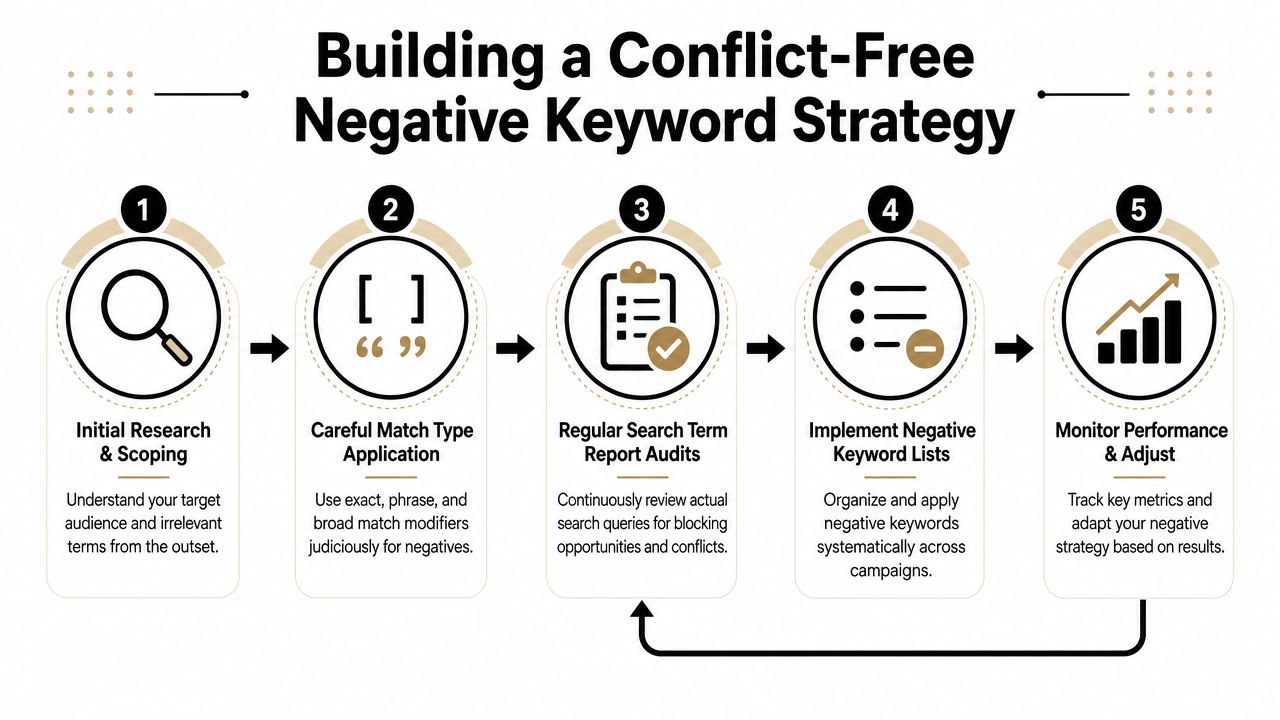
Match type should follow risk
Start with exact negatives when the problem is one query. Move to phrase only when the same unwanted pattern keeps showing up and you have checked that it does not sit inside valuable searches. Use broad negatives sparingly, usually for topics that are clearly outside the business.
In Google Ads, this matters fast. A broad negative like "free" can clean up low-intent traffic in one campaign and unintentionally block converting searches such as "free consultation lawyer" in another. The fix is often smaller than teams expect. Use an exact negative for the junk query, or apply the broader exclusion only in the campaign where that traffic is genuinely wasteful.
Use negatives to route traffic on purpose
Negative keywords are also a routing tool. They help decide which campaign gets the query when multiple campaigns could match.
This shows up all the time in accounts with brand, generic, and high-intent product campaigns. If the generic campaign is allowed to absorb searches that belong in a tighter ad group or a more specific campaign, Smart Bidding learns from the wrong mix of queries. Then the performance problem is no longer just reporting noise. You have weaker ad relevance, fuzzier conversion signals, and less control over budget allocation.
A simple example: if "enterprise crm demo" should go to a product-led campaign with its own landing page and tCPA target, add negatives to the broader campaign so that query cannot drift there by accident.
Put review rules around every shared list
Shared lists save time. They also spread mistakes fast.
Treat every shared negative list like account infrastructure. Name it by purpose, document where it should and should not be applied, and review attachments before you update the list. If you want a practical process for spotting collisions before they suppress delivery, use this negative keyword conflict checklist for shared lists.
One more trade-off matters here. Tight routing improves control, but too many cross-campaign negatives can make an account brittle. If campaign boundaries are too rigid, query volume can dry up in places where Smart Bidding needs room to learn. The right balance depends on account size, search volume, and how separated your offers really are.
A conflict-free strategy is not about adding more negatives. It is about setting rules that keep exclusions precise, scoped, and aligned with how the account is meant to capture intent.
The PPC Manager's Quick-Check Monitoring List
Most negative keyword damage accumulates subtly. That's why a light weekly check beats a heroic quarterly cleanup.
Use this as a standing routine.
Weekly checks that catch problems early
- Review newly added negatives: Compare every new exclusion from the last review period against your top converting search terms. If there's any overlap, re-check match type and scope.
- Watch impression trends on core ad groups: If a high-value ad group drops after a list update, inspect negatives before changing bids or ads.
- Check account-level additions separately: These deserve extra scrutiny because they affect everything downstream.
- Scan shared lists for drift: If a list was built for one campaign type and is now attached elsewhere, re-evaluate it.
- Review search-term freshness: New behavior shows up fast. Don't assume last month's exclusions still fit this month's account.
Monthly checks that keep structure healthy
- Run a conflict review: Focus on broad and phrase negatives first.
- Audit campaign routing: Confirm that brand, generic, and product campaigns aren't blocking each other in odd ways.
- Look at converting query themes: If a blocked word appears inside strong queries, that's a red flag.
- Prune legacy exclusions: Old negatives that no longer reflect the business should be removed or downgraded.
If you want to formalize the cadence, this guide on how often to review the Search Terms report is a practical place to set your rhythm.
Small checks prevent large losses. Negative keyword issues are easier to fix when they're one list change old, not six months old.
Advanced Negative Keyword FAQs and Final Thoughts
The mature view of negative keywords is simple. They are not a cleanup tool only. They are a traffic-shaping tool.
Used well, they reduce waste without starving the account. Used badly, they make your targeting look disciplined while imperceptibly cutting off the searches you wanted.
How do big negative lists affect Smart Bidding
Often, the answer becomes “it depends,” and that's not a dodge. It's the true answer.
There's a growing line of PPC advice that warns against assumption-heavy negative lists, especially when conversion volume is low or when the platform doesn't have strong final conversion feedback. The concern is straightforward. If you over-filter, the algorithm gets fewer signals and less room to learn. That tension between control and exploration is discussed in this analysis of negative keyword mistakes and automation trade-offs.
In lower-data accounts, I'd rather see a smaller, proven set of negatives than a giant speculative list built from instinct.
Can negative keywords funnel traffic between campaigns
Yes, and this is one of the smartest uses of them.
Some agencies use cross-campaign negatives to stop one campaign from capturing queries that should go to a more specific campaign. That lets you push broad commercial intent toward a generic campaign, preserve branded traffic for brand campaigns, or keep product-specific searches landing in the campaign with the most relevant ad and page. That routing use case is highlighted in this discussion of negative keyword strategies many agencies overlook.
Should you remove negatives if traffic drops
Not blindly.
Start with change history, then search terms, then conflict checks. If the drop lines up with a recent negative update, reverse the smallest possible thing first. Don't wipe the entire exclusion framework unless you've confirmed it's broadly broken.
What's the safest operating rule
Treat every negative like a reversible hypothesis.
Check the query. Check the match type. Check the scope. Then monitor after rollout.
That mindset keeps you out of the two bad extremes: accounts with no filtering and accounts with so much filtering they can't grow. If you remember one thing from this article, make it this. Negative keywords blocking good traffic is rarely caused by the idea of exclusion itself. It's caused by exclusions that weren't tested against real query behavior.
Keyword work gets messy fast when you're reviewing search terms, assigning match types, and checking for conflicts across campaigns. Keywordme helps teams handle that workflow in one place by cleaning search terms, building negative lists, and applying match types from real Google Ads query data without the usual spreadsheet shuffle.
.svg)