
How Often Should You Review Search Terms Report: 2026 Guide
How Often Should You Review Search Terms Report: 2026 Guide


SEO Title: How Often Should You Review Search Terms Report
Meta Description: How often should you review search terms report? Get a practical cadence by account stage, trigger events, and a faster workflow.
You're probably asking this because one of two things is happening.
Either you haven't looked at your Search Terms report in a while and you're wondering how much damage might be sitting in there, or you're checking it constantly and starting to suspect you're doing busy work. Both are common. Both can get expensive in different ways.
The mistake is treating search term review like a fixed calendar task with one universal answer. It isn't. The right cadence depends on how volatile the account is right now, how much freedom your match types have, and whether you've changed anything that can suddenly widen traffic.
Why a One-Size-Fits-All Answer Fails
A weekly review sounds disciplined. In practice, it can be far too slow for one account and a complete waste of time for another.
Search term review should follow risk, not habit. Risk changes with account age, query volume, match type, and recent changes inside the account. That is why blanket advice keeps failing people. It ignores the conditions that determine how quickly bad traffic can pile up and how quickly useful search terms can surface.
Account stage changes the job
A new account needs tighter supervision because Google is still testing how closely user queries relate to your keywords. Early on, you are not maintaining a system. You are shaping it.
Leave a new campaign alone for a week, especially with broad match in play, and you can burn through budget on research terms, job seekers, irrelevant locations, or adjacent intents you never meant to buy. The cost is not just wasted spend. Bad query patterns can muddy your performance read and slow down decisions on bids, ads, and landing pages.
A mature account is a different situation. By that point, the core negatives are usually in place, the recurring intent traps are familiar, and the search term report tends to produce fewer surprises. Review still matters, but the cadence can relax unless something changes that widens traffic again.
Short version: stable accounts earn a slower cadence. New or recently changed accounts do not.
Match type and spend set the pace
Broad match gives you more coverage and more ambiguity. That trade-off can be worth it, especially when you want discovery or when Smart Bidding has enough signal to work with. It also means you need to watch query quality more closely, because Google has more room to interpret intent than it does with exact match.
Spend changes the urgency. A campaign spending heavily can create a meaningful loss in a few days. A low-volume campaign may collect too little data to justify daily checks, even if the account structure is messy. Reviewing too often in that case usually creates noise, not insight.
This is also where operational reality matters. If the team can only do a proper review once a week, build a system that catches the highest-risk campaigns first instead of pretending every campaign deserves the same attention. If volume is becoming unmanageable, this guide on handling an overwhelming number of search terms to review will help you sort by impact instead of trying to read everything.
The variables that should actually drive frequency
A useful cadence comes from a few practical inputs:
- Account maturity: New launches and major rebuilds need closer review than settled accounts.
- Traffic volume: More queries create faster feedback, but they also create waste faster.
- Match type mix: Broad match and expansion-heavy setups need more supervision.
- Recent changes: New campaigns, bidding changes, location expansion, seasonality shifts, and landing page changes all raise review priority.
- Team capacity: A lighter schedule that gets done consistently beats an ideal schedule no one follows.
The point is not to review on a fixed day because a blog said “weekly.” The point is to tighten the loop when the account is volatile and loosen it when the account has earned that trust. That shift from calendar-based checks to lifecycle-based and trigger-based reviews is what makes search term work useful instead of repetitive.
Your Search Term Review Cadence Blueprint
Here's the practical version.
For a newly launched Google Ads campaign, practitioners commonly recommend reviewing the Search Terms report every day during the early learning phase, then shifting to at least a weekly cadence once traffic stabilizes, because frequent review helps you turn strong queries into phrase or exact keywords and block irrelevant terms before spend piles up, as outlined in Samson Consulting's guidance on how often to review the Search Terms report.
A simple schedule you can actually use
| Account Stage | Recommended Frequency | Primary Goal |
|---|---|---|
| New launch | Daily | Catch irrelevant queries fast and promote early winners |
| Growing and active account | Weekly | Control query drift and expand useful themes |
| Mature and steady account | Monthly | Maintain relevance and clean up new waste systematically |
That table is the starting point, not a law.
New launch
Daily review is the right move when a campaign is fresh, especially if you're using broad match or testing new keyword themes. Early on, the Search Terms report acts like your reality check. It tells you what people typed, not what you hoped they'd type.
Your daily review should stay narrow:
- Look for obvious mismatches: Terms that are commercially wrong, research-only, job-seeker intent, or unrelated.
- Look for spend with no signal: Queries spending money without showing the right intent.
- Look for breakout terms: Queries that clearly deserve their own phrase or exact match keyword.
Growing account
Once traffic stabilizes, weekly usually becomes the sweet spot. You've got enough data to spot patterns, but you're not waiting so long that irrelevant traffic gets comfortable.
A weekly rhythm works well because it gives you time to see whether a query cluster is a one-off or a pattern. It also keeps the task from turning into endless micromanagement.
Weekly is often where discipline beats intensity. You don't need to stare at the report every morning if the account has settled down. You do need to keep showing up.
Mature account
Databox recommends running a search query report every 2–4 weeks for most businesses, while checking more frequently in the first few days after launch to catch high- and low-performing terms early in its guidance on search query report timing in Google Ads. That's a practical baseline for accounts that are no longer chaotic.
Monthly works when the account is stable, the negative structure is already decent, and no major changes have widened traffic. But monthly only works if the review is systematic. Random spot checks don't count.
A good mature-account review asks three questions:
- Are new irrelevant themes slipping in?
- Are there recurring winners that deserve tighter keyword control?
- Are any old negatives now blocking traffic you want?
The Trigger-Based Review You Cannot Ignore
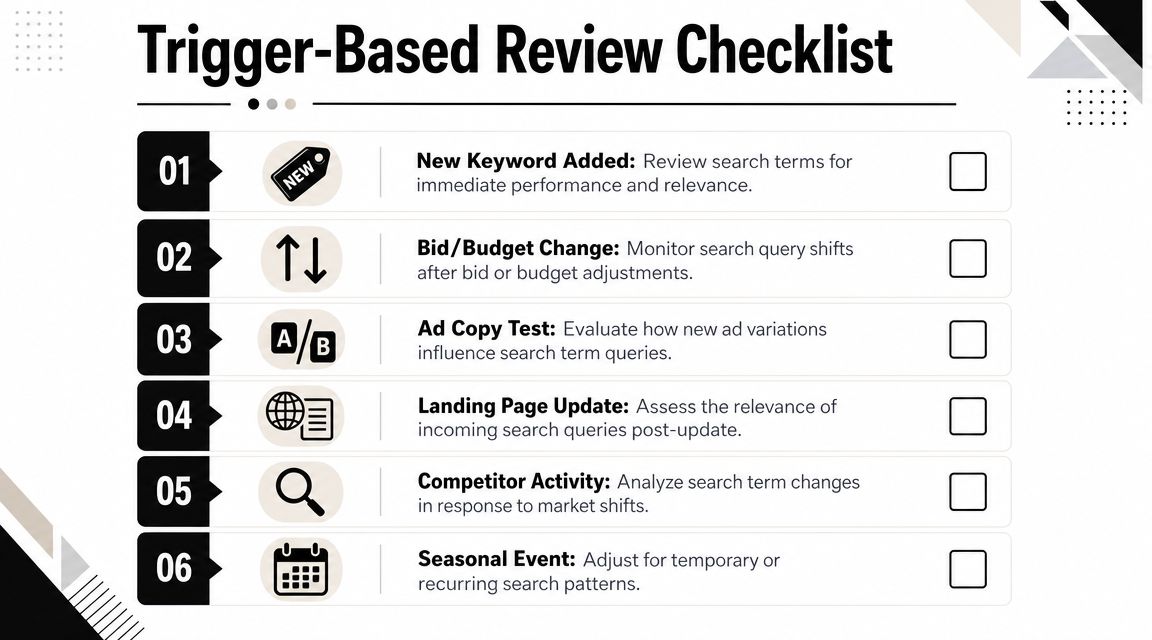
A stable account can go sideways in 48 hours after one big change. You add broad match, open a new location, or switch bidding, and the search term report starts filling with queries you never meant to pay for. That is why review cadence cannot live on the calendar alone.
Changes that should send you straight to the report
The simple "review weekly" rule breaks the moment you widen reach. After any change that gives the platform more room to interpret intent, check search terms sooner and keep checking until query quality settles.
Common trigger events include:
- Launching a new campaign
- Adding broad match keywords
- Switching bidding strategy
- Expanding into new geographies
- Raising budgets aggressively
- Restructuring ad groups around new themes
Those are not routine edits. They change what traffic the account is allowed to bring in. If you wait for the next scheduled review, you can burn through budget on bad-fit queries before anyone catches the pattern.
I treat trigger reviews as temporary surges in oversight. For a stable account, that often means checking every few days right after the change, then dropping back to the normal cadence once the query mix looks clean again.
Why trigger reviews matter
Waste usually starts small. A few irrelevant searches slip in after a targeting change. Then those searches repeat, spend builds, and the account starts optimizing around noise instead of intent.
That is the expensive part people miss.
Search term reviews after a trigger are less about housekeeping and more about damage control. The goal is to catch three things early: irrelevant intent to block, promising queries worth isolating, and weak areas where the recent change was too loose.
The same discipline applies beyond paid search. Teams trying to attract qualified website traffic still need tight alignment between keyword intent and landing page intent. Paid search just makes the cost of mismatch visible faster.
Treat major account changes like a fresh traffic source. Audit the queries before wasted spend turns into a trend.
Keep the review simple. Relevance first. Query volume second. Structure later.
If the immediate job is building exclusions fast, this guide on how to use search terms report to find negative keywords is a practical process to use.
A Practical Workflow for Efficient Reviews
Knowing how often should you review search terms report is useful. Knowing what to do when you open it is what changes performance.
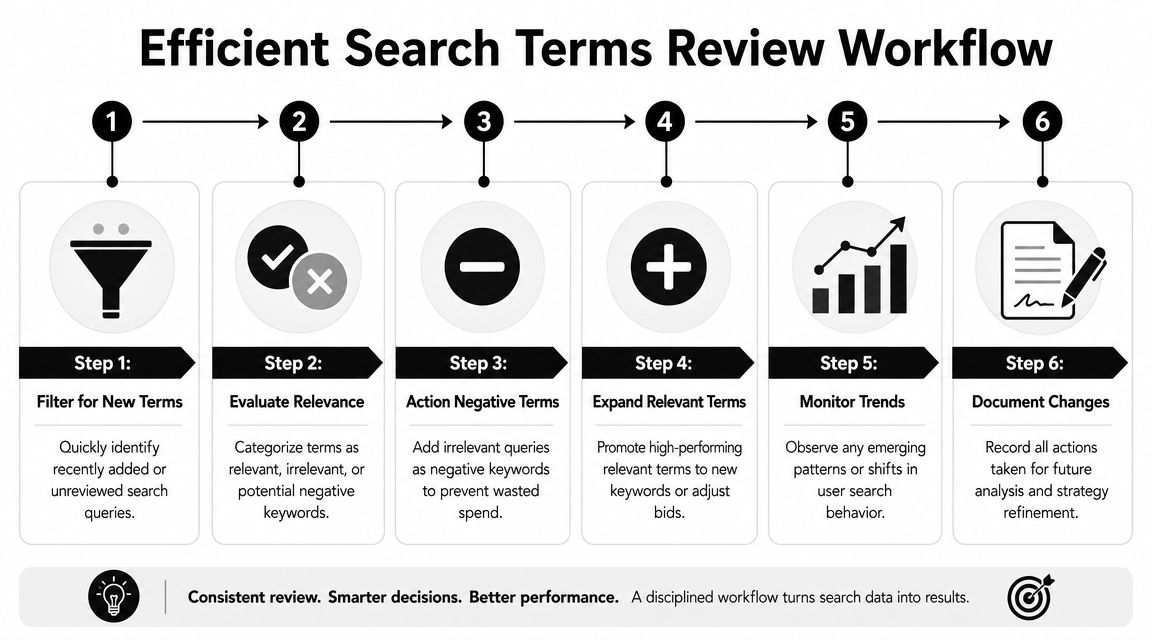
Scrolling wastes time. Don't scroll. Filter, segment, decide, move on.
Start with triage, not curiosity
In a mature account, the review still needs to be systematic. Guidance highlighted by Count emphasizes segmenting queries by intent, conversion rate, and cost-per-conversion so you can decide whether to tighten match types, build new ad groups, or add negatives in its overview of search term analysis.
That gives you a fast sequence.
Filter for fresh or unreviewed terms
Don't mix old decisions with new ones. You want a clean batch.Sort by cost, clicks, or impressions
Start where the account is speaking the loudest. Expensive mistakes get reviewed first.Scan for intent before metrics
A query can be statistically quiet and still obviously wrong. Intent tells you whether it belongs at all.
What to flag immediately
I use three buckets.
- Block now: Irrelevant terms, wrong audience, wrong meaning, wrong stage of intent.
- Watch: Relevant enough to stay alive, but not yet convincing.
- Promote: Strong terms that should become phrase or exact keywords, or deserve their own ad group.
Here are the red flags that usually deserve action:
- High cost with no conversion evidence: These can drain budget.
- Research intent when you need buying intent: “What is,” “how to,” or loosely informational searches can be fine in some funnels, but not in all of them.
- Mismatch with your offer: If you sell premium software, bargain-hunting terms may be a problem. If you sell services, job-seeker terms often are.
- Repeated variants of the same bad theme: Don't just block one query if the pattern is broader.
Good search term reviews aren't long. They're decisive.
Turn winners into structure
A lot of teams focus only on negatives. That's half the value.
When a search term repeatedly shows strong intent, don't leave it buried in the report. Graduate it. Add it as a tighter keyword, align the ad copy if needed, and consider whether it deserves a more focused landing page path.
Search term review now starts driving account structure rather than just cleaning up after it.
If you work across channels, some of the logic is surprisingly transferable. For marketplace campaigns, Headline's Amazon search optimization tips are useful for seeing how search term mining can shape tighter targeting and listing alignment in a different environment.
Keep a simple review record
You don't need a huge governance document. You do need a trail.
Track:
- What you excluded
- What you promoted
- What you left for later
- Any repeating theme worth escalating
That record matters because it stops duplicate work and helps you spot recurring leaks. It also keeps “I think we already dealt with that” from becoming your team's operating system.
How to Automate and Accelerate Your Workflow
An account with five campaigns can survive a manual search term process. An account with fifty starts eating hours on exports, filters, copy-paste work, and repeat decisions that should have been standardized weeks ago.

The goal is not to automate the whole review. The goal is to remove the clerical work so more of your time goes to judgment.
Where automation helps
Automation earns its keep when the account is active enough that the same cleanup patterns keep showing up. That usually happens after expansion. More campaigns, broader match coverage, new geographies, or multiple people touching the account all increase the chance that search term review turns into admin work.
Use automation for repeatable tasks such as:
- Flagging obvious waste themes before you review line by line
- Clustering close variants into one decision
- Applying bulk negatives faster
- Pushing high-intent queries into a promotion queue for keyword review
- Reducing time spent jumping between filters, tabs, and match types
That changes the economics of your cadence. If reviews are faster, you can respond to trigger events without letting the account consume your week.
Keywordme fits that use case. It focuses on search term cleanup, bulk negative actions, and match type handling inside a tighter workflow. If your review standard is solid but execution is slow, tools like that remove friction. For a more detailed process, see this guide on how to review Google Ads search terms report faster.
A practical rule helps here. Automate the steps you would want done the same way every time. Keep the calls that depend on business context with the account manager.
What not to automate blindly
Search term review still needs a human who understands the offer.
A script or workflow rule cannot reliably judge whether a query is bad traffic, early-stage research, competitor comparison, support intent, or a sign that your ad structure is too loose. Those distinctions matter because the wrong negative can cut off profitable volume for months before anyone notices.
Be careful with automation around:
- Queries that look irrelevant on the surface but show strong commercial intent
- Broad negatives that can block useful variants across campaigns
- Seasonal shifts in wording
- New product, pricing, or positioning changes that alter what a good query looks like
- Terms that should become their own ad group or landing page path instead of getting a quick keyword add
This is the trade-off. The larger the account gets, the more you need systems. The more valuable the traffic gets, the more expensive blind automation becomes.
Teams that manage search as part of broader comprehensive digital marketing operations usually do best with a hybrid model. Automation handles sorting, grouping, and bulk actions. A practitioner reviews edge cases, approves exclusions, and decides when a search term signals a structural change instead of routine cleanup.
Conclusion From Reactive Checks to Proactive Strategy
The question isn't just how often should you review search terms report. The better question is what review system fits the account you have right now.
Daily checks make sense when a campaign is new or unstable. Weekly review usually fits active accounts that are growing but no longer chaotic. Monthly maintenance works for mature accounts, as long as someone is still doing it deliberately and not assuming yesterday's negatives cover today's searches.
Digital Third Coast states that negative keyword lists should be reviewed and updated regularly, ideally monthly, to adapt to changing search behavior and maintain ad relevance in its article on proactive negative keyword research. That's a solid baseline for stable accounts, not a substitute for paying attention after major changes.
The practical shift is moving from reactive checking to proactive control. Keep a standing cadence. Layer on trigger-based reviews when launches, bidding changes, match type expansion, or geography changes widen your traffic. That's what keeps the Search Terms report from becoming a cleanup chore after the fact.
This same mindset shows up in broader comprehensive digital marketing work too. The best teams don't just measure on schedule. They respond when conditions change.
If you want to make search term reviews faster and less manual, try Keywordme. It helps you clean up irrelevant queries, add negatives, and turn strong search terms into usable keywords without the usual copy-paste grind.
.svg)