
How to Analyze Search Terms Report Efficiently: 2026 Guide
How to Analyze Search Terms Report Efficiently: 2026 Guide


SEO Title: Analyze Search Terms Report Efficiently
Meta Description: Learn how to analyze search terms report efficiently with a practical PPC workflow for filtering waste, building negatives, and scaling faster.
You open the Search Terms Report for a live account, and it's the same mess every time. Rows of queries, mixed intent, random junk, a few useful terms buried in the noise, and just enough spend on the wrong searches to make you wonder where the week went.
That's where time is often lost. Not because the report is useless. Because it's treated like a reading task instead of a decision system.
If you want to know how to analyze search terms report efficiently, the answer isn't to inspect every row like a forensic accountant. It's to build a repeatable workflow that tells you what deserves attention now, what can wait, and what should never have made it into the account in the first place. That's the difference between routine PPC maintenance and actual control.
Preparing Your Report for a Fast Analysis
The first speed gain comes before analysis. It comes from pulling the right report, with the right scope, in the right format.
Google Ads places the Search terms report under Campaigns, then Search terms in the Insights and reports area, and Google says the report shows the queries used by a significant number of users. That matters because you're not reviewing your planned keyword list. You're reviewing real search behavior, which is what lets you refine keywords, adjust match types, and add negatives based on what users typed into Google, not what you assumed they would type in in Google Ads help.
Start with the right date range
Don't use the same date range for every campaign.
Count.co recommends exporting impressions, clicks, conversions, and cost, while Bounteous' rule of thumb is to pull a search-term report 1–2 weeks after launching a new campaign or ad group, then move to monthly checks once keywords are optimized. Count.co also recommends weekly negative-keyword reviews when irrelevant queries are driving cost, and notes that improved relevance signals are typically visible within 2–3 weeks when changes are working in this search term analysis guide.
That gives you a practical cadence:
| Campaign state | Best review rhythm | Why |
|---|---|---|
| New launch | Early pull after launch | Query patterns show up fast |
| Waste showing up | Weekly cleanup | Stop irrelevant spend before it compounds |
| Mature campaign | Monthly check | Maintain account health without overworking it |
Export only what you'll use
A raw export gets unwieldy fast. Keep the sheet lean enough to scan.
At minimum, include:
- Search term so you can judge intent.
- Match type because Google notes this column helps you see how broad, phrase, exact, or negative settings affect performance.
- Impressions to spot demand.
- Clicks to spot interest.
- Conversions to spot outcome.
- Cost to spot waste.
If you want a cleaner manual review process, this walkthrough on reviewing Google Ads search terms faster is worth keeping nearby while you set up your export and filtering rules.
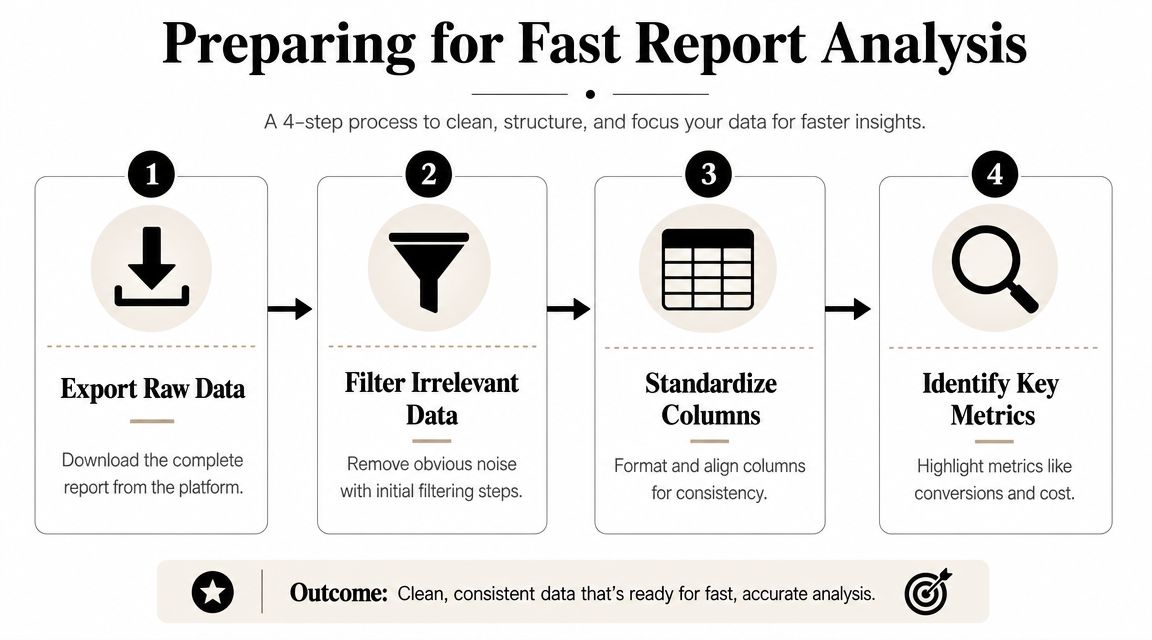
Practical rule: If your export makes you scroll sideways before you've made a single decision, you exported too much.
Clean the sheet before you judge the data
This part sounds boring. It saves more time than any bid tweak.
Use one tab for raw exports and another for review. Standardize naming. Keep match type formatting consistent. If you merge reports from multiple campaigns or accounts, make sure your columns line up the same way every time.
A clean sheet does two things. It reduces bad decisions caused by messy formatting, and it makes your filter logic reusable. Once that setup is stable, the report stops feeling like a dump of data and starts acting like a queue of actions.
Using Smart Filters to Prioritize Your Focus
Most wasted time in search term analysis comes from equal attention. Not every query deserves it.
You don't need to inspect every low-volume row one by one. You need a filter order that pulls the expensive problems to the top, then the growth opportunities, then the edge cases.
Surface the obvious budget leaks first
When I review an account manually, I look for terms that combine three traits: weak relevance, no conversions, and meaningful cost. That's the fastest path to action.
A practical way to do that is to filter for:
- Non-converting queries that have spent enough to matter
- Searches with weak intent such as research-only language, job-seeking terms, freebie intent, or unrelated product categories
- Terms already drifting away from ad group intent even if they still generate clicks
Efficiency is evident at this stage. You're not trying to be all-encompassing initially. You're focused on stopping waste first.
Separate relevance from performance
A query can be relevant and still not deserve promotion yet. A query can also be irrelevant even if it generated engagement.
Use a simple review lens:
| Query type | What it usually means | Action |
|---|---|---|
| Irrelevant and costly | Wasted spend | Negative candidate |
| Relevant but weak | Needs more evidence | Monitor |
| Relevant and promising | Expansion candidate | Consider adding as keyword |
| Ambiguous | Context dependent | Check ad group and landing page fit |
Teams frequently overreact to poor performance without first checking intent. If a term is clearly wrong, block it. If it's aligned but immature, don't rush to kill it.
The fastest analysts aren't the ones who review the most rows. They're the ones who sort rows into clear buckets quickly.
Build a cadence, not a binge session
Search term review goes sideways when it becomes a giant monthly cleanup marathon. You miss waste early, then overcorrect late.
The better rhythm is operational:
- Check new campaigns early so broad matching and automation don't drift too far before you intervene.
- Run a weekly waste pass when irrelevant searches are actively spending.
- Use monthly reviews for stable campaigns where the goal is health, not firefighting.
That rhythm comes straight from the cadence in the earlier source, but the practical takeaway is simple. Treat the Search Terms Report like inbox triage, not archival research.
Don't ignore the smaller signals
There's a trap here. If you only sort by cost, you'll miss useful terms that haven't had enough volume to stand out yet.
Some of the best expansion candidates show up as highly aligned searches with decent engagement but limited impressions. They won't look dramatic in the sheet. They'll look subtly promising.
That's why good filtering always has two passes. One for loss prevention. One for opportunity spotting.
Building Effective Negative Keyword Lists
Most PPC managers know they should add negatives. The real question is how to do it fast without creating new problems.
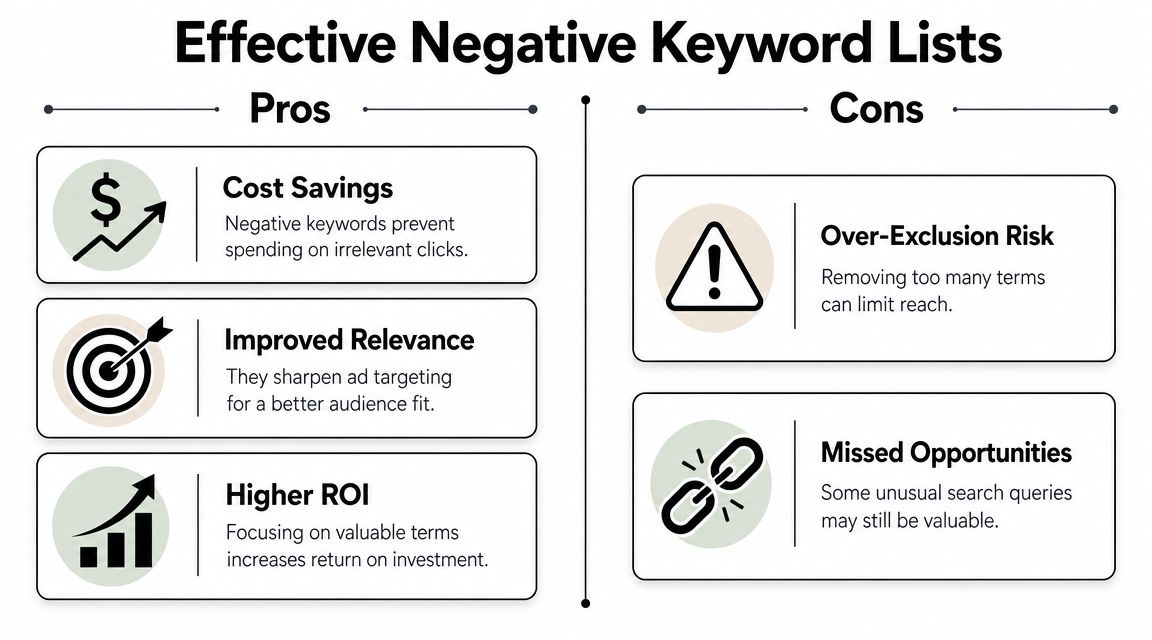
Adding one negative at a time inside the interface feels productive. It's usually just slow. Worse, it often leads to a patchwork list full of inconsistent match types and duplicate logic.
Use bulk cleanup, not one-off edits
A more efficient process is to isolate the worst terms with filters, export them, and build negatives in bulk. Practitioner guidance recommends filtering out exact-match or already-excluded terms, then focusing on searches with zero conversions and poor efficiency. One walkthrough even recommends marking irrelevant terms in red and then adding them directly as negative keywords in bulk. The same guidance also warns that inconsistent syntax and match types create operational mess and can block too much traffic. Related search research also points to the value of using structured logic, synonyms, and controlled vocabulary before adding free-text variants, which helps catch patterns more completely in this research-backed walkthrough.
That's the important part. Don't just react to individual bad queries. Look for repeatable themes.
Build theme-based lists
Here's a practical comparison of how I think about negative themes:
- Low-intent modifiers such as free, cheap, DIY, template, or meaning. These often signal research behavior instead of buying intent.
- Wrong-audience terms like jobs, careers, internship, salary, training, or course when you're selling a service.
- Wrong-offer terms that belong to a different product line, location, or pricing model.
- Support intent when people are clearly looking for login help, customer service, or documentation rather than a new purchase.
A master structure matters more than a giant list. If you want a cleaner framework, this guide on building a master negative keyword list is a useful reference.
Match type discipline matters
Here, people get sloppy.
Negative match types don't behave like positive keyword matching. That means a broad negative can do more damage than you expect if you use it casually. Phrase and exact negatives give you more control when the pattern is useful but not universal.
Use this as a working rule:
| Negative type | Best use case | Risk |
|---|---|---|
| Broad negative | Clear junk theme | Can block more than intended |
| Phrase negative | Repeating bad phrase | Safer pattern control |
| Exact negative | Specific harmful query | Slow if overused alone |
If you work with local service clients or trades, this matters even more because search intent shifts quickly across quote, repair, emergency, review, and job-seeking searches. This piece on how tradies can win more jobs with Google Ads does a solid job of showing how intent quality affects paid search results in practice.
A useful explainer on the mechanics sits below.
Broad negatives save time only when the theme is genuinely broad. If the intent is mixed, use phrase or exact and keep control.
Uncovering Hidden Keyword Expansion Opportunities
The Search Terms Report isn't just a cleanup tool. It's also where campaign expansion gets its best ideas.
Once the junk is filtered out, you're left with the part of the report most advertisers underuse. Real user language that already proved it belongs somewhere in the account.
Look for terms your keyword list missed
The obvious candidates are relevant search terms that convert. But those aren't the only ones worth attention.
Also look for searches that:
- Match the offer tightly even if volume is still modest
- Show strong intent language like product, service, pricing, booking, quote, or near-me variants
- Deserve their own ad group theme because the wording is more specific than your current keyword structure
At this stage, manual reviewers often hesitate. They see a good term, leave a note, and move on. Good terms die in spreadsheets that way.
Promote with structure, not impulse
Not every useful query should become a new keyword in the same format.
Ask three questions first:
- Does this term belong in the current ad group, or does it expose a missing theme?
- Do I need tighter control, or do I want to keep some variation open?
- Will the landing page match the search more clearly if I break this into its own group?
That leads to cleaner decisions:
- Add exact match when the query is highly valuable and you want precision.
- Add phrase match when the wording is strong but likely to produce useful close variants.
- Create a new ad group when the search term introduces a distinct intent bucket you can support with dedicated ads and landing page alignment.
Treat query language like customer language
This is the part people skip when they rush.
Search terms tell you how prospects describe the problem, not how your account describes it. Sometimes those line up. Sometimes they don't. When the market consistently uses wording your campaigns don't, the report shows you the gap.
That's why expansion from search terms is usually stronger than expansion from brainstorming alone. It's grounded in live traffic. The account is already telling you what the audience means. Your job is to decide where that meaning belongs.
Automating Your Workflow with Tools like Keywordme
Manual search term analysis still works. It just breaks down under volume.
Once an account grows, the friction isn't strategy. It's all the little actions around strategy. Exporting, highlighting, formatting, copying negatives, choosing match types, moving winning terms into the right place, then double-checking you didn't paste something into the wrong campaign.
That's where automation starts earning its keep.
The bottleneck is operational drag
Most PPC managers don't need help identifying junk queries. They need help acting on them without turning every review session into spreadsheet admin.
The same goes for keyword expansion. Spotting a strong query is easy enough. Turning it into the right match type in the right ad group, fast and without mistakes, is the part that slows the workflow down.
That's why native-platform-adjacent tools are useful. They reduce handoffs.

Where automation actually helps
A useful automation layer should handle tasks like:
- Bulk negative application without manual reformatting
- Match type assignment without repeated copy-paste work
- Search term promotion into exact, phrase, or broad formats quickly
- Grouping logic so relevant terms don't get scattered across the account
One option in this category is Keywordme, which integrates with the Google Ads Search Terms Report and is designed to help users remove junk queries, apply negatives, and turn promising search terms into keywords without leaving the native workflow. If you want the broader workflow angle, this post on automated search term analysis is a useful follow-up.
Automation should reduce errors, not just clicks
This is the standard I use.
If a tool saves a few clicks but still leaves you checking formatting, rebuilding lists, and correcting placement mistakes, it hasn't fixed the underlying problem. It's just rearranged it.
Good automation trims the mechanical work so your time goes to judgment calls. Which terms deserve exclusion. Which deserve promotion. Which deserve patience. That's the part humans should still own.
Common Search Term Analysis Pitfalls to Avoid
The most common mistake isn't doing too little. It's doing too much too aggressively.
Google warns that the Search Terms Report only includes queries used by a significant number of users, and negative keywords have their own match types. Search Engine Land also notes that negative matching works differently from positive keywords. That's why pattern-based negatives can create collateral damage if you apply them loosely, especially in accounts leaning on broad match and automation in this Search Engine Land discussion.
The traps that hurt good accounts
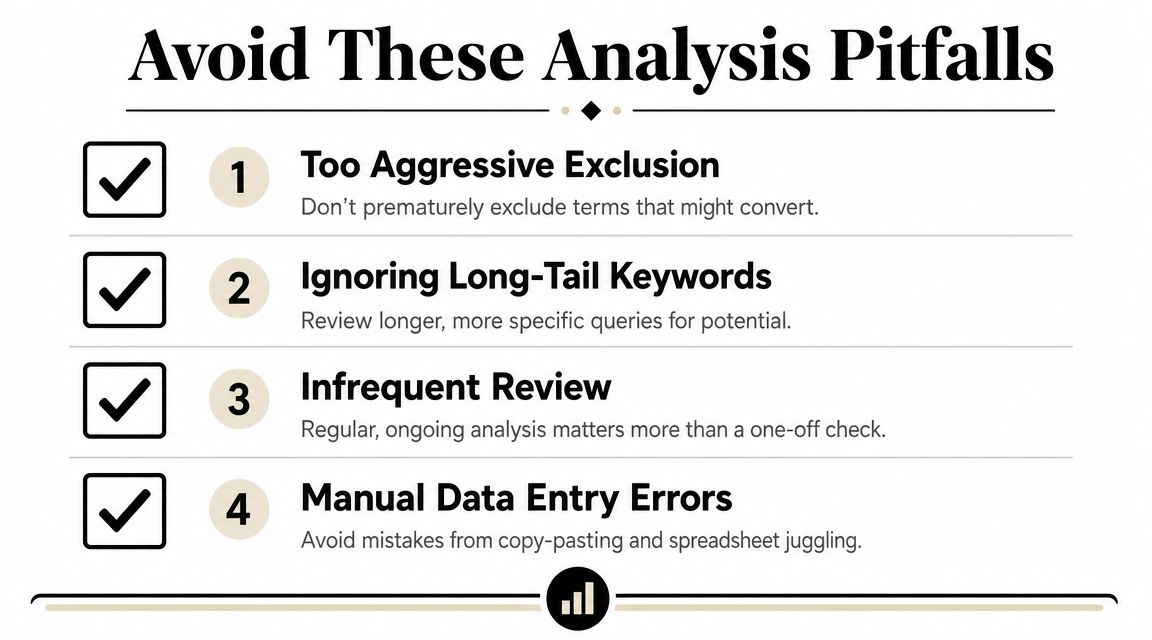
Watch for these mistakes:
- Overblocking patterns that look bad in isolation but are still connected to valuable intent.
- Ignoring long-tail searches because they don't jump out in a cost sort.
- Reviewing too rarely and then trying to solve everything in one pass.
- Trusting manual copy-paste workflows more than they deserve.
Don't optimize blind
A search term doesn't exist in a vacuum. Before you exclude or promote it, check where it came from.
Maybe the query is weak because the ad group theme is too broad. Maybe the term belongs in a different campaign. Maybe the query is top-of-funnel and not supposed to close yet. If you only judge by surface efficiency, you can block pathways that support later conversions.
Precision beats aggression in search term management. Most account damage comes from exclusions that felt obvious at the time.
The efficient workflow is simple when stripped down. Prepare the report well. Filter for impact. Build negatives in themes. Promote useful queries deliberately. Automate the repetitive parts. Stay conservative where match-type risk is high.
If your team is spending too much time exporting spreadsheets, formatting negatives, and manually turning search terms into keywords, Keywordme is worth a look. It's built to work inside the Google Ads Search Terms Report so you can clean up junk queries, apply negatives, and expand campaigns with less manual handling.
.svg)