
Multi Account Management: Mastering Multi-Account
Multi Account Management: Mastering Multi-Account


SEO Title: Multi Account Management for Google Ads
Meta Description: Multi account management for Google Ads without the chaos. Learn account structure, access control, QA, automation, dashboards, and keyword sync.
If you're running a stack of Google Ads accounts right now, you probably know the feeling. One client needs billing fixed, another account has search terms drifting off course, someone on the team renamed campaigns in a way that makes no sense, and your negative keyword process still lives in a spreadsheet nobody trusts.
That's what multi account management looks like when the operation grows faster than the system behind it.
Organizations often try to solve this with more reporting, more Slack messages, or more people checking each other's work. That helps for a week. Then the cracks come back. The fix is operational. You need account architecture that makes sense, access rules that reduce risk, QA that catches expensive mistakes before launch, and a process for keyword control across accounts so one portfolio doesn't undermine another.
The part too many guides miss is this: structure alone won't save you. You can have a tidy MCC and still leak money every day through duplicated search intent, inconsistent negatives, and messy cross-account workflows.
Your Foundation MCC and Account Architecture
The essential starting point is a Google Ads Manager Account, still commonly called an MCC. If you're managing multiple brands, regions, business units, or clients without one, you're building on sand. An MCC gives you centralized control, cleaner user management, and a sane way to view account relationships.
That broader need for centralized control isn't a niche agency issue anymore. A projection for 2026 says the multi-account management software market has split into three distinct tiers for small teams, agencies, and enterprise operators, which reflects demand for centralized control at different levels of scale, according to Conbersa's analysis of multi-account platform tiers.

Flat structure or tiered hierarchy
A flat MCC works when one team manages a modest number of accounts with similar operating rules. Think an in-house group handling separate accounts for product lines or regional campaigns. Fewer layers means faster navigation and less administrative overhead.
A tiered setup, usually with sub-manager accounts, fits better when the business has natural partitions:
- Client segmentation: Agencies often separate accounts by service pod, industry, or ownership group.
- Regional control: In-house teams may split EMEA, North America, and APAC operations.
- Risk containment: Sensitive categories or tightly regulated accounts can live in their own branch.
The mistake is choosing flat because it feels simpler on day one. It usually stops feeling simple after growth.
Practical rule: Build the hierarchy around who approves work, who owns budgets, and who needs visibility. Don't build it around whoever happened to set up the first accounts.
A practical blueprint that scales
Use this decision filter:
| Setup choice | When it fits | What it prevents |
|---|---|---|
| Single top-level MCC | Small in-house teams or tightly aligned portfolios | Unnecessary admin sprawl |
| MCC with sub-MCCs | Agencies, multi-brand groups, regional teams | Permission conflicts and reporting clutter |
| Separated account clusters | Distinct business entities or higher-risk environments | Operational overlap |
Within each client or brand account, keep campaign structure consistent enough that someone new can understand it quickly. Consistency matters more than cleverness.
If you want a useful outside perspective on the operational side of account management for marketers, that piece is worth reading because it pushes on the same reality organizations often face: account scale punishes loose systems.
One more thing. Don't confuse architecture with activity. A neat account tree doesn't automatically create a manageable operation. It just gives you a framework that won't fight you every day. For a more Google Ads-specific walkthrough, Keywordme has a practical guide on how to manage multiple Google Ads accounts efficiently.
Secure Access and Clear Naming Conventions
Most account disasters don't start with bidding. They start with access. Wrong person, wrong permission, wrong account, wrong day.
The baseline for governance is simple. At least two people must hold admin access to every critical account, and teams should log all access changes with dates and approvers to preserve an audit trail. Formal access audits should happen quarterly, based on guidance summarized in this review of multi-account governance practices.
Access that protects the account
I avoid granting broad admin rights unless a role specifically requires them. Many individuals need less access than they believe.
Use a practical split like this:
- Admins: Reserved for senior operators who manage billing, user access, and emergency recovery.
- Standard users: Account managers and specialists who build and optimize campaigns.
- Read-only users: Leadership, finance, or clients who need visibility without edit risk.
For identity handling across a broader organization, tools with directory integration can reduce manual provisioning headaches. If your team relies on a central identity layer, SnapDial's VoIP Active Directory features are a good example of how structured user management can reduce access drift across systems.
Too many teams treat account access like a convenience setting. It's an operational control.
Password discipline matters too. Every account should have a unique password stored in a password manager, and 2FA should use an authenticator app rather than SMS, based on the guidance summarized in this multi-account security walkthrough.
Naming conventions that people can actually use
A naming convention is the shared language of the account. If the language is bad, every audit takes longer, onboarding takes longer, and mistakes survive longer.
Here's a format that works well in practice:
- Campaigns: Brand | Region | Network | Objective | Match/Theme
- Ad groups: Intent cluster + product/service modifier
- Labels: Owner, priority, experiment status, billing tag, launch month
Examples:
- Campaign: BrandA | US | Search | Lead Gen | Nonbrand
- Campaign: BrandB | UK | PMax | Ecommerce | Core Products
- Label: Team-Jordan
- Label: QA-Approved
The naming test
If a campaign name can't answer these questions at a glance, it's too vague:
- Who owns it
- What market it serves
- What channel or network it runs on
- What job it's supposed to do
Short names are good. Ambiguous names are expensive. I'd rather see a slightly longer campaign title than force managers to click through three layers just to understand what they're looking at.
Smart Billing and Bulletproof QA
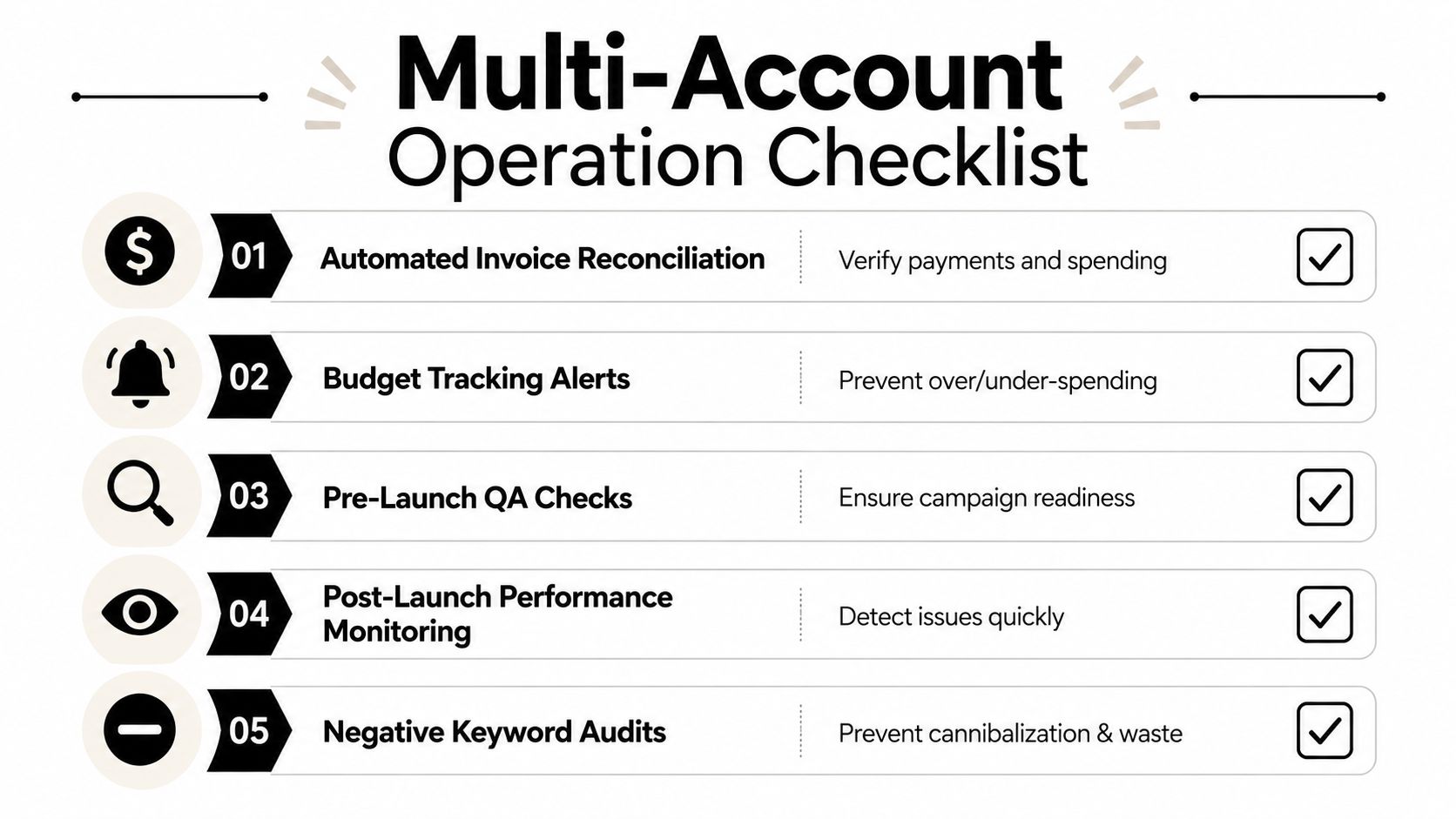
Billing and QA get treated like admin work. That's a mistake. In a multi-account setup, they're risk controls.
Shared payment methods are one of the fastest ways to create avoidable problems. In reseller and agency environments, shared payment methods and identical branding assets account for approximately 60% of detection failures, because platforms can cross-link accounts through financial data, according to Thundercat Tech's practical guide to multi-account strategy.
Billing segregation is worth the hassle
Consolidated billing sounds efficient. Sometimes it is. But it can also blur ownership, create reconciliation mess, and increase the chance that an issue in one account spills into another workflow.
A safer operating posture usually looks like this:
- Separate payment methods: One billing source per client or business entity.
- Distinct billing contacts: Don't recycle the same finance contact everywhere if separation matters.
- Clear invoice mapping: Every account should map to a single owner and approval path.
That doesn't mean every business needs maximum separation. It means you should decide consciously. If an agency values resilience, billing segregation is often the better trade-off than convenience.
The pre-launch QA routine
Most campaign mistakes aren't advanced. They're boring. Wrong location settings. Wrong conversion action. Wrong budget. Broad match left in the wrong place. Negative lists forgotten.
Use a pre-launch checklist that your team follows every time:
- Settings review: Confirm geo, language, bidding, schedule, network, and conversion goals.
- Budget check: Make sure account-level expectations align with campaign limits.
- Asset review: Validate final URLs, tracking templates, ad copy, and extensions.
- Audience and exclusions: Check remarketing layers, placements, and brand safety exclusions where relevant.
- Negative keyword pass: Review both account-level and campaign-level negatives before launch.
A strong QA process doesn't just catch errors. It catches assumptions.
I also like a second-person review for meaningful launches. The builder checks the work first. Another operator signs off before the campaign goes live. That extra layer feels slow until it prevents a week of wasted spend.
Post-launch checks matter too
QA isn't over at publish. The first review window is where hidden issues surface. Watch pacing, search term quality, conversion logging, and approval status early. A campaign can pass setup QA and still fail in execution if the first signals are ignored.
Automation for Scaling Repetitive Tasks
Manual work doesn't break all at once. It chips away at margin, focus, and accuracy until the team starts spending its best hours on repetitive account maintenance.
That's why automation belongs in the center of multi account management. A projection for 2026 says the future of managing multiple accounts is shaped by automation, AI, and strict identity control, with platforms automating security enforcement while businesses automate operational workflows, according to Science Times coverage of multi-account operations.

The automation toolkit
Not every repetitive job needs the same tool. In Google Ads, I think about the stack in three layers.
| Tool | Best for | Watch-out |
|---|---|---|
| Automated Rules | Simple threshold actions like pausing, enabling, or budget alerts | Easy to overuse with blunt conditions |
| Scripts | Custom logic, reporting, anomaly checks, cross-account workflows | Needs maintenance and testing |
| Bulk Actions | One-time or periodic large edits across campaigns or accounts | Fast, but still operator-dependent |
Automated Rules are fine for basic guardrails. Pause low-volume outliers. Flag budget pacing issues. Send alerts when campaign status changes unexpectedly.
Scripts are where things get more interesting. They're useful when you need logic that rules can't handle cleanly. Think custom reporting, search term reviews, naming compliance checks, or inventory-driven changes.
Bulk Actions still matter. They're not glamorous, but they're often the safest option for controlled account-wide edits when a human needs to review changes before pushing them.
What to automate first
Start with the jobs that are repetitive, low judgment, and easy to verify after the fact:
- Status controls: Pause or enable based on clear conditions.
- Budget pacing alerts: Catch spend issues before they become client emails.
- Routine reporting pulls: Give the team summaries without manual exports.
- Hygiene tasks: Labeling, naming checks, and stale asset reviews.
Don't automate strategy decisions just because you can. If a workflow needs nuanced business context, human review should stay in the loop.
A quick explainer is useful here if your team is still sorting out the differences between Google Ads automation options:
The line between efficiency and fragility
Automation can create scale, but sloppy automation creates bigger mistakes faster. Every script and rule should have an owner, a review date, and a narrow purpose. If nobody knows why an automation exists, it shouldn't be running.
That's the true maturity test. Not whether your stack looks advanced. Whether your team still understands what's doing the work and why.
Unifying Keyword Management Across Accounts
A lot of multi-account advice stays high level. Set up the MCC. Lock down access. Standardize reports. All useful. Still incomplete.
The ugly problem usually shows up lower in the stack: cross-account keyword leakage. One account starts bidding into territory another account should own. Negative keyword lists drift apart. Search terms get cleaned in one place and ignored in five others. Nobody notices until performance gets noisy and spend gets harder to explain.
Data cited by Adstellar says 3-5 repetitive activities consume 70% of agency time in multi-account workflows, with keyword cleanup as a primary culprit, in its analysis of difficult-to-manage multi-account operations.
Why keyword leakage gets ignored
It's easy to miss because the loss is distributed. You don't always see one dramatic failure. You see a pattern:
- Account overlap: Two accounts compete for similar queries.
- Negative drift: One manager adds a negative. Another forgets.
- Manual copy-paste: Lists move slowly, unevenly, or not at all.
- Search term fragmentation: Good cleanup decisions don't become system-wide practice.
The account can look organized and still bleed from the keyword layer.
This is why I don't buy the idea that multi account management is mostly a governance problem. Governance is the shell. Keyword control is where a lot of the money gets won or lost.
A workflow that actually holds up
The fix is not another spreadsheet. It's a repeatable process for reviewing search terms, applying negatives, and keeping lists synchronized where overlap matters.
A useful setup looks like this:
- Define ownership boundaries: Know which account owns which intent.
- Create negative list logic: Separate global exclusions from account-specific exclusions.
- Review search terms in batches: Don't leave each account manager to invent their own cleanup standard.
- Push changes consistently: The value comes from propagation, not just discovery.
A tool like Keywordme is a natural fit. Its Chrome plugin works inside the Google Ads workflow and helps teams clean up search terms, apply negatives, assign match types, and handle keyword actions across multiple accounts from one interface. If your team is wrestling with search term review at scale, this guide on managing search terms reports across multiple accounts is a practical starting point.
The point isn't to add another shiny tool. The point is to stop treating negative keyword management like a side task. In high-volume account portfolios, it's core operational work.
Creating a Single Source of Truth with Dashboards
Without a central dashboard, teams start living in tabs. One tab for spend, another for conversions, another for pacing, another for search terms, another for client notes. That setup doesn't scale. It just hides delay behind activity.
A dashboard should act like the cockpit for the portfolio. Not a vanity report. Not a screenshot museum. A working control layer.
There's a catch, though. Guidance in 2026 has emphasized that “isolation is imperative,” requiring separate browser fingerprints, cookies, IPs, and credit cards per account to avoid detection, while many best-practice articles still push shared dashboards and centralized access without explaining the separation needed for platform safety, according to GoUndetected's review of multi-account practices.
What the dashboard should show
At the top level, I want a fast executive view that answers a few basic questions:
- Which accounts are pacing normally
- Which accounts need intervention today
- Where conversions are rising or stalling
- Which campaigns are spending without matching business intent
Then I want drill-down views by account, campaign family, region, or owner.
A tool like Looker Studio can do the reporting side well when the data model is clean. The key is to centralize visibility without creating sloppy access behavior in the underlying environments. Reporting and operational access don't have to be the same thing.
Keep one truth, not five versions
The biggest reporting problem in multi-account setups isn't lack of data. It's competing definitions. Different teams calculate performance differently, name dimensions differently, or filter differently.
Fix that with a reporting standard:
| Dashboard layer | Purpose |
|---|---|
| Portfolio summary | Spend, conversions, pacing, account health |
| Account detail | Campaign trends, anomalies, owner actions |
| Operational layer | QA flags, billing status, unresolved issues |
If you're building stakeholder views beyond pure PPC reporting, Keywordme's post on customizable SEO dashboards is useful for thinking through how different audiences need different levels of visibility without fragmenting the reporting model.
A strong dashboard doesn't replace account management. It makes good account management visible fast enough to act on.
If your team is trying to control search terms, negative keywords, and account hygiene across a growing Google Ads portfolio, Keywordme is built for that operational layer. It gives PPC teams a way to handle keyword cleanup and negative management inside a workflow that fits multi-account environments, instead of relying on scattered exports and copy-paste fixes.
.svg)