
Managing Search Terms Report Multiple Accounts Guide
Managing Search Terms Report Multiple Accounts Guide


SEO Title: Managing Search Terms Report Multiple Accounts
Meta Description: Managing search terms report multiple accounts gets messy fast. Learn a scalable workflow to pull, clean, analyze, and apply changes fast.
If you're managing more than a couple of Google Ads accounts, the search terms report stops feeling like a report and starts feeling like a cleanup project that never ends.
One account might be fine. Three accounts is annoying. Once you're working across agency clients, locations, product lines, or franchise accounts, you're suddenly living in exports, filters, duplicate queries, and negative keyword decisions that never quite make it back into every account consistently. That's where most wasted time comes from.
The core problem isn't just pulling search terms. It's building a repeatable system for managing search terms report multiple accounts without relying on memory, scattered spreadsheets, or someone manually checking the same patterns over and over.
Why Managing Search Terms Across Accounts is So Chaotic
The ugly version of this job looks familiar.
A PPC manager opens one account, checks the Search terms tab, spots junk traffic, adds a few negatives, then jumps to the next account and tries to remember whether that same irrelevant query already got blocked somewhere else. By the time they reach the last account, they've lost the thread. One client has a shared negative list. Another doesn't. A third uses a naming convention nobody enforced. The fourth has broad match terms pulling in weird variants that should've been cleaned up last week.

That's why multi-account search term work feels heavier than it should. The issue isn't effort alone. It's fragmentation.
The manual mess compounds fast
Google's search term workflow still works best when someone reviews actual triggered queries and decides what belongs, what should be excluded, and what deserves promotion into tighter match types. But that process gets messy when every account behaves like its own island.
A few things usually break first:
- Negative keyword consistency: One account gets the exclusion. Another keeps spending on the same bad query.
- Expansion discipline: A converting term gets noticed in one account but never gets promoted elsewhere.
- Review speed: By the time the team finishes exports and cleanup, the data is already stale.
- Trust in the analysis: If campaign names, match types, and query filters aren't standardized, nobody fully trusts the spreadsheet.
This gets worse because Google has reduced query visibility over the past several years for privacy reasons, which means advertisers now have to do more manual filtering and aggregation to separate useful queries from noise, making a unified workflow more important across accounts, as discussed in this search-term reporting walkthrough on YouTube.
Practical rule: If your team reviews search terms account by account with no shared cleanup logic, you're not running a system. You're running a series of isolated guesses.
A lot of teams feel this pain before they can clearly describe it. They know the work is taking too long, they know junk queries are slipping through, and they know good search terms are being discovered too late. If that sounds familiar, this piece on why multiple ad accounts get hard to manage will probably feel uncomfortably accurate.
Why this is no longer optional
Years ago, a sloppy process could limp along because there was more visible query data and fewer layers to reconcile. That's not the environment anymore.
You need one operating model for search terms across accounts. Not because it sounds organized, but because scattered review creates very real PPC problems: wasted spend, missed negatives, duplicate work, and no dependable way to compare what's happening across the whole portfolio.
Building Your Central Data Hub for All Accounts
If the data lives in separate accounts, the decisions stay separate too. The fix starts by pulling everything into one place.
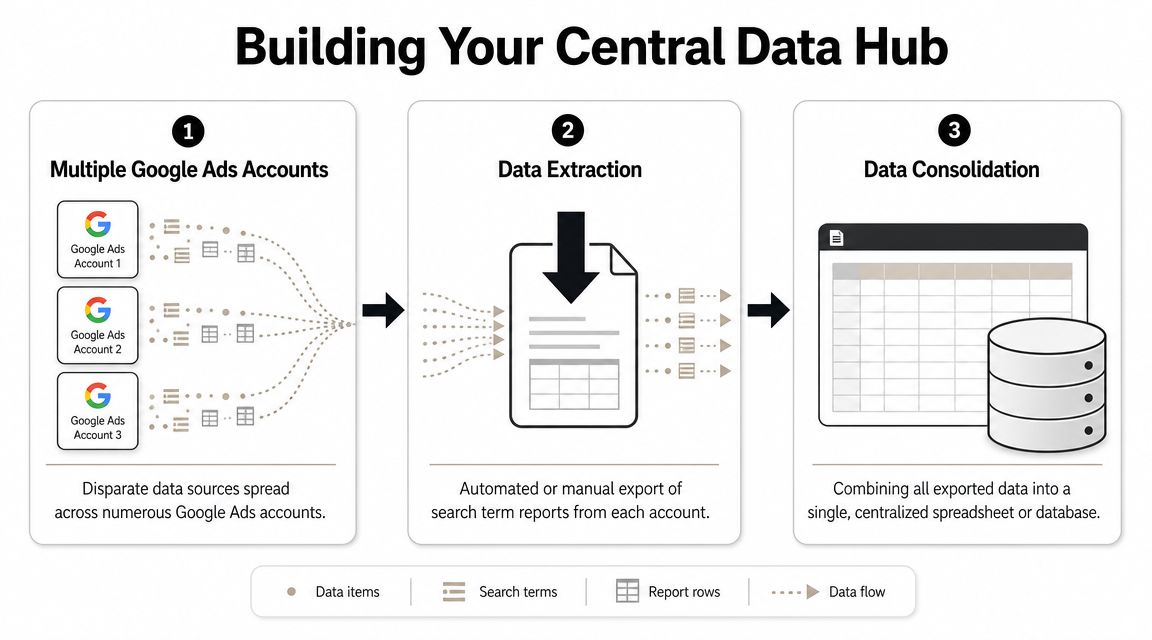
The first version of a central hub is usually ugly. That's fine. It just needs to exist.
Start with the manual baseline
The process often begins with exports from each child account:
- Open the account.
- Go to Campaigns > Search terms.
- Set the date range.
- Export the report.
- Paste it into a master sheet.
- Repeat until you regret your career choices.
This method works for a very small account set. It breaks down fast because every extra account adds more clicks, more export files, more chances to paste into the wrong tab, and more lag between review and action.
A simple Google Sheet can still be a perfectly reasonable first hub if you're trying to prove the process before engineering it. The problem is not the sheet itself. The problem is pretending manual collection is sustainable.
Why you have to extract account by account
This limitation isn't just a workflow preference. It comes from Google Ads architecture.
Google staff explained in the Google AdWords API forum that when using MCC credentials, you must specify each child account's clientCustomerId, and you cannot target the MCC itself for a consolidated report pull. That means multi-account managers have to run separate reporting calls for each child account instead of one MCC-wide search-term report. You can see that constraint in the Google AdWords API forum discussion on MCC reporting.
The important takeaway is simple: your reporting process has to consolidate data after extraction, because Google doesn't hand you one native MCC-level pull for this job.
That's also why scripts, APIs, and reporting layers matter so much. They aren't nice extras. They're the bridge between account-level reporting and portfolio-level decision-making.
If your team is already building internal tooling, this walkthrough on integrating keyword data via API is a useful next step.
A lot of advertisers skip this foundation and jump straight to optimization ideas. That usually backfires. Even campaign setup resources, like this Prescott Google Ads campaign guide, become much easier to apply consistently when your reporting structure is already centralized.
Pick a hub that matches your account load
You don't need the fanciest stack. You need a hub that your team will maintain.
| Hub type | Best fit | Trade-off |
|---|---|---|
| Google Sheets | Small teams, lighter account counts, fast setup | Gets messy as tabs and formulas multiply |
| BigQuery or database layer | Larger portfolios, recurring analysis, deeper joins | More setup and technical ownership |
| Specialized workflow tool | Teams that want analysis and action closer together | Depends on tool fit and process design |
Later, when you're ready to automate the pull itself, it helps to see the moving parts visually.
The practical standard
A usable central hub usually includes these columns:
- Account identifier: So recurring patterns can be grouped by client, region, or product line.
- Campaign and ad group names: Raw labels first. Cleanup comes later.
- Search term and keyword context: You need the triggered query and enough context to decide what to do with it.
- Match type data: Essential for judging whether broad, phrase, or exact is creating noise or opportunity.
- Core performance fields: Enough to sort by cost, conversions, and other decision-driving signals already in your export.
Once all accounts feed one table, you can stop asking, “What happened in this account?” and start asking, “What keeps happening across all accounts?”
Cleaning and Standardizing Your Combined Data
Raw exports are honest, but they're not usable.
Once you merge multiple accounts into one sheet, the next bottleneck shows up immediately: duplicate queries, inconsistent naming, branded terms mixed into non-brand analysis, and rows that look identical until you notice one campaign name uses pipes, another uses dashes, and a third includes random labels someone added six months ago.
Deduplicate first, or analysis gets misleading
Start with a clean tab that references your raw import tab. Keep the raw sheet untouched. That gives you one place to troubleshoot when formulas break.
In Google Sheets, a few functions do most of the heavy lifting:
UNIQUE()for removing duplicate rows or duplicate query listsQUERY()for filtering and restructuring large blocks of exported dataVLOOKUP()orXLOOKUP()for mapping account labels, brand flags, or naming fixes- Pivot tables for checking where duplicates and outliers still exist
If you want a list of distinct search terms from a combined column, =UNIQUE(A:A) is the quick version. If you want cleaner analysis, use a wider logic set so terms are unique by account + campaign + search term rather than search term alone.
Standardize naming before you judge performance
This part is boring. It also prevents bad decisions.
If one account uses Brand | Search | US and another uses Brand_Search_US, your summary tables won't group cleanly. Create helper columns and normalize your labels. You don't need perfection. You need consistency.
A simple cleanup approach looks like this:
- Build a mapping tab with old names in one column and approved names in another.
- Use a lookup formula to assign the approved label.
- Group reporting by the approved label, not the messy original.
Watch for this: Teams often think they have a search term problem when they really have a naming problem. Bad labels create fake complexity.
Separate brand from non-brand early
If you leave brand terms mixed in, broad conclusions get distorted.
Add a helper column that flags branded queries using a simple pattern match. In Sheets, that can be done with a formula using REGEXMATCH(). Then filter your analysis so brand, competitor, and non-brand traffic don't blend into one noisy bucket.
A practical helper setup might include:
- Brand flag: Checks whether the query contains your brand or close variants
- Competitor flag: Identifies rival names if that matters in your account structure
- Clean query field: Lowercases text and strips odd formatting for easier deduping
- Normalized campaign bucket: Maps inconsistent campaign names into one standard label
Clean strings that shouldn't affect decisions
Search term datasets often include junk that makes matching harder than it needs to be. Lowercasing helps. Trimming extra spaces helps. Removing obvious formatting noise helps.
Use helper columns for:
=LOWER(A2)to normalize casing=TRIM(A2)to remove extra spaces=SUBSTITUTE()where recurring characters or separators need cleanup
You don't need a perfect data warehouse to make this useful. You need a dataset where the same query doesn't appear three different ways and where one client's naming habits don't sabotage account-wide analysis.
The moment your combined sheet becomes standardized, the report stops being a pile of exports and starts acting like a decision tool.
Analyzing for Costly Negatives and Hidden Gems
This is the point where the spreadsheet starts paying rent.
Once the data is clean, the job gets a lot simpler. You're looking for two things: search terms that should be blocked, and search terms that deserve promotion into tighter targeting.
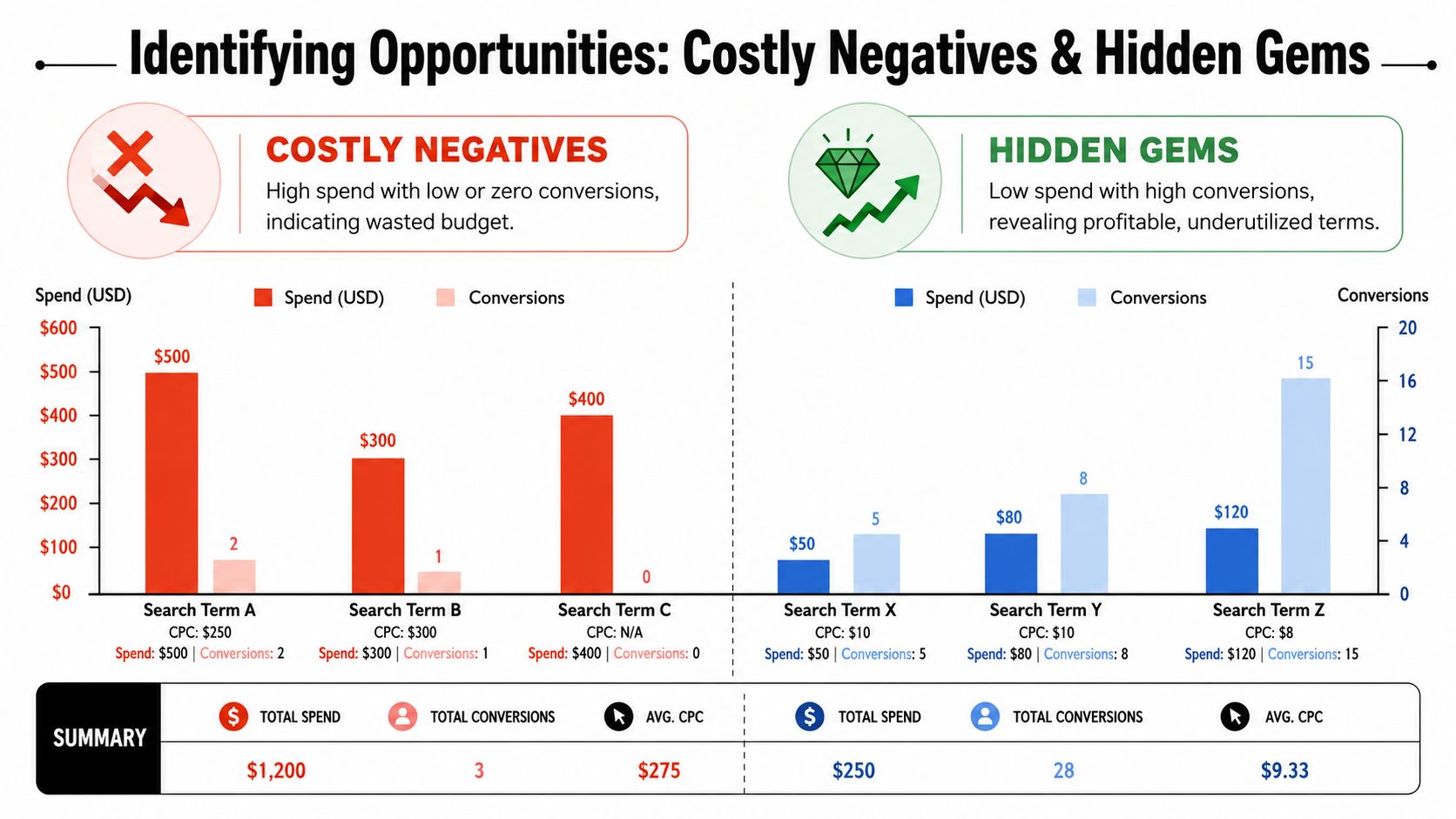
Build one pivot for waste
Start with a pivot table using search term as the primary row.
Then add the fields that matter for decisions in your account structure. Common fields include cost, conversions, clicks, and account or campaign labels. The exact combination can vary, but the goal stays the same: surface search terms that spend money without earning their place.
Filter that pivot to expose likely negatives:
- Search terms with spend but no meaningful outcome
- Queries recurring across several accounts
- Terms appearing through broad or loose matching
- Irrelevant intent patterns that clearly don't belong
The Match type column plays a critical role. Google Ads' search terms report is designed to support match-type review, and the help documentation confirms that the report includes a Match type column for reviewing broad, phrase, exact, and negative behavior in the Search terms view under Campaigns. That's why experienced workflows use match type to isolate where broad and other matching behavior are producing either waste or opportunity, then apply negatives in bulk, especially across shared lists in multi-account setups, as outlined in Google Ads help for the search terms report.
A search term isn't “bad” just because it didn't convert once. It becomes a real candidate for exclusion when its intent is wrong, its pattern repeats, or its matching behavior keeps leading you somewhere you never meant to pay for.
Build a second view for opportunity
The other half of the job is easier to miss because nobody complains about it on Slack. Good search terms often hide inside broad-match traffic until somebody promotes them intentionally.
Create a filtered view that spots:
- search terms that convert cleanly
- queries with strong engagement relative to surrounding traffic
- terms that keep reappearing across accounts or campaigns
- useful variants that aren't already present as dedicated keywords
Then compare them against your current keyword inventory. If the term already exists as a keyword or negative, remove it from your action list. What remains is your candidate set for expansion.
A fast way to do this in Sheets is to maintain a second tab of existing keywords and negatives, then use a lookup or match formula to flag whether each search term has already been handled.
Use match type to understand the source of the signal
Not every good query should be added the same way.
If a valuable term shows up through broad matching, that may be your cue to add it as exact for tighter control, or phrase if you still want some flexibility. If a recurring junk query appears through broader matching patterns across multiple accounts, that often belongs in a shared negative structure rather than as a one-off fix inside a single campaign.
For teams doing a lot of this work manually, this guide on how to analyze search terms reports efficiently is worth keeping open while you build your review routine.
Turn the analysis into three action buckets
Don't leave the findings as one giant spreadsheet of “things to review.” That's where useful work goes to die.
Use three buckets:
| Bucket | What goes there | Typical action |
|---|---|---|
| Negative candidates | Irrelevant or wasteful recurring queries | Add to account or shared negative list |
| Expansion candidates | Strong, relevant search terms not yet targeted directly | Add as exact or phrase keyword |
| Monitor list | Ambiguous terms with mixed signals | Recheck on the next review cycle |
That structure keeps your team from overreacting to every row while still moving quickly on obvious waste and obvious wins.
Applying Your Findings in Bulk Across Accounts
The analysis step feels productive. The implementation step is where teams either save time or create fresh problems.
If you apply findings manually inside each account, the same issues return fast. A negative gets added in one place and missed in three others. A strong query becomes an exact-match keyword in one account but stays buried in broad traffic everywhere else. The more accounts you manage, the less room there is for ad hoc edits.
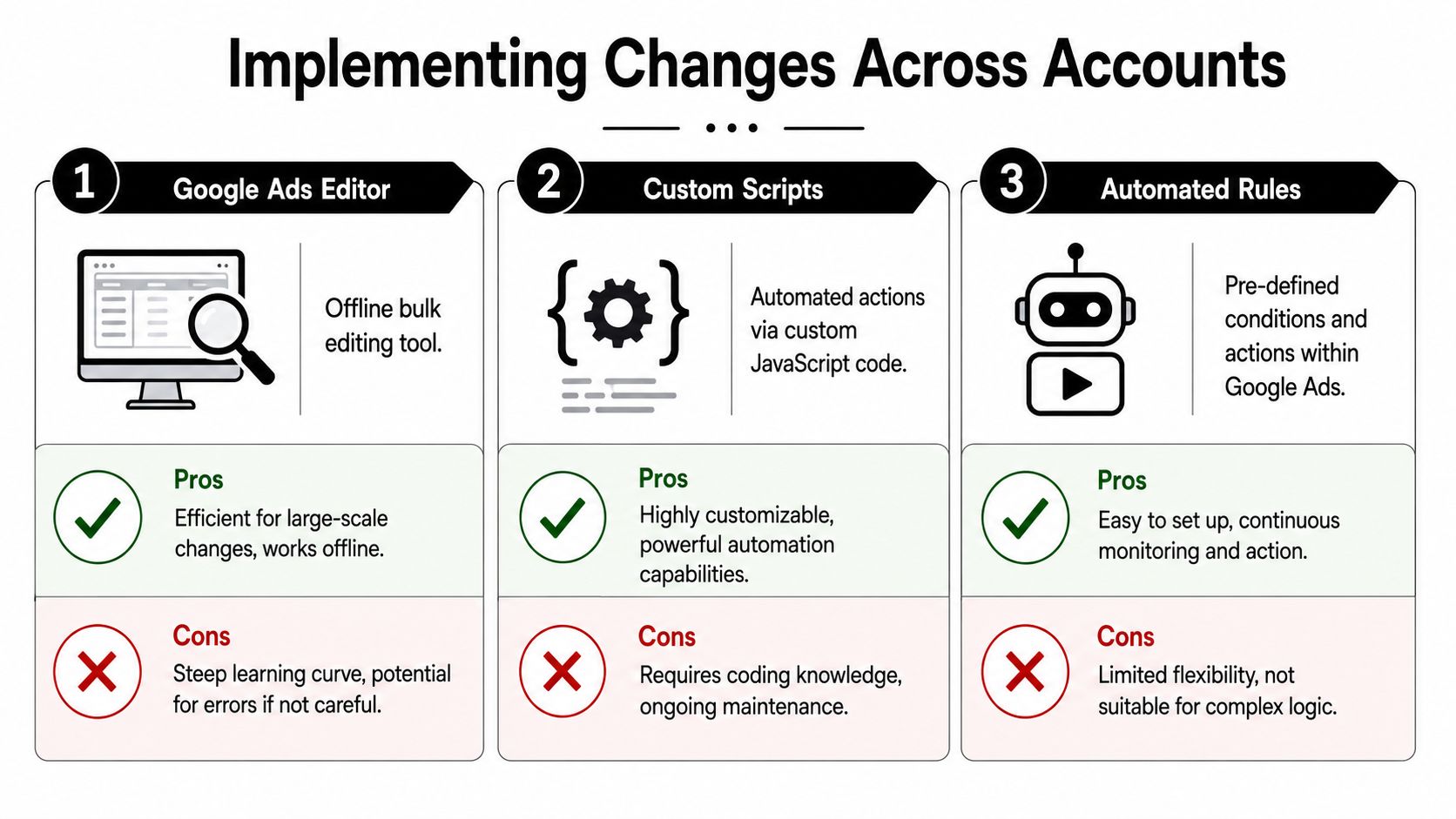
The slow way versus the usable way
The slow way is the native UI, one account at a time. It's fine for a few surgical edits. It's a terrible operating model for repeated cross-account maintenance.
Here's the practical comparison:
| Method | Works well for | Where it breaks |
|---|---|---|
| Manual UI edits | Small changes, quick checks, one-off fixes | Repetition, inconsistency, human error |
| Google Ads Editor | Bulk uploads, campaign-wide changes, offline review | Still depends on good process and careful imports |
| Scripts | Repeatable logic and recurring actions | Requires technical ownership and maintenance |
| Automated rules | Simple recurring conditions | Not flexible enough for more nuanced query decisions |
Shared negatives should do more of the work
If the same irrelevant query pattern keeps showing up across similar accounts, stop treating it like a local problem.
Use shared negative keyword lists where the account structure allows it. That gives you one place to maintain recurring exclusions and reduces the chance that one team member blocks a term while another forgets. The value here isn't glamour. It's consistency.
Shared negatives are one of the few places in Google Ads where a little structure prevents a lot of repeated cleanup.
For positive expansion, Google Ads Editor is usually the cleanest middle ground. It lets you bulk-add exact or phrase keywords, review changes before posting, and avoid the friction of clicking through every account by hand. If your workflow is mature enough, scripts can push this further, but plenty of teams never need to go that far.
Where specialized tools fit
There's also a category between “do everything manually” and “build custom automation.” That's where workflow tools fit.
For example, Keywordme works inside Google Ads through a Chrome extension and is built around search term handling, including adding negatives, grouping terms, assigning match types, and managing this work more directly from the Search Terms Report. For teams doing repetitive cleanup and expansion across multiple accounts, that's useful because it cuts down on formatting and copy-paste steps rather than replacing strategy.
The key point is not which tool you pick. The key point is that your implementation method has to match your account volume. If your review process is centralized but your action process is still manual and scattered, the system is only half built.
Automating and Scaling Your Optimization Workflow
A one-time cleanup feels good for about a week.
Then new search terms come in, old negatives stop being enough, fresh opportunities get buried, and the exact same multi-account mess starts rebuilding itself. That's why the actual goal isn't a heroic cleanup session. It's a cycle your team can repeat without friction.
The repeatable workflow
The system is straightforward:
- Pull search term data from every relevant account into one hub.
- Clean the raw exports so naming, duplicates, and query labels are usable.
- Analyze for exclusions, expansion opportunities, and match-type problems.
- Apply changes in bulk through the method that fits your stack.
Run that on a schedule your team can maintain. Some portfolios need weekly review. Others are better served with a bi-weekly or monthly rhythm. The right cadence depends on account volatility, search volume, and how quickly bad traffic can do damage.
What usually breaks in practice
The common failure points aren't mysterious:
- Script errors: Pulls fail, and nobody notices until the data looks incomplete.
- Spreadsheet drift: One helper column gets changed and the whole cleanup layer becomes unreliable.
- Naming inconsistency: New campaigns get launched outside the agreed naming structure.
- Action lag: Analysis gets done, but implementation sits in a doc instead of being applied.
That's why automation matters. Not because manual work is impossible, but because too many parts of the workflow are repetitive, fragile, and easy to postpone.
A good way to think about this is the same way teams think about broader martech design. This app store research stack strategy makes the point well in a different context: systems scale better when tools are chosen to reduce repeated operational work, not just add more dashboards.
If you're doing managing search terms report multiple accounts the hard way, the pain points are predictable. Exporting is repetitive. Cleaning is error-prone. Bulk implementation can go sideways if the handoff is messy. That's exactly the type of workflow where dedicated automation starts earning its keep.
If your team is tired of juggling exports, Sheets, and manual copy-paste work, Keywordme is worth a look. It helps handle search terms directly inside Google Ads, so you can clean up junk queries, add negatives, group terms, and promote useful searches into the right match types without building your whole process around spreadsheet maintenance.
.svg)