
Landing Pages with Video: A PPC Conversion Guide
Landing Pages with Video: A PPC Conversion Guide


SEO title: Landing Pages With Video for Google Ads
Meta description: Landing pages with video can lift Google Ads results when scripts match search intent, speed stays high, and testing proves conversion impact.
Most advice on landing pages with video is too neat to be useful. Add a video, move it above the fold, keep it short, done. That sounds fine until you’re the one paying for every Google Ads click and the page underperforms.
A video is not a conversion feature by default. It’s a multiplier. If the message is sharp, the page loads fast, and the content answers the query that triggered the click, video can become one of the strongest assets on the page. If those pieces are off, the same video turns into friction, distraction, and wasted spend.
That distinction matters more in PPC than almost anywhere else. Organic visitors may browse. Ad traffic has a meter running.
Why "Just Add Video" Is Terrible Advice
The lazy version of video advice is simple. Put a video on the page and conversions go up. That’s the myth.
A more uncomfortable truth emerges. Broad analysis from Unbounce found that video can be neutral or even negative for conversions when it’s poorly implemented, and the setups that tend to work best use 60 to 90 second videos, above-the-fold placement, and fast load speeds (Unbounce on video landing page performance). That should reset the conversation immediately.
Why marketers keep getting this wrong
A lot of teams treat video like decoration. They already have a landing page, so they bolt on a polished brand clip and expect the page to work harder. But PPC traffic doesn’t care how expensive the edit was. Visitors care whether the page helps them decide, quickly.
A generic video often fails in three places:
- Weak message match. The ad promised one thing, the video opens on something else.
- Slow delivery. Heavy embeds and poor compression drag down the page.
- No decision support. The video looks nice but doesn’t reduce uncertainty.
Video on a landing page should answer the click, not celebrate the brand.
There’s also a reason video can’t be ignored. Video is projected to account for 82% of global internet traffic by 2025 (video traffic projection). People are used to learning through motion, voice, interface walkthroughs, and face-to-camera explanation. So the answer isn’t “don’t use video.” It’s “stop using it lazily.”
What PPC managers should care about instead
For Google Ads, the right question isn’t whether a video belongs on the page. It’s whether that video makes the click more likely to turn into a qualified action.
That means looking at trade-offs, not trends:
| Situation | Likely outcome |
|---|---|
| Brand montage on a high-intent lead page | More distraction, weaker clarity |
| Fast product demo tied to the keyword theme | Better comprehension and stronger intent alignment |
| Long autoplay asset with poor mobile handling | Friction and abandonment |
| Tight explainer placed near the headline and CTA | Better decision support |
If a video doesn’t improve relevance, clarity, or trust, it’s just occupying premium screen space.
The Real Benefits for Your PPC Campaigns
When video works on a landing page, it helps PPC in ways stakeholders care about. Not vanity engagement. Real commercial outcomes.
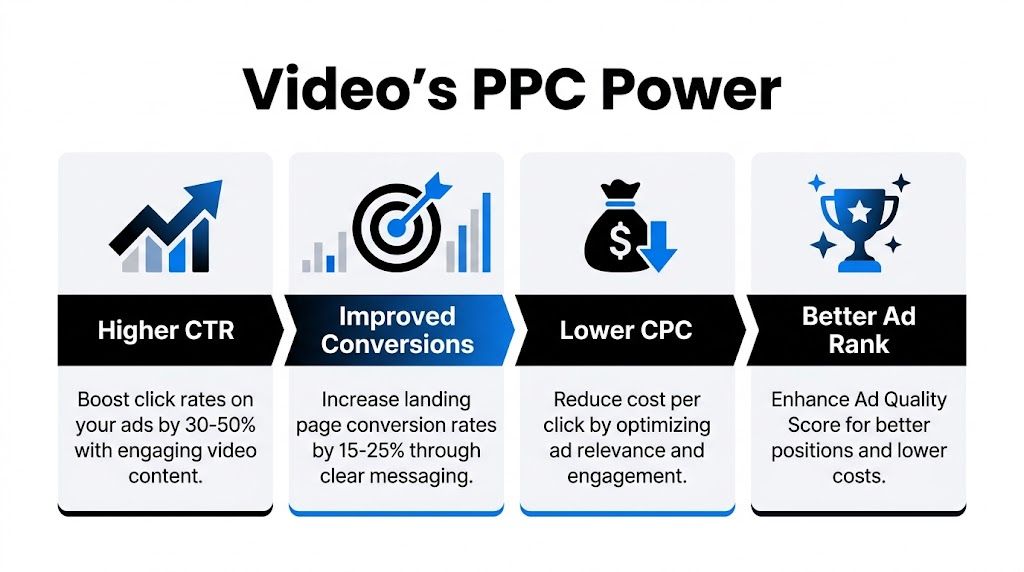
SellersCommerce reports that adding a video to a landing page can boost conversions by up to 80%, and that video helps people retain 95% of a message compared with 10% for text (landing page video conversion data). That retention point is often underestimated. Paid clicks are expensive. If your page can explain the offer clearly before the visitor bounces, you waste less traffic.
Better pre-qualification
A strong video filters the click. That’s good.
If someone searched for a solution, lands on your page, watches the first part of the video, and realizes the product isn’t right for them, that saves your sales team from handling low-fit leads later. If they keep watching, understand the product, and move to the form or trial, the page has done more than persuade. It has pre-qualified.
Video beats dense copy for many offers, especially software, services, and anything that needs a quick explanation. Text can explain features. Video can show the product, explain the workflow, and handle objections in one pass.
More time to make the case
Visitors on pages with video spend 1.4 times more time engaged, according to the SellersCommerce roundup linked above. More time by itself doesn’t guarantee better performance, but in PPC it often means you’ve earned enough attention to communicate the core value proposition.
That extra attention window helps with:
- Explaining category complexity for products that aren’t instantly obvious
- Reducing skepticism with demos, proof, or a human presenter
- Improving CTA readiness because the visitor understands what happens next
Stronger persuasion for cold traffic
Cold search traffic often lands with partial intent. They know the problem. They don’t fully trust the solution yet.
Video can close that gap faster than copy alone. The same source notes that 88% of consumers report being convinced to purchase after watching a product video on a landing page. For PPC, that’s the practical upside. Your ad can win the click, but the landing page still has to justify the next action.
Practical rule: If your offer needs a demo in the sales call, it probably benefits from a demo before the lead form too.
Why this matters for account performance
Google Ads rewards relevance and post-click experience, even if it doesn’t publish a tidy formula for every quality signal. When the ad, page, and user intent line up, campaigns usually get easier to scale. Better conversion rates let you bid more confidently. Clearer pages reduce wasted clicks. Stakeholders stop arguing over top-of-funnel metrics because the page is pulling its weight.
That doesn’t mean every landing page needs video. Some offers are simple enough that extra media gets in the way. But if you sell something that needs explanation, contrast, proof, or workflow visibility, video often gives paid traffic the context it was missing.
Core Principles for High-Converting Video Content
The biggest mistake in landing pages with video is starting with production. Teams talk about cameras, motion graphics, presenters, and editing styles before they’ve decided what the visitor needs to know.
The script matters more than the polish. A plain screen recording with tight messaging will usually beat a glossy brand film that never answers the search.
Match the video type to the click
Different search intent needs different video formats. That sounds obvious, but many pages still use one generic asset for every campaign.
Here’s the practical way to approach this:
- Product demo works when the user already knows the category and wants proof the tool does the job.
- Explainer video works when the offer needs context before the visitor can evaluate it.
- Customer testimonial works when trust is the main blocker.
- Founder or specialist walkthrough works when buyers need confidence in the thinking behind the solution.
A branded montage usually belongs on a homepage, not on a hard-working PPC landing page.
Build the script around one decision
A conversion-focused landing page video should help the visitor make one decision. Not five.
Good scripts usually follow a simple progression:
Name the problem fast
Open on the exact pain the click implies. If someone searched for help managing junk search terms, don’t begin with company history.Show the mechanism
Explain or demonstrate how the offer solves that problem. Screen recordings are especially strong here because they remove ambiguity.Handle the obvious objection
Is it hard to set up? Does it work for small accounts? Is it only for agencies? Address the objection before the visitor has to hunt for answers.Direct the next step
The CTA in the video should match the CTA on the page. No mixed signals.
The opening matters more than the ending
Most drop-off happens early. That’s why the first few seconds need to feel like continuation, not interruption.
Bad opening:
“We’re excited to introduce our platform...”
Better opening:
“If your search terms report is full of irrelevant clicks, this shows how to clean it up fast.”
That second line does something important. It reflects the visitor’s mental state. They didn’t click because they wanted a cinematic welcome. They clicked because they want a result.
Treat the first line of the video like the second line of the ad.
What works for cold Google Ads traffic
Cold traffic responds best to videos that reduce uncertainty quickly. In practice, that usually means straightforward language and visible proof.
A good cold-traffic video often includes:
| Element | Why it helps |
|---|---|
| Immediate pain-point framing | Confirms message match after the click |
| Visible interface or real-world process | Makes the offer concrete |
| Short, specific proof points | Builds trust without overloading |
| Single CTA | Keeps the decision simple |
What usually hurts performance is the opposite. Long intros, heavy storytelling before relevance is established, jargon, and multiple competing calls to action.
Keep the page copy and video in sync
A landing page with video doesn’t give you permission to stop writing good copy. The headline, subhead, CTA, form, proof, and video need to sound like they belong to the same argument.
If the ad says “reduce wasted spend from irrelevant searches,” and the video says “grow your business with smarter marketing,” the page feels stitched together. Visitors notice that disconnect even if they can’t explain it.
Some of the strongest pages use a simple pattern:
- headline states the benefit
- video demonstrates the claim
- bullets reinforce the mechanism
- CTA captures the action
That’s much tighter than using the video as a separate mini-brand campaign.
Don’t overproduce the wrong thing
Marketers sometimes assume better production automatically means better conversion performance. It doesn’t.
For PPC pages, clarity usually beats spectacle. Crisp audio, readable captions, clear visuals, and a direct script matter. Fancy drone footage and slick transitions don’t matter if the visitor still can’t tell what the product does or why they should trust it.
If budget is limited, spend it on scripting, editing for pace, and making the demo understandable. That’s where the lift usually comes from.
Technical Best Practices for Flawless Implementation
A landing page video can be excellent and still lose money if the implementation is sloppy. Many builds often fall apart at this stage. The creative team hands over a polished asset, then the page loads slowly, mobile handling is clumsy, and the embed steals focus from the CTA.
That’s why technical execution needs the same discipline as ad setup.
Choose the host based on campaign needs
YouTube is easy and cheap, but it isn’t always the best fit for PPC pages. It can introduce distractions, branding you don’t control, and suggested content that pulls attention away from conversion.
Vimeo and Wistia usually give you tighter control over presentation and analytics. That matters when you’re treating the video as a sales asset instead of just a media file.
A simple comparison helps:
| Hosting option | Best use | Main drawback |
|---|---|---|
| YouTube | Fast deployment and simple embeds | More distractions and less control |
| Vimeo | Cleaner presentation | Analytics may be lighter depending on setup |
| Wistia | Serious testing and engagement tracking | Paid investment for teams that need depth |
The point isn’t that one platform always wins. It’s that PPC pages need you to care about what happens after someone hits play.
Placement and load speed decide whether the asset helps
Unbounce’s analysis is useful here because it pushes against the usual hype. Video can underperform if it’s badly executed, and the setups that tend to work best use above-the-fold placement, 60 to 90 seconds, and fast load speeds. On a paid landing page, speed is not a technical side note. It is part of the offer.
If the video delays the page, the visitor may never reach the part where your message becomes persuasive.
A practical checklist:
- Compress aggressively so the asset doesn’t drag the page down
- Use responsive embeds so mobile users aren’t pinching and zooming
- Load the video intelligently instead of blocking core page content
- Keep the first frame or thumbnail relevant to the ad promise
Thumbnail strategy beats autoplay debates
Marketers love arguing about autoplay. In practice, the bigger issue is whether the video looks worth watching.
The play decision often comes down to one screen. The headline, the thumbnail, the position, and the visible CTA all work together. If the thumbnail is vague or overdesigned, play rates suffer even when the video itself is strong.
Use thumbnails that show one of these:
- a person speaking directly to the audience
- the product interface in action
- a clear before-and-after state
- an on-screen benefit tied to the search intent
Later in the test cycle, it helps to review how other teams frame video intros and embeds. This example is useful for seeing page-level implementation in motion:
Mobile viewing changes the build
A lot of paid traffic lands on mobile, so a desktop-first video layout is asking for trouble. The player should resize cleanly, captions should be readable, and the CTA should remain obvious without requiring the visitor to scroll awkwardly around a large embed.
Even if you don’t autoplay, assume many visitors will watch without sound at first. Captions aren’t optional on serious PPC pages. They improve comprehension, reduce dependence on audio, and make demos easier to follow in mixed viewing environments.
A landing page video should feel native to the page on mobile. Not like a desktop asset squeezed into a smaller box.
Common technical mistakes that waste ad spend
A few issues show up again and again:
- Embedding the full file with no performance thought. The page slows down before the user sees the value.
- Using a background video when a demo is needed. Motion without substance burns attention.
- Letting the video compete with the form. If the eye doesn’t know where to go, conversion friction rises.
- Ignoring caption styling. Tiny captions or poor contrast make the video harder to use.
- Publishing one video across all traffic sources. The page may look consistent, but the message fit suffers.
Technical polish doesn’t rescue a weak message. But poor implementation can absolutely ruin a strong one.
Connect Search Terms to Video Scripts
Most advice about landing pages with video stops at layout and formatting. Put the video high on the page. Add captions. Keep it short. That’s useful, but it misses the most important input a PPC manager has: the search terms report.
One of the biggest gaps in existing guidance is the failure to connect video performance data with Google Ads search term analysis, which leaves marketers guessing at video angles instead of scripting to real user queries (Mindstamp on the search term gap).

Use queries as creative direction
Search terms tell you what the visitor was trying to solve in their own language. That is better input than brainstorming in a meeting room.
If your paid traffic includes themes like:
- negative keyword automation
- clean up search terms report
- Google Ads keyword management tool
- how to stop irrelevant clicks
then your landing page video should sound like it was built for those exact concerns. Not broad “smarter marketing” language. Not brand puffery. A tight answer.
That changes the script immediately. Instead of opening with company positioning, you open with the job the visitor wants done.
A practical workflow that actually scales
The workflow is simple enough to run inside a normal PPC process.
Pull the search terms report
Group terms by intent, not just by campaign or ad group.Find repeated pain patterns
Look for the questions and frustrations behind the queries. Those become your opening hook.Create one video angle per intent cluster
Don’t force one generic video to carry every audience.Write the script in the language buyers used
If the search terms say “negative keyword list,” don’t swap it for softer internal jargon.Pair each video with the matching landing page variant
Message match should survive the click.
If you need a structure to speed up scripting, this guide on writing a script for your YouTube video is a useful reference for building a tight opening, body, and CTA without padding the message.
The search terms report is not just for negatives
A lot of advertisers use search terms reports only to cut waste. That’s necessary, but incomplete. The same report also tells you what your best prospects expected to see next.
For that reason, creative teams should spend time with PPC data. The report doesn’t just reveal irrelevant traffic. It reveals demand language. Keyword themes, objections, and feature expectations are all sitting there if you look for them.
If you want a deeper refresher on how to read and act on that data, the Google Ads search terms report guide is worth reviewing before you start scripting.
The best landing page video often sounds less like marketing and more like the visitor finishing their own sentence.
Example of intent-based scripting
A query like “how to automate negative keyword lists” calls for a very different video than “Google Ads optimization software.”
The first query suggests a task-focused visitor. They likely want a quick workflow demo. Show the interface. Show the action. Show the result.
The second query is broader. That visitor may need category framing first, then a demonstration of where the product fits.
Same product. Different intent. Different script.
This is the piece often skipped, and it’s why so many video landing pages feel polished but vague. Search data gives you a much better brief than guesswork ever will.
Measure Success and A/B Test Your Videos
Landing pages with video are typically judged by the final conversion rate, and assessment stops there. That’s too late in the process. You need earlier signals that tell you whether the video is helping, hurting, or being ignored.
The most useful early indicator is video play rate. Lambda Films makes the point clearly: low play rates often point to presentation problems such as weak thumbnails or poor placement, not necessarily bad content (video play rate as a diagnostic metric).
Start with leading indicators
If almost nobody presses play, you don’t have a conversion problem yet. You have an attention problem.
That changes what you test first.
| Metric | What it can reveal |
|---|---|
| Play rate | Whether the thumbnail, placement, and framing attract engagement |
| Drop-off points | Where the script loses attention |
| CTA clicks after viewing | Whether the video builds action, not just watching |
| Form starts and completions | Whether the page flow still works after the video |
This is why advanced hosting analytics can be useful. Heatmaps and engagement traces often expose script issues faster than conversion reporting alone.
What to test first
The best A/B tests are usually the least glamorous ones. Marketers often want to test entirely different videos before they’ve tested the wrapper around the video.
Start with these:
Thumbnail style
Compare a human face, product UI, or headline-led still.Placement
Test directly under the headline versus beside the form or CTA block.Opening line
One version can lead with the pain point, another with the desired outcome.Length
Test a tighter version against a fuller walkthrough.On-page support copy
Sometimes the problem isn’t the video. It’s that the surrounding headline doesn’t earn the click to play.
If your testing process needs structure, this landing page A/B testing guide covers the broader framework well.
How to read weak performance correctly
A poor result doesn’t always mean “video doesn’t work for this offer.” It can mean:
- the wrong visitors clicked the ad
- the page promised one thing and the video delivered another
- the thumbnail didn’t communicate value
- the video was too long before it became useful
- mobile viewing was clumsy
- the CTA after the video was weak
That’s why I’d avoid blunt conclusions after one test. Especially in paid search, traffic quality and message match can distort the result quickly.
If the play rate is weak, fix packaging first. If the play rate is healthy but conversions lag, fix the script or the offer.
Tie testing back to campaign quality
The smartest video testing doesn’t happen in isolation. It sits beside campaign data.
When a keyword theme sends strong traffic but the landing page underperforms, the video may be the mismatch. When the page engages viewers but conversions stay weak, you may have an offer or lead-quality issue. When play rate is low across one ad group but healthy across another, that’s often a clue about message fit.
The point is to build a loop. Search intent shapes the video. Video performance shapes the page. Page performance shapes the next round of campaign decisions.
That’s a much better system than uploading one asset and hoping the conversion rate sorts it out.
Your Action Plan for Video Landing Pages
If you want landing pages with video to help Google Ads performance, keep the process disciplined.
Start with the query. Read the search terms, group intent, and decide what the visitor needs to see. Then script a video that answers that need fast, with a clear opening, visible proof, and one CTA.
Next, implement it carefully. Keep the page quick, place the video where it supports the decision, and make sure mobile visitors can watch without friction. After launch, track play rate, engagement, and conversion behavior. Don’t assume the first cut is the winner.
A simple checklist works:
- Use real search intent to choose the angle
- Write for clarity instead of brand theater
- Keep implementation lean so load speed doesn’t collapse
- Test the wrapper first if nobody plays the video
- Refine the script next if people watch but don’t convert
For extra inspiration outside PPC, these webinar landing page best practices are helpful because they show how strong registration pages align message, media, and CTA without clutter.
If you’re building or revising paid pages, this guide to PPC landing pages is a strong companion resource.
Frequently Asked Questions
A common blind spot is proving whether video is reducing wasted ad spend inside Google Ads, not just inflating engagement. That ROI question is still under-addressed in many guides, especially when attribution and page-view metrics muddy the picture (Involve.me on video landing page ROI measurement).
| Question | Answer |
|---|---|
| Should the video go above the fold? | Usually yes, if the video is central to understanding the offer. If the offer is simple, supporting placement lower on the page may work better. |
| Is autoplay a good idea? | Sometimes, but only if it doesn’t feel intrusive and doesn’t compromise performance. For PPC pages, a strong thumbnail often matters more than autoplay. |
| What kind of video works best for Google Ads traffic? | Usually a short demo, explainer, or proof-led walkthrough. The right choice depends on what the user searched for and what uncertainty needs to be removed. |
| Should I host on YouTube or a paid platform? | YouTube is easy, but paid platforms often give better presentation control and deeper analytics. For serious testing, those extras can matter. |
| How do I know if the video is the problem? | Check play rate, engagement, and post-view behavior. Low plays often signal thumbnail or placement issues. Healthy viewing with weak conversions usually points to script, offer, or CTA problems. |
| How should I measure ROI from video landing pages? | Don’t stop at views. Compare conversion quality, lead quality, and how the page performs against non-video variants for the same campaign intent. |
| Should every landing page have video? | No. If the offer is simple and the page already converts well, video may add friction. Use it where explanation, trust, or demonstration will help the visitor decide. |
If your Google Ads search terms are messy, your landing page video strategy will usually be messy too. Keywordme helps clean up search terms, build negatives faster, expand keyword opportunities, and tighten message match between the query and the page. That makes it easier to create landing pages with video that speak to real intent instead of guesses.
.svg)