
How to Target Multiple Service Areas in One Campaign
How to Target Multiple Service Areas in One Campaign


You've got trucks in three towns, leads coming in from five, and a client asking why you're paying for clicks you'll never serve. That's usually the moment someone starts learning how to target multiple service areas in one campaign properly, not by adding more pins to a map, but by fixing the settings underneath them. Done right, one campaign can stay clean, shared, and profitable across every zone you cover.
Why Multi-Area Campaigns Quietly Drain Budget
The phone rings on a Monday morning. It's a homeowner with a burst pipe, ready to book, except they're two hours past your dispatch radius. Your dispatcher turns them away, you paid for the click anyway, and the same thing happens again on Wednesday from a lead form filled out by someone who searched for a city they used to live in.
That pattern is rarely a keywords problem. It's almost always geography. The three usual culprits are easy to miss because none of them look broken inside the interface.
- Default location behavior: Google's default can reach people physically located in, regularly present in, or showing interest in your target areas, and advanced options exist to narrow that to people likely to be physically present, as covered in Google's guide to advanced location options.
- Blanket radius targets: One wide circle around headquarters swallows suburbs you don't serve and misses pockets you do.
- Main-city copy: Ads naming only your home base confuse searchers in secondary towns, so they click, scan, and bounce, or call to ask if you even come out there.
If your call log doesn't match your map, you're not buying demand. You're buying geography lessons.
What a One-Campaign Setup Can and Cannot Fix
Consolidating areas into one campaign doesn't create this waste, and splitting into ten campaigns doesn't automatically cure it. A single build helps when it pools learning and budget around one offer. It hurts when it pools bad signals, because every unqualified lead from a weak area trains the shared bidding rules for the strong ones too.
That's the risk. You're not just wasting individual clicks. You're teaching a shared system that out-of-area inquiries count as success, and it'll go find more of them. The fix starts with structure, gets serious about presence, and ends with exclusions you'll maintain every month, not once at launch.
Choosing the Right Campaign Structure
Most multi-location accounts I inherit sit at one of two extremes. Either everything lives in a single campaign because that's how it launched, or there's a separate campaign for every town because someone once heard that's best practice. Neither answer holds up without looking at what differs between your areas.
The Consolidation Test
Google Ads lets you combine countries, subnational regions, cities, territories, postal areas, radii, and location groups in one campaign, and it also permits bulk addition of up to 1,000 location targets at a time, which makes consolidation practical at scale according to Google's multi-area geographic targeting documentation. The question isn't whether the platform allows it. It's whether your areas behave enough alike to share rules.
Keep areas together when the offer, budget, and conversion objective are shared. A plumber running the same emergency services, same pricing, and same call goal across a metro and its suburbs is a good consolidation candidate. Split campaigns when commercial value or competition differs sharply, because a shared budget will feed the busiest metro and starve a smaller zone you want to grow.
Single vs Multi-Campaign Structure
| Factor | Single Campaign | Separate Campaigns |
|---|---|---|
| Budget control | One pool, simpler to manage | Ring-fenced spend per region |
| Bidding rules | Shared learning across all areas | Tuned to each market's competition |
| Maintenance | One set of ads and keywords | Duplicated builds and edits |
| Reporting | Needs location segmentation to see winners | Performance visible at campaign level |
| Best fit | Similar value and services everywhere | Different offers, stakes, or goals by area |
Before you decide, it helps to look at how other operators define their footprints in plain terms, such as the published service zones for Florida agents and builders from Pinnacle Property Media, which show what a clean zone list looks like when a business puts it on paper. That kind of clarity should exist before you open campaign settings.
One more practical detail muddies this decision. How you draw each zone matters as much as which campaign holds it, and our breakdown of radius targeting versus zip code targeting in Google Ads covers when a circle beats a postal list. Pick your drawing method first, then argue about campaign count.
Practical rule: If you'd defend the same bid, the same budget priority, and the same ad in two towns, they can live in the same campaign. If you'd defend different numbers, split them.
Presence Versus Presence or Interest Targeting
This is the setting that decides whether your multi-area campaign pays for residents or for researchers. Most advertisers never open it, because it sits under advanced options and the default feels safe. It isn't safe. It's broad.
What Each Setting Actually Buys
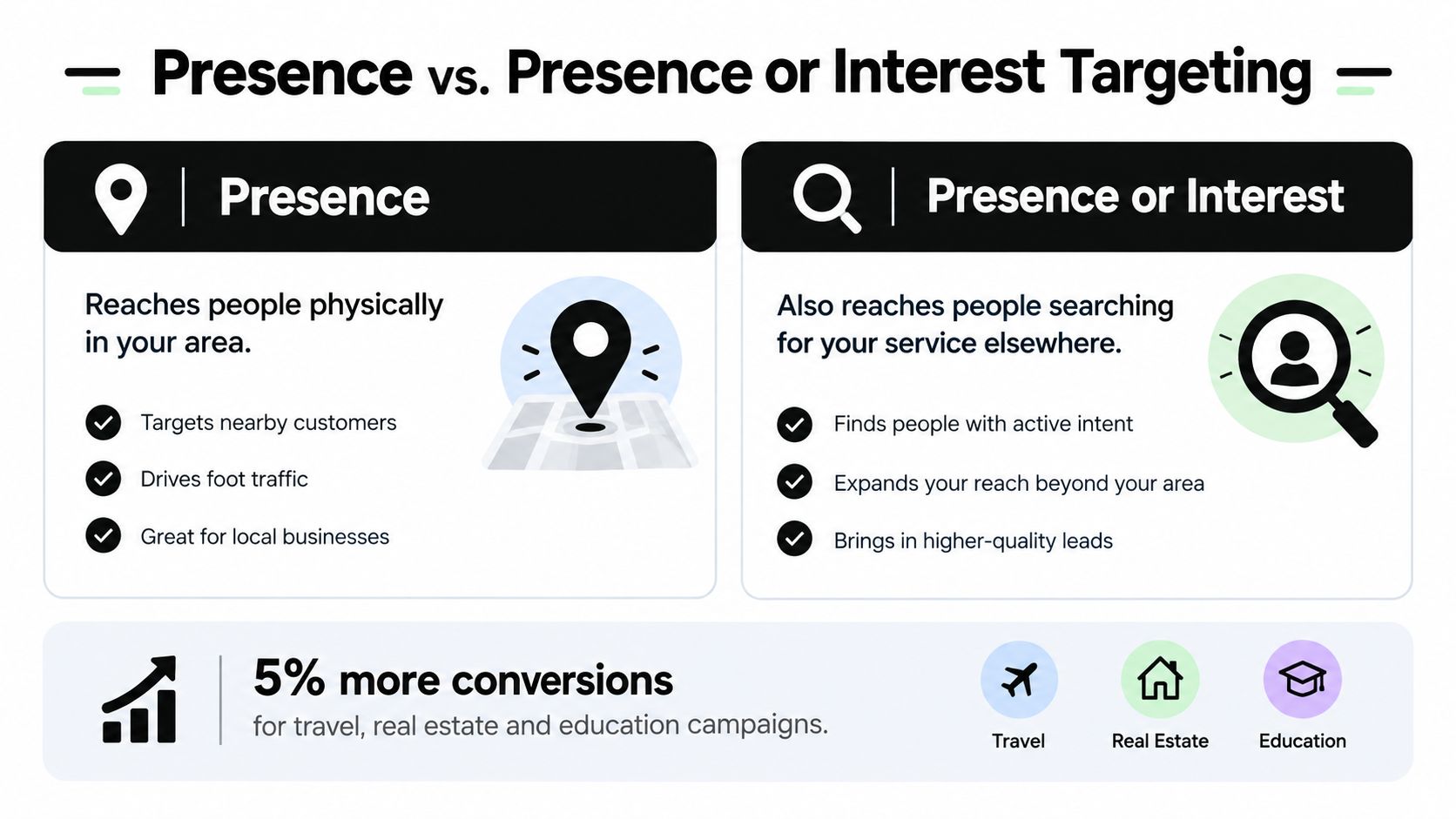
Presence reaches people who are in, or regularly in, your targeted areas. Presence or Interest adds people who've shown interest in those areas through searches, past visits, or content they viewed. That extra reach sounds harmless until you think about who it includes. Someone comparing neighborhoods for a move next year, a landlord who lives three states away, a homeowner researching a second property they handle through a local manager. Each one can click. Few can be dispatched today.
Google's own documented experiment shows why teams leave the broader setting on. In global internal data covering Search campaigns from May 21 to June 1, 2022, advertisers in travel, real-estate, and education who switched from Presence to Presence or Interest recorded 5% more conversions, per Google's location targeting developer documentation. For those categories, the logic holds. People book hotels, research schools, and scout properties before they arrive.
Where the Broader Setting Breaks Down
A plumber, an HVAC crew, or a lawyer taking in-person consultations runs a different business. The service happens at a physical address inside a fixed territory, so presence is the honest default. Broader reach can inflate conversion counts with leads your team can't serve, and Google cautions that location matching relies on signals like user settings, devices, and platform behavior, so geographic accuracy isn't guaranteed.
Use this decision rule and move on:
- Presence only: Local delivery, in-person appointments, on-site work, anything tied to a dispatch zone.
- Presence or Interest: Services customers legitimately research before traveling, relocating, or buying from a distance.
After launch, audit matched locations against your lead log and ask one uncomfortable question: did this lead come from a resident, a commuter, or someone merely researching the area? Our deeper walkthrough on Google Ads presence versus interest location targeting shows where to find that split. If interest-based traffic produces unusable leads, tighten the setting rather than celebrating the extra volume.
Organizing Keywords and Ad Groups by Intent
Once structure and presence are settled, the build gets easier. The trap here is duplication. Teams panic about relevance and create a separate ad group for every city and every service, then drown in dozens of near-identical groups that nobody optimizes.

Three Patterns That Hold Up
Service-led ad groups group keywords by the job itself, drain cleaning, water heaters, emergency calls, and handle geography through location insertion in headlines. This works when your service catalog is the same everywhere, which is true for most home-service brands I run.
Geo-led ad groups flip the logic. Each group targets city-plus-service terms for one place, which suits hyper-local intent like a lawyer whose searches are dominated by town names. Volume per group runs thinner, so this only pays off where searchers consistently type the location.
A hybrid model is what most mature accounts end up with. Shared commercial terms without a city name sit in service-led groups, while a smaller set of proven city-specific terms gets its own groups. You avoid the copy-paste mess without giving up local relevance where the data supports it.
Match Type Discipline
Whichever pattern you pick, match types decide whether geographic intent stays clean. Broad terms pull in neighboring towns, competitor locations, and research queries unless you police them. Tightening match types on your proven geo terms and keeping exploration separate is boring work, and it's the work that protects cost per conversion. This is also where Keywordme fits a real workflow, since its bulk match-type assignment lets you set exact, phrase, or broad across keyword sets in one action instead of editing line by line.
For a look at how mismatched intent corrupts an organic build too, the SEO guidance for North Georgia lawn care from Barefoot Organics is a useful reminder that location and service intent drift apart fast when nobody audits them.
Geo-Tailored Ad Copy and Landing Pages That Convert
Targeting gets you the right audience. Copy decides whether that audience believes you serve them. I've watched correctly targeted campaigns underperform for months because every ad named the headquarters city and every landing page read like a national brochure.
Copy Patterns You Can Ship This Week
Start with location insertion in headlines so a searcher in a secondary town sees their own town, not your main base. Pair that with a zone-specific trust signal, a local office reference, a neighborhood you work in, or a review theme from that area. Generic credibility claims don't do the same job.
Then add a dispatch-time promise by zone where you can honor it. A same-day claim in the core metro and an honest next-day framing in outlying towns beats one vague fast-service line stretched across the whole map. It also screens out callers whose expectations you can't meet, which improves lead quality.
Landing Pages That Match the Click
Your landing page should reflect the visitor's region in the headline, the service list, and the proof elements. Dynamic region reflection works well, but even static pages per major zone outperform one page that mentions everywhere and convinces nobody. Health and service providers do this instinctively, and the reVIBE Mental Health treatment guide shows how a provider frames services around the specific state it serves rather than talking in generalities.
Behind the scenes, keep your zone definitions organized in spreadsheets rather than editing targets one by one. Google Ads location spreadsheets support radius entries with a distance, unit, and center location, for example '10 | mi | Chicago, Illinois', enabling structured management of multiple service areas and location-specific bidding at scale according to Google's bulk upload spreadsheet documentation.
Targeting earns the impression. Local copy earns the call. Skipping the second half wastes the first.
Bid Modifiers and Budget Allocation by Area
A single campaign with shared settings still shouldn't spend evenly across every zone. Areas differ in competition, ticket size, and close rate, and your bids need to admit that openly. The screenshot below shows the kind of centralized view that makes those comparisons manageable.

Read the Locations Report Both Ways
The targeted locations view shows performance for the areas you chose. The matched locations view shows where users were when your ads triggered, and that gap between intention and reality is where budget leaks hide. Reporting can go deep, down to postal codes and congressional districts in the United States, so there's no excuse for judging a whole metro as one blob.
Apply positive bid adjustments to areas producing qualified conversions at a cost you can defend, and negative adjustments to zones generating cheap clicks that never close. Resist the urge to chase cheap traffic. A low cost per click in an area your dispatchers hate serving is not efficiency, it's deferred waste.
The short video below walks through how location-level thinking fits into everyday campaign management, and it's worth watching before your next budget review.
A Weekly Reallocation Rule
Review location performance weekly, but move budget in small steps. Shift spend toward your strongest zones, trim modifiers on the weakest, and wait for the next cycle before judging the change. What you're protecting against is overcorrection, because a single soft week in a good area says less than a consistent pattern across matched-location data. If one region keeps demanding its own budget logic every single week, that's the campaign telling you it wants to be split.
Preventing Overlap With Exclusions and Negatives
Everything above works until scale shows up. More areas mean more edges, more overlapping radii, and more ways for interest-based noise to slip through. This cleanup layer is what keeps a broad multi-area build honest over time.
Clean Up in the Right Order
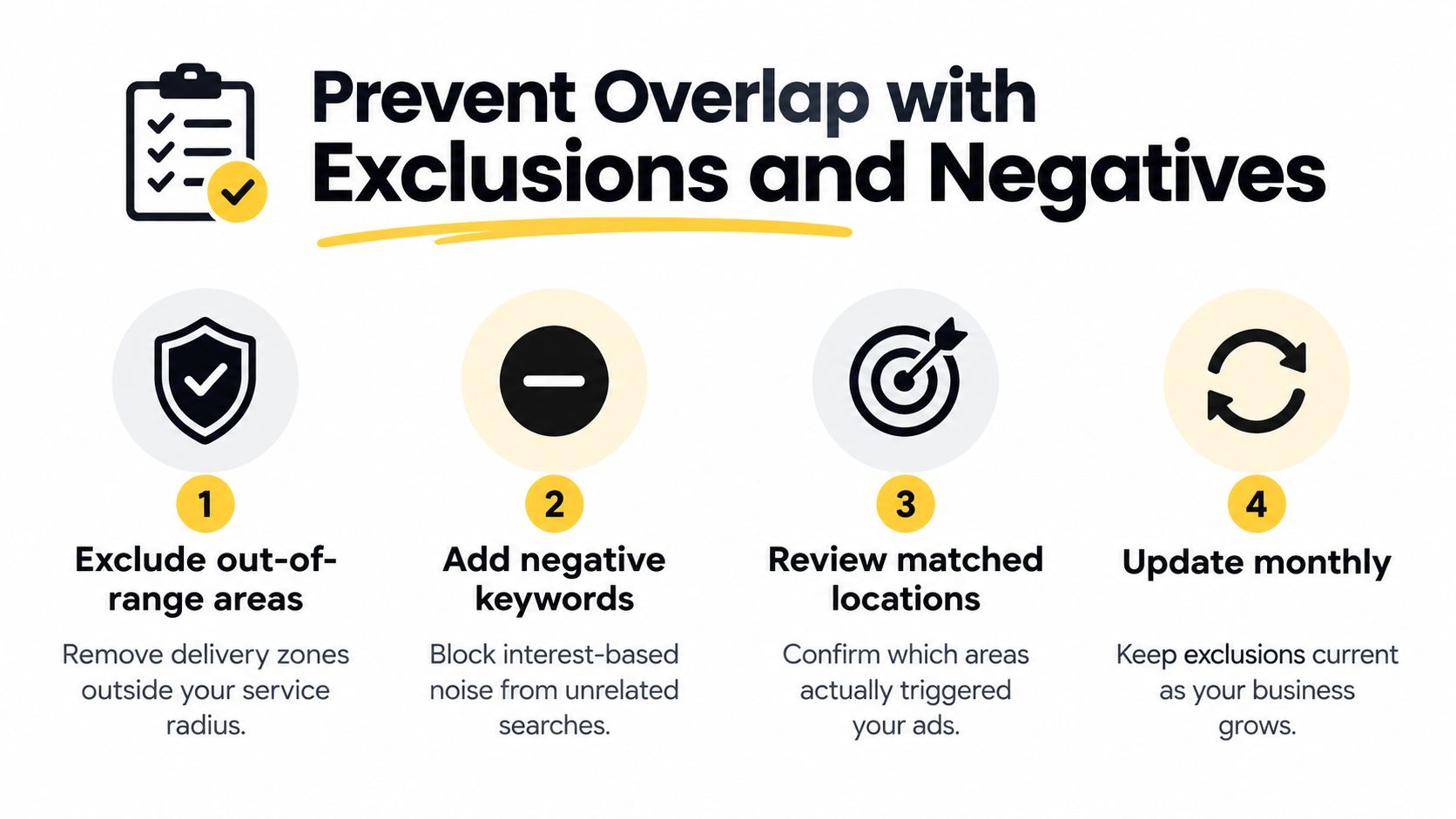
Start with geography itself. Google Ads allows location exclusions, enabling advertisers to remove specific regions from delivery when an area falls outside service coverage or produces unwanted traffic, as documented in Google's guidance on excluding geographic locations. Exclude the ring just outside your dispatch boundary first, because that's where almost-qualified leads breed.
Next, layer negative keywords at account and campaign level. City names you don't serve are the obvious entries, but don't stop there. Research-intent phrases, do-it-yourself queries, and job-seeking terms pile up across multi-area campaigns faster than single-market ones, since every added zone multiplies the junk. Shared negative lists keep that work from being repeated campaign by campaign.
Then automate the watch. Set automated rules or scheduled reports to flag areas and search terms burning spend without qualified conversions, so exclusion candidates surface before the monthly invoice does. Our step-by-step on how to exclude cities from a Google Ads campaign covers the mechanics if your team hasn't built this muscle yet.
This connects directly to the presence decision. Exclusions are the operational lever that lets you keep a broader setting where it's justified, because problem areas get cut as evidence arrives instead of dragging on for quarters.
Launch Checklist and the Metrics That Matter
- Confirm zones on paper: Every targeted area is inside real dispatch or delivery coverage.
- Set presence deliberately: Default to presence for on-site work, broaden only with a reason.
- Exclude the boundary ring: Block adjacent areas you can't serve before spending a dollar.
- Segment conversions by location: Lead quality gets reviewed per area, not just in aggregate.
- Review matched locations monthly: Exclusions and modifiers update as coverage grows.
Judge the campaign on four signals. Qualified lead rate by area tells you if geography is clean. Matched-location conversion cost tells you what each zone costs. Exclusion-driven spend saved proves your cleanup is working. Assisted conversions catch areas that influence bookings without taking the final click.
Treat this as a loop, not a launch event. As your service footprint expands, new areas join the campaign, new edges need excluding, and last quarter's weak zone sometimes becomes next quarter's growth market. Build the review habit now and scaling gets boring, which is exactly what you want.
When you're managing keywords, match types, and negative lists across several service areas at once, the manual formatting work eats the hours you should spend on bid and budget decisions. Keywordme brings keyword research, bulk match-type assignment, and automated negative keyword list building into one platform so multi-area campaigns stay clean without the copy-and-paste grind. Start your free trial at Keywordme and tighten up your next location rollout this week.
.svg)