
How to Reduce Cost Per Click Google Ads: 2026 Guide
How to Reduce Cost Per Click Google Ads: 2026 Guide


Your Google Ads account doesn't usually scream before costs get ugly. It just starts drifting. A keyword that used to be manageable gets expensive. A campaign that looked steady last month now burns through budget by lunch. You lower bids, traffic drops, and the underlying problem persists.
That's why how to reduce cost per click Google Ads isn't really a bidding question. It's an account health question. High CPC is usually a symptom that relevance is weak, targeting is loose, or waste has crept in through search terms you never meant to buy.
The fix is rarely one trick. It's a loop. Diagnose what's inflating costs, tighten the keyword and ad structure, block junk traffic, improve the page experience, then repeat. That's the grind of PPC. The good news is that a disciplined process works a lot better than random bid cuts.
Why Your Google Ads CPC Is So High
When CPC rises, most advertisers assume the same thing. Competitors are bidding harder, so we need to fight back. Sometimes that's true. Often it's only part of the story.
Google doesn't price clicks in a vacuum. Your actual CPC is shaped by how relevant your keyword, ad, and landing page feel to the search. If those pieces are misaligned, you pay more to stay visible. If they're tight, you can hold position without overpaying for every visit.
High CPC usually traces back to three levers
The first lever is Quality Score. If your ads don't earn clicks, don't match intent, or send people to weak landing pages, Google has no reason to reward you with efficient traffic.
The second is relevance. Account structure matters more than people want to admit. One ad group with a pile of loosely related terms almost always leaks money. The ad can't speak clearly to every query, so click quality slips and costs creep up.
The third is targeting discipline. Broad matching, weak negatives, sloppy geo coverage, and all-day scheduling can fill a campaign with traffic that looks active but doesn't deserve the spend.
Practical rule: Don't treat high CPC as the disease. Treat it as the warning light.
What doesn't work
A lot of common fixes feel productive but don't hold up:
- Blind bid cuts: You save money per click, then lose impression share on the searches that actually mattered.
- Constant budget shuffling: Moving spend around without fixing relevance just relocates the problem.
- Launching more ads into a messy structure: More copy won't rescue bad targeting.
- Chasing cheaper traffic for its own sake: Low CPC can still be expensive if the clicks are wrong.
A strong account usually earns lower CPC because the whole system is cleaner. Search terms match the right keyword. The keyword lives in the right ad group. The ad mirrors the search. The landing page finishes the promise. When that chain breaks, costs rise.
Diagnose Your High CPCs Before Making Changes
Before you touch bids, act like an auditor. The account is already telling you why CPC is high. You just need to pull the right reports and stop guessing.

Check Auction Insights first
Start with Auction Insights on the campaigns or ad groups where CPC feels out of line. You're looking for patterns, not drama. If overlap is high and outranking pressure is consistent, competitor behavior may be contributing to the increase.
That matters because the fix changes depending on what you find. If the market got more aggressive, you may need to shift toward narrower, higher-intent terms instead of trying to win every expensive query. If competition looks stable, the issue is more likely inside your own account.
Use this report to answer a simple question: are costs rising because rivals changed, or because your setup stopped earning efficiency?
Pull the Search Terms report and get honest
The Search Terms report is where wasted spend usually hides. This is the report I trust most when a campaign looks expensive but can't clearly explain itself.
Scan for three kinds of problems:
- Intent mismatch: Queries that mention research, definitions, tutorials, or free options when you're trying to drive leads or sales.
- Wrong audience signals: Searches from job seekers, students, competitors, or people looking for support rather than buying.
- Theme drift: Broad or phrase variants that keep expanding into adjacent topics your ad group was never built to handle.
If search terms look messy, your CPC problem is rarely just about bidding.
Segment the account instead of reading averages
Averages hide expensive pockets. Segment performance by device, location, and time of day. You might find that desktop traffic is fine while mobile clicks are draining budget, or that one region keeps buying expensive traffic without the same business value.
A quick diagnostic workflow looks like this:
- Sort by cost first: Find the campaigns, ad groups, and keywords spending the most.
- Compare CPC against conversion quality: Expensive clicks aren't automatically bad. Expensive clicks with weak outcomes are.
- Break out segments: Device, hour, weekday, audience, and location often expose patterns that campaign-level views miss.
- Review ad group intent: If one group contains mixed intent, treat structure as a root issue.
Write down the cause before you make the fix
This sounds basic, but it matters. For each expensive area, label the likely cause in plain language.
| Signal you see | Likely cause |
|---|---|
| CPC is high across many keywords in one campaign | Structure or relevance problem |
| CPC is high only on certain search themes | Match type or query control problem |
| CPC spikes in limited geos or devices | Segmentation and bid adjustment problem |
| CPC rose while search terms got noisier | Negative keyword gap |
That one habit stops a lot of bad optimization. You don't need more motion. You need a cleaner diagnosis.
Master Your Quality Score to Lower Costs
Quality Score gets talked about like it's mysterious. It isn't. It's Google's shorthand for whether your ad experience deserves efficient pricing. If you improve the components behind it, CPC usually gets easier to control.
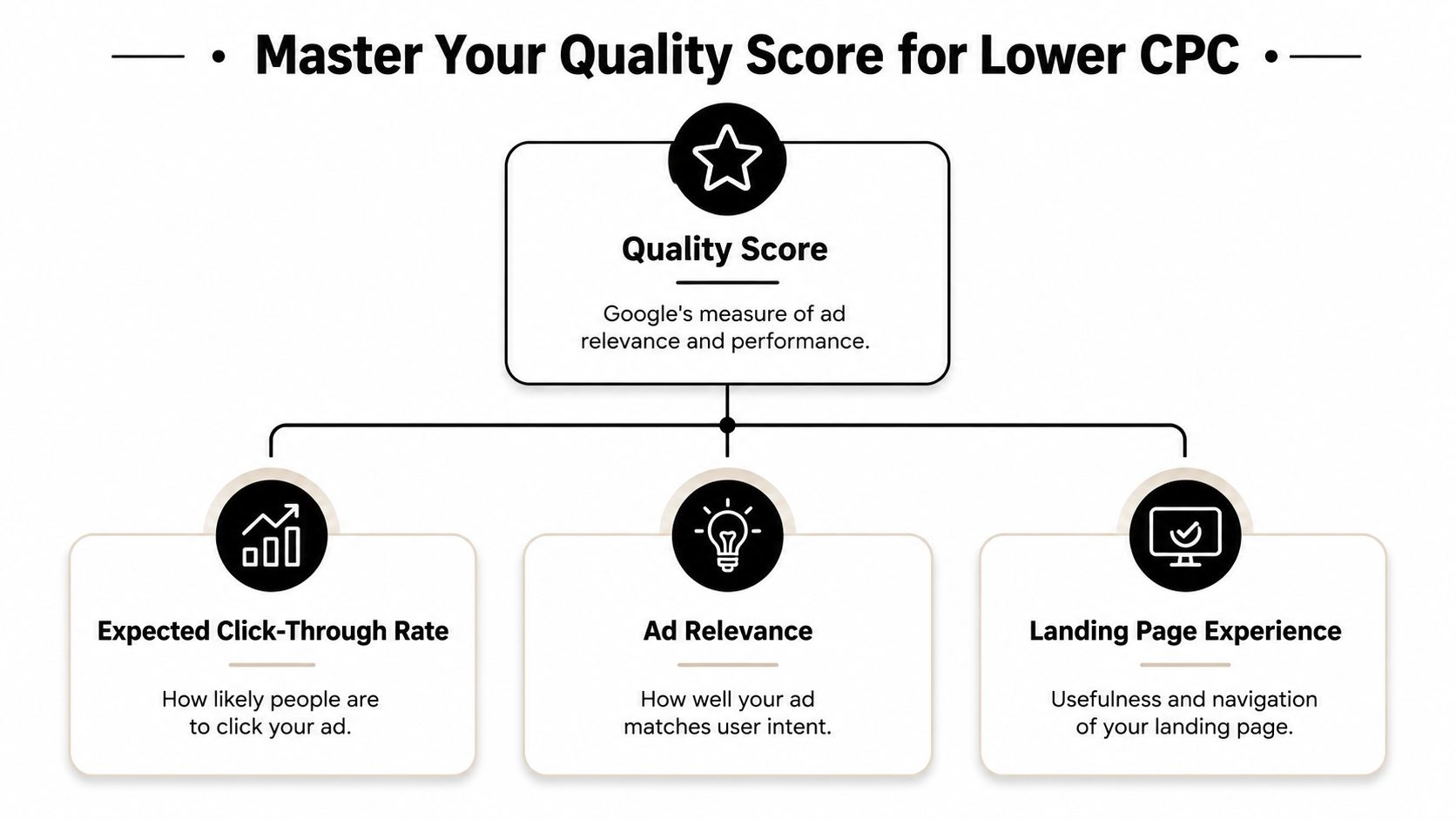
The financial impact is worth taking seriously. For every point increase in Quality Score from 1 to 10, advertisers can see up to a 16% decrease in cost-per-click, according to WordStream's Quality Score infographic.
Expected CTR is your first pressure point
Expected click-through rate is Google's read on whether people are likely to click your ad. If your ad looks generic beside more specific competitors, you usually pay for that.
Ways to improve it:
- Write to the actual query: If the search is commercial, make the ad commercial. Don't answer a buying search with vague brand language.
- Use sharper headlines: Clear offer language beats clever copy most of the time.
- Keep ad groups tight: Ads perform better when they don't have to speak to too many meanings at once.
- Fill out assets: Sitelinks, callouts, and snippets give the ad more surface area and often make it more useful.
Here's the practical test. If a user searches your keyword and sees your ad, would they think, “That's exactly for me,” or “That's probably related”? The second reaction is expensive.
For a deeper tactical breakdown, this guide on improving Google Ads Quality Score is worth reading alongside your account review.
Ad relevance comes from structure, not hope
Ad relevance improves when the keyword, ad copy, and user intent line up cleanly. This is why bloated ad groups drag CPC up over time. They force one ad to cover several meanings, and the copy gets watered down.
A cleaner structure usually looks like this:
| Weak setup | Stronger setup |
|---|---|
| One ad group for many related themes | Separate groups by clear intent |
| Generic ads reused across terms | Ads written around a tight keyword theme |
| Mixed match types with little control | Match types used deliberately by theme |
Field note: Most CPC problems blamed on bidding are really ad group problems wearing a bidding disguise.
If you're working inside old accounts, this cleanup is manual and tedious. But it matters because relevance compounds. Once the ad matches the search more closely, CTR improves, Quality Score improves, and CPC pressure often eases.
Landing page experience finishes the job
A strong ad can still pay too much if the landing page feels slow, vague, or disconnected from the promise in the ad. Google wants continuity. The user clicked for one thing and expects to arrive at that exact thing.
Focus on:
- Message match: Use the same language and offer framing from the ad on the page.
- Clarity: Put the main action, value proposition, and proof near the top.
- Usability: Make the page easy to use on mobile and desktop.
- Speed: Slow pages kill intent before users even evaluate the offer.
If your landing pages lag, this practical resource on conversion-focused speed optimization is a useful place to tighten the page experience.
Before you move on, watch this overview if you want a quick refresher on the mechanics behind Quality Score and account efficiency.
Refine Your Keyword Strategy and Match Types
Keyword strategy is where cheap-looking accounts turn expensive fast. Not because the keyword list is too small, but because the account gives Google too much room to interpret intent for you.
If you're serious about how to reduce cost per click Google Ads, tighten control before you chase scale. Broad targeting has its place, but many accounts lean on it long after it starts pulling in expensive, low-fit traffic.
Use match types on purpose
A lot of waste starts when advertisers treat match types like a minor setting. They're not. They define how close a search has to be before you pay for it.
A simple way to think about them:
- Exact match: Best when you want tight control over intent and ad messaging.
- Phrase match: Useful when you want controlled reach around a core search theme.
- Broad match: Better for discovery when the account has strong guardrails and active monitoring.
The mistake is letting broad match do the heavy lifting in an account with weak negatives and mixed ad groups. That setup invites search terms you never would have chosen manually.
For a clearer breakdown of where each one fits, this guide to Google Ads keyword match types does a good job of laying out the trade-offs.
Group keywords by intent, not by convenience
Most advertisers know they should structure ad groups tightly. Fewer do it, because cleanup takes time and nobody wants to spend a day dragging search terms into the right buckets.
That work matters. A campaign built around intent themes gives you cleaner ads, stronger relevance, and easier control over spend. A campaign built around convenience usually ends up with one ad group trying to serve too many jobs.
Here's a quick comparison:
| Loose structure | Tight structure |
|---|---|
| Similar but mixed intents in one group | One clear theme per group |
| Ads stay broad to fit everything | Ads can mirror the actual search |
| Search term review gets messy | Search term decisions get faster |
| CPC pressure builds quietly | Waste is easier to isolate |
What this looks like in practice
Say you sell accounting software. Don't throw these into one ad group just because they share a product category:
- accounting software
- accounting software for freelancers
- bookkeeping software for small business
- free accounting template
- accountant jobs
Those searches don't deserve the same ad. Some are commercial. Some are informational. One is clearly irrelevant. If they sit together, your ad gets diluted and your CPC usually reflects that.
A better approach is to split them by intent and exclude the junk. Then your ad for “accounting software for freelancers” can speak to freelancers, instead of pretending one generic message will satisfy every query.
Manual refinement works, but it's a grind
PPC gets repetitive. You review search terms, identify winners, decide the right match type, move them into better ad groups, and add the obvious losers as negatives. Then you repeat it next week because new query variants keep showing up.
That's the part many teams underestimate. The strategy is straightforward. The workload isn't.
Tight keyword strategy doesn't fail because it's wrong. It fails because most teams can't keep up with the manual upkeep.
If you manage a small account, you can do this by hand for a while. In larger accounts, the copy-and-paste work becomes the bottleneck. Search terms pile up faster than anyone can classify them cleanly, and the account drifts back toward broad, noisy traffic.
That's why the best keyword strategies aren't just smart. They're maintainable. If your process can't keep pace with incoming search data, CPC rises even when you know exactly what should happen.
Build a Bulletproof Negative Keyword List
Negative keywords are one of the fastest ways to stop paying for traffic you never wanted. They don't just trim obvious waste. They improve the quality of what remains.
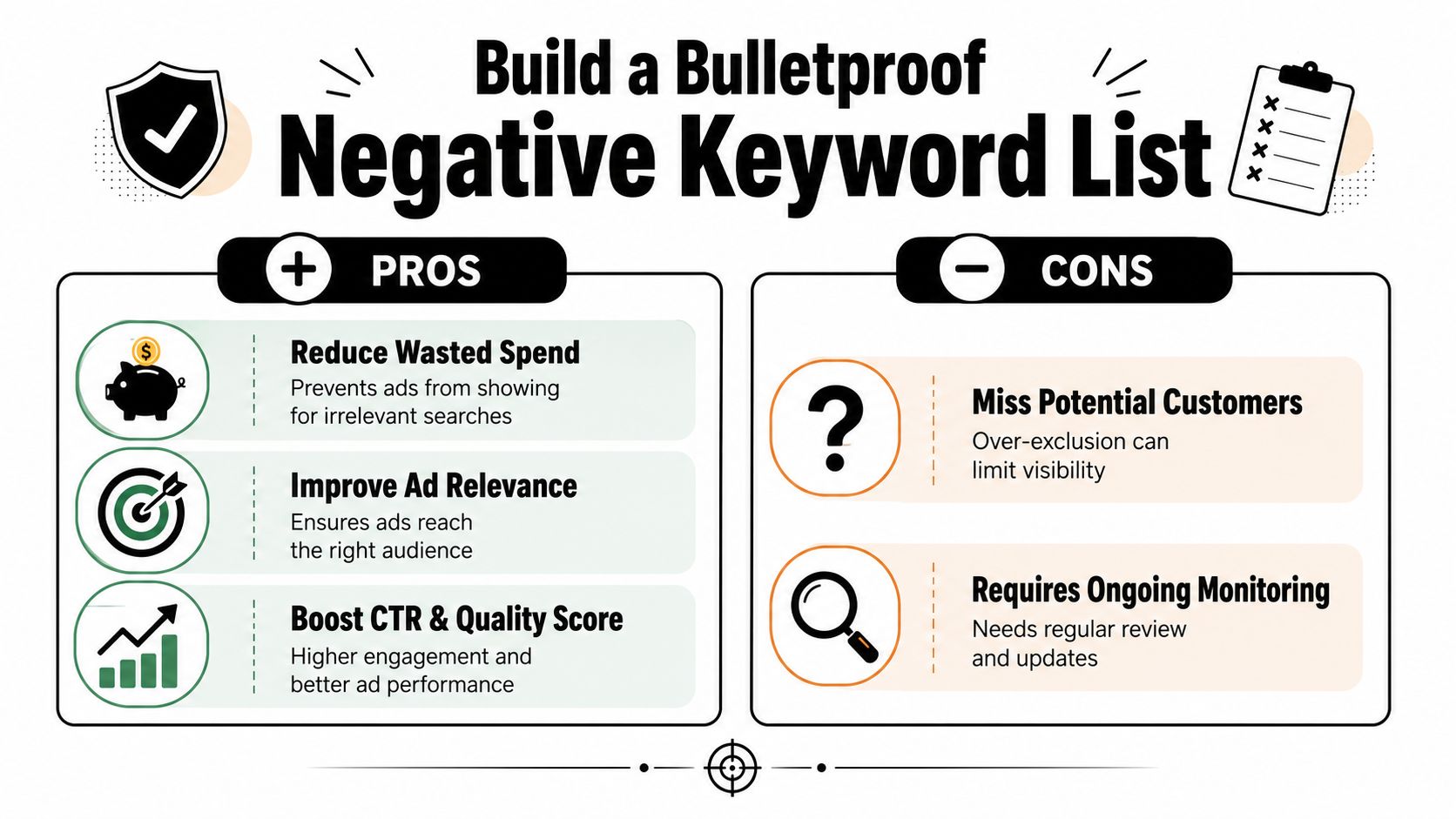
A weak negative strategy creates a familiar pattern. Click volume looks healthy. Search term reports look chaotic. CPC feels inflated because too many paid clicks came from low-value searches that should have been blocked at the door.
Start with recurring waste patterns
You don't need fancy theory here. Most accounts leak spend through the same kinds of searches:
- Job-seeking terms: careers, jobs, hiring, internship
- Freebie intent: free, template, sample, download
- Research-only phrasing: what is, definition, tutorial, examples
- Support intent: login, phone number, customer service
- Wrong-fit audiences: student, course, certification, training
- Competitor filtering: competitor names, if those clicks don't fit your strategy
Not every account should exclude every one of those. The point is to review them as categories, not as one-off surprises.
Why this work has such high ROI
A good negative list helps in three ways at once:
- It cuts wasted spend quickly. You stop buying clicks from searches that were never likely to convert.
- It sharpens traffic quality. The remaining impressions are more aligned with the ads you wrote.
- It makes your account easier to read. Cleaner search term data leads to better optimization decisions later.
That last point gets overlooked. Bad traffic doesn't just cost money. It muddies your data.
Add negatives to protect intent, not to chase perfection. Overblocking can be just as costly as underblocking.
If you want a practical walkthrough for list building and match type choices on exclusions, this guide on adding negative keywords is a solid reference.
The real challenge is consistency
Most PPC managers know they should review search terms regularly. The problem is that manual negative work is tedious. You scan rows, pick out junk, format terms, decide campaign versus ad group level, then repeat the same motions again and again.
That's where process usually breaks. Not because the strategy is unclear, but because the account generates more search term noise than the team can clean up consistently.
A bulletproof negative list isn't a one-time file. It's a living control system. The advertisers who keep CPC under control are the ones who keep adding exclusions before wasted traffic has time to pile up again.
Iterate with Bidding Ads and Landing Pages
Once the account structure is clean, CPC control becomes a rhythm. You adjust bids where traffic quality is stronger, test ad copy to improve click behavior, and keep landing pages aligned with the promise that got the click in the first place.
Use bid adjustments to direct spend, not just cut cost
Segmented data gives you an advantage. If certain devices, locations, audiences, or hours consistently bring weaker traffic quality, lower exposure there and protect budget for stronger pockets of demand.
That's different from slashing bids everywhere. Smart bid work is selective. It shifts spend toward conditions where the same keyword is more likely to perform well.
A practical review cycle might include:
- Device checks: See whether mobile, desktop, or tablet traffic deserves different treatment.
- Location trimming: Pull back where traffic is expensive and weakly aligned.
- Ad scheduling: Reduce visibility during low-intent periods if performance patterns support it.
- Audience layering: Exclude or soften bids for segments that keep consuming spend without business value.
Test ads and pages as one system
Advertisers often separate ad testing from landing page testing. Users don't. They experience them as one journey.
If the ad promises a demo, the page should push directly into a demo. If the ad stresses pricing clarity, the landing page shouldn't make people hunt for it. That continuity can improve the overall efficiency of the account far more reliably than cosmetic tweaks.
For teams looking to tighten the post-click side, these actionable CRO strategies are useful because they focus on practical page improvements instead of theory.
Know when automation helps and when it hurts
Automation can be excellent when the account has clean inputs. It can also amplify bad structure when the foundations are messy. Smart Bidding works better after you've cleaned search terms, tightened targeting, and aligned the landing page.
That's the broader lesson. Lower CPC isn't the result of one setting. It's what happens when the account becomes more relevant, more controlled, and easier to optimize every week.
Keywordme is built for the messy part of PPC work that eats time every week. If you're tired of combing through search terms, formatting negatives, and restructuring ad groups by hand, Keywordme helps you clean up junk queries, assign match types, expand winning themes, and keep optimization moving without the usual spreadsheet grind.
.svg)