
Improving Team Productivity: 2026 Guide for Success
Improving Team Productivity: 2026 Guide for Success


SEO Title: Improving Team Productivity in PPC Teams
Meta Description: Improving team productivity starts with fixing broken workflows, unclear roles, and PPC bottlenecks before adding more tools or meetings.
Most advice on improving team productivity starts in the wrong place. It says to add another app, tighten accountability, or spin up more meetings. In PPC teams, that usually creates a shinier version of the same mess.
The primary drag on output usually isn't effort. It's friction. Search term reviews live in one spreadsheet, budget pacing notes sit in Slack, naming rules exist in someone's head, and nobody agrees on who owns negative keyword hygiene. Work moves, but it lurches.
That's why the teams that improve fastest tend to reject the "buy another tool" reflex. They diagnose why work is broken before they try to speed it up.
Why Your Productivity Push Is Probably Failing
The usual playbook treats productivity like a software problem. If the team feels slow, leaders buy a dashboard. If communication feels messy, they add a standup. If reporting takes too long, they stack on another layer of automation. In PPC, that often means more tabs, more alerts, and more places for work to hide.
That approach misses the bigger issue of productivity debt. Toggl describes it as the cumulative cost of fragmented workflows, missing skill sets, and poor knowledge management that tools alone can't fix. It also notes that 60% of low productivity stems from organizational inefficiencies like meeting madness and broken workflows rather than individual performance in its piece on team productivity debt and broken workflows.
What productivity debt looks like in PPC
A paid media team rarely says, "We have productivity debt." It shows up in more familiar ways:
- Repeated cleanup work: Search terms get reviewed twice because the first pass wasn't documented well.
- Ownership gaps: One person assumes the strategist owns negatives. The strategist assumes the specialist does.
- Slow handoffs: Creative, landing page, and PPC teams all wait on each other because nobody agreed on approval order.
- Busywork reporting: Analysts spend hours rebuilding the same weekly deck instead of spotting account risk.
Those aren't isolated annoyances. They stack. Each workaround becomes "just how we do it here," and output starts to look decent from a distance while margin, speed, and quality erode underneath.
Practical rule: If your team keeps solving the same operational problem every week, you don't have a motivation issue. You have a system issue.
Why more tools can make it worse
Tool sprawl hides root causes. A project board won't fix a vague intake process. A new reporting platform won't solve the fact that campaign naming conventions are inconsistent. A Slack channel won't create accountability if no one has explicit ownership.
Improving team productivity becomes uncomfortable. Leaders have to stop asking, "What tool are we missing?" and start asking, "Where exactly does work break?"
If your marketing team has already felt the drag of extra process without better output, the better path is to focus on operational friction first. A useful companion read is this guide on how to improve marketing efficiency, especially if your bottlenecks cut across channel teams instead of sitting inside PPC alone.
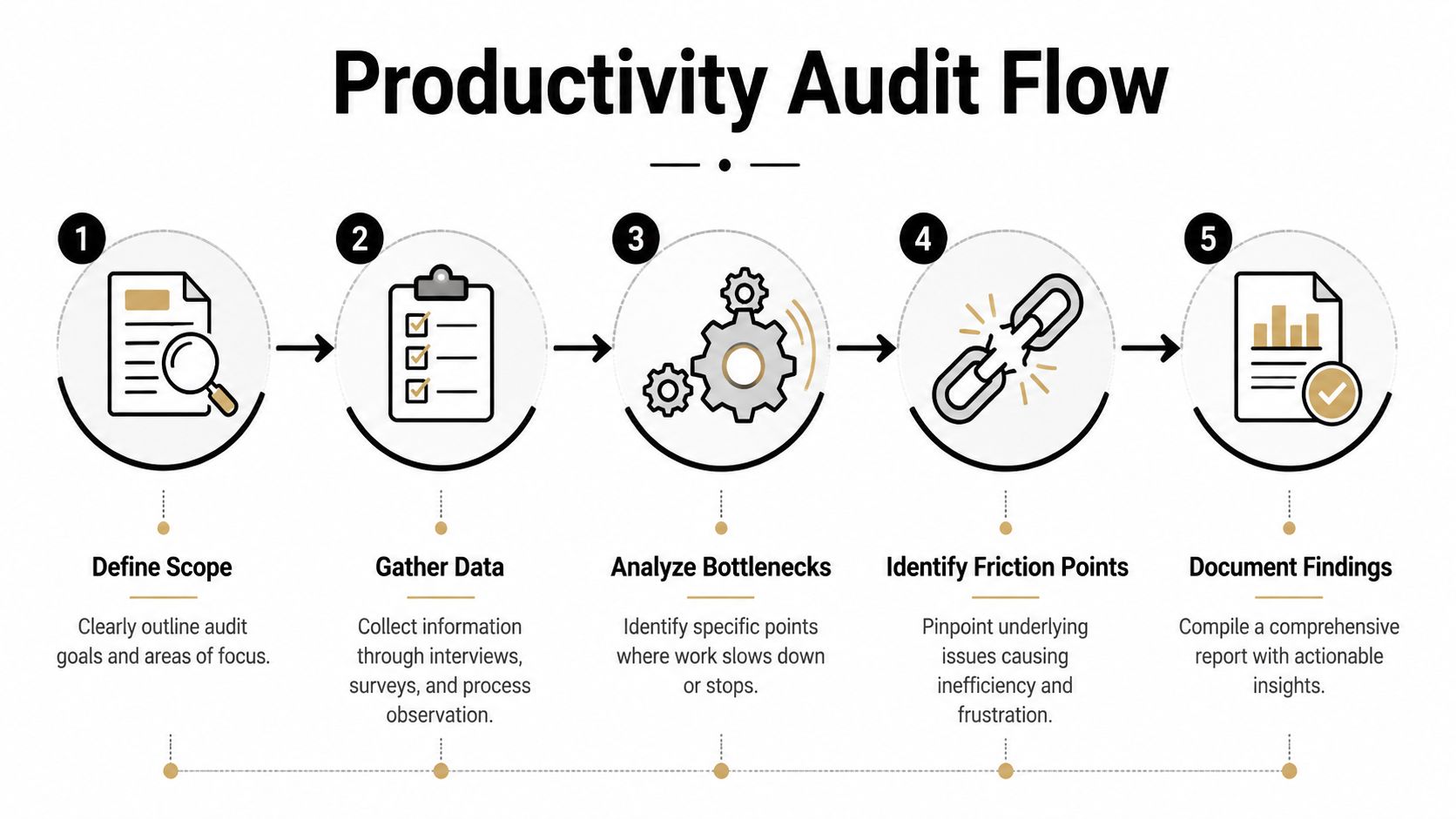
Finding the Friction With a Productivity Audit
A solid productivity audit isn't surveillance. It's diagnosis. Done well, it shows where work stalls, where handoffs fail, and where the team confuses activity with progress.
Research from the National Academies points to team processes, especially shared understanding of goals, roles, and conflict resolution mechanisms, as the primary drivers of effectiveness. The same review also recommends defining productivity metrics tied to business outcomes, collecting baseline data, and segmenting analysis to uncover blockers before making changes, as outlined in this research summary on team effectiveness and process design.
Start with outcomes, not effort
Most PPC teams already track plenty of data. The problem is they often track what's easy, not what's useful. Time in seat isn't a productivity metric. Neither is raw task volume if the tasks don't map to business value.
A better audit starts with a short list of outcome-linked measures such as:
| Audit area | Useful PPC example | What it reveals |
|---|---|---|
| Workflow speed | Campaign launch cycle time | Where approvals or setup stall |
| Quality | Rework on ad copy, tracking, or budget pacing | Which steps create preventable errors |
| Focus | Time lost to repeated interruptions or status chasing | Whether the team can actually do deep work |
| Handoff reliability | Delays between strategy, build, QA, and launch | Where ownership is fuzzy |
Combine numbers with firsthand feedback
The spreadsheet never tells the whole story. You need the team's version too.
Run the audit using both operational data and direct feedback:
- Map a real workflow: Pick one recurring PPC process, like weekly search term optimization or a new campaign launch.
- Track the handoffs: Note where work changes owner, where approvals sit, and where someone has to ask, "Who does this?"
- Review task history: Look at timestamps, revisions, QA issues, and reopen rates.
- Ask the team privately: Use anonymous questions about bottlenecks, duplicate work, and unclear expectations.
- Compare patterns: Match what the system shows against what people feel.
You'll usually find a mismatch. Leadership thinks the problem is capacity. The team says the problem is rework. Both may be partly right, but only one points to the effective fix.
Teams usually don't need a bigger push. They need fewer hidden obstacles.
Audit one painful process before you audit everything
A full org review can bog down fast. Start with the process everyone complains about. In many PPC teams, that's some mix of search term analysis, reporting prep, budget pacing, or campaign QA.
Keep the first pass narrow and concrete. For example, if your account managers spend too much time rebuilding recurring checks, this walkthrough on automating weekly account audits is worth reviewing after you've confirmed the exact manual steps causing the delay.
The audit should end with plain-language findings. Not "communication needs improvement." More like, "Campaign builds wait for naming validation because there is no documented convention and no single approver."
That level of detail is what makes the next move obvious.
Prioritizing Your Fixes With a Simple Framework
A good audit creates a new problem. Suddenly you can see everything that's broken.
That's useful, but it can also scatter the team. If you try to fix intake, reporting, launch QA, ad review, and negative keyword management all at once, you'll spread your best operators across too many projects and get half-finished cleanup everywhere.
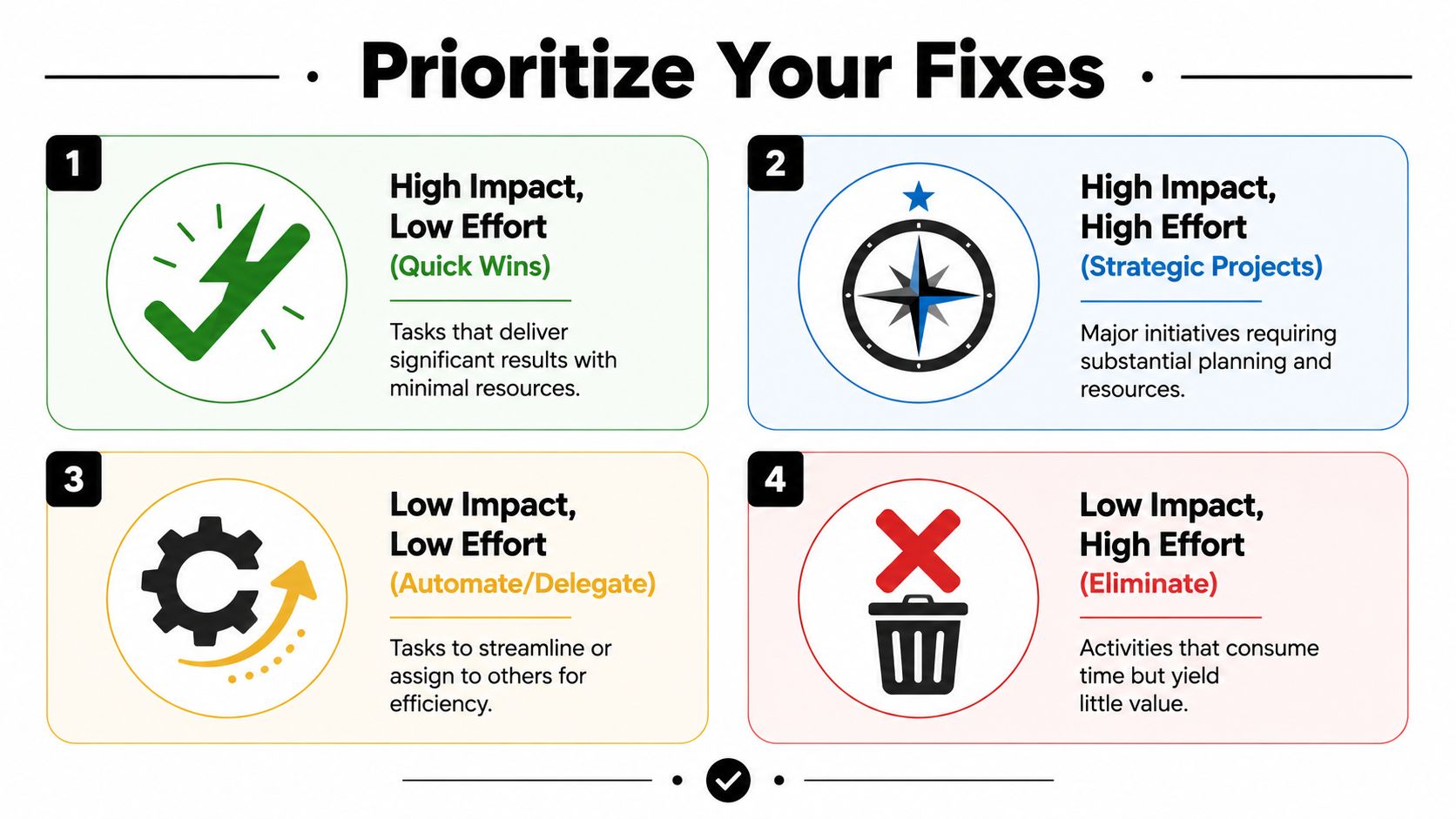
The simplest way through it is an impact versus effort matrix.
Sort fixes before you start them
Put every fix from your audit into one of four buckets:
- High impact, low effort: Standardize naming rules, create a shared negative keyword review checklist, define who approves ad launches.
- High impact, high effort: Rebuild the reporting workflow, redesign campaign intake, align PPC and creative handoffs.
- Low impact, low effort: Clean up a folder structure, archive unused templates, trim notification noise.
- Low impact, high effort: Custom systems nobody asked for, complex dashboards nobody uses, meetings created to monitor another meeting.
This sounds obvious. In practice, teams often chase the high-effort fixes first because they feel strategic. Meanwhile the quick wins that would remove daily friction stay untouched.
Use the four Ds on your task list
Asana recommends the Delete, Defer, Delegate, Diminish mechanic for reducing low-value work, and notes that it can cut wasted hours by up to 30% in inefficient workflows in its guide to reducing work waste with task prioritization.
Here's how that plays out in PPC operations:
- Delete: Kill a recurring internal report that nobody uses to make decisions.
- Defer: Push a dashboard redesign until the current reporting process is stable.
- Delegate: Move first-pass search query tagging to the team member with available bandwidth and a clear SOP.
- Diminish: Cut a bloated weekly sync down to only open issues and decisions.
The best productivity fix is often subtraction, not acceleration.
A practical PPC example
Say your audit uncovers two issues. First, reporting takes too long because each strategist formats client slides differently. Second, nobody maintains a shared negative keyword template for new accounts.
The reporting redesign may have broader upside, but it's also messier. It touches client expectations, templates, account structure, and internal review habits. The negative keyword template is smaller, but it can remove recurring duplication almost immediately.
That doesn't mean you ignore reporting. It means you sequence the work. Grab the quick win, build trust, then tackle the larger repair with more clarity and less team fatigue.
Improving team productivity depends as much on what you refuse to do right now as what you decide to fix.
Streamlining Workflows and Clarifying Roles
Once priorities are set, the hard truth is this. Most PPC productivity problems come back to unclear ownership and undocumented execution. Teams don't stall because they lack hustle. They stall because the work has too many gray areas.
If campaign setup lives with one person in one account, with another person in another account, and nobody can explain the rule, you don't have flexibility. You have fragility.
Role clarity removes rework
Every PPC team needs explicit ownership in a few places:
| Workflow area | Primary owner should be clear on | Common failure when it's vague |
|---|---|---|
| Campaign build | Setup, naming, match type structure, QA handoff | Launch delays and setup errors |
| Search term management | Review cadence, negative decisions, escalation rules | Duplicated work and wasted spend |
| Budget pacing | Monitoring thresholds, client comms, adjustment approvals | Late reactions and avoidable scrambling |
| Reporting | Data source, commentary owner, final review | Last-minute rewrites |
A lot of leaders resist this because they want cross-training. That's fair. But cross-training only works after primary ownership is established. Shared responsibility without named accountability turns into polite confusion.
Document the workflow people actually use
Don't build an idealized SOP that no one follows. Document the actual sequence first. Then improve it.
For PPC teams, that usually means writing down:
- Trigger points: What starts the process?
- Inputs required: Brief, budget, landing page, tracking, audience, creative.
- Decision owner: Who approves or rejects changes?
- Handoff standard: Where work moves next and in what format.
- Definition of done: What must be true before the task is complete?
If you want a strong external perspective on streamlining workflows, The OKR Hub has a useful framework for reducing friction without turning process into bureaucracy.
Clear process should reduce questions, not create more of them.
SMART goals work better than broad directives
Teams underperform when leadership gives them fuzzy marching orders like "improve account performance" or "be more proactive." The SMART framework fixes that by forcing goals to be Specific, Measurable, Achievable, Relevant, and Time-bound, which aligns individual effort with concrete targets, as outlined in Predictive Index's guide to using SMART goals for stronger team productivity.
In PPC, that changes the conversation.
Instead of:
- "Tighten up search term management this quarter."
Use:
- "Document the weekly search term review process for all lead gen accounts, assign one owner per account, and enforce the checklist by the end of the current planning cycle."
Instead of:
- "Make reporting better."
Use:
- "Create one reporting template for recurring client summaries, assign a final reviewer, and require all strategists to use it for future reporting cycles."
That kind of clarity doesn't just help management. It lowers stress for specialists who want to do strong work without guessing what "good" means this week.
Using Automation and Tools the Smart Way
Tools help when they target a proven bottleneck. They hurt when teams use them to avoid making process decisions.
That's especially true in PPC. Automation can't fix a broken review cadence, shaky naming standards, or a team that hasn't decided who owns negatives. It can, however, save serious time once those basics are locked down.

Automate the repetitive layer, not the judgment layer
In paid search, the repetitive layer usually includes:
- Search term cleanup
- Bulk match type assignment
- Negative keyword formatting
- Recurring account checks
- Moving inputs from inboxes into a trackable system
Those are good candidates for automation because they consume time without requiring fresh strategic thinking every single pass.
If your team still relies on email chains to move work into production, it helps to review practical tools for email-to-task workflow so requests don't disappear inside inboxes before they ever reach the media team.
Where AI fits in a working PPC operation
AI is useful when it compresses manual prep, summarization, and repetitive pattern work. ProofHub's roundup reports that AI users save 2.2 hours per week, and it cites one study where AI increased productivity by 66% depending on the work type in its overview of workplace productivity statistics and AI gains.
That matters, but only if the team uses the saved time well. If AI drafts notes faster, yet nobody fixed the reporting approval path, you'll just produce faster chaos.
A better use case in PPC looks like this:
- The team identifies manual search term handling as a bottleneck.
- They standardize how reviews should happen.
- They automate formatting, grouping, or bulk actions.
- Specialists spend the reclaimed time on offer testing, audience insight, and account strategy.
This walkthrough can help if you're mapping that stack of use cases in paid media: PPC workflow automation tools.
A short demo helps when you're evaluating workflow fit in practice:
What smart tooling decisions have in common
They usually pass three tests:
- The process already exists: The team knows the right sequence before trying to speed it up.
- The friction is recurring: This isn't a one-off annoyance. It keeps costing time.
- The output is visible: You can tell whether the tool removed manual effort or just moved it elsewhere.
That's the line a lot of teams miss. Improving team productivity with automation isn't about collecting capabilities. It's about removing a known drag from a live workflow.
Measuring Impact and Building a Culture of Improvement
Most productivity projects fail in the final stretch. Teams make changes, feel a little relief, then move on without checking whether the fix held up under normal workload.
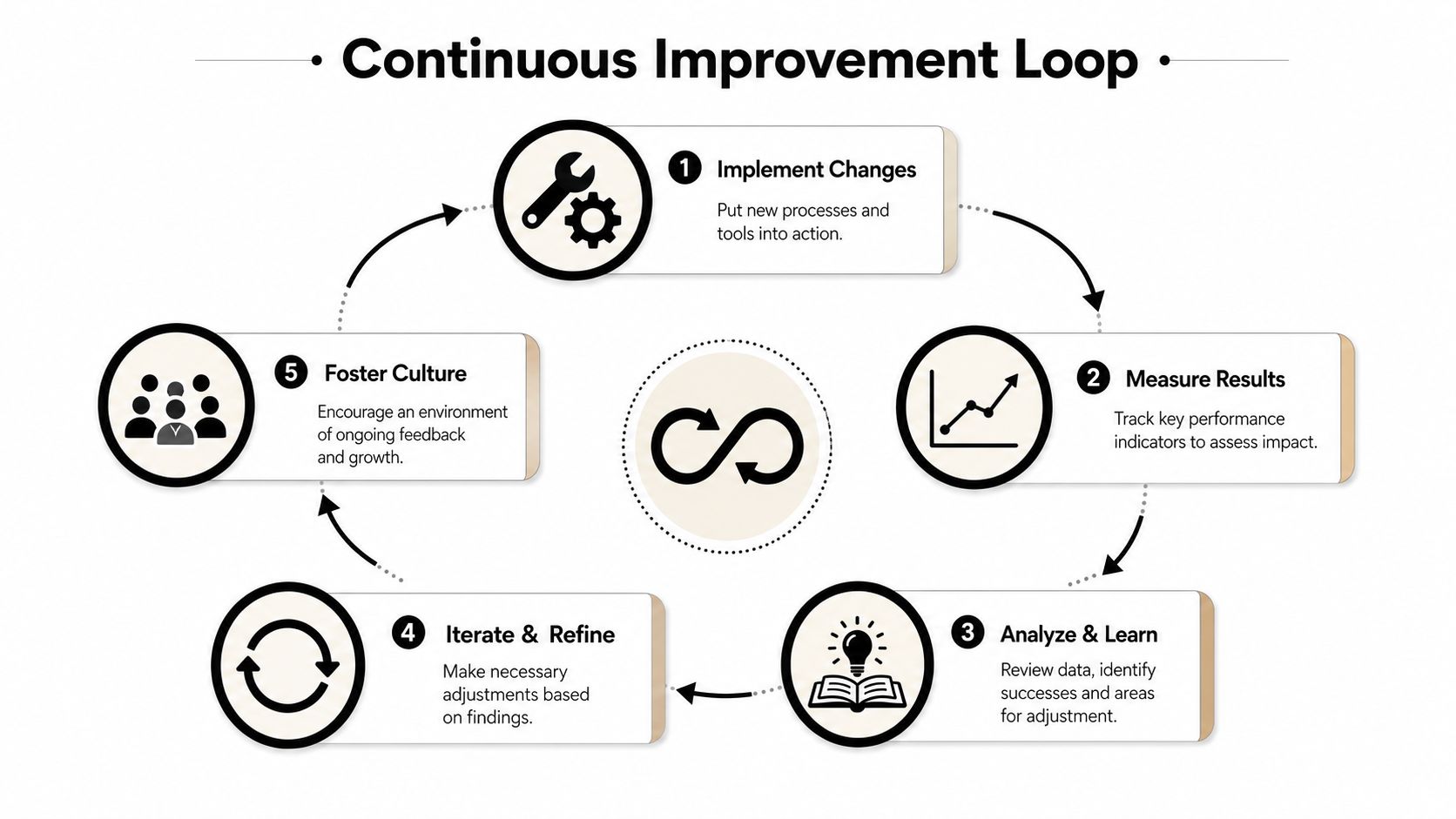
The better approach is to treat productivity like an operating rhythm. Change something. Measure what happened. Keep what worked. Adjust what didn't.
Revisit the same metrics from your audit
Don't invent a new scorecard after the fix. Go back to the baseline measures you used at the start and compare them over time.
For PPC teams, that often means looking at:
- Cycle time: Are launches, reviews, or reporting rounds moving faster?
- Rework: Are fewer deliverables getting kicked back for cleanup?
- Ownership friction: Are fewer tasks sitting in limbo waiting for someone to claim them?
- Team sentiment: Do specialists feel clearer on priorities and less buried in admin?
If you need a practical primer on choosing effective team productivity metrics, TimeTackle has a solid reference point for balancing operational indicators with real work outcomes.
Productivity sticks when engagement is part of the system
This is the part a lot of operations leaders ignore because it sounds soft. It isn't.
ActivTrak's workplace productivity roundup cites Gallup's finding that engaged employees are 18% more productive than disengaged peers, and companies with highly engaged workforces see a 23% increase in profits in its collection of employee engagement and workplace productivity statistics.
That connection shows up clearly in agency and in-house PPC teams. When people understand ownership, have fewer broken workflows, and aren't forced to waste energy on preventable chaos, they do better work. They also spot account risk earlier, collaborate more cleanly, and recover faster when performance dips.
Productivity improves when the team trusts the system it's working inside.
Build a repeatable loop
A sustainable improvement loop usually includes:
- One operational review cadence: Monthly or quarterly is often enough.
- One owner for each process: Someone has to maintain the standard.
- One feedback path for friction: Team members need a clean way to flag recurring pain.
- One rule for experimentation: Test changes small before rolling them across every account.
That's how improving team productivity stops being a rescue mission and becomes a management habit. Less firefighting. Better decisions. Fewer hidden drains on the team.
If your PPC team is stuck doing manual keyword cleanup, repetitive negative list work, and clunky search term formatting, Keywordme is worth a look. It helps Google Ads teams remove repetitive keyword tasks, clean up workflows faster, and spend more time on strategy instead of copy-paste busywork.
.svg)