
Google Ads Keyword List Builder: Your 2026 Guide
Google Ads Keyword List Builder: Your 2026 Guide


You're probably in the same spot most PPC teams hit sooner or later. You open Google Ads, pull ideas from Keyword Planner, export a CSV, dump everything into a spreadsheet, and then lose half your afternoon cleaning garbage terms, fixing match type formatting, and trying to remember which keywords belong in which ad group.
That workflow still “works” in the sense that campaigns can launch. It does not work if you care about speed, control, or avoiding dumb mistakes that cost money. A good Google Ads keyword list builder isn't just a keyword generator. It's the system you use to find terms, reject junk early, organize intent, and push clean lists into campaign structure without creating a mess you have to clean up later.
Beyond Spreadsheets A Modern Keyword Workflow
A common failure point in Google Ads work is easy to spot. A manager exports ideas, cleans them in a spreadsheet, groups them in another tab, adds match types by hand, then uploads a list that still needs fixing inside the account.
That sequence creates drag because keyword building is being handled as a series of separate chores instead of one operating workflow. Expansion, negative filtering, grouping, and match type assignment affect each other. Split them apart, and quality drops while review time goes up.
Google's keyword planning flow already points toward a tighter process: collect ideas, save them to a plan, assign match types, and place them into ad groups. The practical takeaway is simple. A keyword list only has value if it is clean enough to launch and structured enough to control spend.
Why the old method breaks down
The spreadsheet-first method slows down at the exact moment judgment matters.
A weak term gets exported because no one wants to stop and filter yet. Duplicates survive because the grouping pass happens later. Match types get added in bulk after intent has gone stale in the reviewer's head. By the time the list is ready, the team has spent more time formatting than deciding which searches deserve budget.
I see the same mistake from junior PPC managers all the time. They treat cleanup as a downstream task. In practice, delayed cleanup is how junk keywords earn a spot in the account.
Operational details add friction too. Google Ads has formatting constraints for uploaded keywords, so manual cleanup is not just tedious. It creates more opportunities for avoidable errors. As noted earlier, those limits matter once lists get large.
Practical rule: If keyword expansion, negatives, grouping, and match type formatting happen in separate tools, review quality usually falls before launch speed improves.
What a modern workflow looks like
A stronger process runs in one continuous pass. Add a term, judge intent, block obvious waste, place it in the right cluster, then assign the right match type while the context is still fresh.
That changes how decisions get made:
- Expansion happens with intent review: New ideas are useful only if they fit the account's actual buying queries.
- Negative filtering starts early: Excluding research terms, jobs, freebie searches, and irrelevant modifiers before export saves more time than cleaning later.
- Grouping happens during selection: Terms sort faster when the offer, landing page, and query intent are still top of mind.
- Match types follow control, not habit: Exact for precision, phrase for qualified coverage, broad only where signals and budgets can support it.
This integrated workflow is a substantial upgrade. The old build-then-clean method treats expansion first and judgment later. Tools like Keywordme combine those decisions in real time, which cuts down on duplicate handling, manual bracket work, and the usual tab-hopping that turns a one-hour task into a half-day job.
If your current process still depends on CSV cleanup, this breakdown of a Google Ads spreadsheet alternative is a useful reference. For teams comparing research tools before they settle on a workflow, SubmitMySaas-2's list of alternatives is also a practical starting point.
Finding Your Goldmine Sourcing High-Intent Keywords
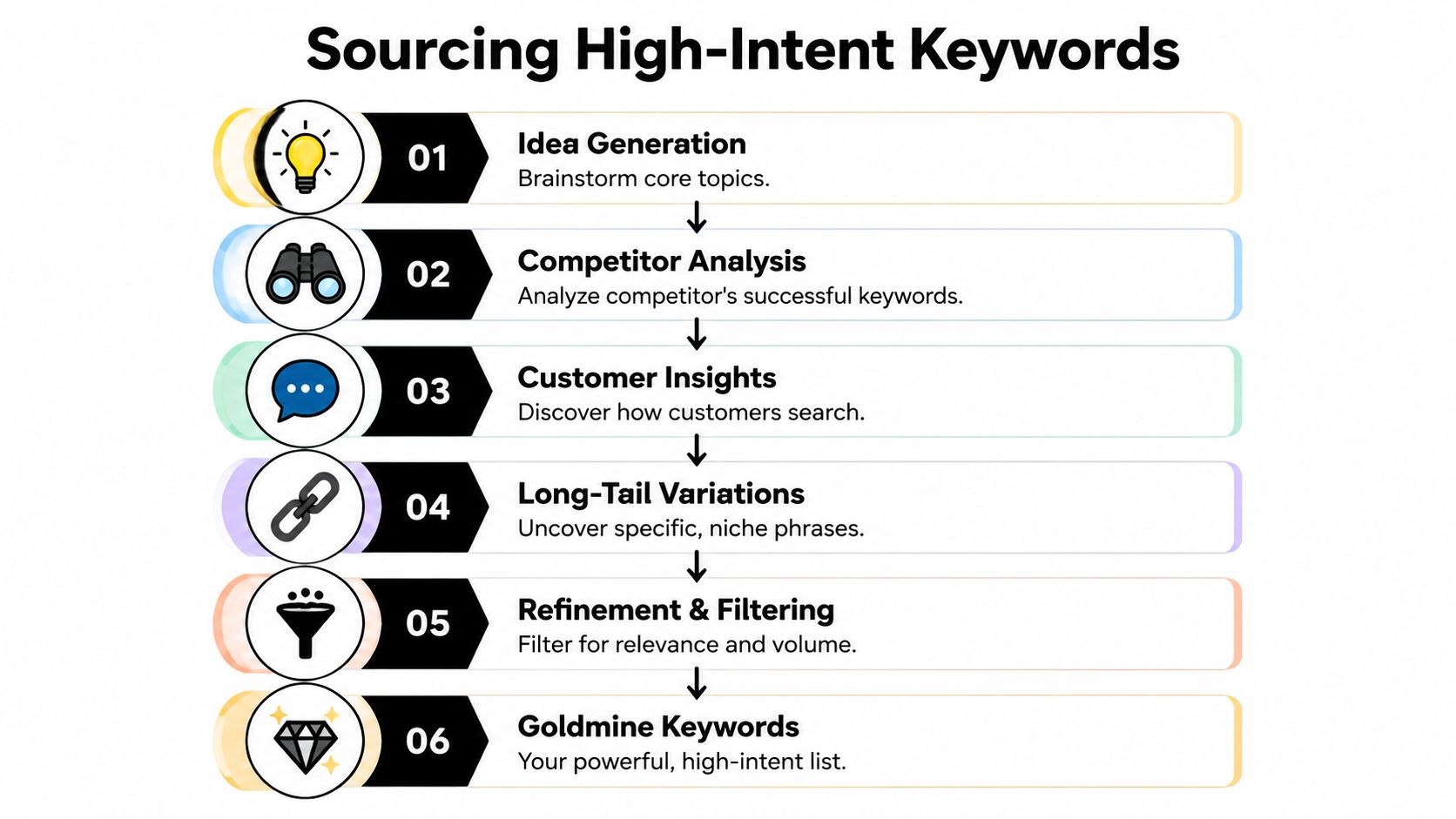
A keyword list gets expensive fast when the source material is weak. If the starting point is a few obvious seed terms from Google autocomplete, the account usually fills up with broad, crowded phrases and misses the searches that convert.
Start with a controlled seed list
A smaller, tighter seed list produces better expansion than dumping in every term the business can think of. Earlier in the article, Google's keyword planning documentation was cited for a practical planning flow and a disciplined keyword range. The useful takeaway is simple. Start narrow enough to judge intent properly, then expand from terms that already look commercially sound.
Good seed terms usually come from four places:
- Core products or services: The phrases a ready-to-buy customer would type without marketing jargon.
- Problem-driven searches: Terms that describe the pain point, symptom, or job to be done.
- Comparison language: Alternatives, competitors, replacements, and use-case-specific searches.
- Geographic modifiers: City, region, and “near me” variants when location changes buying intent.
The mistake is not starting too small. The mistake is starting too loose.
Mine the language customers already use
A common mistake is to chase research tools before checking the words customers already hand you in sales and support conversations. That data is usually cleaner than a brainstorming doc and more commercial than a generic keyword tool export.
Look at what prospects say when they are close to a decision. Sales call notes show urgency and buying criteria. Support tickets surface product terms and setup language. Demo forms and chat transcripts reveal how buyers describe their problem before your team translates it into internal labels.
Search term reports matter too, especially in active accounts. They show the phrasing real users chose, not the phrasing the marketing team guessed.
I trust customer language more than workshop language almost every time.
Look sideways at competitors without copying them
Competitor research is useful when it answers one question. What demand are they willing to build dedicated pages around?
Review headline copy, navigation labels, pricing pages, comparison pages, and industry-specific landing pages. That shows which topics they believe deserve budget and message control. Then pressure-test those ideas against your own offer. Some themes will fit. Others will bring clicks that look relevant on paper and go nowhere after the landing page.
If you want extra discovery tools beyond the usual browser extensions, SubmitMySaas-2's list of alternatives is a helpful starting point.
For a more PPC-specific method, this guide to finding high-intent keywords for PPC adds useful examples of how to separate research traffic from buying traffic.
Judge intent while you source, not after
The old workflow wastes time. Teams build a huge list first, then open another tab to clean it later. A better process is to score intent as each term comes in, while the context is still clear. That is the primary advantage of an integrated workflow in tools like Keywordme. Expansion, filtering, and decision-making happen in one pass instead of three.
Use a simple intent screen:
| Intent signal | What it usually means | What to do |
|---|---|---|
| Strong commercial phrasing | User is comparing options or trying to buy | Keep and expand around it |
| Informational wording | User is learning, not necessarily shopping | Keep only if the campaign supports that stage |
| Ambiguous short head terms | Volume is high, intent is mixed | Isolate for tighter review |
| Irrelevant modifiers | Query falls outside the offer | Exclude immediately |
That last column matters. If a term already looks weak during sourcing, it does not deserve a second round of handling later. That is how keyword builders turn into keyword hoarders.
Cleaning Your List Before You Spend A Dime
Monday morning. The campaign is ready, the client wants it live by noon, and the keyword list still has obvious junk in it. Terms like "free," "jobs," and "how to" are sitting beside real buying queries. If that list goes straight into Google Ads, the first clicks teach an expensive lesson.
This step should be treated as budget protection, not simple cleanup. I have seen too many accounts lose their first week of spend because someone planned to sort negatives out after launch. The old build-then-clean method creates extra work twice. First you upload weak terms. Then you spend time explaining why the account matched to traffic nobody wanted.

Reactive cleanup costs money and time
No sourced statistic is needed to make the point. PPC managers see the pattern constantly. A rushed launch with a messy keyword list produces search terms reports full of research traffic, wrong-location queries, job seekers, support requests, and unrelated products. By the time the negatives are added, budget has already been spent and performance data is harder to read.
An integrated workflow fixes that. Keyword expansion, rejection, negative filtering, and early match type decisions should happen in the same pass. Tools like Keywordme help because they reduce the handoff between tabs, sheets, and later cleanup rounds. That is the difference between a live list and a dumping ground.
What to cut before upload
A clean list is not always smaller. It is clearer.
Remove or isolate keywords that create predictable waste:
- Low-intent modifiers: terms like how, tutorial, ideas, examples, or definition when the campaign is built for leads or sales
- Wrong audience signals: jobs, salary, course, certification, DIY, template, free
- Offer mismatches: products, services, brands, or locations you do not sell
- Duplicate intent: near-identical phrases that do not need separate treatment yet
- Overlong or awkward queries: phrases that are unlikely to map cleanly to ad copy, landing pages, or useful matching behavior
A lot of junior PPC work gets wasted here. Someone exports hundreds of suggestions, dumps them into a spreadsheet, sorts alphabetically, and starts deleting row by row. That is slow. It also hides patterns. If ten bad keywords share the same modifier, the right move is not deleting ten rows. The right move is adding one negative rule and screening the rest of the list against it.
Build negative logic while you review
Every rejected term should produce a decision, not just a deletion.
Use a simple triage process:
- Review the candidate keyword
- Mark it keep, hold, or reject
- If rejected, identify the bad modifier, audience cue, or intent pattern
- Add that pattern to your negative list immediately
- Recheck the remaining keywords against the same rule
That is faster than cleaning everything at the end. It also produces a smarter account structure before anything is uploaded.
For example, if "crm software training" is out because the campaign sells CRM software, not courses, "training" is probably a negative candidate across the whole build. If "plumber apprenticeship" shows up in a local services campaign, "apprenticeship" and "jobs" belong on the negative list before launch, not after the first wasted clicks.
Volume is a weak reason to keep a keyword
Advertisers new to search often keep shaky terms because the search volume looks attractive. That usually backfires. More queries do not mean more opportunity if the intent is mixed and the ads cannot qualify the click.
The better question is whether the term deserves traffic now, under this campaign, with this landing page. If the answer is unclear, park it for review or place it in a controlled testing bucket. Do not let it sit beside proven commercial terms as if both deserve the same treatment.
This is also where match type thinking starts, even before ad groups are finalized. If you are unsure how broad, phrase, and exact should shape your list, this guide to Google Ads match types and when to use each is the right reference point.
Use this table during review:
| If a keyword is... | Keep | Review later | Reject |
|---|---|---|---|
| Directly tied to your offer and landing page | Yes | ||
| Commercial, but broad enough to need tighter control | Yes | ||
| Informational with weak purchase intent | Yes | ||
| Irrelevant to the service, product, or audience | Yes | ||
| A repeat source of bad modifiers or wrong intent | Reject and add negative logic |
That habit changes the build quality fast. The list gets smaller in the right places, the negative list gets stronger, and the campaign starts with cleaner traffic instead of paying to discover obvious mistakes.
Structuring Ad Groups And Assigning Match Types
A clean keyword list can still produce messy traffic if the structure is loose. This is usually where the old workflow starts breaking down. Teams expand keywords first, then try to sort intent later in a spreadsheet, then assign match types in a separate pass. By the time the campaign is ready, half the list needs to be reconsidered.
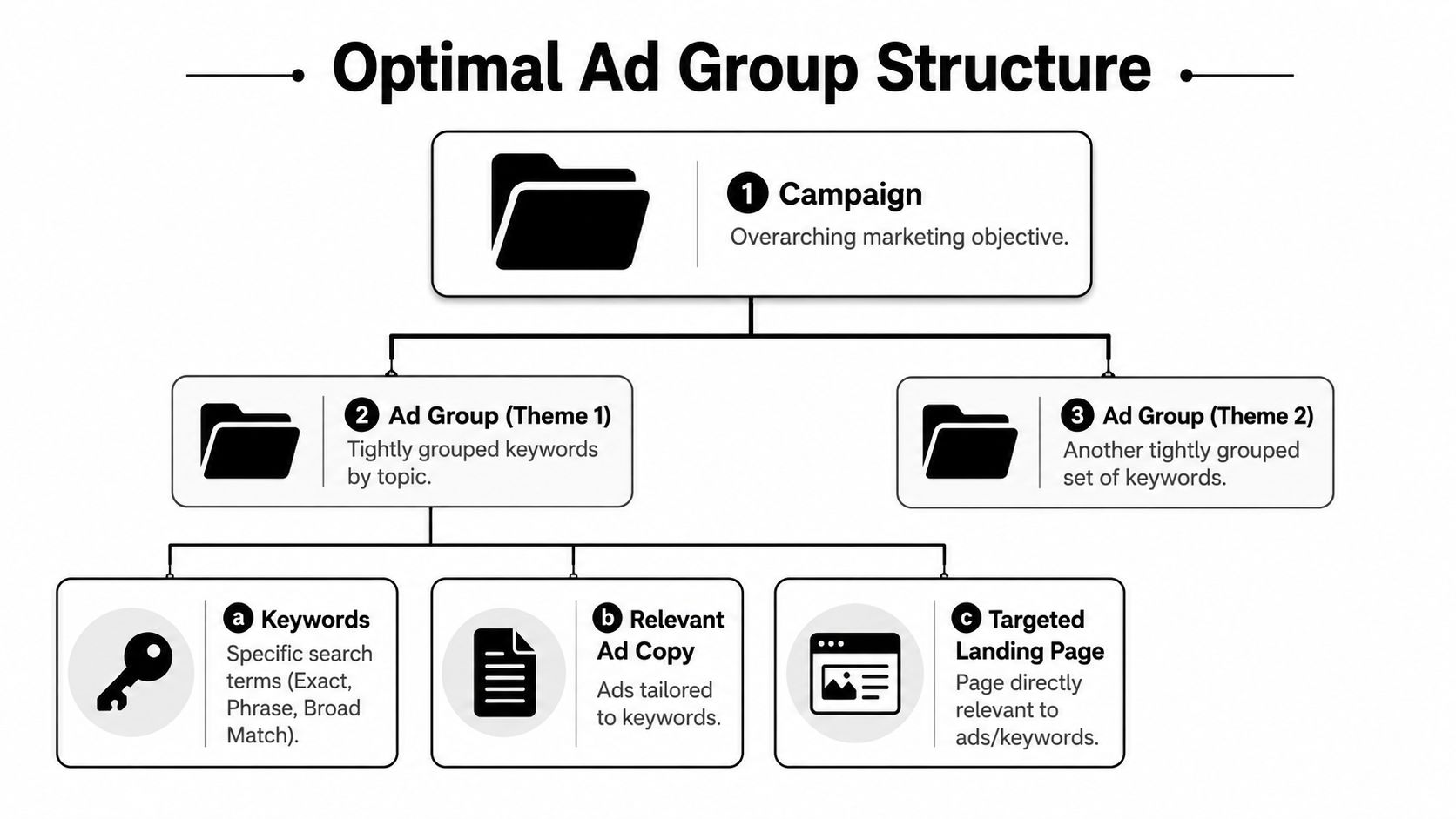
A better build process handles grouping and match type decisions at the same time you review the keyword itself. If a term belongs under a different service, route it there immediately. If it needs tighter control, assign phrase or exact immediately. If it only makes sense as a discovery term, keep it in a broad testing group with clear negative coverage. That integrated approach is faster, and it prevents the common spreadsheet problem where one keyword gets copied into three ad groups with three different levels of intent.
Group by intent, offer, and landing page fit
Ad groups should reflect how a searcher is evaluating your offer. Convenience-based grouping creates weak ad copy and mixed search term reports. A junior PPC manager will often group by obvious word overlap. An experienced one groups by what the click should lead to.
A practical structure usually separates:
- Core service themes: One cluster per service line or product category
- Commercial modifiers: Pricing, quote, buy, near me, emergency, comparison
- Audience language: B2B, consumer, enterprise, local, branded
- Landing page destination: Different page usually means different ad group
- Testing buckets: Broader or less proven terms kept separate from proven revenue drivers
This is why extreme granularity is not always the right answer. Single-keyword ad groups can help in a narrow set of cases, but they also create maintenance overhead fast. Tight thematic groups usually give better control without turning the account into admin work.
Assign match types during review, not after cleanup
Match type assignment should follow confidence level and budget tolerance. If the term is proven, tightly aligned to the offer, and likely to convert without much interpretation, exact makes sense. If the theme is strong but real searches will vary, phrase usually gives enough reach without giving up too much control. Broad belongs in controlled discovery, not as a default setting on an unvetted list.
Manual formatting is where teams waste hours for no strategic gain. Adding brackets and quotes across hundreds of rows is slow, easy to mess up, and detached from the decision that is key, which is how much freedom you want to give Google on that query theme.
Use this working rule set:
| Match type | Best use | Main trade-off |
|---|---|---|
| Exact | Proven, high-intent terms tied closely to the offer | Lower reach |
| Phrase | Strong commercial themes with useful variation | Requires search term review |
| Broad | Discovery inside tightly grouped ad sets with negatives in place | More drift and more monitoring |
If you need a sharper framework, this guide on Google Ads match types and when to use each covers the decision logic in more detail.
One mistake shows up constantly. Advertisers put broad, phrase, and exact versions of loosely related keywords into the same ad group, then wonder why reporting gets muddy and ad relevance slips. Keep match types aligned to intent clusters. Keep experimental coverage separate from core revenue terms. That makes bids, search term review, and negative expansion much easier to manage.
The goal is simple. Every keyword should enter the account with a clear home, a clear level of control, and a clear expectation for what kind of query it is allowed to match.
Automate Your Workflow With The Keywordme Builder
At some point, every serious advertiser hits the same conclusion. The work itself isn't hard. The manual handling is what breaks the process.
What manual work gets wrong
The standard stack usually looks like this:
- Pull ideas in Keyword Planner
- Export them
- Clean them in Sheets or Excel
- Sort by topic
- Add negatives separately
- Format phrase and exact manually
- Recheck for upload issues
- Import and fix whatever breaks
Nothing there is advanced. It's just fragmented. And fragmentation creates errors.
Google's own Keyword Planner is built to help advertisers discover keywords, save them, and assign match types. But the same documentation also makes the practical constraints clear. Keywords should stay within 80 characters and 10 words, as shown in Google Ads Help. Once lists get large, those constraints make cleanup and formatting much more operational than strategic.
What an integrated builder changes
A proper Google Ads keyword list builder collapses those disconnected tasks into one working surface. That means you can review search terms, keep the high-intent queries, reject junk, build negatives from those rejections, and apply match types without bouncing between tabs.
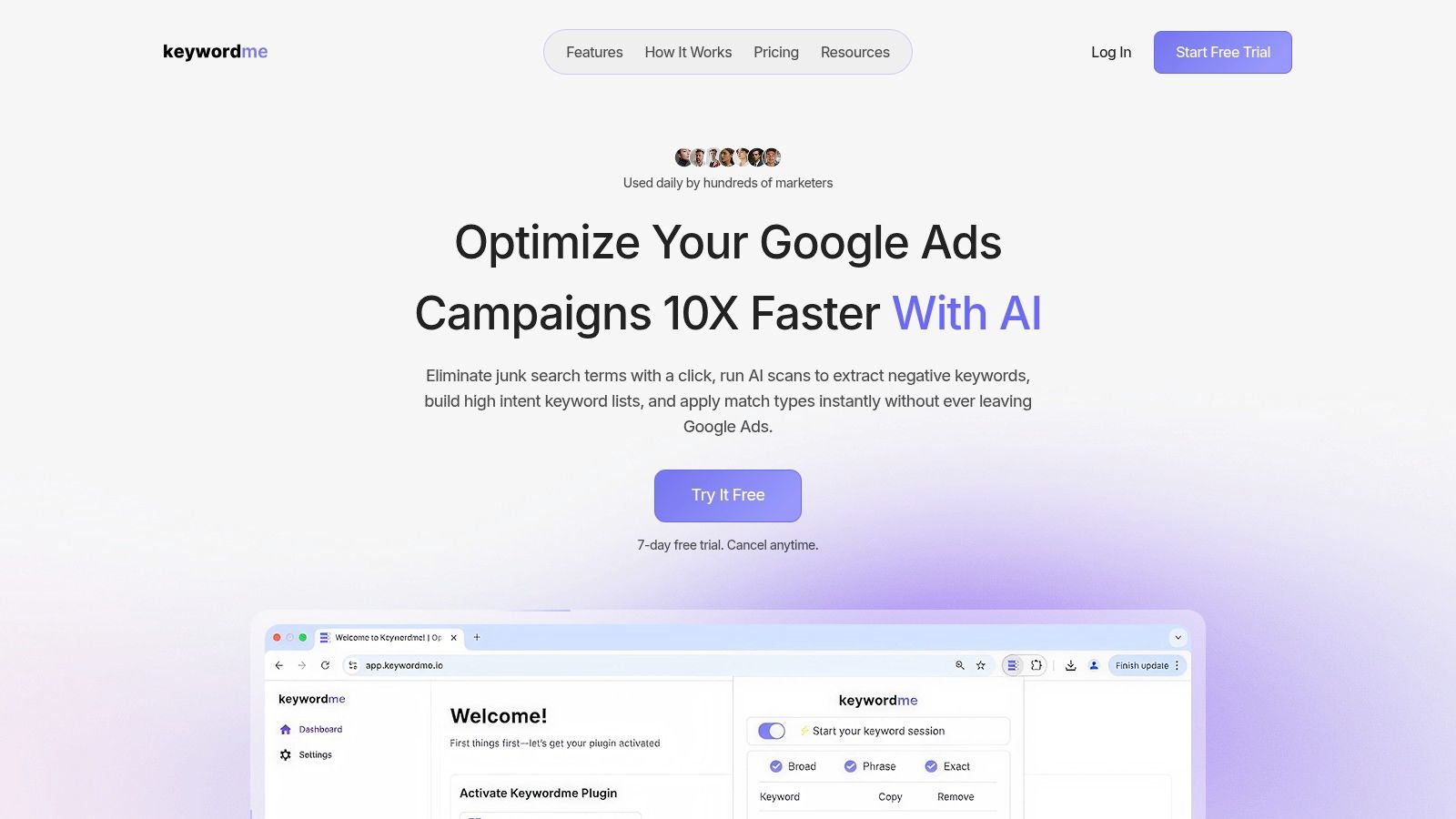
One option is Keywordme, which is designed to work inside a Google Ads workflow for keyword research, search term cleanup, bulk match type assignment, and negative keyword handling. That's useful because it treats keyword expansion and filtering as one continuous process instead of two separate chores.
Here's what that integrated workflow looks like in practice:
- Live review of search terms: You're not guessing from static exports. You're working from actual query data.
- One-pass acceptance and rejection: Good terms become candidates for ad groups. Bad terms become negative logic.
- Bulk match type assignment: Phrase, exact, and broad can be applied without hand-formatting every row.
- Cleaner ad group expansion: New keywords move into existing themes or new clusters without spreadsheet reshuffling.
That changes the speed of account maintenance. More importantly, it changes the quality of your decisions because the review happens while context is still visible.
Why this matters for day-to-day PPC work
Most wasted PPC time comes from administrative drag, not hard thinking. The strategic decisions usually take minutes. The copy-paste work takes the rest of the hour.
This walkthrough shows the kind of workflow shift that matters in practice:
When your process is integrated, a search term review session becomes more than maintenance. It becomes campaign building. You're expanding the account and tightening it at the same time.
The fastest PPC teams don't skip steps. They stop repeating the same step in three different places.
Old workflow versus integrated workflow
| Task | Old build-then-clean process | Integrated workflow |
|---|---|---|
| Keyword discovery | Separate from filtering | Happens alongside filtering |
| Negative keyword creation | Usually after launch | Built during review |
| Match type assignment | Manual formatting | Bulk action |
| Ad group expansion | Spreadsheet sorting | Immediate placement |
| Error handling | Found late, often during import | Reduced earlier in the process |
That's a key advantage. Fewer handoffs. Fewer formatting mistakes. Fewer irrelevant terms slipping through because cleanup got delayed.
Exporting Importing And What Comes Next
Once the list is clean and structured, the last part should be boring. If exporting and importing feels dramatic, the list probably wasn't ready.
Keep the handoff clean
Before you import anything into Google Ads or Google Ads Editor, do a final pass on a few basics:
- Check naming consistency: Campaign and ad group labels should be obvious to the next person touching the account.
- Verify match types visually: Especially if the list passed through multiple tools.
- Scan for duplicates: Duplicate keywords create confusion fast, even when the platform flags some of them.
- Confirm exclusions: Negative keyword themes should already reflect the rejected terms from your build process.
If you're using Google Ads Editor for bulk changes, stage the import there first when the account is large. It gives you one more chance to catch structure issues before they hit production.
Don't treat the list as finished
A keyword list is never done. It's just ready for the next round of decisions.
After import, keep watching the account for three things:
- Search term drift: Broad and phrase variants can reveal both winners and junk.
- Ad group leakage: If a theme starts pulling mismatched queries, your grouping is too loose.
- Landing page mismatch: Good keywords still fail when the destination page doesn't carry the same intent.
The strongest workflow is cyclical. Search terms feed new keyword candidates. Rejections feed negatives. Tight themes become cleaner ad groups. Then the account gives you the next batch of evidence.
That's how a Google Ads keyword list builder should function in real life. Not as a one-time research tool, but as the operating system for continuous keyword control.
If your current process still depends on exports, spreadsheets, and manual bracket work, Keywordme is worth a look. It gives PPC teams a cleaner way to build keyword lists from search terms, apply match types in bulk, and turn rejected queries into negative keyword logic without bouncing between tools.
.svg)