
Facebook Ads Targeting Options Explained for 2026
Facebook Ads Targeting Options Explained for 2026


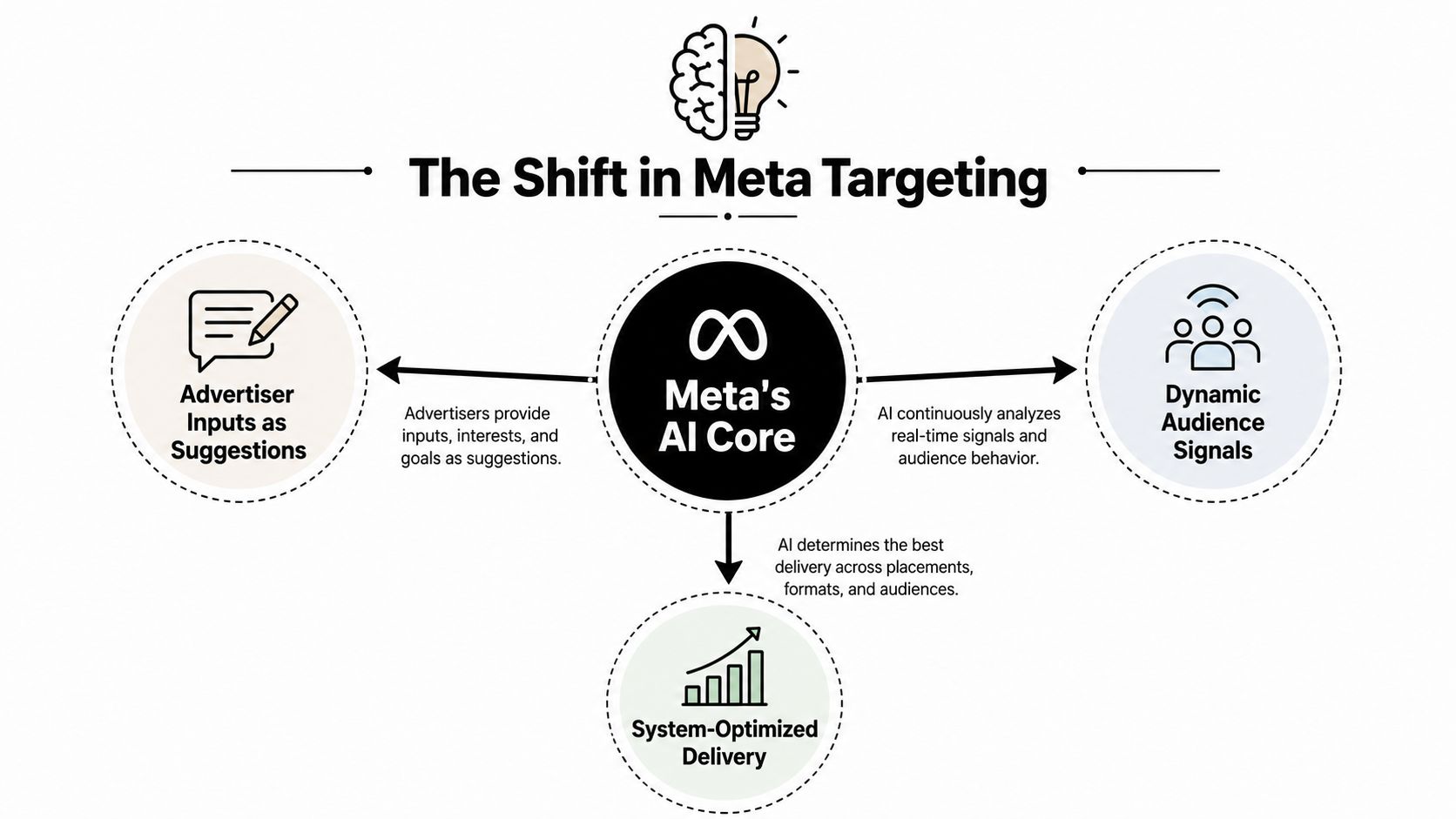
Most advice about Facebook ads targeting options is stuck in the past. The familiar playbook says to stack interests, layer behaviors, exclude narrow groups, and keep tightening the audience until it looks like a perfect customer profile. That approach made sense when advertisers could treat every setting as a firm boundary. It's a poor description of Meta's current delivery system.
Meta still gives advertisers manual controls for age, gender, location, demographics, interests, and behaviors, but Advantage+ audience can use those inputs as suggestions while finding people more likely to respond. Detailed targeting expansion applies to the interest and behavior layer, while age, gender, location, language, and exclusions continue to constrain delivery according to Meta's audience expansion guidance.
The practical shift is simple: you're no longer building a locked room and waiting for Meta to find someone inside it. You're giving the system useful signals, then deciding which boundaries matter.
Why Facebook Ads Targeting Is Not What Most Guides Say It Is
The most common mistake is treating Facebook targeting like a spreadsheet exercise. Marketers build a profile, combine several interests, add behaviors, remove people who seem irrelevant, and assume the resulting audience is more qualified. In today's Meta environment, that confidence can be misplaced. Many inputs now guide delivery rather than control it, particularly inside Advantage+ audience campaigns.
Meta's current framework still rests on three foundational audience approaches:
- Core Audiences use Meta's available demographic, interest, and behavior signals.
- Custom Audiences use first-party or engagement data connected to your business.
- Lookalike Audiences help Meta find new people who resemble a source audience.
Meta describes these three approaches in its official ad targeting documentation. That same documentation separates the controls advertisers can still select manually from Advantage+ audience, which can optimize toward people likely to respond.
The old comfort zone is getting smaller
Interest stacking feels precise because the interface makes it visible. You can see the categories, combine them, and watch the estimated audience change. But a smaller audience isn't automatically a better audience. A narrow collection of inferred interests may give the delivery system less room to identify people who convert through signals you can't see in Ads Manager.
Meta has also consolidated detailed targeting options. Industry coverage reported that ad sets using unavailable detailed targeting options would stop delivering from January 15, 2026, following earlier consolidation, and reported a 22.6% improvement in median cost per conversion when detailed targeting exclusions were removed. Those findings are covered in MediaPost's reporting on Meta's targeting consolidation.
That doesn't mean manual targeting is useless. It means the job has changed. Use Core controls to establish sensible eligibility, use Custom Audiences when you own meaningful data, and use Lookalikes when your source audience carries a clear business signal.
Practical rule: Trust automated delivery where it has reliable conversion feedback. Keep control where a mistake would waste budget, violate policy, or reach the wrong location.
Core Audiences and the Targeting Layers You Still Control
Core Audiences are the part of Ads Manager many users recognize. You choose a location, define basic demographics, and optionally add detailed targeting based on demographics, interests, and behaviors. The important distinction is that these layers don't all behave the same way once expansion or Advantage+ delivery is active.
Think of location, age, gender, and language as guardrails. Think of interests and behaviors as suggestions about who might respond. Meta's detailed targeting expansion can broaden the interest and behavior layer, but it doesn't override age, gender, location, language, or exclusions, as explained in Meta's detailed targeting expansion documentation.
What each layer means at delivery time
Geography is usually the most important Core control for local campaigns. A plumbing company serving one metro area shouldn't rely on an interest such as home improvement to define its market. The location should do that work.
Age and gender can remain useful when the product has a clear demographic boundary, though advertisers should avoid using them just because an old persona document says to. Language helps in multilingual regions when the ad and landing page are written for a distinct language group.
Demographics can include education, relationship status, parental status, and work-related attributes. These signals may help with positioning, but they aren't a substitute for conversion data. Job titles, for example, can be incomplete or interpreted rather than verified.
Interests and behaviors are best treated as weighted hints. Selecting several interests doesn't create a guaranteed chain of conditions, especially when Meta has permission to expand delivery. An interest is closer to a recommendation from a shop assistant than a lock on the door.
A useful audience segmentation glossary can help teams keep the difference between audience categories, signals, and hard eligibility rules clear.
| Layer | What It Controls | Still Useful In 2026 |
|---|---|---|
| Location | Where delivery can occur | Essential for local and regional offers |
| Age and gender | Basic demographic eligibility | Useful when tied to product or policy requirements |
| Language | Language-based delivery constraints | Helpful in multilingual markets |
| Demographics | Profile and inferred audience signals | Useful for testing, not blind precision |
| Interests | Topic and affinity suggestions | Useful as a seed, weaker as a rigid fence |
| Behaviors | Activity and commerce-related signals | Useful when paired with strong creative and conversion data |
| Exclusions | Certain audience-level restrictions | Use Custom Audience exclusions for customer suppression |
The rule of thumb is straightforward: keep Core inputs minimal unless you have a clear reason to constrain them. Local services need accurate geography. Regulated or highly specific offers need careful eligibility. Everyone else should test whether a broad seed gives Meta more useful room to work.
Custom Audiences Built From Your Own Data
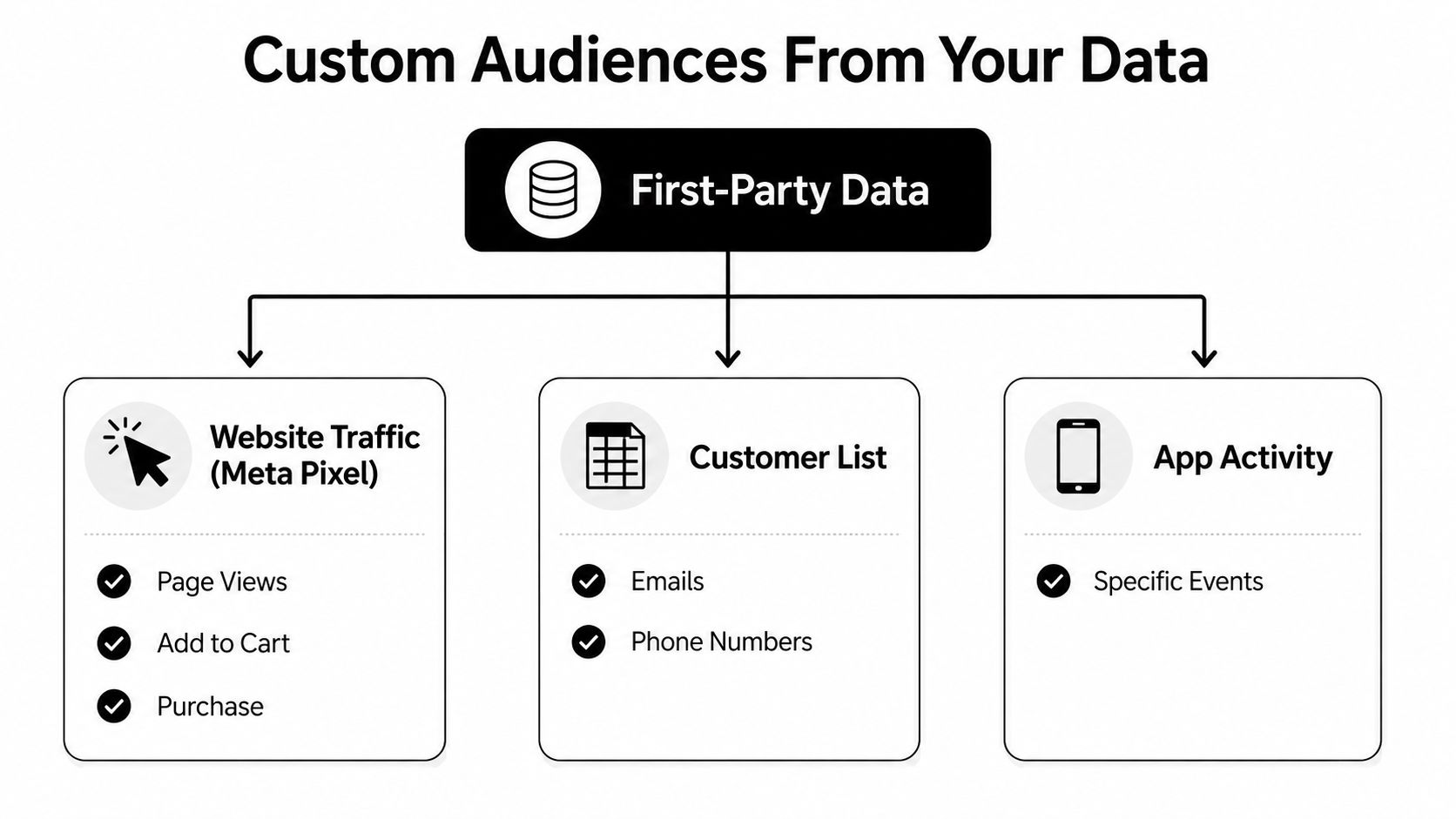
Custom Audiences become valuable when your business has evidence of intent rather than a theory about identity. A website visitor has interacted with your offer. A lead form responder has shown enough interest to open or submit a form. A past purchaser tells you something different from a casual video viewer. Treating all of them as one audience throws away useful context.
An ecommerce brand usually starts with website activity tracked through the Meta Pixel. Website visitors can be organized around events such as ViewContent, AddToCart, and Purchase. Someone who viewed a product but didn't add it to the cart needs a different message from someone who bought recently.
Match the source to the business stage
A CRM upload gives an established company a way to reach existing customers, dormant accounts, or qualified leads. That makes it useful for retention and win-back work, provided the list is handled lawfully and kept current. A new business without much customer history may get more value from website visitors and engagement activity while it builds its database.
Meta also supports Custom Audiences from app activity, catalog interactions, video viewers, lead form responders, and other engagement sources. Its documentation describes an exclusion-only Custom Audience that can be used only to prevent delivery to selected people, which is often the cleanest way to suppress recent purchasers from acquisition campaigns. See Meta's Custom Audience source options for the available categories.
Consider three practical audience stories:
- A prospect watches a meaningful portion of a product video but doesn't visit the site. That person belongs in a warm engagement audience.
- A visitor views a service page and opens a lead form. That person deserves a stronger follow-up than someone who only saw a post.
- A customer appears in the CRM after purchase. That record can support retention, cross-sell, or suppression from an acquisition campaign.
Small lists can struggle to deliver consistently, especially when you narrow them further. Larger first-party pools support richer segmentation, but the principle stays the same: don't force a tiny audience into a precise campaign structure. Give Meta enough eligible people and let the system find the responders within that pool.
For a practical explanation of how remarketing lists fit into a broader paid media setup, see this guide to remarketing lists.
Lookalike Audiences and When They Outperform Interests
A Lookalike Audience starts with a source, usually a Custom Audience, and asks Meta to find new people who resemble it. The source matters more than the label. A list of recent purchasers contains a clearer commercial signal than a broad collection of page engagers, while repeat buyers may reveal stronger patterns than one-time visitors.
The familiar percentage choices represent a trade-off between similarity and reach. A 1% Lookalike stays closest to the source profile. A 5% Lookalike gives the system more room to find prospects, with a looser resemblance. A 10% Lookalike reaches more broadly and may be useful when the product has wide appeal, but it generally gives up precision.
| Lookalike Size | Audience Reach | Best Seed Source | Expected CPA vs Interests |
|---|---|---|---|
| 1% | Most concentrated around the source | Recent purchasers or repeat buyers | Often the strongest candidate for a controlled test |
| 5% | Broader discovery pool | Qualified leads or high-intent site events | May trade precision for additional volume |
| 10% | Broadest discovery approach | Large, healthy conversion or engagement sources | Useful when the offer can support wider prospecting |
The popular claim that a Lookalike always beats interests is too simple. What often happens is more specific: a 1% Lookalike built from high-value purchasers can give Meta a better signal than a hand-stacked interest audience. The Lookalike is based on people who completed a valuable business action. The interest stack is based on inferred affinities, which may not map cleanly to buying intent.
Choose seeds for signal, not vanity
Strong candidates include recent converters, repeat buyers, qualified lead form responders, and engaged video viewers. Avoid building a Lookalike from a source that mixes customers, employees, unqualified leads, and casual visitors. The algorithm can only learn from the pattern you give it.
Don't keep layering Lookalikes on top of Lookalikes. That adds another inference step and can blur the original commercial signal. If the source contains fewer than 1,000 quality events, the better move is usually to improve the seed rather than launch another similarity model.
For app-focused acquisition teams, the same principle applies when audience strategy sits alongside paid app growth. Keywordme's Facebook app PPC guide provides useful context for connecting acquisition intent with broader paid campaign management.
Advantage+ and Detailed Targeting Expansion Explained
Many older Facebook ads guides treat interests and exclusions as fixed walls. Meta's current Advantage+ system treats several of them more like starting suggestions. You enter audience signals, and Meta can search beyond them when its system predicts a stronger chance of achieving the campaign objective.
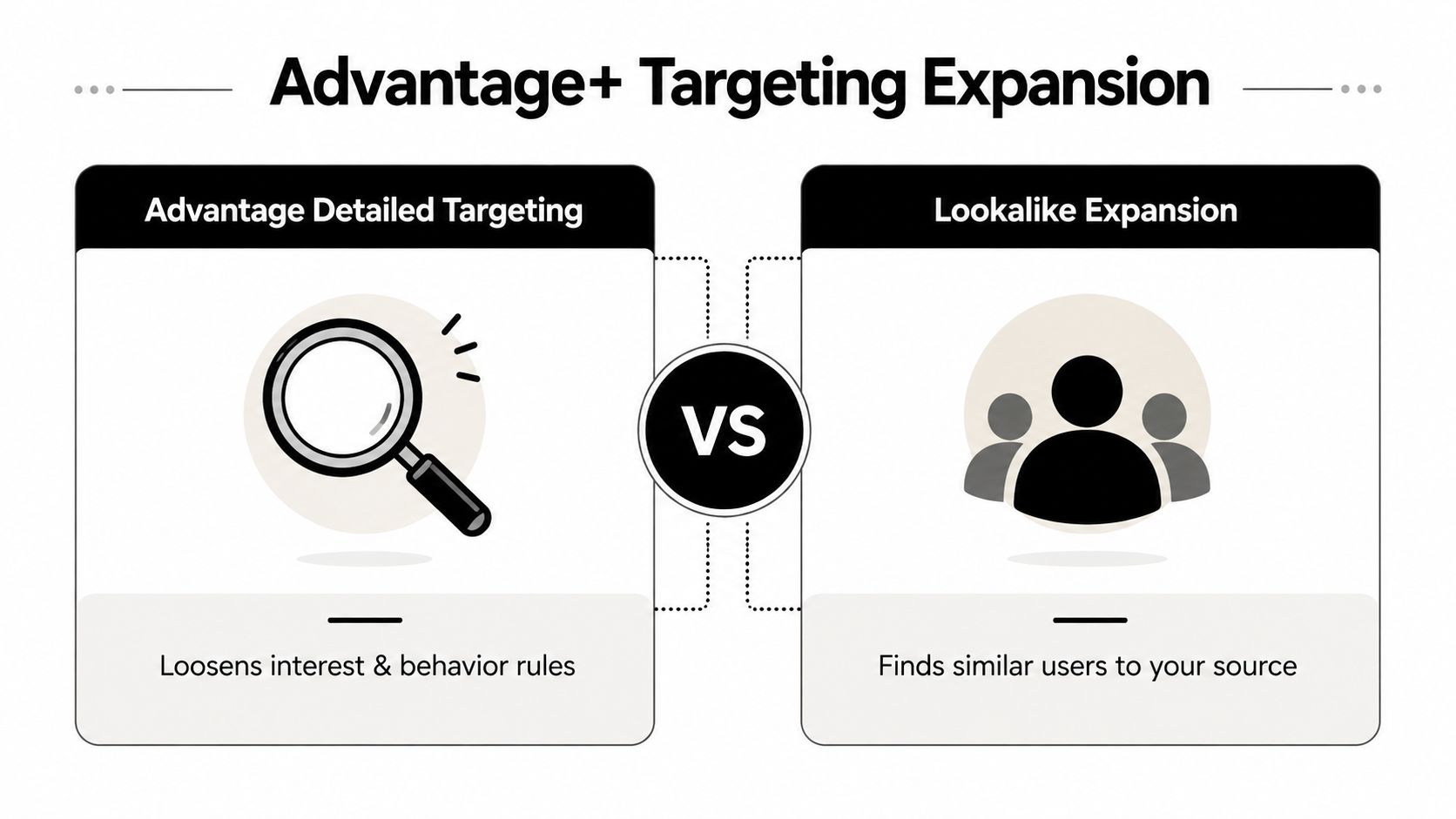
Two controls are easy to confuse:
- Advantage detailed targeting can extend delivery beyond selected interests, behaviors, and other detailed signals.
- Detailed targeting expansion relaxes the detailed-targeting layer, allowing Meta to find additional eligible people.
Expansion does not remove every boundary. Age, gender, location, language, and exclusions still shape delivery under the rules in Meta's expansion help documentation. Special Ad Category rules add further limits, while Custom Audience exclusions can still suppress known groups.
The broader lesson from the reported cost-per-conversion improvement is conditional, not universal. Removing a restriction can help when the campaign has enough conversion data, reliable tracking, varied creative, and an offer that appeals beyond a narrow interest cluster. It is less persuasive when the selected audience reflects a real eligibility rule, a tight service area, or a group that should not receive the ad.
Separate automation from audience expansion
Meta separates these controls at the API level. targeting_optimization_types identifies enforced automation at the campaign specification level, while targeting_relaxation_types and targeting_optimization govern expansion in the targeting specification. The Advantage targeting API reference also documents how Advantage detailed targeting applies across campaign objectives and optimization choices.
That distinction makes delivery easier to diagnose. If an ad reaches people outside the interests entered in Ads Manager, the setup may be working as intended rather than ignoring your configuration.
Manual targeting still earns its place when geography, eligibility, or suppression must be enforced. Otherwise, fewer inputs can give Meta more room to match a clear conversion event with the right people.
Picking the Right Targeting Mix for Your Campaign
Audience selection should follow the campaign's job, not the marketer's desire to fill every field in Ads Manager. Start with the objective, then consider the budget, the available first-party data, and any policy category that changes what Meta permits.
A local service business with a modest daily budget might need only its service area, a sensible age boundary, and strong local creative. Adding several interests about home ownership or local lifestyle may make the audience look more intentional without improving delivery. Let Advantage+ explore within the geographic boundary while the ad speaks directly to the service problem.
An established ecommerce brand has a different starting point. It can use Purchase and AddToCart Custom Audiences for retention and retargeting, then test a 1% Lookalike from its strongest purchaser source for prospecting. The audience strategy follows the data maturity of the account.
B2B advertisers chasing booked demos should separate warm and cold intent. Retarget people who visited high-intent pages or engaged with lead content, then use professional signals such as job title or seniority as suggestions rather than assuming they form a perfect filter.
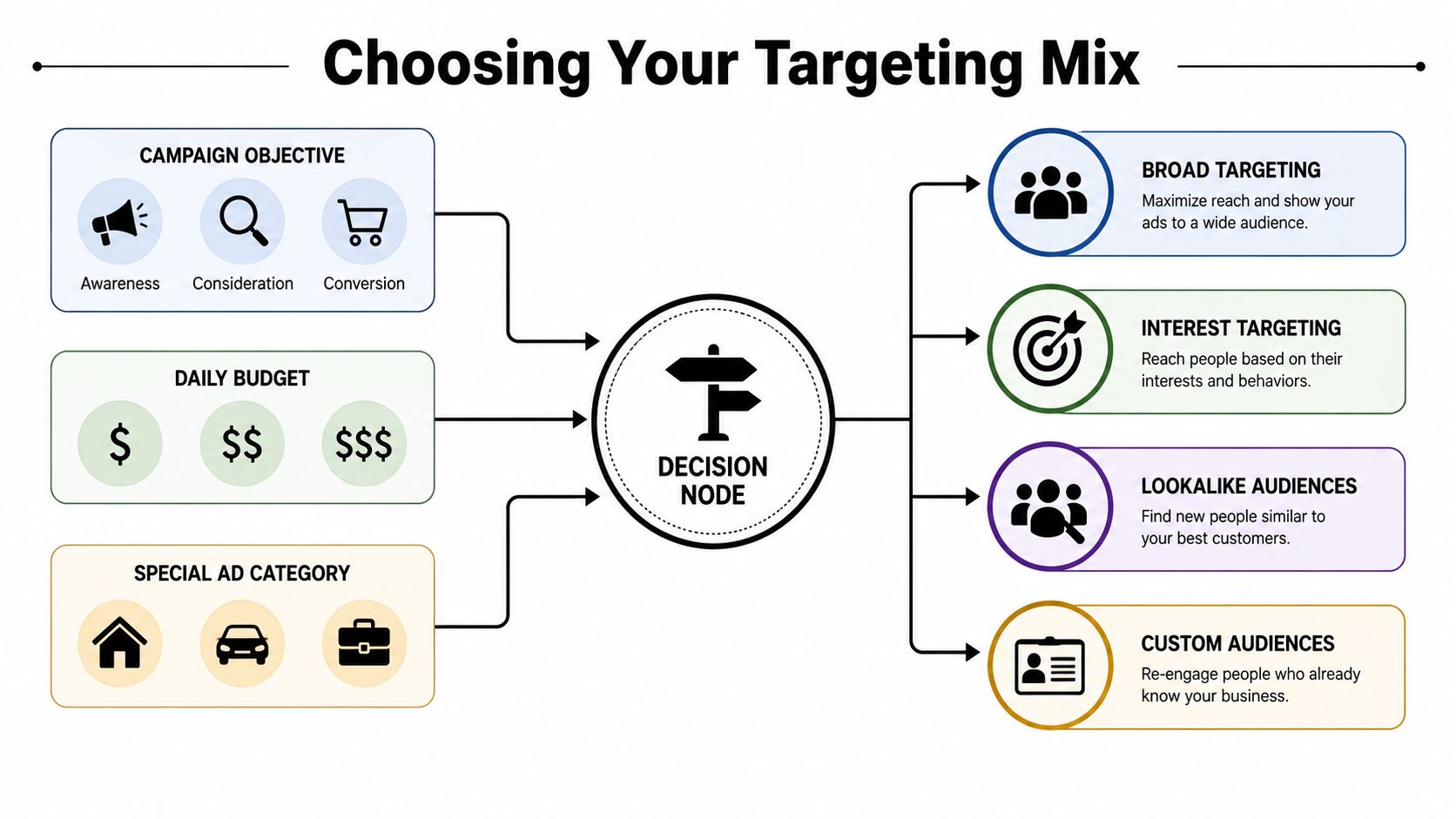
Use this decision tree
- Is the campaign retargeting known users? Use a relevant Custom Audience, then exclude people who already completed the desired action when appropriate.
- Is it prospecting with reliable purchase or lead data? Start broad or test Advantage+ with a high-quality Custom Audience seed or Lookalike suggestion.
- Is the business local? Set geography first. Keep detailed targeting light unless a specific qualification matters.
- Is the product regulated? Check the Special Ad Category before building the audience.
- Does the account lack meaningful conversion data? Use clear Core signals and strong creative while building first-party data, rather than pretending the algorithm has a mature pattern to follow.
Special Ad Categories include housing, employment, credit, and social issues or politics. Meta restricts age, gender, ZIP or postcode, and many detailed targeting options in these categories. Broad location targeting is required with a minimum 15-mile, or 24-kilometre, radius, as summarized in this Special Ad Category targeting guide.
The audience mix should make delivery possible, protect the budget from obvious waste, and give the system a useful signal. It doesn't need to express every detail of your buyer persona.
Optimization Tips When the Algorithm Does Most of the Work
Most current Meta campaigns are not won by finding one perfect interest. Older guides still describe targeting as a set of hand-picked interests and exclusions, but Advantage+ now handles more audience discovery. Your work shifts toward the inputs that shape delivery: the objective, conversion signal, boundaries, data quality, creative, and measurement plan.
Six controls still deserve attention
Choose the event before choosing the audience. A Sales campaign optimized for Purchase seeks a different person from a Leads campaign optimized for a qualified form submission. A weak event gives automation a poor destination, no matter how carefully you build the audience.
Set bidding rules with restraint. Cost caps and bid strategies can help when you understand the economics, but an aggressive cap can stop delivery. Start with a realistic constraint, then assess conversion quality rather than judging success by cheap clicks.
Feed clean data. Remove duplicate customer records, check event prioritization, and confirm that the Pixel or other tracking setup records the actions that matter. Audience automation cannot repair a broken conversion signal.
Decide what needs exclusion. Detailed targeting exclusions were deprecated in the January 21, 2025 platform change. Meta directed advertisers toward the excluded_custom_audiences field instead. The Ads Manager change took effect on March 31, 2025, and boosted Facebook and Instagram posts followed on June 10, 2025, according to Meta's exclusion guidance. Treat exclusions as a deliberate data rule, not as another interest to stack into the audience.
Use creative as a qualification signal. Show the customer, problem, use case, and language you want Meta to associate with the campaign. As manual controls become less dominant, the ad itself gives the system another way to identify likely responders.
Read early signals without panicking. Check delivery, event quality, lead quality, and obvious tracking failures soon after launch. Do not split an ad set into tiny segments because one interest looks interesting in the report. Give the system enough room to learn before changing several variables at once.
The account editor is no longer where every optimization happens. Your offer, event setup, exclusions, and creative often matter more than another interest combination.
For campaign setup covering Meta Business assets, Pixel installation, event prioritization, Conversions API, and audience creation, use Keywordme's guide to advertising on Facebook and Instagram.
A practical first check after launch looks like this:
- Tracking: Confirm the selected conversion event is firing as expected.
- Eligibility: Check that location, age, language, and Special Ad Category settings match the offer.
- Delivery: Look for accidental audience restrictions or an overly aggressive bid constraint.
- Creative: Identify whether the ad clearly signals the intended customer and problem.
- Data quality: Review lead or purchase quality, not just low-cost surface metrics.
- Structure: Resist creating extra ad sets until the existing setup has a real reason to change.
Keywordme helps PPC teams manage Google Ads keyword research, search-term cleanup, match-type assignment, negative keyword lists, and campaign expansion from a Chrome plugin. Visit Keywordme to see how it can reduce manual PPC work while you focus on the audience, creative, and conversion decisions that Meta's automation cannot make for you.
.svg)