
Facebook App PPC Guide for App Install Success
Facebook App PPC Guide for App Install Success


A product team can do everything right on launch morning and still feel like the campaign is wobbling. Installs start coming in, the dashboard fills up, and then the harder question lands fast, are these the right users, and can the budget keep working after the first tap?
The core function of Facebook App PPC is not merely to buy clicks; it involves utilizing Meta's scale, auction system, and reporting to acquire users who progress within the app. For a broader paid social setup, this guide to advertising on Facebook and Instagram is a useful companion, but app campaigns need their own logic from the start.
Understanding Key Concepts
A first app campaign on Facebook App PPC can look busy fast. Installs start arriving, the auction keeps moving, and the dashboard fills with numbers, yet the harder question is still waiting, whether those users will stay active long enough to justify the spend.
Facebook App PPC works differently from a simple traffic buy because Meta is not only selling a click, it is also choosing delivery based on an objective and an audience signal. That difference matters in app campaigns, since the platform has to decide which people see which ad, in which placement, and at what cost.
Meta's Facebook app generated a large share of Meta's revenue in 2024, which reflects how mature the auction and monetization system is for paid media at global scale Business of Apps. The same source also shows that average CPC has stayed in a relatively stable band over time, while awareness campaigns and app-install campaigns tend to sit in different click-cost ranges Business of Apps.

What the system is actually optimizing
A campaign objective works like the steering wheel for delivery. Once you choose it, Meta uses audience logic and performance signals to push toward that result, which is why Facebook PPC behaves more like a conversion-optimization system than a pure click-buying channel Landingi. If you are chasing installs, the algorithm is not only competing for traffic, it is also learning which users resemble the ones most likely to take that first step.
Practical rule: if the objective does not match the business outcome, the account can look active without producing useful learning.
Why performance metrics have to be read together
The clearest way to judge app PPC is to look at CTR, CPC, landing page conversion rate, and cost per result before you scale budget Landingi. Each metric answers a different question. CTR shows whether the ad earns attention, CPC shows the price of the click, and cost per result shows whether the system is delivering users who matter.
Meta's Ads Manager also gives advertisers the kind of visibility that helps teams separate surface-level volume from real progress SocialPilot. You can review performance by campaign, ad set, or ad, customize date ranges such as Last 7 days or Last 30 days, and analyze demographics, placements, and locations directly in the app SocialPilot. That reporting depth is useful because broad targeting only works well when it is paired with clear quality signals after install.
Why this still matters for app marketers
The scale of the audience explains why the channel keeps working. Facebook had about 3.07 billion monthly active users in 2026, a year-over-year increase of 2.6% SocialPilot. At that size, small improvements in audience selection, creative relevance, and event optimization can produce meaningful volume, but volume alone is not the goal.
The better standard is post-install value. A campaign can win cheap installs and still lose money if those users never return, never activate, or never reach a meaningful in-app action, so the primary task is balancing broad reach with the signals that point Meta toward higher-quality users.
Setting Up Campaign Objectives
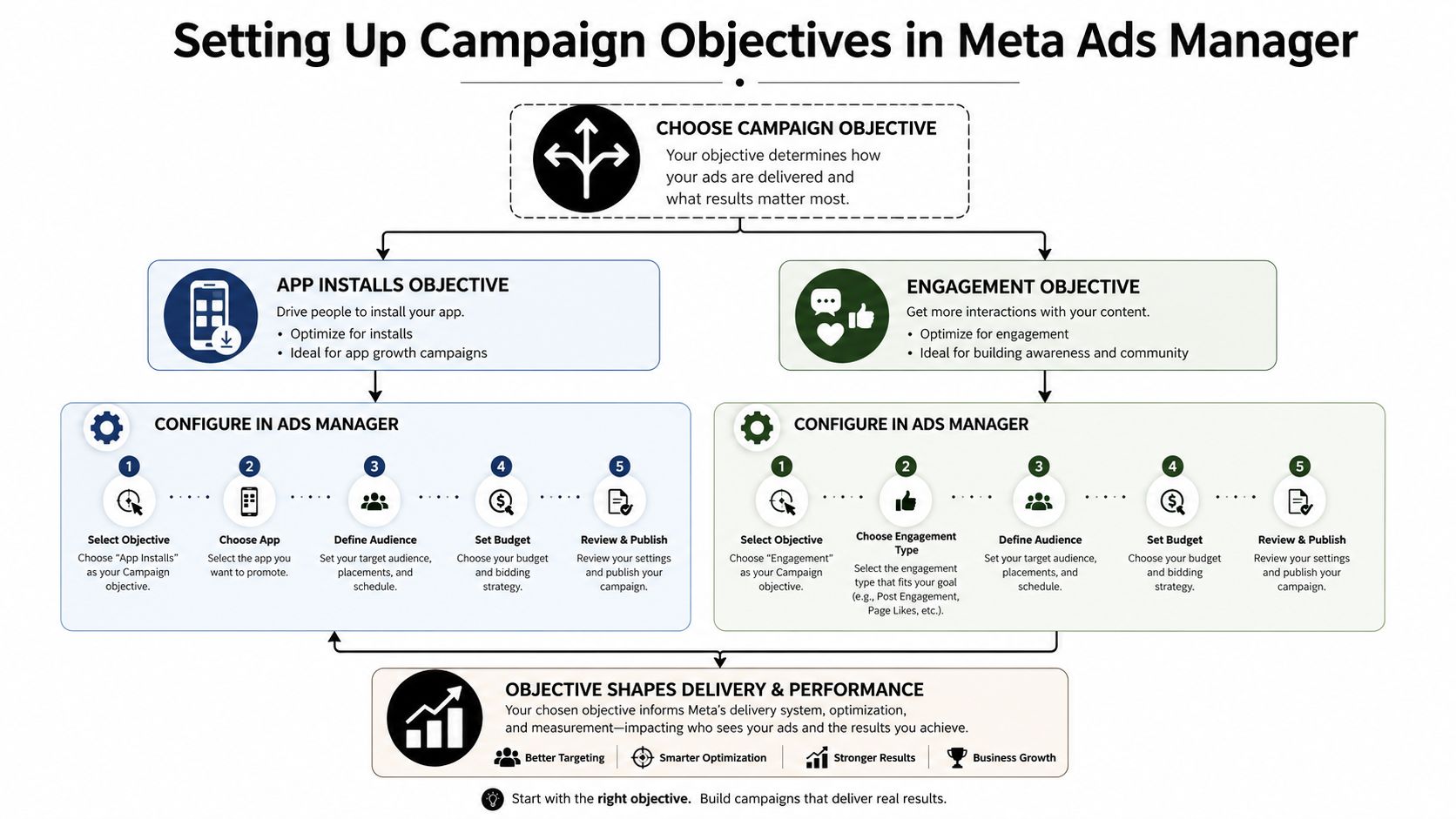
A Facebook app campaign can look well built on the surface and still send Meta the wrong instruction. The objective is the instruction. It tells the system whether you want new installs, early engagement, or a warmer audience to work with later, so getting this choice right shapes everything that follows Landingi.
Choosing between installs and engagement
For app growth, App Installs fits when the priority is to bring in new users. Engagement works better when the first step is interaction, such as getting people to view, react, or interact before they are moved deeper through retargeting or a follow-up sequence. The two objectives can both support app growth, but they guide delivery toward different kinds of outcomes.
A simple way to separate them is to ask what the first meaningful action should be. If the campaign needs users in the app, App Installs is the direct path. If the campaign needs signals that show interest before acquisition, Engagement can help build that audience pool first.
Choose the objective that matches the first meaningful action you want the platform to optimize for, not the action you hope users will eventually take.
How the setup flow should feel inside Ads Manager
Inside Meta Ads Manager, the campaign objective comes first, and the rest of the structure is built around that choice. That order matters because the objective tells the system what success looks like. If the campaign later gets judged only by instinct, the actual problem may be the setup rather than the audience.
A clean workflow looks like this:
- Start with the business outcome. Decide whether the campaign needs installs, engagement, or another action path.
- Match the objective to that outcome. Do not use engagement as a shortcut if acquisition is the actual target.
- Build budget around the goal. Objective selection affects how delivery learns, so budget pacing should reflect the learning phase.
- Watch the right metrics early. CTR and cost per result are useful signals before you scale spend.
The goal is not complexity. The goal is to keep the campaign from training Meta on the wrong lesson.
Where advertisers usually get tripped up
Many app teams try to force an install-driven campaign before the creative and measurement setup are ready. The result is noisy data, which makes it harder to tell whether the problem is the audience, the message, or the objective itself. A cleaner approach is to let each campaign do one job well, then use the next layer of retargeting or follow-up to handle the rest.
That separation matters for post-install ROI. Broad targeting can still work, but only when the objective and the quality signals point in the same direction. If the setup is clear, the account becomes much easier to read, and weak performance is easier to trace back to the right cause.
Creative Best Practices
Creative is the first thing a person sees, so it has to do more than look polished. In facebook app ppc, the ad needs to earn the tap quickly, then keep the promise after install by setting the right expectation for what the app provides. Feed, Stories, and Reels each ask for a different visual rhythm, so one asset rarely does the same job in every placement.

Match the format to the placement
For Feed inventory, 1080×1350, or 4:5, is the main format to build around. For Stories and Reels, 1080×1920, or 9:16, is required Superscale. That difference matters because a square asset leaves unused space on mobile, while a vertical asset fills the screen and matches how people move through short-form placements.
File handling also matters. The same source notes that images can go up to 30 MB and video up to 4 GB, with H.264 MP4/MOV support Superscale. If an export is too heavy or poorly formatted, the ad may stumble before the message gets a fair test.
Pick the ad type based on the message
A single image ad works best when the offer is simple and obvious. A carousel helps when you need to show several screens, use cases, or benefits in sequence. Video fits better when motion is needed to explain the experience, while Stories and Reels work best when the creative is built for vertical, thumb-first viewing.
The creative also has to stay relevant at the asset level, not just in the headline. Facebook's Platform Policies say every part of an ad, including text, images, and other media, must be relevant and appropriate to the product or service and the audience seeing it. The same policy also prohibits autoplay audio or Flash animation that starts without user interaction or expands after a click, and it bans content that exploits political agendas or other hot-button issues for commercial use SEC policy excerpt.
Build the creative so it can actually scale
Many app teams try to rescue a weak concept with more budget. That usually does not work. Strong app creative does three things fast. It shows the app outcome, it makes the promise concrete, and it follows the placement spec without forcing the viewer to work for the meaning.
If you are refining video concepting, this resource on optimize AI video ads for social connects creative iteration with social ad execution in a practical way. For ad copy examples that fit app-style offers, the linked page can help you test different angles without slipping into vague messaging.
A simple checklist helps keep the work focused:
- Show the app, not just the brand. Users should understand the product in the first second or two.
- Lead with the action. Open with the benefit or result, not a slogan.
- Use the right aspect ratio. 4:5 for Feed, 9:16 for Stories and Reels Superscale.
- Keep the media compliant. Relevance and interaction behavior are policy issues, not just design choices SEC policy excerpt.
Creative quality matters after the install too. If the ad promises a feature the app cannot support, broad targeting may still bring volume, but the post-install signals will sag because the first click trained the wrong expectation. The best app PPC creative sets up the next action clearly, so retention and user value can be measured against a message that matches the actual product experience.
Audience Targeting and Bidding Strategies
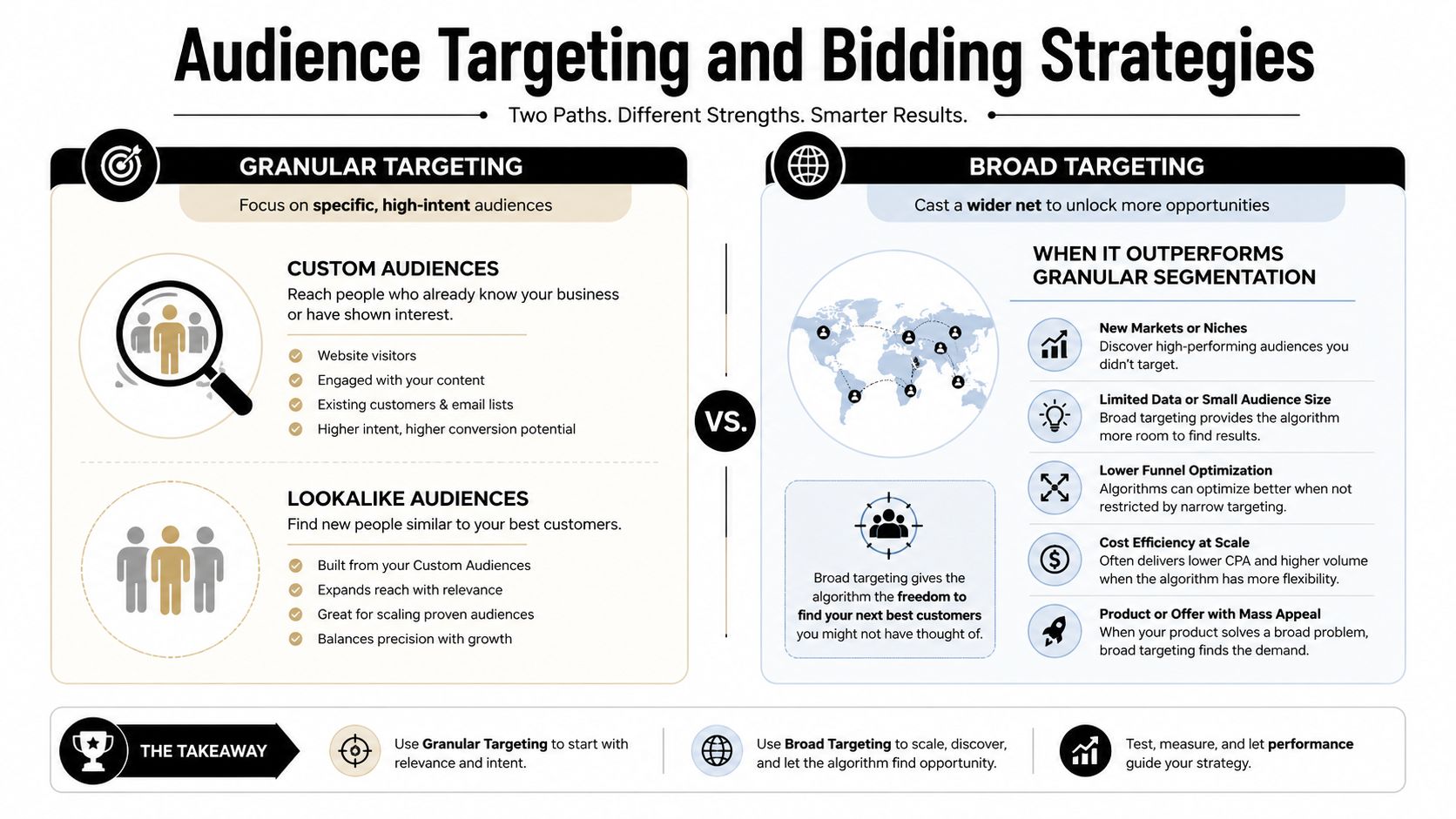
A Facebook app campaign can waste money fast if targeting is treated like a guessing game. Marketers often stack interests, add job titles, layer lookalikes, and then wonder why delivery feels cramped. Current practitioner guidance gives Meta more room to find installers through broad audiences, while detailed interest segmentation still has supporters who want tighter control YouTube practitioner discussion.
Granular targeting still has a place
Custom audiences and lookalikes work best when you already have a strong signal source, such as prior app users, site visitors, or high-intent contacts. They are useful for niche products, unusual offers, or creative that needs a sharper message match. Granular targeting also helps teams test whether one audience bucket is dragging performance down.
A narrow audience is like a small funnel. It can be useful when the top of the funnel is already well defined, but it can also slow the flow if you keep narrowing before the system has enough room to learn. The trap is assuming that more layering always improves results. In practice, too many filters can choke delivery, slow learning, and leave you with too little volume for the algorithm to stabilize.
When broad targeting makes more sense
Broad targeting works better when the creative is strong, the app event signal is clean, and the account has enough conversion volume for the system to learn from. That is why so many current best-practice conversations favor less constrained audiences and more creative-led segmentation.
Broad does not mean careless. It means you let Meta search more freely inside a larger pool while you control the parts you can control, such as creative, event quality, and budget discipline.
Practical rule: if you cannot explain why each audience filter exists, the filter is probably there out of habit.
Bidding strategy should follow the quality of your data
If your tracking is still shaky, aggressive bidding is a fast way to pay for confusion. A cleaner approach is to pace budget slowly enough for the account to learn, then widen once the campaign shows stable signal patterns. The right bid control depends on the goal and the quality of the data, but the logic stays the same. Use tighter control when uncertainty is high, and looser control when the system has enough conversion signal to optimize.
The strongest audiences are the ones that let the system learn without losing intent. That is why the core debate between narrow and broad targeting is not about ideology. It is about whether your creative, event setup, and budget can support the audience width you choose. If the audience is too tight, you may get cleaner naming on paper but weaker learning in practice. If the audience is too wide without enough signal, the system can drift before it finds users who remain active.
A simple testing order
Use this order when you are not sure where to start:
- Test the cleanest broad version first. Let the platform show you its baseline.
- Add one meaningful constraint at a time. If performance changes, you will know why.
- Keep the creative constant during the test. Otherwise you will not know whether targeting or messaging drove the shift.
- Watch cost per result, not just clicks. Meta's current optimization logic rewards conversion signals before you scale.
Once that baseline is clear, compare the users who install with the users who keep coming back. That second layer matters more than raw install volume, because post-install value is what turns a low-cost click into a useful app user.
SDK Tracking and Attribution Setup
A campaign can look healthy and still be blind if the app data isn't wired correctly. That's why SDK and attribution setup sit underneath every other optimization decision. Without clean event feeds, Meta can't learn from the actions that matter, and you can't tell whether the campaign is buying real users or just cheap activity.
If you're working with a hybrid app stack, the setup guidance for Facebook tracking for Capacitor apps is a helpful technical reference because it sits closer to implementation details than most high-level PPC guides.
Install the SDK and map the events
The first job is getting the Meta SDK into the iOS and Android builds, then mapping the events you care about. Standard and custom in-app events should reflect what success means for the app, not just what's easy to measure. If the only event you track is install, the algorithm has very little to learn from after the first tap.
Once the events are in place, validate them in Ads Manager. If fires don't match actual user actions, fix that before you spend more. Bad attribution creates false confidence, and false confidence wastes budget.
Keep attribution and reporting connected
Attribution windows and reporting need to line up with the way the campaign is being judged. If the campaign is set up to optimize for one event but the dashboard is celebrating another, you'll make the wrong call on scaling. That's why cross-channel measurement matters too, especially when app campaigns sit alongside search, email, or other paid social channels. A broader framework for that is covered in this cross-channel attribution guide.
A few checks are worth doing every time:
- Confirm the SDK is firing on both platforms.
- Verify standard events and any custom in-app events.
- Test the attribution view in Ads Manager.
- Check whether the event names match the way the campaign is optimized.
Watch for privacy-related gaps
iOS privacy changes made measurement harder for many teams, so you can't rely on old assumptions about perfect visibility. The right response is not to guess harder, it's to tighten the event schema and accept that your optimization model should be built around the best signals you can reliably collect.
A good tracking setup is boring in the best way. It operates reliably, matches reality, and gives the campaign a stable base to learn from.
Sample Campaign Structures and Optimization Playbooks
A strong Facebook app PPC account usually needs more than one campaign path. One campaign works to bring in new users, another brings back people who saw the app but did not act, and a third moves existing users deeper into meaningful in-app behavior. The point is not to run extra campaigns for the sake of volume. The point is to separate the jobs so each campaign can optimize around a cleaner signal.
A useful way to picture the account is like a set of lanes on a road. If every driver has to share one lane, traffic slows and no one can tell what caused the delay. Separate the lanes, and you can see which group is moving, which one is stuck, and where to adjust.
A simple acquisition funnel
For a global install push, keep the structure tight. Start with a dedicated acquisition campaign, use the objective that matches installs, and give the creative enough room to prove itself before you change too many variables. If the ad gets attention but the app events do not follow, the issue is usually not just audience size. It can also be the offer, the onboarding path, or the post-click experience.
Teams often get tempted to chase the cheapest install possible. That looks efficient until the cohort fails to activate. Effective app campaigns should optimize beyond installs, tracking retention, activation, and revenue so you avoid buying low-cost installs that do not turn into useful users Branch.
Reengagement needs a different playbook
Reengagement campaigns should not look like acquisition campaigns with a different audience list. Returning users already know the brand, so the message needs to remind them why the app matters now. That might be a refreshed feature, a time-sensitive offer, or a cleaner path back into the product.
The common mistake is using generic install-style creative on people who already downloaded the app. It wastes the fact that they have already shown intent. A better move is to segment by user stage, then tailor the message to the next action you want.
Retargeting should be event-led, not ego-led
Once the app has enough event data, retargeting can focus on users who installed but did not activate, users who started but did not finish, or users who hit a value event and can be nudged toward the next step. The campaign should not be judged on impressions or even clicks alone. It should be judged on whether the right users are moving forward.
A useful optimization routine looks like this:
- Scale only after the event signal is stable. Otherwise you are spending faster on uncertainty.
- Rotate creative when frequency rises or the message starts feeling stale.
- Expand audiences when the existing pool starts saturating.
- Keep post-install quality in the scorecard. Retention and activation show whether the campaign is creating value.
A Sustainable Optimization Pattern
The best app accounts separate volume from value. Volume tells you the platform can find users. Value tells you the product can hold them. When both move in the same direction, budget decisions get much easier.
That is why the strongest playbooks keep asking the same quiet question, not “How cheap was the install?”, but “What happened after the install?” If the answer stays fuzzy, the campaign may still be buying activity, but it is not yet buying growth.
Conclusion and Next Steps
A Facebook app PPC campaign only works well when the parts fit together. The objective has to match the business goal, the creative has to suit the placement, the audience setup has to give Meta enough room to learn, and the tracking stack has to reflect what users do after install. If one piece is off, the account becomes harder to interpret, like a machine with one misaligned gear.
The next step is a simple audit of the campaign you already have. Check whether the objective matches the outcome you want, confirm that your ad assets fit the feed and vertical specs, and make sure the SDK events reflect real app value instead of only install volume. Then judge the campaign on CTR, cost per result, retention, activation, and revenue, not just the cheapest click you can buy.
Broad targeting and quality signals need to work together. Broad audiences give the system room to find people, but post-install indicators such as activation and retention show whether those users are worth the spend. If broad targeting feels risky, test it in a controlled way. If granular targeting feels too tight, simplify one layer at a time.
The goal is not to choose a side. It is to build a campaign that keeps learning while still bringing in users who stay active and create value.
A useful final check is to ask one question before changing budgets. What happened after the install? If that answer is clear, the campaign is moving in the right direction. If it stays fuzzy, the account may be buying activity, but not yet buying growth.
.svg)