
Remarketing Lists Explained: A Complete Guide for PPC Pros
Remarketing Lists Explained: A Complete Guide for PPC Pros


Remarketing lists are groups of users who've previously interacted with your brand, and Google Search remarketing lists can remain active for up to 540 days. They let you serve more relevant ads across Google's surfaces, reconnecting with people who showed interest but didn't convert.
A visitor lands on a product page, compares options, checks delivery details, and leaves. Your team sees the session in Analytics, but the sale never happens. That's the normal customer journey, not a tracking failure. The practical question is whether you'll treat that visitor like a cold prospect later or preserve the context of their previous interaction.
Remarketing lists give you that context. They help agencies separate casual readers from people who viewed pricing, started checkout, submitted a form, or returned several times. The technology is straightforward. The hard part is list architecture, membership hygiene, campaign alignment, and compliance across multiple client accounts.
Why Remarketing Lists Matter for Your Campaigns
Most paid traffic doesn't convert during the first visit. Someone may need internal approval, more product research, a comparison with competitors, or just a better moment to act. Remarketing lists preserve a useful audience signal so your next ad can acknowledge previous interest instead of treating every impression as a first introduction.
Google introduced remarketing to its advertising platform in 2009, initially through the Google Display Network. The capability later expanded to YouTube in 2010, cross-device remarketing in 2013, dynamic remarketing in 2015, remarketing lists for search ads in 2017, custom audiences in 2019, and Gmail and Discover in 2020. That progression turned remarketing from a single-channel retargeting feature into an audience system spanning search, video, display, email, and content discovery. Google's Analytics documentation provides the underlying historical context.
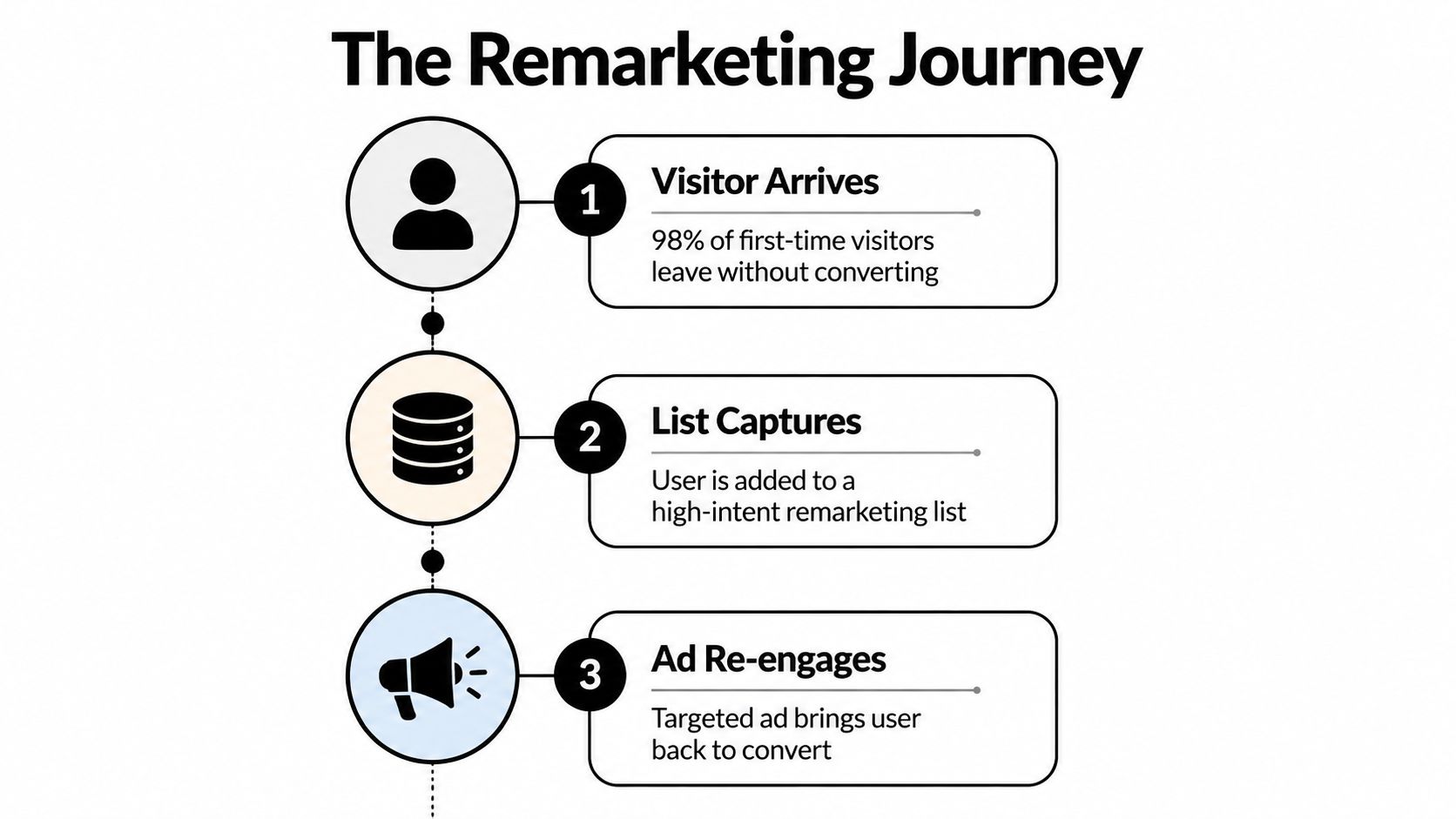
The value is context, not simply repetition
Consider an agency managing paid search for a software company. A visitor who reads a general guide belongs to a different decision stage from someone who visits pricing and begins a demo request. Both users are technically past visitors, but the second audience deserves a different message, landing page, and exclusion logic.
That distinction is what makes remarketing lists useful for PPC teams. You can reconnect with previous visitors while combining their historical engagement with a new search, browse, or viewing action. A return visitor searching for a related solution may need reassurance about implementation, a product comparison, or a direct route back to a partially completed action.
Practical rule: Build audiences around decisions users made, not merely pages they happened to load.
Remarketing also gives account teams a clearer way to evaluate returning-user behavior. Rather than judging every campaign by blended performance, you can examine whether people with prior engagement respond differently from new prospects. That insight can influence ad copy, audience exclusions, landing-page routing, and budget allocation.
The tactic isn't a substitute for demand generation. It's a way to recover value from interest your campaigns already created. If the original traffic is poorly qualified, a larger remarketing audience won't fix the underlying targeting. Strong list design starts with useful traffic and preserves the behavioral signals that make a later interaction more relevant.
How Remarketing Lists Work Under the Hood
A remarketing list updates when a person meets defined audience rules on a website, app, or another eligible property. Depending on the setup, Google Ads or Analytics uses tags, cookies, Google signals, and account settings to connect qualifying activity with an audience. The platform then checks whether each person still meets the membership conditions.
For agencies managing multiple accounts, the important detail is that a list is not a permanent record of every visitor. Membership follows a time window, and that window affects both relevance and delivery. Google states that the default duration is 30 days, while Display and Search remarketing segments can use a maximum of 540 days. The clock resets when a user returns to the site or app. After the selected duration expires, the user is removed unless they engage again. Google's audience-duration documentation explains the expiration behavior.
Duration is a relevance decision
A short window keeps an audience closer to its original intent. It can suit quick buying decisions, limited-time offers, or lead forms where the user's need may change rapidly. A longer window fits considered purchases, renewals, seasonal demand, and sales cycles that involve repeated research.
The trade-off is audience freshness. A longer duration creates more opportunities to reach older visitors, but it also combines recent intent with weaker historical signals. Someone who viewed a service page yesterday should not automatically receive the same message as someone who visited months ago. Agencies can separate those users into recency bands when campaign strategy requires different bids or creative.
Document duration as part of the audience specification rather than accepting an inherited account default. Record the event rule, inclusion logic, exclusions, duration, destination campaigns, and intended message. That record helps an agency prevent one client's conventions from being copied into another account without review.
The platform has limits beyond the clock
Google describes remarketing reach as the share of people across remarketing lists who were shown ads among all eligible list members. Use reach as a delivery and list-quality diagnostic, not as a conversion measure. A list can deliver broadly while producing weak results if its rules admit low-intent visitors.
Duration changes also create migration and hygiene issues. Google notes that reducing a list duration and then increasing it immediately does not remove users retained under the previous setting. Recreating the list is required when the team needs to reset that duration logic fully. The list-duration policy provides a reference for account migrations and cleanup work.
Step-by-Step Setup in Google Ads and Analytics
Begin with the measurement layer, then build audiences around campaign decisions. In Analytics, verify data collection, confirm the property is connected to the relevant Google Ads account, and check that consent settings permit the intended collection. Keep privacy-signal configuration with the account's compliance documentation rather than treating it as a setup shortcut.
Build the first audience deliberately
Define the business event: Choose one behavior tied to a campaign objective, such as a product view, pricing-page visit, form start, checkout start, or previous purchase. Agencies managing several accounts should avoid creating every possible page audience before deciding how each list will be used.
Set inclusion and exclusion rules: A lead-generation list for form starters can exclude completed submissions. An ecommerce cart-abandoner list can exclude purchasers. These exclusions prevent acquisition messages from following users after they complete the intended action.
Choose a duration: Match the membership window to the decision cycle. Use a shorter window when recent intent matters most, and a longer one when the offer requires extended consideration. Google Ads removes users after the selected period. Google's duration guidance explains how that setting operates.
Name the list consistently: Use a structure such as
Client | Market | Behavior | Recency | Exclusion.Acme | UK | Pricing Visitors | 30d | No Leadsgives another strategist enough context to audit the audience without opening its rule builder.Publish and validate: Confirm that the audience appears in Google Ads, the source account is linked, the rules populate as expected, and consent behavior does not prevent collection unexpectedly. Record a test user journey in the QA notes, including the page or event that should qualify and the exclusion that should remove the user.
Apply the audience with intent
In Search campaigns, decide whether the audience should inform reporting or restrict delivery. Observation keeps the wider campaign eligible while allowing comparison of audience behavior. Targeting limits delivery to selected audience members, so use it in a deliberate audience-only structure, not as an accidental campaign setting.
For multi-account teams, record the list's owner, rule logic, destination campaigns, and approval status. That audit trail reduces the risk of attaching a client's audience convention to the wrong campaign. Aim Set Win's Google Ads services offers outside context for account structure and implementation alongside internal QA. For selection decisions, review remarketing group guidance and document why each list is attached to each campaign.
Segmentation Strategies for Better Targeting
A single “all visitors” list is easy to build and difficult to use intelligently. It combines readers, researchers, buyers, existing customers, support users, and accidental visitors into one audience. That broad pool may support reach, but it gives an agency little control over message relevance.
A segmented architecture starts with behavior. Product viewers, cart abandoners, form submitters, pricing visitors, and previous customers each represent a different relationship with the brand. The list should reflect that difference, and the campaign should have a clear reason for using it.
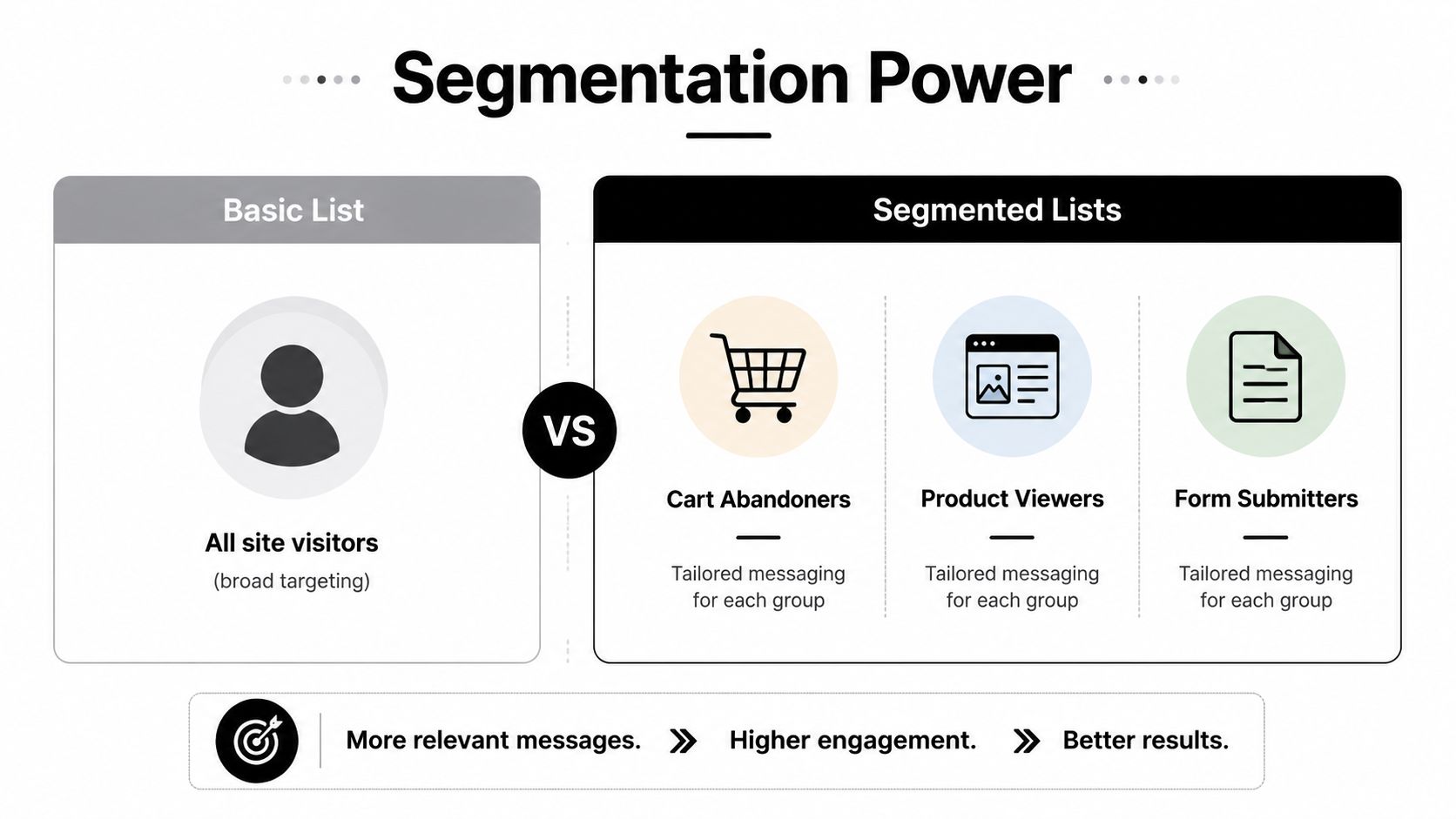
Broad lists versus narrow lists
| Approach | Useful when | Main risk |
|---|---|---|
| Broad site visitors | The account needs an initial audience signal or reporting baseline | Weak intent differences make messaging generic |
| Product or service viewers | The team wants category-specific reminders | Similar visitors may still have different needs |
| Cart or form abandoners | The user took a strong commercial action | The audience may become too small for restricted targeting |
| Previous customers | The goal involves renewal, accessories, repeat purchase, or win-back | Acquisition campaigns may waste spend if exclusions are missing |
Broad segmentation is often the safer starting point for an account with limited traffic. Narrow segmentation gives better control when the audience can support it and when the creative or offer changes by behavior. Over-segmentation creates a tidy interface but can leave campaigns with insufficient delivery and inconclusive reporting.
Build an audience hierarchy
Use parent and child audiences rather than unrelated lists scattered across an account. A parent audience might contain all qualified visitors. Child audiences can then isolate high-intent behaviors, while purchaser and lead lists act as exclusions or separate retention pools.
The hierarchy should answer three questions:
- What did the user do? Viewed, searched, added, started, submitted, or purchased.
- How recently did it happen? Recency should guide urgency and message tone.
- What should happen next? Return to a product, complete a form, compare options, renew, or leave acquisition messaging.
For example, a cart abandoner can receive a direct completion message, while a product viewer may need education or proof. A form submitter shouldn't keep seeing an acquisition ad when a sales follow-up or onboarding message is more appropriate.
The best segmentation isn't the most detailed one. It's the smallest structure that gives the campaign a meaningful decision to make.
List Sizing, Privacy, and Compliance Rules
Audience architecture fails when agencies treat list size, data quality, and privacy as separate tasks. A list needs enough eligible members for its intended use, while collection must follow an authorized, transparent setup that matches platform rules and user expectations.
For remarketing lists used to tailor Search ads, Google requires at least 1,000 cookies before activation. A smaller audience may still collect data, but it cannot materially influence Search ad customization or bid strategy until it reaches the threshold. Treat eligibility as an operational check, not a reason to broaden every audience rule.
Diagnose scale before changing strategy
If a list is ineligible, audit the tag, Analytics and Google Ads connections, consent configuration, event firing, exclusions, and membership duration first. A broken audience can resemble a traffic shortage, while a narrow rule can resemble a tracking failure.
A practical agency review separates five checks:
- Collection: Is the tag or Analytics event firing on the intended pages?
- Eligibility: Does the audience meet Google's Search size requirement?
- Relevance: Does the rule represent a meaningful business action?
- Permission: Does the setup match applicable privacy obligations and the account's consent process?
- Use: Is the audience attached to campaigns that can act on it?
This checklist matters more when an agency manages several accounts, because a copied audience template can carry the same tagging or consent error across campaigns.
Google policy prohibits placing remarketing tags on sites or apps the advertiser does not own and operate. It also prohibits unrelated businesses from placing their tags on the advertiser's property and forbids sharing user data between unaffiliated advertisers or businesses. Add Google's personalized advertising policy to the agency onboarding checklist and document who controls each data source.
For clients formalizing processor responsibilities, documentation such as a DPA for protecting personal data can clarify roles and processing expectations. Teams must still review their own legal requirements, since a platform setting does not constitute a complete privacy program. For practical context on tracking visitors and its implementation considerations, see website visitor tracking guidance.
Common Pitfalls and Optimization Tactics
The common assumption is that a larger remarketing audience is automatically better. It isn't. A large list can contain old visitors, low-intent readers, existing customers, and people who never had a realistic path to conversion.
List decay is the first issue to investigate. Users leave when membership expires, and older audiences can lose practical relevance even before the platform removes them. Review performance by recency, not only by one combined audience total. If recent users respond well and older users don't, the answer may be a tighter duration or a different campaign rather than more spend.

Fix the message before forcing the bid
Over-penetration often starts with identical creative. The user sees the same offer regardless of whether they read a blog post, abandoned a cart, or already completed a purchase. That repetition wastes the behavioral information the list was built to preserve.
Use a simple diagnostic sequence:
- Check audience freshness: Compare recent and older members where reporting supports it.
- Review exclusions: Remove converters, current customers, employees, and irrelevant support traffic when appropriate.
- Inspect placements and queries: Look for inventory or search themes that don't match the intended action.
- Refresh creative: Change the proof point, objection handled, landing page, or call to action rather than only changing colors.
- Avoid premature fragmentation: Combine audiences when the campaign can't collect enough meaningful data to make separate decisions.
The contrarian move: Narrowing a list isn't always optimization. Sometimes a broader, clean audience with one clear message will outperform several tiny segments that can't deliver consistently.
Creative fatigue also appears in search. Returning users may need a different headline emphasis from new prospects, but that doesn't mean every audience deserves a separate campaign. Start with a measurable hypothesis, then split the structure only when the reporting justifies the added maintenance.
Integrating Remarketing with Broader PPC Workflows
Remarketing lists shouldn't sit in a separate corner of the account. They influence search-query interpretation, keyword expansion, exclusions, landing-page choices, conversion analysis, and budget decisions. An audience that shows high engagement but weak lead quality may require tighter keyword filtering, not a higher bid.
Agencies managing multiple campaigns need a shared operating system. Store audience definitions with campaign notes, map each list to its intended action, and make exclusions visible to everyone who edits the account. That prevents one specialist from adding a purchaser audience while another continues bidding for acquisition without realizing the overlap.
Connect audience signals to search decisions
A useful workflow links each audience to a PPC question:
- Returning product viewers: Should the campaign use a more specific product message?
- Cart abandoners: Should the landing page return users to the cart or address delivery and returns?
- Previous customers: Should acquisition campaigns exclude them while retention campaigns pursue repeat demand?
- Pricing visitors: Should sales-oriented queries receive different creative or qualification language?
- Low-intent readers: Should the audience remain observational rather than restrict campaign reach?
Keyword management belongs in the same review. Search terms can reveal whether the audience is encountering irrelevant queries, whether negative keyword coverage needs work, and whether a warm audience justifies a different match-type strategy. Keywordme can support this process by cleaning search terms, building negative keyword lists, assigning match types, and handling bulk campaign changes through its Chrome plugin interface.
A broader funnel perspective also helps. For teams connecting awareness activity to conversion campaigns, this awareness-to-customer marketing guide offers useful framing for how audiences move between stages. Remarketing works best when the next action is defined, not when the audience is added to every campaign.
Create an agency maintenance rhythm
Set a recurring review for list eligibility, duration, exclusions, audience overlap, search terms, creative relevance, and conversion quality. During client handoffs, export the audience map and explain which lists are observational, which restrict targeting, and which exist only as exclusions.
For examples of how returning-user context can shape ad messaging, review https://www.keywordme.io/blog/remarketing-ads-examples. The principle is simple: use remarketing lists to make better campaign decisions, then use broader PPC controls to execute those decisions cleanly.
Keywordme helps PPC teams manage the keyword work around remarketing campaigns, including search-term cleanup, negative keyword handling, match-type assignment, and bulk optimization. Visit Keywordme to explore the workflow and start the seven-day free trial for your agency or in-house account.
.svg)