
AdWords Keyword Types Explained Your PPC Targeting Guide
AdWords Keyword Types Explained Your PPC Targeting Guide


AdWords keyword types are the rules you set in Google Ads that tell it which searches should trigger your ads. There are three main flavors: Broad Match for maximum reach, Phrase Match for a balanced approach, and Exact Match for pinpoint precision. How you use them determines how closely a user's search needs to match your keyword.
Nailing this is step one for any campaign that actually makes you money.
Why Keyword Match Types Are Your Most Powerful Tool
Ever feel like your Google Ads budget is just vanishing into a black hole? It’s a common frustration. The secret to plugging that leak isn't some ridiculously complex bidding strategy—it's getting a solid grip on the fundamentals of AdWords keyword types.
Think of match types as the bouncers for your ads. They stand at the door and decide who gets to see your message and who gets sent away. This one setting is the difference between casting a huge, expensive net hoping to catch a few good fish (Broad Match) and using a precision harpoon to go after only the biggest catches (Exact Match).
This chart breaks down the hierarchy, showing how you trade reach for control.
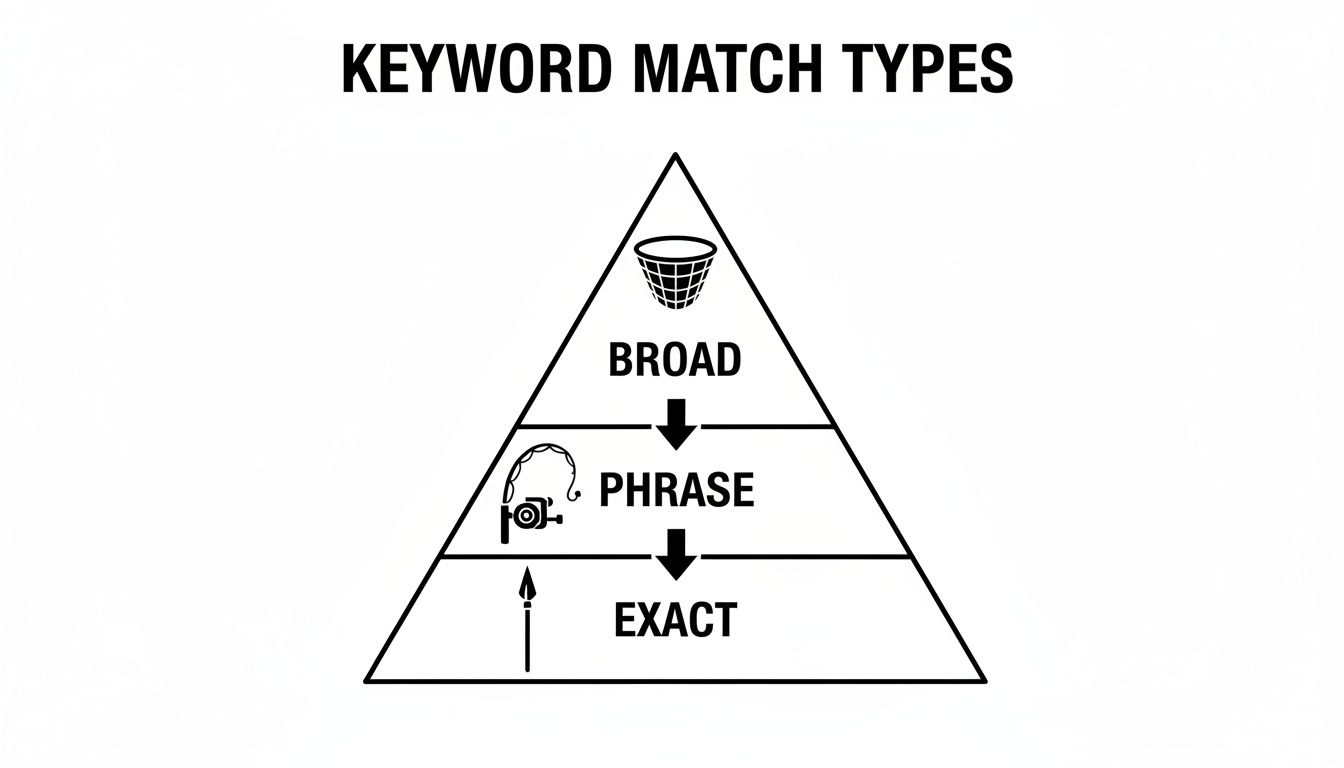
As you can see, Broad Match is at the top of the pyramid, giving you the widest possible audience. At the bottom, Exact Match gives you the tightest control.
The Foundation of Every PPC Campaign
Getting your match types right is everything. It's the difference between wasting your budget on clicks from people who are just browsing and attracting customers who are actively looking for exactly what you sell. It’s the absolute bedrock of a profitable PPC campaign and maximizing your return on ad spend (ROAS).
Ever since Google first rolled out keyword match types back in the year 2000, they’ve been the core of every smart PPC strategy. Sure, they’ve evolved over the years, but the main idea is the same. Broad match is the default, showing your ads for all sorts of related searches. Phrase match tightens things up, requiring the search to have the same meaning. And exact match demands the closest possible intent, although it now accounts for close variations. You can find more cool facts about keyword history over on DataForSEO.
Choosing the right match type isn't just a technical task—it's a strategic decision that directly controls your campaign's reach, relevance, and bottom-line profitability.
At the end of the day, understanding these settings gives you direct influence over two critical campaign metrics:
- Reach: How many eyeballs you get on your ad.
- Relevance: How well a person's search aligns with your offer.
The sweet spot is finding the perfect balance between the two. In the next few sections, we'll dive deep into each match type so you can start making smarter, more profitable choices for your campaigns.
Using Broad Match Without Burning Your Budget
Let's talk about the wild west of Google Ads: the Broad Match keyword. It offers the widest reach imaginable, but it's also hands-down the fastest way to torch your budget if you're not careful. The tricky part? It’s the default setting, so lots of newcomers start using it without ever realizing the risks involved.
Think of it like telling Google, "Hey, show my ad for anything that seems even remotely related to my keyword."
To be fair, today’s broad match is much smarter than the old version. It now uses AI to get a feel for synonyms, related searches, and what the user is actually trying to find. For example, if you use the broad match keyword low-carb diet plan, your ad could easily pop up for searches like "keto meal ideas," "carb-free recipes," or even "healthy eating for weight loss."
This is a classic double-edged sword. On one side, it’s an incredible discovery tool, uncovering new search patterns and keywords you never would have thought of on your own. But on the other, it can trigger your ads for totally irrelevant searches, which means wasted clicks and a terrible return on your ad spend.
Taming the Broad Match Beast
So, how do you get all the upside of broad match without setting your money on fire? The secret isn't just one thing—it's a smart combination of Smart Bidding and a meticulously managed negative keyword list.
Smart Bidding strategies, like Target CPA or Maximize Conversions, let Google's AI analyze a ton of signals in real-time to figure out which clicks are most likely to turn into customers. This adds a much-needed layer of intelligence that keeps broad match from going completely off the rails.
But you can't just set it and forget it. A strong negative keyword list is your most important defense. This is where you get to explicitly tell Google which search terms you don't want your ads to show up for.
By proactively adding negative keywords, you’re essentially building guardrails for your broad match campaigns. You’re telling Google, "Go ahead and explore, but don't go down these specific dead-end streets."
This manual oversight is absolutely critical. For instance, if you sell premium running shoes, you'd immediately want to add negative keywords like "free," "cheap," and "used" to stop your ads from showing to bargain hunters. We get way more into the nitty-gritty in our complete guide to https://www.keywordme.io/blog/broad-match-keywords, which is a must-read if you're going to use this match type.
Finding all these negative terms can feel like a chore, but it's non-negotiable if you want to be profitable. You have to live in your search terms report. This is also where tools like Keywordme can be a lifesaver, letting you spot and negate irrelevant search terms right from the report. It saves a ton of time and, more importantly, protects your ad budget.
Mastering Control with Phrase and Exact Match
So, we've talked about casting a wide net with broad match. Now, it's time to get a bit more precise—think less net, more spear. When you need to target people who are much closer to pulling out their wallets, phrase match and exact match keywords are your best friends. These two Adwords keyword types are all about taking back control and cranking up the relevance.

Think of it like this: telling Google to find "food" is a broad match. It's vague. But telling it to find "the best taco shop open now" or plugging in a specific address? That's what phrase and exact match do. You're giving Google much clearer instructions, and in return, you get sent to much better destinations—in this case, high-quality customers.
Finding Balance with Phrase Match
Phrase match is the happy medium, the perfect sweet spot between the wild reach of broad match and the laser focus of exact match. You signal a phrase match keyword by wrapping it in quotation marks, like "running shoes".
This tells Google, "Hey, the core meaning of my phrase has to be in the search." The order of the words is important, but Google can add words before or after your phrase.
For instance, if your keyword is "women's hiking boots", your ad could pop up for searches like:
- buy women's hiking boots online
- best deals on women's hiking boots
- women's hiking boots for rocky trails
This match type is fantastic for catching an audience that still has strong buying intent but might word their searches a little differently. You’re connecting with people who know what they want, even if they don't type it in exactly the way you'd expect.
Precision Targeting with Exact Match
Ready to get hyper-specific? When you absolutely need to reach the most qualified, ready-to-buy searchers, you bring out the big guns: [exact match]. You use square brackets to define these keywords. This is your go-to for high-intent searches that you know, from experience or research, are money-makers.
A few years back, "exact" meant exactly that. Not anymore. Now, Google gives it a little wiggle room, showing your ads for searches with the same core meaning. This includes close variations like plurals, misspellings, or synonyms that don't change the intent.
So, your exact match keyword [men's dress shirt] could still trigger your ad for searches like:
- mens dress shirt
- dress shirt for men
- men formal shirt
Even with this bit of flexibility, exact match gives you the tightest possible control over who sees your ads. It's no surprise that these keywords often have much higher click-through rates (CTR) and conversion rates. Why? Because the ad is a near-perfect match for what the person was looking for.
The Trade-Off: As you move from phrase to exact match, your potential reach gets smaller. But what you lose in volume, you gain in relevance and Quality Score, which almost always leads to a lower cost-per-conversion.
Building your campaigns around these more specific match types is a game-changer. By creating tightly-themed ad groups full of phrase and exact match keywords, you can write super-specific ad copy that speaks directly to the searcher. This perfect alignment between keyword, ad, and landing page is exactly what Google loves to see, and it will reward you with a better Quality Score, lower costs, and a more profitable campaign.
How Negative Keywords Make Your Campaigns Profitable
The most successful Google Ads campaigns I've ever seen are often defined not by what they target, but by what they ruthlessly exclude. This brings us to the unsung hero of profitability: negative keywords. Honestly, they might just be the most important of all AdWords keyword types.
Think of them as the bouncer for your ad budget. While your regular keywords (broad, phrase, exact) tell Google who to let in, negative keywords tell Google who to turn away at the door. This simple act of exclusion is what stops you from hemorrhaging money on clicks that were never going to convert anyway.
Let's say you sell high-end "leather briefcases." The last thing you want is your ad showing up for someone searching for "free leather briefcase patterns" or "leather briefcase repair jobs." Those clicks are guaranteed money-losers. By adding free and jobs as negative keywords, you instantly protect your budget from irrelevant searches.
Your Best Source for Negative Keywords
So where do you find these golden nuggets of exclusion? The absolute best place is your Search Terms Report inside Google Ads. No question. This report shows you the actual, real-life searches people typed right before they clicked your ad. It's a goldmine.
Seriously, reviewing this report regularly is non-negotiable for anyone running ads. You're hunting for search terms that are:
- Completely irrelevant: Searches that have absolutely nothing to do with what you sell.
- Low-intent: Terms that scream "I'm just browsing," like searches including 'reviews', 'vs', or 'ideas'.
- Targeting the wrong audience: Terms that point to a totally different customer, like 'for students' or 'cheap'.
When you spot one of these budget-wasters, you add it as a negative keyword right then and there. This isn't a one-time task; it's the heartbeat of ongoing campaign optimization. It's how you continuously sharpen your targeting, making sure every dollar you spend goes toward clicks that have a real shot at becoming customers.
The consistent habit of adding negative keywords directly shores up your bottom line. It improves your click-through rate (CTR), boosts your Quality Score, and ultimately lowers your cost per conversion.
This is a make-or-break part of managing a campaign. Adding just a handful of smart negatives can be the difference between a campaign that barely breaks even and one that's wildly profitable. To get into the nitty-gritty of how they work, check out our guide on negative keyword match types for a deeper dive.
Using a tool like Keywordme makes this whole process so much faster. Instead of manually digging through reports and copy-pasting terms, you can analyze your search terms and add negatives with a single click. It saves hours of tedious work and helps prevent costly mistakes.
How to Check Which Keyword Types Are Actually Working
So, your campaign is live. Great. But now comes the real work: figuring out what’s actually making you money and what’s just burning through your cash. This is where the pros separate themselves from the amateurs—by digging into the data.
You need to know which of your AdWords keyword types are the heavy lifters. Is it broad match bringing in surprise wins, or is exact match the quiet, consistent earner? The only way to know for sure is to analyze your performance by match type, and thankfully, you can do this right inside your Google Ads account.
Answering these questions is non-negotiable. Which match type is driving the most conversions? Which one gives you the best return on ad spend (ROAS)? And, most importantly, which one is sneakily wasting your budget on junk clicks?

Think of this analysis as your treasure map. It shows you exactly where to dig for gold (and where to stop digging) by helping you shift your budget and tweak your bids for maximum profit.
Finding the Match Type Report
Getting to this data is simple. Just pop into your Google Ads account, head over to the Keywords section, and click into the Search keywords report. Now for the magic trick: segmenting the data.
- Look for the "Segment" icon—it kind of looks like a little pie chart. Click it.
- From the dropdown menu that appears, just select "Keyword match type."
Voilà! Your report will instantly transform, breaking down all the juicy metrics—clicks, impressions, cost, conversions, ROAS—for each match type. You'll get a clean, side-by-side comparison of how your broad, phrase, and exact match keywords are performing.
This one simple view can be a real eye-opener. I’ve seen accounts where a broad match campaign spent $7,600 to bring in $224,000 in value, which sounds amazing until you realize it only worked because the product had massive profit margins. Without segmenting, you’d never get that kind of clarity. As you can see from these performance insights on YouTube, the details really matter.
Making Sense of the Data
Once you have the segmented report in front of you, the path forward becomes much clearer. You’ll probably spot some familiar patterns. Maybe your exact match keywords have an incredible conversion rate but aren't getting much traffic. On the flip side, your broad match keywords might be pulling in tons of clicks but almost no sales.
This isn't just a bunch of numbers; it's a clear set of instructions. It's Google telling you to put more budget behind your winning exact match terms and to get way more aggressive with negative keywords to tame your wild broad match campaigns.
This process goes hand-in-hand with a regular review of your search terms. When you explore your Google Ads search terms report, you see what people actually typed into the search bar. Comparing that with your match type performance data is how you turn a good campaign into a finely tuned, profit-generating machine.
Building Your Winning Match Type Strategy
Okay, we’ve covered the individual Google Ads keyword types. Now, let's put the puzzle pieces together and build a real, repeatable strategy that actually works. A great campaign structure isn't just about using different match types; it's about giving each one a specific job to do, creating a system that constantly feeds itself new, valuable data.
The whole game boils down to two things: discovery and performance. You want a workflow that's always on the lookout for new opportunities and then has a clear plan to cash in on them.
Create Discovery and Performer Campaigns
One of the most powerful ways to structure your account is to separate campaigns based on their mission. This simple split gives you way more control over your budget and bidding.
Discovery Campaign (Broad Match): Think of this as your R&D department. It's where you use broad match keywords, typically with an automated bidding strategy like Target CPA. Its one and only job is to cast a wide net and fish for new, profitable search terms you never would have thought of on your own.
Performer Campaigns (Phrase & Exact Match): This is where your all-stars play. Once your Discovery campaign finds a search term that consistently brings in conversions, you "promote" it by adding it as a phrase or exact match keyword into a dedicated Performer campaign.
This two-part system lets you explore and take risks without blowing your core budget on the wild west of broad match. Your Performer campaigns stay lean, stable, and incredibly profitable because they're constantly being fed a diet of proven keywords.
By splitting your campaigns this way, you give each one a clear purpose. Broad match is for finding the gold. Phrase and exact match are for refining it. It's a clean, scalable system that stops your best keywords from getting drowned out by less predictable ones.
Mastering Google Ads keyword types is a huge piece of the puzzle, but it's just one part of the bigger picture of finding solid strategies for growing your online business. A well-oiled PPC account is a cornerstone for real, sustainable growth.
Streamline Your Workflow
Let's be honest—manually digging through search term reports, moving keywords, adding negatives, and organizing ad groups is a drag. It’s tedious and takes forever. This is where you bring in the right tools to do the heavy lifting.
A tool like the Keywordme Chrome plugin, for instance, was designed specifically for this kind of workflow.
It lets you scan your search term report and, with just one click, add a hot new search term as a phrase or exact match keyword directly into your Performer campaign. In that same click, it can add it as a negative to your Discovery campaign to stop any overlap. This turns what was a multi-step, copy-paste nightmare into a simple, single action. That’s how you scale—by saving time and boosting performance across the board.
Common Questions About Google Ads Keyword Types
Let's dive into a few of the questions I hear all the time about keyword match types. Getting your head around these will give you a ton of confidence when you're in the trenches, managing your campaigns.
Which Keyword Match Type Is the Best?
Honestly, there isn't one. The "best" type is a myth; it all comes down to what you're trying to achieve. Any truly effective strategy is going to be a cocktail of all three match types, plus a rock-solid negative keyword list.
Think of it like this:
- Broad Match: This is your discovery tool. Use it to explore new search territory and find out what people are actually looking for.
- Phrase Match: The sweet spot. It gives you a great balance between reaching a decent-sized audience and maintaining control over who sees your ads.
- Exact Match: This is your sniper rifle. You use it to target people who know exactly what they want and are typing it into Google.
How Have Keyword Match Types Changed Recently?
The biggest shift is that Google now cares way more about the meaning behind a search, not just the literal words someone types. The idea of a truly "exact match" has been gone for a while.
These days, an exact match keyword will also catch close variations like plurals, typos, and even synonyms. Phrase match has gotten even looser, pulling in queries where the core meaning is the same, even if the words are different. This shift means you have less direct control than you used to, which makes a sharp negative keyword strategy absolutely non-negotiable for cutting out wasted spend.
Should I Use the Same Keyword in Different Match Types?
As a general rule, no—not in the same ad group, anyway. It just muddies the waters. When an auction happens, Google's system is designed to pick the most restrictive match type that's eligible.
For instance, if someone searches for 'running shoes,' and you have both [running shoes] (exact) and "running shoes" (phrase) in the same ad group, Google will almost always trigger the exact match keyword. To keep your data clean and your control tight, it's a much better practice to separate your match types into their own dedicated ad groups.
Stop wrestling with match types and hunting for negative keywords. Keywordme turns hours of manual grunt work into a few clicks, letting you focus on the big picture instead of getting lost in spreadsheets. Start your free trial and build more profitable campaigns today.
.svg)