
Why Am I Paying for Irrelevant Clicks Google Ads? Fix It
Why Am I Paying for Irrelevant Clicks Google Ads? Fix It


You open Google Ads, see clicks coming in, and the spend looks active enough to make you think demand is there. Then you check leads, sales, booked calls, or qualified pipeline and the account feels hollow. Traffic showed up. Business results didn't.
That gap is usually what people mean when they ask why am I paying for irrelevant clicks google ads. They're not really asking about invoicing. They're asking why the account keeps attracting people who were never likely to buy in the first place.
The frustrating part is that this often hides inside campaigns that look fine at a glance. CTR can look healthy. Impression volume can look healthy. Even conversion reporting can get noisy enough to blur what's actually going on. If you want to stop the waste, random tweaks won't do it. You need a workflow: diagnose, prioritize, fix, monitor.
The Billion-Dollar Question on Every Advertiser's Mind
Most advertisers hit this moment the same way. A campaign is live. Search volume is there. Clicks are happening. But the sales team says lead quality is off, or the ecommerce dashboard says revenue isn't keeping pace with spend.
That disconnect isn't minor. Industry reporting cited in PPC analysis estimated that 9% of all paid traffic across search and social campaigns is invalid, or about 1 in 12 clicks, and that roughly $17 billion was wasted on invalid traffic on Google Ads in 2024 according to this PPC analysis on invalid traffic. The money hurts, but the measurement problem is often worse because bad clicks can distort CPA and ROAS.
Hollow clicks create bad decisions
When a campaign pulls in the wrong searches, you don't just lose spend. You train the account on bad signals.
A keyword that looks like a traffic winner can prove to be a junk magnet. An ad group can seem productive because it gets engagement, while the true search intent underneath it is weak. Smart Bidding doesn't magically fix that. If the data going in is messy, the system can optimize toward messy outcomes.
Practical rule: If spend is rising faster than qualified outcomes, assume query quality is part of the problem until proven otherwise.
That matters whether you're managing local lead gen, ecommerce, SaaS, or a national service account. The account can look busy while still being inefficient.
The real job is budget control through intent control
A lot of Google Ads advice focuses on bids, budgets, and conversion actions. Those matter. But none of them save you if your campaigns keep matching to searches you never wanted.
If you want a broader view of spend planning and paid search economics, this strategic paid search guide is a useful companion read. It helps frame the budget side of the problem. The missing piece for most advertisers is intent filtering inside the account itself.
Here's the working mindset I use: don't treat irrelevant clicks as random platform noise. Treat them like a diagnosable operating issue. Once you do that, you stop reacting emotionally to wasted spend and start tracing where the waste enters the account.
The Real Reason You Pay for Useless Clicks
Most advertisers lump all bad clicks into one bucket. That's the first mistake.
There are invalid clicks and there are irrelevant clicks. Those are not the same problem, and mixing them together usually leads to the wrong fix.

Invalid isn't the same as irrelevant
Google Ads applies credits for clicks it identifies as invalid, but lower-quality clicks that are still technically valid can remain billable, which is why irrelevant clicks are often a targeting problem rather than just a fraud problem, as explained in this breakdown of irrelevant clicks in Google Ads.
Here's the simplest way to think about it.
- Invalid clicks are the ones the platform can clearly treat as non-genuine or deceptive.
- Irrelevant clicks come from real people using real searches that happen to be a poor fit for your offer.
- Billable waste often sits in the second category, not the first.
It's like a mail carrier delivering a letter to the right building, but the wrong person inside opens it. Delivery worked. Relevance didn't.
That distinction changes how you manage the account. If you assume Google will refund all useless traffic, you'll spend your time looking in the wrong place. If you understand that much of the waste is technically valid, you start tightening targeting, search-term review, negatives, and structure.
The six usual causes inside the account
In practice, useless clicks usually show up through a mix of account choices:
- Broad targeting drift where keywords reach further than the business can support
- Weak negative keyword coverage that leaves obvious junk queries unblocked
- Loose ad copy that attracts curiosity instead of qualified intent
- Landing page mismatch where the ad promises one thing and the page delivers another
- Thin monitoring habits where no one reviews search terms often enough
- Poor account segmentation where different intents get blended together
Google can catch some obvious junk. It can't decide which valid searches are bad for your business model.
That's why the answer to "why am I paying for irrelevant clicks google ads" is usually uncomfortable but fixable. The platform didn't necessarily make a billing mistake. The account allowed too much ambiguity.
What doesn't work
A few responses sound sensible but usually don't solve the root issue.
- Relying on automatic protections alone. Helpful, but incomplete.
- Judging performance only from top-level campaign metrics. That hides the search intent.
- Blaming competitors, bots, or Google by default. Sometimes that's part of it, but often not the main issue.
The useful shift is this: stop asking only whether a click was fake. Start asking whether the search was worth paying for.
Your First Step Diagnosing the Damage
The fastest way to find the leak is the Search Terms Report. Not the keyword list you added. The actual queries that triggered your ads.
Google states that it refunds traffic only when it meets invalid-click criteria such as automated clicks or accidental double-clicks, while clicks that are merely irrelevant or low-converting are usually still treated as valid and billable. That's why the practical fix is to use the search terms report to diagnose query quality, as outlined in Google Ads invalid clicks guidance.

Where to look first
Inside Google Ads, go to the campaign or ad group level and open the search terms view. Don't overcomplicate this with a giant reporting stack on day one. Start with the place where real query intent is visible.
Then sort with intent in mind, not vanity in mind.
A clean review pass usually starts with:
- Highest cost search terms. Expensive junk matters first.
- Queries with clicks but no meaningful outcomes. These often reveal mismatch.
- Terms that obviously describe another product, audience, or need.
- Queries that signal research intent when you need buying intent.
If you're working in a lead gen account, compare search terms against qualified leads, not just form fills. If you're in ecommerce, compare them against actual product fit and revenue relevance, not just add-to-carts.
What wasted intent looks like
Junk traffic has patterns. Once you start reading search terms regularly, you see them fast.
Look for:
- Research-only wording like users who want explanations, definitions, or tutorials when you're selling a service
- Wrong-price signals such as bargain-seeking language when you sell premium offers
- Wrong audience cues like student, job seeker, DIY, template, or free intent when none of that fits
- Wrong product families where Google matched a broad concept but not your actual offer
- Competitor terms if you aren't intentionally running that strategy
- Location mismatch for searches outside your service area
Field note: One irrelevant term isn't the story. Repeated intent patterns are the story.
That's what turns a cleanup task into a real diagnosis. You're not just blocking single words. You're identifying whole categories of mismatch.
How to prioritize what to fix
Don't try to clean the whole account in one sitting. Start with the waste that changes outcomes fastest.
| Priority level | What to review | Why it matters |
|---|---|---|
| High | Expensive search terms with no relevant outcomes | They drain budget immediately |
| Medium | Queries with decent volume but weak fit | They quietly skew learning |
| Lower | Edge-case oddities with little spend | Worth fixing, but not first |
This is also the point where teams overreact. They see a few bad terms and start blocking aggressively. Resist that. The goal isn't to shrink traffic. The goal is to separate buyer intent from non-buyer intent.
How Your Keyword Match Types Betray You
A lot of wasted spend starts with a keyword that looked reasonable when you added it. The trouble came from the match type, not the root keyword itself.
If you bid on blue sneakers, you're not just choosing a topic. You're telling Google how tightly or loosely to interpret that topic. That's where accounts get sloppy.
Reach and relevance are always trading off
Broad match gives Google the most room. Exact match gives it the least. Phrase sits in the middle.
That sounds basic, but the operational consequence is huge. A keyword can look controlled in the interface while matching to searches you would never approve if you saw them first.
Here's the quick comparison.
| Match Type | Example Search It Matches for 'blue sneakers' | Irrelevant Click Risk | Best Use Case |
|---|---|---|---|
| Broad | Searches loosely related to blue sneakers or similar intent | High | Discovery when monitoring is tight |
| Phrase | Searches that include the phrase or close intent around it | Medium | Controlled expansion with intent guardrails |
| Exact | Searches closely aligned to that exact meaning | Lower | High-intent, precision-focused traffic |
Broad match isn't automatically bad. It becomes expensive when the rest of the account isn't disciplined enough to support it.
Where broad match goes wrong
Broad match fails most often in accounts that already have these issues:
- Thin negative keyword lists
- Mixed-intent ad groups
- Generic ad copy
- Weak search-term review habits
In that setup, broad match becomes a volume engine for ambiguity. Google sees semantic connections. Your budget pays for them. Sales teams then call the traffic low quality.
Phrase match can still wander. Exact match can still surprise you. But broad match magnifies structural mistakes faster than the others.
A practical way to choose
I usually think about match types as operating modes, not just settings.
- Broad when you want discovery and you're prepared to review search terms aggressively
- Phrase when you want flexibility without giving away too much control
- Exact when the keyword already proved itself and you want tighter purchase intent
If your account keeps attracting irrelevant clicks, broad match usually isn't the only problem. It's the amplifier.
For a more detailed breakdown of how these options behave in live accounts, Keywordme has a solid guide on Google Ads keyword match types.
Tight match types don't fix a bad strategy. They do make a bad strategy less expensive.
That's often the right first move while you repair the rest of the account.
Your Tactical Playbook for Stopping the Bleed
Once you've identified junk queries, the fastest corrective action is negative keywords. This is the part most advertisers know about, but many still handle it in a scattered way.
The fix works better when you stop treating negatives as random one-offs and start managing them as a system.

Start with themes, not just isolated words
A search term review usually reveals clusters. That's useful because clusters are easier to maintain than isolated reactions.
For example, you might find traffic that falls into buckets like:
- Informational intent where people want definitions, examples, or learning material
- Low-value commercial intent where users want free, cheap, or discounted options you don't offer
- Wrong-offer traffic where the query belongs to an adjacent product line
- Job-seeker or support intent where the user needs something completely different from your sales goal
If you only add negatives one by one, you'll always feel behind. If you group them by pattern, account hygiene gets much easier.
Choose the right level for the block
Not every negative belongs at the campaign level.
Use ad group negatives when you want to route traffic to the right ad group instead of blocking it entirely. Use campaign negatives when the query is bad for everything inside that campaign. Use shared lists when the same junk theme appears across multiple campaigns.
That distinction matters because overblocking creates a second problem. You stop irrelevant traffic, then accidentally block useful traffic too.
A helpful walkthrough on the mechanics and workflow is this guide on optimizing Google Ads campaigns. It complements the account-side cleanup process well.
Here's a simple framework I use:
Block obvious junk immediately
Terms that can never convert for that offer should be excluded fast.Route overlapping intent carefully
If a search belongs somewhere else in the account, use negatives to direct it rather than kill it.Create reusable negative themes
This keeps future launches from repeating old mistakes.
A practical visual helps here:
Build a living negative keyword process
Negative keywords aren't a one-time cleanup. Search behavior changes, promotions change, and Google keeps expanding query matching logic.
A durable process looks like this:
- Review search terms on a schedule that matches spend velocity
- Tag recurring patterns instead of only fixing single instances
- Document why a theme was blocked so future managers don't undo it blindly
- Check downstream impact to make sure good traffic didn't disappear with the bad
If you want the platform-specific how-to for implementation, Keywordme has a practical article on how to add negative keywords.
Operator mindset: The best negative keyword isn't the cleverest one. It's the one that blocks wasted intent without choking real demand.
That balance is the whole game.
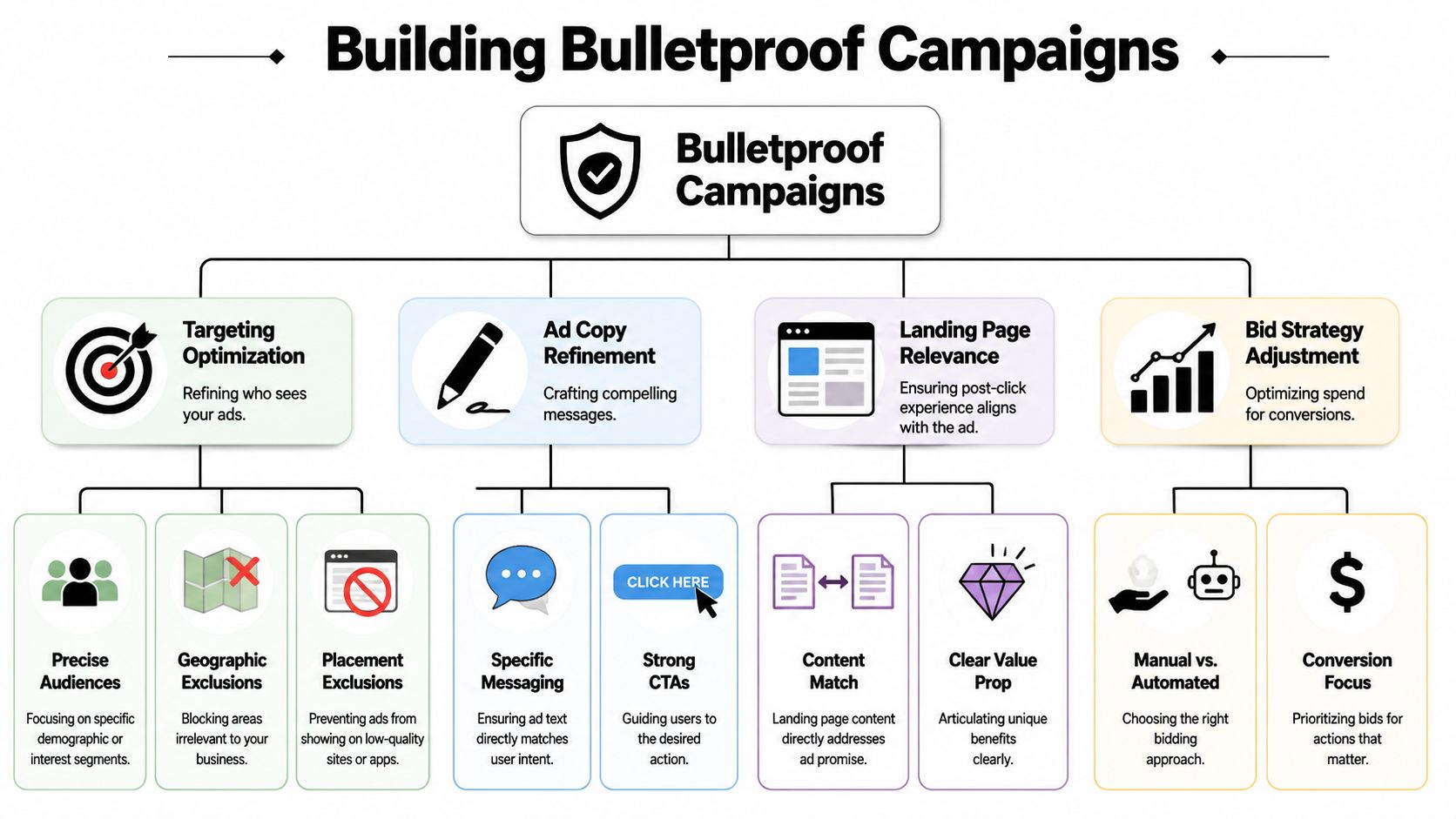
Advanced Strategies for Bulletproof Campaigns
Negative keywords are essential, but they don't solve everything. In some accounts, especially Shopping and broad-match-heavy setups, negatives mainly reroute traffic rather than eliminate weak intent entirely.
That's why campaign structure becomes the bigger lever.
Bidnamic notes that a nuanced cost driver is how match types and campaign structure route intent, especially in Shopping, where you don't target search terms directly. Negative keywords often shift traffic between campaigns rather than removing all low-intent traffic, which makes account architecture a primary control point as automation expands query coverage, as explained in this guide to stopping irrelevant clicks in Shopping and search.
Structure controls intent before the click
When accounts are built around broad themes instead of clear intent separation, query quality drifts fast. Good structure does the opposite.
That usually means:
- Separating branded and non-branded intent
- Isolating high-intent terms from exploratory terms
- Splitting products or services that attract very different search behavior
- Using campaign priorities and exclusions deliberately in Shopping
This isn't just tidiness. It's control. If every kind of search enters the same campaign bucket, Google's automation has too much freedom to blend intent types that should stay separate.
Add more filters than keywords
A bulletproof campaign doesn't rely on keyword controls alone. It layers additional relevance filters.
The strongest combinations often include:
| Lever | What it helps control | Common use |
|---|---|---|
| Audience exclusions | Who should not see the ad | Filtering poor-fit users |
| Geographic exclusions | Where demand is not useful | Blocking non-service areas |
| Device or schedule adjustments | When and where low-value traffic appears | Reducing repeat waste windows |
| Landing page alignment | Whether the click was worth buying | Matching ad promise to page intent |
A lot of irrelevant clicks aren't solved at the query level alone. Sometimes the search is acceptable, but the ad copy is too broad or the landing page doesn't qualify the visitor well enough.
If you keep fixing the same irrelevant traffic pattern with negatives alone, the account probably has a structure problem.
That's the point where advanced work starts paying off. You're no longer just cleaning waste after it happens. You're building routes that make the wrong click less likely to happen in the first place.
Automating Your Defense and Winning Back Time
Manual cleanup works. It just doesn't scale well.
If you're managing a small account with limited change volume, you can review search terms and negatives by hand without too much pain. Once the account grows, or once you're juggling multiple clients, that process becomes repetitive fast. Things get missed. Reviews get delayed. Junk queries sit live longer than they should.
That's where automation earns its keep. Not because the work is beneath you, but because the repetitive part of the work shouldn't consume your best attention.
Scripts can help flag waste patterns. Rules can support routine hygiene. Purpose-built tools can speed up search term review, bulk negative handling, and match type decisions. One option is Keywordme, which is built to help clean up junk search terms and apply negatives and match types inside a tighter workflow.
If you're handling this problem regularly, it's also worth looking at this article on how to automate negative keyword management.
The point isn't to remove human judgment. You still need judgment for diagnosis and prioritization. Automation just removes the slow, error-prone copy-and-paste layer so you can spend more time on structure, messaging, and expansion.
If irrelevant clicks keep draining your Google Ads budget, Keywordme gives you a faster way to review search terms, apply negatives, organize match types, and keep account hygiene under control without turning cleanup into a full-time job.
.svg)