
What Is GCLID? Boost Your Ad Tracking in 2026
What Is GCLID? Boost Your Ad Tracking in 2026


SEO Title: What Is GCLID in Google Ads
Meta Description: What is GCLID? Learn how Google Ads auto-tagging, forms, and CRM capture connect clicks to leads and sales for better attribution.**
GCLID is a unique tracking code Google Ads adds to your landing page URL after an ad click, and it gives 100% click-level granularity for attribution when used for Google Ads tracking. In plain English, it’s the digital fingerprint that helps you connect ad spend to real outcomes like form fills, calls, and sales.
If you’ve ever clicked a Google ad and landed on a page with a long URL ending in something like ?gclid=..., you’ve already seen it in action. That string is typically ignored. PPC managers learn very quickly not to.
That little code is one of the most important pieces of Google Ads tracking. Without it, you can still run campaigns. But tying a lead back to the exact click that created it gets much harder, especially when the sale happens later in your CRM instead of right on the website.
This matters most when your funnel isn’t instant. Maybe someone clicks an ad today, fills out a quote form, talks to sales next week, and signs a deal later. If you capture the GCLID properly, you can keep that click connected to the lead all the way through the funnel. That’s what makes better attribution possible, and better attribution is what lets you make smarter budget decisions.
Your Introduction to the GCLID
A client once asked me why their landing page URL looked “broken” after they clicked their own ad. It wasn’t broken at all. The URL had a GCLID attached, and that was a good sign.
GCLID stands for Google Click Identifier. Google Ads automatically appends it to landing page URLs when someone clicks your ad, as described in Google Ads auto-tagging documentation. Each click gets its own unique alphanumeric ID, so Google can tell one click apart from another.
The easiest way to think about it is a package tracking number. If ten packages leave a warehouse, each one needs its own code so you know where it came from and where it ended up. GCLID does the same job for ad clicks.
What the code actually does
On its own, the code doesn’t mean much to a person reading the URL. But inside Google’s tracking system, that identifier connects the click to details like the campaign, ad group, and keyword tied to that visit, based on the documented role of GCLID in Google Ads attribution.
That’s the practical reason PPC teams care about it. It helps answer questions like:
- Which campaign drove this lead
- Which keyword started the customer journey
- Which click later turned into revenue
A GCLID looks messy in the URL, but clean in reporting. That’s why you want it there.
If you’re trying to understand what is gclid, don’t get stuck on the letters and numbers. Focus on the job it does. It gives Google Ads a reliable way to recognize a click later when a conversion happens.
Google Ads Auto-Tagging Explained
Google creates the GCLID for you through a feature called auto-tagging.
That matters because manual tracking breaks in ordinary ways. Someone forgets a UTM. A landing page gets cloned without the right parameters. A CRM records the lead, but no one can tell which click started the conversation. Auto-tagging reduces that cleanup work by attaching Google’s click ID automatically at the moment of the ad click.
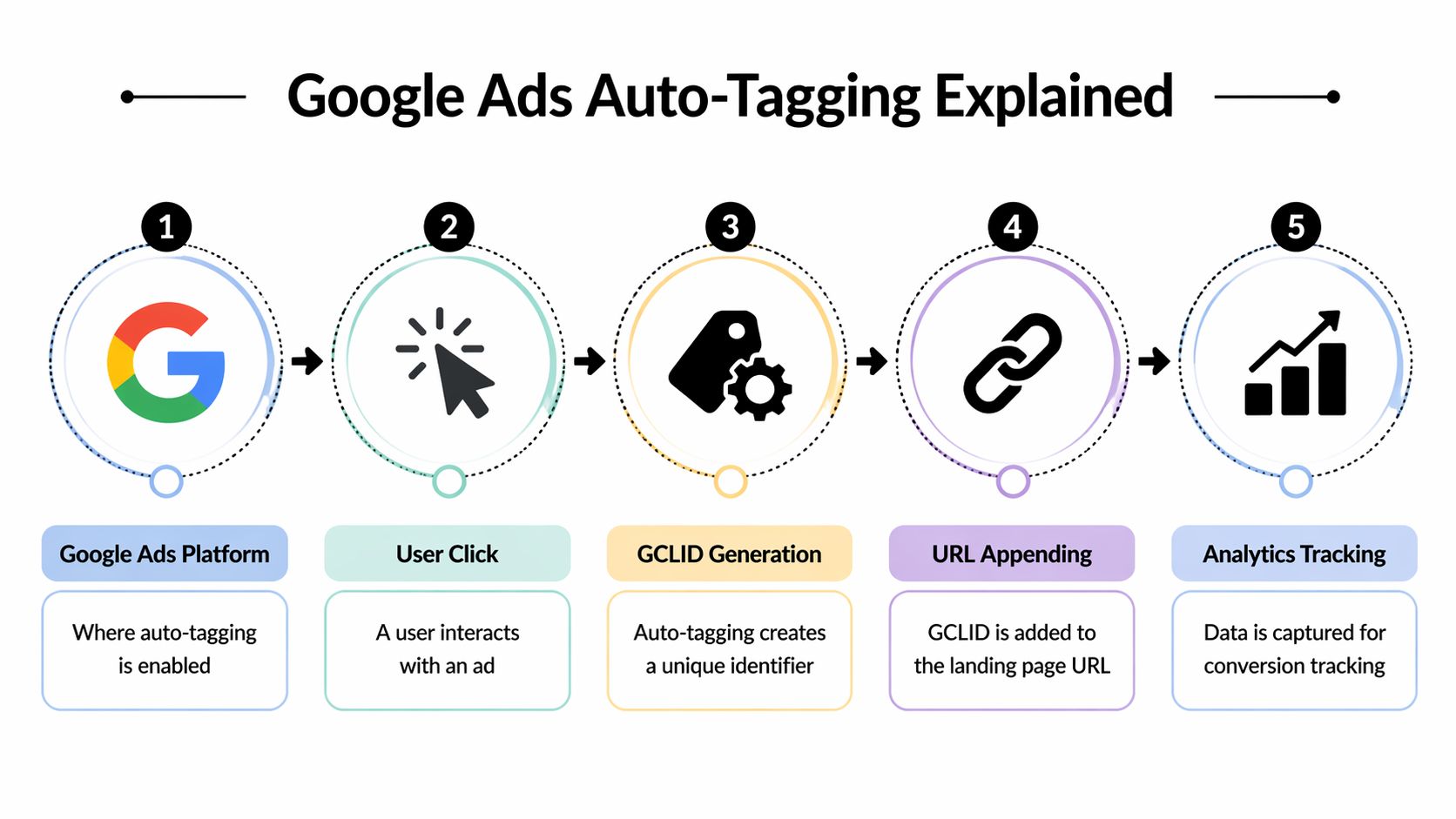
What happens when auto-tagging is on
The process is simple:
- A person clicks your Google ad
- Google generates a unique GCLID for that click
- The GCLID is added to the landing page URL
- Your website receives the visitor with that identifier attached
- Your tracking setup can store it and pass it into a form, CRM, or offline conversion workflow
The fifth step is the one PPC teams care about most.
If the GCLID only appears in the URL for a split second, it does not help much. The useful setup is the one where your site captures that value, keeps it with the lead record, and sends it into the systems your sales team already uses. That is how a click turns into something you can match later to pipeline, closed revenue, and return on ad spend.
Why Google handles this automatically
You do not read or decode the GCLID yourself. Google uses it behind the scenes to recognize the click and connect it to the right ad interaction.
A good comparison is a courier label. The number on the package matters less to you than to the delivery system that scans it at each stop. GCLID works the same way. The code helps Google and your measurement stack identify which click led to the form fill, phone call, qualified opportunity, or sale.
That is also why GCLID and UTMs serve different jobs. UTMs are useful for broad traffic labeling across channels. GCLID is built for Google Ads click-level attribution, especially when you want cleaner conversion data and a stronger handoff into offline reporting.
The practical payoff for your campaigns
Here is the actual "so what?"
With auto-tagging turned on, you can capture the GCLID in a hidden form field, store it in your CRM, and later upload offline conversions tied to actual sales outcomes. Once that loop is in place, you are no longer optimizing only for front-end leads. You can optimize for the keywords and campaigns that produce qualified pipeline and revenue.
That becomes even more useful in accounts with long sales cycles. A prospect may click today, submit a form next week, talk to sales next month, and close much later. If the GCLID stays attached to that record, your team can still credit the original ad click correctly. Tools that focus on paid search analysis, including Keywordme, become more useful once that attribution chain is intact because the campaign data is tied to real business outcomes instead of surface-level lead counts.
If you are still getting the account basics in place, this walkthrough on setting up a Google Ads campaign is a helpful primer before you fine-tune tracking.
For a related breakdown of URL parameters in paid traffic, Keywordme also has a useful guide on Google tracking URLs.
How a GCLID Travels Through Your Funnel
A prospect clicks your Google ad on Monday, reads a few pages, leaves, comes back later, and finally books a demo. Sales closes the deal weeks after that. If the GCLID stays attached the whole way, you can trace that revenue back to the original click instead of treating it like an anonymous lead.

That is the full journey. The GCLID starts in the landing page URL, but its job is to keep traveling through the session, the form submission, and eventually the CRM record.
From ad click to session data
A GCLID works like a package tracking number. The click creates the shipment record. Your site then has to hold onto that number long enough to connect the visit to a real conversion.
In practice, your tag setup reads the GCLID from the landing page URL and stores that click information in the browser. If the visitor views other pages, starts a multi-step form, or comes back shortly after, that identifier should still be available to the systems handling conversion tracking.
A common point of confusion is assuming the tracking work is done once the GCLID appears on the landing page. It is not. The handoff between pages, forms, tags, and domains decides whether attribution survives.
What happens at conversion time
At conversion time, Google’s tracking setup tries to match the recorded action back to the original ad click using the stored GCLID. If that handoff works, Google Ads can connect the conversion to the campaign, ad group, keyword, and search term data behind the click.
That matters for more than lead counts.
If your team captures the GCLID and later passes it into the CRM, you can connect early actions like form fills to later outcomes like qualified opportunities, closed deals, or revenue. That is the full-funnel use case. It is also the difference between optimizing for cheap leads and optimizing for sales results. Platforms like Keywordme become more useful here because the click data can be evaluated against downstream business outcomes, not just front-end conversions.
Practical rule: If the GCLID reaches the landing page but does not stay attached through the conversion path, attribution breaks before the lead record is even complete.
A short visual walkthrough helps here:
Where teams lose the thread
The weak spots are usually technical and easy to miss during campaign launch:
- Redirect problems that remove the GCLID before the landing page fully loads
- Tag setup issues where the site never stores the click information in the browser
- Multi-step forms that fail to carry the identifier from one step to the next
- Cross-domain journeys where a visitor lands on one domain and converts on another without proper tracking continuity
- CRM handoff gaps where the lead submits successfully, but the GCLID never gets written to the contact or deal record
Each of those breaks the chain a little earlier than many teams expect. The result is familiar. Google Ads shows leads, the CRM shows revenue, and no one can confidently tie the two together.
Once you understand that travel path, debugging gets much easier. You are not just checking whether a parameter exists in a URL. You are checking whether the original click ID survives long enough to support offline conversion imports, ROI reporting, and smarter campaign optimization.
Capturing GCLID for Deeper Insights
GCLID's capabilities extend beyond website reporting. If your business closes leads offline, books demos through sales reps, or updates deal stages in a CRM, you need the GCLID to move beyond the browser.
The hidden field setup
The most common method is simple. Add a hidden field to your lead form for the GCLID.
When someone arrives from a Google ad, your site can read the GCLID from the URL or stored session data and place it into that hidden form field automatically. The person filling out the form never sees it. They just enter their name, email, company, or phone number like normal.
When they submit, the form sends:
- Visible lead data like name and email
- Hidden click data like the GCLID
That package then lands in your CRM.
Why this matters in a CRM
Once the GCLID sits on the lead record, your sales team can move that lead through the funnel without losing the original ad source. If the lead becomes qualified later, books a sales call, or closes into revenue, you still have the click identifier tied to that customer record.
That’s the bridge between ad click and offline value.
A basic workflow looks like this:
- User clicks a Google ad
- Landing page receives the GCLID
- Your site stores it
- A hidden form field captures it on submission
- Your CRM stores it with the lead
- Later sales outcomes can be tied back to the original click
If your team measures only form fills, you optimize for lead quantity. If your CRM carries GCLID into later stages, you can optimize for lead quality.
Practical implementation notes
You don’t need a giant custom stack to do this. Many teams use:
- Google Tag Manager to help manage page logic
- JavaScript on the form page to populate the hidden field
- Salesforce or HubSpot to store the value in the contact or lead record
- Google Ads offline conversion imports to send final outcomes back to Google Ads
This is also where tools around search term cleanup become more valuable. Once click and lead quality are tied together more cleanly, platforms like Keywordme can help PPC teams work from real query data to organize negatives, refine match types, and clean up search term waste inside Google Ads workflows.
The big shift is mental. You stop treating a lead form as the finish line. It becomes the handoff point for attribution.
Using GCLID for Smarter Attribution
A lot of PPC accounts look healthy until you ask a harder question. Which clicks turned into revenue?
GCLID helps answer that question because it keeps the original Google Ads click tied to later outcomes. Online, that might be a purchase or a form submission. Offline, it might be a booked demo, a qualified opportunity, or a closed deal that shows up weeks later in your CRM. The practical value is simple. You stop measuring only what happened on the website and start measuring what happened in the sales process.
That changes how attribution works in day-to-day campaign management.
Online attribution and offline attribution
Online attribution is the shorter path. Someone clicks an ad, converts on the site, and Google Ads can match that conversion back to the click if your tracking is set up correctly.
Offline attribution adds one more handoff. The GCLID has to stay attached to the lead record long enough for your sales team or CRM to report back what happened next. If a prospect fills out a form on Monday and signs a contract a month later, the GCLID is the reference point that connects the sale to the original ad click, much like a package tracking number follows a shipment through each stop.
That matters in longer sales cycles, especially for B2B teams, service businesses, and any company where the actual conversion happens after a call, a meeting, or a quote.
What smarter attribution changes in practice
Once your CRM is feeding qualified stages or revenue outcomes back to Google Ads, campaign analysis gets much more useful.
You can answer questions like:
- Which keywords produce sales-qualified leads instead of just form fills
- Which campaigns influence pipeline and closed revenue
- Which search terms create busywork for sales without producing real opportunities
Those answers improve bidding, budget allocation, and search term decisions. They also help reduce wasted ad spend because you are judging performance by business outcomes, not by low-friction conversions that look good in a dashboard.
Keyword-level insight becomes more valuable here too. If your attribution setup shows that certain queries drive plenty of leads but very little downstream value, tools like Keywordme help PPC teams clean up search terms, organize negatives, and refine match types based on what results in revenue.
GCLID versus UTM parameters
GCLID and UTM parameters do different jobs.
GCLID is Google Ads specific. It is built for click identification and conversion matching inside the Google Ads ecosystem. UTM parameters are broader labels you add to links so analytics tools can classify traffic from email, paid social, organic social, partnerships, and other channels.
A simple way to separate them is this. GCLID helps Google Ads know which click led to a result. UTM parameters help your reporting stack know where a visit came from across channels.
GCLID vs. UTM Parameters at a Glance
| Feature | GCLID (Auto-tagging) | UTM Parameters (Manual Tagging) |
|---|---|---|
| Primary use | Tracks Google Ads clicks | Tracks many marketing channels |
| Setup method | Automatic through auto-tagging | Manual parameter creation |
| Channel coverage | Google Ads only | Email, social, organic, paid social, and more |
| Granularity | Rich Ads-specific click data | Depends on how you structure tags |
| Error risk | Lower because Google appends it automatically | Higher because humans build the tags |
| Best use case | Google Ads attribution and conversion matching | Cross-channel traffic labeling |
If you want to connect Google Ads data to the rest of your marketing reporting, this guide to cross-channel attribution for multi-source reporting is a useful next read.
Troubleshooting Common GCLID Issues
When GCLID tracking breaks, the symptom usually looks simple. Conversions don’t show up correctly, imported data looks thin, or Google Ads can’t tie lead quality back to clicks. The cause is usually somewhere between the ad click and the conversion event.

Parameter stripping and redirect problems
The first thing I check is the landing page URL after a real ad click. If the GCLID disappears during a redirect, nothing downstream can save the situation.
Common symptom and cure:
Symptom
You click the ad, but the final landing page URL no longer contains the GCLID.Cure
Review redirect rules with your developer. The parameter needs to survive the trip from ad click to final page load.
Auto-tagging and tagging conflicts
Sometimes the issue is less technical and more administrative. Someone turned off auto-tagging, changed templates, or started cleaning URLs too aggressively.
Look for these:
Auto-tagging disabled
If it’s off, Google won’t append the GCLID.URL rewriting tools
Some setups strip query parameters to keep URLs “clean.” That can accidentally remove the one parameter you need most.Case changes
If a system rewrites the GCLID value, attribution can fail.
If your reports suddenly get fuzzy after a site update, assume the path of the click changed before you assume Google Ads changed.
Cross-domain headaches
This one catches a lot of teams. The ad lands on one domain, but the form or booking engine lives on another. If the click identifier doesn’t carry across that handoff, the conversion may lose its origin.
A quick PPC medic checklist:
- Click a live ad and inspect the landing URL
- Confirm the GCLID remains present after redirects
- Check whether your form pages live on another domain
- Review whether your tags still fire after recent site changes
- Test a full lead path, not just the first page
If you’re debugging a broader tracking failure, this guide on Google Ads conversion tracking not working is a practical companion.
Privacy Consent and the Future of GCLID
Privacy rules changed the way marketers think about tracking, but they didn’t make GCLID irrelevant. If anything, they made clean first-party measurement more important.

Why GCLID still matters
GCLID sits inside Google Ads’ own measurement framework. It’s still one of the core ways Google can connect ad clicks to later actions when the click originated in Google Ads.
That doesn’t mean nothing has changed. Consent choices, browser restrictions, and tighter privacy expectations all affect how much data is available and how consistently it can be used. Your tracking setup needs to respect those choices.
How modern tracking is adapting
Against this backdrop, tools like Consent Mode and Enhanced Conversions become important. The job now isn’t just “track everything.” The job is to measure responsibly and preserve useful attribution where consent and platform rules allow it.
A sensible privacy-first setup usually includes:
- Clear consent handling so ad-related measurement responds to user choices
- First-party site tagging so your own domain participates in the measurement chain
- CRM-based conversion workflows for businesses that close sales after the original click
- Offline imports when website conversions don’t tell the full story
The takeaway is pretty practical. The ecosystem is changing, but the question behind what is gclid stays the same. It’s still the identifier that helps Google Ads recognize which click started the journey. The difference now is that marketers need cleaner implementations and better consent-aware systems around it.
Frequently Asked Questions About GCLID
Does GCLID replace UTM parameters
No. GCLID is for Google Ads click tracking. UTM parameters still matter for other channels like email, social media, and organic campaigns.
Can I see a GCLID on traffic from social media or SEO
No. GCLID is specific to Google Ads traffic. If the visit came from social, email, or organic search, you’ll need other tracking methods such as UTMs.
What happens if auto-tagging is turned off
Google Ads stops appending the GCLID to your landing page URLs. That means you lose the automatic click identifier that supports Google Ads conversion tracking and attribution.
Why do people store GCLID in forms and CRMs
Because many valuable conversions don’t happen immediately on the website. Capturing the GCLID in a hidden field lets you tie later sales outcomes back to the original ad click.
Is GCLID useful only for ecommerce
Not at all. It’s often even more important for lead generation, B2B, home services, healthcare, legal, and any business with a longer sales cycle.
If I’m asking what is gclid, what should I do first
Start by checking whether auto-tagging is enabled in Google Ads. Then test a live ad click and confirm the landing page URL contains the GCLID. After that, make sure your site, forms, and CRM preserve that value through the funnel.
If you want to turn GCLID data into cleaner search term decisions and tighter Google Ads workflows, Keywordme is worth exploring. It helps teams work through keyword expansion, match type handling, and negative keyword cleanup using real Google Ads search term data, which becomes much more useful when your attribution setup is solid.
.svg)