
What Is a Good Cost Per Click Google Ads? a 2026 Guide
What Is a Good Cost Per Click Google Ads? a 2026 Guide


The 2025 average Google Ads CPC was $5.26, but a good cost per click is the one that still makes money at your conversion rate and margin, not the average.
That distinction changes how you manage an account. A higher-priced click can be the cheaper way to acquire a customer, while a bargain click can be money wasted. Before you lower bids, work out what a conversion is worth and how often your clicks produce one.
What a Good CPC Looks Like by Industry
There's no universal good CPC, only one that works for your business. LocaliQ's benchmark analysis covered 16,446 U.S. search advertising campaigns, with data from April 2024 through March 2025, and reported an average CPC of $5.26, according to Search Engine Land's coverage.
That average rose 12.88% year over year, according to PPC Land's report on LocaliQ's benchmarks. It's useful budgeting context, but it doesn't tell you whether your next click will be profitable.
Average Google Ads CPC by industry
The older reference point is $4.66 across industries in 2024, with the category figures below coming from WordStream's Google Ads benchmarks. All category rows are from that benchmark year, not updated category estimates.
| Industry | Average CPC | Note |
|---|---|---|
| All industries, 2024 | $4.66 | Broad directional benchmark |
| All industries, 2025 | $5.26 | Up 12.88% year over year |
| Arts and Entertainment | $1.72 | Lowest category average in this set |
| Travel | $1.92 | Low-cost category |
| Real Estate | $2.10 | Low-to-mid cost category |
| Dentists and Dental Services | $6.82 | Higher-cost category |
| Home and Home Improvement | $6.96 | Higher-cost category |
| Attorneys and Legal Services | $8.94 | Highest category average in this set |
These are directional U.S. category averages, not guaranteed prices or a global rate card. Your service area, offer, keyword mix, and competitors can put your account on either side of its category benchmark.
For example, a hypothetical $7 CPC would look expensive beside the entertainment benchmark but ordinary beside legal services. That comparison is a reason to investigate, not an instruction to cut bids.
Practical rule: Use an industry average to spot questions worth asking, not to decide which keywords deserve your budget.
For a more specialized comparison, print-on-demand sellers can consult Skup's guide to POD advertising benchmarks. Compare benchmarks that reflect your business model rather than treating every online sale as economically equivalent.
Find the row closest to your business, then check what those clicks produce. Being below average isn't an achievement if the visitors don't buy, and being above average isn't a problem if customer acquisition remains profitable.
Why the Average CPC Can Mislead You
The CPC in your dashboard isn't a fixed price attached to your keywords. Average CPC equals total click cost divided by total clicks. In Google's average CPC explanation, clicks costing $0.20 and $0.40 produce a $0.30 average CPC.
That's different from maximum CPC, the bid limit you enter under applicable bidding settings. Google explains that actual CPC is often lower than the maximum bid, because the auction generally charges what's needed to clear relevant Ad Rank thresholds and beat the next eligible competitor.
Segment before you judge
Google's guidance on CPC fluctuations identifies factors including competition, the exact query, device, location, seasonality, consumer behavior, and changes to the results page. An account-wide average compresses all that variation into a single figure.
Say an account averages $7 per click, while one ad group averages $2 and another averages $15. That hypothetical account average doesn't reveal which group deserves more budget, and the groups won't contribute equally unless their click volumes happen to match.
Start your investigation with:
- Search terms: Separate searches that describe your offer from searches that merely share vocabulary.
- Ad groups: Compare tightly related services rather than blending different customer needs.
- Location and device: Look for differences in conversion outcomes, not just click prices.
Cheap isn't the same as efficient
A law firm's higher-priced traffic might come from people ready to hire. An online shop's hypothetical $1.50 average CPC might come from visitors searching for free templates, instructions, or products it doesn't stock.
Lowering the shop's bids won't fix that mismatch. It may buy fewer of the same unsuitable visits.
A cheap click that can't become a customer isn't a bargain.
Don't optimize for the lowest dashboard number. Optimize for economically useful traffic, then measure what you paid to turn that traffic into customers.
How to Calculate Your Break-Even CPC
Your break-even CPC starts with business economics:
Break-even CPC = conversion rate × gross profit per conversion
Use the conversion rate as a decimal. Gross profit per conversion means revenue minus the direct costs of delivering the sale, before advertising expense. This is a contribution-level break-even calculation, not a promise that you've covered overhead.
Work from profit, then choose your return
Consider an illustrative business with a 5% conversion rate, $200 revenue per sale, and 60% gross margin. That produces $120 gross profit per sale and a calculated $6.00 break-even CPC:
0.05 × $120 = $6.00
Spending at that ceiling would consume the expected gross profit in advertising. You'd usually want a lower working target to leave room for operating costs, uncertainty, and profit.
For a revenue-based return target, use:
Target CPC = conversion rate × revenue per conversion ÷ target ROAS
With the same hypothetical business and a 3.0 revenue ROAS target, the calculation is 0.05 × $200 ÷ 3 = approximately $3.33. Using gross profit instead of revenue produces $2.00, but that is a gross-profit-to-ad-spend target, not standard revenue ROAS.
Don't treat those two return measures as interchangeable. Also distinguish your calculated ceiling from the amount the auction charges, which Google's actual CPC guidance explains may be below your maximum bid.
Build a usable ceiling
- Pull a representative conversion rate. I'd start with the last month, then widen the window if conversions are sparse or sales arrive slowly.
- Work out gross profit per conversion, including direct fulfillment costs and typical refunds.
- Multiply conversion rate by gross profit. Keep both inputs tied to the same offer and conversion action.
- Compare that result with actual CPC, then set a working target below break-even.
- For lead generation, adjust conversion value for qualification and close rate. A form submission isn't automatically a sale.
Use this cost-per-acquisition calculation guide to keep your click, lead, and customer calculations consistent.
Cost per conversion at a $4.66 CPC by conversion rate
The following is a calculated sensitivity example, using an illustrative $50 cost-per-conversion target. Cost per conversion equals CPC divided by conversion rate; allowable CPC equals the target multiplied by conversion rate.
| Conversion rate | Cost per conversion at $4.66 CPC | Max CPC for $50 per conversion |
|---|---|---|
| 2% | $233.00 | $1.00 |
| 5% | $93.20 | $2.50 |
| 10% | $46.60 | $5.00 |
| 20% | $23.30 | $10.00 |
The click price hasn't changed, but acquisition economics have. Your calculated number is a ceiling, not a bid you need to hit exactly.
Judging CPC Against ROI and Profit
Put conversion rate, cost per lead, qualified-lead rate, customer acquisition cost, and profit per conversion beside CPC. Each answers a different question. CPC tells you the price of a visit, while customer acquisition cost tells you what you paid to win a customer.
For a hypothetical law firm, a $7 CPC could work if 8% of clicks become signed clients and the resulting work generates enough profit. A shop could lose money buying $1 clicks if those visitors never purchase. Neither click price is a verdict by itself.
How to read CPC against conversions
Use your own target and historical performance to define high and low. Don't label a group expensive just because another group serves cheaper searches.
| Scenario | What it looks like | Verdict |
|---|---|---|
| High CPC, strong conversions | CPC above your average, cost per conversion under target | Keep bidding and scale carefully |
| Low CPC, strong conversions | Cheap clicks that actually convert | Scale the budget |
| Low CPC, weak conversions | Cheap clicks, few leads, poor lead quality | Tighten keywords or cut the group |
| High CPC, weak conversions | Expensive clicks that rarely convert | Lower bids or fix the landing page |
For the first row, protect the traffic that produces profitable customers. Before scaling, check whether the results depend on branded searches, a temporary offer, or a narrow pocket of demand.
For the second row, increase budget deliberately rather than assuming performance will stay unchanged. Additional spend may reach different searches or less purchase-ready users.
Check the money after the conversion
Suppose customer acquisition costs $90, while gross profit per customer is $60. That hypothetical campaign loses money on the initial purchase, however attractive its CPC looks. Repeat purchases only change the conclusion if you can substantiate their value and timing.
The return-on-ad-spend formula helps evaluate revenue efficiency, but revenue alone doesn't account for margin. Keep the profit check separate, especially when your products have different delivery costs.
Lead-quality check: Count the leads sales can actually work, not just the forms your tracking records.
Cheap form fills can include wrong service areas, unsuitable budgets, or people who never answer. Review the search-term report weekly, compare CPC with your economic ceiling, and check qualification before cutting a group that appears expensive.
What Pushes Your CPC Up or Down
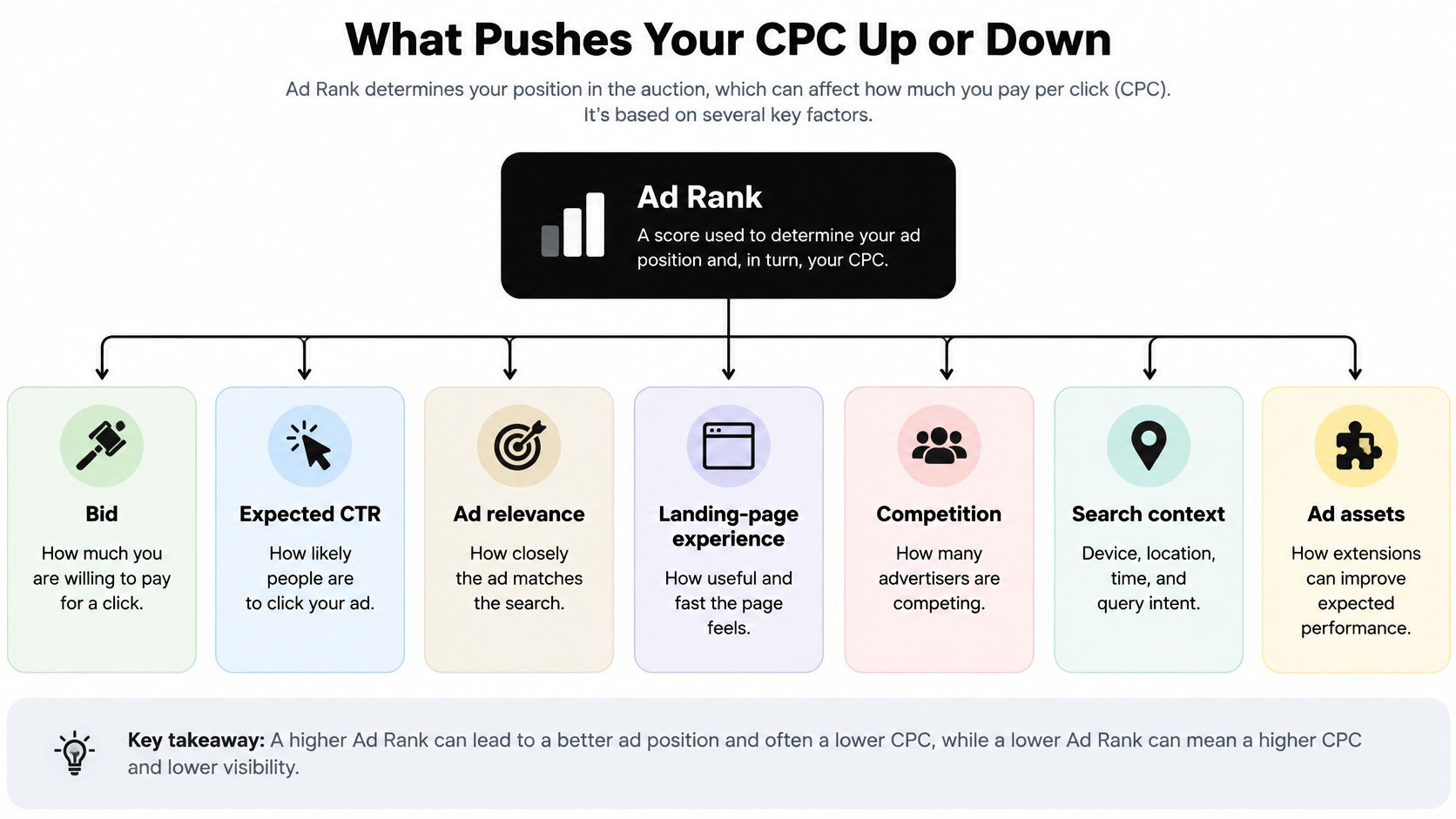
Ad Rank determines whether your ad is eligible to appear and how it competes for placement. Google's Ad Rank documentation identifies the bid, auction-time ad quality, competition, search context, thresholds, and expected asset impact as relevant factors.
Ad quality includes expected click-through rate, ad relevance, and landing-page experience. A larger bid isn't the only way to compete, and better alignment can help you qualify or compete without paying as much.
This diagram separates the main factors that affect auction outcomes.
Improve the match rather than chasing a score
Start with the searcher's task. If someone needs an emergency plumber, the keyword, headline, and landing page should all support booking emergency plumbing service in the right area.
Sending that person to a general homepage adds work and uncertainty. A relevant service page with clear availability, service coverage, and a straightforward contact path is a better match.
Google displays Quality Score on a 1–10 scale, using expected click-through rate, ad relevance, and landing-page experience, but describes it as a diagnostic rather than a direct auction input in its Google Ads FAQ. Use those component ratings to identify weaknesses, not as a scorecard to improve at any cost.
The practical Quality Score guide can help you turn those diagnostics into keyword, ad, and page changes.
Intent can justify a higher price
An emergency plumbing search may cost more but bring someone who needs service immediately. A broad plumbing-tips search may be cheaper yet attract someone determined to do the repair themselves.
Device, location, season, search wording, and competitor activity can also change the price without any edits from you. Separate those shifts from problems you can fix.
For another perspective on outcomes, Clipatra's explanation of paying for defined consumer actions is useful context. A CPC campaign still charges for clicks, so you must connect those clicks to meaningful downstream actions yourself.
For a complementary explanation, watch this video.
Watch three signals together:
- Keyword diagnostics: Identify weak expected response, relevance, or page experience.
- Search-term relevance: Check whether actual searches match what you sell.
- Landing-page match: Confirm that the page fulfills the specific promise in the ad.
Lower Your CPC and Set a Target You Can Test
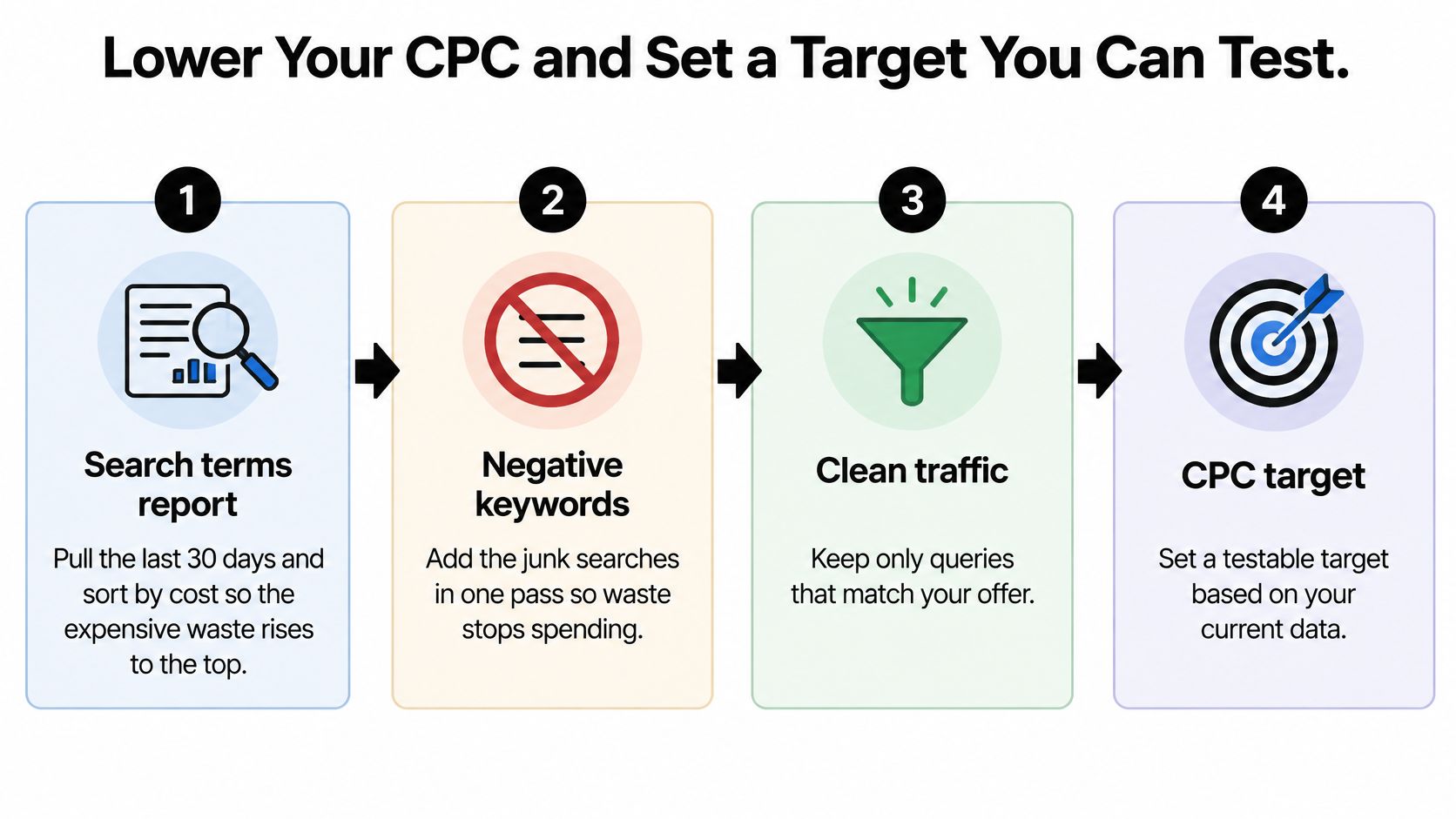
Start with the search terms report, not the bid column. I'd pull the last month and sort by cost so expensive waste is easy to find, then check conversion delay before labeling recent searches unsuccessful.
The aim isn't to eliminate every costly click. It's to stop buying irrelevant visits and give useful traffic a realistic price limit.
Use this workflow to keep cleanup tied to a measurable target.
Clean the traffic before changing bids
Exclude clear junk searches. Add negatives for irrelevant intent, unsupported services, and locations you don't serve. In Keywordme, junk keywords can be removed from the search terms report with a single click or quick mouse highlight, and negative or positive lists can be built with a click or mouse drag. Don't exclude a useful phrase just because one search containing it was unsuitable.
Move proven converting search terms into focused ad groups using exact or phrase match. High-converting keywords can be added straight from the search terms report. Avoid splitting closely related terms into so many groups that management becomes needlessly complicated.
Keep broad match accountable. Retain it where conversion evidence supports it, and tighten targeting where unrelated searches consume spend. Don't assume a match type is profitable or wasteful without examining the actual queries.
Match headlines and landing pages to each keyword group. Fix a broken promise before testing minor wording changes, and don't send every service to the same generic page.
Inspect high-spend keyword diagnostics. Prioritize weak relevance and landing-page components where meaningful spend is at stake. Don't chase a better diagnostic rating on a keyword that already meets your business target.
Set a controlled test
Use Google Keyword Planner for keyword cost estimates and forecasts of likely clicks, impressions, or conversions based on planned spend. Treat forecasts as planning inputs, not guaranteed results.
Trim bids selectively. For a manual CPC test, I'd consider reducing maximum bids by 10–15% on weak groups and testing a working ceiling around 70–80% of calculated break-even CPC, using the last 90 days where representative. These are starting recommendations, not universal performance thresholds. With automated bidding, adjust the strategy's applicable targets instead of assuming individual maximum bids control delivery.
Give the test two weeks as an initial review window, extending it if conversion volume or delay demands more time. Compare acquisition cost, qualified outcomes, and volume with the previous period. Don't change the landing page, bids, and targeting simultaneously if you need to identify what helped.
Cutting bids before adding negatives can leave the same waste in place at lower volume. Cutting already-profitable groups can remove customers you wanted to keep.
Check your economic ceiling monthly, and whenever margins or conversion performance materially change. An industry benchmark is context. Your profit determines the price you can afford.
Keywordme works inside Google Ads to help you remove junk search terms, build negative keyword lists, and add converting searches without copy-and-paste workflows. Visit Keywordme to clean up the traffic behind your CPC and make your next bid test about profitable customers, not cheaper clicks.
.svg)