
How to Find and Fix Wasted Ad Spend Fast
How to Find and Fix Wasted Ad Spend Fast


In 2025, 8.51% of paid ad traffic was classified as invalid, equivalent to roughly one in every 11.7 paid clicks. Using projected global digital ad spend above $740 billion, the same report estimated approximately $63 billion in annual waste from invalid traffic, including bots, scraping, malicious competitor activity, and accidental clicks (Global Invalid Traffic Report 2026.pdf)). That figure is serious, but it isn't the whole story.
A large share of wasted ad spend comes from clicks that are technically real and still have little chance of becoming customers. Broad search queries, stale audiences, weak placement controls, and poor match-type discipline drain budgets every day. The practical fix starts with intent, not with a generic fraud checklist.
Where Wasted Ad Spend Actually Comes From
The largest budget leaks often come from targeting decisions, not obvious fraud. Platforms deliver according to the settings they receive, so broad queries, aging audiences, and weak placement controls can turn legitimate clicks into expensive non-conversions.
Industry research reported that approximately 37% of digital advertising budgets produce no measurable business impact, representing about $293 billion annually against roughly $790 billion in digital ad spend (Ryze analysis of wasted ad spend). In programmatic media, the Association of National Advertisers reported $26.8 billion in inefficient spend in its Q2 2025 benchmark, up from about $20 billion in 2023, as reported in the same analysis. Fraud accounts for part of that loss. Weak targeting, low-attention inventory, and inefficient supply paths account for the rest.
The three leaks I look for first
Search-term mismatch is usually the quickest recoverable leak. Broad match can connect a commercial keyword with research queries, job searches, free resources, or an unrelated interpretation of the product. The click is real and the landing page may work correctly, yet the visitor still has no credible buying intent. Compare each query's spend with the account's target CPA, then separate terms for negatives, bid changes, or continued testing.
Audience drift takes longer to notice. In-market segments, remarketing pools, customer lists, and LinkedIn-style professional audiences can remain active after their original assumptions stop matching the offer. Membership alone does not prove that a person fits the ideal customer profile. Review audience performance by campaign, conversion rate, and CPA, and remove segments that spend beyond the acceptable acquisition threshold without producing qualified actions.
Placement waste affects Display, video, and programmatic campaigns. Apps, sites, and content environments can generate impressions or clicks without meaningful commercial engagement. Check placement-level spend, exclude unsuitable environments, and compare assisted activity with actual leads or sales rather than judging delivery efficiency alone.
| Waste source | Typical % of budget lost | Primary fix |
|---|---|---|
| Invalid traffic | 8.51% of paid ad traffic in the 2026 global report (source | Validate traffic quality and investigate suspicious patterns |
| Fixable Google Ads issues | 34% average budget waste in an audit of 347 accounts (audit benchmark) | Review queries, targeting, bids, tracking, and campaign structure |
| Irrelevant keyword activity | About 15% of budget in the same audit benchmark | Add negatives and tighten match-type controls |
| Programmatic inefficiency | $26.8 billion in the Q2 2025 benchmark | Improve supply, attention, targeting, and measurement |
These figures measure different forms of leakage. Invalid traffic concerns traffic quality, account audits identify correctable setup problems, and programmatic benchmarks address inefficient media investment. Treating them as one total would distort the diagnosis.
A useful audit separates fraudulent activity, legitimate but irrelevant clicks, and valid traffic that the account overpays for. Do not classify exploration as waste because it has not converted. Judge the query's intent, spend against target CPA, and the quality of the resulting visit.
Auditing Your Search Terms Report for Budget Leaks
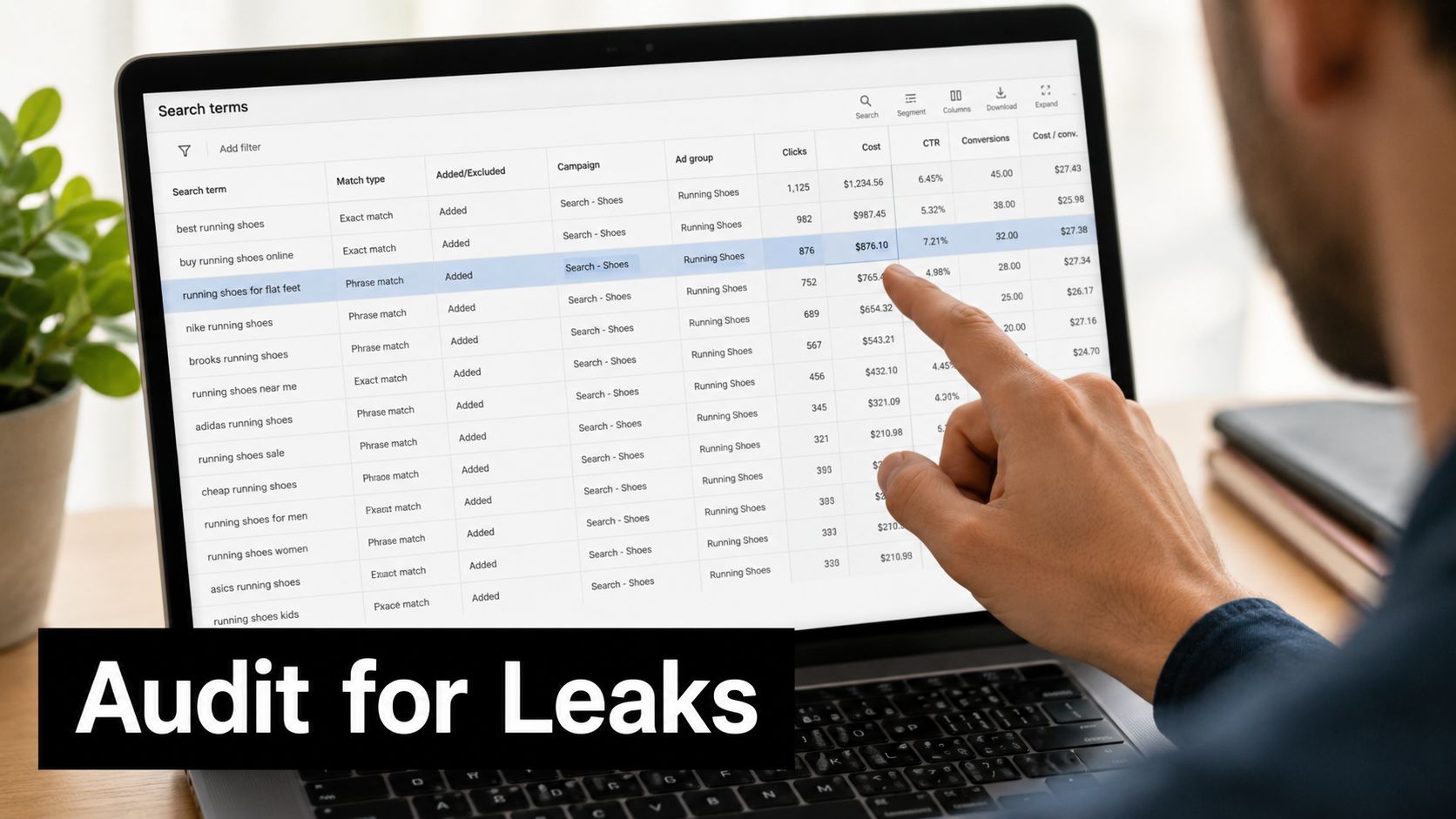
Search-term audits should start with cost, intent, and target CPA, not impressions. Export the last 30 to 90 days, sort queries by spend, and inspect terms that consumed meaningful budget without converting. Accounts with 1,000 or more monthly clicks can use a 30-day lookback to keep the review focused on current query behavior, as outlined in this negative keyword discovery framework.
A practical review sequence
Sort by cost, not impressions. A query can generate substantial visibility while using little budget. Leakage usually sits in terms that have accumulated spend without producing a conversion.
Compare spend with target CPA. A query that spends more than 1.5 to 2 times target CPA with zero conversions is a strong exclusion candidate, according to North Country Growth guidance. For clearly irrelevant intent, act sooner. The framework above also supports reviewing terms once spend reaches 50% of target CPA without a conversion, while placing terms between 25% and 50% on a watch list. Apply the stricter rule when the intent is plainly wrong, and allow more observation when the query could represent legitimate research.
Classify before excluding. Irrelevant queries should become negatives. Low-intent but potentially useful terms may need a bid reduction or observation period. Seasonal and newly emerging queries require enough context before removal.
Check the Added column. Continued spend on an apparent negative often indicates the exclusion sits at the wrong campaign level, uses an unsuitable match type, or fails to cover a close variant entering through another route.
The workflow in this Google Ads Search Terms Report guide covers opening the report, sorting by cost, and converting high-spend, non-converting queries into negatives.
Do not confuse a keyword with a query
A keyword such as “project management software” can trigger the query “free project management template.” The keyword fits the offer, but the query signals a resource seeker rather than a software buyer. Adding free template as a phrase negative can block that intent while preserving searches such as “project management software for agencies.”
Zero conversions alone should not trigger automatic exclusions. Automation can identify queries, compare spend with target CPA, and send ambiguous terms for review. For accounts with frequent spend changes, spend anomaly detection by Cyndra adds a separate way to flag unusual cost behavior before the scheduled audit.
Review on a fixed schedule. One cleanup can recover budget, while recurring checks catch leakage returning through new variants, expanded matching, or newly launched campaigns.
Building Negative Keyword Lists That Block Waste
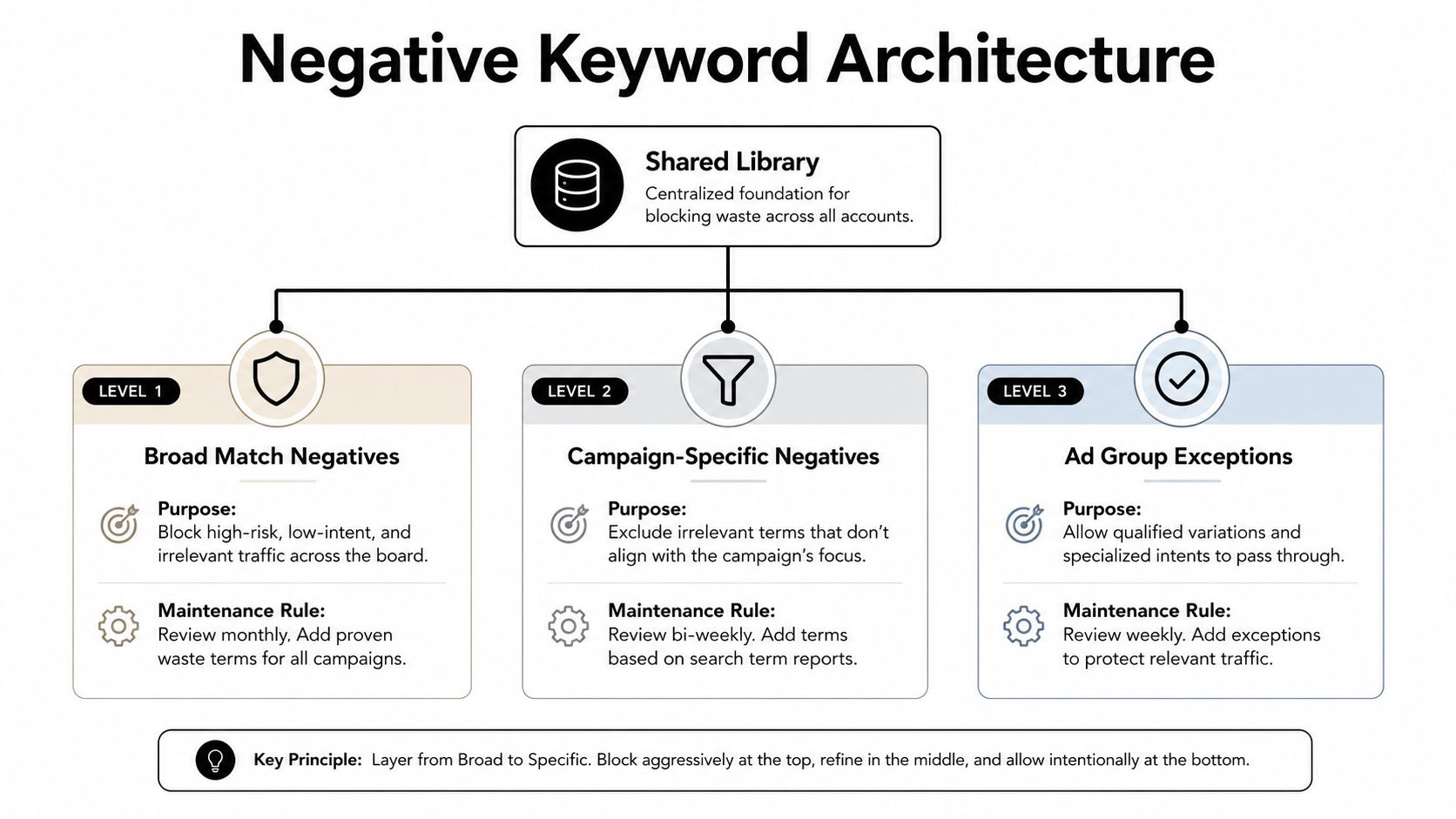
Negative keywords work best as an information architecture, not as a pile of disconnected exclusions. When every campaign owns a different version of “jobs,” “free,” or “DIY,” gaps appear quickly and nobody knows which list is safe to edit.
Build the library by intent
Start with a shared library for waste that should be blocked across the account. Common categories include:
- Employment intent: jobs, careers, hiring, resume, salary, and internship.
- Research and DIY intent: how to, tutorial, template, guide, and examples.
- Price-sensitive intent: free, cheap, discount, and open source, when the offer doesn't support those expectations.
- Wrong-use-case intent: unrelated locations, audiences, industries, or product categories.
Apply campaign-specific lists when the exclusion depends on the offer. A B2B software campaign may exclude “student” or “personal,” while an education campaign might need those terms. Ad group negatives should handle the finest distinctions, especially when several ad groups could otherwise compete for the same query.
Match the negative to the risk
Use broad negative match for a sweeping category where any occurrence should be blocked. Use phrase negative match when the word combination matters, such as “free template.” Use exact negative match when one precise query is wasteful but related variants remain commercially useful.
That hierarchy protects good long-tail traffic. Blocking template broadly could remove “template automation software,” while blocking “free template” as a phrase is more controlled. Review the list on a regular schedule, remove obsolete exclusions, and inspect the search-term report for false positives.
One 2026 guide recommends creating separate account-level lists for waste categories such as jobs, careers, hiring, salary, how to, DIY, free, cheap, and unrelated locations (shared negative keyword guidance). The approach is more maintainable than scattering individual negatives across ad groups.
Use the Google Ads negative keyword workflow to apply and manage these exclusions, but keep human review in the loop. A negative list should make the account more precise, not just smaller.
Choosing Match Types to Control Query Leakage
Match type decisions determine how much interpretation the platform can apply between your keyword and the user's query. Broad match can discover demand that a rigid keyword set misses, but it also creates the largest review burden. Phrase and exact match give you tighter control, although they can reduce discovery and may miss valuable variations.
The right choice depends on the target CPA, conversion volume, search intent, and quality of the negative library. Broad match isn't automatically wasteful. It becomes risky when the campaign lacks reliable conversion tracking, sufficient exclusions, or a process for acting on search-term data.
| Match type | Leakage risk | Best use case | Required safeguards |
|---|---|---|---|
| Broad | Highest interpretation risk | Discovery and scalable campaigns with strong signals | Smart bidding, clean conversion data, shared negatives, frequent query reviews |
| Phrase | Moderate context risk | Controlled expansion around a clear commercial theme | Phrase negatives, query categorization, landing-page alignment |
| Exact | Lowest structural leakage risk, but close variants still matter | High-value terms with strict CPA requirements | Close-variant review, exact negatives, deliberate bid management |
When broad match earns its place
Broad match works best when the campaign can distinguish a good conversion from a cheap interaction. That means the primary conversion action should represent real business value, not every form start or page view. It also needs a negative-keyword process that responds to new query patterns before they accumulate substantial spend.
Phrase match is useful when the core wording carries a clear meaning and you want controlled expansion. It can capture variations without handing the platform unlimited latitude. Exact match suits terms where a small amount of leakage has a direct impact on profitability, particularly when the query is expensive and the acceptable intent is narrow.
Google's close variants blur the old boundaries. Even exact match doesn't mean only one literal string will trigger an ad, so the Search terms report remains necessary regardless of the setting. Don't treat match type as a substitute for query analysis.
A tighter match type is a control, not a strategy. If the landing page, conversion action, and negative library are misaligned, narrowing the keyword won't solve the underlying waste.
A practical migration starts with high-cost, low-converting broad terms. Move the proven commercial query into phrase or exact match, then add the irrelevant variants as negatives. Keep genuine discovery terms in broad only when their conversion data justifies the freedom.
Refining Bids and Audiences to Stop Low-Intent Clicks
Keyword relevance can be strong while the economics remain poor. A campaign may attract the right type of person but pay too much for a device, location, audience segment, or placement that rarely produces a useful action.
Start with segmented economics
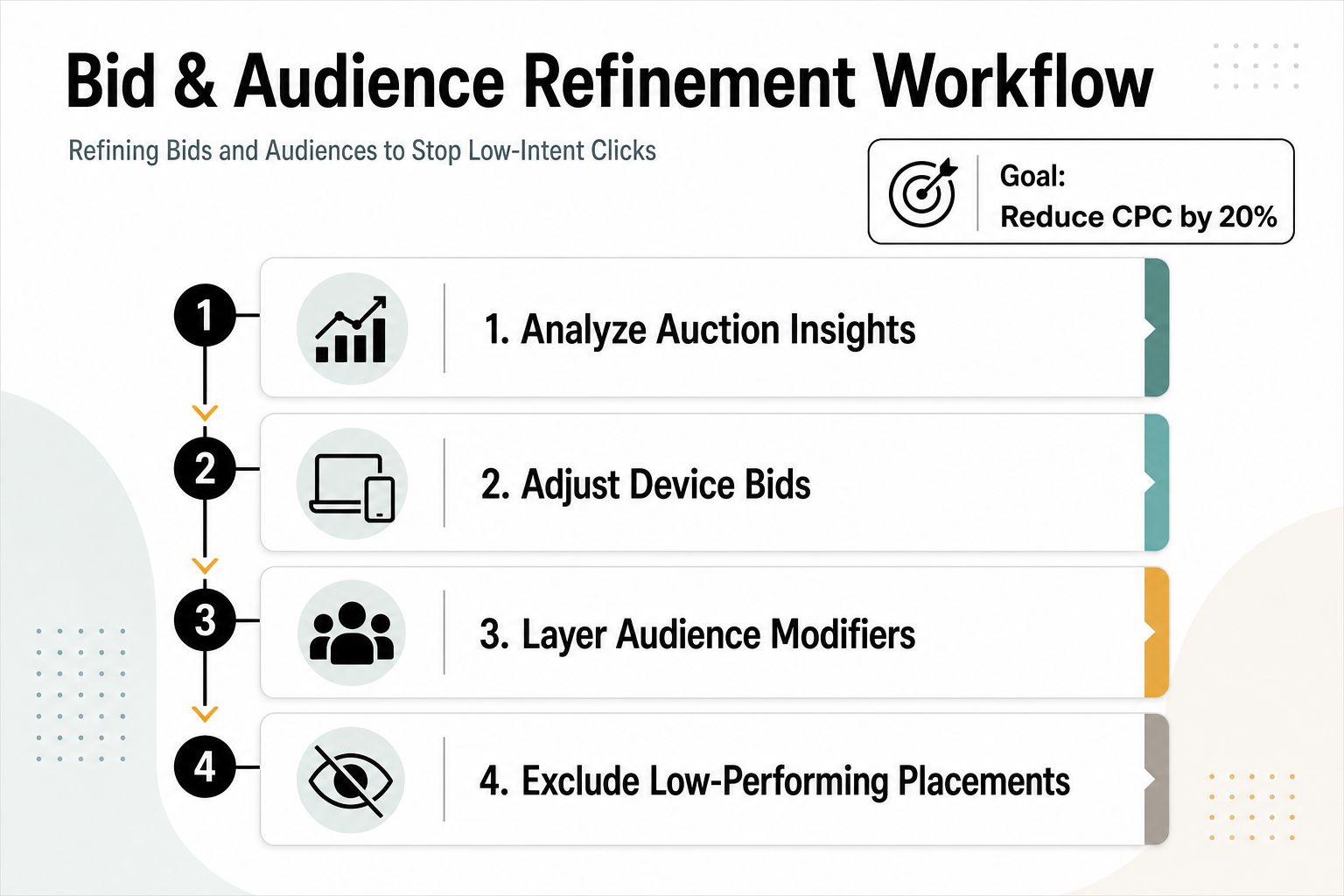
Break performance down by device, location, demographic, audience, and network. Look for segments with enough spend to make a decision, then compare their CPA with the account's target rather than relying on assumptions about who “should” convert.
A segment running at twice target CPA is a reasonable candidate for a 50% bid reduction when the campaign structure and conversion tracking support that adjustment. Treat that as a decision rule, not a universal law. If the segment contributes valuable assisted conversions, has a longer sales cycle, or is strategically important, reduce exposure gradually and validate the result.
Audience observation is especially useful before exclusion. Layer customer lists, in-market audiences, remarketing pools, and demographic signals in observation mode, then compare how each segment behaves inside the same campaign. This reveals whether a broad audience is hiding a profitable subgroup or whether the entire segment is consuming budget without commercial value.
Audit placements instead of trusting averages
Display and video campaigns need placement-level review. Exclude apps, sites, channels, and content categories that generate clicks without meaningful post-click behavior. A placement with 100 or more impressions and zero conversions can enter a review queue, but don't exclude it solely on that basis if the buying cycle is long or conversion tracking is delayed.
Location settings deserve the same scrutiny. “Presence or interest” can expose ads to people researching a place rather than living or operating there. For local services, that distinction can create a large amount of activity with little sales potential.
A useful external reference is this paid media case study from Prometheus Agency, which provides context for evaluating paid media beyond a single platform metric. The lesson for an account audit is simple: judge the segment by its contribution to the business outcome, not by cheap clicks alone.
Avoid making multiple bid changes at once. Change one dimension, record the date and rationale, then compare performance after enough conversion data has accumulated. Otherwise, you won't know whether the improvement came from the audience exclusion, the device adjustment, the placement block, or a change in demand.
Automating Ongoing Optimization to Protect Your Budget
Manual audits find leaks. They don't keep the leaks closed. Search behavior changes, campaigns expand, landing pages move, and platform matching evolves, so a clean account can deteriorate without a monitoring routine.
Automate detection before action
Set rules that flag keywords or search terms after they cross a spend threshold without a conversion. The threshold should reference target CPA, not an arbitrary account-wide dollar amount. For example, a high-intent campaign may route a term for immediate review at a fraction of target CPA, while a longer sales cycle may require a larger observation window.
Scripts can scan new search terms for known waste patterns such as employment, free resources, unrelated locations, or competitor research. Alerts should distinguish between a new anomaly and a known recurring category. Otherwise, the team gets noisy notifications and starts ignoring the system.
A useful operating rhythm includes:
- Daily monitoring: Catch sharp cost changes, broken tracking, and unusual delivery.
- Weekly review: Process new search terms, placements, and audience segments.
- Monthly analysis: Compare waste by campaign, query category, and match type.
- Quarterly maintenance: Review negative lists, conversion actions, exclusions, and bidding assumptions.
The wider discipline is often called ad ops, covering the operational processes that keep advertising systems accurate, coordinated, and accountable. Smart bidding belongs in that system, but it shouldn't receive unlimited authority. Automation can optimize toward a badly defined conversion just as efficiently as it can optimize toward revenue.
Use a dashboard that surfaces spend without conversions, CPA by segment, query waste, placement waste, and invalid-traffic signals in separate views. That separation prevents bot activity from being confused with legitimate low-intent traffic.
For teams that want to reduce manual formatting and bulk handling inside Google Ads, Keywordme's Google Ads optimization workflow can support recurring search-term cleanup, negative-keyword handling, match-type assignment, and campaign expansion based on actual query data. The tool should complement judgment, not replace it.
A sustainable process closes the loop: detect the leak, classify the cause, apply the smallest safe change, and measure the business result. That is how you reduce wasted ad spend without choking off useful discovery.
Keywordme helps PPC teams turn real search-term data into cleaner negative keyword lists, tighter match types, and faster Google Ads workflows. Visit Keywordme to explore the tool and start a seven-day free trial, then use your next Search terms report to find the most expensive leakage first.
.svg)