
User Permission Management Guide for Secure Access
User Permission Management Guide for Secure Access


A fast-growing team can look organized on the surface and still be one click away from a mess. A new hire gets broad access because it's easier than thinking through the request. A marketer shares a file, a developer keeps a test account alive, and suddenly nobody's sure who can see what, who approved it, or which access is still hanging around after a project ended. That's where user permission management stops being an admin chore and becomes part of basic business safety.
When permissions are loose, people work around them. When permissions are too rigid, they stall work just to get access that should've been obvious. Good access control sits in the middle, giving teams enough freedom to move while keeping sensitive systems, data, and customer accounts under clear ownership. For teams that build apps and manage SaaS tools, a practical starting point is a structured setup like managing users in CEFCore, because the logic behind roles and access boundaries shows up in almost every modern stack.
Introduction to User Permission Management
A common failure pattern starts with convenience. A company grows, tools multiply, and someone decides that giving everyone broad access is faster than sorting out role differences. For a while, that feels harmless. Then one person deletes a record, exposes a report, or edits something they never should've touched, and the cleanup turns into a scramble.
User permission management is the discipline of deciding who can do what in a system, and making those choices visible, repeatable, and reviewable. That matters because permissions aren't just labels. They're operational guardrails, and when they're vague or inherited by accident, the whole access model becomes hard to trust. The practical goal is simple, keep people productive without handing out more power than they need.
Organizations often don't notice permission problems until they've already created friction. A sales rep can't find a document, a support agent can't update a record, or a contractor still has access after the project ends. Those are process symptoms, but they usually point to the same root issue, access was never designed with lifecycle control in mind.
Practical rule: if nobody can explain why a user has access, that access is already overdue for review.
The rest of this guide follows the path most IT and dev teams take, from understanding the model to building a workflow that can survive cloud sprawl, SaaS growth, and non-human identities.
Understanding User Permission Management
User permission management answers three questions, who can access something, what they can do, and when that access should exist. That sounds simple until you look at modern systems. A single person may have access through a role, a group, a directly assigned entitlement, a connected app, or a temporary exception that was never cleaned up.
The reason the field matured around role-based access control, or RBAC, is that it gave teams a cleaner way to think. RBAC maps access to job functions instead of to individual users, which makes permissions easier to assign, review, and audit. Modern guidance still leans on that model, Zuplo recommends monitoring role changes, temporary permissions, and audit logs, and advises access control audits every 3 to 6 months as outlined in Zuplo's RBAC guidance. Google Analytics' admin settings also separate account access by assigning roles to users and groups in its own admin structure, which reflects the same basic idea.
The key pieces teams confuse
Identity is the person, service, or system requesting access. Entitlement is the permission itself. Role is the bundle that groups entitlements into something manageable. When people mix those terms together, they end up reviewing people instead of reviewing access.
Cloud and SaaS environments made this more urgent because access changes fast. Teams spin up projects, connect apps, and inherit shared workspaces, then forget to shrink access after the work is done. That's why structured governance matters more than ad hoc approval by chat message or spreadsheet.
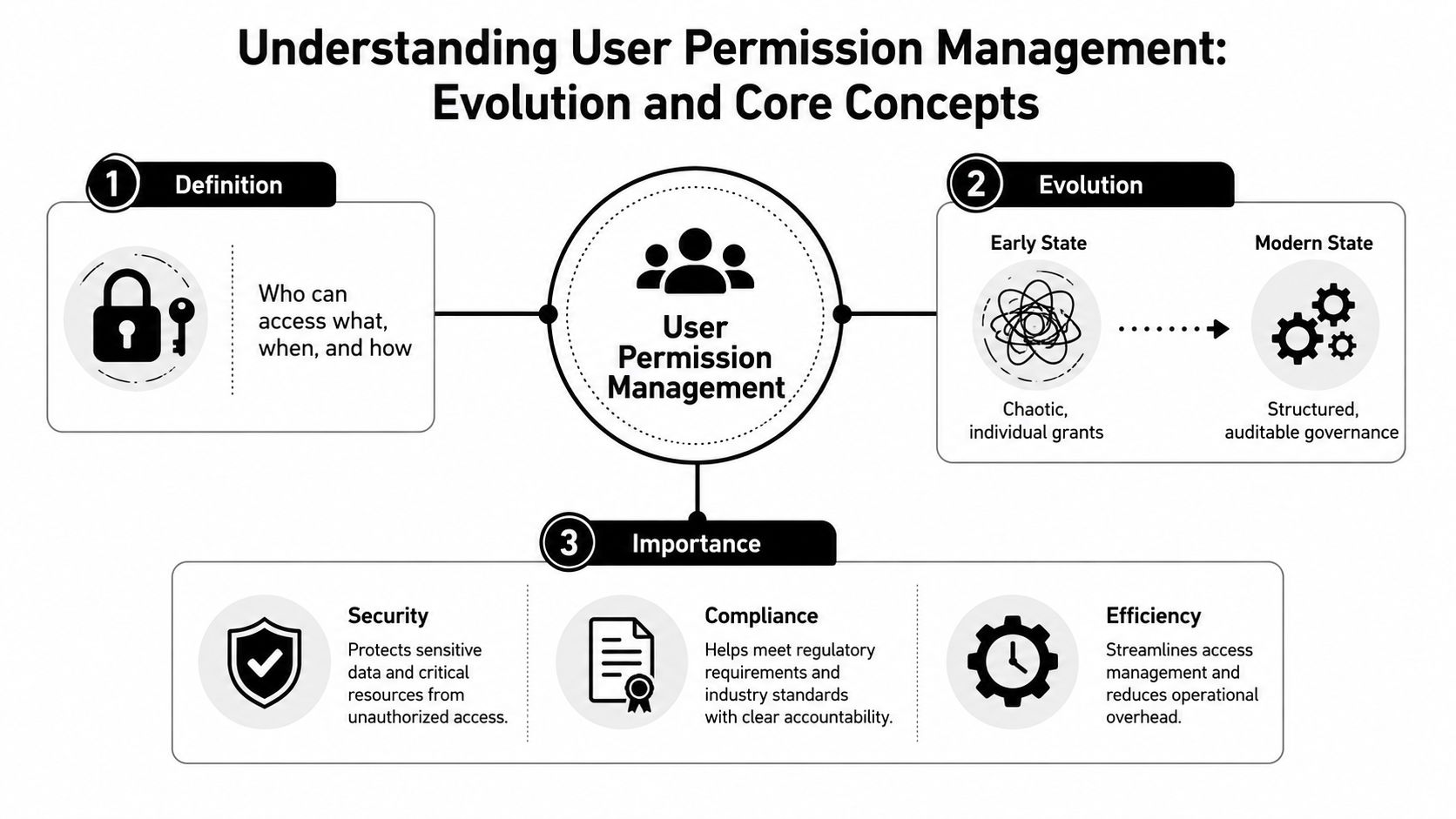
A useful way to think about the shift is this, early permission systems acted like a drawer full of unlabeled keys. Modern systems try to act like a key cabinet with logs, labels, and rules for who can borrow what. That doesn't remove risk, but it makes risk visible.
Why the shift matters in practice
- Security: fewer people can reach sensitive systems by mistake or abuse.
- Compliance: auditors can trace access decisions instead of guessing.
- Efficiency: admins spend less time untangling one-off access requests.
Comparing Permission Models
Permission models solve different access problems. RBAC, ABAC, and PBAC each reduce risk in a different way, and the wrong fit usually shows up as either too much admin work or too much ambiguity in decisions. The better choice depends on how often access changes, how fine-grained those decisions need to be, and how much context your systems can evaluate.
RBAC is the easiest model to explain because it starts with job function. If someone is a support agent, they get the support role. If someone is a finance manager, they get the finance role. That approach works well when responsibilities stay fairly stable and the main concern is too many exceptions that slowly widen access. It also maps cleanly to the split between delegated permissions for interactive signed-in apps and application permissions for background services, which helps separate human access from non-human access in a practical way in Microsoft's best practices.
ABAC, or attribute-based access control, helps when access depends on context. A user might receive access only if they belong to a certain department, use a managed device, or touch a resource with a matching label. That gives teams more precision than RBAC, but it also raises the bar for data quality. If attributes are stale or inconsistent, the policy decisions become hard to trust.
PBAC, policy-based access control, moves more of the logic into explicit rules. That can work well in large environments, especially where policies need to express exceptions, conditions, or layered approval paths. It also brings more administrative overhead if nobody owns the policy set, because the rules can become as hard to manage as the access they were meant to simplify.

Choosing the model without overthinking it
Start with the pattern of access, not the acronym. Use RBAC when access follows stable job patterns. Use ABAC when context matters and the attributes behind those decisions are reliable. Use PBAC when the business needs expressive rules that roles alone cannot describe cleanly.
Microsoft Entra Permissions Management adds another layer to that decision by focusing on continuous entitlement visibility rather than static roles alone. Microsoft describes it as a CIEM solution that shows permissions across identities, which matters because hidden or overextended entitlements often accumulate as cloud estates grow and SaaS apps multiply as described in Microsoft's overview. That wider view is important for machine accounts, service principals, and OAuth scopes too, since those permissions often expand outside the same review process used for employees.
The common mistake is treating one model as if it covers every case. RBAC gives structure, but it will not tell you whether that structure still matches the way people, services, and apps use access today.
Core Principles You Need
A user permission decision starts with one question. What is the smallest access grant that still lets the person, service, or app do the job? That is the heart of least privilege, and it works like handing out the one key needed for one door instead of the master ring for the whole building. A bank would not give every employee the vault code, and your systems should not treat access any differently.
Microsoft's authorization guidance ties least privilege to incremental consent and just-in-time or just-enough access, JIT and JEA, so users receive only the scopes needed for a task and only for as long as they need them in Microsoft's developer strategy guidance. That approach narrows the blast radius if an account is compromised. A stolen token, password, or session has less room to move when broad standing access is not already in place.
Why minimum access is still hard
Agreeing with least privilege is easy. Sticking to it is harder. Teams often grant broad access because they want work to continue, then never come back to tighten the grant after the urgent task is done. Time-bound access and small scopes help prevent that drift because they force a review point instead of leaving access open by default.
Segregation of duties belongs in the same conversation. One person should not be able to request, approve, and carry out the same high-risk action without a separate check. In practice, that can mean one admin grants access, another reviews the reason, and a third person handles sensitive production changes.
Access should match the task, not the title.
What this looks like in real systems
- Delegated permissions: best for signed-in users who need to act in context.
- Application permissions: best for background services that do not have a human present.
- Dynamic consent: useful when access should appear only at sign-in or first use.
These patterns keep unnecessary broad grants out of the system. They also make permission reviews easier, because you can tell which access is standing, which is temporary, and which should never have existed in the first place. That matters just as much for machine accounts, service principals, and OAuth scopes as it does for employee accounts, especially when SaaS app sprawl creates more places for permissions to accumulate. A mature permission model treats access like a living decision, one that can shrink, expire, or change as the work changes.
Implementation Checklist and Governance Workflow
Good governance needs a routine, not just a policy page. Start by naming the roles that exist in your company, then list the systems each role touches. That sounds basic, but most permission problems start when the org chart and the access model drift apart.
Build the workflow in the right order
- Initial role definitions. Identify job functions and map them to access needs.
- Attribute inventories. Record the user and resource attributes that affect access decisions.
- Policy creation. Turn those decisions into rules people can review.
- Approval gates. Decide who can approve increased access and under what reason.
- Periodic review. Recheck access on a schedule and remove what no longer fits.
The important part is to separate the automated pieces from the human ones. Automated onboarding and offboarding should handle the routine lifecycle work, while approval gates should catch exceptions that need judgment. Guidance from access-control sources recommends automating onboarding, offboarding, and role changes through IAM tools, while also keeping audit trails of who accessed what, when, and from where as described by miniOrange.
When teams skip logging, they lose the story behind the access change. When they skip automation, they create manual drift, and manual drift is where stale permissions hide.
If an access change can't be explained after the fact, it wasn't governed well enough at the start.
A useful internal check is whether your teams can answer three questions without chasing screenshots. Who approved this access? Why was it needed? When does it expire? If any of those answers are fuzzy, the process needs another control.
For teams coordinating across campaigns, tools, and departments, the same access logic shows up in operational collaboration too, which is why structured workflow habits matter as much in systems administration as they do in Google Ads team collaboration software.
Tooling Audit and Monitoring Strategies
Tools make permission management survivable once the environment gets messy. IAM platforms help with identity lifecycle and role assignment. CIEM tools help with entitlement visibility across cloud assets. SaaS discovery tools help you find the apps, scopes, and connections that never made it into the original inventory.
The biggest blind spot now is SaaS sprawl. Many teams know how to define roles, but they don't know how to continuously track connected apps, user-granted scopes, and shadow IT across a changing stack. UpGuard's guidance highlights the need to automatically discover connected applications, map permission scopes, and flag risky configurations such as dormant accounts, malicious apps, or unusual spikes in permission grants in its SaaS permission management guidance. That's a different problem from classic internal role design, because the risk often lives outside the core system.
What to look for in a monitoring stack
Choose tools that can answer these questions without a manual export.
- Discovery: can it find connected apps and hidden accounts?
- Scope mapping: can it show exactly what each app can access?
- Alerting: can it flag unusual permission changes?
- Review support: can it produce logs that help explain who changed what?
The goal isn't to collect more dashboards. It's to reduce the time between an odd access change and someone noticing it. That's where audit trails and permission analytics earn their keep.
The same operational idea shows up in multi-team environments too, where access needs to stay readable across groups and services. If you're comparing tool sets for shared operations, the structure used in PPC management platform for teams is a good reminder that coordination and permissions usually fail together.
A good monitoring setup doesn't just report status. It makes ownership obvious. That's especially important when the actual risk is a connected app that nobody remembers approving, but everyone assumes is covered somewhere else.
Migration and Compliance Considerations
A legacy permission setup can look stable, even as it slips from effective management. An old directory, a stack of ACLs, years of local admin exceptions, and scattered OAuth scopes can all keep working after the business has outgrown them. The migration problem is not only technical. It is also about moving people, machine accounts, and SaaS app access without breaking compliance obligations or leaving a new layer of unmanaged permissions behind.
Start with a current-state audit. You need to know what access exists before you can redesign it. Then define the future model, whether that is RBAC, ABAC, PBAC, or a combination. After that, run a pilot with a small set of users, systems, or teams, then expand the rollout in phases. If your environment spans multiple business units or tenants, multi-account management best practices can help you keep ownership clear while the migration is in progress.
Keep compliance in the plan from day one
Compliance is part of the migration itself, not a final checkbox after the move. Audit logs, access approvals, and review evidence need to stay available during the transition, because auditors still need to trace who had access, when it changed, and why. In regulated environments, the access model has to support those records from the start.
Environment-specific control matters here. A hospital platform, for example, cannot treat access the same way as a marketing workspace. Systems that handle clinical data, scheduling, or operational records need tighter ownership, clearer approval paths, and review boundaries that match the risk. For a real-world example of how access complexity shows up in regulated environments, see advanced hospital management solutions, where access design has to align with operational and compliance constraints.
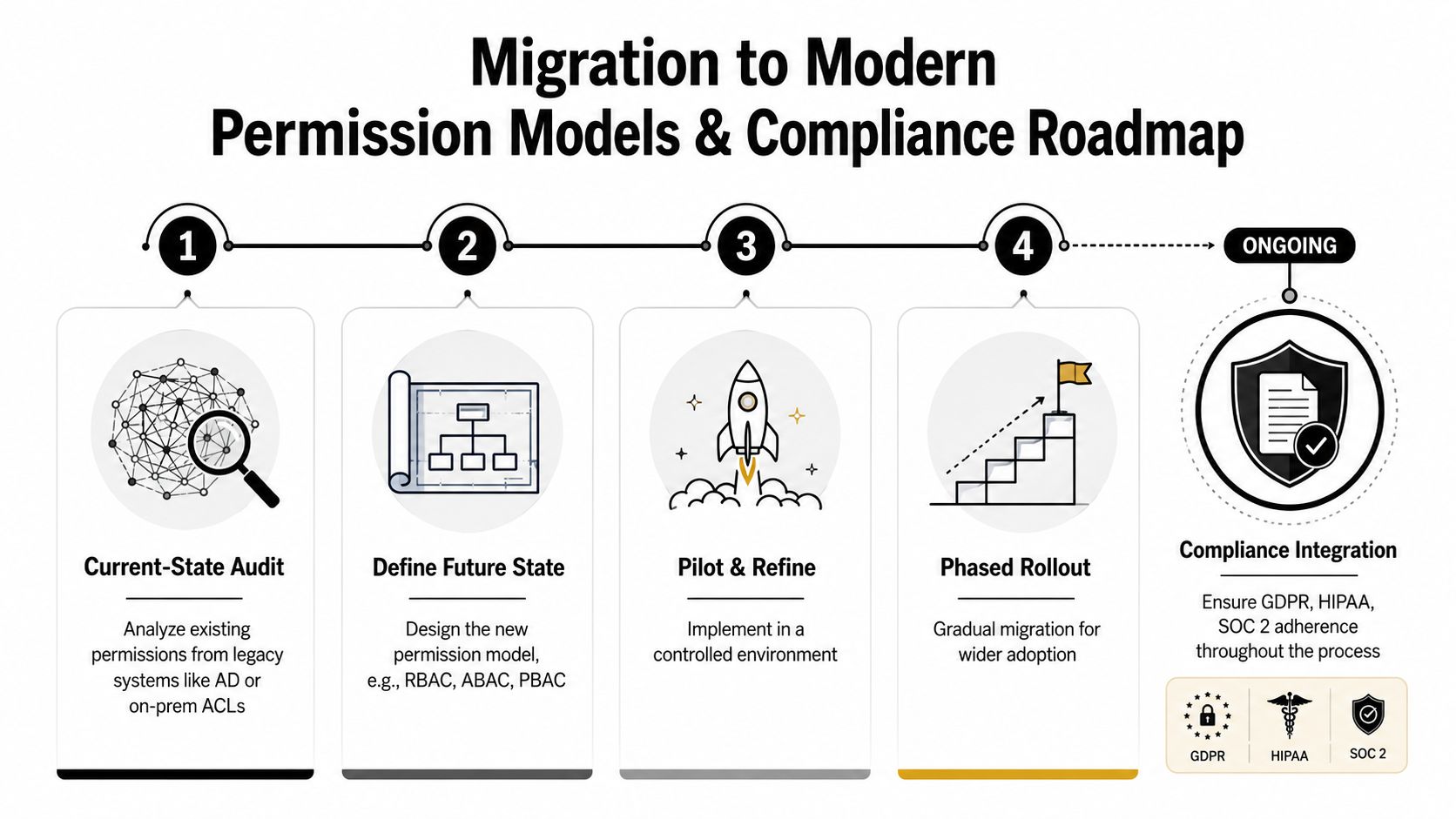
The hard lesson in migration work is that old access does not disappear just because a new model exists. Someone still has to retire it, verify it, and keep checking that the new setup has not inherited the same mess through a different path. A phased rollout with review checkpoints takes longer, but it is the safer way to avoid creating a second legacy problem.
Conclusion
Strong user permission management turns access from a vague risk into a controlled business process. RBAC gives structure, least privilege narrows exposure, logging proves what happened, and continuous review keeps drift from taking over. The teams that do this well don't just react to access requests, they design access to age safely.
Start by mapping current permissions, then cut back anything that isn't clearly justified. Build automation for routine changes, keep humans in the approval loop for exceptions, and include non-human identities and SaaS app scopes in every review. That's how permission management becomes a control system instead of a cleanup project.
A CTA for Keywordme.
.svg)