
How to Select Remarketing Group in Google Ads
How to Select Remarketing Group in Google Ads


You're staring at a pile of remarketing lists, the campaign budget keeps moving, and the reporting feels noisier than it should. That's usually the moment people ask how to select a remarketing group, but the issue is almost never the dropdown in Google Ads. It's the audience architecture underneath it.
A small U.S. marketing services firm can still run very effective remarketing work. Select Remarketing Group LLC appears in Salary.com as founded in 2011, with 51-100 employees, $5 million-$10 million in annual revenue, and headquarters in Wilmington, Delaware. That scale fits a research-driven services shop more than a giant agency, which is a useful reminder that good audience logic matters more than flashy size. For the broader market, remarketing works because retargeted users convert at materially higher rates than cold traffic, and benchmark data show Google display remarketing CTR around 0.65% with conversion rate at 2.66%, while standard display CTR sits around 0.07% and retargeted users are reported as 70% more likely to convert than non-retargeted visitors (remarketing statistics and platform benchmarks).
Why Selecting a Remarketing Group Is a Strategy Decision
A campaign can look busy and still be poorly organized. You open Audience Manager, see a long list of remarketing audiences, and the budget is already moving. The key question is not whether the lists exist, it is whether you are using the right grouping logic for the people in them.
Audience structure shapes the whole account
A remarketing group is more than a label. It sets the boundary for who sees the message, who gets excluded, and how closely the ad matches intent. If you push every visitor into one broad bucket, relevance slips. If you split too far, delivery gets thin and the reporting becomes harder to read. That is the practical problem behind Select Remarketing Group, and it is why the decision affects far more than one ad group.
The channel is still worth the effort because retargeted users are reported as 70% more likely to convert than non-retargeted visitors, and Google display remarketing CTR benchmarks sit around 0.65% compared with 0.07% for standard display (remarketing benchmarks). Those figures do not mean every audience is worth separating. They do mean the audience choice sits upstream of creative, bidding, and landing page fit.
Practical rule: if your creative, landing page, and bid strategy all assume the same user intent, your remarketing group is probably too broad.
Audience architecture drives the account. The first decision is whether one pool is enough, whether you need two tiers, or whether buyers and existing customers need a hard exclusion path. For a practical look at targeting logic, Keywordme's audience targeting guide is useful context. If you are still weighing channel choice for local demand, the comparison in which ad platform brings local leads gives a realistic check on where remarketing and prospecting tend to perform.
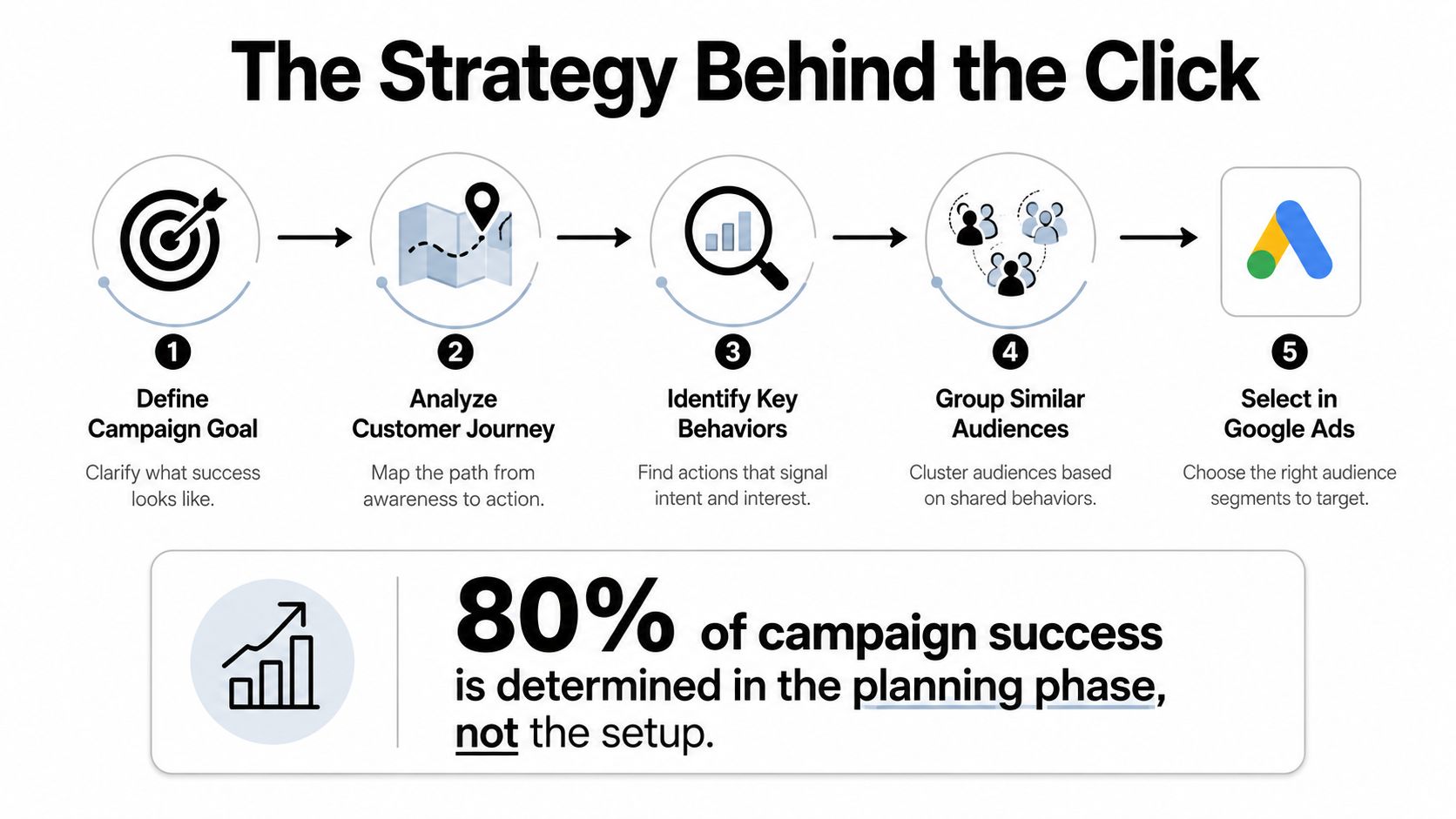
A second layer matters in accounts with enough traffic to support it. If you keep every high-intent visitor in the same group, you lose the chance to separate cart abandoners from product viewers, or recent purchasers from returning prospects. The right structure makes exclusions cleaner and gives you a better read on which audience moves the needle. The wrong one looks tidy in setup and noisy in performance.
Building the Remarketing List Before You Select It
A remarketing list has to exist before the campaign can use it well. That sounds basic, but a lot of accounts contain audiences that are technically built and practically weak. The cleaner approach is to start with a clear behavioral rule, then make sure the list can serve before you tie spend to it.
Start with rules, not names
Google Ads and Google Analytics both support audience creation from user behavior, but the useful distinction is how precise the rule is. A list built from a specific page visit usually carries a cleaner intent signal than a vague all-visitors segment. Google Ads documentation shows audience lists can be created in Audience Manager, shared from Analytics, and then published back into Google Ads for activation (Google Ads remarketing overview).
The mechanics matter because rule-based lists rely on rule_item_group logic. Google's example flow for a specific-page audience starts by creating the first rule item group with two rule items, one for users who visited a checkout page and one for users with multiple items in cart (Google Ads rule item group example). In Microsoft Advertising, the same concept is explicit, a RuleItemGroup applies an AND relationship across the rules, so the page visitor only qualifies if the page satisfies every condition in that group (Microsoft RuleItemGroup definition).
Build the list in the interface you already use
In Google Ads, the practical flow starts in Tools and Settings, then Shared Library or Audience Manager, depending on the account layout. From there, you create a remarketing audience, choose the behavior source, and publish or share it into Google Ads if the audience originated elsewhere. If the list comes from Google Analytics, keep the sync clean and verify that the audience is still linked after edits. If you need the setup sequence laid out step by step, this Google Ads remarketing setup guide keeps the process grounded in the platform flow.
A rule that says “visited pricing page” is usually more actionable than “all site visitors” because it carries more intent and less noise.
The platform docs also show how inclusion and exclusion can live inside the same flexible list structure. Google's visited-specific-page guidance uses inclusive_operands and exclusive_operands inside a flexible rule user list, which is the right model when you need to say “people who did this, but not that” (Google Ads visited-specific-pages guide). That is where a lot of list quality is won, before the campaign is even live.
Selecting the Remarketing Group in Your Campaign
Once the list is ready, the decision is how tightly you want to control delivery. Open the campaign, go to Audiences, then choose whether the list should run in Targeting or Observation. Targeting limits impressions to people in the selected audience. Observation keeps the campaign broader and lets you read performance for that audience without forcing delivery to stop elsewhere.
Campaign level and ad group level are not the same
Google's documentation makes one boundary clear, positive user list targeting cannot be set at both campaign and ad-group level for the same list. That matters because stacking the same audience in both places does not add precision, it usually adds confusion. In practice, you want one level to control delivery and the other to stay available for exclusions, testing, or bid signals.
The cleanest sequence is simple. Select the campaign, open Audiences, add the list, then decide whether the list is shaping delivery or only being observed. If you need the setup flow laid out in the platform's own terms, this Google Ads remarketing setup guide keeps the process tied to the interface instead of theory.
Use one level to control, the other to measure
Search campaigns usually need more discipline here than Display. In Google's remarketing guidance, positive user list targeting for this use case is supported only for Search campaigns, and Search or Shopping user list targets do not support url_custom_parameters, tracking_url_template, final_urls, or final_mobile_urls. That creates a real operational boundary. If you expect a simple attach-and-forget setup, the account structure pushes back.
A clean setup usually looks like this. One list per intent stage. One targeting level per list. Exclusions handled separately.
That keeps the same user from drifting between incompatible buckets and makes bid logic easier to interpret. It also helps you see whether a list is driving useful volume, or just adding a neat label to a weak audience.
Audience Size Thresholds You Cannot Ignore
The fastest way to kill a remarketing idea is to get too clever with segmentation before the list can serve. Google Ads has a hard audience-size gate. For Search remarketing, Storeya reports at least 1,000 active visitors or users in the last 30 days, while other remarketing use cases require 100 active visitors or users in the last 30 days (Storeya remarketing strategies). That isn't a nice-to-know detail. It decides whether your setup even has a chance to run.
Broad first, then narrower
The safer operating sequence is to start with a broader high-intent segment, such as cart abandoners or product-page visitors, then split into recency windows once the parent list is viable. A list built around 7-day, 30-day, and 365-day behavior can be useful, but only after each child audience is large enough to avoid starving delivery. Smaller lists tend to stretch the learning process and leave you with inconclusive data rather than sharper targeting.
Google's audience tools support page-visit rule creation and exclusion logic, but they don't waive the eligibility gate. That means the number next to the audience name matters more than the naming convention. A tidy list that can't serve is still a dead list.
Check the threshold before you spend
You don't need a complicated audit to avoid this trap. Check whether the list has enough active users for the campaign type, then ask whether the recency split is doing useful work. If the answer is no, merge it back into a higher-intent bucket.
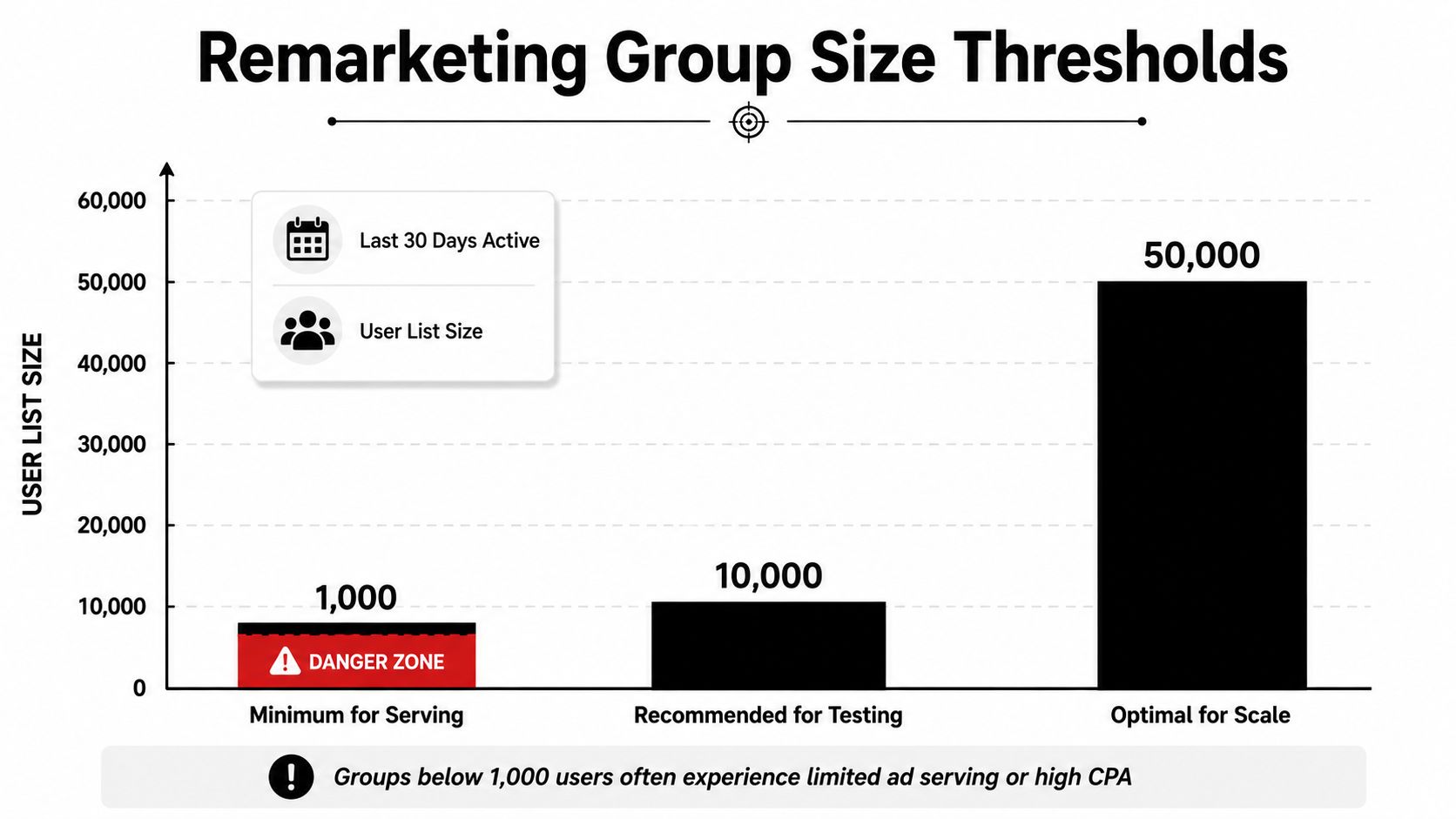
If a list looks strategically smart but can't clear the serving threshold, it belongs in planning, not in a live campaign.
When One Group Beats Many
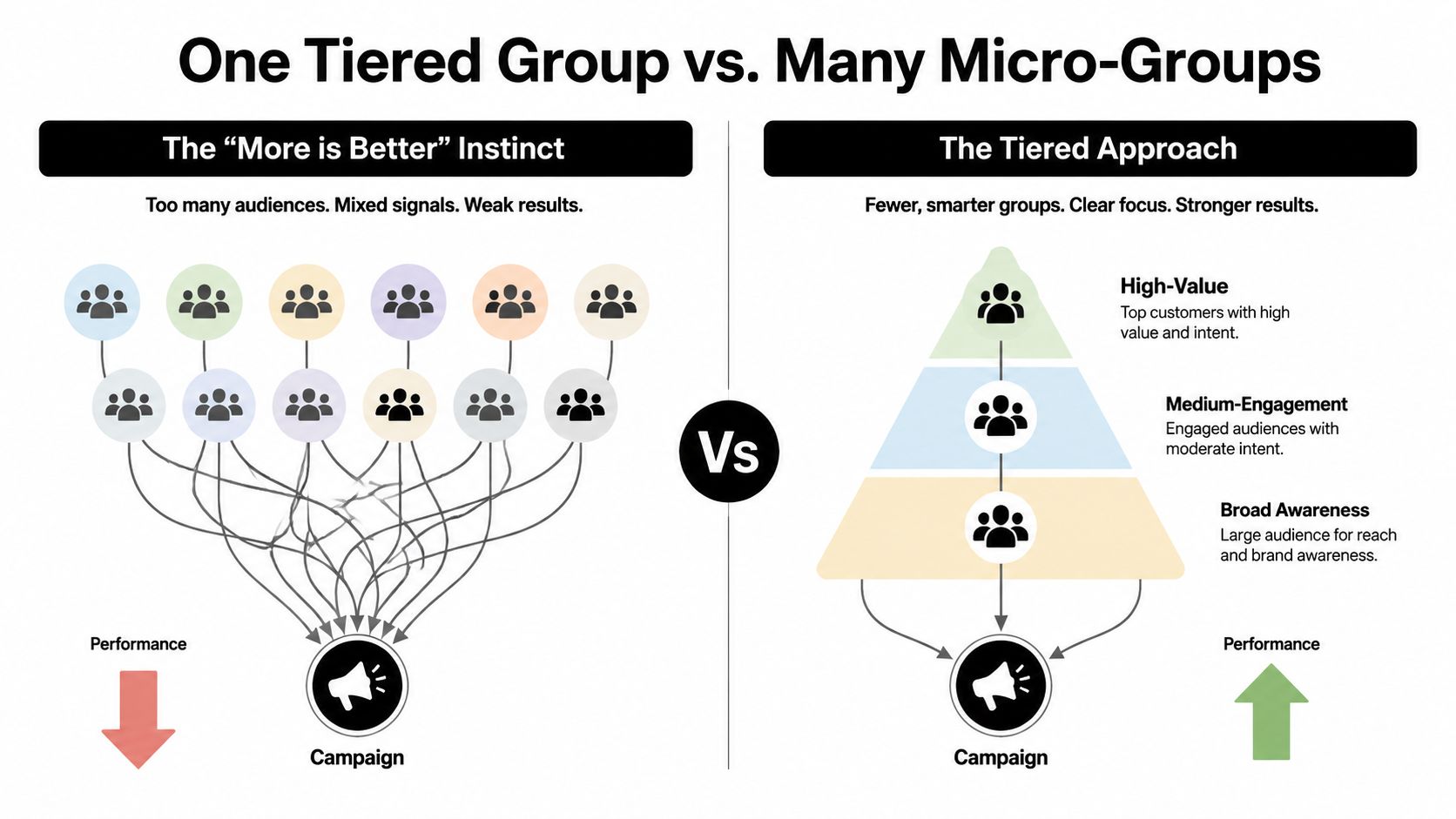
More segments can make an account look busy without making it perform better. That happens often with remarketing. A team builds a separate list for every page path, every recency window, and every micro-behavior, then wonders why none of them gain traction.
Tiered intent usually beats micro-splitting
A broader high-intent group usually wins when conversion volume is limited because it keeps the signal intact. A cart abandoner list, for example, usually says more than three thinner lists built around nearly identical page paths. Microsoft Advertising's RuleItemGroup structure reinforces the same logic, because conditions inside a group are combined with AND logic, so every extra layer narrows the pool that qualifies. Granularity sounds disciplined. In a smaller account, it can just drain the list before it has a chance to learn.
That is why the simpler setup often performs better. One well-built list can carry more weight than five polished but underfed lists. The same pattern shows up in these remarketing ad examples, where the cleanest structures are usually the easiest to read and manage. This matters most when traffic is modest and repeat visits are inconsistent. The point is not to prove you can create more audience variants. The point is to keep enough volume for bidding and reporting to mean something.
Keep the structure simple enough to read
A practical tiering model usually looks like this:
- High intent: cart abandoners, checkout starters, pricing-page visitors.
- Medium intent: product viewers, service-page readers, engaged return visitors.
- Boundary groups: past purchasers and current customers, which should usually be excluded from acquisition-style remarketing.
Past purchaser lists are the place where teams need to be strict. If someone already bought, they rarely belong in the same pool as a cold cart abandoner unless the campaign has a real upsell purpose. That separation matters more than the label on the audience. It keeps the message, the bid logic, and the reporting aligned with what the user did.
A simple structure also makes the account easier to troubleshoot. When a campaign underperforms, you can see whether the issue is the audience itself, the offer, or the bid strategy. When the setup is cluttered with tiny variants, each one looks important and none of them gets enough delivery to tell you much.
Managing Overlap and Exclusions Between Groups
Overlap is where remarketing gets sloppy. A user visits a product page, comes back through email, adds to cart, and lands in three different lists with three different bid assumptions. If you don't control that mess, you end up paying to compete with yourself.
Exclusions are part of the design, not an afterthought
Google Ads and Microsoft Advertising both make exclusions a core control, not a cosmetic one. Google's audience-segment setup supports segment exclusions at campaign and ad-group level, and Microsoft's audience tooling also exposes bid control and exclusion behavior for audience associations (Google Ads audience segments getting started). The technical point is simple. If a user belongs in one bucket, they should usually be blocked from the buckets they don't belong in.
A clean rule set looks like this in practice. Put the primary remarketing list in the intended campaign or ad group, then exclude any higher-intent or lower-intent lists that would muddy the message. A past purchasers list, for example, should keep those users out of a standard acquisition remarketing funnel unless the offer is specifically for repeat buyers. That separation keeps reporting aligned with reality.
Audit for overlap before bids start moving
The Audience Manager report is the place to check whether the same users are drifting across lists. You're not looking for perfection, you're looking for obvious collision. If a single audience is sitting inside three active remarketing groups, your bid adjustments don't mean much because the system is still deciding which bucket wins the impression.
Clean exclusions turn remarketing from a pile of partially overlapping lists into a set of defined user paths.
The mistake many teams make is treating exclusions as cleanup work after launch. In reality, exclusions are part of how you define the remarketing group in the first place. If the audience boundary isn't clear, the rest of the setup just hides the problem.
Troubleshooting and a 30-Day Optimization Checklist
When a remarketing group doesn't serve, the issue is usually boring, not mysterious. The list is too small, the audience isn't shared correctly, or the targeting mode is set in a way that prevents delivery. If you're managing lists through Google Analytics, one common miss is forgetting to share the edited audience back to Google Ads after making changes.
Fast diagnosis for the common failures
If a list shows zero impressions, check three things first. The audience may not meet the serving threshold, the campaign may be targeting the wrong level, or exclusions may be blocking the entire pool. If the group is marked ineligible, confirm that the source audience is still active and that the list still matches the current rule logic.
Microsoft Advertising adds one more portability warning. Its documentation caps a RuleItemGroup at 100 rule items and requires the items in a group to be the same concrete subtype, with only StringRuleItem currently supported (Microsoft RuleItemGroup limits). That matters if you ever move a design across platforms. A structurally elegant list in one system can become awkward in another.
A simple 30-day checklist
- Check list size: confirm the audience still meets the serving threshold for the campaign type.
- Review overlap: make sure your exclusions are preventing audience collisions.
- Inspect delivery mode: verify whether the group is in Targeting or Observation and whether that matches the goal.
- Decide the next move: expand, merge, or retire the group based on actual serving, not how tidy the naming looks.
The best accounts don't keep every remarketing list forever. They keep the ones that create readable intent and retire the ones that look smart but can't carry traffic. That discipline keeps the campaign structure honest and makes the next test easier to trust.
If you want cleaner audience structure, sharper negative logic, and less time spent untangling remarketing groups by hand, Keywordme can help streamline the Google Ads side of the workflow. Visit Keywordme to see how it fits into your PPC process and tighten the way you organize the campaigns behind your remarketing strategy.
.svg)