
Master pay per click keywords to Boost PPC ROI in 2026
Master pay per click keywords to Boost PPC ROI in 2026


At its core, a pay-per-click keyword is just a word or phrase you bid on in platforms like Google Ads to get your ads in front of potential customers. They’re the absolute foundation of your entire PPC strategy. Get 'em right, and you'll connect with people actively looking to buy. Get them wrong, and you might as well be shouting into an empty room.

What Are Pay Per Click Keywords Anyway?
Try to think of pay-per-click keywords as the exact language your customers use when they're hunting for a solution you offer. It’s like knowing precisely what to ask a store clerk to find the perfect item on the first try. These words are the bridge between someone’s problem and your business’s solution.
When you launch a PPC campaign, you’re not just buying random ad space. You’re bidding for the attention of folks who have typed very specific things into a search engine. Your keywords are powerful signals of what they want, and those signals tell you exactly where to spend your ad budget.
The Foundation of Paid Search
To really get what pay-per-click keywords do, it helps to see the bigger picture of search engine marketing. A great place to start is by understanding SEO vs PPC. While SEO is a long game to earn free, organic traffic, PPC lets you jump to the front of the line by paying for clicks—and keywords are the currency you use to buy that spot.
The keywords you choose will literally determine everything: who sees your ad, how much you pay for each click, and ultimately, whether your campaign makes money or loses it. It's the single most important decision you'll make in paid search.
And this is a massive industry. With a projected $351.5 billion to be spent on search advertising in 2025, you can't afford to be sloppy. Companies typically spend anywhere from $100 to over $10,000 monthly on Google Ads, and these campaigns can be incredibly profitable. On average, businesses earn $8 for every $1.60 spent. It works.
Considering that 45% of page clicks go to PPC ads, getting your keywords right is the fastest way to stop wasting money and start seeing real growth.
At the end of the day, your keyword list is your targeting tool. It’s how you tell Google, "Hey, show my ad to this person, not that one." To do that well, you need to go beyond just picking popular words and really dig into a few key areas:
- User Intent: What is the searcher actually trying to do? Are they just browsing, comparing prices, or are they ready to buy right now?
- Relevance: How well does the keyword line up with the product or service you’re selling?
- Cost: How much are you willing to shell out for a single click from someone searching that specific term?
Nailing this balance is what separates a profitable PPC campaign from a money pit.
How to Master Keyword Match Types
If keywords are what you say to Google, then keyword match types are how you say it. Think of them as your tone of voice—they give you control over how strictly or loosely Google listens to your instructions. Nailing this is the secret to balancing your ad spend with your reach.
Let's use an analogy I love.

Imagine you walk into a coffee shop. Using Broad Match is like shouting, “I need coffee!” You’ll get everything thrown at you—drip, lattes, cappuccinos, maybe even tea. It's fantastic for discovering what’s available but can get pretty overwhelming (and expensive).
Phrase Match is like asking for “a hot latte.” The barista now understands the core of what you want. They might suggest a vanilla or caramel latte, but they won't offer you an iced tea. It’s much more focused.
Exact Match is like ordering a “medium oat milk vanilla latte with no foam.” You get exactly what you asked for. Nothing more, nothing less. This gives you ultimate control but limits you to only that very specific order.
Match types aren't just a technical setting; they're a strategic choice. Let's break down how to use each one effectively.
A great way to visualize the differences is to see them side-by-side. This table gives you a quick rundown of how each match type functions in the real world.
A Simple Guide to Keyword Match Types
As you can see, there’s a clear trade-off between control and reach. The magic happens when you learn how to blend them together.
Broad Match: The Discovery Tool
Broad Match is your widest net. If you bid on the keyword running shoes (with no special syntax), your ad could pop up for searches like fast sneakers, where to buy trail running footwear, or even marathon training gear. Google’s goal here is to connect your ad to the general topic, not just your specific words.
This might sound a little chaotic, but it has a very specific, powerful purpose: it helps you discover new pay-per-click keywords that real customers are using—terms you might never have thought of. The big catch? Without a solid negative keyword list to weed out irrelevant searches, it can burn through your budget in a heartbeat.
This balancing act is more critical than ever. Between 2024 and 2025, Google Search CPCs jumped by a staggering 45%, with the average CPC now sitting at $4.22 across industries. You can’t afford to waste clicks, but you also can’t afford to miss out on new customer behaviors.
Phrase Match: The Balanced Approach
This is where most campaigns find their sweet spot. Phrase Match strikes a perfect balance between broad reach and pinpoint accuracy. You signal it with quotation marks, like "women's running shoes". This tells Google that your core phrase must be included in the search.
Your ad could then show up for valuable searches like:
best women's running shoes for salebuy women's running shoes onlinereviews for women's running shoes
But it won't trigger for men's running shoes or women's hiking boots. Phrase match is the reliable workhorse for most PPC accounts, delivering a steady flow of relevant traffic without being too restrictive. It's ideal when you have a good sense of how people search but want to catch those slight, natural variations in their phrasing.
Your goal is to build a smart, balanced strategy that finds new customers without blowing your budget. Phrase match is often the sweet spot where you can achieve both, capturing qualified leads while keeping costs in check.
Exact Match: The Precision Instrument
When you've found a keyword that converts like crazy, it's time to bring in Exact Match. By wrapping your keyword in brackets, like [red nike running shoes], you're telling Google to only show your ad for that exact search or extremely close variations that mean the exact same thing.
This gives you maximum control and predictability. The traffic you get is hyper-qualified, which usually leads to higher conversion rates and a better Return On Ad Spend (ROAS). The trade-off is volume. You’ll get far less traffic, and you risk missing out on long-tail variations you haven't discovered yet. That’s why exact match is best reserved for your proven, top-performing keywords.
A winning PPC strategy rarely sticks to just one match type. It’s all about the artful blend of all three to drive the best results. For a deeper look at the technical details, you can check out our complete guide on Google Ads keyword match types.
Finding Keywords That Actually Convert
Let's be honest, great keyword research isn't about collecting a massive list of popular terms. It’s about finding the ones that actually make you money. The best pay per click keywords are the ones that put your ads in front of people who have their wallets out, not those who are just browsing. To do this, you have to get inside your customer's head.
The first step is a good old-fashioned brainstorm. Forget the spreadsheets for a minute and just think about your business. What problems do you solve? If you're a plumber, maybe you jot down "leaky pipes" or "clogged drains." Start broad—we'll narrow it down soon.
Start by Thinking Like Your Customer
Okay, now let's take those broad ideas and imagine them as real-life Google searches. Picture someone standing in a puddle in their kitchen at 10 PM. They aren't just going to type "plumber" into their phone.
Their search is going to be specific, urgent, and probably a little frantic. They’re searching for things like:
emergency plumber near me24-hour pipe repair servicecost to fix a burst pipe
These are what we call high-intent keywords. They scream, "I have a problem, and I need to hire someone right now." Finding these is the secret to building a campaign that drives leads, not just clicks.
Use Keyword Tools to Find Real Data
Once you have a solid starting list of these customer-focused phrases, it's time to see what the data says. This is where a tool like Google's Keyword Planner becomes your best friend. You can plug in your brainstormed terms and get a much clearer picture.
The goal of keyword research isn't just to find terms with high search volume. It's to find the sweet spot between volume, competition, and—most importantly—the user's intent to buy.
These tools give you the hard numbers you need to make smart decisions about your pay per click keywords, showing you metrics like:
- Search Volume: Roughly how many times a month do people search for this?
- Competition: How many other companies are bidding on this exact term?
- Cost-Per-Click (CPC): What’s the ballpark price you’ll pay every time someone clicks your ad?
This data helps you prioritize your budget. A keyword with 10,000 monthly searches looks amazing on paper, but if the competition is “High” and the CPC is $50, it might drain your budget fast. Sometimes, a keyword with lower volume but crystal-clear intent is worth far more.
Spy on Your Competitors for Hidden Gems
Here’s a pro tip: your competitors have already done some of the work for you. One of the smartest ways to build out your keyword list is to see what's already working for them. Why start from scratch?
Tools like Semrush or Ahrefs let you peek behind the curtain and see which keywords your competitors are spending their ad money on. This is a massive shortcut. You can quickly spot their top performers and consider adding them to your own campaigns. Even better, you can find valuable keywords they’ve completely missed.
This kind of competitive analysis helps you build a powerful keyword list right from day one. You can learn more about this process by diving into our detailed guide on pay per click keyword research. By mixing a little customer empathy with data and some competitive snooping, you'll build a keyword list that doesn't just get clicks—it gets customers.
Using Negative Keywords to Stop Wasting Money
Let’s talk about plugging the leaks in your ad budget. While we put a ton of focus on the pay per click keywords we want to bid on, the keywords you block are just as crucial. Your negative keyword list is your campaign's first line of defense against wasted spend.
Think of it as the bouncer for your ads. It stands at the door and makes sure you only pay for clicks from the right crowd—the people who are actually looking to buy what you’re selling.
If you sell high-end, custom-built furniture, you definitely don't want your ad popping up when someone searches for a "free used couch." Every time that happens and you get a click, you've paid for traffic that was never going to convert. Negative keywords are how you stop that from happening.
How to Find Your Negative Keywords
So, where do you find these budget-draining terms? The best spot is right inside your Google Ads account, in a little gem called the Search Terms Report. This report shows you the actual search queries people typed into Google right before your ad showed up. It's a goldmine for spotting both good and bad traffic.
Once you start digging through this report, you'll see patterns emerge. Let's say your ad for "luxury leather boots" is getting triggered by searches like:
how to repair leather bootscheap leather bootsleather boot jobsfree leather boot patterns
Right away, you can see that words like repair, cheap, jobs, and free are dead ends for you. By adding them to your negative keyword list, you're telling Google, "Hey, if a search has any of these words in it, don't show my ad." This one move instantly tightens up your targeting and stops you from throwing money away.
Don't think of adding negative keywords as a one-and-done task. It's an ongoing process of refining your campaigns. A clean, well-maintained negative list is one of the most powerful tools you have for boosting your profitability and ROI.
Automating the Cleanup Process
Of course, sifting through thousands of search terms by hand is a massive time-sink. This is where automation tools become a lifesaver. For example, a platform like Keywordme can link directly to your Google Ads account.
Instead of messing with spreadsheets and complex filters, you can review search terms right where you manage your ads. With just a click, you can banish irrelevant terms to your negative lists, turning hours of tedious work into a quick, few-minute cleanup session.
As we head toward 2026, the game is changing. Keywords are still the heart of PPC, but intent-based marketing is taking over. This shift is powered by AI, where an incredible 65% of high-intent searches now result in an ad click. For anyone running PPC campaigns, this means reviewing search terms to build out negative lists is more critical than ever. As these powerful PPC trends on monsterinsights.com show, tools that automate this cleanup can be a game-changer, scrubbing junk terms and slashing costs.
Building a Proactive Negative List
Why wait for bad clicks to happen? You can get ahead of the game by building a proactive negative keyword list right from the start. This usually includes common terms from people who have zero intent to buy, like job seekers, researchers, or DIYers.
Think about adding words such as:
jobsorcareersreviewsorcomparisonsfreeordownloadDIYorhow to
This pre-emptive strike protects your budget from day one. As your campaigns run, you'll keep adding to this list based on the real-world data you find in your search terms report. Our guide on how to add negative keywords in Google Ads gives you a complete step-by-step walkthrough. By making negative keywords a core part of your routine, you’re not just saving money—you’re making your entire PPC strategy smarter.
Alright, let's ditch the theory and talk about what this looks like in the real world. Knowing the concepts is one thing, but actually managing pay per click keywords without going crazy is a whole different ballgame. It's the daily grind that separates profitable campaigns from expensive hobbies, and that’s where a smart workflow, maybe with a little help from a tool like Keywordme, can change everything.
If you’ve ever spent time in a Google Ads search term report, you know the feeling. It’s a giant wall of data. Your next winning keyword is in there somewhere, but so are a ton of budget-sucking junk terms. The old-school way of dealing with this is a nightmare of copying terms, clicking through five different screens, pasting them into a negative list, and then repeating the process for keywords you actually want to add. It's slow, tedious, and a recipe for mistakes.
From Manual Misery to Automated Magic
For any PPC manager, that manual workflow is a well-known time-suck. You see a totally irrelevant search term, so you copy it. Then you navigate to your negative keywords, paste it, choose the match type, and hit save. A minute later, you spot a golden long-tail keyword you want to bid on. So you copy that, hunt down the right ad group, paste it in, and hope you remember the right syntax for phrase match.
Do that a hundred times, and your afternoon is shot. This is exactly where a tool that works right inside your existing workflow can be a game-changer.
The whole point isn't to work harder—it's to stop doing the dumb, repetitive stuff. When you automate the tedious tasks, you free up your brain to focus on the high-level strategy that actually moves the needle for the business.
With a tool like the Keywordme Chrome plugin, that entire painful process disappears. You’re not juggling tabs and spreadsheets anymore; you’re taking action right from your search term report. The goal is to create a simple, repeatable loop to stop wasting money.
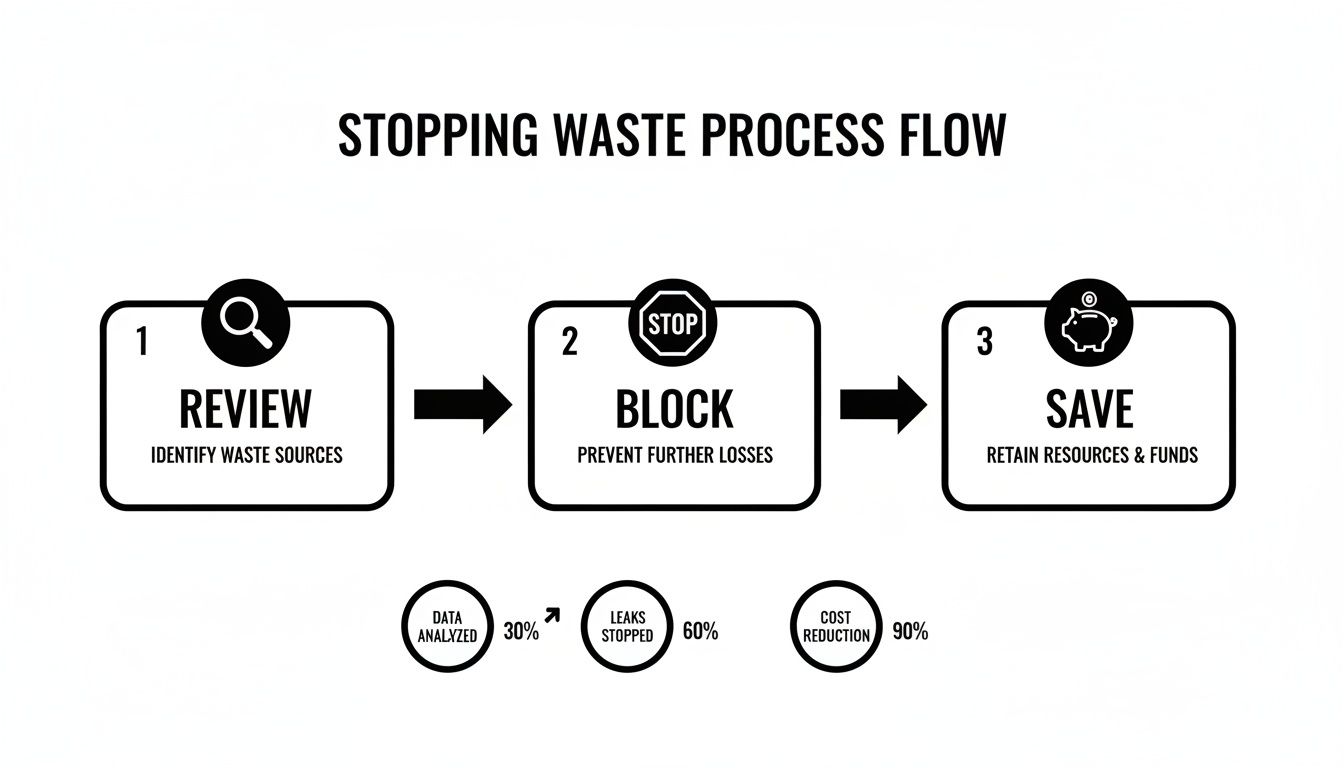
This little flow chart nails it: you review your terms, block the junk, and save your budget. It's a simple feedback loop that leads to massive improvements over time.
What a 10x Speed Boost Actually Looks Like
So what does this look like in practice? Imagine you’re scrolling through your report and spot the search query "free accounting software templates." Your company sells premium software, so every click on that is just money down the drain.
Instead of the old copy-paste-navigate dance, you just check a box next to the term. A little menu pops up, and with one click, you can add "free" and "templates" to your negative keyword list. Bam. Done. You just saved yourself a few minutes and all future ad spend on those terms.
A little further down, you see a gem: "best accounting software for small construction business." That’s a super high-intent keyword that you hadn’t even thought of, and it’s a perfect fit for your "Small Business" campaign.
The tool makes it dead simple to grab these opportunities without ever leaving your report.
With another click, you can add that winner to the right ad group, set it as a phrase match, and get right back to finding more opportunities. The whole thing—spotting the keyword and taking action—takes seconds. Not minutes.
The Real-World Payoff
This isn't just a minor improvement; it’s a total change in how you manage your pay per click keywords. When you can do these critical tasks 10 times faster, the results start compounding in a big way.
Suddenly, you have the time and energy to:
- Keep Your Traffic Squeaky Clean: You can purge irrelevant search terms daily, before they do any real damage to your budget.
- Find Hidden Gems: You can spot and act on new, high-intent keywords faster than your competitors.
- Manage at Scale: You can handle huge, complex accounts with thousands of keywords without getting buried in the manual work.
At the end of the day, a better workflow means you spend less time being a data entry clerk and more time being a strategist. You can finally ask the big questions, like "How can we make our landing pages convert better?" or "What new ad copy should we test next?" That's where the real growth happens.
How to Measure and Optimize Your Keywords
Getting your campaign live is just the beginning. The real work—and the real money—is in the day-to-day optimization. You could have the most perfectly researched pay per click keywords, but if you just set them and forget them, you're essentially just gambling with your budget.
Think of your keywords as employees on your payroll. Some are your top performers, consistently bringing in sales. Others are just showing up, costing you money, and not pulling their weight. Your job as the manager is to figure out who's who and act accordingly.
The Metrics That Really Matter
To start sorting your high-achievers from your budget-wasters, you need to look past vanity metrics like impressions. The numbers that truly tell the story are the ones that connect a click to a result.
Here are the four big ones I always have my eye on:
- Click-Through Rate (CTR): This is simply the percentage of people who click your ad after seeing it. A high CTR is a great sign that your ad and keyword are resonating with searchers.
- Conversion Rate: Of the people who clicked, how many actually did the thing you wanted them to do (like buy a product or fill out a form)? This metric separates the lookers from the buyers.
- Cost Per Acquisition (CPA): This is your bottom-line number. It answers the most important question: "How much did I actually pay to get this customer?"
- Return On Ad Spend (ROAS): The ultimate measure of whether your ads are profitable. For every dollar you put in, how many dollars in revenue are you getting back?
Click-Through Rate is often the first signal of whether your ad is hitting the mark. For anyone wanting to really nail this part of the equation, there are some fantastic strategies for improving Click Through Rates that can make a huge difference.
A Simple Framework for Keyword Review
So, how do you use this data to make smart decisions? The goal is simple: stop funding the keywords that are draining your account and double down on the ones that are making you money.
For example, a keyword with a super high CTR but zero conversions is a classic problem. It's like having a fantastic salesperson who gets tons of people in the door, but none of them ever buy. This points to a major disconnect between what your ad promises and what your landing page delivers.
Your job isn't just to get clicks; it's to get the right clicks. A keyword that drives ten low-cost conversions is infinitely more valuable than one that brings in a thousand empty clicks.
Here’s a straightforward way to audit your keywords regularly:
- Identify the Winners: Find the keywords with a solid conversion rate and a CPA or ROAS that makes sense for your business. These are your star players. Give them a bigger budget or a higher bid to maximize their impact.
- Spot the Losers: Look for any keywords that are spending money but have brought in zero conversions. Pause these immediately. There's no reason to let them keep wasting your budget.
- Investigate the Maybes: These are the tricky ones, often with a high CTR but a low conversion rate. Dig in here. Is the landing page a poor match? Is your ad copy a little too broad or misleading?
- Optimize the Underperformers: Got keywords with a few conversions but a CPA that's just too high? Don't pause them right away. Try lowering your bid first. You might find a sweet spot where you still get some conversions, but at a cost that you can live with.
A Few Common Questions We Hear About PPC Keywords
Getting into pay per click keywords always sparks a few questions. Honestly, even those of us who have been doing this for years still find ourselves double-checking the basics. Here are some of the most common questions that land in my inbox, with straight-to-the-point answers.
How Many Keywords Should I Have in an Ad Group?
There's a ton of old advice out there about the "perfect" number, but it's best to ignore it. The real goal isn't hitting a specific number, but creating ad groups with an incredibly tight theme. We generally aim for 5-20 keywords that are all slight variations of the same core idea.
Think of it this way: if your ad group is for "red running shoes," every keyword inside should be laser-focused on that. You shouldn't have "blue hiking boots" anywhere near it. This tight focus lets you write ad copy that speaks directly to the searcher, which in turn leads to a better Quality Score, cheaper clicks, and way more conversions.
What’s a Good Click-Through Rate for My Keywords?
Everyone wants to know how their numbers stack up, but "good" is completely relative. Sure, the average Click-Through Rate (CTR) across Google Search is about 6.11%, but that number doesn't tell the whole story.
A 2% CTR on a really broad, awareness-building keyword might be fantastic. But if someone searches for your exact brand name or a super-specific term like "buy leather messenger bag," you should be pushing for 10% or higher.
A "good" CTR isn't just a number you hit and forget about. It's a trend line that's consistently moving up. A low CTR is your first warning sign that something is off between your keyword, your ad, and what the person on the other end actually wanted.
Should I Still Bother With Broad Match Keywords?
Absolutely, but you have to handle them with care. Google's AI has gotten much smarter, making Broad Match a great tool for uncovering new keyword ideas and audiences you would have never found on your own. It can be a real engine for growth.
The catch? Running Broad Match without a rock-solid negative keyword list is like setting your budget on fire. You'll waste a ton of money on irrelevant clicks. The smart way to use it is to put your Broad Match keywords in their own campaign with a limited budget. Then, you have to commit to checking your search terms report daily and aggressively adding all the junk searches to your negative list. This trains the algorithm and protects your wallet.
Let's be real, managing pay per click keywords can feel like a full-time job. Keywordme was built to help you stop wasting money, find the keywords that actually convert, and get your optimization work done up to 10x faster. Ditch the spreadsheets and see what you can do with a workflow built for speed. Give Keywordme a try with our 7-day free trial.
.svg)