
Paid Advertising on LinkedIn: A Practitioner's Guide (2026)
Paid Advertising on LinkedIn: A Practitioner's Guide (2026)


You’re probably here because you’ve already felt the pain of broad social advertising. The clicks come in. The form fills look decent at first glance. Then sales checks the leads and finds students, job seekers, competitors, or people who were never close to buying.
That’s the moment paid advertising on linkedin starts making sense.
LinkedIn is expensive compared with channels Google Ads users are used to. But the point isn’t cheap traffic. The point is access to people in a professional context, where job title, company, industry, and seniority are part of the targeting foundation instead of a rough guess. If your offer is B2B, high-consideration, or tied to a specific buying committee, that changes the economics fast.
Why LinkedIn Ads Are Your B2B Secret Weapon
A familiar B2B scenario goes like this. Paid social reports strong click volume, cost per lead looks acceptable, and the sales team still rejects half the names because they were never realistic buyers. LinkedIn earns its keep when that gap between lead volume and pipeline quality gets too expensive to ignore.

The higher cost is usually buying better access
LinkedIn is rarely the channel for cheap traffic. It is the channel for getting in front of specific job functions, seniority bands, company sizes, and industries with far less guesswork than broader social platforms.
That distinction matters because B2B deals are rarely won by reaching "more people." They are won by reaching the right people early enough, often before they are searching actively and before a competitor shapes the shortlist.
For teams used to lower-cost paid social, the sticker shock is real. The mistake is treating LinkedIn like a pricier version of Meta. It is a different buying environment. If you need broad consumer-style scale, compare it to channels built for that, such as Facebook and Instagram advertising options for reach-first campaigns. If you need to get in front of operations leaders at mid-market SaaS companies or HR directors at firms above a certain headcount, LinkedIn usually gives you a cleaner path.
Why experienced advertisers still waste money here
The expensive mistakes on LinkedIn are usually self-inflicted.
A team launches with strong creative, then leaves Audience Expansion on and wonders why lead quality slips. Another campaign targets senior titles but sends traffic to a generic page built for every industry. Someone celebrates CTR while the CRM shows zero qualified opportunities. Those are common failures, even on accounts run by experienced marketers.
The platform rewards precision, but only if the account setup matches that goal. Tight targeting, offers that fit buying stage, and conversion tracking tied to pipeline matter more here than vanity metrics.
Google Ads logic does not map cleanly to LinkedIn
Google Ads captures existing intent. LinkedIn often builds commercial intent or puts your offer in front of a buying group before the search happens. That changes how success should be judged.
A junior buyer might look at the higher CPC and decide the channel is inefficient. A stronger read is to compare cost against sales-qualified leads, opportunity creation, and deal influence. I have seen LinkedIn lose on front-end efficiency and still win on revenue because the lead mix was better and sales cycles started with the right stakeholders already aware of the problem.
That is the advantage. Paid advertising on LinkedIn works best when the goal is not "more leads," but more leads that sales would want.
If your team also needs guidance on the organic and outbound side of the platform, this guide to LinkedIn Marketing is a useful companion to the paid strategy.
Choosing Your Campaign Objective and Ad Format
A common LinkedIn mistake happens before the first impression. The campaign is built around the ad format someone wants to use, not the action the business needs. Then the account spends two weeks chasing clicks, form opens, or video views that never turn into qualified pipeline.
Start with the conversion point you want to buy.
On LinkedIn, the objective is not a naming choice. It affects who gets your ads, how the platform bids, and what behavior the system tries to produce. If you choose the wrong one, good creative and decent targeting still struggle.
Match the objective to buying stage
Use a simple framework:
- Brand awareness for broad exposure inside a tightly defined market, usually when the short-term goal is recall or audience building.
- Website visits when the landing page does heavy lifting, such as product education, category explanation, or a detailed case study.
- Lead generation when the offer is clear and low enough friction for an in-platform form.
- Website conversions when the handoff must happen on your site and the tracking setup is clean.
- Engagement or video views when you need to warm a cold audience before asking for a stronger commitment.
The trade-off is straightforward. Higher-intent objectives usually cost more per result, but they give the algorithm a clearer target. Lower-intent objectives can look cheaper in platform reporting while producing weak traffic, soft leads, or no pipeline impact at all.
That is where experienced marketers still burn budget. They optimize for the metric the platform can produce cheaply, then wonder why sales rejects the leads.
Avoid the usual objective mismatch
A demo request to a cold audience is often too aggressive. A checklist, webinar, calculator, or short industry report usually performs better as the first touch because it earns enough engagement to build a useful retargeting pool.
That does not mean every campaign needs a long funnel. It means the ask should fit the level of intent.
For example, choose Lead Generation if you are offering a practical asset and want contact capture inside LinkedIn. Choose Website Conversions if qualification happens on your own form, your CRM routing matters, or sales needs fields that LinkedIn forms do not collect well. Choose Website Visits only if the page is strong enough to convert interest into action. Sending paid traffic to a vague product page is one of the fastest ways to make LinkedIn look overpriced.
Choose the format based on the job
If this is a first serious campaign, start simple. Single Image ads are usually the safest control because they are easy to test, fast to iterate, and clear enough to isolate what is working. In many B2B accounts, they beat more polished formats on cost per qualified lead because the message is easier to process.
Video has a role, but usually earlier in the funnel. It can explain a category, show the product, or build credibility. It also tends to create more room for waste if the audience is broad or the CTA is too ambitious.
Document Ads can work well for practical assets because the format matches how LinkedIn users consume professional content. Carousel can help if the offer indeed has multiple points to explain. Sponsored Messaging is useful in narrower cases, especially event promotion, ABM follow-up, or highly specific outreach. It becomes expensive and intrusive fast if used too broadly.
LinkedIn Ad Format Comparison
| Ad Format | Best For | Key Benefit | Consideration |
|---|---|---|---|
| Single Image | Direct lead generation, retargeting, clear offers | Simple to test and easy to align with one message | Weak creative gets ignored fast |
| Video Ads | Product education, thought leadership, audience warming | Better for explaining a concept visually | Often less efficient for direct lead capture |
| Carousel Ads | Multi-feature offers, sequential storytelling | Lets you test angles within one ad | Can feel busy if the message isn’t tight |
| Document Ads | Checklists, guides, reports, templates | Strong fit for in-feed content consumption | Asset quality matters a lot |
| Sponsored Messaging | ABM, event invites, follow-up offers | Feels personal when tightly targeted | Overuse feels intrusive |
A setup that works in real accounts
For a first major launch, keep the structure tight:
Cold prospecting with Single Image or Document Ads
Build each campaign around one audience hypothesis and one offer. Do not mix three industries, two personas, and multiple CTAs in the same campaign.Lead Gen Form for lower-friction offers
This usually fits guides, checklists, webinars, assessments, and some consultation offers. It can improve volume, but watch lead quality closely. Lower friction helps good prospects convert and helps poor-fit users slip through.Retargeting based on actual engagement
Follow up with people who clicked, opened a form, watched enough video to show interest, or visited a key page without converting.
This structure gives you clearer readouts. You can tell whether the problem is the offer, the audience, the form friction, or the landing page. That matters on LinkedIn because vague account structure hides expensive mistakes.
If you also run Meta, do not copy the same campaign logic across channels. The audience behavior and creative expectations differ enough that the same offer can need a different setup. This comparison of how to advertise on Facebook and Instagram is a useful reference if your team is translating campaigns between platforms.
Mastering Audience Targeting and Segmentation
Paid advertising on linkedin either becomes a precision tool or an expensive mess.
Google Ads users often start with keywords and search terms. On LinkedIn, your raw material is the buyer profile itself. You’re defining who should see the message before they raise their hand. That means your audience architecture matters more than your average social campaign.
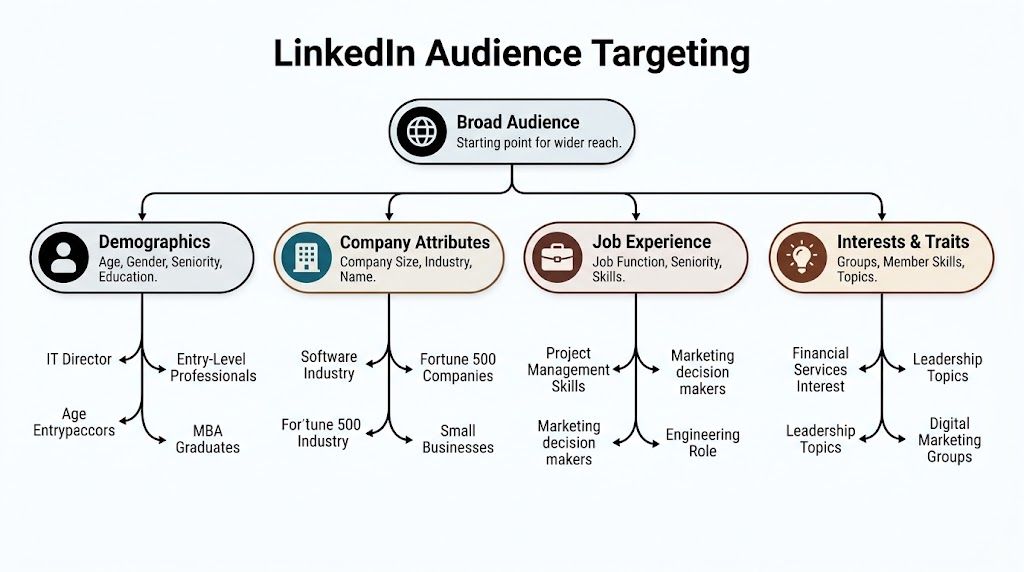
Build from the ICP outward
Start with your ideal customer profile, not the ad platform menu.
Ask four questions first:
- Who buys
Decision-maker, recommender, practitioner, or all three? - Where they work
Industry, company size, company list, growth stage. - How they describe themselves
Job title, job function, seniority, skills. - Who should never see the ad
Existing customers, recruiters, students, competitors, irrelevant segments.
That last point gets skipped all the time. Exclusions are not cleanup work. They are targeting.
What to layer first
LinkedIn gives you a lot of levers. The mistake is pulling too many at once. If you narrow by title, seniority, company size, skills, interest, and groups all in one go, you can box yourself into a tiny audience and force delivery into weird corners.
A cleaner approach:
- Start with company traits
Industry, company size, and sometimes named accounts if you’re doing ABM. - Then add role definition
Job title if the title is standardized, or job function plus seniority if titles vary. - Use skills carefully
Skills can help, but they can also widen the audience in unexpected ways if the profile signal is loose. - Apply exclusions early
Remove bad-fit industries, existing clients, internal staff, and obvious mismatches before launch.
Good targeting isn’t about making the audience as small as possible. It’s about making it coherent.
Title targeting versus function targeting
This is one of the first judgment calls junior buyers struggle with.
Job title targeting is great when the market uses consistent titles. Think “Demand Generation Manager” or “VP of Sales.” It gets shaky when titles vary by company or geography.
Job function plus seniority is safer when titles are messy. “Marketing” plus “Manager, Director, VP” often gives you stronger coverage than trying to chase every possible title variation manually.
I usually prefer function-based builds for early prospecting and title-heavy builds for tighter retargeting or named-account work.
Matched Audiences and retargeting
Once you’ve got baseline prospecting campaigns live, LinkedIn gets stronger.
Matched Audiences lets you work with your own data. That can include company lists, contact lists, or website audiences. Using this data, ABM starts to feel real instead of theoretical. You stop asking the platform to find “people like” your buyer and start giving it a defined universe to work from.
Use cases that make sense:
- Named account campaigns
Upload target companies, then layer seniority and role. - Website retargeting
Show a harder offer to visitors who already engaged with product or solution pages. - Lead follow-up suppression
Exclude recent converters so prospecting budget doesn’t chase people who already filled out the form.
Lookalikes need restraint
Lookalike-style expansion can be useful when you’ve already proven message-market fit and need scale. It is not where I’d start for a niche B2B campaign.
If your seed audience is weak, broad, or mixed-quality, the scaled audience usually inherits those problems. That’s why I’d rather squeeze performance from clean retargeting and solid exclusions before trying to widen anything.
A segmentation model that holds up
A practical campaign map often looks like this:
| Segment | Audience logic | Best use |
|---|---|---|
| Cold ICP | Industry + company size + function/seniority | First-touch education and offer testing |
| Named Accounts | Company list + role filters | ABM and sales-assisted campaigns |
| Warm Engagers | Site visitors, ad engagers, form openers | Stronger CTA and lower-funnel asks |
| Suppression Lists | Customers, employees, recent leads | Waste control and cleaner reporting |
If you manage multiple channels, this is also where tools outside LinkedIn can help with operational consistency. For example, Keywordme is built for Google Ads keyword cleanup, expansion, and negative keyword handling, which matters when you’re aligning search intent campaigns with B2B audience campaigns across platforms.
Budgeting Bidding and Managing Your Ad Spend
You launch a LinkedIn campaign, check spend 72 hours later, and the CPC looks high enough to trigger a Slack thread. That moment catches even experienced paid media teams, especially if they are used to Google Ads where strong intent can bail out a lot of bad decisions.
LinkedIn gives you less room for sloppy setup. Expensive traffic is normal here. Waste is not.
Set budgets around learning speed, not vanity efficiency
The first mistake is setting a budget too low to learn anything. The second is giving LinkedIn too much freedom before the account has earned it.
Start by deciding what you need from the first 2 to 3 weeks. If the goal is validation, fund enough spend to compare audiences, offers, and formats without starving delivery. If the goal is scale, use the data you already have and protect efficiency with tighter controls.
For a new campaign, I prefer a test budget that can support a few clean comparisons at the same time. One audience. One offer. One conversion path. Then a second variation with one major change. That structure tells you what moved performance. A thin budget spread across five audiences and three creatives just buys confusion.
Bid strategy should match account maturity
LinkedIn bidding is simpler when you treat it as a control problem.
Maximum Delivery
Use this when you need the platform to find the clearing price and collect baseline data. It fits new launches, fresh audiences, and accounts with limited conversion history.
It also creates one of the most common budget problems. Teams leave Maximum Delivery running after the learning phase, then wonder why costs drift up as the system chases volume. If lead quality is uneven, that extra volume usually is not helping.
Cost Cap
Cost Cap is usually the better next step once you know what an acceptable cost per result looks like. It gives the algorithm room to work, but adds a guardrail.
This is often the best fit for ROI-focused campaigns because it forces a harder conversation about target economics. If sales only accepts one in every five leads, your cap has to reflect pipeline value, not form fill volume.
Manual bidding
Manual bidding works for narrow tests, especially when delivery is sensitive and the audience is small. It also punishes impatience. Bid too low and you barely enter auctions. Bid too high and you can overpay before you realize the audience was weak.
I use manual bidding sparingly. It is a testing tool, not a default operating mode.
Spend usually climbs because of setup choices
High costs are often blamed on LinkedIn as if the platform made the decision alone. In practice, spend gets inflated by a short list of avoidable choices:
Audience Expansion is left on
This is a repeat offender. It can make reporting look healthy while pushing budget into looser traffic than you intended. For niche B2B campaigns, turn it off unless you have already proven that broader reach still produces qualified pipeline.The audience is too narrow for the ask
A tiny senior-level audience paired with a hard conversion goal can force expensive auctions and unstable delivery.The offer is too aggressive for cold traffic
Demo requests and sales calls have their place. For first-touch campaigns, they often raise costs without improving downstream quality.The campaign is optimized to the wrong result
Cheap leads are not useful if sales rejects them. Budget decisions should follow qualified pipeline, not the prettiest top-line CPL in the dashboard.Creative fatigue is ignored
On LinkedIn, stale ads can stay live longer than they should because volume is lower. CTR slips, relevance drops, and you end up paying more to say the same thing to the same people.
If your team is used to search, borrow the same discipline you apply to query quality. The message has to match the buyer. If you need examples to tighten weak angles before spend ramps, review these B2B ad copy examples for conversion-focused campaigns.
A practical pacing model
Budget control gets easier when each campaign has a job.
Prospecting campaigns should have a clear ceiling and a longer evaluation window. Retargeting campaigns can run on less budget, but they need closer monitoring because audience size changes fast. Named account campaigns often deserve protected budget because volume is lower and every impression is more deliberate.
One more rule matters here. Do not increase budget just because delivery is stable. Increase budget when lead quality holds and the sales team would willingly ask for more of that exact lead type.
A good explainer on bidding mechanics and pacing helps here:
The budget rule that saves money
Use bids to control price. Use targeting and offers to control quality.
If costs are high and lead quality is strong, fix the conversion path before cutting bids. If costs are high and lead quality is weak, tighten the audience, turn off expansion, and revisit the offer. That sequence avoids the classic mistake of squeezing bids while the underlying problem sits upstream.
Creating Ad Copy and Creatives That Convert
LinkedIn users don’t reward hype. They punish it.
That’s why ad creative that works on broader social platforms often falls flat here. The audience is more skeptical, the feed is more crowded with business language, and vague claims get filtered out fast. If your ad sounds like generic B2B software copy, people keep scrolling.
Write to the job the buyer needs done
The strongest LinkedIn ads usually make one clear promise to one clearly defined person.
Not this:
- “Transform your growth with an innovative platform”
More like this:
- “Cut wasted PPC spend by cleaning search terms and building negative keyword lists faster”
That second version has a buyer, a problem, and an outcome. It sounds like someone who works in the category wrote it.
What high-performing copy usually gets right
Three things matter most:
- The hook is specific
It names a problem, friction point, or missed opportunity. - The offer is easy to understand
Checklist, demo, audit, guide, benchmark, webinar. People should know what they get immediately. - The CTA matches intent
Cold traffic can handle “Download” or “Get the guide.” Warm traffic can handle “Book a demo.”
If you want examples of how to tighten weak messaging, Keywordme has a practical library of ad copy examples that’s useful when your team is staring at a blank draft.
Creative should look like it belongs in a professional feed
On LinkedIn, clarity beats cleverness more often than not.
Use visuals that do one of these jobs well:
| Creative approach | Works when | Fails when |
|---|---|---|
| Product UI or workflow snapshot | The product solves an operational problem | The screenshot is too dense to read |
| Bold text-led graphic | The offer can be summarized in one line | The design looks like a banner ad |
| Human-led business visual | Trust and relevance matter | It feels like stock-photo filler |
| Document cover | The asset has obvious utility | The title is vague or overbranded |
The copy formula I’d hand to a junior buyer
Try this structure:
- Call out the pain
Waste, low lead quality, reporting gaps, manual work. - Name the result
Better attribution, cleaner lead flow, less friction, stronger pipeline quality. - Offer the next step
Download, register, request, compare, calculate.
Here’s a clean example:
Teams used to Google Ads often bring the wrong playbook to LinkedIn. Use this checklist to build tighter audiences, better offers, and cleaner lead-gen campaigns.
That works because it sounds grounded. No chest-beating. No empty promise.
What to stop doing
A few creative habits usually underperform on LinkedIn:
- Overstuffed copy
If it takes effort to understand, it loses. - Abstract messaging
“Drive synergy” and “enable growth” don’t help the buyer picture the value. - Weak visual hierarchy
Tiny text, busy layouts, too many claims. - CTA mismatch
Asking for a demo when the audience barely knows you.
LinkedIn ads don’t need to be boring. They do need to be legible, credible, and focused.
Measuring and Optimizing for True ROI
Most weak LinkedIn programs don’t fail because the platform is bad. They fail because the team measures surface activity and calls it success.
Clicks matter. Impressions matter. CTR matters. But if they don’t connect to qualified leads, opportunities, and actual revenue, you’re optimizing a dashboard, not a business result.
Start with tracking you can trust
At minimum, your account should have the LinkedIn Insight Tag configured correctly for key conversion actions. If your campaign sends traffic to your site, that setup is basic infrastructure, not an optional extra.
After that, the bigger upgrade is server-side tracking.
Adopting LinkedIn’s Conversions API can reduce CPA by an estimated 20% and capture up to 22% more conversion signals missed by browser-based pixels, according to this Conversions API and LinkedIn ad performance analysis. The same source notes that Document Ads paired with Lead Gen Forms can achieve CPLs as low as $45 to $65.
That matters because browser-only tracking misses real activity. If your reporting is incomplete, your optimization decisions get worse.
What to watch after launch
A clean reporting stack separates diagnostic metrics from decision metrics.
Diagnostic metrics help you identify friction:
- CTR
Tells you whether the message earns attention. - CPC
Tells you how expensive that attention is. - Form open rate or landing-page behavior
Tells you whether the click had real intent.
Decision metrics tell you whether the campaign deserves more budget:
- Qualified lead rate
- Sales acceptance
- Opportunity creation
- Return on ad spend
If someone on your team still confuses visibility with effectiveness, this explainer on understanding what an impression is on LinkedIn is worth sharing. It helps newer marketers separate exposure from actual business impact.
Optimization should happen in layers
Don’t change five things because one week looks soft. Work the problem in order.
First layer is creative-message fit
If CTR is weak, start with the ad itself. Tighten the hook, simplify the visual, or swap the offer.
Second layer is audience quality
If people click but don’t convert, the audience may be too broad, too cold, or just wrong for the ask.
Third layer is conversion friction
If the audience is right and the ad is getting attention, check the form, page experience, or handoff process.
Fourth layer is attribution and channel context
This is where cross-channel thinking matters. A LinkedIn click may influence a branded search later, a direct visit, or a sales touch that closes outside the platform. That’s why teams running serious B2B programs should have a working model for cross-channel attribution, not just platform-native reporting.
Don’t optimize LinkedIn around the cheapest lead. Optimize around the lead your sales team would actually want more of.
A reporting rhythm that keeps teams honest
Weekly reviews should answer a few plain questions:
| Question | Why it matters |
|---|---|
| Did the campaign attract the right roles and companies | Filters out vanity lead volume |
| Did the offer convert qualified interest | Separates message issues from targeting issues |
| Did downstream sales quality hold up | Prevents low-quality scale |
| Did attribution capture enough of the path | Avoids cutting campaigns that assist pipeline |
That’s the difference between campaign management and channel stewardship. One tweaks ads. The other improves revenue decisions.
Common LinkedIn Advertising Pitfalls to Avoid
The most expensive LinkedIn mistakes usually don’t look dramatic. They look normal. That’s why they linger.
A campaign launches with default settings, broad logic, and a decent-looking CTR. Weeks later, the spend is gone and nobody wants more of the leads. This is preventable.
Leave Audience Expansion off unless you have a clear reason
A critical and often overlooked mistake is leaving Audience Expansion enabled. It can push delivery beyond your carefully defined audience, which often dilutes B2B targeting and inflates costs. For ROI-focused campaigns, many practitioners recommend disabling it immediately, as discussed in this breakdown of LinkedIn audience expansion mistakes.
This is the one default setting I’d tell a junior buyer to check every single time.
Other mistakes that drain budget quietly
Choosing the wrong objective
If you want leads, don’t optimize for traffic and hope the platform magically finds converters. Objective mismatch creates bad delivery patterns from the start.
Going too broad because volume feels safer
Broad audiences can look efficient early because they deliver. That doesn’t mean they deliver the right people.
Asking for too much too soon
Cold audiences rarely owe you a demo request. Give them a reason to care first.
Forgetting exclusions
If you don’t exclude customers, employees, competitors, and obvious poor-fit segments, your reporting gets muddy and your spend gets sloppy.
The platform will spend your money either way. Your setup decides whether that spend is disciplined.
A quick pre-flight check
Before launch, confirm these basics:
- Audience Expansion is off
- Exclusions are in place
- Objective matches the business goal
- Offer matches audience temperature
- CTA is explicit
- Lead handling after conversion is clear
A lot of LinkedIn performance problems are setup problems wearing a creative costume.
Your Go-Forward Plan and Best Practice Checklist
The strongest LinkedIn accounts don’t treat paid as a standalone machine. They use it as part of a wider B2B system. Paid creates reach and controlled testing. Organic builds credibility. Retargeting connects the two.
For small businesses and freelancers, that blend matters even more. A combined approach, such as retargeting people who engaged with organic content, can improve ROI by leaning on warmer audiences and reducing wasted spend, as noted in this overview of integrated LinkedIn paid and organic strategy.
The checklist I’d use before every launch
- Start with one business outcome
Don’t ask one campaign to do everything. - Use simple formats first
Single Image, Document Ads, and Lead Gen Forms are easier to diagnose. - Build audiences from the ICP
Then tighten with exclusions. - Keep bids practical
Start stable, then control cost once you have signal. - Write like a human
Specific promise, clear offer, direct CTA. - Measure downstream quality
Sales feedback matters more than pretty top-line numbers. - Retarget warm engagement
Don’t force every conversion on the first touch.
The big shift for Google Ads-minded teams is this: on LinkedIn, quality control starts before the click. Audience logic, offer design, and conversion path matter as much as the bid.
Get those right, and paid advertising on linkedin becomes a lot easier to justify.
If you’re managing LinkedIn alongside Google Ads, Keywordme helps with the search side of the equation by handling keyword cleanup, expansion, match types, and negative keyword workflows in one place. That’s useful when you want cleaner intent capture in Google Ads while LinkedIn handles audience-driven B2B demand generation.
.svg)