
How To Optimize Google Ads & Slash Your Costs
How To Optimize Google Ads & Slash Your Costs


Before you even think about tweaking ad copy or testing new bidding strategies, you’ve got to pop the hood and see what’s really going on with your Google Ads account. This isn't the glamorous part of PPC, but it's where you find the money leaks and fix the foundational cracks that are holding you back. A solid audit ensures every dollar you spend is actually working for you.
Your Foundation For Google Ads Success

It’s so easy to get distracted by shiny new features or complex optimization tactics. But let’s be real—if your account structure is a mess or your conversion tracking is busted, you're basically decorating a house that's about to fall down. Building a rock-solid foundation, often with the help of expert-led Paid Search strategies, is the only way to get sustainable results.
The first move is always a full account health check. Think of it as a diagnostic. We're looking for the simple, often overlooked issues that are quietly draining your budget. Things like sloppy campaign organization, broken tracking, or a disconnect between your ad spend and your actual business goals.
Is Your Campaign Structure Costing You Money?
Take a hard look at how your campaigns and ad groups are organized. I've seen it a hundred times: one ad group stuffed with dozens of barely-related keywords. It's a classic, costly mistake. It forces you to write generic ads that don't speak to anyone, which tanks your Quality Score and jacks up your costs.
A clean, effective structure is all about tight themes. Each ad group should feel like its own little world, where every single keyword is directly relevant to the ads and the landing page you send traffic to. This isn't just about being neat; it's about making it easy for Google to see that you're giving users exactly what they’re searching for.
An organized account isn't about looking tidy. It’s about creating clear pathways for Google's algorithm to understand what you're selling and who you're selling it to. Get this right, and your ad costs go down while your conversion rates go up.
If you're building an account from the ground up and want to do it right the first time, our guide on Google Ads for beginners is a great place to start.
Can You Actually Trust Your Conversion Tracking?
This one is completely non-negotiable. If you can't accurately measure what’s working, you're just gambling with your ad budget. You need to be 100% sure your conversion tracking is installed correctly and—even more importantly—that you're tracking actions that actually matter to your business.
Are you tracking real leads and sales, or are you optimizing for vanity metrics like page views? Your conversion goals must mirror your business objectives. For an ecommerce store, that's a sale. For a SaaS company, it's a demo request or a free trial signup. Without this data, you're flying blind.
Where Is Your Budget Really Going?
It’s time to follow the money. Are you letting a few dud campaigns gobble up the budget before your star performers even get a chance to shine? A proper audit means digging into where every dollar is going and asking if that allocation makes sense based on performance.
And what about your bidding strategies? Are you still clinging to manual CPC when an automated strategy like Target CPA could be delivering better results? The right choice always depends on your specific goals and how much conversion data you've collected.
To help you get started, here's a checklist you can use to run a quick but thorough audit on your own account.
Your Google Ads Account Audit Checklist
Use this checklist to run a comprehensive audit of your Google Ads account and pinpoint key areas for immediate optimization.
| Audit Area | What to Check | Why It Matters |
|---|---|---|
| Campaign Settings | Location targeting, ad schedule, device bid adjustments, network settings (disable Search Partners and Display Network if underperforming). | Prevents wasted spend on irrelevant clicks from the wrong places, times, or devices. |
| Account Structure | Tightly-themed ad groups (15-20 keywords max), logical campaign naming conventions. | Improves Quality Score, lowers CPCs, and makes the account much easier to manage and scale. |
| Keyword Strategy | Match type usage (avoiding 100% broad match), search term report analysis for negative keyword opportunities. | Ensures you're showing up for relevant searches and not paying for unqualified traffic. |
| Ad Copy & Extensions | At least 3-5 ads per ad group, use of all relevant ad extensions (sitelinks, callouts, structured snippets). | Increases Click-Through Rate (CTR) and gives users more reasons to choose your ad over a competitor's. |
| Conversion Tracking | Is the tracking tag firing correctly on thank you pages? Are you tracking valuable actions (sales, leads)? Is value-based bidding set up? | Without accurate data, you can't optimize. This is the source of truth for all your decisions. |
| Bidding & Budgets | Are budgets allocated to top-performing campaigns? Are you using the right bid strategy for your campaign goals (e.g., Maximize Conversions, Target CPA)? | Puts your money where it will have the most impact and lets Google's AI help you hit your goals. |
Running through this audit gives you a clear baseline. You'll know what’s working, what's broken, and where your biggest opportunities are hiding. The insights you uncover here will drive every other optimization you make.
And the effort pays off. Even with costs on the rise, well-managed accounts are crushing it. In 2026, the average conversion rate for Google Ads across all industries hit 7.52%, with top-tier accounts in sectors like Automotive Repair reaching an incredible 14.67%. It just goes to show that a sharp, optimized account will always win. You can dig into more of these Google Ads benchmarks on WordStream.
Master Your Keywords to Stop Wasting Money
Let's be honest: keywords are the heart and soul of your Google Ads. They're what connect you to people searching for exactly what you sell. But they can also be a massive black hole for your budget, burning cash on clicks that have zero chance of converting. To really get a handle on your ad spend, you need to go beyond basic keyword lists and start thinking strategically.
It all begins with understanding what people actually type into that search bar, not just what you think they're typing. Your best friend here is the Search Terms Report. Seriously, this report is a goldmine. It shows you every single, unfiltered search query that triggered your ads and cost you money.
Figure Out What Searchers Are Really After
Spending time in your Search Terms Report can be a real wake-up call. You’ll usually find three types of queries: the slam dunks that are a perfect fit, the ones that are kind of related but not really, and the completely irrelevant searches that are just eating your budget alive.
Your job is to be relentless about that third group. Every irrelevant search term is a hole in your pocket. Adding it to your negative keyword list plugs that hole for good.
I once audited an account for a client selling high-end "custom wood furniture." A quick peek at their search terms showed they were spending hundreds on clicks from people looking for "free wood furniture plans." Adding one simple negative keyword—"free"—instantly stopped the bleeding and saved them a huge chunk of their monthly budget.
This isn't a set-it-and-forget-it task. It’s an ongoing process. A weekly dive into your Search Terms Report is one of the highest-impact things you can do to keep your campaigns profitable.
Choosing the Right Match Type for the Job
Once you start cleaning up your traffic, the next layer of control comes from keyword match types. Each one gives Google a different amount of leeway in matching your keywords to what people search for. Getting this mix right is the key to balancing cost and reach.
Here’s a quick rundown of the main options:
- Exact Match
[keyword]: This is your sniper rifle. It's the most restrictive, showing your ad only for the exact search or incredibly close variations. Use this for your proven, money-making keywords. - Phrase Match
"keyword": A fantastic middle ground. Your ad can show when a search includes the meaning of your keyword. It gets you more visibility than exact match but filters out a lot of the junk that broad match can pull in. - Broad Match
keyword: The wild card. Google can show your ad for any search it thinks is relevant. This needs to be handled with care and a rock-solid negative keyword list. It's best for discovering new keyword ideas, not for your core campaigns.
A smart approach uses all three. Build your core campaigns around phrase and exact match. Then, you can run a separate, low-budget campaign with broad match keywords specifically to find new search queries, which you can then add to your main campaigns with a tighter match type.
The Real-World Impact of Smart Keyword Strategy
Tidying up your keywords isn't just a "best practice"—it has a direct and massive impact on your bank account. With the average cost-per-click (CPC) hitting $5.26 in 2026, and some industries like legal seeing clicks that cost over $8, every bad click is a painful mistake. For anyone just starting, figuring out your keyword strategy is absolutely vital. If you need some help, our guide on how to find low-competitive keywords can point you toward some easy wins.
These rising click costs, combined with an average cost-per-lead of $70.11, put a ton of pressure on advertisers. But this is exactly where a well-run account can pull away from the pack. By mastering your keywords and constantly cutting out wasted spend, healthy accounts often see a 2-4x return on ad spend. You can see more data on what businesses are paying for ads on Quimby Digital. It all comes down to a simple goal: stop paying for clicks from people who were never going to buy from you anyway.
Automating Your Workflow With Keywordme
We've covered the nitty-gritty of mastering keywords—digging through search term reports, building out negative lists, and picking the right match types. This is easily the highest-impact work you can do on an account. But let's be honest: doing it all by hand is slow, repetitive, and just plain soul-crushing.
This is where smart automation completely flips the script. A tool like the Keywordme Chrome plugin isn't just about saving a little time; it's about turning a full day's work into a 15-minute task. This frees you up to think about big-picture strategy instead of getting lost in endless copy-pasting.
The whole process can be boiled down to a simple, repeatable loop.
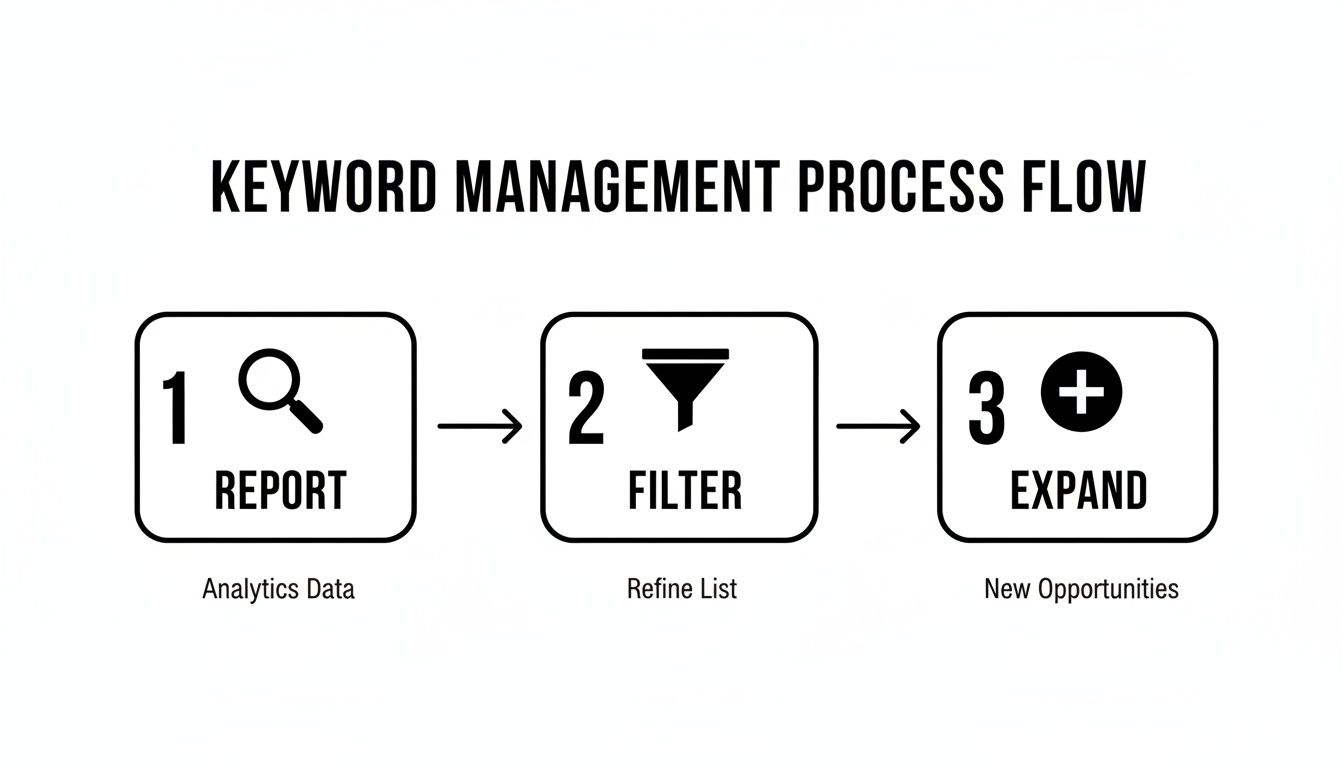
Think of it as a cycle: you analyze what's happening, filter out the junk, and then expand on what's working. When you automate this, the cycle spins at lightning speed.
Instantly Clean Up Your Search Terms
Once you hook keywordme into your Google Ads account, the first and most immediate win is clearing out all the irrelevant traffic that's been bleeding your budget dry. No more exporting reports and sorting through thousands of rows in a spreadsheet. You can do it all right inside the Google Ads interface.
With just a few clicks, you can filter your search terms report to isolate every query that has cost you money but hasn't led to a single conversion.
Imagine you're an e-commerce store selling "premium leather dog collars." You can instantly find and flag search terms like "cheap nylon collars," "how to make a dog collar," or even "collar training for cats." Instead of adding these as negatives one by one, you can bulk-add them to your negative keyword list in seconds.
This immediate cleanup is the fastest way to optimize Google Ads performance and see a real impact on your return on ad spend (ROAS). You stop wasting money on clicks that were never going to convert anyway. We dive deeper into this in our post on why you should automate keyword management.
Expand and Refine Your Keywords with a Single Click
Cleaning up is only half the job. The other half is finding what’s already working and doubling down on it. This is another area where doing things manually really slows you down.
Let's say you spot a great, high-converting search term in your report that isn't a keyword you're actively bidding on. Maybe it's a long-tail phrase with obvious purchase intent. The old way would involve copying the term, navigating to the right campaign and ad group, and then adding it as a new keyword with the correct match type. What a hassle.
With an automation tool, this becomes a simple, one-click action.
- You find a winning search term.
- You click to add it as a new keyword.
- You instantly assign it as Phrase or Exact Match.
Think about a local plumber in Miami. They might discover the search term "emergency plumber for clogged drain in Brickell" converts like crazy. With a tool like keywordme, they can add [emergency plumber brickell] as an exact match keyword to their "Emergency Services" ad group with one click. Just like that, they're set to capture more of that high-intent traffic.
This isn’t just about saving time—it’s about making better decisions, faster. When you remove all that friction, you’re far more likely to do these crucial optimization tasks regularly. That's what leads to a consistently healthier and more profitable Google Ads account.
Nailing Your Bidding and Budgeting Strategy
Picking a bidding strategy is one of the most important decisions you'll make in Google Ads. Think of it as the brain of your entire operation, telling Google exactly what you're trying to accomplish. It's easy to get lost in all the automated options, though.
Let's break down Google's Smart Bidding. These aren't just simple settings; they're sophisticated AI models aiming to get you the best bang for your buck based on your specific goals. But here’s the catch: the algorithm is only as good as the data you give it. Garbage in, garbage out.
This is precisely why getting your keyword strategy right, like we talked about earlier, is so fundamental. When you pair clean, relevant keywords with the right bidding strategy, you’re giving Google's AI the fuel it needs to find your perfect customers with almost scary accuracy.
Choosing the Right Bidding Strategy for Your Goals
Your bidding strategy needs to be a perfect match for what you actually want to achieve. Are you just trying to get as many leads as possible? Or do you need to hit a specific return on every dollar you spend? Each goal has a bidding strategy designed for it.
Here’s a quick rundown of the heavy hitters:
- Maximize Conversions: This one’s simple. You're telling Google, "Get me the most leads or sales you can within my daily budget." It's a fantastic starting point for lead gen campaigns where you just need to drive volume.
- Target CPA (Cost Per Acquisition): This is for when you know your numbers. You tell Google exactly what you're willing to pay for a conversion, and its job is to average out at that cost. This is my go-to for stabilizing lead costs once a campaign is running smoothly.
- Target ROAS (Return On Ad Spend): The holy grail for e-commerce. You tell Google something like, "For every $1 I spend, I need to make $4 back." The system then hunts for users who are most likely to make high-value purchases to hit that target.
- Maximize Conversion Value: Think of this as the e-commerce version of Maximize Conversions. Instead of just getting the most sales, it focuses on getting the most revenue. It’s a great choice if your products have a wide range of prices.
The single biggest mistake I see people make is choosing an advanced strategy like Target ROAS without enough data. If you only have a few conversions, the AI is just guessing. You have to give it enough data to learn. I always recommend starting with Maximize Conversions to build up conversion history before getting more specific.
Automation Is Here to Stay
It's no secret that the industry has gone all-in on automation, and for good reason—it just plain works. The latest data shows just how much AI-driven strategies have taken over.
In 2026, Maximize Conversions and Target ROAS strategies each command about 33% of all ad spend. Maximize Conversion Value and Target CPA aren't far behind, at 15% and 10% respectively. It’s pretty clear that manual bidding is having a tough time keeping up. You can see more of these Google advertising benchmarks on Pixis.ai if you want to dig deeper.
Smart Budgeting to Protect Your Best Campaigns
Finally, let’s talk money. A brilliant bidding strategy means nothing if your budget is a mess. I’ve seen it a hundred times: a new, experimental campaign eats up the entire daily budget before the proven, high-performing campaigns even get a chance to run.
You have to be disciplined. Give your best campaigns—the ones with a track record of high ROAS—the biggest slice of the budget pie. If you're launching something new, quarantine it with a smaller, dedicated budget so it can't sink your winners. It’s all about making sure your star players get to step up to the plate every single day.
Crafting Ad Copy And Landing Pages That Convert
You can have the best keyword list in the world and a brilliant bidding strategy, but if your ads are boring and your landing page is a dead end, you're just lighting money on fire. The goal isn't just to get clicks; it's to create a seamless journey from the moment someone types in a search to the second they become a customer.
This is where your creativity and understanding of your customer truly shine. It’s about connecting with the human on the other side of the screen, understanding their problem, and showing them you have the solution. Your ad has to earn the click, and your landing page has to earn the conversion.
Writing Ad Copy That Actually Gets Clicked
Let’s be real, just filling out all the headline and description fields in a Responsive Search Ad isn't enough. The real art is getting inside your searcher's head. Your ad copy needs to nail three things: mirror their search intent, speak to their immediate pain point, and present a solution that's too good to ignore.
For instance, someone frantically searching for an "emergency plumber" isn't comparison shopping for next week. They have a problem now. Your headline needs to feel like a life raft. Something like "24/7 Emergency Plumber - Fast Response Guaranteed" works because it promises speed and reliability, which is exactly what they need.
A great ad isn't just about what you say; it's about what the searcher feels. It should offer instant relief, spark curiosity, or create a sense of urgency. Test copy that speaks directly to the user’s motivation behind the search.
Think about what makes you different. Is it your free shipping? Your money-back guarantee? An award-winning team? Don't hide those gems. Weave them into your ad descriptions and callout extensions to give people every reason to choose you over the competition.
Creating High-Converting Landing Pages
Getting the click is only half the battle. Your landing page is where you have to deliver on the promise you just made in your ad. The most critical rule here is message match. If there's a disconnect between your ad and your landing page, you've already lost.
If your ad shouts about a "50% Off Spring Sale," that sale better be the first thing people see when they land on the page. Any friction or confusion sends people straight to the back button.
A landing page that really works has a few key things in common:
- A Clear Value Proposition: In a single, powerful headline, tell them exactly what problem you solve and why they should care. Make it impossible to miss.
- Frictionless Forms: Only ask for what you absolutely need. I've seen conversion rates jump just by removing one or two unnecessary form fields. A shorter form is almost always a better form.
- Compelling Social Proof: This could be customer testimonials, reviews, case studies, or logos of companies you've worked with. People trust other people more than they trust you, so let your happy customers do the selling.
- A Singular Call-to-Action (CTA): Decide on the one thing you want a visitor to do. Is it "Buy Now," "Request a Demo," or "Download The Guide"? Make it big, bold, and obvious. Don't confuse them with multiple choices.
The Power of A/B Testing
You'll never truly optimize Google Ads if you aren't testing. What you think is a killer headline might completely flop, while a tiny wording change you almost overlooked could double your conversion rate. A/B testing is how you find out what actually works by methodically testing one change at a time.
Don't make the mistake of testing five things at once. Pick one element—a headline, a button color, a form field—and create just two versions. Run the test until one is a clear winner, then roll out that winner and move on to the next test. It's a never-ending cycle of improvement.
To get your gears turning, here are a handful of A/B tests I've seen deliver great results for both ad copy and landing pages.
Ad Copy And Landing Page A/B Testing Ideas
| Element to Test | Variation A (Control) | Variation B (Test Idea) |
|---|---|---|
| Ad Headline | "High-Quality Leather Bags" | "Handcrafted Leather Bags with a Lifetime Warranty" |
| Landing Page CTA | "Submit" | "Get Your Free Quote Now" |
| Landing Page Headline | "Our Services" | "Solve Your [Specific Problem] in 24 Hours" |
| Landing Page Form | 5 Fields (Name, Email, Phone, Company, Message) | 3 Fields (Name, Email, Message) |
| Social Proof | Written Testimonials | Video Testimonials from Customers |
By constantly testing and iterating on both sides of the click, you build a powerful conversion machine that gets smarter and more profitable over time.
Your Top Google Ads Questions, Answered
Been managing Google Ads accounts for a while now, and you start to see the same questions pop up again and again. It's a powerful platform, but let's be honest, it can get complicated fast.
So, I've rounded up a few of the most common questions we get from advertisers. Think of this as a quick chat to clear up the hurdles that might be slowing you down.
"How Often Should I Actually Be Optimizing My Campaigns?"
This is the big one. The right answer really depends on how fresh your campaign is.
For a brand-new campaign, you've got to be in there daily for at least the first week. No exceptions. Your main job is to play defense—get into that Search Terms Report and start aggressively adding negative keywords. You'll be amazed at the junk traffic that can sneak in and drain your budget right from the get-go.
After that initial sprint, you can ease into a weekly routine. That's the sweet spot for most accounts. It gives you just enough data to make smart calls without getting lost in the weeds.
Your weekly check-in should be a quick, focused hit:
- Hit the Search Terms Report first. This is non-negotiable. What are people actually typing to trigger your ads? Find the irrelevant stuff and add it to your negative list.
- Glance at performance. How are your big-picture metrics like CTR, CPC, and conversion rate looking? Are your best campaigns being starved for budget?
- Check your bidding. Is your Smart Bidding strategy doing its job? If you set a Target CPA, is the actual cost per conversion close to your goal?
You can save the bigger projects, like a full ad copy overhaul or landing page tests, for a bi-weekly or monthly cadence. Consistency is everything. A tool like keywordme can shrink this weekly task from a few hours down to a quick 15-minute review, which makes it a whole lot easier to stick with.
"Why Is My Cost Per Click (CPC) So High?"
Ah, the dreaded high CPC. This almost always boils down to two usual suspects: brutal competition and a low Quality Score. If you're in a tough niche like law or insurance, high costs are, unfortunately, part of the game.
But you're definitely not helpless. Your secret weapon against sky-high CPCs is improving your Quality Score. Google literally gives you a discount for providing a great experience. A higher Quality Score means better ad positions and lower costs.
Here's how to fight back:
- Create super-tight ad groups. Every keyword in an ad group should be laser-focused on the same theme, which should match your ads and landing page perfectly.
- Write irresistible ad copy. Don't just list features. Speak directly to what the searcher wants and give them a compelling reason to click. This jacks up your Click-Through Rate (CTR).
- Build a solid landing page. Make sure it's fast, relevant to the ad they just clicked, and dead simple to navigate.
And, of course, be absolutely relentless with your negative keywords. Every irrelevant click you block is one less expensive mistake dragging your performance down.
"What's The Absolute Fastest Way To Stop Wasting Money?"
Easy. The single most impactful thing you can do—right now—is to dive into your Search Terms Report and build a killer negative keyword list. I can almost guarantee your ads are showing up for hundreds of useless search queries that are just burning through your budget.
Seriously, go look. Open your Google Ads account, find the Search Terms Report, and sort it by 'Cost.' The results might shock you. You'll immediately spot expensive search terms that have zero to do with what you sell.
For example, a SaaS company selling "CRM software for small business" could be wasting a small fortune on clicks from people searching for "free CRM for students." Adding "free" and "students" as negative keywords instantly plugs that leak.
Negating these junk terms delivers an immediate return on your time. It’s exactly what tools like keywordme are built to automate, helping you find and block thousands of these budget-wasters in minutes instead of hours.
Ready to stop wasting time and money on manual tasks? keywordme turns hours of tedious keyword cleanup and optimization into a few simple clicks, helping you slash wasted spend and boost your ROI instantly. Start your free trial today and see how fast you can optimize your campaigns.
.svg)