
Slash Your ACoS With Negative Keywords on Amazon
Slash Your ACoS With Negative Keywords on Amazon


If you've ever felt like you're just throwing money away on your Amazon ads, you're not alone. The good news is, there's a powerful tool to stop the bleeding: negative keywords.
Think of them as your ad campaign's bouncer. They tell Amazon exactly which search terms are irrelevant to your products, preventing you from paying for clicks that will never turn into sales. It's the fastest way to stop wasted ad spend and start lowering your ACoS.
Your Secret Weapon for Amazon PPC Profitability

Running Amazon PPC means you're almost certainly paying for clicks that will never convert. It's a frustrating reality when you see your Advertising Cost of Sales (ACoS) climbing without any real sales growth to show for it. This is precisely why getting a handle on negative keywords isn't just some "pro tip"—it's an absolute must for survival.
They're the gatekeepers of your ad budget. By telling Amazon which terms to avoid, you force its algorithm to spend your money only on shoppers who are actually looking for what you sell.
The True Cost of Ignoring Negatives
Let's walk through a real-world example. Say you sell a premium 'leather dog collar.' If you're running broad match campaigns without any negatives, your ad could easily pop up for searches like "cheap nylon puppy collar" or even "dog collar repair kit."
A shopper hunting for a bargain clicks your ad, sees the premium price, and immediately leaves. You just paid for a click that had a 0% chance of converting. Now, imagine that happening hundreds or thousands of times a day. The wasted spend adds up in a hurry.
The concept is simple but incredibly powerful: Stop paying to attract the wrong customers. Every irrelevant click you block is money back in your pocket—money you can then push toward keywords that actually make you sales.
Protecting Your Margins Is the Name of the Game
In today's competitive market, a smart negative keyword strategy is the foundation of any profitable Amazon PPC effort. It's how the top brands keep their margins healthy even as ad costs rise.
It's not uncommon for unoptimized campaigns to see ACoS climb to 50% or more. In many broad match campaigns, this 'junk' traffic can account for a staggering 20-30% of all impressions. By diligently adding negatives, you filter out that noise and focus your budget where it counts.
To build on this, exploring specialized Pay Per Click (PPC) agency strategies can give you a wider view on managing paid search across different platforms, turning your ad campaigns from a drain on resources into a true revenue-generating machine.
Finding the Budget Leaks in Your Search Term Report
Your Amazon Search Term Report is a goldmine, but let’s be honest—it can look like a monster spreadsheet at first glance. This report is where you get the raw, unfiltered truth: the exact phrases shoppers are typing right before they click your ad and either buy your product or bounce.
Don't get overwhelmed by the rows and columns. Buried in that data are the clues you need to stop hemorrhaging cash on clicks that go nowhere. It’s all about spotting the budget-killers and using that intel to make your campaigns smarter.
How to Find Your Search Term Report
First thing's first, you've got to pull the report. Amazon keeps it tucked away in the advertising console.
- Log into your Seller Central account.
- Head over to the Advertising tab and click on Campaign Manager.
- On the left-hand menu, look for Measurement & Reporting, and then click on Reports.
- You’ll need to create a new report. Select your campaign type (usually Sponsored Products), pick "Search term" for the report type, and set your time frame.
I usually recommend looking at the last 30 to 60 days. That gives you enough data to spot real patterns without letting one weird sales day throw everything off.
What to Look For: The Top 3 Culprits
Once you’ve downloaded the report (it’ll likely be a .csv or Excel file), it's time to play detective. You don't need to analyze every single line. The goal here is to find the biggest offenders fast.
The principles for digging through this data are universal, whether you're on Amazon or optimizing search ad performance on other platforms. You're hunting for clicks that don't convert.
You're primarily looking for three types of toxic search terms:
High Spend, Zero Sales: These are the most obvious money pits. Any search term that's eaten up a good chunk of your budget without a single sale is your top priority. What’s a "good chunk"? A solid rule of thumb is any term that has spent more than your product's profit margin without a sale. Cut it loose.
Totally Irrelevant Searches: You'll see some that just make you go, "Huh?" If you're selling leather dog leashes, a click from someone searching "cat scratching post" is a complete waste. These are easy wins—negate them immediately.
Wrong-Fit Shopper Queries: These are a bit more subtle. The term might seem related, but it’s attracting the wrong kind of buyer. For example, if you sell premium, high-end blenders, searches that include words like "cheap," "discount," or "under $20" are bringing in bargain hunters who will never pay your price.
By focusing on these three categories, you can quickly filter out the noise and identify the terms that are actively draining your budget. This isn’t about perfection; it’s about making impactful changes fast.
If you’re running ads on other platforms, this process will feel very familiar. The core idea of using real customer data to sharpen your targeting is the same everywhere. For instance, our guide on the Google Ads search terms report walks through a nearly identical process for uncovering waste and boosting ROI.
Spotting Negative Keyword Candidates In Your Report
Here’s a quick reference guide to spotting which search terms are draining your budget and need to be added as negatives.
Keep this table handy when you're sifting through your report. It helps you quickly categorize the search terms that are just costing you money without bringing in any sales.
How to Add Negative Keywords Like a Pro
Alright, so you've dug through your search term report and you've got a list of keywords that are just eating your budget. Now what? Knowing where and how to add these negative keywords is just as important as finding them. This is where you stop playing defense and start actively sculpting your ad traffic.
The process isn't rocket science, but it definitely requires some strategy. You’ll be working at two main levels inside your campaigns: the campaign level and the ad group level.
Campaign Level vs. Ad Group Level Negatives
Think of these two options as using a sledgehammer versus a scalpel. Both are incredibly useful tools, but you wouldn't use them for the same job.
Campaign-Level Negatives are your broad-stroke exclusions. These are the terms you never want any ad in that campaign to show up for, period. It's the perfect spot for those universal money-wasters that apply to all the products in the campaign.
Good candidates for campaign-level negatives include:
- Competitor brand names (unless you have a specific conquesting strategy in place).
- Totally irrelevant product types. For example, adding "plastic" as a negative if you only sell premium metal goods.
- Search terms that signal the wrong intent, like "free," "used," "reviews," or "how to."
Adding a negative at this level is a powerful move—it protects every single ad group underneath it. It's the "set it and forget it" way to stop bleeding cash across an entire campaign.
Ad Group-Level Negatives are all about surgical precision. You use these to fine-tune specific product lines within the same campaign. Let's say you sell both men's and women's running shoes in one campaign, but they're in separate ad groups. You’d add "women" as a negative to the men's ad group and, you guessed it, "men" as a negative to the women's ad group. Simple, effective, and stops you from paying for clicks from the wrong audience.
This simple flowchart can help you decide in a snap whether to negate a term or just keep an eye on it.
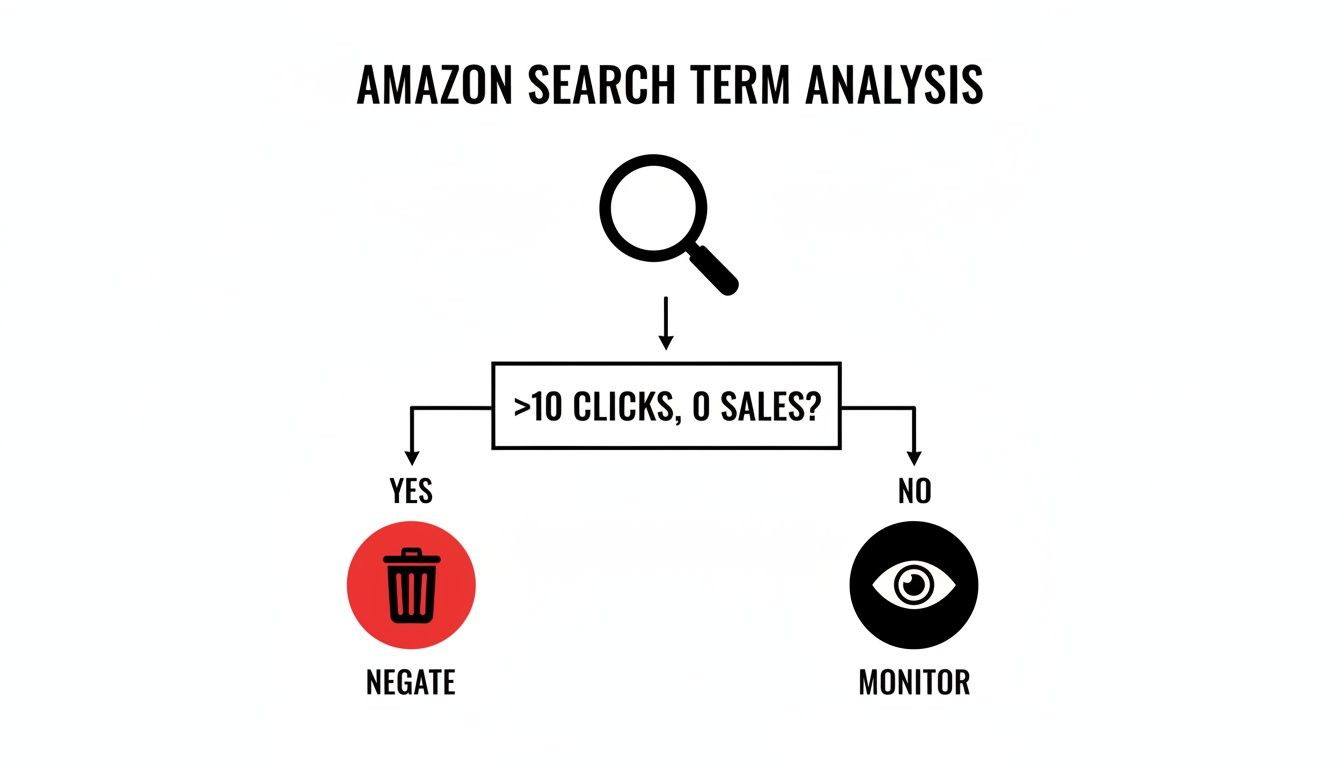
The logic is straightforward: if a term is racking up clicks (over 10 is a good starting point) but has zero sales, it’s a prime candidate for the chopping block.
Negative Phrase vs. Negative Exact Match
Okay, now for the most important choice you'll make when adding a negative: the match type. Amazon gives you two options here, and picking the right one is the key to not accidentally nuking your own traffic.
Negative Phrase Match: This is your workhorse. It blocks any search query that contains your negative keyword in that specific order. If you add "gel pens" as a negative phrase, your ad is blocked for "blue gel pens," "best gel pens for artists," and "black gel pens." It’s perfect for cutting out entire categories of irrelevant searches.
Negative Exact Match: This one is much more targeted. It only blocks the exact search query you enter (and its close variants like plurals). So, adding
[gel pen]as a negative exact will block searches for "gel pen" and "gel pens," but your ad could still pop up for "blue gel pen."
My Pro Tip: When you're not sure which to use, start with Negative Phrase match. It casts a wider net and is generally safer for blocking irrelevant concepts without you having to think of and list every single possible variation.
Getting these match types right is fundamental. Amazon's own rules state that negative exact match keywords can have a maximum of 10 words, which forces you to be strategic. For example, adding 'boy’s winter coat' as a negative phrase can prevent a ton of irrelevant clicks from gender-mismatched searches, saving budget that so many unoptimized campaigns waste.
If you want an even more detailed walkthrough, check out our comprehensive guide on how to add negative keywords to your campaigns.
Building Scalable Negative Keyword Lists
When you're first starting out, adding negative keywords one by one feels manageable. But as your Amazon business grows, that approach just doesn't scale. What was once a quick weekly task becomes a massive, time-sucking chore.
To really get ahead with your PPC and stop wasting money, you need to be proactive, not just reactive.
This is where building reusable Negative Keyword Lists completely changes the game. Think of these as master lists of terms you never want to bid on. You can apply them across multiple campaigns with a single click. Instead of putting out the same fires every time you launch a new product, you’re building a firewall that protects your ad spend from the get-go.
Your goal is to stop chasing down wasteful search terms after they've cost you money and block them before they ever get the chance.
Creating Your Foundational Lists
A great way to start is by creating a few core lists that will probably apply to any product you sell. These lists are designed to weed out the most common money-wasters—the search terms that show a shopper is just browsing or looking for something you don't offer.
I like to organize them into a few key groups:
- Informational Intent: This list is full of terms like "reviews," "how to," "guide," "pdf," and "instructions." Someone searching for "wooden spoon reviews" is still in research mode, not "buy now" mode.
- Low-Quality Traffic: Here’s where you put words like "free," "cheap," "discount," "used," and "broken." If you're selling a premium product, you don’t want to pay for clicks from bargain hunters who will never convert.
- Irrelevant Materials: Make a list of all the materials you don't use. If you only sell wooden products, your list should absolutely include "plastic," "metal," "silicone," and "nylon."
By creating these master lists, you're setting a baseline of protection for your whole account. Any new campaign you launch can inherit this wisdom instantly, making it smarter and more efficient from day one.
Automating the Build-Out Process
Now, even with lists, manually keeping them updated takes time and effort. This is where a good tool can give you a serious edge. Platforms like Keywordme are built to do most of this heavy lifting for you.
Instead of you having to dig through search term reports every week, a dedicated tool can analyze your performance data for you. You can set rules—for example, "negate any keyword with more than 15 clicks and 0 sales"—and the software will automatically add those duds to your lists.
This creates a cycle of continuous optimization that saves a ton of hours and keeps your campaigns running lean. For a much deeper look, our guide on building a powerful negative keyword list has a bunch more strategies and templates you can swipe.
Taking this systematic approach ensures your negative keywords amazon strategy grows right alongside your business, turning a reactive chore into a powerful, proactive asset.
The Hidden Risk of Over-Optimization

It’s easy to get a little trigger-happy. Once you see the power of cutting wasteful ad spend, the temptation is to start negating every keyword that isn't an instant home run. But going overboard with your negative keywords amazon strategy comes with a sneaky risk: you might be killing off future sales.
This is the very real danger of over-optimization. A search term that looks like "bad traffic" today might not be tomorrow. Some keywords just need a little time to ripen, and blocking them too soon can be a mistake that quietly costs you a lot of money.
The real skill is learning to spot the difference between a genuinely junk term and one that just needs more data to show its true colors. It’s all about finding that sweet spot between trimming the fat and giving your campaigns enough breathing room to uncover new, unexpected ways to get sales.
Don't Choke Your Campaign's Growth
I like to think of ad campaigns like a plant. You absolutely need to prune the dead leaves—those are your truly irrelevant keywords—to help the whole thing thrive. But if you start snipping off every new branch before it even has a chance to sprout, you’ll stunt its growth entirely.
Some search terms are part of a longer customer journey and might not convert on the first or even second click.
For instance, a search for "best waterproof hiking boots for women" might get a few clicks but no immediate sales. It’s tempting to add it to your negative list. But what if that shopper is just starting their research? They might be comparing options and plan to come back in a week to buy. If you block that term right away, you've just lost a potential customer.
Being too quick to add a negative keyword can feel like you're saving money in the short term, but you could be sacrificing significant long-term revenue. Patience really is a virtue in PPC.
The Real Cost of Being Too Aggressive
The financial hit from over-optimization isn't just a theory. In a fascinating nine-month experiment, researchers discovered that aggressively negating low-performing keywords in Amazon PPC campaigns led to a jaw-dropping loss of nearly half the total revenue over a 285-day period.
Turns out, those supposedly "bad" keywords actually matured over time, eventually contributing a ton of sales that would have been completely missed. If you're curious, you can read more about these surprising findings on Amazon negative keywords.
This completely flips the script on the old-school, ruthless cost-cutting mindset. Instead of just fixating on clicks and spend, you have to consider a keyword’s potential.
So, before you negate a term, ask yourself these questions:
- Is it truly irrelevant? Or is it just a relevant term that hasn't converted yet?
- Has it received enough data? A term with only a handful of clicks and no sales isn't a proven loser; it's simply unproven.
- Could this be a discovery keyword? Your auto campaigns are built to find new paths to conversion—don't shut them down before they get a chance to work.
By taking a more patient, data-backed approach, you can sidestep the costly mistake of blocking sales channels your competitors might be overlooking.
Got Questions About Negative Keywords? Let's Clear Things Up.
Even the most seasoned sellers run into tricky situations with negative keywords on Amazon. It's an area with plenty of nuance, so let's tackle some of the most common questions I hear. Nailing these details is what separates a decent campaign from a great one.
This isn't just about theory. It’s about getting you practical answers you can use to make smarter decisions and stop wasting money.
How Often Should I Be Updating My Negative Keywords?
Consistency is everything. For a brand-new campaign or anything with a high daily budget, you need to be in your search term report at least weekly. This is non-negotiable if you want to catch obvious budget leaks before they drain your account.
Once a campaign is more mature and chugging along predictably, you can often relax a bit. Checking in every two weeks, or even once a month, is usually fine. The key is to make it a habit. Think of it like weeding a garden—if you do it a little bit, often, you stay ahead of the problems. Let it go for too long, and you'll have a massive, time-consuming mess on your hands.
What’s the Difference Between a Negative Keyword and a Negative Product Target?
This one trips a lot of people up, but it's simple once you get it. It all comes down to what you're blocking: a shopper's search query or a specific ad placement.
- Negative Keywords are all about blocking search terms. If you sell a premium stainless steel garlic press, you might add "plastic" as a negative keyword. This stops your ad from showing up when someone searches for a "cheap plastic garlic press." You're controlling who sees you in the search results.
- Negative Product Targeting is about blocking placements on other product pages. You use this to tell Amazon, "Don't show my ad on this competitor's ASIN or on any products from this specific brand." This is for your Product Targeting and Sponsored Display campaigns.
So, one handles search visibility, and the other handles where your ads appear on the digital shelf. Both are crucial for cutting wasted spend, but they solve two completely different problems.
Can I Use Negative Broad Match on Amazon?
Short answer: no. This is a common point of confusion, especially for anyone with a background in Google Ads.
Amazon's system keeps it simpler by only offering two negative match types: Negative Phrase and Negative Exact. There is no "Negative Broad" option. This actually makes your job a little more straightforward, but it also means you have to be more deliberate. Negative Phrase will block any search containing your target phrase in that specific order, while Negative Exact blocks only that one, precise search term.
Honestly, I think this limitation is a good thing. It forces you to be more strategic. You can't just toss in a broad negative term and hope for the best; you have to specifically identify the exact patterns of wasteful searches you're seeing in your reports.
Will Using Negative Keywords Hurt My Organic Rank?
Absolutely not. Adding negative keywords to your ad campaigns will not directly harm your organic rankings. In fact, it often has a powerful indirect benefit.
When you use negative keywords effectively, your ads become far more efficient. Your conversion rate goes up because you're only paying for clicks from relevant shoppers. This means you stop lighting money on fire and can reinvest that budget into the keywords that are actually driving sales.
What does Amazon's A9 algorithm love? Sales velocity. More sales from highly-effective, well-managed ads sends a strong positive signal to Amazon. So, a healthy, optimized ad account almost always supports your organic growth over the long haul.
Ready to stop wasting time and money on bad clicks? Keywordme gives you the tools to automate your negative keyword management, clean up your campaigns, and scale your ads with confidence. Stop digging through spreadsheets and start optimizing smarter. Try Keywordme free for 7 days!
.svg)