
A Guide to Managing Pay Per Click Campaigns
A Guide to Managing Pay Per Click Campaigns


If you want to get PPC management right, you have to start with a solid, scalable foundation. This isn't just about picking keywords; it's about building a logical account structure that actually reflects your business goals and, crucially, setting up conversion tracking so you know what's really working.
Building Your Foundation for Smart PPC Management
Diving into PPC ads without a clear plan is the fastest way to burn through your budget. So many people get hyper-focused on bids and ad copy, but the real wins—and the most painful losses—are decided at the structural level. A messy account is a nightmare to manage and becomes impossible to scale, leading to wasted spend and data that makes no sense.
Your goal isn't just to get campaigns live. It’s to build a system that you can easily optimize and grow over time. Think of it like organizing a massive library. If you just toss books on shelves at random, good luck finding anything. But if you sort them by genre, author, and subject, finding exactly what you need is a piece of cake. Your Google Ads account works the same way.
Structuring Campaigns by Intent
The best way I've found to structure an account is by mapping it to your customer's journey. Please, don't just dump all your keywords into one giant campaign. It's much smarter to create separate campaigns based on what the searcher is actually trying to do.
For example, if you're an e-commerce store selling running shoes, your campaign structure might look something like this:
- Brand Campaigns: For anyone searching directly for your store's name. These are your warmest leads.
- Generic "Shoe Type" Campaigns: For broader, top-of-funnel terms like "men's trail running shoes."
- Specific Model Campaigns: Targeting searches with high purchase intent, like "Brooks Ghost 15 running shoe."
- Competitor Campaigns: For people searching for your rivals. A great way to steal market share.
This method gives you total control. You can set different budgets and write incredibly specific ad copy for each stage of the buying process. The message for someone searching "best running shoes" should be very different from the one for someone who already knows they want the "Brooks Ghost 15."
The Power of Granular Ad Groups
Ad groups are your next layer of organization inside each campaign. One of the most common mistakes I see is marketers cramming hundreds of vaguely related keywords into one ad group. This absolutely tanks your Quality Score because it's impossible for your ad to be relevant to every single keyword.
The solution is to create super-focused, tightly-themed ad groups. You might've heard of Single Keyword Ad Groups (SKAGs), and while the strategy has evolved, the principle remains golden.
The core idea is simple: Group keywords with nearly identical intent together. This ensures your ad copy directly speaks to the user's search query, which dramatically improves click-through rates and ad relevance.
Let’s go back to our "men's trail running shoes" campaign. Instead of one ad group, you could create separate ones for "waterproof trail running shoes," "wide fit trail running shoes," and "lightweight trail running shoes." Each ad group gets its own tailored ads, creating a much better experience for the user and giving you much stronger performance data.
And finally, getting your conversion tracking right from day one is completely non-negotiable. It's the only way you'll ever know which keywords, ads, and campaigns are actually driving sales or leads. Proper tracking is the bedrock of successfully managing pay per click advertising—it’s what turns guesswork into a data-backed strategy.
Getting Your Keyword and Match Type Strategy Right
This is where the magic really happens in PPC. You can have the most beautifully structured account in the world, but if your keyword and match type strategy is off, you're just throwing money away. It’s what decides who sees your ads and how much you're paying for each click.
So many advertisers fall into the trap of chasing high-volume, generic keywords. They look great on a spreadsheet, sure, but they usually bring in a ton of low-intent traffic that just clicks around and leaves. You burn through your budget with nothing to show for it.
The real game-changer is figuring out what your best customers are actually typing into Google. The best way to do this is to get your hands dirty and look at the real data.
Forget guessing. I always tell people to adopt a 'search term-first' mindset. Jump into your Search Term Report—even if you've only run a small test campaign. This is your goldmine. It shows you the raw, unfiltered queries people used that triggered your ads, giving you a list of proven, high-intent keywords to build around.
Picking the Right Match Type for the Right Job
Once you’ve got your keywords, you need to give Google some rules. This is where match types come in. They tell Google how much creative freedom it has to match your keyword to a user’s search. Using them strategically is probably the single biggest lever you have for controlling costs.
Exact Match: Think of this as your sniper rifle. Denoted by brackets like
[men's running shoes size 10], it gives you maximum control. Your ad shows for that exact search or incredibly close variations. It’s perfect for your highest-performing, bottom-of-the-funnel keywords that you know convert.Phrase Match: This one’s a bit more flexible, using quotation marks like
"men's running shoes". Your ad can show up when a search includes your keyword phrase in the right order, even with other words tacked on before or after. It’s my go-to for capturing a wider—but still very relevant—audience.Broad Match: With no symbols at all, this is you handing the keys over to Google's AI. Your ad could show for searches that are just thematically related to your keyword, including synonyms and concepts you never thought of. Use this one with extreme caution. It's fantastic for discovering new keyword ideas but can obliterate your budget with irrelevant clicks if you don't have a rock-solid negative keyword list.
A battle-tested approach is to use a mix. Start with exact and phrase match for the keywords you’re confident in. Then, maybe spin up a separate, low-budget "discovery" campaign using broad match. The goal isn't profit; it's to mine for new, high-performing search terms you can then move over to your main campaigns as exact or phrase match.
If you want to get into the nitty-gritty of each option, check out our guide on Google Ads keyword match types. It’ll really help you strike that perfect balance between reach and relevance without breaking the bank.
How to Balance Cost and Competition
Keyword costs are all over the map. The average cost per click (CPC) on Google Ads is about $5.26 across major markets, but that's just a baseline.
I’ve seen legal clients pay $8–$9 for a single click on terms like 'injury attorney,' while e-commerce keywords might be closer to $3–$4. The data shows that high-competition industries can pay 3.4x more per click, which is why you can’t afford to be sloppy with your keywords and match types.
This is where smart tools come in handy. For instance, the Keywordme Chrome plugin helps you automate match type assignments on the fly, saving a ton of time and cutting out wasted spend by focusing your budget only on high-intent terms. To see how your industry stacks up, you can find more data about real-world CPCs.
Ultimately, managing your keywords is a cycle. You research, you launch, you analyze the data, and you refine. Start with what you know, listen to what the numbers tell you, and never, ever stop tweaking.
The Unsung Hero That Cuts Wasted Ad Spend

Every dollar you don’t waste is a dollar you can reinvest into what’s actually working. This simple truth is the key to successfully managing pay per click campaigns, and it brings us to the most underrated tool in the entire PPC arsenal: negative keywords.
Too many advertisers pour all their energy into finding keywords to bid on, completely ignoring the ones they should be actively blocking. Honestly, it’s a massive mistake. A proactive negative keyword strategy is often the fastest way to boost your ROI because it immediately stops your budget from leaking out on irrelevant clicks.
Digging for Gold in Your Search Term Reports
Your best source for negative keywords is hiding in plain sight—the search term report. This is where Google shows you the exact queries people typed right before clicking your ad. Scouring this report needs to become a weekly ritual for you.
You're essentially on a treasure hunt for queries that are a terrible fit for your business. Let's say you sell premium running shoes. You absolutely don't want to pay for clicks from someone searching for "cheap running shoes" or "running shoe repair." Each irrelevant term you find and add as a negative is a small win that adds up to huge savings over time.
Think of it like this: Your keywords open the door to potential customers, but negative keywords act as the bouncer, making sure only the right people get in. Without them, you’re paying for a lot of window shoppers who were never going to buy.
Building and Organizing Your Negative Keyword Lists
Just finding negative keywords isn't enough; you have to organize them properly. Google Ads gives you a couple of ways to do this, and using them correctly will save you a ton of headaches later on.
Campaign-Level Negatives: These are perfect for terms that apply to one specific campaign but not others. For instance, if you have a campaign dedicated to "men's shoes," you might add "women's" as a negative at this level. Simple.
Shared Negative Lists: This is your master list for terms you never want to show up for, no matter the campaign. Think of universal junk terms like "free," "jobs," "reviews," or "DIY." You build this list once and apply it across your entire account.
This organized approach ensures you're not just plugging leaks but building a rock-solid defense against wasted ad spend. It's a non-negotiable part of good PPC hygiene. If you want to go deeper, you can learn more about Google Ads negative keywords in our article.
Streamlining the Process with the Right Tools
Let's be real—manually sifting through search term reports can be incredibly tedious, especially in large accounts. This is where tools can make a huge difference. Imagine being able to instantly flag and add hundreds of garbage terms as negatives in a single click. That’s the kind of efficiency that separates struggling advertisers from the ones who are absolutely crushing it.
Tools like Keywordme can simplify this entire workflow right inside your browser. Instead of exporting data and manually updating lists, you can manage everything on the fly.
This kind of interface lets you select irrelevant search terms directly from the report and add them as negatives without ever leaving the page. It turns a mind-numbing task into a quick, efficient part of your routine. By automating the grunt work, you free yourself up to focus on high-level strategy instead of getting lost in spreadsheets.
How to Master Bids and Budgets Without Going Broke
Managing your PPC bids and budget often feels like walking a tightrope. One wrong move and you're burning through cash with nothing to show for it. But get it right? You unlock profitable growth and start making every dollar count.
Let’s get one thing straight: there’s no magic, one-size-fits-all bidding strategy. The best approach for you hinges entirely on your campaign goals, how much data you've collected, and frankly, how much control you're comfortable giving to Google's algorithm.
What’s the Right Bidding Strategy for You?
Think of your bidding strategy as the engine powering your entire campaign. It’s what tells Google how to spend your money to hit your specific targets, whether that’s a flood of website traffic, a steady stream of leads, or a killer return on investment.
So, what are your options? It usually boils down to a few key players.
Here's a quick rundown to help you figure out where to start.
Choosing Your Google Ads Bidding Strategy
A quick comparison of common automated bidding strategies to help you decide which is right for your campaign goals.
Ultimately, the choice depends on your starting point and your destination. If you don't have the data, you can't just jump into a conversion-focused strategy and expect miracles.
My two cents? If you're just starting out and don't have much conversion history, kick things off with Manual CPC or Maximize Clicks. This helps you get your feet wet and gather that crucial initial data. Once you're consistently seeing 15-30 conversions in a 30-day window, you've earned the right to test a smarter strategy like Target CPA. You can dive deeper into this in our complete guide to PPC bid management.
Budgeting Smarter, Not Harder
Your daily budget isn't something you just "set and forget." It's a powerful lever. You can pull it to control how fast your campaigns spend and perform throughout the day. The goal is to make your budget work smarter, and a big part of that is finding ways to reduce customer acquisition cost, which is more important than ever with ad costs on the rise.
Beyond your daily budget, bid adjustments are your secret weapon for granular control. These let you bid more or less aggressively based on all sorts of factors.
For example, do you know your ideal customers are searching on their desktops between 9 AM and noon? Perfect. You can apply a positive bid adjustment for that specific device and time slot, telling Google to bid more competitively when it matters most.
This kind of fine-tuning is what separates the pros from the amateurs. It’s how you go from just spending a budget to truly investing it where you know you’ll get the best bang for your buck.
Finding Your Groove with Ongoing Optimization
Let’s get one thing straight: successful PPC campaigns are never a “set it and forget it” deal. I think of them as living, breathing things that need regular check-ups to perform their best. The real secret isn't just making random tweaks when you feel like it, but building a solid, repeatable rhythm for analyzing and improving your accounts.
This rhythm is what really separates the campaigns that just limp along from the ones that consistently knock it out of the park. It ensures you’re always on top of what’s happening, catching opportunities before they disappear and staying one step ahead of the competition. Without a routine, you're constantly playing defense; with one, you're proactively driving better results.
Your Weekly PPC Pulse Check
Think of your weekly check-in as a quick health screening for your account. This isn't about deep, strategic overhauls. It's about the essential tasks that keep things humming along and stop small leaks from turning into budget-sucking floods. Consistency is the name of the game here.
A good weekly routine really just boils down to a few fundamentals:
- Dive into Search Term Reports: This is absolutely non-negotiable. I spend a good chunk of time here sniffing out irrelevant queries that are burning cash and immediately add them to my negative keyword lists.
- Check Your Pacing and Budgets: Are you on track to spend your monthly budget? Are any campaigns suddenly going rogue and overspending? A few small tweaks here can keep everything balanced.
- Scan Ad Copy Performance: It’s time to be ruthless. Pause the ads that aren't pulling their weight and identify the winners. If you notice certain headlines or descriptions are killing it with a high click-through rate, use those insights to write new variations to test against your champs.
The point of the weekly check isn't to reinvent the wheel. It's all about maintenance and making those small, smart adjustments. By catching problems early and often, you make sure your campaigns are always running as efficiently as possible.
The Deeper Monthly Analysis
Once a month, it's time to zoom out and look at the bigger picture. This is your chance to spot broader trends, make more strategic calls, and really plan for the weeks ahead. You're searching for the patterns that you just can't see when you're buried in the daily data.
This deeper dive is what allows you to make truly informed decisions on things like budgets, bidding strategies, and overall direction.
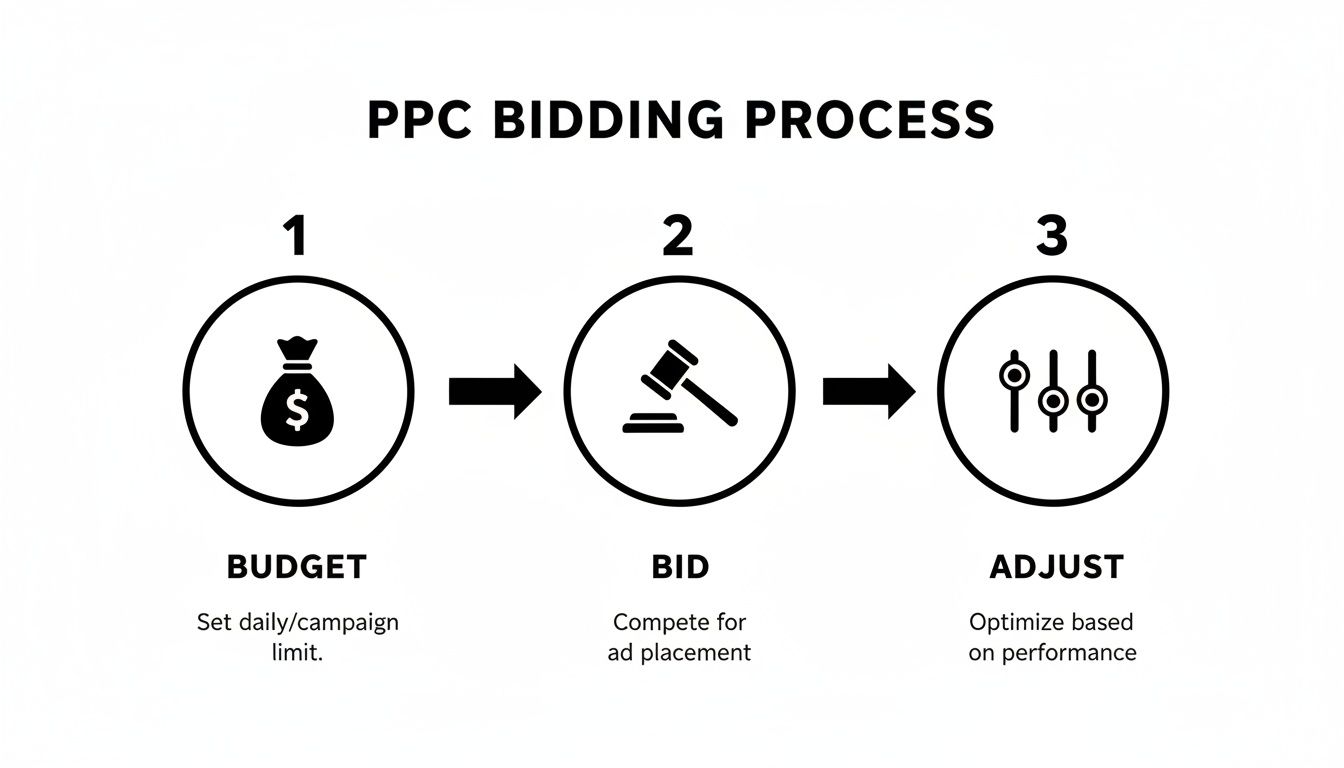
This simple flow is a great reminder of the core process: set your budget, define your bids, and then get into the ongoing cycle of adjusting to make things better.
Your monthly tasks should feel more strategic. Here’s a checklist I often run through:
- Review Auction Insights: Who are you really competing against? How often are you showing up above them? This data is gold for informing your bidding strategy and can alert you to new players in your space.
- Monitor Quality Scores: Are your scores generally trending up or down? A steady decline is a huge red flag that your ad relevance or landing page experience needs some serious attention.
- Analyze Performance by Device & Day: Dig into how you're performing on desktops, mobile, and tablets. Are you seeing better conversion rates on weekends? Or maybe during business hours? Use this data to apply smart bid adjustments.
- Assess Campaign Goals: Take a big step back and ask the tough question: Is this campaign still doing what we built it to do? If the answer is no, it might be time for a more significant strategy shift.
This entire optimization process, both weekly and monthly, can be a massive time sink. Tools like Keywordme can be a lifesaver here. Instead of getting lost for hours in spreadsheets, you can turn many of these tasks into a few quick clicks. Building this consistent cadence—and finding ways to do it efficiently—is the real secret to steady, long-term PPC growth.
Common Questions I Get Asked About Managing PPC Campaigns
Let's dive into some of the questions that always pop up when people start managing pay-per-click campaigns. I'll give you the straight scoop on how long it really takes to see results, what a "good" click-through rate actually means, and what to do when your performance suddenly tanks. These are the real-world answers you need, straight from the trenches.
How Long Does It Take to See Results from PPC?
Ah, the million-dollar question. The honest, non-agency answer? It depends.
You'll see data like clicks and impressions pouring in almost right away—that’s the beauty of PPC. But meaningful results, the kind that actually make you money? That’s a different story and it takes a bit of patience.
As a rule of thumb, give any new campaign at least 30 to 90 days before you make any huge judgments. Think of that first month as an investment in data. You’re learning what works: which keywords actually convert, what ad copy people respond to, and where you're just lighting money on fire.
Don't freak out if you're not seeing a positive ROI in the first few weeks. That initial phase is all about gathering intel, not printing cash. Stick with it, keep tweaking, and be patient.
What Is a Good Click-Through Rate (CTR)?
A "good" CTR is all over the map. It completely depends on your industry, the keyword's intent, and the type of campaign you're running.
For Google Search campaigns, you'll often hear an average of around 3-5%, but please don't treat that as gospel. If you're running a campaign on your own brand name, you might see a CTR of 30% or higher. On the other hand, a broad, top-of-funnel keyword might only pull a 1-2% CTR, and that can be perfectly fine.
Instead of getting hung up on some random industry benchmark, ask yourself these questions:
- Is my ad relevant? Does the headline and copy speak directly to what the person just searched for?
- What's the keyword intent? High-intent keywords (like "emergency plumber near me") will almost always have a higher CTR than research-focused ones ("how to fix a leaky faucet").
- Is my offer any good? A compelling call-to-action can make a huge difference.
The best approach is to benchmark against yourself. Your goal should be to constantly improve your own CTRs over time. That’s what rigorous A/B testing is for.
What Should I Do If My Performance Suddenly Drops?
Seeing your performance nosedive is terrifying, but don't hit the panic button just yet. It's almost always something you can fix.
The first thing to do is run a quick diagnostic. Did you recently switch up your bidding strategy? Did a new competitor just jump into the auction and start driving up costs? Most of the time, the culprit is something you can pinpoint and correct.
Go through your checklist: Look for disapproved ads, check your account's change history to see what was recently tweaked, and definitely dig into the auction insights report. A sudden performance drop is a signal. It’s telling you something in the ad environment—or in your account—has changed. Your job is to play detective and figure out what.
Ready to stop wasting time and start optimizing like a pro? Keywordme gives you the tools to clean up junk search terms, expand your winning ad groups, and manage your campaigns up to 10x faster. Try Keywordme free for 7 days and see what you've been missing.
.svg)