
Guide to managing google adwords campaign: Boost ROI with proven tactics
Guide to managing google adwords campaign: Boost ROI with proven tactics


Before you even think about spending a single dollar on clicks, you need a solid foundation. This is where so many people go wrong. They jump straight into keyword research, and it costs them a fortune.
Think of your campaign structure as the blueprint for your house. If the foundation is weak, the whole thing will eventually crumble, no matter how nice the furniture is. A well-organized account isn't just about being tidy; it makes management easier, scaling possible, and your optimizations far more effective.
Build a Campaign Structure That Actually Works
The goal here is to create a clear hierarchy that flows from your big-picture business goals down to the nitty-gritty of individual ads. When you get this right, you create relevance at every step. And relevance is exactly what Google rewards with higher Quality Scores and, you guessed it, lower costs.
Start With Your Business Goals
Everything—and I mean everything—starts with what you're trying to achieve. Are you after e-commerce sales? Lead gen for your service business? Or maybe just getting your brand name out there? Your main goal dictates your entire strategy, from budget to campaign type.
Let's take a company selling athletic shoes. Their goals might lead to a few different campaign types:
- Performance Max Campaign: Push sales for their best-selling running shoes.
- Search Campaign: Grab people with high intent who are searching for specific models like "men's trail running shoes."
- Display Campaign: Build brand awareness by showing cool, visual ads to people who are into fitness.
Trying to cram all these into one campaign is a recipe for disaster. Each one needs its own budget, targeting, and way of measuring success.
Campaigns: The Top-Level Organizer
Campaigns are the highest level of organization in your account. This is where you set the big-picture rules that all the ad groups underneath will follow.
Here are the key settings you'll control at the campaign level:
- Daily Budget: How much you're willing to part with each day.
- Location Targeting: The specific cities, states, or countries where your ads will appear.
- Language Targeting: The language of the customers you want to talk to.
- Bidding Strategy: How you want Google to bid for you (e.g., Target CPA, Maximize Conversions).
A smart way to separate campaigns is by product line, service category, or even different geographic areas if you have separate budgets for, say, New York and California. An online clothing store might set up campaigns for "Men's Shirts," "Women's Dresses," and "Kids' Shoes." This gives you tight control over where your money goes.
Ad Groups: The Secret to Relevance
Okay, this is where the real magic happens. Ad groups are basically folders that hold your keywords and the ads that go with them. If you remember one thing, make it this: keep your ad groups tightly themed. Each ad group should focus on a very small, very specific set of related keywords.
By creating granular ad groups, you ensure that the ad a user sees is hyper-relevant to their search query. This alignment between keyword, ad, and landing page is the core principle of a successful Google Ads strategy.
For example, inside that "Men's Shirts" campaign, you wouldn't just throw every shirt-related keyword into one giant ad group. That’s a rookie mistake. Instead, you'd break it down into much more specific ad groups:
- Men's Dress Shirts
- Men's Casual T-Shirts
- Men's Flannel Shirts
This structure lets you write incredibly specific ad copy. Now, when someone searches for "white cotton dress shirts," they see an ad that talks exactly about that—not some generic ad about "men's clothes." This is how you boost your click-through rate and signal to Google that your ads are a perfect match. If you want to dive deeper into this, check out our guide to CPC campaign management.
This diagram really helps visualize the flow, from your main business goals down to the individual campaigns and ad groups.
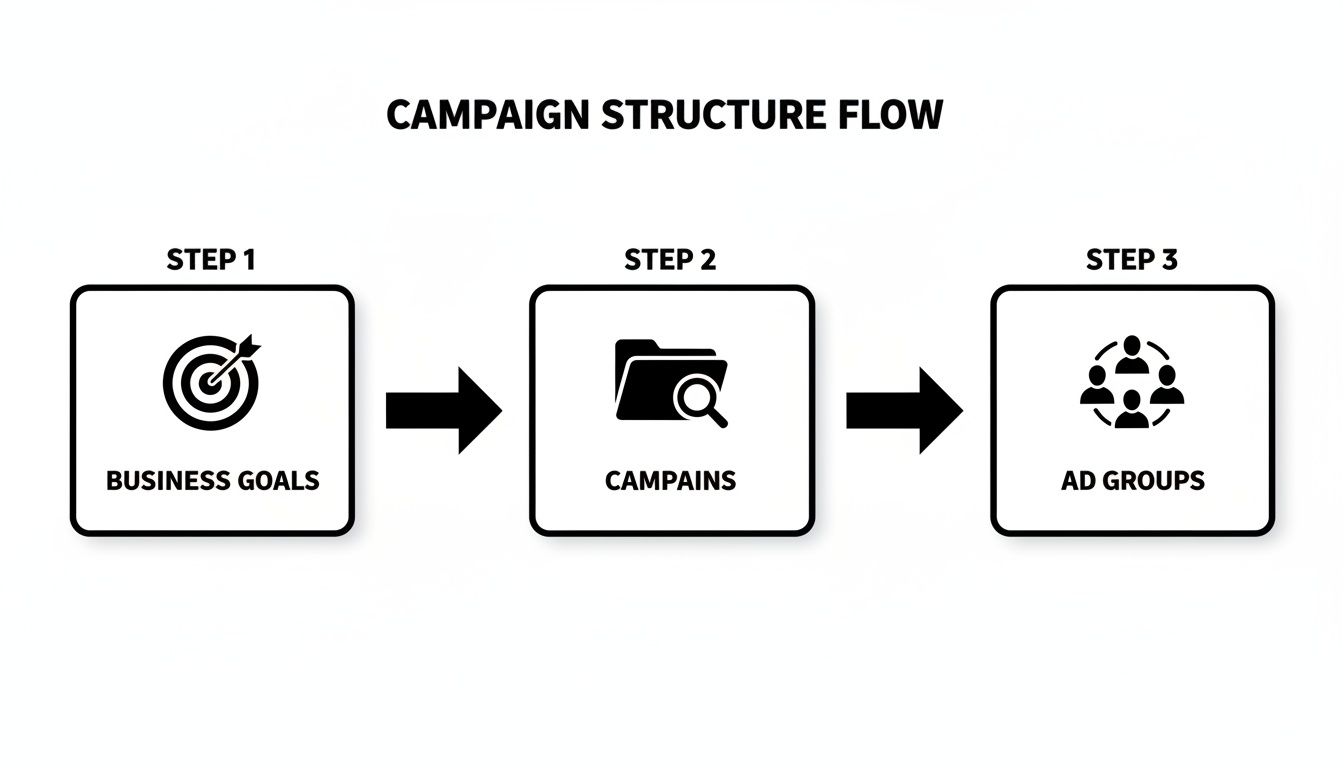
Following this top-down process ensures every ad you run is tied directly to a business objective. That’s how you maximize relevance and stop wasting your budget.
Picking the Right Keywords and Match Types
Alright, you've got your campaign structure dialed in. Now it's time for the fun part: picking the keywords that will actually make your campaigns run. But here's the thing—just grabbing a list of keywords isn't going to cut it. The real magic, and the real control, comes from mastering keyword match types.
Think of it like fishing. Your keyword is the bait, but the match type is the net you use. A broad match is a giant dragnet that catches everything, including a bunch of junk you don't want. An exact match is more like a spear, targeting only the specific fish you’re after.
Honestly, getting this part wrong is one of the fastest ways to burn through your budget on clicks from people who were never, ever going to buy from you. It's a foundational skill for managing a successful Google Ads account.

The Three Flavors of Match Types
Google Ads gives you three main levers to pull when it comes to controlling which searches trigger your ads. A healthy, well-managed account uses a strategic mix of all three.
- Broad Match: This is where you give Google the keys to the car. Your ad can show for searches that are related to your keyword, even if they don't contain your actual words. It's fantastic for discovery, but it can be a massive budget-waster if you're not keeping a close eye on it.
- Phrase Match: This is the sweet spot for most keywords, offering a great balance between reach and control. Your ad shows up for searches that include the meaning of your keyword, giving you some flexibility without going totally off the rails.
- Exact Match: This is your sniper rifle. It's the most restrictive and targeted option, showing your ad only for searches with the exact same meaning or intent as your keyword. This is where you'll usually see your highest conversion rates.
Let's say you sell "ergonomic office chairs." With broad match, you might pop up for "comfortable desk seating" or "best chairs for back pain." Using phrase match, you'd likely appear for searches like "buy ergonomic office chairs online." And with exact match, you’d pretty much only trigger for that specific search.
Your match type strategy is your way of putting guardrails on Google's AI. By using a mix of match types, you're telling the algorithm exactly how much freedom it has to explore, steering your budget toward the most qualified traffic.
How to Build Your Keyword Strategy
One of the biggest mistakes I see is people leaning too heavily on broad match, just hoping Google's algorithm will figure it all out. That’s like leaving the front door of your shop wide open and just hoping the right customers wander in. You need a plan.
I always recommend starting with phrase and exact match for your core, high-intent keywords—the ones that scream "I'm ready to buy!" These are your money-makers. As you start collecting data in your Search Terms Report, you'll uncover new, relevant queries. From there, you can promote the good ones to their own phrase or exact match keywords.
For a much deeper look into the nuances, check out this guide on how Google Ads keyword match types work. This layered approach lets you keep a tight grip on costs for your proven winners while still carefully exploring new opportunities.
A Practical Guide to Keyword Match Types
Choosing the right match type isn't just a technical step; it has a massive and immediate impact on your campaign's performance metrics. Here’s a quick breakdown to help you decide which tool to use for the job.
As you can see, each has its place. The real challenge is that applying these match types manually across hundreds or thousands of keywords is an absolute grind.
This is exactly where a tool like the keywordme Chrome plugin comes in. It lets you sift through your search term reports and, with a single click, either promote a term to the right match type or add it as a negative keyword. It turns a painfully slow task into a quick, decisive action.
Mastering Your Negative Keyword Strategy
If you're serious about getting results from Google Ads, you need to get obsessed with negative keywords. It sounds a little backward, I know. But what you don't show up for is often far more important than what you do.
A rock-solid negative keyword strategy is the single fastest way to stop hemorrhaging cash on clicks from people who were never going to buy from you anyway.
Think of it this way: your keywords are the invitation to your party. Your negative keywords are the bouncer at the door, turning away all the wrong people. Without a good bouncer, your party gets packed with folks who just want free drinks, draining your budget and messing up your data.
This isn't a "set it and forget it" task. It's an ongoing hunt. Your primary weapon here is the Search Terms Report—a goldmine showing you the exact, unfiltered queries people typed into Google right before clicking your ad. Your job is to roll up your sleeves, dive into this report regularly, and weed out all the junk.
Uncovering and Eliminating Wasted Spend
Every single click on an irrelevant search term is money straight down the drain. These clicks might seem small on their own, but trust me, they add up to thousands of dollars in wasted ad spend over a year. Your mission is to find these budget vampires and stop them dead in their tracks.
So, what are you actually looking for in that report?
- Wrong Intent: Someone searching for "free logo maker" is not your customer if you're a high-end design agency. Easy wins here are adding terms like "free," "DIY," and "templates" as negatives.
- Irrelevant Products: If you sell premium leather work boots, you definitely don't want to be paying for clicks from searches like "cheap rubber rain boots."
- Competitor Brands: Now, this can be a specific strategy, but unless you're intentionally targeting competitors, bidding on their brand names is usually an expensive way to get low-quality clicks.
- Informational Queries: People searching for "how to fix a leaky faucet" are in research mode, not "hire a plumber right now" mode. Look for terms like "how to," "what is," and "reviews."
A well-tended negative keyword list is like a shield for your budget. It ensures every dollar is spent on attracting people who actually want to buy what you're selling, which directly boosts your ROI.
Building these lists is a non-negotiable part of any good optimization routine. To get a head start on plugging those budget leaks, check out this ultimate negative keyword list for some great ideas you can implement right away.
Building Your Negative Keyword Lists
Don't just add negative keywords one by one. That's a recipe for chaos. The smart way to do it is by organizing them into lists you can apply across multiple campaigns.
For instance, almost every account can benefit from a "Universal Negatives" list. This is where you'll put terms that are almost always irrelevant, like "jobs," "hiring," "salary," and "example." Apply that list to every campaign you run.
From there, you can get more specific. A campaign for "CRM Software" might have a dedicated negative list full of competitor names. An e-commerce campaign for shoes might have one that blocks searches for Amazon and Walmart. This structured approach saves a ton of time and keeps things clean.
We actually put together a guide on this exact topic. You can check it out here to build your own general negative keyword list to use as a starting point.
Here's where a tool like keywordme can make a huge difference. The screenshot below shows how you can spot and add negatives right from the search terms report inside the platform.
Instead of the old-school, tedious process of copying terms from one screen and pasting them into the Google Ads interface, you just check the boxes next to the irrelevant queries and add them as negatives with a single click. This turns a task that used to take hours into a quick, five-minute cleanup job.
Let AI and Smart Bidding Do the Heavy Lifting
If you're still managing bids manually, you're playing on hard mode. The days of painstakingly adjusting bids keyword by keyword are pretty much over. To get ahead with Google Ads today, you have to let Google's machine learning and automated bidding strategies do the work for you. The trick is to give the AI the right instructions and clean, high-quality data to work with.
Think of it like this: manual bidding is like driving a stick shift in rush hour traffic. You have full control, sure, but it's exhausting and requires constant attention. Smart Bidding is like a modern automatic transmission. It analyzes everything in real-time—the road, your speed, how you drive—and shifts gears for you, giving you a much smoother and more efficient ride. Your job is just to point it in the right direction.

Breaking Down the Smart Bidding Strategies
Google has a whole menu of AI-powered bidding options, but you'll probably spend most of your time with just a few of them. The "right" one really just depends on what you're trying to accomplish.
Here are the big three:
Maximize Conversions: This one does exactly what it says on the tin. You tell Google to get you the most conversions it can for your budget. It's a great starting point if your main goal is cranking up the lead volume, and every lead is more or less worth the same to your business.
Target CPA (Cost Per Acquisition): This is my go-to for most lead gen campaigns. You tell Google exactly what you're willing to pay for a conversion, and its AI goes to work trying to hit that number. You need a solid understanding of what a lead is actually worth to you for this to be effective.
Target ROAS (Return On Ad Spend): If you're running an e-commerce store, this is your best friend. You set a target return for every dollar you spend—for example, a 500% ROAS means you want to make $5 in sales for every $1 in ad spend. The algorithm then hunts for clicks that are most likely to get you to that goal.
See the common thread? It's all about data. These strategies can't just pull success out of thin air. They need a consistent flow of conversion data to learn what works and what doesn't.
You Have to Feed the AI Good Data
One of the biggest mistakes I see people make is flipping the switch to Smart Bidding on a messy campaign and expecting magic. Google's AI is incredibly powerful, but it's not psychic. It needs clear signals to figure out who your ideal customer is.
This is where all that hard work you did on campaign structure and negative keywords really shines. A clean, tightly organized account with a rock-solid negative keyword strategy is like giving the AI a perfectly curated diet of high-quality data. It filters out all the junk searches, so when the AI sees a conversion, it knows it came from a super-relevant search. That's what allows it to quickly find more people just like that.
Expert Tip: Don't even think about switching to a conversion-focused bidding strategy until your campaign is getting at least 15-30 conversions per month. Any less than that, and the algorithm is just guessing, which usually leads to a wild and unpredictable ride.
Watch Out for These Common Stumbles
Moving from manual to automated bidding can be nerve-wracking. But if you sidestep a few common pitfalls, the transition will go a lot smoother.
- Setting Wildly Unrealistic Targets: If you've historically paid $50 for a conversion, setting a Target CPA of $15 right away is just going to choke your campaign. Start with a target that's grounded in reality, based on your past performance. You can always nudge it down later as the algorithm gets smarter.
- Constantly Fiddling with It: Once you turn on Smart Bidding, give it some breathing room! The system needs time to learn. If you're constantly changing budgets and targets, you keep resetting that learning phase, and it will never find a stable rhythm.
- Having Messy Conversion Tracking: Your bidding strategy is only as smart as the data you feed it. If your conversion tracking is broken, you're telling the AI to optimize for the wrong things. Double-check it, then triple-check it. It has to be perfect.
By 2025, AI will be central to how top advertisers run their Google Ads campaigns. The data already shows that businesses using AI-driven optimization see a 25% jump in conversions over those sticking to manual methods. This is especially true with smart bidding, which can slash your cost per acquisition (CPA) by up to 30%. You can read more about these Google Ads predictions and trends to see where things are headed. This is exactly why a tool like keywordme is so important for managing your negative keywords—it ensures the data you hand over to the AI is squeaky clean, helping it learn faster and deliver better results.
Measuring Performance and Optimizing for Growth
If you can't measure it, you can't improve it. It's a cliché for a reason. When you're in the weeds of a Google Ads campaign, it's dangerously easy to get distracted by flashy numbers like clicks and impressions. But real growth? That comes from obsessing over the metrics that actually pad your bottom line.
This all starts with having rock-solid conversion tracking. Seriously, before you touch anything else, make sure your account is accurately measuring what matters—be it a form fill, a phone call, or a sale. Without this, you’re just guessing, and even the most sophisticated bidding strategies are working with garbage data.
Key Metrics That Actually Matter
Once you know your tracking is solid, you can start focusing on the key performance indicators (KPIs) that tell you what’s really going on. Forget the vanity metrics. There are only a few numbers you need to live and breathe.
Here’s what I keep my eyes on:
- Conversion Rate: This is your truth-teller. What percentage of people who click your ad actually do the thing you want them to do? It’s a direct grade on how persuasive your ads and landing pages are.
- Cost Per Conversion (CPA): How much are you paying for each lead or sale? This is the number that keeps your budget in check and determines your actual profitability.
- Return On Ad Spend (ROAS): For any e-commerce business, this is the holy grail. It’s the simple measure of how much revenue you get back for every dollar you put in. A 400% ROAS means you’re making $4 for every $1 spent. That’s a good day.
These are the numbers that cut through the noise. A campaign with a million impressions but zero conversions is just an expensive hobby. On the flip side, a small campaign with only a few hundred clicks but a killer conversion rate and low CPA is a goldmine you need to pour money into, fast.
Your Weekly and Monthly Optimization Rhythm
Great campaign management isn't about making frantic changes every single day. It’s about building a consistent routine—a rhythm of analysis and optimization. I think of it as a weekly tactical check-up and a deeper monthly strategy session.
Each week, you should be in the trenches making small, smart adjustments. Dive into your Search Terms Report to find and block irrelevant queries. Pause keywords that are eating your budget without converting. This is where tools like keywordme are a lifesaver, turning a tedious, time-sucking task into a quick cleanup.
The monthly review is when you zoom out. Are your bidding strategies actually working? Does it make sense to move the budget from one campaign to another that's crushing it with a higher ROAS? This is where you look at the trends and make the big calls that guide your growth for the next 30 days.
The real goal here isn’t just fixing what’s broken. It's about finding what’s working and doubling down on it. The secret to scaling on Google Ads is simple: consistently shift your budget from the losers to the winners.
Setting Realistic Benchmarks for Success
It’s always helpful to know what "good" actually looks like. The median conversion rate across all Google Ads campaigns is around 4.61%, which is a solid benchmark to aim for. But context is everything. Conversion rates can swing wildly depending on your industry and ad type. For example, search ads average a respectable 3.17% conversion rate, while display ads often sit at a much lower 0.46% because the user's intent just isn't as strong.
At the end of the day, getting traffic to your site is only half the battle. To really squeeze every drop of value from your ad spend, you need a smart conversion rate optimization strategy for your landing pages. This is how you make sure the qualified traffic you’re paying for actually turns into customers once they arrive.
A Few Common Questions We Hear

Even with the best playbook, you're going to have questions pop up as you manage your Google Ads account. That's just part of the game. We've put together some of the most common questions we get asked, with straightforward answers to help you get unstuck and make better decisions.
How Often Should I Be Checking My Google Ads Campaigns?
When a campaign is brand new, you should be in there daily for the first week, maybe two. This is your chance to be aggressive with adding negative keywords and to spot any obvious budget leaks before they do real damage.
Once things settle down, a solid weekly check-in is the right rhythm for most accounts. This is when you'll live in the Search Terms Report, see how your keywords are doing, and make sure your budget is on track. Beyond that, a bigger-picture monthly review is perfect for analyzing trends and deciding if your overall bidding strategy still makes sense.
A tool like keywordme can seriously speed up that weekly search term cleanup. What used to be a tedious chore can become a quick five-minute job, giving you more time to think about strategy instead of getting lost in the weeds.
What's the Single Biggest Mistake People Make Managing Campaigns?
Hands down, it's the "set it and forget it" approach. It's shockingly common. Someone will do all the hard work to launch a campaign and then just let it run on autopilot, rarely, if ever, checking the Search Terms Report.
This is a recipe for disaster. It leads to a massive amount of wasted ad spend on clicks that have zero chance of converting. For example, a SaaS company selling "CRM software" might end up blowing their budget on searches for "free CRM templates" if they aren't proactively adding "free" and "templates" to their negative keyword list.
The secret to a profitable Google Ads account isn't in the initial setup; it's in the consistent, ongoing refinement. Small, regular tweaks are what separate the campaigns that print money from the ones that just burn it.
Should I Use Automated or Manual Bidding?
This is a great question, and the right answer really depends on where your campaign is at in its lifecycle. I almost always recommend starting a new campaign with Enhanced CPC. It gives you a good bit of control while letting the system learn and establish a performance baseline, which is critical when you have zero conversion data.
Once your campaign is humming along and consistently bringing in at least 15-30 conversions per month, you've probably earned the right to switch to an automated strategy like Target CPA or Maximize Conversions. Google's AI is smart, but it needs that historical data to make good decisions.
Flipping the switch to a conversion-focused bid strategy too early is a classic mistake that just leads to erratic performance. Before you do anything, make absolutely sure your conversion tracking is bulletproof.
How Do I Fix a Low Quality Score?
Think of a low Quality Score as Google's way of telling you there's a serious disconnect between your keyword, your ad, and your landing page. The fix is all about tightening up the alignment between those three pieces.
Here’s a quick mental checklist to run through:
- Ad Group Structure: Are your ad groups super specific? Each one should feel like a tight little theme of closely related keywords, not a big bucket of loosely related ideas.
- Ad Copy Relevance: Does your ad copy actually include the keyword? More importantly, does it speak directly to what the person was searching for? Your ad needs to feel like the perfect answer to their query.
- Landing Page Experience: Does the landing page deliver on the promise of the ad? If your ad screamed "50% Off Blue Widgets," that landing page better have a giant picture of blue widgets with a 50% off tag.
Improving that connection is the most reliable path to a better Quality Score, which ultimately means you pay less for your clicks.
Ready to stop wasting hours on manual keyword grunt work? keywordme turns the tedious parts of campaign management into a few quick clicks, helping you slash junk searches, find hidden gem keywords, and seriously boost your ROI.
.svg)