
Keywords for Advertising: A Practical 2026 Guide
Keywords for Advertising: A Practical 2026 Guide


You open a Google Ads account expecting a manageable search-terms report. Instead, you find thousands of queries, many unrelated to what you sell, and no obvious way to tell whether the problem is your keyword list, match types, negative keywords, or campaign structure.
That's the reality of keywords for advertising in modern PPC. They're no longer a static list you build before launch and forget. They're inputs to an ongoing audit loop that connects search intent, auction behavior, ad relevance, landing pages, and conversion data. The advertisers who protect budget best don't collect more keywords. They keep deciding which queries deserve access to the account.
What Keywords for Advertising Actually Mean Today
Keywords for advertising are the search terms advertisers use to enter auctions on platforms such as Google Ads and Microsoft Advertising. In a traditional Search campaign, you add a keyword, choose a match type, write an ad, and allow the platform to determine whether a user's query is close enough to trigger an auction. Google explains that match types control how closely a keyword must relate to a search before an ad can enter the auction, which makes them a control for reach, relevance, and exposure to waste (Google's explanation of keyword match types).
That definition is narrower than “any word people search.” Your SEO keyword may be a topic you want to rank for organically. An advertising keyword is a targeting input connected to a bid and an ad. An audience signal is different again. It describes the user or group you want to reach, rather than the query they typed.
The layers around a paid keyword
A keyword rarely works alone. Its behavior depends on several layers:
- Match type: Broad, phrase, or exact determines how much semantic distance Google can allow between your keyword and the user's query.
- Ad group theme: Closely related keywords should lead to ad copy written for the same intent.
- Landing page: The destination should answer the question or fulfill the offer implied by the query.
- Audience signals: Remarketing lists, customer data, and other audience inputs can provide context, especially in automated campaigns.
- Bidding and conversion signals: The platform uses auction-time information and recorded outcomes to decide how aggressively to participate.
The same phrase can therefore produce very different results in two campaigns. A tightly themed ad group with a relevant landing page may turn a high-intent query into a useful click. The same keyword inside a generic ad group may attract traffic that looks related but has little commercial value.
Practical rule: Treat every keyword as a hypothesis about intent, not as permanent permission to spend.
The Search terms report turns that hypothesis into evidence. It shows the query that triggered the ad, the keyword that matched, and the match-type classification. Review that relationship repeatedly. The goal isn't to build the largest possible list. It's to keep the account aligned with the searches your offer can genuinely satisfy.
How Paid Keyword Auctions Quietly Built Modern Search Ads
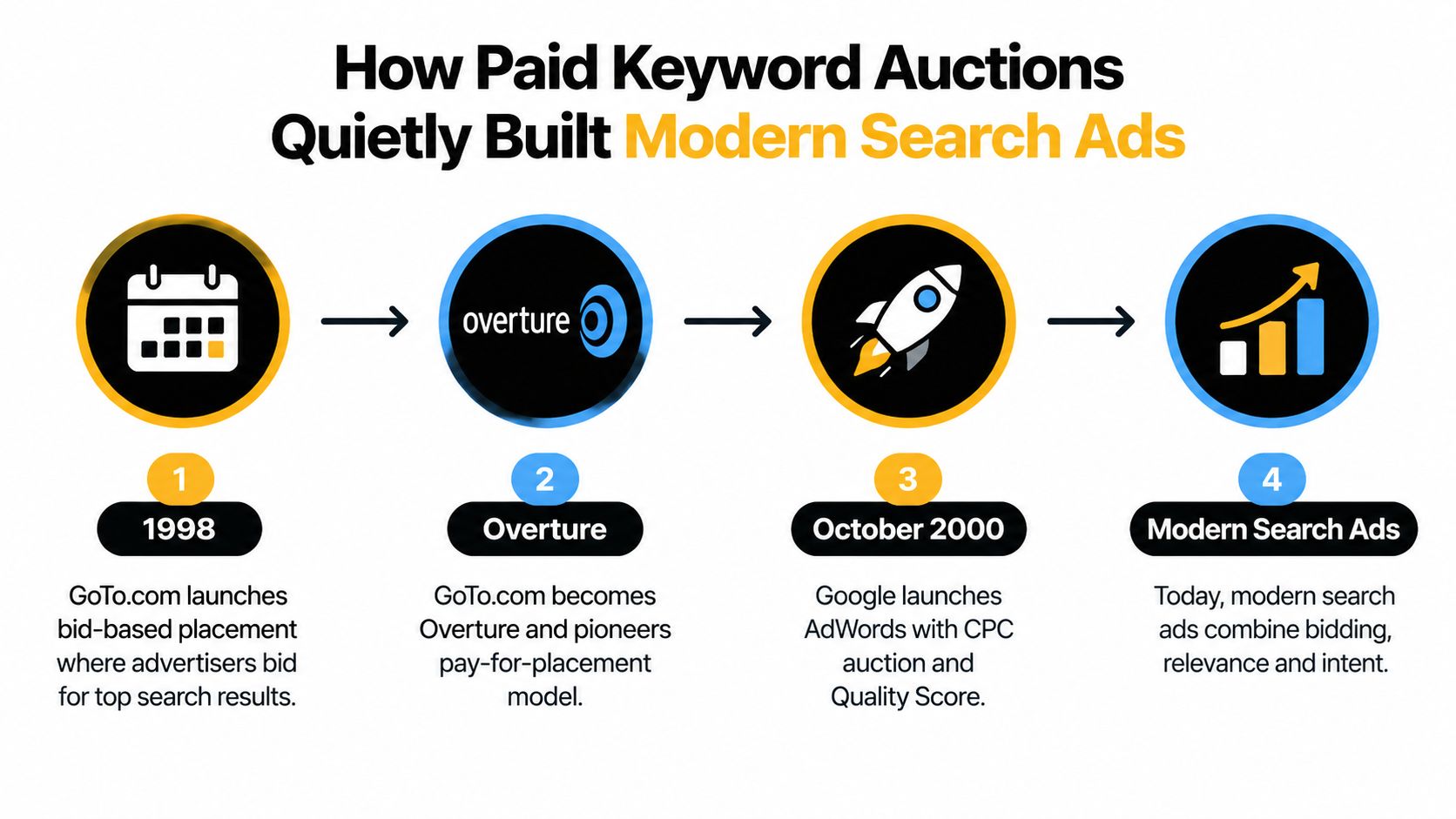
Paid search began with a simple commercial idea. In the late 1990s, GoTo.com, later known as Overture, launched a paid keyword auction model in which advertisers bid on specific search terms and paid when users clicked. A patent on the concept was issued in 1998, helping establish the economic foundation for keyword advertising (the history and economics of sponsored search auctions).
Google launched AdWords in October 2000, then changed the market in 2002 by introducing a generalized second-price auction. Under that model, an advertiser pays the minimum amount needed to maintain a position, rather than paying their own bid. Yahoo and Overture also moved to this mechanism, and the combination of bidding, relevance, and position became the basic grammar of paid search.
Why match types became economic tools
An auction needs a clear answer to a basic question: which advertiser should be eligible for this search? Keywords gave advertisers a way to express intent, while relevance systems helped platforms distinguish useful ads from poor ones. That relationship eventually developed into the quality and relevance signals advertisers now associate with Google Ads.
Google's match-type history shows a steady loosening of literal keyword control. Google Ads launched with exact and phrase match, added broad match in 2006, introduced modified broad match in 2010, and folded close variants into exact and phrase match between 2014 and 2017. In 2021, Google retired broad match modifier and left broad, phrase, and exact as the available match types, according to this documented history of Google Ads keyword changes (Google Ads keywords and match types).
The commercial lesson is easy to miss. Match types aren't merely interface toggles. They define how much interpretation you're allowing the auction system to apply to your targeting. A tighter match can protect intent. A wider match can discover demand. Neither choice is automatically correct without search-term review.
The video below provides additional context on how paid search developed:
Match Types Explained Without the Jargon
Take one keyword, women's running shoes, and use it to compare the available controls. Broad match gives Google the most room to find related searches. Phrase match keeps the central wording more constrained but still allows additional language. Exact match is the tightest option, although modern exact match also includes qualifying close variants rather than requiring a character-for-character copy.
| Match Type | Syntax | Reach | Typical Use Case |
|---|---|---|---|
| Broad | women's running shoes | Widest, including related searches | Discovery when conversion signals are reliable |
| Phrase | “women's running shoes” | Moderate, with the phrase concept retained | Controlled expansion around a proven theme |
| Exact | [women's running shoes] | Tightest, including relevant close variants | High-intent traffic and efficiency-focused campaigns |
Broad match can reach a search such as “best shoes for jogging women” or “pink sneakers sale.” Those queries may be useful in some businesses, but they can also pull an account away from its actual offer. Broad match is not automatically bad. It transfers more interpretation to Google, so the advertiser must inspect the resulting queries.
Phrase match for “women's running shoes” can reach a query such as “cheap women's running shoes for marathon.” The added words change the commercial context, but the core concept remains recognizable. That makes phrase match useful for discovery when you want more reach without opening the door as widely as broad.
Exact match, written as [women's running shoes], can include close variants such as plurals, misspellings, and reordered words. It offers stronger intent control than the other options, but it isn't a promise that only the exact typed phrase will trigger an ad.
A practical starting structure
For a new search campaign, a useful editorial starting point is 70% exact, 20% phrase, and 10% broad. That isn't a universal law, and Google's softened match behavior means the search terms report matters more than the setting displayed beside a keyword.
If broad match generates a valuable query, promote that query into the appropriate exact or phrase structure when it deserves dedicated messaging. If phrase match repeatedly produces irrelevant language, tighten the campaign or add a carefully scoped negative. The mistake is letting one match type carry discovery, efficiency, and organization at the same time.
For a deeper explanation of how these controls work together, see this guide to keyword match types.
Building a Keyword List That Maps to Real Intent
The weakest keyword lists usually start with a huge export from a research tool. They contain synonyms, loosely related topics, competitor names, questions, and product terms, but no clear decision about which searches deserve budget. A progressive build produces a smaller list with a stronger connection to the business.
Start with language customers already use
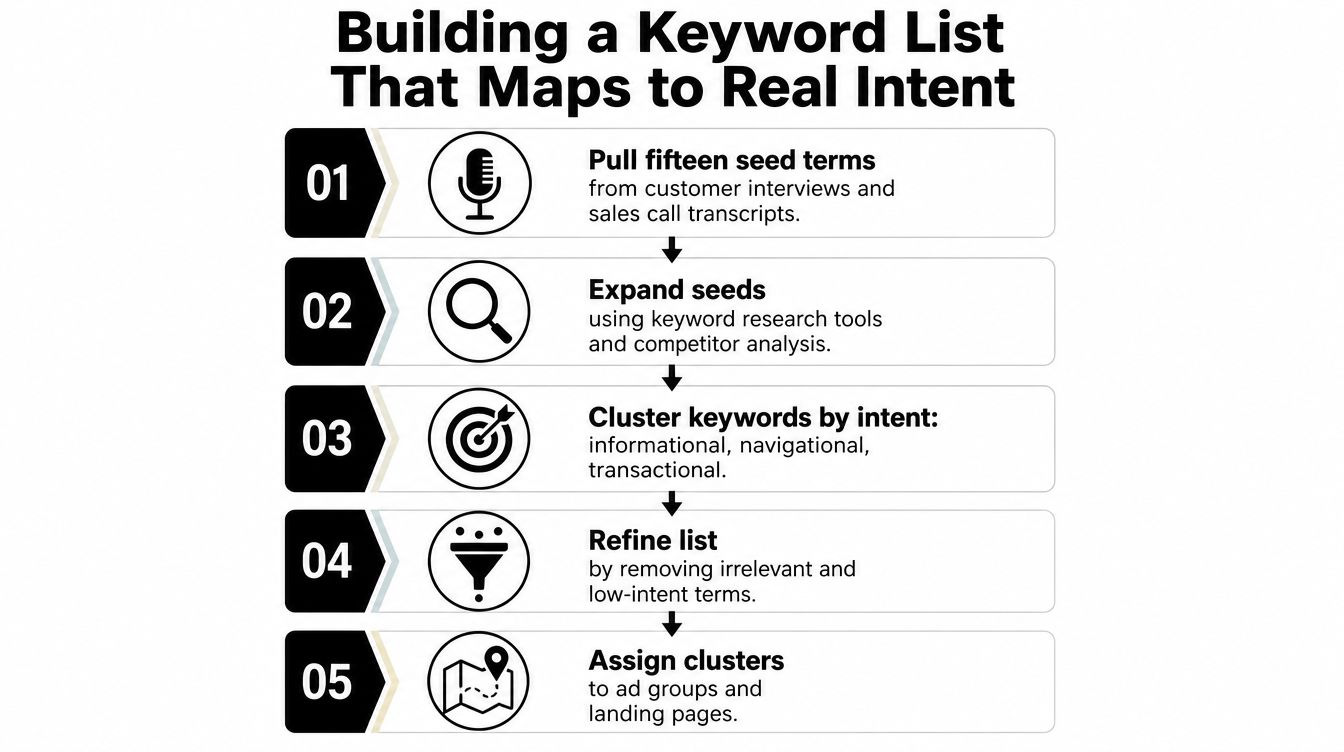
Pull fifteen seed terms from customer interviews, sales-call transcripts, support conversations, and top organic landing pages. These sources reveal the language people use when describing a problem, comparing options, or asking for a solution. A keyword tool can expand that language, but it shouldn't replace it.
Use Google Ads Keyword Planner for expansion, then compare its suggestions with first-party data. Tool estimates help you discover possibilities. Your own conversion records, CRM notes, search-term history, and sales feedback help you decide whether those possibilities matter.
Tag the intent before you group the terms
Assign each candidate to an intent bucket:
- Informational: The user wants an explanation, definition, or tutorial.
- Commercial: The user is comparing providers, features, or prices.
- Transactional: The user is ready to buy, book, request, or subscribe.
- Branded: The user is looking for your company, product, or a known destination.
Then sort each bucket by business value. An informational query may belong in SEO content rather than a direct-response campaign. A transactional phrase may deserve a dedicated ad group and landing page even if it has less apparent volume.
For readers who want a broader research process, this practical resource on how to build a keyword list offers useful planning context.
Give each theme one clear destination
Assign each intent cluster to a single-themed ad group and one landing page. An ad group for women's running shoes shouldn't also contain trail running shoes or running shoe reviews. Those searches may relate to the same category, but they express different needs and should receive different copy or destinations.
This structure gives responsive search ads a cleaner message to work with. It also makes performance easier to diagnose. When an ad group contains one recognizable intent, a weak result points more clearly to the bid, query quality, ad message, landing page, or offer.
Negative Keywords and the Hidden Cost of Over-Blocking
Google's guidance is straightforward: add irrelevant search terms as negative keywords so your ads stop appearing for searches that don't fit your products or services (Google's search terms report guidance). That advice is sound, but the popular interpretation, “keep adding negatives until the list is enormous,” can damage an account.
An exclusion prevents traffic before you can evaluate its full value. It can remove an obvious waste query, but it can also block a comparison shopper, a valuable long-tail phrase, or a search that supports a later conversion. This risk grows as matching becomes more semantic and less dependent on literal word order.
Use scope deliberately
Google Ads supports broad, phrase, and exact negative match types for Search campaigns. Negative broad blocks a search when it contains all the negative terms in any order. Negative phrase requires the terms in the same order, while negative exact requires the same terms in the same order with no additional words (Google's negative keyword match type definitions).
| Tier | Scope | Example Terms | When to Apply |
|---|---|---|---|
| Universal | Account-level | free, tutorial | Only when the term can never fit any relevant offer |
| Campaign | Campaign-level | used, wholesale | When one campaign has a specific commercial boundary |
| Ad group | Narrow ad-group scope | trail, marathon | When nearby themes must remain separated |
| Query-specific | Exact negative | [specific irrelevant query] | When one known search needs blocking without wider effects |
Account-level negative lists apply automatically across relevant Search and Shopping inventory, so an old list can create exclusions far beyond the campaign where it was originally built (Google's account-level negative keyword list guidance). Treat those lists like shared infrastructure, not a convenient dumping ground.
Audit the exclusions, not just the queries
Start with a lean universal list containing terms such as free, jobs, or tutorial only when those searches cannot plausibly lead to the advertised offer. Don't block competitor terms automatically if comparison shoppers are commercially valuable. Don't block job-related searches if recruiting is part of the funnel.
A quarterly audit should flag any negative that has matched more than fifty times in twelve months and force a fresh review. The number is a review trigger, not proof that the negative is wrong. Check whether the term blocked converting queries, supports a meaningful audience, or belongs at a narrower scope.
The Search terms report also matters because negatives added from that report default to negative exact match in Search campaigns unless you change the syntax (Google's Search terms report documentation). That default can be useful for precision, but it won't solve an account-wide problem by itself.
For a more focused exclusion workflow, see this guide to building a negative keyword list.
What the Performance Data Actually Says About Match Types
Match-type performance depends on account maturity, conversion quality, budget distribution, audience signals, and campaign structure. Still, independent analysis provides a useful directional pattern: exact match delivered the highest ROAS and CTR in one 2026 analysis, with lower CPA than broad match in roughly 70% of accounts (the cited match-type performance analysis).
That finding doesn't mean exact match should receive every impression. It means advertisers should separate efficiency-focused intent from discovery traffic instead of judging all match types inside one blended campaign. Broad and phrase may produce useful searches, but their job is different from exact.
| Match Type | Avg. CPA vs. Exact | Best Use Case | Required Conditions |
|---|---|---|---|
| Exact | Baseline | Proven, high-intent queries | Clear conversion tracking and tight themes |
| Phrase | Often higher than exact, with broader discovery | Expansion around known intent | Regular search-term review |
| Broad | Often less efficient than exact | Automated discovery with strong signals | Reliable Smart Bidding and meaningful audience context |
Phrase match often makes more sense when an account needs discovery and has limited historical conversion data. Newer campaigns can need that additional reach to uncover the language customers use. Broad match can work when Smart Bidding has strong conversion signals and audience layers help the system distinguish valuable users from casual researchers.
The structure follows from the evidence. Build default campaigns around exact match grouped by tight intent. Put phrase expansion in dedicated campaigns with separate budgets so discovery doesn't consume the budget intended for proven demand. Reserve broad for situations where the account has enough signal density to support automation, such as branded defense or remarketing audiences.
Clicks alone won't settle the question. Compare conversions, conversion value, CPA, and ROAS, while accounting for budget and attribution differences. A broader keyword that creates useful assisted demand may deserve a role, but it shouldn't hide behind a blended average.
A Weekly Workflow for Search Terms and Match-Type Tuning
Keyword management works best as a recurring loop. Launch-day research gives you a starting hypothesis. Weekly search-term analysis tells you whether the platform is finding the intent you intended to buy.
Monday starts with the report
Export the Search terms report and segment queries by spend, conversions, conversion value, and intent. Begin with expensive queries that have no conversions, but don't treat that filter as an automatic blocking queue. A query can look wasteful in isolation and still fit the offer, the audience, or the customer journey.
Google identifies the Search terms report as the place to find the searches that triggered ads. Use it to compare the query with the matched keyword, the ad group theme, and the landing page rather than reviewing the query column alone.

Make decisions in sequence
- Remove clear mismatches: Add irrelevant terms as negatives, but review automated and bulk suggestions against recent conversion data first.
- Promote useful queries: Move consistently converting searches from broad or phrase into exact or phrase keywords when their language fits the existing theme.
- Create cleaner homes: If a valuable query needs different ad copy or a different landing page, give it a new ad group instead of forcing it into the old one.
- Review negative syntax: Check broad, phrase, and exact negatives so a broad exclusion doesn't unintentionally remove a valuable specific opportunity.
- Record the change: Log the query, evidence, action, owner, and expected outcome.
Optimization principle: Don't ask only whether a query is irrelevant. Ask whether it belongs somewhere else in the account.
Check search-term relevance, match type, Quality Score, landing-page alignment, and auction-time signals together. Automation can flag anomalies and format bulk changes, but a strategist still has to decide whether unusual traffic is wasteful or routed to the wrong ad group.
For a repeatable reporting process, use this Google Ads Search terms report workflow. End the week by comparing results with the previous period, documenting what changed, and scheduling the next review.
Your Keyword Optimization Checklist
Run this audit directly in Google Ads or your preferred PPC platform:
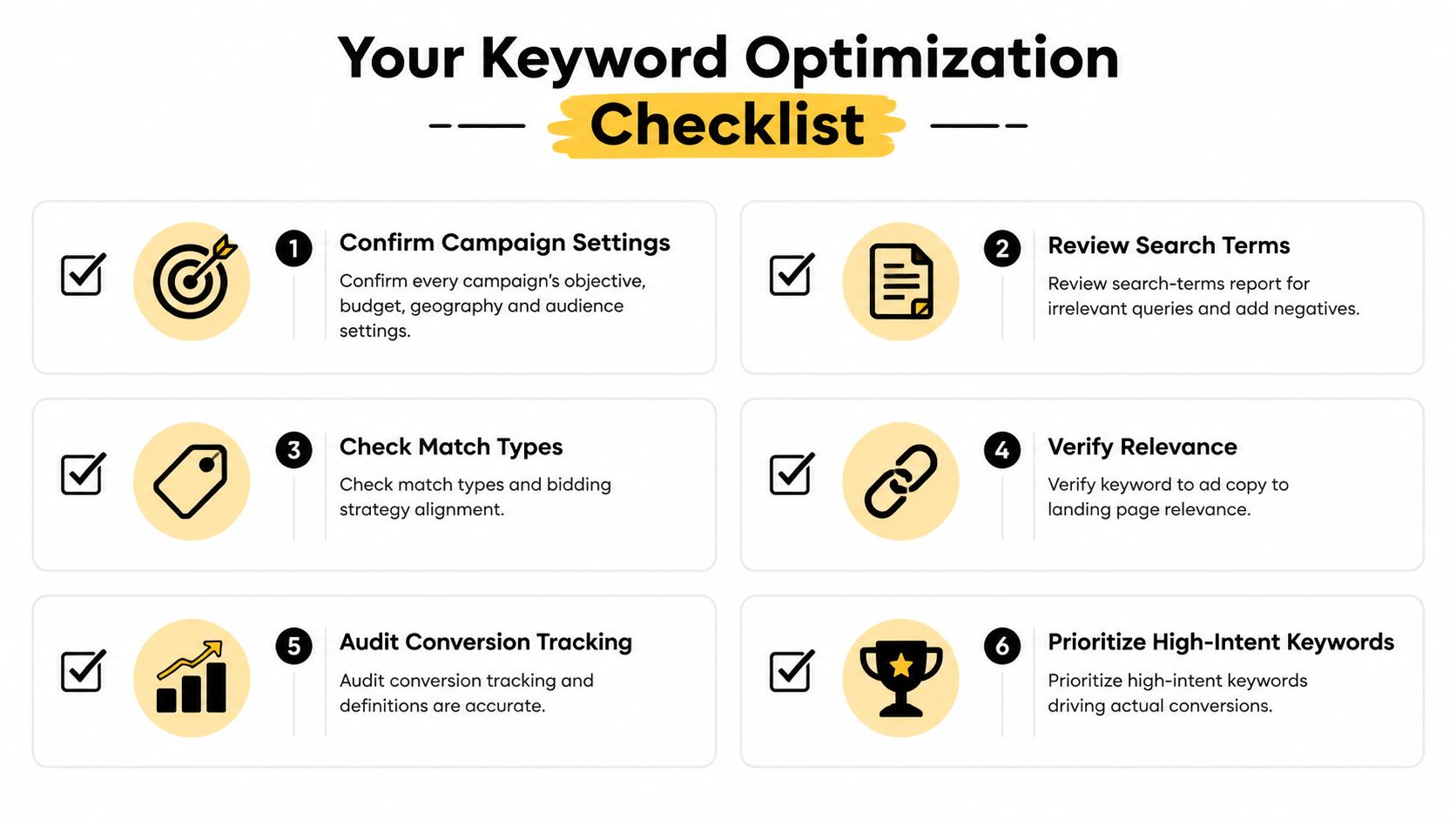
- Confirm campaign boundaries: Check the objective, budget, geography, audience settings, and conversion definitions.
- Review actual queries: Look for irrelevant searches, expensive non-converting terms, close variants, and valuable long-tail language.
- Add negatives carefully: Exclude only terms that can't plausibly lead to the offer, using the narrowest practical negative match type.
- Map intent: Label remaining terms as research, comparison, purchase, support, or brand, then place each cluster in a tightly themed ad group.
- Align the experience: Make sure the keyword, ad, landing page, offer, and call to action express the same intent.
- Compare outcomes: Judge broad, phrase, and exact using conversions and conversion value, not clicks alone.
- Check conflicts: Review Quality Score, search-term overlap, wasted spend, and negative keyword conflicts.
- Document ownership: Record the change, owner, evidence, and expected outcome before repeating the process.
Automation has a useful role. It can suggest keywords, surface anomalies, format match types, and speed up bulk handling. It shouldn't replace query-level judgment, conversion validation, or campaign accountability.
Teams evaluating broader search visibility may also find it useful to compare PPC work with a best AI visibility agency for SaaS, particularly when paid and organic discovery need to support the same commercial themes. The operational principle remains the same: connect targeting decisions to real user intent and measurable business outcomes.
Keywordme provides one way to manage this workflow inside Google Ads. Its Chrome plugin can work from the Search Terms Report to extract negative keywords, build high-intent keyword lists, organize terms by performance, and apply exact, phrase, or broad match types without repeated manual formatting.
Keywordme helps PPC teams turn messy search-term data into organized keyword decisions, from negative keyword handling to match-type assignment and campaign expansion. Visit Keywordme to review the workflow and start a seven-day free trial for your next advertising keyword audit.
.svg)