
Optimize Your Google Ads Search Terms Report Workflow
Optimize Your Google Ads Search Terms Report Workflow


You open the Search Terms report because performance feels off. CPCs look fine, clicks are coming in, but something's leaking. Then you scroll through the query list and see the usual mess. Research terms, job seekers, DIY searches, oddball matches, and a few gems buried in the middle.
That's where most accounts get stuck. Teams treat the report like a cleanup chore instead of what it really is, a repeatable optimization engine. The best google ads search terms report workflow doesn't start when a campaign goes sideways. It runs on schedule, pushes structural changes back into the account, and turns raw query data into negatives, new keywords, tighter ad groups, and better budget control.
Google's own documentation makes the practical value pretty clear. The report shows the actual searches that triggered ads, and Google also notes you can use what you learn there to change keyword match types and add negatives through the same broader optimization process in the Search Terms report help documentation. In other words, this is not just a reporting tab. It's an action layer.
The Foundation Setting Up Your Report for Analysis
A bad review usually starts before the first decision. The report is technically open, but the view is wrong, branded queries are mixed with acquisition traffic, low-signal rows fill the screen, and someone starts adding negatives anyway. That is how good queries get blocked and waste slips through for another week.
The fix is simple. Treat report setup like the first layer of your optimization engine.
Build a clean working view
The Search Terms report sits under Campaigns, then Insights & reports, then Search terms. Opening it takes seconds. Building a view that supports accurate decisions takes a little more discipline.
You are not looking at full query visibility, so the visible portion has to be handled carefully. In practice, Google withholds a meaningful share of low-volume search term data, which makes filters, segmentation, and consistent review rules more important than a quick scan.

My default setup checklist
Before I review anything, I set the report up in this order:
Choose a date range with enough signal. New campaigns need tighter windows because volume is thin and changes are happening fast. Mature campaigns need enough data to show patterns, not one odd day with inflated spend or a single conversion spike.
Add decision-making columns. I want cost, clicks, conversions, conversion value if available, and the matched keyword. Query text without performance context leads to gut calls. Gut calls create bad negatives.
Filter out rows that cannot change an outcome. Zero-click rows and terms with trivial spend can wait. Start where action will affect budget, lead quality, or volume.
Separate brand from non-brand. I often see accounts get stuck here. Branded searches can make almost any query set look healthier than it is, so I isolate them before I judge expansion or waste.
Keep match type visible. Broad match can surface useful growth terms, but it also creates more review work. If you cannot see where a query came from, you cannot decide whether the issue is the query, the keyword, or the campaign structure.
Practical rule: Review branded and non-branded search terms separately if the goal is acquisition insight.
Segment before you judge
A useful report view should map back to the actions you take in the account.
Campaign-level analysis helps with budget direction and theme drift. Ad group-level analysis helps spot misrouted queries and structural gaps. A match type lens shows where control is loose and where new exact or phrase keywords should be promoted. That is the shift from reactive cleanup to a repeatable engine. Each review should produce one of four outputs: a negative, a new keyword, a routing change, or a note that the term stays where it is.
| View | Best use |
|---|---|
| Campaign level | Spot budget leaks and intent drift |
| Ad group level | Find routing problems and restructuring opportunities |
| Match type lens | Identify weak control and keyword promotion candidates |
This part is not glamorous, but it saves money and protects growth. Teams that skip setup usually spend more time debating single queries than improving account structure. If you need a stronger baseline for how to read Google Ads reports properly, start there, then bring that discipline into your weekly search term process.
For teams trying to get better at understanding your Google Ads spend, this is usually the first place I tighten up. And if the weekly review is eating too much time, tools like Keywordme can speed up the sorting and clustering work so you can spend more of the hour on decisions that move ROI.
Systematically Eliminating Wasted Ad Spend
Monday morning, the search terms report is full of clicks that never had a chance to convert. That is not a cleanup task. It is a signal that your optimization engine needs better filters.

I treat wasted spend review as a weekly control system. The goal is not to delete a few bad searches and feel productive. The goal is to reduce how often bad intent enters the account in the first place, while keeping enough reach to find profitable query patterns.
Bad spend usually shows up in recognizable intent buckets.
- DIY intent. Searches like how to, tutorial, template, or homemade often burn money if the offer is a service or paid software.
- Job-seeker intent. Careers, salary, jobs, interview, and resume terms can slip into commercial campaigns and produce low-value clicks.
- Research-only intent. Informational queries can help upper-funnel programs, but they often drag down bottom-funnel Search campaigns.
- Wrong audience modifiers. Free, cheap, used, student, or local can be good or bad depending on the offer. Context decides.
The useful habit is to label the pattern, not just the query. One bad search matters. A repeatable waste theme matters more, because that is what lets you prevent the next 20 clicks instead of reacting one row at a time.
Choose the right negative type
Negative match choice is where a lot of accounts get sloppy. A rushed review can block good traffic along with bad traffic, which turns a cost-control task into a volume problem.
Use exact match negatives when one specific query is wrong but the wording could still be valuable in another search.
Use phrase match negatives when the intent pattern is consistently bad and you want to close that lane across close variants.
A simple rule keeps this clean: block the smallest thing that solves the problem. If exact negatives keep piling up around the same theme, promote that theme to a phrase negative. If phrase negatives start cutting off useful volume, pull them back and get more precise.
Make the review operational, not emotional
Teams waste time when every bad query becomes a debate. A better system uses clear actions. Keep it to three.
- Add a negative.
- Flag a routing or structure issue.
- Leave it alone because the query is acceptable, even if it did not convert yet.
That discipline is what turns search term analysis into an engine instead of a chore. Over time, the account gets cleaner, query routing improves, and the review gets faster because the same junk stops reappearing.
I also watch waste as a trend, not a one-week panic metric. If irrelevant spend stays stubbornly high after several review cycles, the problem usually sits upstream in campaign structure, match type usage, audience exclusions, or weak ad group themes. Reviewing harder will not fix loose architecture.
If you need a broader financial lens while cleaning this up, Bruce and Eddy has a practical piece on understanding your Google Ads spend that pairs well with search term review.
For execution, speed matters. Manual exports and negative uploads add friction to a workflow that should be routine. A system for how to automatically add negative keywords cuts admin time, and tools like Keywordme help cluster waste patterns fast so the weekly hour goes into decisions, not spreadsheet cleanup.
Discovering and Expanding High-Intent Keywords
A strong search terms workflow should produce more than negatives. It should surface the next keywords, ad groups, and messaging angles worth building on purpose.
That shift matters in mature accounts. Once the obvious waste is under control, the report becomes a weekly source of demand signals. Real users show you how they describe the problem, what level of specificity they want, and which queries deserve tighter control instead of loose matching.
The promotion test I use
When a search term shows purchase intent and keeps appearing, I do not ask only whether it converted. I ask whether promoting it will improve account control or create clutter.
I use three checks.
First, does this query deserve its own bid and ad coverage? If the term is commercially clean and specific, exact match usually makes sense.
Second, does it fit the current structure? A term can perform well and still belong somewhere else. If the intent, offer, or use case is different from the ad group it matched into, that is a routing problem. Build around the query instead of forcing it to live in the wrong place.
Third, is there a repeatable theme behind it? One strong query often points to a broader cluster you can test in phrase match, new ad copy, or a dedicated landing page section.
That is how the report turns into an optimization engine. You are not just reacting to what happened last week. You are building the next version of the account from observed demand.
What gets promoted and what stays in observation
Promoting every converting query is how accounts get bloated fast. You end up with overlapping keywords, muddy ad groups, and no real gain in control.
Use a tighter filter:
| Search term pattern | Likely action |
|---|---|
| Specific, high-intent query | Add as exact match |
| Repeated commercial variation | Add as phrase match |
| Different use case than current ad group | Build a new ad group or segment |
| Relevant but unstable wording | Watch it longer before promoting |
The trade-off is simple. Waiting too long can slow growth. Promoting too quickly creates duplication and weakens structure. In practice, I would rather add fewer keywords with clear intent and clear ownership than fill the account with one-off variants that do nothing except complicate reporting.
Good search terms should improve more than targeting
At this point, experienced PPC teams get more value from the same review time.
A useful query can become a keyword, but it can also improve headlines, descriptions, landing page copy, and segmentation. If searchers consistently use a modifier your ads never mention, fix the message. If they describe the problem in sharper language than your brand does, use their wording. Search term analysis is not just query management. It is message research with commercial intent attached.
Good search terms should shape keywords, ad copy, landing pages, and account structure.
I also sense-check discovered terms before I scale them. Search volume patterns, competitiveness, and likely bid pressure all matter. A term can be relevant and still not deserve its own build if volume is thin or CPCs are likely to get expensive without enough upside. That is one reason a repeatable system beats one-off keyword mining. The decision is not "did this query work once?" The decision is "does this deserve a permanent place in the account?"
If you want a faster version of that process, this guide to automated search term analysis workflows shows how to sort expansion candidates without spending half the week in spreadsheets. Tools like Keywordme help cut the mechanical work so the review stays focused on judgment, structure, and ROI.
Automating Your Workflow to Optimize Faster
Manual search term analysis is a rite of passage. It's also a bottleneck.
You export the report. Clean the file. Sort it. Label junk. Separate expansion ideas. Format negatives. Build upload sheets. Double-check match types. Then upload everything and hope nothing got mangled between tabs. It works, but it doesn't scale, and it definitely doesn't help teams move quickly across multiple accounts.

Where the manual workflow breaks
The spreadsheet itself isn't the actual problem. The actual problem is the number of low-value actions wrapped around it.
- Export friction. Someone has to pull the right view, with the right columns, on the right date range.
- Formatting drag. Raw data almost always needs cleanup before anyone can act on it.
- Decision lag. By the time the file is organized, the person making the calls has already lost momentum.
- Implementation risk. Every copy-paste step creates another chance to push the wrong negative, the wrong match type, or the wrong campaign assignment.
That's why a modern google ads search terms report workflow needs more than discipline. It needs tooling that collapses mechanical work.
Why automation matters more with Performance Max
This gets even more obvious in Performance Max. Search terms aren't available in the regular search_term_view. Practitioners have to work through campaign_search_term_insight, pull insight categories, then iterate by campaign insight ID to retrieve individual terms. One cited implementation notes that a campaign with 10,000 insights may require 10,000 separate requests in the Google Ads API forum discussion on PMax search term retrieval.
That's not a “be more organized” problem. That's a workflow design problem.
Manual analysis in that setup becomes impractical fast. The only sane path is batch processing, theme detection, and direct action from structured outputs.
Better systems remove the boring work
Purpose-built tooling changes the game. You don't need a prettier dashboard. You need a faster path from query insight to account action.
A good workflow system should help you:
- Group repeated irrelevant themes so negatives are applied with intent, not row by row
- Promote promising terms quickly with the right match type
- Map actions to the right campaign or ad group without tab overload
- Reduce formatting work so more time goes to judgment instead of cleanup
If you're comparing manual review against a more efficient setup, the gap gets obvious once accounts get larger or match types get looser. For a deeper look at that shift, this piece on automated search term analysis is worth a read.
For a visual walkthrough of what a smoother process looks like, this video is useful:
Measuring the Impact of Your Optimization Efforts
Monday's search term review looks great on paper. Negatives were added, a few winners were promoted, and the sheet is clean. Two weeks later, CPA is flat and spend drift is back. That usually means the process created activity, not control.
A good search terms workflow should behave like an optimization engine. Each review cycle should make the next one faster, cleaner, and more profitable. If that compounding effect is missing, the account is still running on manual cleanup.
Measure change, not effort
Track impact in two lanes.
The first lane is protection. Measure whether the query themes you blocked stopped spending money. The second lane is growth. Measure whether the terms you promoted into keywords, ad groups, or new campaigns produced efficient conversions after the change.
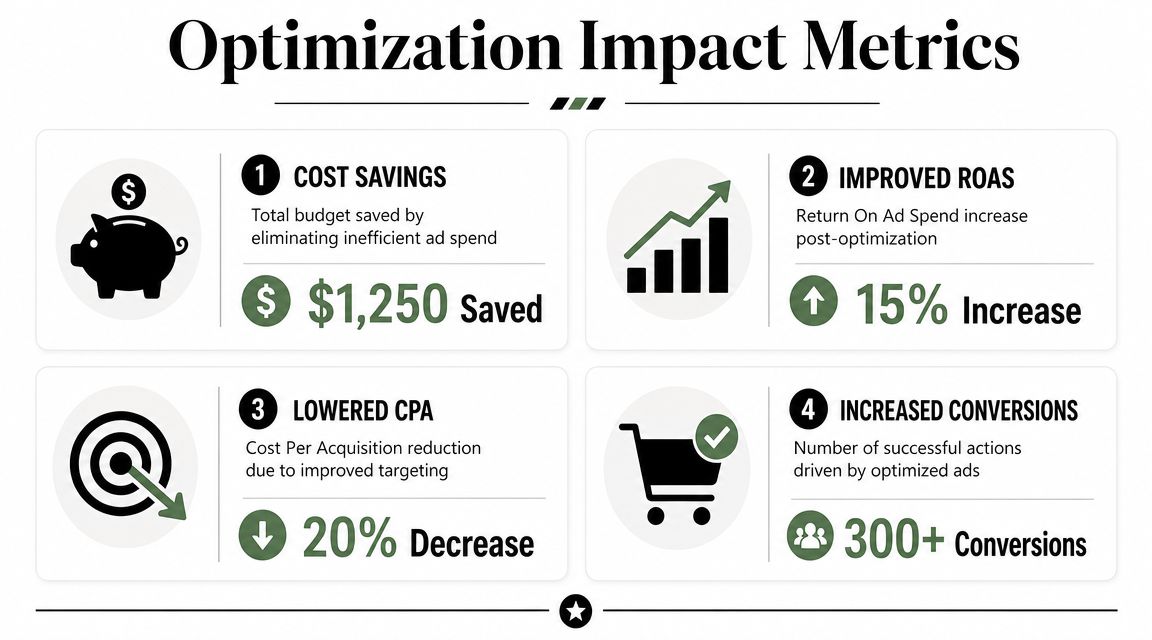
That sounds simple, but plenty of teams miss one part of it. They count negatives added and keywords promoted, then stop there. I care more about what happened after the action. Did blocked themes stay blocked? Did promoted terms hold conversion rate once they had their own bids, ads, and landing page path? That is the true scorecard.
Use a compact weekly scorecard
You do not need a big reporting build to manage this well. A short operating view is enough if it stays consistent week to week.
| KPI | What to watch |
|---|---|
| Irrelevant query cost trend | Is spend on excluded or low-fit themes declining after each review cycle? |
| Negative keyword containment | Are the same bad themes staying out, or returning through close variants and match expansion? |
| Promoted keyword efficiency | Do added exact or phrase terms convert at acceptable CPA or ROAS after launch? |
| Search-to-keyword adoption rate | Are strong query themes getting promoted quickly, or sitting in the report for weeks? |
| Top-line business metrics | Are CPA, ROAS, lead quality, or revenue per conversion improving over time? |
The fourth line matters more than it gets credit for. If strong search terms keep appearing but sit unpromoted for weeks, the workflow is too slow. That lag costs volume and often leaves high-intent traffic trapped inside broad matching where control is weaker.
Tie every query decision to business results
Search term analysis is useful because it changes traffic quality. Better traffic quality should show up somewhere that finance, sales, or the client values. Lower CPA. Better ROAS. Higher lead quality. More budget shifting toward queries with commercial intent.
Some weeks will be quiet. That is normal. A mature account often has review cycles where the job is keeping drift under control.
What matters is the trend across a month or quarter. Wasteful themes should fade faster. Good themes should move into structure faster. Campaigns should rely less on reactive cleanup and more on planned expansion. That is the shift from maintenance to an optimization engine.
Tools help here because measurement gets messy fast once changes pile up across campaigns. If the team is still comparing exports by hand, tracking cause and effect gets slow. Systems like Keywordme cut that admin work down so you can spend more time judging what changed and whether it improved ROI.
Frequently Asked Questions About Search Term Analysis
How often should I review the Search Terms report
My rule of thumb is simple. Review new campaigns weekly until query patterns settle down. Mature campaigns can usually move to every other week, unless spend jumps, match types change, or lead quality starts slipping.
The point is not sticking to a calendar for its own sake. The point is catching waste early and promoting good terms before they sit buried in the report for too long.
Should I sort by impressions, clicks, cost, or conversions first
Start with cost if the account is bleeding money on weak traffic. Start with conversions if the goal is expansion.
Then check matched keyword and campaign context. That is usually enough to decide whether a term needs a negative, a new keyword, or its own structure.
What should I do with a search term that converts but doesn't quite fit the current ad group
Treat that as a routing decision, not just a keyword decision. If the query points to a different use case, offer, or audience, give it its own ad group or campaign so ads and landing pages can match it properly.
If it is just a tighter version of the current theme, add it to the existing structure and move on. Good account structure comes from repeated clean decisions like this.
How do I avoid over-blocking with negative keywords
Use exact negatives first when the problem is one clear bad query. Use phrase negatives only after you have seen the same weak intent pattern enough times to trust the pattern.
I always ask one question before adding a broader negative. What valuable traffic could I block by accident? If the answer is unclear, wait for another review cycle.
Is the Search Terms report still worth using if Google hides some data
Yes. It is incomplete, but still useful.
The mistake is treating missing visibility as a reason to stop reviewing queries. The visible terms still show where money is being spent and where strong intent is breaking through. That is enough to improve structure, cut waste, and feed the next round of keyword expansion.
Can I use the report to change match types directly
Yes. Search term analysis should lead to structural changes. That includes adding exact match for proven queries, loosening match type where volume is too constrained, or adding negatives where broad matching keeps drifting into weak intent.
If the workflow ends in a spreadsheet and never changes the account, it is only reporting. It is not optimization.
How should I handle branded searches in this workflow
Split them out early. Brand terms can inflate performance and hide problems in non-brand campaigns.
For branded query reviews, the job is usually control. Check for irrelevant variants, competitor terms mixed into the traffic, and messaging gaps that should be handled in ad copy or negatives.
What's the biggest mistake experienced PPC managers make here
They review query text without enough business context. A search term can look wrong and still produce qualified leads. Another can look perfect and still waste budget.
The other common mistake is treating search term analysis like housekeeping. The upside comes from turning repeated winners into keywords, tighter ad groups, and better landing page alignment. That is how a cleanup task becomes an optimization engine.
Does this workflow change for Performance Max
Yes. The job gets harder because query visibility is more limited and the manual export process gets old fast.
That is usually where teams feel the gap between reactive cleanup and a real system. If you are handling a lot of PMax or high-volume Search campaigns, tools like Keywordme save a lot of copy-paste work and make it easier to act on patterns before they go stale.
.svg)