
Keyword Match Type Tool Guide for Smarter PPC
Keyword Match Type Tool Guide for Smarter PPC


Monday morning starts with a familiar screen: thousands of search terms, broad-match queries that look “close enough,” and a negative keyword list nobody fully trusts. One campaign manager reviews the first batch, flags irrelevant searches, changes a few keywords to phrase or exact match, and promises to finish the rest after the next meeting. By Friday, the same work is waiting in another account.
A keyword match type tool matters because this problem isn't really about brackets, quotation marks, or keyword syntax. It's about cleanup latency. The longer a team takes to classify useful queries, block waste, and restructure coverage, the longer the account operates with yesterday's assumptions.
Why Match Type Work Takes Over Your Week
A large Google Ads account rarely produces a neat, self-contained set of search terms. A broad keyword can attract product research, jobs-related searches, DIY questions, competitor references, and valuable buying intent. The campaign manager has to decide what belongs in the account, what should become a negative, and whether a promising query deserves its own phrase or exact keyword.
That decision repeats across campaigns, ad groups, locations, and product lines. One account might need a single adjustment. An agency managing several accounts needs the same judgment applied repeatedly, often while different stakeholders are asking for budget changes and performance explanations.
The real bottleneck is review speed
Manual workflows break down in predictable ways:
- Search-term review becomes reactive. Operators check queries only when spend looks wrong, rather than maintaining a dependable review rhythm.
- Negative lists drift. A term blocked in one campaign may remain active elsewhere, creating duplicate work and inconsistent controls.
- Match-type changes arrive late. A converting search may continue triggering through a broader parent keyword long after the account has enough evidence to isolate it.
- Account structure loses clarity. Teams add keywords without recording why they changed the match type or which query prompted the decision.
A keyword match type tool compresses these tasks by applying consistent rules across many keywords at once. It can help classify search terms, prepare exact or phrase variants, identify negative candidates, and record changes so another operator can understand the decision later.
Practical rule: If your team spends more time moving keywords between formats than deciding which queries deserve budget, the workflow needs automation.
This is closely connected to lead quality. A click can look inexpensive while still producing no commercial value, so the qualified lead capture guide is useful context for teams trying to connect search-term hygiene with downstream lead qualification. The important distinction is that a tool doesn't replace judgment. It removes repetitive handling so judgment happens sooner.
The best operational test is simple: compare the time required to review, classify, and deploy changes before and after introducing the tool. If the process still requires opening every campaign, copying every term, and checking every negative list by hand, the software has only changed the interface, not the workload.
What Match Types Do in Google Ads
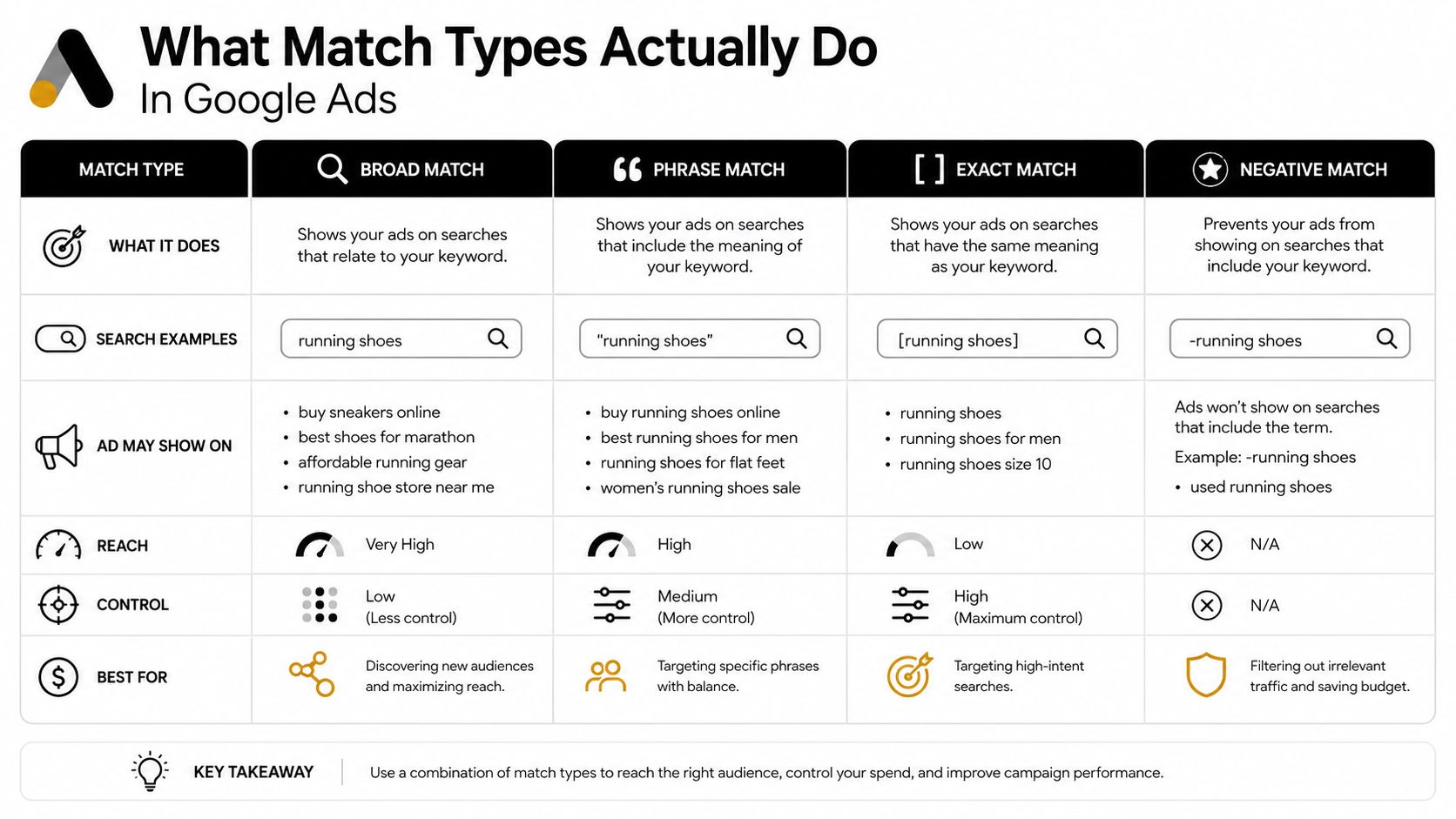
A user searches “running shoes near me.” Before the ad enters the auction, Google evaluates whether the query fits the keyword's match-type rules. Those rules determine how closely the query must align with the keyword and define which searches your bidding strategy can assess. Google describes broad, phrase, and exact match behavior through meaning and intent, not only literal word order.
Exact match allows searches with the same meaning or intent as the keyword. Phrase match reaches searches containing the keyword's meaning while allowing additional concepts around it. Broad match covers related meanings and uses contextual signals to interpret the query.
Broad match is a reach decision
Broad match can find demand absent from the original keyword list. The trade-off is operational: broader reach creates more search terms to review, classify, and exclude. Without a responsive negative keyword process, query cleanup falls behind and wasted spend remains in the account longer.
Google identifies broad match as the default match type. Its guidance states that phrase match includes the searches exact match can reach, while broad match includes both of those ranges plus additional related queries. A match-type tool can shorten the handoff from discovery to control by converting groups of keywords without rebuilding each one manually.
Close variants apply to every match type by default, with no opt-out. They can include misspellings, singular and plural forms, stemming, abbreviations, reordered words with the same meaning, and changes involving function words such as articles, prepositions, and conjunctions, as described in this overview of close-variant behavior.
A query becomes eligible first. Audience signals, conversion history, landing-page relevance, and ad assets can then influence performance. Responsive Search Ads assemble combinations of headlines and descriptions, but those assets do not answer the initial workflow question: should this query enter the auction through this keyword at all?
That decision connects match-type selection to search-term cleanup latency and negative-list hygiene. If operators cannot review new queries and update exclusions quickly, broad reach can outpace account control. A tool should support controlled decisions rather than promise literal matching. Exact formatting does not guarantee that only the identical string will trigger.
For teams refining creative coverage as well, Google Ads creative testing fits the same operating process. Query eligibility affects which searches receive an ad, while creative relevance affects what happens after the impression.
Core Features a Match Type Tool Should Handle
A useful tool earns its place by removing repeated account operations. Reformatting a keyword list is helpful during a build, but it isn't enough for an active account where search terms, negatives, and match assignments change every day.
Must-have capabilities
Bulk reassignment should work across campaigns and ad groups, with safeguards against overwriting the wrong entities. The operator needs to select a set of keywords, choose the destination match type, preview the changes, and apply them in a controlled batch.
Search-term clustering and n-gram analysis turn a noisy query report into recurring themes. A single irrelevant query may be easy to ignore. A repeated word pattern can reveal a product mismatch, job-seeker intent, free-service intent, or a competitor cluster that deserves a shared exclusion rule.
Negative keyword suggestions should come from recent search-term data rather than a generic preset. The strongest workflow identifies the query, shows where it appeared, checks whether it has conversion value, and then recommends a campaign, ad-group, or shared-list action.
Limit awareness is essential. Google's account guidance allows search campaigns up to 10,000 negative keywords per campaign, negative keyword lists up to 5,000 keywords per list, and Display and Video campaigns up to 1,000 negative keywords. Those limits are documented in Google Ads account limits, and a tool should warn operators before a cleanup batch fails.
Audit logs protect the account from invisible changes. Record the old match type, new match type, affected campaign, operator, timestamp, and reason whenever possible. Without that history, a later performance shift becomes a guessing exercise.
Nice-to-have features
Cross-account rules help agencies standardize obvious exclusions while preserving campaign-specific exceptions. Google Ads Scripts or API integrations can run recurring checks, and custom logic can promote a converting query to exact match or route a repeated waste pattern into a negative list. Scheduled reclassification is useful when search-term volume is steady and the team has defined approval rules.
| Feature | Why It Matters | Tier |
|---|---|---|
| Bulk match-type reassignment | Cuts repetitive edits across large keyword sets | Must-have |
| Search-term clustering | Finds recurring intent patterns and waste themes | Must-have |
| Negative suggestions | Connects query review directly to exclusion work | Must-have |
| Limit warnings | Prevents failed or incomplete batches | Must-have |
| Audit history | Shows who changed what and why | Must-have |
| Cross-account rules | Applies consistent governance across clients | Nice-to-have |
| Script or API integration | Supports recurring automation | Nice-to-have |
| Custom promotion logic | Moves proven queries into tighter coverage | Nice-to-have |
| Scheduled reclassification | Reduces manual review frequency | Nice-to-have |
The practical benchmark is not the number of buttons. Use the PPC tool feature guide to assess whether the workflow removes enough handling to materially shorten weekly review. If the operator still exports, cleans, edits, uploads, and reconciles every file manually, the tool isn't solving the central problem.
Why Match Type Choices Are Shifting Fast
Match type labels look stable inside the interface, but the budget behind those labels keeps moving. Optmyzr's analysis covering 2022 to 2026 found that exact match lost 9.5% of spend share, while phrase and broad match gained share, with broad match becoming dominant by budget in that analysis (Optmyzr match-type performance analysis).
A separate Optmyzr dataset shows the direction more concretely. Broad keyword share moved from 33.12% to 36.67%, exact declined from 37.11% to 34.35%, and phrase moved from 29.77% to 28.98% between 2022 and 2024, with all figures sourced from the same analysis.
| Match Type | Approx. Spend Share | What This Means for Operators |
|---|---|---|
| Broad | Dominant by budget in the cited Optmyzr analysis | Requires active query review and negative hygiene |
| Phrase | Gained spend share in the longer-period analysis | Needs account-specific validation rather than automatic trust |
| Exact | Declined by 9.5% over the longer period | Still useful for controlled intent coverage and query isolation |
The point isn't that broad match is always good or always dangerous. Broad can expand reach and uncover demand, but it can also enlarge the review queue when the account lacks strong conversion signals or negative governance. Exact can provide tighter control, but an exact-heavy structure may fail to capture enough demand when search volume is limited.
Google's match-type system has also changed materially over time. Google Ads launched in 2002 with Exact and Phrase match, introduced Broad match in 2006, added Modified Broad Match in 2010, expanded close-variant behavior between 2014 and 2017, and retired Broad Match Modifier in 2021, folding its behavior into Phrase match. The timeline is documented in Google Ads keyword match-type history.
Why static assignment logic fails
A rule such as “always use exact” or “convert everything to broad” ignores how Google interprets intent, how Smart Bidding uses signals, and how the account's own search-term data develops. A keyword that needed broad coverage during discovery may deserve exact coverage after qualified searches accumulate. Another keyword may need broader reach because exact and phrase variants aren't spending the available budget.
That creates a moving workflow rather than a one-time setup. The durable defense is a short loop between match-type assignment, query review, and negative keyword building. A tool that handles only formatting misses the part that changes performance most often, the speed at which operators can act on new evidence.
Negative Keywords and Match Types Working Together
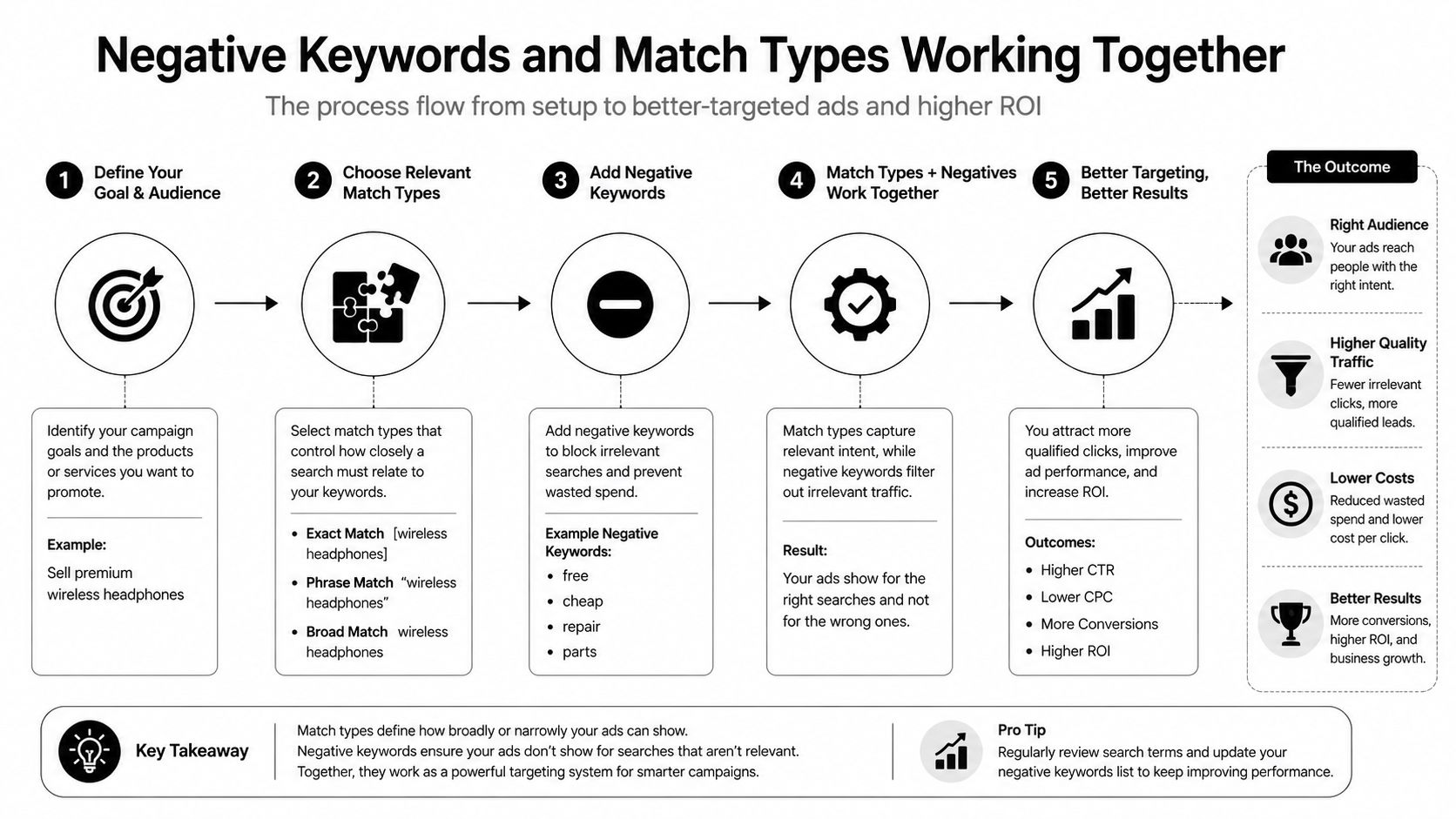
A broad keyword creates reach, but its value depends on how quickly the account filters irrelevant searches. Without a disciplined exclusion process, broader eligibility can attract queries that share vocabulary with the keyword while missing the campaign's commercial intent. The operational problem is workflow speed: delayed search-term cleanup leaves waste active longer and makes negative-list maintenance harder.
Review each query through three decisions:
- Keep the query eligible when it matches the offer and supports the campaign objective.
- Promote the query to phrase or exact when it deserves deliberate coverage, a dedicated ad group, or clearer reporting.
- Exclude the query when its intent is irrelevant, commercially unsuitable, or repeatedly wasteful.
Build one review loop
Start with recent search-term data and group related queries before adding negatives individually. Check whether the query appeared in multiple campaigns, whether an existing negative already blocks it, and whether excluding one word could remove valuable intent elsewhere.
A capable match type tool can suggest negative candidates, apply them at campaign or ad-group level, and flag conflicts with positive keywords. Those checks reduce repeated manual review across campaigns and keep similar queries from receiving inconsistent decisions. The useful gain is not syntax conversion alone. It is shorter time between discovering a pattern and applying the correct control.
Search campaigns can support up to 10,000 negative keywords per campaign, while a negative keyword list can contain up to 5,000 keywords, according to Google's account-limit documentation. Those ceilings make list hygiene part of account architecture. Teams need naming, ownership, scope checks, and regular removal of obsolete exclusions.
Broad match isn't a set-and-forget setting. It's a permission to explore, paired with a responsibility to filter.
A recruiter account that sells hiring services may keep attracting searches containing “jobs.” Changing every positive keyword to exact would reduce reach without addressing the underlying intent. A faster response is to identify the recurring jobs pattern, confirm it is outside the offer, add the negative at the correct scope, and preserve broader coverage for employer searches. The guidance in negative keywords and match types helps clarify how positive coverage and exclusions should relate.
For Display and Video campaigns, Google treats all negative keywords as broad matches. A negative can block searches containing all listed words in any order, as described in the Google Ads API match-type reference. Reusing the same negative-list habits across campaign types can therefore create unintended exclusions. The tool should show campaign type and scope before deployment, so operators can verify the resulting coverage rather than trusting familiar notation.
Fitting a Match Type Tool Into Your Daily Routine
The most reliable setup treats match-type work as a recurring operating rhythm. The tool handles repetitive changes, while the operator approves intent decisions and checks that negatives won't remove legitimate demand.
A Monday review can follow a practical sequence:
- Export or retrieve the latest search-term data.
- Cluster recurring queries and identify new intent patterns.
- Suggest match-type changes for useful searches.
- Compare negative candidates with existing positive and negative coverage.
- Review account-limit warnings.
- Apply changes in manageable batches.
- Record what changed and why.
The sequence matters because close variants keep producing new query shapes even when the visible keyword list hasn't changed. Misspellings, plurals, reordered words, abbreviations, and function-word changes can all enter the review stream under Google's current behavior. The operator shouldn't treat every new variation as a new strategic insight, but the account still needs a way to detect meaningful patterns among the noise.
Where automation earns its keep
Native Google Ads Editor remains perfectly adequate for a one-off exact-match addition or a small campaign adjustment. It becomes less comfortable when an agency needs to compare multiple campaigns, identify repeated n-grams, apply exclusions consistently, and preserve a clear change history.
Bulk conversion is where a specialized workflow usually saves the most handling. Instead of manually wrapping terms in brackets, removing existing quotation marks, checking duplicates, and uploading files, the operator can review a prepared change set and spend time on decisions that require account knowledge.
Account limits also affect scheduling. A large conversion or negative-keyword operation may need to run in controlled batches rather than during a live performance review. The tool should surface limits and failed operations clearly, while the operator should avoid launching broad changes without a rollback path.
Measure the right outcome
Don't judge the tool by whether it can produce exact, phrase, and broad formatting. Judge it by time to action:
- How quickly does a new waste pattern become a negative?
- How quickly does a valuable query receive deliberate coverage?
- How often does the same search term require review in multiple campaigns?
- Can another operator audit the change without asking for background?
The value is operational. A faster cleanup loop gives the account a better chance to respond while the evidence is still current.
Choosing the Right Match Type Tool for Your Account
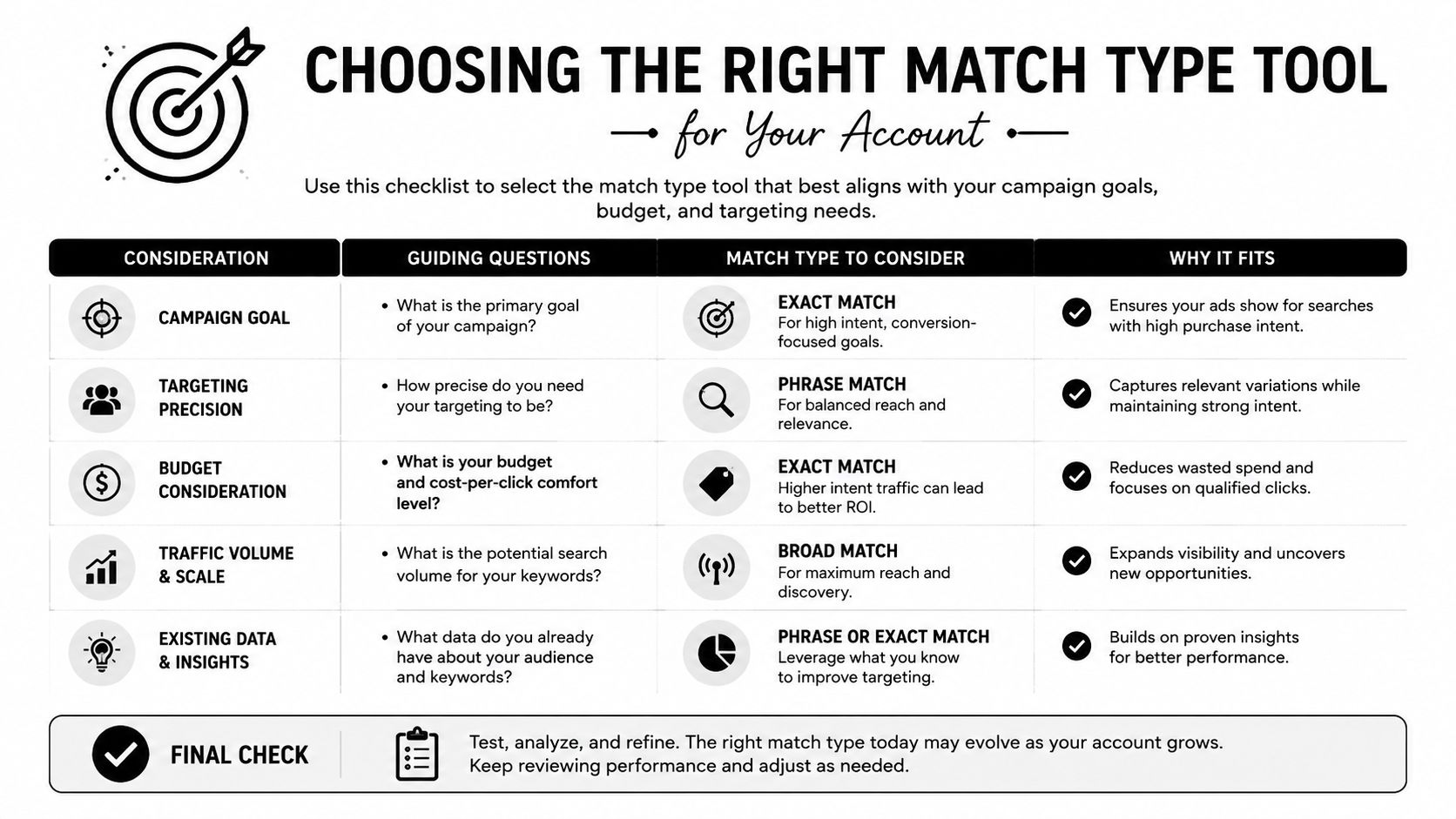
Start with the workflow, not the feature page. A tool should fit the way your team reviews queries, approves negatives, restructures campaigns, and documents changes.
Use a practical evaluation checklist
Bulk conversion is essential if the account has a large inventory or frequent restructuring. Confirm that the tool can work across campaigns and ad groups, preserve campaign context, and show a preview before applying changes.
Negative-list building should connect directly to search-term reports. A standalone keyword formatter won't help much if the operator still has to identify waste, find duplicates, check conflicts, and build exclusions in separate spreadsheets.
Editor compatibility matters because many PPC teams still use Google Ads Editor for controlled deployment. Look for clean exports, predictable formatting, and a workflow that doesn't force manual CSV preparation for routine work.
Audit logs should show when a match type changed, who made the change, what the previous state was, and whether the action succeeded. Version history is especially important when several specialists manage the same account.
Watch for weak implementations
Avoid tools that only add brackets or quotation marks without validating the underlying logic. Reformatting is not the same as deciding whether the keyword should be broad, phrase, exact, or negative.
Be cautious when a product hides close-variant behavior, ignores campaign-type differences, or provides no warning about negative-list capacity. A routine cleanup process shouldn't depend on manually reconciling multiple exports every time.
Pricing deserves practical scrutiny too. Agencies may prefer account-based pricing that reflects client management rather than a per-keyword model that becomes more expensive as the inventory grows. The right choice depends on the account mix, review frequency, and number of operators.
Use the PPC tool selection guide as a checklist, then run a controlled pilot on one campaign. Compare the hours spent reviewing search terms, the speed of negative deployment, the number of duplicate decisions, and the clarity of the audit trail. Don't commit because the interface looks polished. Commit when the workflow removes work without weakening control.
Keywordme provides a workflow for applying broad, phrase, and exact match types inside Google Ads, adding keywords from search-term data, and handling negative keyword operations in one place. Visit Keywordme to test whether its match-type and search-term workflow fits the way your team manages PPC cleanup.
.svg)