
Mastering How to Use AI for Negative Keywords Google Ads
Mastering How to Use AI for Negative Keywords Google Ads


Meta title: How to Use AI for Negative Keywords in Google Ads
Meta description: Learn how to use AI for negative keywords Google Ads with smarter prompts, human review, and a repeatable workflow that cuts wasted clicks.
If you're managing Google Ads long enough, you eventually hit the same wall. The search terms report turns into a junk drawer. A few obvious negatives jump out fast, then you're left scanning line after line, trying to decide whether a query is harmless noise, a hidden conversion path, or something that should've been blocked last week.
That manual review work is where a lot of accounts lose momentum.
AI can help, but only when you use it like an analyst's assistant, not a replacement for account judgment. The best setup isn't one clever prompt. It's a repeatable system for pulling the right data, asking better questions, validating the output, and applying negatives in a way that protects volume while trimming waste. That's the version that holds up in live accounts.
Stop Drowning in Search Term Reports
Most PPC managers know the routine. You open a search terms report intending to do a quick cleanup. Twenty minutes later, you're five tabs deep, second-guessing whether "free template," "jobs near me," and "how to do it yourself" belong in the same bucket. The easy calls get made first. The expensive mess stays buried.
That problem gets worse as accounts scale. A small campaign can still be handled with elbow grease. A busy account with broad match, multiple campaigns, and constant query expansion turns manual search term review into a recurring time sink. You know wasted spend is in there. Finding it consistently is the hard part.
Where AI actually helps
AI is useful because it can process patterns faster than a human staring at a spreadsheet. It can group irrelevant intent, surface root words, and flag repeated themes you might miss during a rushed review. That's a very different claim from saying it can run negative keyword strategy on autopilot. It can't.
Used well, AI shifts the workflow from reactive cleanup to a more structured process. Instead of reviewing every row one by one, you can focus on the decisions that matter. That usually means validating patterns, checking edge cases, and deciding where negatives belong.
Practical rule: Let AI do the first pass on search term classification. Keep final approval with the person who understands the offer, the sales cycle, and the weird queries that still convert.
If you're still building your foundation on the Google Ads side, this overview on how to optimize ad campaigns with negative keywords is a useful refresher on the strategic role negatives play before you automate anything.
For the review process itself, a cleaner system starts with a better reporting habit. This walkthrough on analyzing search terms reports efficiently is worth reading if your current process still depends on endless tab-hopping and manual filtering.
Prepping Your Data for AI Analysis
Bad inputs produce bad recommendations. That's especially true when you're trying to learn how to use AI for negative keywords Google Ads without creating a mess. If the report is too broad, too noisy, or poorly sorted, the model will still give you answers. They just won't be the answers you need.

Start with the right export
A solid workflow starts inside Google Ads. Export the search terms report using a 30-day window, sort by impressions in descending order, and feed the top 50 terms into an AI model like GPT-3.5 with your campaign goals so it can extract useful root negatives, as outlined by Fisher Digital.
That sequence matters for a reason. A 30-day range usually gives enough query variety to reveal patterns without drowning the model in stale data. Sorting by impressions pushes high-traffic junk to the top, which is where cleanup usually creates the fastest impact. Limiting the first batch keeps the review manageable and makes it easier to spot whether the model understands the account.
What your export should include
Keep the file simple. You don't need every possible column. You need enough context to make decisions.
- Search term text: This is the core input. Without it, the model can't classify intent.
- Impressions first: High-impression irrelevant terms deserve attention before low-volume oddities.
- Campaign or ad group context: This helps distinguish universal junk from campaign-specific noise.
- Performance clues: If you include conversions or cost, use them for human review rather than expecting the model to infer business value perfectly.
For teams that need a wider foundation, this guide to Google Ads for small businesses gives a useful operational view of campaign setup and account structure, especially if negative keyword work is still inconsistent.
A second habit helps here too. Review query groupings, not just isolated terms. This deeper look at search query analysis is helpful when your report contains patterns that only become obvious once you cluster related searches together.
Clean data doesn't make AI smarter. It makes your judgment easier after the AI responds.
Crafting Smart Prompts for Negative Keywords
Most weak AI output starts with a weak prompt. "Find negative keywords from this list" sounds efficient, but it usually produces generic suggestions, mixed intent, and too many full phrases that waste valuable negative slots.
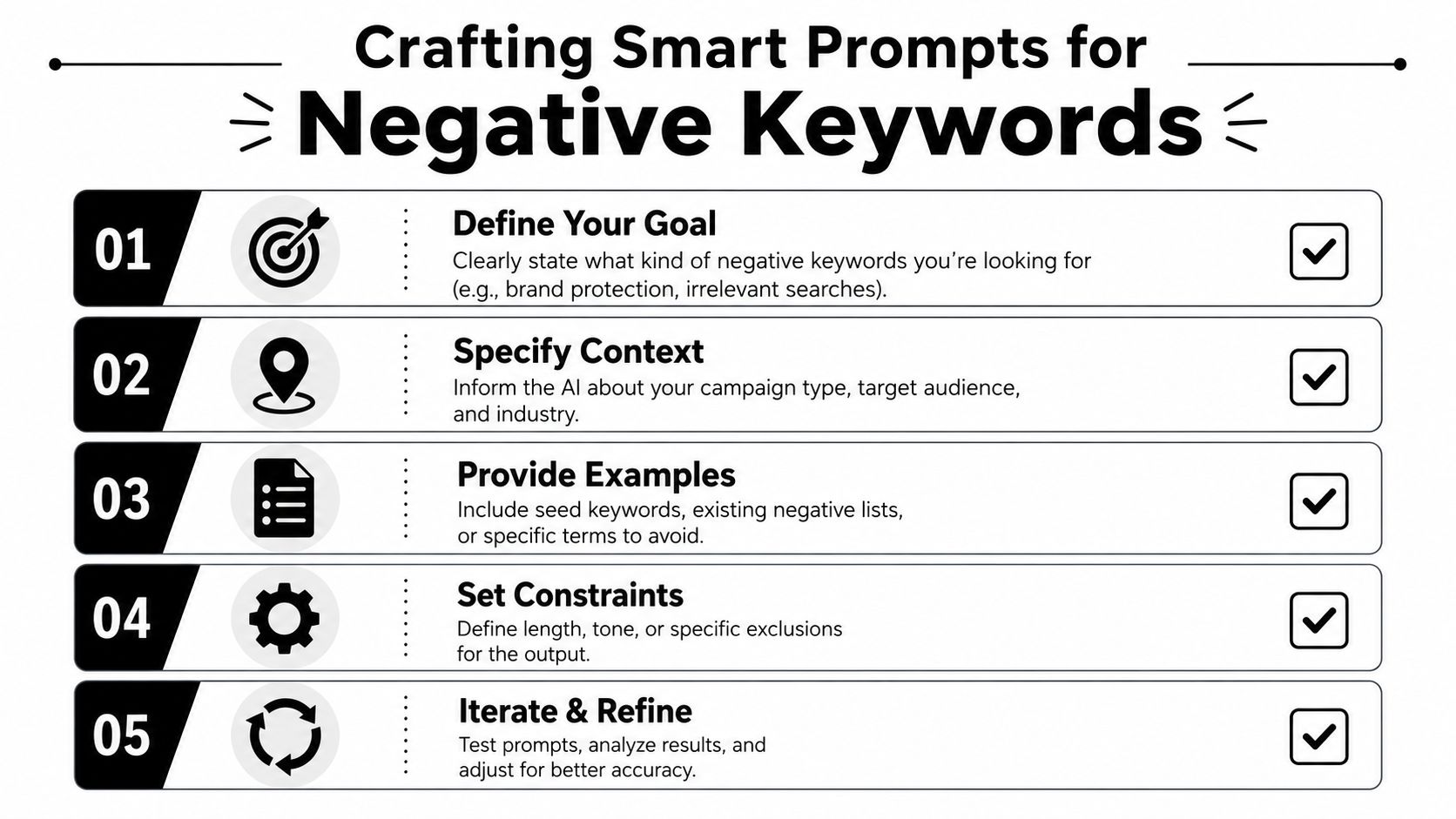
The fix is context. Tell the model what you're selling, who you want, what success looks like, and how to format its answer. Good prompts reduce cleanup later.
Ask for match types, not a random list
Your prompt should force structure. One of the most useful instructions is to have the model sort recommendations by Broad Negatives, Phrase Negatives, and Exact Negatives, which Karooya explains here. That matters because each match type solves a different problem.
Use broad negatives for obvious irrelevance at the campaign level. Use phrase negatives when a repeated pattern shows up in multiple unwanted queries. Use exact negatives for one-off terms that are bad on their own but shouldn't block close variants.
Here's a practical prompt I like for first-pass analysis:
You are an expert PPC strategist. Review the 50 search terms below for a Google Ads campaign selling [product/service]. The goal is [campaign goal]. Identify negative keyword opportunities and group them into Broad, Phrase, and Exact match recommendations. Prioritize root words when they can block multiple irrelevant searches. Do not suggest negatives that could block buyer intent, educational lead intent, or high-commercial-intent variations relevant to the business. For each suggestion, explain why it should be excluded.
That final line matters. If the model has to explain itself, bad logic becomes obvious faster.
Prompt for root words, not just phrases
A lot of junior media buyers make the same mistake. They ask AI to mark bad search terms, then paste those exact terms into negative lists. It works for cleanup, but it's inefficient. Root words are often more valuable than full phrases because they can eliminate clusters of junk.
Try this second prompt after the first pass:
- Role first: You are a Google Ads search term analyst.
- Business context: We sell [offer] to [audience]. We do want searches related to [allowed intent]. We do not want [excluded intent].
- Task: From these search terms, extract root negative keywords that can block repeated irrelevant patterns.
- Output format: Table with root word, recommended match type, example blocked queries, and caution notes.
- Constraint: Flag any term that might be risky to negate because intent could vary by context.
That "caution notes" field saves headaches.
A quick walkthrough can help if you want to see prompting in action before building your own templates:
A simple before and after
Weak prompt:
- Vague task: Find negative keywords from this list
Better prompt:
- Defined role: You are a PPC strategist auditing search intent
- Clear objective: Reduce irrelevant traffic without blocking educational or high-intent commercial queries
- Useful format: Group by match type and prioritize root negatives
- Built-in caution: Mark anything ambiguous for human review
The model should help you think faster. It shouldn't force you to spend more time cleaning up its output than reviewing the original report.
Validating and Implementing AI Suggestions
AI output is a draft. Treat it like one.
The biggest mistake isn't using AI for negatives. It's assuming the model understands your business well enough to make the final call. It doesn't know which oddball query closes over the phone, which educational search turns into a pipeline lead, or which campaign intentionally targets upper-funnel intent.
Review with a decision filter
Before adding anything, run every AI suggestion through three checks:
- Is this irrelevant everywhere, or only in one campaign?
- Could this term carry different intent depending on the modifier around it?
- Would blocking the root word remove useful volume along with the junk?
That first question determines placement. Universal junk belongs at account level. Campaign-specific noise should stay closer to the campaign or ad group where it creates friction. Shared lists are useful when several campaigns suffer from the same irrelevant pattern but you don't want to make it a global block.
Work within Google's limit
Google Ads has a strict 1,000-keyword limit per account-level negative list, which is why root-word selection matters so much. AI can help identify high-impact negatives such as "free" or "jobs" that block many irrelevant variations while using list space more efficiently, as noted in this Google Ads account-level negative keyword walkthrough.
That cap changes how you should think. Don't spend account-level slots on every bad phrase if one root negative can handle the pattern cleanly. At the same time, don't force a root word into an account-wide list if it could block valid searches in another campaign.
A simple implementation framework looks like this:
| Placement | Best use | What to watch |
|---|---|---|
| Account level | Universal irrelevance across the whole account | Wasting slots on overly specific phrases |
| Campaign level | Noise tied to a campaign theme | Duplicating negatives already handled elsewhere |
| Ad group level | Precision filtering inside tightly themed groups | Overcomplicating maintenance |
Human review is where strategy lives. AI can suggest exclusions. Only the account manager can decide the blast radius.
Automate Your Workflow with a Tool like Keywordme
The manual version works. Export the report, sort it, paste terms into a model, review the output, then copy everything back into Google Ads. It's workable for occasional cleanup. It's clumsy when you need consistency across multiple accounts.

The primary issue isn't just the time. It's the handoff friction. Every export, spreadsheet edit, formatting tweak, and copy-paste step creates another chance to misapply match types, skip a campaign, or leave recommendations sitting in a sheet instead of in the account.
Why integrated workflows win
An integrated workflow is cleaner because the data, analysis, and implementation live closer together. You spend less time moving information between tools and more time reviewing actual decisions.
That matters even more for agencies and in-house teams juggling dozens of campaigns. Repeatable processes beat heroic manual effort every time. If your stack already includes AI tools in adjacent channels, products like SEO Agent show the same broader lesson. Teams move faster when analysis and action are connected instead of scattered across tabs.
For PPC specifically, a tighter process around negatives saves mental energy. This guide on how to automate negative keyword management is useful if your current routine still relies on spreadsheets and one-off prompts.
What a better system should do
Look for a workflow that lets you:
- Pull live search term data: No manual export every single time.
- Review suggestions inside context: You should see the query, intent pattern, and match type together.
- Apply negatives cleanly: Match type assignment shouldn't be an afterthought.
- Scale across accounts: The process should hold up whether you're managing one campaign or a large portfolio.
Good automation removes repetitive handling. It doesn't remove judgment.
Common AI Pitfalls and How to Avoid Them
AI gets sold as if the only mistake is not using it. In negative keyword management, the opposite problem shows up just as often. People trust the output too quickly, get aggressive with exclusions, and choke off useful traffic.
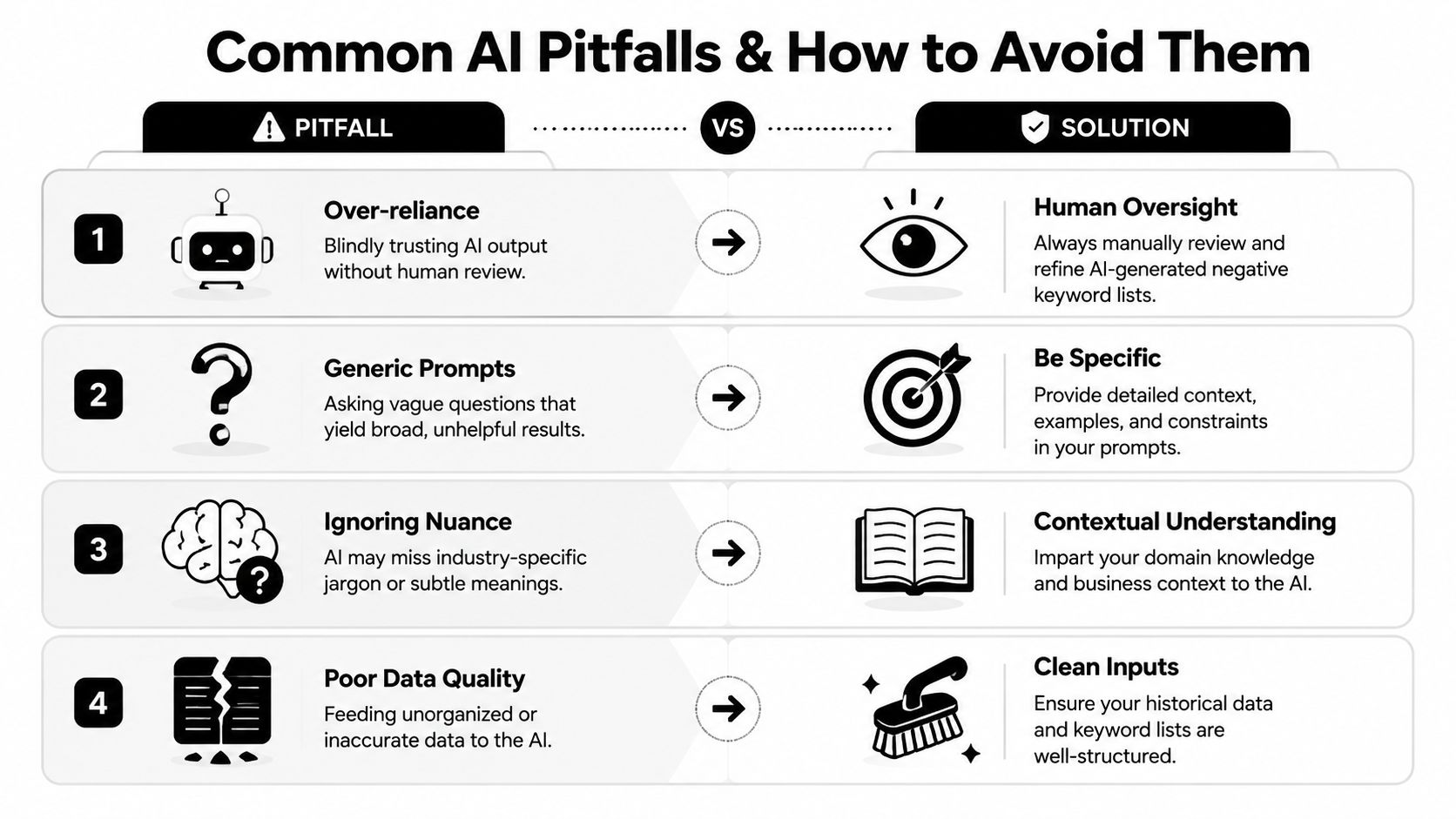
Over-negation is the expensive mistake
This is the one that hurts most because it can look smart in a spreadsheet. You remove junk, queries get cleaner, and everyone feels efficient. Then lead volume softens because the system blocked searches that looked irrelevant on the surface but did carry buying or research intent.
According to Karooya's 2025 negative keyword analysis, 18% of campaigns using broad AI-based negatives saw a 10-15% drop in conversions, and campaigns using AI with human validation achieved 35% higher ROAS than those relying only on automated filters.
That should reset expectations fast. AI isn't dangerous because it's useless. It's dangerous because it can sound convincing while being slightly wrong at scale.
Where generic AI gets confused
Intent-based negation is where many generic models stumble. Terms like "DIY" or "how to" aren't universally bad. For some service businesses, those searches feed educational content, remarketing audiences, or leads that convert later. If you prompt a model with no business context, it will often flatten nuance and treat informational modifiers as junk.
Use a layered strategy instead of one blunt list.
- Account-level negatives: Reserve these for terms that are almost never useful.
- Campaign-level negatives: Apply these when irrelevance depends on the campaign goal.
- Shared lists: Use them when multiple campaigns need the same guardrail without making it account-wide.
A negative keyword isn't just a filter. It's a rule with consequences. The broader the rule, the more carefully you need to test it.
A safer review habit
When you're checking AI suggestions, look for these failure patterns:
- Intent collapse: Different user intents get grouped together as if they're all irrelevant.
- Modifier blindness: The model flags a root word without noticing that nearby terms change meaning.
- Industry mismatch: Generic logic overrides how buyers search in your niche.
- Prompt drift: The AI starts answering the broad idea of your request instead of the exact classification task.
The fix isn't more trust. It's tighter prompts, cleaner inputs, and a human who knows the account.
Measuring Your Success and Refining Your Strategy
If you can't measure the process, you won't know whether your AI workflow is helping or just creating cleaner-looking reports.
The easiest trap is judging success by how many negatives you added. That's vanity. More negatives don't automatically mean better traffic. The actual test is whether the account wastes less spend, earns cleaner clicks, and demands less manual cleanup.
Use baseline metrics before you touch anything
Set the benchmark first. Toffu's guidance on AI automation for negative keywords recommends defining success as reducing irrelevant clicks by 25%, improving CTR by 15%, and saving at least 5 hours per week on manual review during the first month.
Those are useful because they measure both performance and operations. You want better traffic quality, but you also want a process the team can keep running without resentment.
A practical refinement loop
Track results on a schedule and keep the loop simple.
- Week one: Capture your baseline from current search term noise and review effort.
- Ongoing review: Compare newly added negatives against search term quality and click relevance.
- Monthly check: Look at whether time savings came with stable or improved conversion quality.
- Prompt updates: Revise prompts based on the false positives and edge cases you found in review.
A lot of strong PPC work is boring in the best way. You create a routine, keep feeding it better data, and tighten judgment over time. That's the answer to how to use AI for negative keywords Google Ads. Not a magic prompt. A dependable operating system for search term control.
Keywordme is a smart next step if you're tired of stitching this workflow together by hand. It helps you review junk search terms, build negative keyword lists, apply match types, and clean up Google Ads faster without living in spreadsheets. If you want a smoother way to turn search term data into action, try Keywordme.
.svg)