
How to Set Conversion Values for Lead Gen Campaigns
How to Set Conversion Values for Lead Gen Campaigns


Your home-services campaign is bringing in forms, the dashboard looks busy, and sales keeps asking why so many inquiries are for jobs you don't take. Say every form submission carries a $50 conversion value. Switching to Maximize conversion value won't fix that setup. You've still told Google Ads that the cheapest inquiry and a serious buyer are worth exactly the same amount.
Knowing how to set conversion values for lead gen campaigns starts outside the bidding settings. Price the outcome from your actual funnel economics, choose a stage you can report reliably, and check the measurement before you let Smart Bidding spend against it.
Lead Values from Close Rate and Profit
Expected lead value by funnel stage
| Stage | Observed rate | Expected value | Bid to this stage when |
|---|---|---|---|
| Raw form lead | 5% become customers | $100 on $2,000 profit | Volume is high and CRM outcomes are not ready |
| Qualified lead | 20% become customers | $400 on $2,000 profit | CRM qualification is consistent and timely |
| Fast-contacted lead | 10% close | $100 on $1,000 profit | First-response time is tracked and fast leads really close more |
| Delayed lead | 2% close | $20 on $1,000 profit | The same offer closes poorly after a slow follow-up |
| Closed customer | Deal is won | Full contribution profit, example $2,000 | Closed deals are frequent and feedback is not months late |
These are worked scenarios, not suggested prices for every account. The raw-lead and qualified-lead calculations follow the expected-value approach in Google Ads' qualified-lead and converted-lead guidance, which distinguishes CRM-assessed prospects from leads reaching a defined sales milestone.
Calculate the money behind the milestone
Use this formula:
Expected lead value = contribution profit per customer × probability that a lead at this stage becomes a customer.
Start with a completed group of leads. Don't divide this month's sales by this month's inquiries if those sales came from older inquiries. Match leads to their eventual outcomes, then calculate the close rate for the stage you're pricing.
In the raw-lead scenario, only a small share of submissions becomes customers, so the expected value is a fraction of the customer's contribution profit. Qualification increases the likelihood of closing, which justifies a higher assigned value. It doesn't mean qualification created cash or that the sales team should book that amount as revenue.
The fast-contacted and delayed rows illustrate a separate offer with different customer economics. They're useful only if your CRM records response times and the resulting close-rate difference. Don't mix those customer-profit assumptions into the other rows.
The closed-customer row removes the probability estimate because the deal is won. Use the actual contribution profit where available, rather than forcing every customer into an average.
Define profit before you assign value
Contribution profit isn't top-line contract revenue. Ask finance which fulfillment costs, commissions, sales costs, refunds, and cancellations belong in your calculation, then apply that definition consistently. Don't subtract a cost twice because separate teams maintain separate spreadsheets.
For example, a $500 contract can be a weak acquisition target after sales effort, delivery costs, and a low chance of closing. A larger contract can also be less attractive than a smaller, higher-margin job.
Commercial terms matter, too. When evaluating outsourced acquisition, Ever Outbound Inc.’s offer that the first two closes are commission-free is something to include in the acquisition-cost comparison, not a reason to inflate the underlying lead value.
Keep these events separate in your account:
- Initial lead: A valid inquiry entered the business.
- Qualified lead: Sales confirmed the prospect meets a written qualification standard.
- Closed customer: The prospect reached your defined won-deal milestone.
I'd review values monthly when lead flow is steady and quarterly when completed sales are sparse, with an earlier review after a material pricing or margin change. Choose one primary stage for bidding, usually the furthest stage with enough timely outcomes, and leave earlier stages available for reporting.
Choosing the Stage and Proxy Values
Choose the bidding stage before touching conversion settings. A signed contract is a stronger business outcome than a form submission, but it's a poor feedback signal if your sales team rarely closes deals or takes months to report them.
For a hypothetical B2B business with a 60-day sales cycle, an accepted opportunity may be the more usable milestone. Price that opportunity from its historical chance of closing and the contribution profit remaining after cancellation risk.
Use a stage you can report while it still matters
Google's value-based bidding guidance recommends the stage closest to the final sale, at least two different reported values, regular uploads, and conversion delays under seven days for faster feedback; it also permits proxies such as lead scores when exact economic values are difficult to establish.
That doesn't mean you should make every funnel stage a bidding target. Different values can represent stronger and weaker prospects within the chosen stage, rather than rewarding the same person repeatedly as they progress.
Use the difference between primary and secondary conversion actions to separate the outcome the campaign should pursue from the events you still want to observe.
Map the qualification milestone and its underlying evidence before assigning proxy values.

Give every proxy an expiration condition
Your valuation sheet should record more than the number sent to Google Ads:
- Basis: Historical economics, a relative quality score, or a temporary assumption.
- Owner: The person responsible for checking closed outcomes.
- Retirement rule: Replace the proxy when completed deals support a stable stage-level estimate.
Keep score-based values labeled as scores. A high score isn't collected revenue, and its value-to-cost ratio isn't financial ROAS.
Response speed deserves similar caution. A historical audit of 2,241 U.S. companies reported an average first response of 42 hours, with companies responding within an hour approximately seven times more likely to qualify a lead than later responders, as summarized in Omago's lead-response review. That's context for investigating your operation, not a multiplier to paste into your account.
Don't split values by industry, location, and product interest until each group has enough completed outcomes to support the distinction. For businesses with several acquisition touchpoints, Fypion Marketing's guide to prove ROI with multi-touch attribution offers useful context for separating journey attribution from the value assigned to a bidding event.
How to Set Values and Value Rules in Google Ads
The conversion action should describe the milestone you selected, not a convenient page load. A confirmation page can trigger the event, but the business definition should still be a valid lead, qualified prospect, or converted customer.
Use this workflow to distinguish the action's base value from any later adjustment.
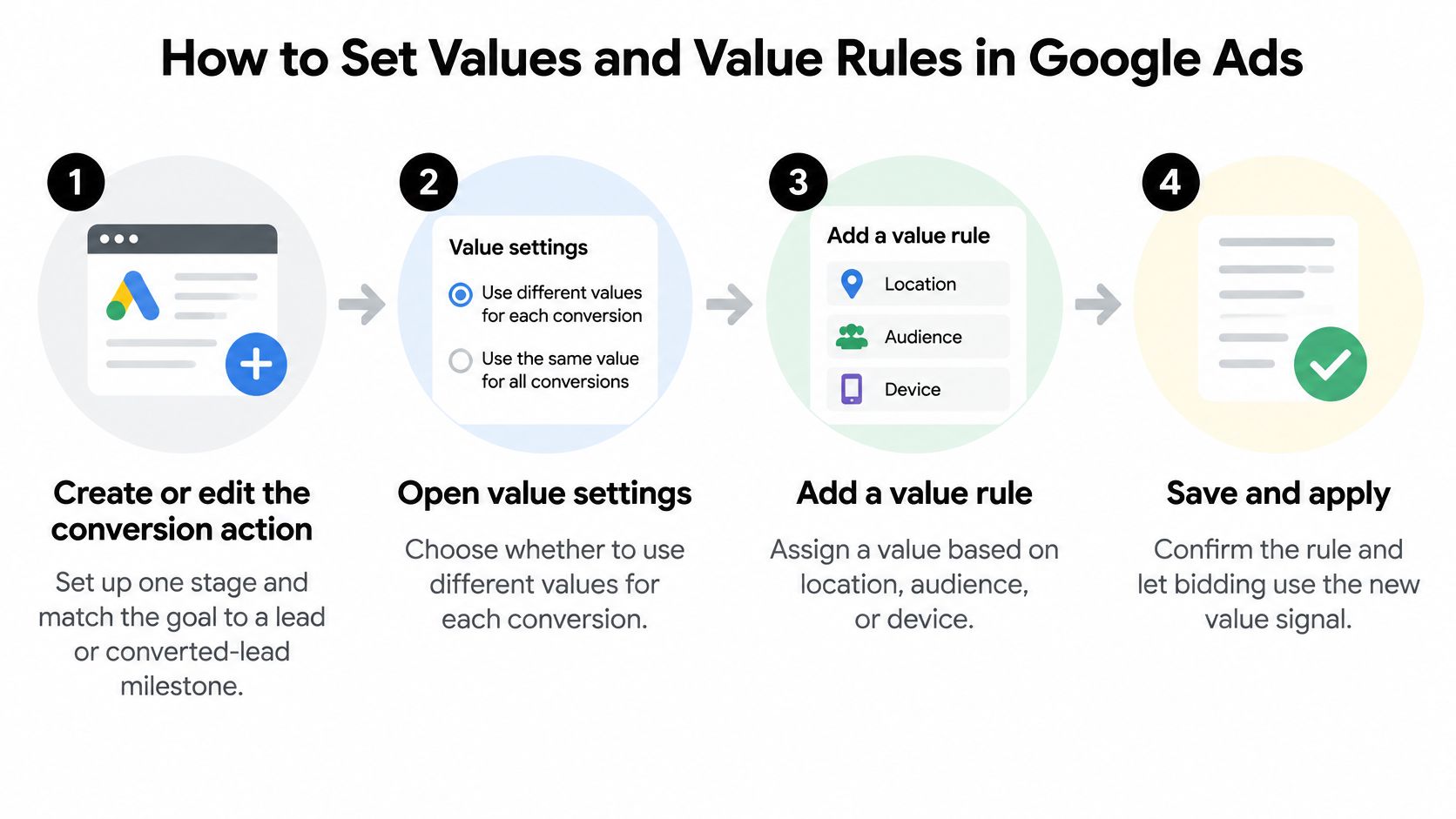
Set the action value first
- Create or edit the selected conversion action. Match the goal to the actual lead milestone and check whether the campaign uses that action for bidding.
- Choose a static value when the economics are similar. A business selling the same service in the same market may not need lead-level differentiation.
- Choose dynamic values when the inquiry reveals different potential. In the value settings, select Use different values for each conversion, then supply a sensible default.
According to Google's conversion-value setup documentation, dynamic values must be numeric, use a period as the decimal separator, and include a three-letter ISO 4217 currency code.
Say a roofing form asks whether the prospect wants a repair or a full replacement. Pass the appropriate expected value from that selection. I'd set the fallback to the lower supported value so a missing selection doesn't receive the replacement estimate, then investigate missing fields rather than treating the fallback as permanent.
Static values, dynamic values, and value rules
| Method | Use it when | What you enter | What bidding sees |
|---|---|---|---|
| Static value | Every lead has similar profit potential | One amount and one currency on the action | The same value on every conversion |
| Dynamic value | Form field, service, or product changes worth | Use different values for each conversion, plus a numeric default and ISO currency | The runtime value, or the default if none is sent |
| Value rule | Location, device, or audience changes worth after the click | Primary and optional secondary condition, such as California times 2 | The adjusted value in real time for value-based bidding |
Add rules only for an unpriced difference
Google's conversion value rules documentation gives an example where California leads worth $10 receive a 2× adjustment to a $5 base value; value-based strategies use those adjusted values in real time. Rules can use location, device, or audience conditions, with a primary condition and an optional secondary condition.
Don't apply a regional multiplier when your runtime calculation already includes that region's higher close rate. Otherwise, you price the same advantage twice.
Practical rule: Each economic difference should enter the value calculation once, either in the event value or in a rule.
If you prefer a video alongside the settings workflow, use this walkthrough.
Submit a test lead and inspect the conversion value reporting column after processing. Confirm the runtime amount and intended adjustment appear, not just the default you entered during setup.
How to Import CRM and Offline Lead Values
The sales system has information the website tag doesn't: whether the prospect answered, qualified, attended, signed, or canceled. Your import needs to carry that outcome back without losing the original advertising identifiers or changing the valuation definition.
Give the handoff a named owner. A perfectly configured conversion action won't help if nobody notices that the CRM export stopped.
Build the handoff around the sales event
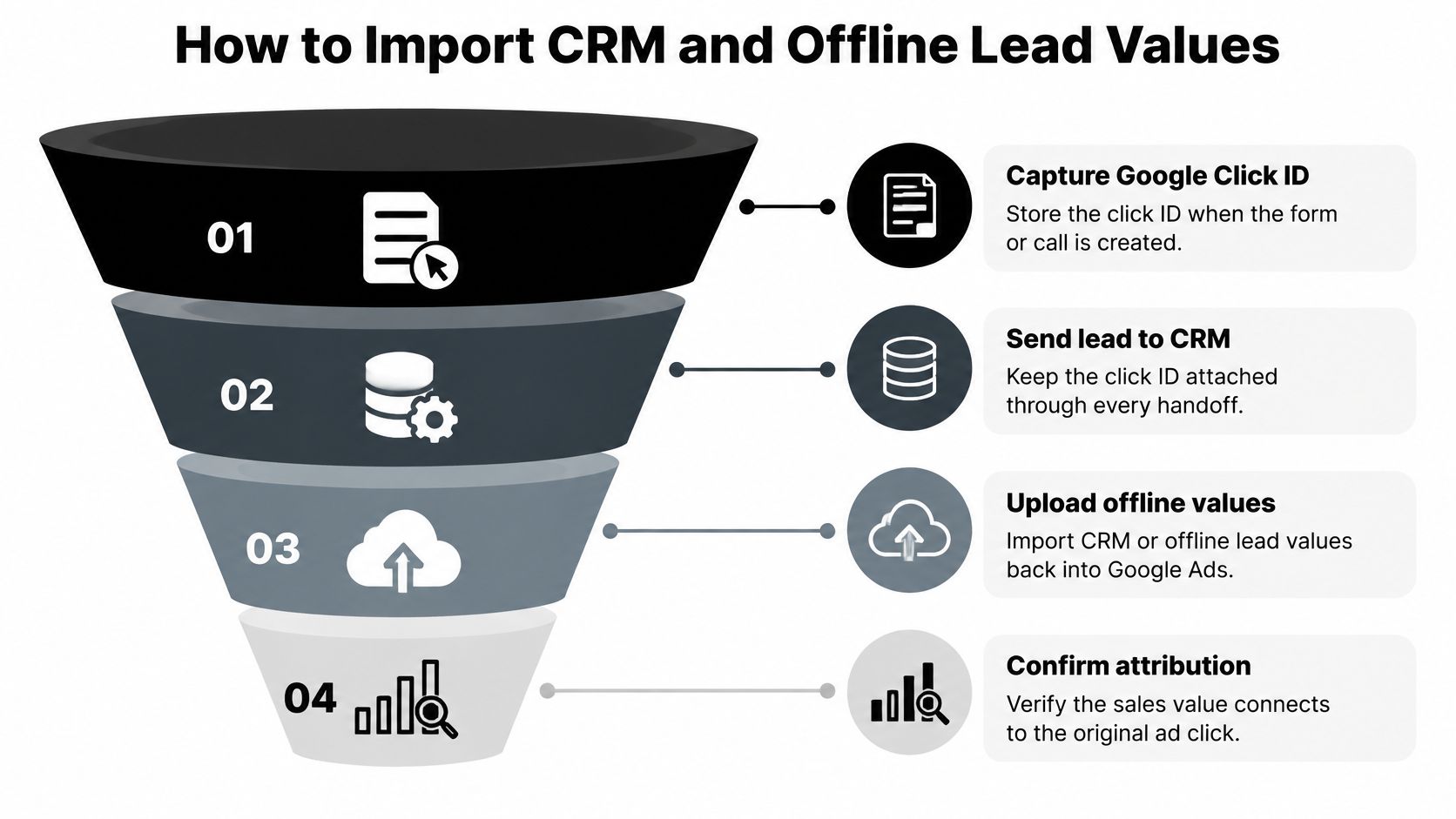
Capture identifiers when the lead enters the business. Store the Google Click ID, or GCLID, on the lead record where available. Preserve it through form integrations, call handling, lead reassignment, and CRM merges.
Google's enhanced conversions for leads setup guide recommends continuing to send the GCLID regardless of implementation method and specifies imported fields including conversion time, conversion value, and conversion currency. Use an order ID to help control duplicates, with a consistent identifier for the same imported event.
Write the outcome when the milestone happens. When sales qualifies the lead or marks the contract won, record the event's timestamp and assigned value. Don't use the upload time as a substitute for when the outcome occurred.
Map CRM statuses explicitly. “Qualified” shouldn't mean “sales accepted” in one pipeline and “we sent an email” in another. Use the approved stage value, not a salesperson's guess about how promising the conversation felt.
Send outcomes on a dependable schedule. I'd automate a daily upload rather than rely on a recurring manual export. A monthly file may be convenient for reporting, but it leaves campaign decisions working without recent sales feedback.
Include legitimate phone-closed and rep-closed outcomes in the process. The channel through which sales finishes the deal shouldn't determine whether the advertising account receives it.
Keep the identifier attached throughout the handoff shown below.
Add matching without confusing it with valuation
Configure enhanced conversions for leads. Google's implementation guidance describes matching hashed customer information from imported leads with information collected on the website or lead form and signed-in accounts that interacted with an ad. That provides an additional matching key alongside retained click identifiers.
The same guidance directs advertisers to validate imported conversion actions before using them for Smart Bidding. Successful transmission isn't the same as a verified outcome.
Standardize identity and consent handling. Confirm the appropriate consent is collected, normalize email addresses and phone numbers according to the implementation requirements, and maintain a canonical CRM identity. Preserve event history when records merge so qualification and sales timestamps don't disappear.
- Coverage: Imported eligible outcomes are reasonably reconciled with CRM records.
- Values: Numeric amounts and currency codes match the intended model and account reporting.
- Adjustments: Rule-adjusted values appear where expected, without double pricing.
- Uniqueness: Repeated submissions and upload retries don't create duplicate economic outcomes.
- Differentiation: Stronger and weaker leads receive meaningfully different values when value-based bidding is the intended strategy.
- Early in the week: Confirm the primary action, valuation basis, and person responsible for imports.
- During the week: Check incoming records, resolve failed uploads, and verify the reporting columns.
- Before the review: Audit search terms and document exclusions that could change the lead mix.
A fancy match rate cannot rescue a made-up value. Better identity matching doesn't repair inflated profit assumptions, duplicated CRM records, or qualification definitions that change with the sales rep.
For field mapping and implementation details, use the CRM-to-Google Ads offline conversion import workflow. The operational deliverable is straightforward: a dependable upload of the selected qualified or converted event, its assigned value, its original timestamp, and the identifiers needed to attribute it.
How to Test Values Before You Change Bids
Pull qualified-lead and sale counts from the CRM and Google Ads for the same reporting period. Align the event definitions, date basis, time zone, and expected upload lag before interpreting a gap.
If the numbers still disagree materially, investigate measurement. Don't respond by changing Target CPA or Target ROAS.
Diagnose the failed check
Value and import failures before bidding
| What you see | Likely cause | Fix before bidding |
|---|---|---|
| Every conversion shows the same value | Static action or a missing runtime value | Send dynamic values or accept a true single-tier model |
| Imported sales far below the CRM | Consent, bad email or phone, missing GCLID, slow upload | Fix identity and upload daily, then recheck counts |
| The same lead counted twice | No order ID or two CRM records | Deduplicate and send an order ID |
| Values swing wildly by tiny segments | Too few conversions for the number of tiers | Collapse to a stable two-tier value |
A CRM-to-platform gap isn't automatically an error. Some CRM records may be ineligible for attribution, while recent outcomes may still be processing. Reconcile eligible records and investigate unexplained differences rather than demanding that every CRM sale appear in Google Ads.
Google's enhanced conversions overview describes hashed first-party information supporting offline matching and recommends regular, ideally daily, uploads. Treat matching coverage and economic accuracy as separate checks: you can attribute an outcome correctly and still assign it the wrong value.
Open individual records, not just totals. A duplicated sale and a missing sale can cancel each other numerically while leaving your account with the wrong training examples.
Write a go or no-go decision
I'd use about two weeks of daily uploads as an initial validation window, not a Google requirement. Extend it when your CRM takes longer to produce the selected outcomes or when the sample is too thin to judge.
Check the following before approving the action:
A clean import answers “Did we measure it?” A defensible value answers “Was it worth that much?” You need both answers.
If you close only a handful of deals each month, reject a hypothetical ten-tier score that changes whenever another customer signs. A stable raw-versus-qualified model is easier to audit, although only the chosen stage should remain the bidding target. Within that stage, keep value tiers broad until completed outcomes justify finer distinctions.
Make the decision explicit: go when the action is reliable enough to guide spend, no-go when unexplained gaps, duplicates, or unstable values remain. The value-based bidding guide can help with strategy selection after that approval, not instead of it.
Recalculate Values Then Clean the Queries
Use the first week to establish a controlled rollout, not to change every campaign lever. Freeze the selected primary conversion, put the approved expected values into the action or CRM mapping, and leave earlier milestones outside the bidding goal.
Put the next recalculation date on the calendar before changing strategy. Assign someone to bring completed lead outcomes and updated contribution economics to that review, rather than letting the original spreadsheet become permanent.
Separate rollout work from performance judgment
A practical sequence keeps the account understandable:
Keep monitoring cost per valued conversion, qualification rate, and downstream profit contribution. Raw form-fill CPA can remain a diagnostic metric, but it shouldn't overrule evidence that the inquiries don't become useful business.
For the broader acquisition plan, Lead Printer's a practical guide to generating sales opportunities provides context beyond the conversion settings. The campaign still needs an offer and targeting that attract people sales can serve.
Clean the inputs before updating the estimate
Review the Google Ads search terms report for unsupported services, job seekers, research-only searches, and locations you don't serve. Add appropriate negatives and tighten match types where loose matching repeatedly produces irrelevant intent.
Don't exclude a relevant commercial query just because its inquiries cost more. Check whether those prospects qualify and close before deciding the traffic is waste.
After cleanup, recalculate using a completed cohort that reflects the changed traffic mix. Keep older cohorts separate so you can distinguish a genuine improvement in acquisition quality from a change in how sales recorded outcomes.
For a hypothetical qualified lead worth $400 with an allowable acquisition cost of $100, the economic target calculation is $400 ÷ $100 = 400%. Because the value represents expected contribution profit, that percentage measures profit-based conversion value against ad spend, not collected-revenue ROAS. Compare the result with actual campaign performance before setting a target the account may not be able to reach.
I'd watch the validated values under the existing strategy for two to four weeks, extending that rule-of-thumb window when conversion lag requires it. Only then consider moving from Maximize conversions or Target CPA to Maximize conversion value or Target ROAS. Bid to the stage you can measure on time, and stop paying for searches you never wanted.
Keywordme offers search-term cleanup, negative keyword handling, and match-type changes through a Chrome plugin. Visit Keywordme to organize that query work before your next lead-value recalculation, so your bidding model reflects the traffic you intend to buy.
.svg)