
Primary vs Secondary Conversion Actions Google Ads Guide
Primary vs Secondary Conversion Actions Google Ads Guide


You're staring at a campaign that looks fine on paper. Conversions are rolling in, cost per conversion looks tidy, and then sales asks where the actual customers are. Or the reverse happens. You fixed tracking last week, imported a clean qualified lead event, and bidding behaves like nothing changed.
That's usually not a bidding strategy problem. It's a Primary vs Secondary Conversion Actions Google Ads problem, and it sits in your conversion settings, often unnoticed. One toggle decides what Smart Bidding is allowed to chase. Get it wrong and you can clean up keywords, rewrite ads, and fuss over budgets while the algorithm learns from the wrong event. I treat that toggle as a bidding data decision, not a tidy labeling job, because that's exactly what it is.
Primary vs Secondary Conversion Actions Explained
The blunt answer is this. A primary conversion action counts in the Conversions column and can steer your bids. A secondary conversion action is observation-only and shows up only in All conversions and All conversion value. If you remember nothing else, remember that split.
Say you're running an online store. A completed purchase is your primary candidate because it's money in the bank. An add-to-cart is useful, sure, but nobody pays rent with carts. Keep add-to-cart secondary and you can still watch where shoppers hesitate without telling Google to go find more cart-adders instead of buyers.
The Default Rule Side by Side
This table is the default behavior in most accounts. There's one exception worth flagging now so it doesn't trip you later. A secondary action tucked into a custom goal that a campaign uses for bidding can still influence bids, which is why you can't judge an action by its label alone.
| Question | Primary action | Secondary action |
|---|---|---|
| Counted in the Conversions column | Yes, when its goal is used for optimization | No, appears only in All conversions |
| Used by Smart Bidding | Yes, when its goal is used for optimization | No, unless it sits in a custom goal used for bidding |
| Shows in All conversions | Yes | Yes |
| Shows in All conversion value | Yes | Yes |
| Can pull budget toward it | Yes | No |
| Typical examples | Purchase, qualified lead, booked appointment | Page view, product view, add to cart, checkout start |
The Google Ads conversion goals documentation makes the mechanics clear. A primary action is included in Conversions and can be used by bidding strategies, but only when the campaign uses the conversion goal containing that action. A secondary action is excluded from Conversions and bidding signals while staying visible in All conversions and All conversion value.
That same documentation gives you the practical examples too. A purchase can be primary while page views, product views, add-to-cart events, or checkout starts stay secondary when you want to monitor the funnel without directing budget toward those events. It also confirms the custom goal exception, so campaign and goal settings always need to be reviewed together.
The Two-Condition Chain Most People Miss
Bidding doesn't turn on just because you flipped something to primary. Two conditions have to line up at the same time.
- Condition one: The action itself is marked primary in its settings.
- Condition two: The goal that contains that action is selected for campaign optimization in that campaign.
Break either link and the outcome changes. A primary action sitting in a goal the campaign doesn't use won't drive bidding at all. It'll report only in the broader All conversions columns, which confuses people who swear they set it up right. They did half the job.
The reverse catches people too. Because of that custom goal exception, a secondary action can still end up bidding if someone built a custom goal around it and pointed a campaign at it. That's how an account ends up optimizing toward checkout starts while everyone insists checkout is secondary. Technically true, practically irrelevant.
Check the chain, not the label: If an action should steer bids, verify it's primary and that its goal is actually selected in the campaign. If either answer is no, bidding isn't using it the way you think.
Where Each Action Shows Up in Reporting
Walk the columns once and a lot of reporting arguments disappear. When its goal is used for optimization, a primary action feeds Conversions, Conversion value, All conversions, and All conversion value. A secondary action feeds only the two All columns.
That map explains why your numbers never match if you're comparing the wrong columns. A stakeholder looking at All conversions sees purchases plus carts plus checkout starts and wonders why you reported a smaller number. You reported Conversions because that's the optimization number. Both numbers can be correct. They're answering different questions.
It also explains phantom wins. If someone promotes an easy event and Conversions suddenly jumps, performance didn't improve. The definition changed. Your CPA drops overnight, the dashboard looks great, and revenue stays flat because you redefined success to include something cheaper.
Why Bidding Cares So Much
Target CPA, target ROAS, and Maximize Conversions learn from the Conversions signal. They don't know your business. They know the event you told them to get more of, and they'll get more of it with impressive efficiency.
Make add-to-cart primary and bids may chase cheap carts from browsers who love adding things and never checking out. You'll get volume. You won't necessarily get paid orders. Make a contact page view primary for a lead gen account and you'll find plenty of people willing to look at a form without filling it in.
I would not blame the bidding strategy until you've checked both conditions in the chain. Also check attribution and counting settings while you're in there, because a one-per-click versus every-conversion choice changes the numbers you're judging. A bad CPA is often a measurement setup wearing a bidding strategy costume.
Choosing Which Conversions Should Be Primary
The core rule is simple. A primary action should be a business outcome you'd happily pay for, with enough volume for bidding to learn and a signal you actually trust. If you wouldn't write a check for more of that event, it doesn't belong in primary.
Volume alone is a terrible reason to promote something. Plenty of accounts promote a flimsy micro-conversion because the actual outcome feels too sparse, then spend months wondering why traffic quality slid. Bidding got exactly what it asked for. That's the trap.
Six Criteria Worth Scoring
Use downstream evidence, not gut feel. A form submit that duplicates like crazy leans secondary even if it's plentiful. A CRM-qualified lead that closes within a few weeks leans primary even if it arrives in smaller numbers, because it's real.
| Criterion | Lean primary when | Lean secondary when |
|---|---|---|
| Business value | The action is a sale, qualified lead or booked appointment | The action is a step on the way to one |
| Volume | There are enough events each month for bidding to learn | Events are rare or very cheap, so they add noise |
| Lead or sale quality | CRM or sales data confirms the outcome is real | Nobody checks whether the event leads anywhere |
| Duplicate risk | Each real outcome fires once | Form submits and thank-you pages both fire for one lead |
| Consent coverage | Most users in your markets can be measured | Consent limits leave large gaps in the data |
| Time lag | The outcome lands within a window you can live with | The outcome takes months, so bids learn too slowly |
A weak but high-volume micro-conversion should usually stay secondary, while a lower-volume but well-measured qualified lead is a strong primary candidate.
That distinction matters more as measurement gets messier. The Google Ads enhanced conversions documentation describes hashed first-party customer data being matched with Google's logged-in data to improve online conversion measurement, and it recommends a strong consent framework for advertisers in the European Economic Area and the UK. It also notes that from April 2026, website tags, Data Manager, and API connections are accepted through a unified enhanced-conversions setting, with existing users migrated automatically.
That April 2026 change is a good reminder to fix the underlying signal, not just the label. Ask whether the event is complete, deduplicated, and legally usable in your markets before you promote it. A primary action built on consent-limited or duplicate data trains bidding on a distorted picture of your customers.
A Quick Test Before You Promote Anything
Pull the evidence first. Look at qualified rate, revenue per conversion, duplicate rate, consent coverage, and time lag from click to outcome. If an event can't show you downstream proof, keep it secondary while you build that proof.
The video below walks through the practical side of making that call in a live account.
One last thing on this choice. Cleaner search terms can't rescue a bidding signal that's measuring the wrong event. You can prune junk queries all day, but if primary means an unqualified call or a duplicate form, bidding will keep learning the wrong behavior from clean traffic.
Example Scenarios and the Metrics to Watch
Start with the store, since it's the setup many advertisers recognize. A completed purchase is primary, judged by ROAS and cost per purchase. Add-to-cart and checkout start stay secondary, and their job is diagnostic. They tell you where shoppers drop, not where to spend.

Find the row closest to your business in this table. The pattern is consistent even when the industry changes.
| Business type | Primary action | Secondary actions | Metrics to watch |
|---|---|---|---|
| Online store | Completed purchase | Add to cart, checkout start | ROAS, cost per purchase, cart-to-checkout rate |
| B2B lead generator with CRM | CRM-qualified lead | Form submit, demo page view | Cost per qualified lead, lead-to-opportunity rate |
| Local service business | Booked appointment | Call click, directions request | Cost per booking, call-to-booking rate |
| SaaS with free trials | Paid subscription | Trial start, pricing page view | Cost per paid customer, trial-to-paid rate |
| Lead form with junk leads | Lead that passes qualification | Raw form submit | Qualified lead rate, gap between Conversions and All conversions |
What Each Row Is Really Teaching You
The B2B row is where accounts win or lose without fanfare. Bidding on form fills gets you form fills, including students, competitors, and people with no budget. Bidding on CRM-qualified leads is slower but honest, so cost per qualified lead and lead-to-opportunity rate become the numbers that matter. If you're still pricing what a good lead is worth, our guide on working out the value of a lead helps you set a target you can defend.
Local services have a similar trap with calls. A call click isn't a booking, and a directions request isn't a customer walking in. Keep both secondary, make the booked appointment primary, and watch call-to-booking rate to see whether your ads attract callers who commit.
SaaS is the classic bait. Trial starts are cheap and plentiful, so they look like a gift for a starved algorithm. But a trial isn't revenue. Make paid subscription primary, keep trial start secondary, and judge yourself on cost per paid customer and trial-to-paid rate. Cheap trials that never convert are just expensive hobbies.
The junk-lead row is the diagnostic one. Keep the raw form submit secondary and watch the gap between Conversions and All conversions. If that gap keeps widening, your form is feeding you unqualified leads faster than real ones. Manufacturers dealing with long sales cycles face a version of this too, and a measurement playbook for manufacturers from Machine Marketing is useful context for tying ad activity to downstream outcomes rather than raw responses.
Now compare your account against your row. Does your current primary match, or is a secondary action doing a primary job without anyone noticing because nobody revisited the setup after launch? That mismatch is more common than anyone admits.
How to Set Up and Toggle Conversion Actions
The clicks themselves are easy. The mistakes happen in the steps people skip before and after saving. Work through this in order and don't rush the goal check at the end.
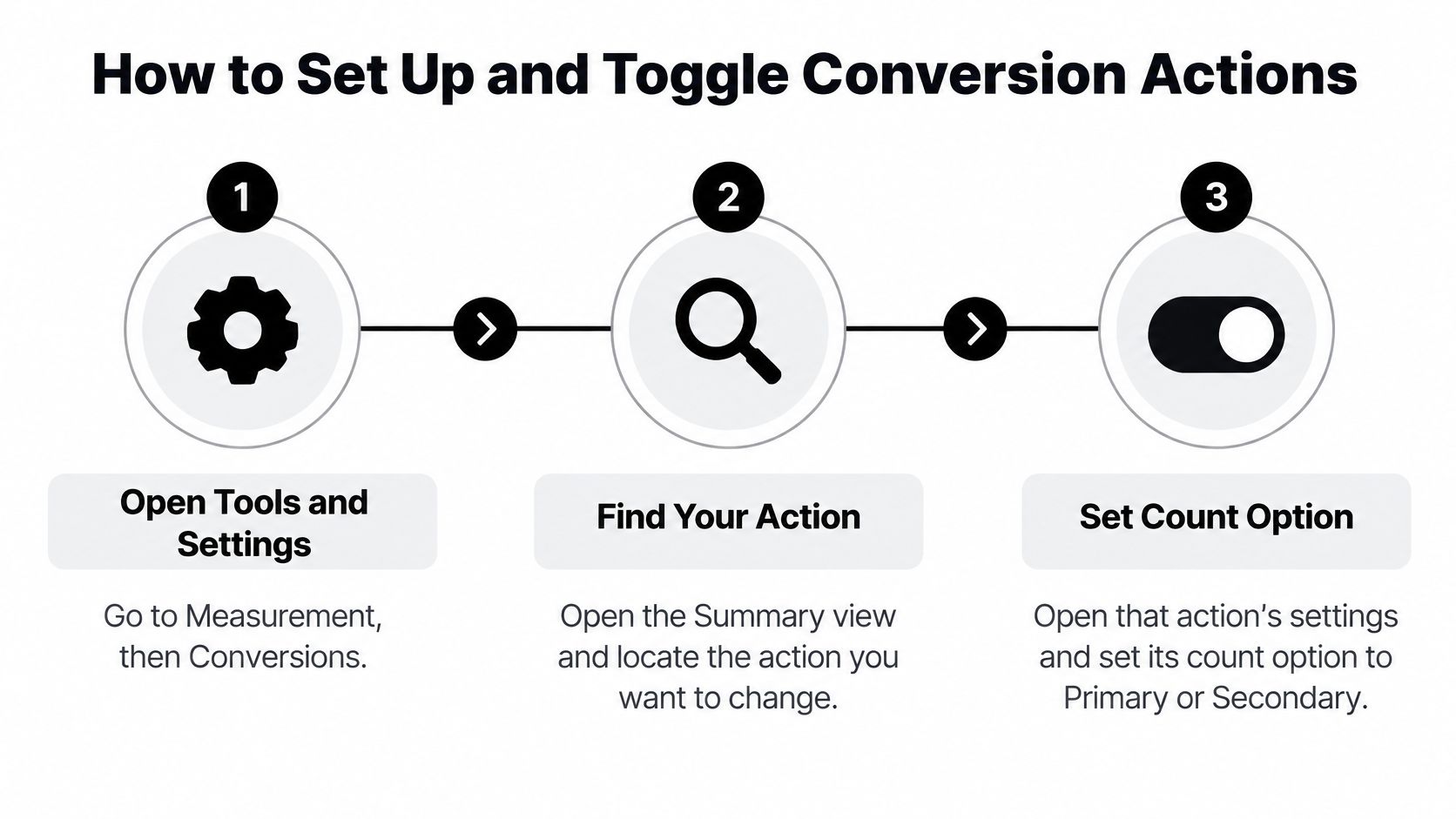
The Toggle Itself
- Open the conversions area: Go to Tools and settings, then Measurement, then Conversions. Every action in the account lives here, including the imports you forgot about.
- Find your action: Open the Summary view and locate the action you want to change. Read the name carefully, because accounts accumulate near-duplicates like "Lead," "Lead Form," and "Lead (GA4)" that mean different things.
- Set the count option: Open that action's settings and set it to Primary or Secondary, then save. Menu labels shift between interface versions, so if a button has moved, check the wording against Google's help pages instead of guessing.
Saving isn't the finish line. You've changed condition one of the chain. Condition two is still waiting.
Confirm the Goal and the Campaign
- Check the goal: Open your conversion goals and confirm the goal containing this action is selected for campaign optimization. Skip this and your shiny new primary may never touch a bid.
- Check each campaign's goal source: Confirm whether each campaign uses account-default goals or its own campaign-specific goals. Changes can spread further than expected here, or not spread at all.
- Add both columns: Put Conversions and All conversions side by side in your campaign table. You'll see immediately whether the action moved into the optimization column or stayed in observation territory.
- Give bidding time: Expect bids to adjust over several days after a change. Judging the switch on day one is how people panic-revert a correct fix.
- List everything: Write down every conversion action and its current primary or secondary setting.
- Confirm the goals: Check that each campaign uses the goal holding its intended primary action.
- Compare the columns: Look at Conversions versus All conversions for the last thirty days and explain the gap.
- Hunt duplicates: Test your lead forms end to end and confirm one real lead fires one primary conversion.
The Google Ads guidance on account-default goals explains that marking a goal as an account default makes its primary actions eligible for reporting and bidding across campaigns, except campaigns using campaign-specific goals. It also notes that imported analytics or automatically created events may default to secondary status to avoid unintended bidding or spend changes.
That default is Google doing you a favor, by the way. Don't flip an imported or auto-created event to primary just because it has volume. Flip it only after you know what it'll do to bids. If your tracking foundation needs work first, our walkthrough on setting up Google Ads conversion tracking properly covers the setup checks to do before you touch these toggles.
Verify the Change Worked
While you're verifying, check the conversion window and the count type, meaning every conversion versus one per click or session, on each action you touched. Those settings change the numbers you're comparing after a toggle. A purchase action counted once per click will never match a backend that counts repeat orders, and that gap isn't a primary or secondary problem.
Keep one primary action per meaningful business outcome where you can. Three primaries chasing the same lead is not thoroughness. It's noise with extra steps.
Troubleshooting Conversion Setups That Go Wrong
The most common panic sounds like this. All conversions is sitting well above Conversions and somebody assumes tracking is broken. Usually it isn't. Slow down before you change a single setting.
The Google Ads help page on conversion columns explains that the Conversions column counts conversions from primary conversion actions and is generally the column used for bidding optimization. All conversions includes data from secondary actions and can also include other measurements such as view-through conversions. So a higher All conversions total is normal, not an error.
Use each column for its actual job. Conversions tells you what's driving optimization right now. All conversions shows broader observed activity that isn't necessarily influencing bids. Compare them deliberately instead of treating the gap as a bug.
Symptoms Worth Checking in Order
| Symptom | Likely cause | Fix |
|---|---|---|
| CPA spikes after a micro event was promoted | Cheap events became primary, so bids chase them | Demote the micro event to secondary and let bidding relearn |
| Valuable action has no effect on bids | Its goal is not selected for campaign optimization | Select the goal in the campaign and confirm it is used |
| Imported event drives spend toward junk | Imported event was switched to primary without review | Revert it to secondary and check its downstream value first |
| Counts doubled for one lead | Form submit and thank-you page both fire | Keep one firing event as primary and move the other to secondary |
| Counts drop after consent changes | Consent limits remove measured conversions | Review consent coverage and enhanced conversion setup before changing the primary set |
| Campaign ignores the account default goal | Campaign uses its own campaign-specific goals | Check the campaign goal settings and align them with the account |
A few of these deserve emphasis. The doubled lead is embarrassingly common because someone tags the form submit and someone else tags the thank-you page, and both end up primary. Bidding then thinks you're getting twice the leads you are, and your real CPA is double the reported one. Deduplicate the firing before you touch budgets.
The consent row needs patience. If counts dropped after a consent change, promoting extra events to primary won't restore the missing data. It'll just replace a measurement gap with a noisier signal. Review coverage and your enhanced conversion setup first.
Timing matters on the fixes too. Demoting a micro event or selecting the right goal changes what bidding learns, and that relearning plays out over days, not hours. Reporting fixes, like deduplicating a double fire, show up in your data right away but need a fresh look at recent history, since past reports were inflated.
Confirm Your Primary Set Before You Trust Automation
The verdict first. Keep one primary action per meaningful business outcome, such as a purchase or a CRM-qualified lead, and keep funnel steps secondary unless they are proven to track revenue. If an event hasn't earned primary status with downstream proof, it hasn't earned it.
A Short Audit You Can Finish This Week
Agencies should document the primary set per client and revisit it after any tracking change, because a new tag or import can reshuffle the whole picture. In-house teams can tie the review to monthly reporting so it gets done. If volume is your worry, our breakdown of how many conversions Google Ads needs to optimize helps you judge whether your primary set can support Smart Bidding.
Brands selling on marketplaces face the same signal quality question in a different interface, and a bidding guide for Amazon brands from Headline Marketing Agency is a handy parallel read on feeding automation cleaner targets. The platform changes. The principle doesn't.
Once your conversion set is sound, cleaning up junk search terms is the natural next step. Keywordme's Chrome plugin helps you build negative keyword lists and apply match types in bulk, so bidding learns from cleaner traffic. Its seven-day free trial lets you test it on one account first. But if your primary set is still shaky, fix that before anything else. Cleaner queries can't rescue a signal that measures the wrong event.
Your bids are only as good as the primary conversion you point them at, so audit that set first and then tighten the traffic feeding it. Keywordme helps you clear junk search terms, build negative keyword lists, and apply match types without the spreadsheet slog. Start the seven-day free trial on one campaign and see how much cleaner your optimization signal gets.
.svg)