
How to Find Search Terms: A Practical Google Ads Workflow
How to Find Search Terms: A Practical Google Ads Workflow


Most advice on how to find search terms starts in the wrong place. It tells people to chase keyword ideas, export a sheet, and hope the data sorts itself out. That's how accounts get bloated with junk queries, weak intent, and expensive assumptions.
The clean way is harsher and better. Start with real query data, separate what people typed from what you thought they would type, then use performance signals to decide what deserves more budget and what deserves a hard negative. If you're running Google Ads, that's the difference between a tidy account and a leaky one.
Understanding the Search Terms Report in Google Ads
Keywords are what you bid on. Search terms are what people typed before your ad showed. If you don't separate those two, you end up optimizing theory instead of behavior.
In Google Ads, the path is simple. Go to Campaigns > Insights and reports > Search terms. Google says this report shows the queries that were used to trigger ads, and it only appears after there's enough activity to report, which means you're looking at live auction behavior, not a guess dressed up as research. Google also notes that low-volume queries may be grouped into an “other search terms” row or withheld, so this is a sample of query behavior, not a perfect log of every single search. See Google's explanation of the report in the Search terms report help page.
That limitation matters, because a lot of marketers mistake incomplete data for bad data. It isn't bad, it's just partial. Used correctly, it's still the fastest way to find waste, uncover new keyword opportunities, and build a negative keyword list from what users already proved they wanted.
Practical rule: if a query fired ads, it's real intent. Don't argue with it, sort it.
I'd also keep one thing handy while you're getting your footing. If you need a plain-language refresher on the difference between searches and terms, the internal guide on what a search term is is worth a quick read before you start trimming spend.
If you're setting up or cleaning up campaigns, it also helps to compare bidding options with Expert Mode before you go too far down the wrong campaign structure. A messy structure makes search-term analysis harder than it needs to be.
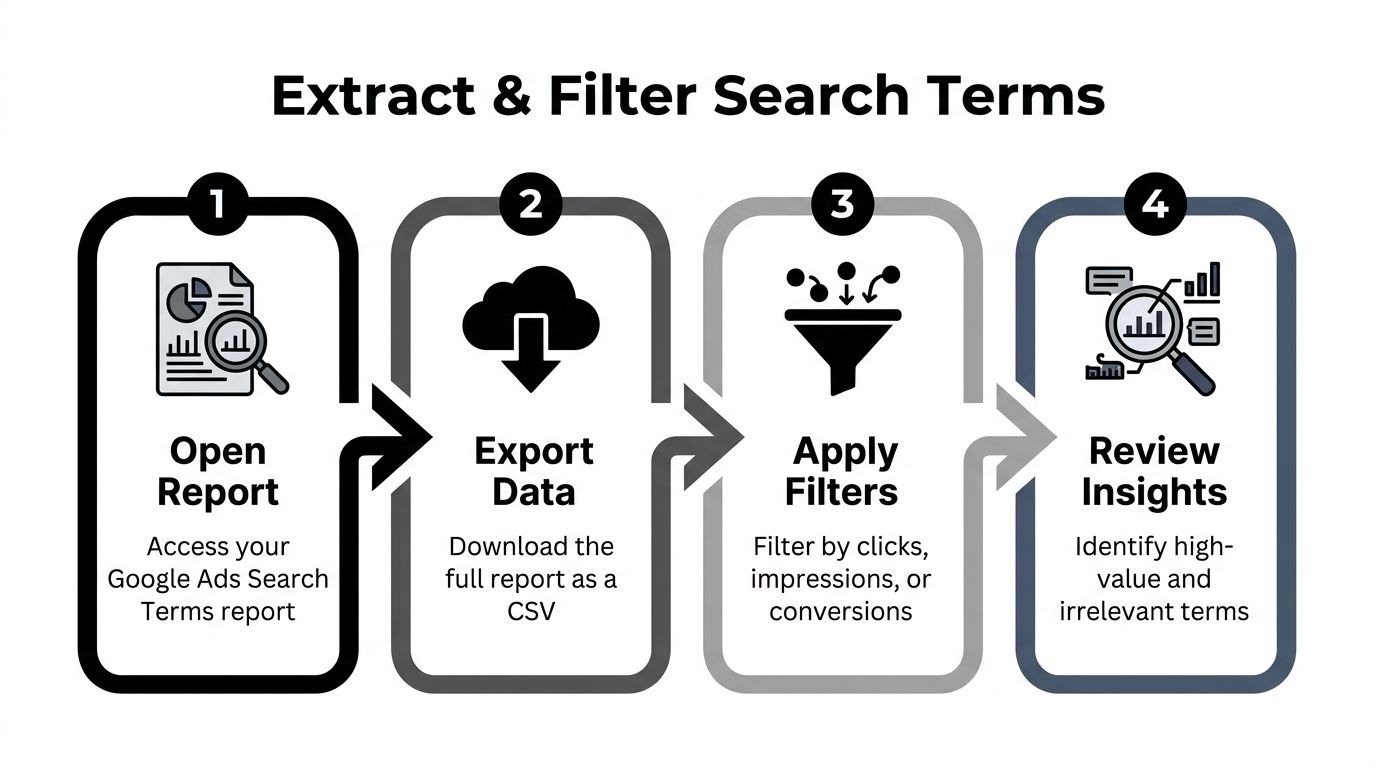
Extracting and Filtering High-Value Search Terms
Raw search-term data is dead weight until you filter it for action. Export the report, add the right columns, and stop treating every query like it deserves the same attention. The point is simple, find the terms that make money, waste money, or sit close enough to fix.
Start with the Search terms report and use a date range that matches the decision you need to make. If you are reviewing recent performance, use a shorter window. If you are looking for stable patterns, widen it. Then add the columns that matter for cleanup, conversions, cost per conversion, click-through rate, and average position. Those fields show whether a query is converting, stalling, or burning budget on clicks that never turn into anything useful.
Use a filtering order that keeps the analysis honest:
- Sort by conversions first to surface the terms already proving themselves.
- Sort by CTR next to catch strong intent that has not earned enough volume yet.
- Sort by cost last to expose terms that are taking money without giving it back.
That order beats volume-chasing because it starts with outcomes. A query with modest traffic and clean conversion behavior usually matters more than a high-volume phrase that never closes. The same logic applies when you prioritize accounts with intent data, the signal that shows whether a prospect is just browsing or ready for a sales conversation.
Here is the cleanest way to read the sheet:
| Search term signal | What it usually means | What to do |
|---|---|---|
| High conversions | The term is aligned with your offer | Promote it |
| Strong CTR, weak volume | Good intent, not enough reach yet | Test expansion carefully |
| High cost, no conversions | Budget drain | Pause it or negate it |
| Relevant but underperforming | The term may belong, but the landing page or ad needs work | Review before cutting |
A query can look busy and still be bad. One of the most common mistakes is treating click-happy terms as valuable just because they attract attention. If the clicks do not turn into revenue, you are paying for curiosity.
Use this filter discipline: promote proven terms, fix borderline terms, and cut obvious junk. Do not put all three in the same bucket.
For a practical checklist on pulling candidates from live query data, keep the A four-step infographic illustrating how to extract and filter Google Ads search terms effectively. handy while you work through the report.
Evaluating Search Terms by Intent and Competition
A search term can be popular and still be wrong for your business. That's why I never start with volume alone. I start with intent, then check whether the query is worth fighting for.
Google Trends is useful here because it shows interest as a relative measure, not absolute counts, and it analyzes a sample of Google searches rather than every search. Google also says you can compare up to 5 terms in Explore and filter by country, date range, category, and Google property, which makes it handy for seeing whether a term is rising, fading, or just having a moment. The important part is not the raw popularity score, it's the shape of demand over time. For that framing, Google's own explanation of Trends is the right reference point: how Google Trends data works.
The question is whether the term matches your page and your goal. Informational queries belong near educational content. Transactional queries belong near conversion pages. Commercial queries sit in the middle and need tighter judgment. HubSpot's advice to weigh search volume, keyword difficulty, and search intent together is the correct way to keep yourself from picking terms just because they look exciting on paper. It also warns against relying only on high monthly volume, which is exactly how accounts drift into vanity targeting.
Keyword difficulty deserves special treatment. Treat it as a relative triage signal, not a sacred score. Different vendors model it differently, so don't pretend the number means the same thing everywhere. If a term looks competitive but the query clearly matches a profitable offer, it can still be worth pursuing. If the term is broad, muddy, and far from the landing page, it's dead weight no matter how attractive the volume looks.
Hard truth: more search volume is not automatically more value. Quiet long-tail terms often convert better because the intent is tighter and the mess is smaller.
When I'm deciding whether to spend on a term, I want the term to earn its place. If it can drive awareness, leads, or purchases, it belongs in the conversation. If it's only there because the number looks nice, it doesn't.
If you want another useful lens on that decision, Stamina's note on prioritizing accounts with intent data aligns well with this mindset. Intent should steer the work, not decorate it.
Expanding Ad Groups with Winning Search Terms
Once a search term proves itself, don't leave it buried in a report. Move it into the structure where it can do more work. That usually means adding it as a keyword in the right ad group, then matching the ad and landing page to the same intent.
The match type choice matters. Use exact match when you want tight relevance and very little drift. Use phrase match when the core term is valuable but you want some flexibility around variations. Use broad match only when you've already built strong negative keyword coverage and you're comfortable letting Google explore more variation. The wrong match type can turn a good query into a noisy one fast.
A clean example looks like this:
- Exact match:
[emergency plumbing repair] - Phrase match:
"emergency plumbing repair" - Broad match:
emergency plumbing repair
Those are not interchangeable. Put the exact variant in the ad group that already matches the intent tightly. Use phrase if you want nearby variations without opening the floodgates. Keep broad in a broader campaign only when your negatives are doing real work. If you don't know where the term belongs, the term is probably too loose to promote yet.
Ad group structure should follow search-term clusters, not internal department logic. If three winning queries are all about one intent, they should live together. That makes ad copy cleaner and landing-page alignment much easier. It also keeps you from forcing one ad to answer five different search problems badly.
A few rules keep expansion from turning into account sprawl:
- Promote only validated terms: a search term should have clear performance signals before you add it.
- Match intent to ad group: don't dump a strong query into a generic bucket.
- Use negatives to protect the group: every expansion creates new leakage risk.
- Wait before calling it a win: give new keywords time to breathe for seven to fourteen days before you decide whether they belong.
That waiting period matters because short-term noise can fool you. A term can look good in a tiny sample and then go flat. Don't crown a winner on one good afternoon.
Building and Applying Negative Keyword Lists
Negative keywords are where real cleanup happens. They stop irrelevant queries before they waste more budget, and they are the fastest way to make messy search-term data useful. If a query is irrelevant, off-brand, or clearly never going to convert, it does not deserve another impression.
Build the junk list fast and with intent. Add irrelevant queries, competitor brand names you do not want to appear beside, informational searches that will never close, and phrases that keep getting clicks without conversions. If a term keeps proving the wrong intent, it belongs in a negative list, not in a “maybe later” folder.
Use the right scope. Ad group negatives are for narrow cleanup, where you want to block a bad query from one cluster but leave it open elsewhere. Campaign negatives are for broader exclusions that should apply across the full campaign. Exact negative match blocks only the specific query. Phrase negative match blocks a wider set of variations. That difference matters, and sloppy use of it is where budgets get wasted.
A practical example makes the choice clear. If the search term is “free CRM software,” an exact negative blocks that exact query. A phrase negative on “free CRM” blocks the family of queries around that phrase. If the term is irrelevant in every form, use the broader negative. If it is only bad in one context, keep the exclusion narrow.
Review the Search terms report weekly, update the negative list on a steady cadence, and archive old negatives that no longer fit the account. That is not busywork, it is maintenance that keeps your account clean.
| Negative Keyword Mistakes and Fixes | |
|---|---|
| Blocking too broadly | Use a narrower match type or move the negative to the ad group level |
| Leaving old negatives in place | Audit and archive irrelevant exclusions |
| Negating a term before checking intent | Review the query and landing page fit first |
| Mixing campaign and ad group logic | Keep exclusions aligned with scope |
| Forgetting recurring review | Set a weekly Search terms review and a monthly negative list cleanup |
For a clean starting point, use this Google Ads negative keyword list template as a practical structure for pulling candidates into one place. If you are comparing workflow tools, the AI SEO tool comparison is useful context for where automation fits alongside manual cleanup.
Automating Search Term Optimization with Keywordme
Manual search-term cleanup is where good intentions go to die. You export the report, sort it, tag a few winners, build some negatives, then lose an hour to copy-paste. Keywordme exists to remove that grind by handling the repetitive parts inside a live Google Ads Search terms workflow.
The browser plugin scans the report and automates three core actions in one pass. It identifies junk terms to add to a negative keyword list, suggests match-type expansion for high-converting terms, and surfaces new keyword opportunities that deserve their own ad group. That's the part teams want but never bother to systematize because the manual version is annoying. For teams comparing tools, MyMentions has a useful AI SEO tool comparison that helps frame where automation tools fit in a broader workflow.
The difference is mostly friction. Manual workflow means export, filter, triage, copy, paste, format, upload, and repeat. The plugin workflow means open the live report, scan, review suggested actions, and apply changes. Same job, fewer places to make a mistake.
That matters whether you're working on one account or many. The same cleanup logic applies to small shops and large operations, but the pain compounds faster as the account gets bigger. If your team keeps doing the same search-term cleanup by hand every week, you're burning time on formatting instead of decisions.
Best use case: let software handle the tagging and list-building, then spend your brain on the calls that actually need judgment.
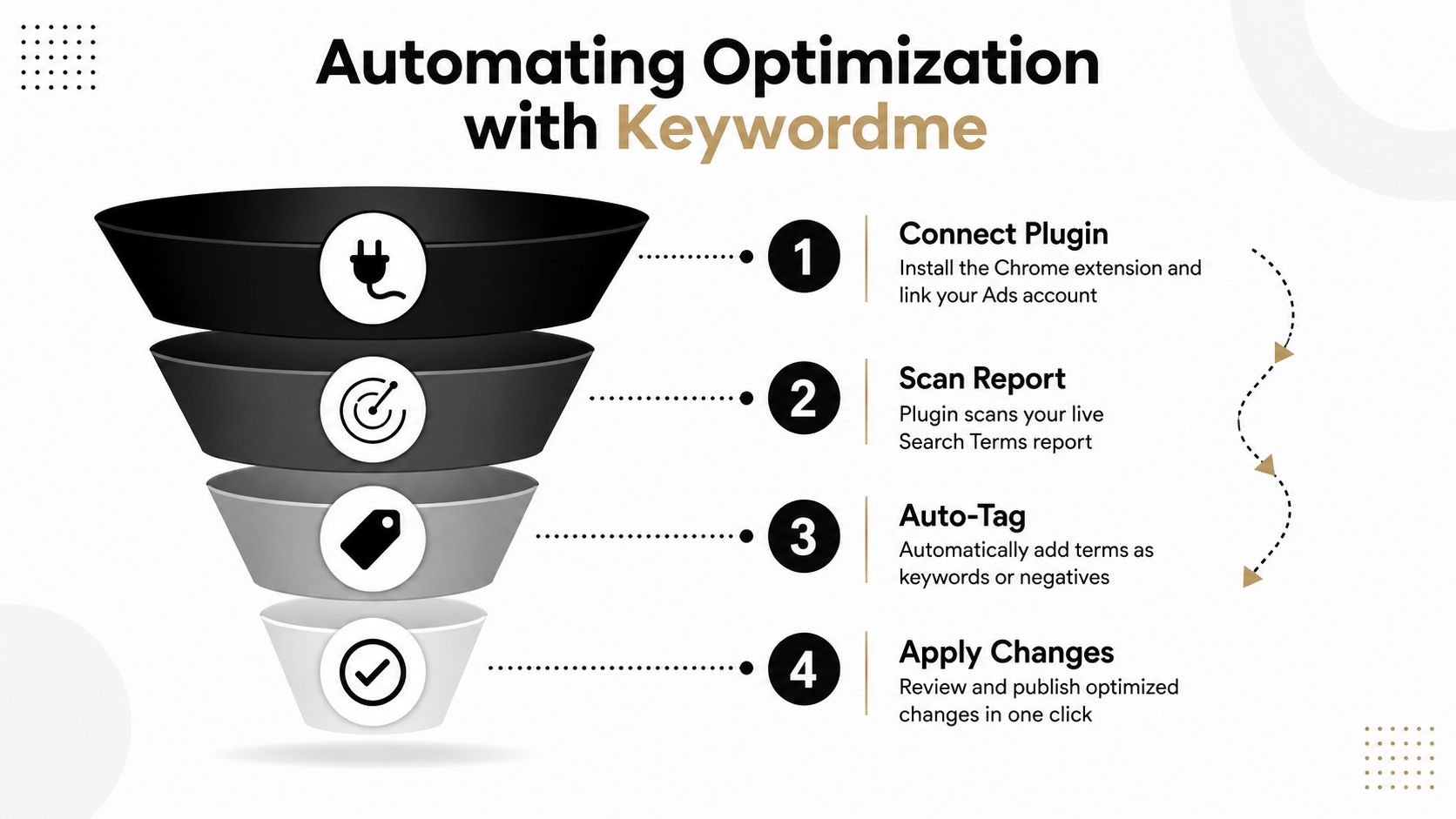
If you want the exact automation flow, the internal guide on automating search term analysis in Google Ads shows how the routine maps into a repeatable process. Keywordme also offers a seven-day free trial and a help center, which makes setup low-friction if you want to test the workflow before rolling it into your account routine.
Putting It All Together Your Search Term Optimization Checklist
Search-term work gets better when it becomes a habit, not a fire drill. You don't need a huge framework. You need a clean routine that catches waste, promotes winners, and keeps the account from drifting.
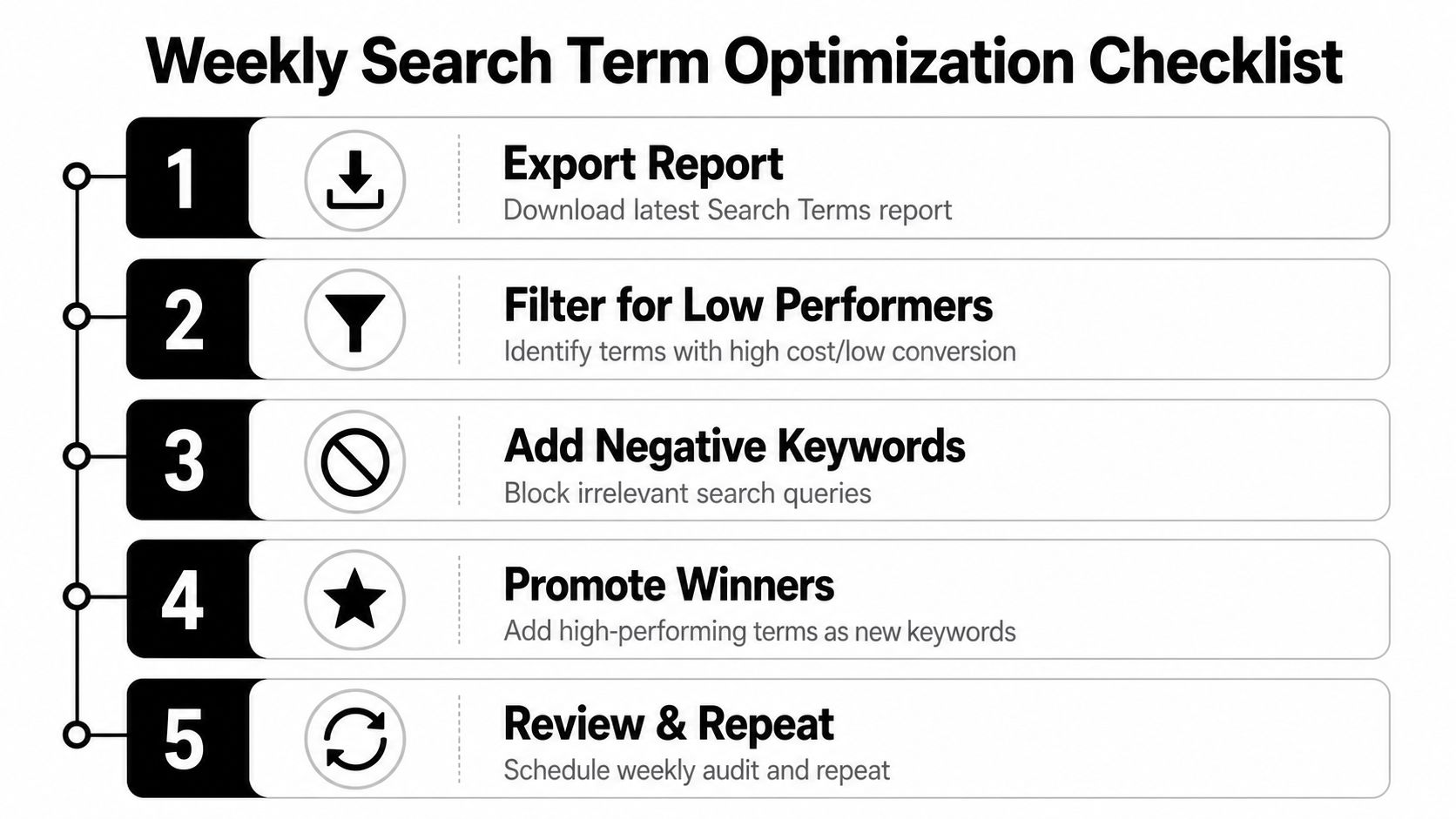
Use this checklist every week:
- Export the Search terms report and pull a date range that fits the decision you're making.
- Filter for low performers by checking cost, CTR, and conversion behavior before you touch anything.
- Evaluate intent and competition so you know which terms deserve more spend and which ones are too weak or too broad.
- Add winners as new keywords in the right ad group with the match type that fits the intent.
- Update your negative list so the same junk queries stop draining the account again.
- Run the same review through Keywordme if you want the repetitive sorting and tagging handled faster.
- Repeat on a schedule because search-term cleanup only works when it's ongoing.
That sequence is the whole game. Find what people searched, decide what belongs, and remove what doesn't. If you keep doing that, you stop paying for sloppy traffic and start buying cleaner intent.
Keywordme gives you a faster way to handle search-term cleanup without living in spreadsheets. It scans live Google Ads query data, flags negatives, and surfaces keyword expansion opportunities so you can act on real behavior instead of guessing. If you want to tighten your campaigns and waste less spend, visit Keywordme and test the workflow for yourself.
.svg)