
Master How to Find Negative Keywords Google Ads in 2026
Master How to Find Negative Keywords Google Ads in 2026


SEO Title: How to Find Negative Keywords Google Ads
Meta Description: Learn how to find negative keywords Google Ads teams employ to cut waste, build shared lists, and scale cleaner traffic across campaigns.
You open the Search terms report and spot the same old mess. Clicks from people looking for free stuff. Clicks from job seekers. Clicks from people trying to learn, compare, or fix something you don't even offer. The budget didn't disappear because Google Ads is broken. It leaked because nobody closed the obvious holes.
That's where negative keywords matter. Not as account housekeeping. Not as a once-a-quarter cleanup task. They're one of the few controls that directly protect spend from bad intent.
Most advice on how to find negative keywords Google Ads gives you the beginner version. Add bad queries one by one. Move on. That works for an afternoon. It falls apart when you manage multiple campaigns, broad match traffic, or a client account that keeps generating fresh junk every day. The better approach is a system. Review search terms consistently, classify waste by intent pattern, push stable exclusions into shared lists, and only block terms after checking context so you don't choke off real demand.
Why Your Ad Spend Is Leaking and How Negatives Plug the Holes
Bad traffic usually isn't dramatic. It's small, repeated, and easy to ignore until the account starts feeling heavy. CTR slips. Lead quality gets weird. Sales asks why so many form fills aren't relevant. The campaign still spends, so it looks active. It just doesn't stay efficient.
Negative keywords fix that at the source. They stop your ads from entering auctions tied to the wrong intent. That means less budget spent educating non-buyers, entertaining bargain hunters, or attracting searches that belong to a different business model.
What wasted spend usually looks like
Most irrelevant traffic falls into a few buckets:
- Research intent: searches with modifiers like “how to,” “tutorial,” or “course”
- Low-value intent: searches containing “free”
- Employment intent: searches with “jobs” or “salary”
- Wrong offer fit: terms related to products, services, or audiences you don't serve
A lot of advertisers make the same mistake. They treat each bad search as a one-off event. That creates bloated cleanup work and misses the pattern causing the waste.
Practical rule: Don't just negative the exact ugly query you saw. Find the modifier or root intent behind it.
What actually works in real accounts
A useful negative keyword workflow does three things well:
- Finds bad search behavior early through regular report reviews.
- Groups exclusions by intent pattern so one decision blocks future variants.
- Separates local fixes from scalable rules so campaign-specific terms don't clutter account-wide lists.
That last part matters more than most tutorials admit. One campaign may need to block “training,” while another campaign sells training. If you throw every exclusion into one giant list, you'll eventually suppress traffic you wanted.
Here's the operating mindset that holds up: protect relevance first, then scale the system. Manual cleanup without structure becomes a maintenance trap. Structured negative management turns your account into something more stable, easier to audit, and harder to waste.
Mining Gold from Your Search Terms Report
If you only use one source to find negatives, use the Search terms report. Google's own guidance says to review the actual queries that triggered your ads and add irrelevant ones as negatives, and published audit guidance commonly recommends using at least a 30-day date range so patterns have enough volume to show up clearly in the data (Google Ads help on search terms and negatives).
Start with a decent window. Too short, and you'll react to noise. Too long, and you'll delay obvious fixes. For most accounts, a month gives you enough context to spot repeated intent problems without overfitting the account to a weird week.
Here's the process at a glance:
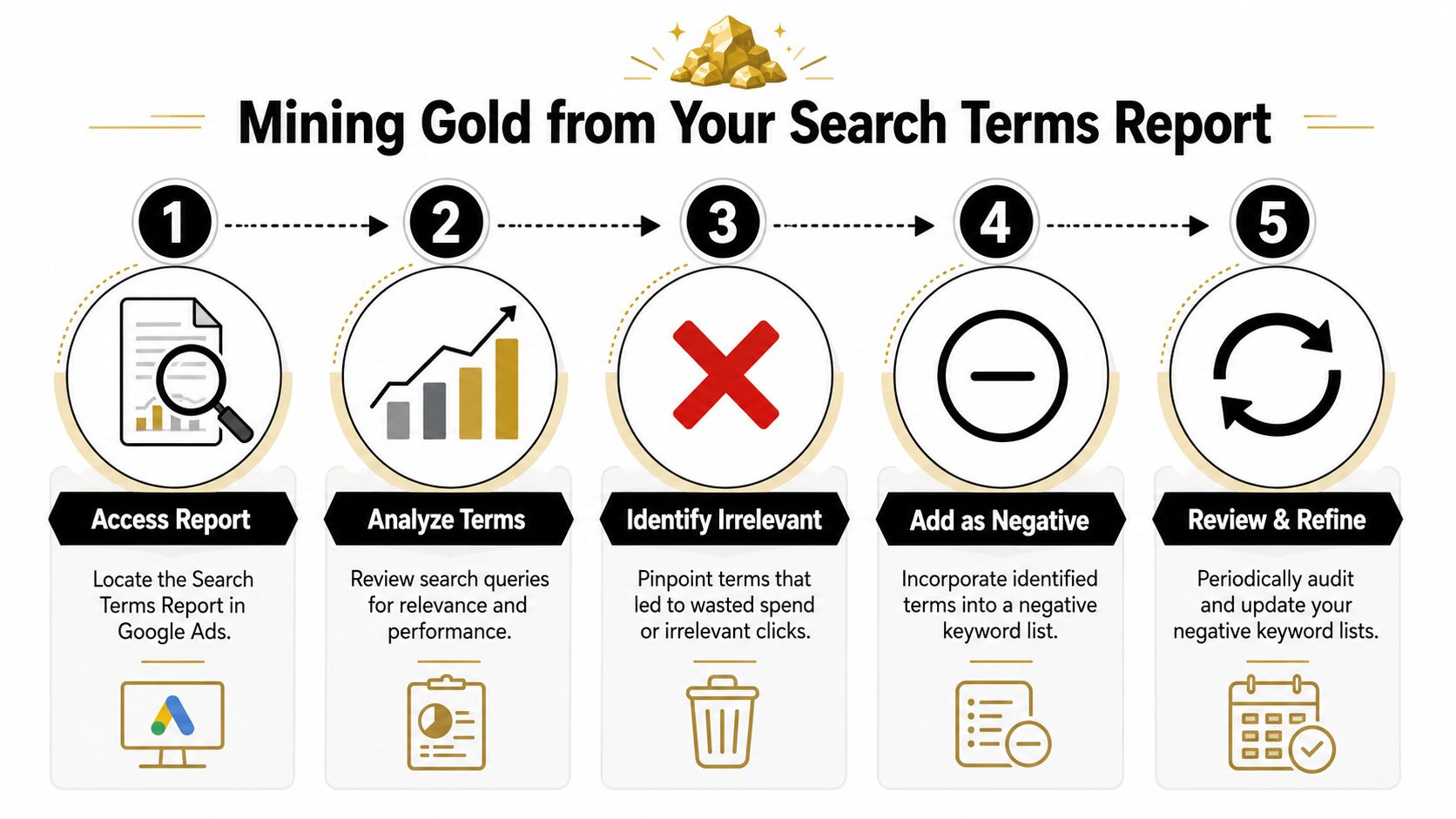
How to read the report without wasting time
Don't scroll randomly. Sort with intent in mind.
Look first for terms that are clearly irrelevant on their face. Then look for terms that are relevant-ish but commercially weak. Those are different problems. The first should usually be excluded. The second needs judgment.
A clean workflow looks like this:
- Scan for obvious junk: “free,” “jobs,” “salary,” “tutorial,” “course,” and similar modifiers are often the fastest wins.
- Check queries with spend but weak outcomes: if a term keeps attracting clicks and shows poor performance signals, it deserves review.
- Look for repeated stems: if several bad searches share the same root pattern, exclude the pattern instead of each query.
If you want a deeper walk-through of reading that report efficiently, Keywordme has a useful guide on the Google Ads Search Terms Report.
Bad search terms rarely arrive one at a time. They arrive in clusters that share intent.
Add negatives for the pattern, not the symptom
Newer advertisers often lose a lot of time. They add one exact-match negative for one ugly query and feel productive. Then the next variant appears tomorrow.
A better move is to identify the intent trigger. If people keep searching your offer with “free,” adding the root term as a negative can block future variants too. That's the difference between cleanup and prevention.
Later in the review, use this video if you want to see the process in action:
Signals worth taking seriously
Not every non-converting term should be blocked. Some need more time. Some belong in a different ad group. Some are top-of-funnel and still useful. What deserves attention first?
| Signal | What it usually means | Action |
|---|---|---|
| Clearly irrelevant wording | Wrong audience or wrong need | Add as negative |
| Repeated low-intent modifier | Pattern-level mismatch | Block the modifier or root term |
| Weak engagement and poor fit | Search intent mismatch | Review before excluding |
| Relevant query but wrong campaign | Structure issue | Add campaign-level negative or move targeting |
The Search terms report tells you what happened. That's why it stays at the center of any serious Google Ads negative workflow.
Proactive Hunting with Google Keyword Planner
Reactive cleanup is necessary. It's not enough.
If you wait for search terms to appear before making decisions, you're paying tuition every time a new campaign launches. A smarter setup starts before the first click. That's where Google Keyword Planner helps. Not because it hands you a finished negative list, but because it shows the language orbiting your main keyword themes. That language reveals the intent traps.
Build a starter exclusion list before launch
When I'm preparing a campaign, I don't just ask what I want to target. I ask what I absolutely don't want mixed into the same traffic pool.
A common best practice is to classify negatives by intent pattern rather than one-off terms. Practitioners routinely watch for modifiers such as “how to,” “free,” “jobs,” “salary,” and “course”, then add the root term as a negative so future variants get blocked too (Keywordme guide to finding negative keywords).
That principle works well inside Keyword Planner. Enter your core commercial terms, then review the related ideas with one question in mind: does this phrase signal buyer intent, learning intent, or something else?
The filters I use mentally
Keyword Planner can flood you with adjacent searches. Most of them are harmless. Some are expensive distractions. I sort them loosely into these groups:
Informational searches
“How to,” “what is,” “tutorial,” “guide.” These usually belong to content strategy, not direct-response campaigns.Education and training searches
“Course,” “certificate,” “class.” Useful only if that's your offer.Employment searches
“Jobs,” “salary,” “hiring,” “vacancies.” Easy negatives for most lead gen and ecommerce campaigns.Freebie intent
“Free,” “template,” “sample,” “download.” Sometimes relevant, often not.
If you want a more specific pre-launch process, Keywordme also has a walkthrough on using Google Ads Keyword Planner for negatives.
What this approach catches that reactive reviews miss
Search-term cleanup is backward-looking. Keyword Planner helps you catch categories of waste before they trigger impressions. That matters most in broad campaigns, new verticals, and accounts where multiple people build campaigns without a shared filtering standard.
If a bad intent pattern is obvious before launch, there's no reason to wait for it to spend money.
There's also a second benefit. Proactive negative planning forces you to define offer boundaries early. Are you targeting buyers, researchers, students, or applicants? If your answer isn't clear, your keyword strategy usually isn't clear either.
The best starter lists aren't huge. They're sharp. A compact list of intent-based negatives does more work than a random pile of one-off exclusions copied from another account.
Scale Your Efforts with Shared Negative Lists
Adding negatives one by one inside a single campaign is fine until the account grows. Then it becomes repetitive, inconsistent, and fragile. One person blocks “jobs” in two campaigns, forgets three others, and six weeks later you're still paying for employment searches in the same account.
Google explicitly supports account-level negative keyword lists that can be applied across multiple campaigns, and later edits to the shared list automatically propagate to campaigns using it (Google Ads help on account-level negative keyword lists). That's the shift most advertisers need. Stop thinking only about individual exclusions. Start thinking about governance.
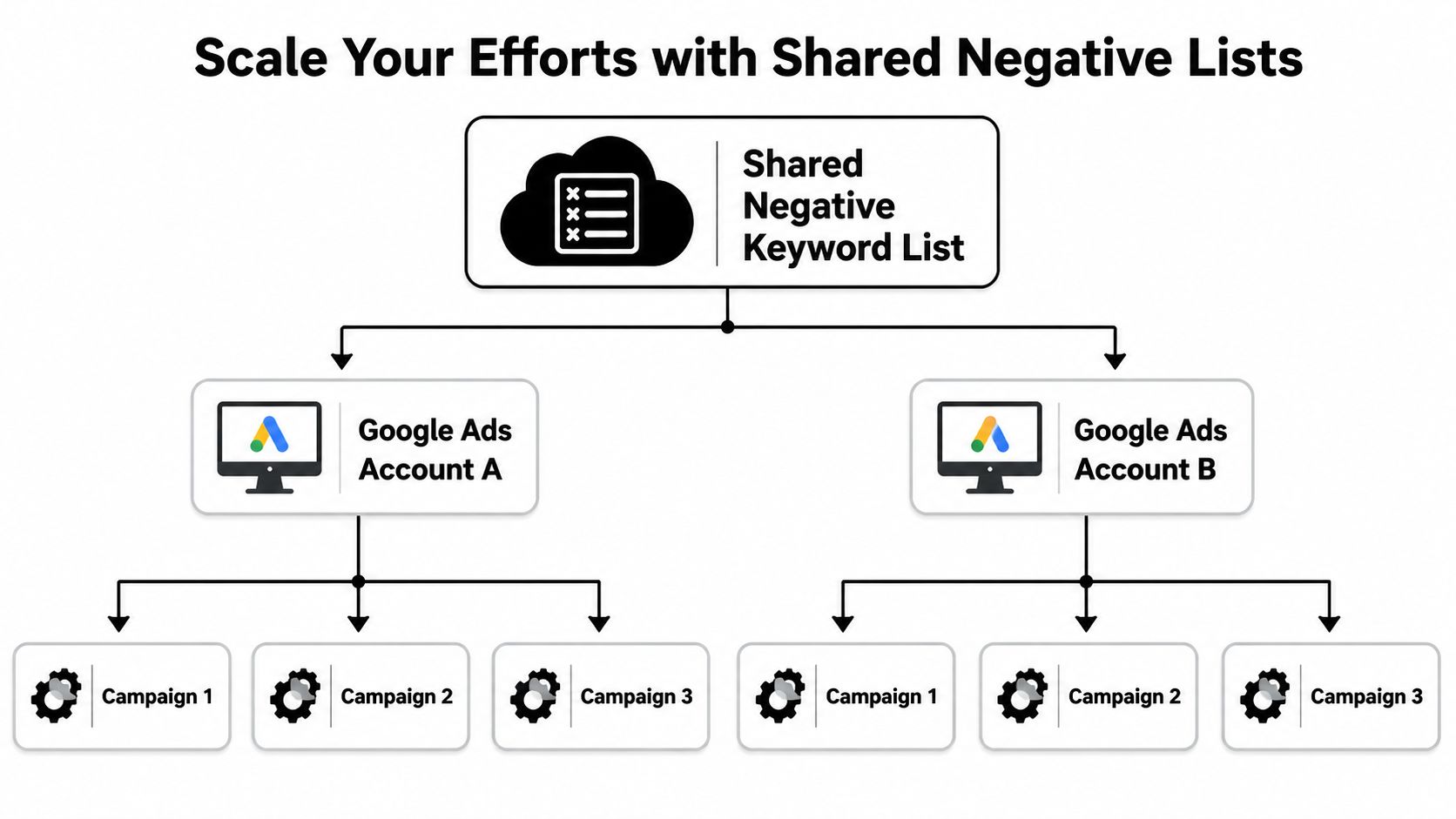
What belongs in a shared list
Shared lists are for exclusions that are stable across multiple campaigns. Not probable. Not maybe. Stable.
Typical candidates include:
- Universal low-intent modifiers: terms like “free” when you don't offer a free version
- Employment modifiers: “jobs,” “salary,” “careers” if hiring intent never matters
- Research-only terms: “tutorial” or “course” when you sell services, not education
- Audience mismatches: terms tied to segments your business never serves
These lists are especially useful in large accounts because they reduce duplicate work and make future audits cleaner. Keywordme has a practical companion piece on managing negative keywords across multiple campaigns.
What should stay at campaign level
Not every negative deserves to be global. Some terms have mixed intent and need to stay local.
For example, one campaign may target software buyers while another targets implementation services. A term that's irrelevant in one can be valuable in the other. Shared lists are blunt instruments when intent overlaps.
Use campaign-level negatives when the term is:
| Negative type | Best home | Reason |
|---|---|---|
| Universal mismatch | Shared list | Applies broadly across the account |
| Offer-specific mismatch | Campaign level | Only blocks one offer or funnel |
| Funnel separation term | Campaign level | Prevents overlap between campaigns |
| Ambiguous term | Local first | Needs context before scaling |
The system that keeps this manageable
A workable setup usually has layers:
- Core shared list for terms nobody wants.
- Campaign-specific lists for offer-level filtering.
- Regular review cadence so new patterns move into the right layer over time.
That last point is where most accounts break. People find a bad term, add it somewhere, and never revisit the decision. Shared list strategy only works when someone owns the logic. Otherwise, the account fills with contradictory exclusions.
Shared lists save time only when your rules are consistent. Without that, they just spread mistakes faster.
The core skill isn't building a long list. It's deciding where each exclusion belongs so the account stays clean without becoming restrictive.
Advanced Strategies to Avoid Costly Mistakes
Negative keywords look simple until they start blocking traffic you desired. Then performance gets weird fast. Impressions drop. High-intent queries vanish. Nobody notices for days because the changes looked harmless at the time.
Most of these mistakes come from two habits. First, adding negatives too aggressively. Second, using the wrong match type by default.
Why phrase match is usually the safest default
For durable negative lists, industry guidance often favors phrase match because exact negatives only block the exact query and can miss close variants. The risk goes the other way too. If you overblock, you can suppress high-intent traffic, so exclusions should follow a review of context and performance signals such as low CTR or low conversion rate (Store Growers guide on negative keywords).
That lines up with what holds up in practice. Exact-match negatives are too narrow for many recurring junk patterns. Broad exclusions can get sloppy. Phrase match often gives the cleanest balance between coverage and control.
The biggest mistake is overblocking mixed-intent terms
Some words are bad in one context and valuable in another. Those are the dangerous ones.
Take a term like “training.” For a software company selling employee enablement, that may be commercial. For a product company that doesn't educate users, it may be irrelevant. If you push mixed-intent words into shared negatives too quickly, you can knock out good traffic across multiple campaigns at once.
Use this checklist before adding a broader exclusion:
- Check the full query context: not just the single word that annoyed you
- Look at performance signals: low CTR or weak conversion behavior matters more than instinct
- Compare against active target keywords: make sure you're not negating part of your own strategy
- Test locally before scaling: campaign level first, shared list later
Don't confuse account cleanup with account health
A very clean negative list can still be a bad list. I've seen accounts where everything looked organized, but volume was getting strangled because someone kept excluding any term that wasn't an obvious closer.
That's not optimization. That's overcorrection.
Good negative management protects intent. Bad negative management protects your ego from messy data.
You also need to watch for conflicts with target keywords. If you actively bid on a theme in one place and negative the same language elsewhere without thinking through structure, delivery gets inconsistent. That's usually a sign the campaign architecture needs work, not more exclusions.
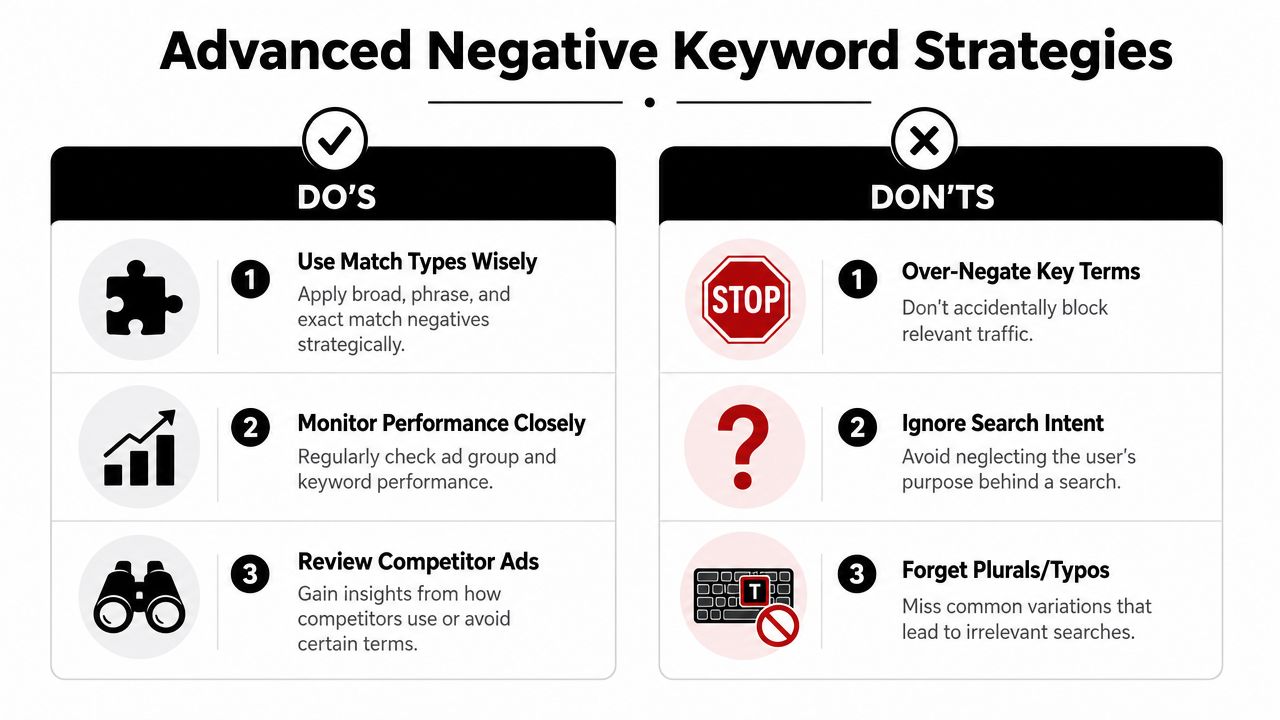
A practical do and don't list
Do review match type before saving. The default isn't always the right choice.
Do keep ambiguous negatives local first. Scale them only after repeated confirmation.
Do use performance context. A term that looks ugly may still convert.
Don't block every top-of-funnel phrase automatically. Some accounts need discovery traffic.
Don't dump all exclusions into shared lists. Centralized mistakes spread fast.
Don't ignore plural, wording, and query context differences. Small variations can change intent.
If you're serious about how to find negative keywords Google Ads accounts can sustain long term, the work becomes more strategic at this point. The easy part is finding bad terms. The harder part is deciding how much to block without damaging reach.
Accelerate Your Workflow with Keywordme
The manual workflow works. It also eats time.
You review reports, sort terms, copy exclusions, choose match types, decide list level, and repeat the same motions across campaigns. That's manageable in a small account. It gets tedious quickly once search volume expands or multiple people touch the same Google Ads setup.

Keywordme is built for that part of the job. It's a Google Ads management tool with a Chrome plugin that helps clean up junk search terms, apply match types, and handle negative keyword workflows inside Google Ads without all the manual formatting and copy-paste work. That makes it easier to move from one-off cleanup to a repeatable process across campaign, ad group, and shared-list decisions.
Where automation actually helps
The useful part of automation isn't replacing judgment. It's removing repetitive actions around that judgment.
That means tools are most helpful when they speed up tasks like:
- spotting clusters of junk terms inside search term data
- applying the right negative match type quickly
- pushing exclusions into the correct account level
- keeping list-building consistent across campaigns
If you're managing one small campaign, you can do all of this by hand. If you're managing several campaigns, or multiple client accounts, you'll usually achieve greater efficiency by tightening the workflow around decisions instead of spending energy on admin.
The strongest setup is still the same one described throughout this article. Review actual queries. Group waste by intent. Keep universal exclusions separate from local ones. Audit regularly so new junk doesn't pile up. A tool just makes that system easier to run consistently.
If you want a faster way to turn search-term review into usable negatives, Keywordme is worth a look. It's designed for Google Ads teams that want less manual cleanup and a cleaner workflow for building, assigning, and maintaining negative keywords at scale.
.svg)