
How to Create a Google Ad That Actually Converts
How to Create a Google Ad That Actually Converts


So, you're ready to dive into Google Ads? Awesome. The whole process really just comes down to a few core decisions: setting up your account, figuring out what you want to achieve, and then choosing the right campaign type and keywords to make it happen. Every single choice you make at the start has a ripple effect on your results later on.
Laying the Groundwork for a Winning Google Ad
Before you even think about writing a headline or bidding on a keyword, you’ve got to get your foundation solid. I’ve seen too many people jump straight to the "fun" stuff and wonder why they're burning through cash with nothing to show for it. Don't be that person.
This initial setup is all about strategy. It kicks off with creating your Google Ads account, which is pretty straightforward. But right after that, you hit your first big fork in the road: picking a campaign type and, more importantly, defining your goal.
Defining Your Campaign’s Purpose
This is the single most important question you need to answer: "What do I actually want this ad to do?" Your campaign objective is your guiding light. It tells Google's algorithm what to optimize for and determines which ad formats and bidding options you'll even have access to.
Most of the time, your goal will be one of these:
- Sales: You want people to buy something directly from your website or app.
- Leads: Your goal is to get potential customers to fill out a form or give you a call.
- Website Traffic: You just need to get the right eyeballs on your website to explore your content.
- Brand Awareness and Reach: It's all about getting your name out there to a massive audience.
A campaign without a clear objective is like a ship without a rudder. You’ll spend money and drift around, but you won't reach a specific destination. Defining your goal first ensures every subsequent action is purposeful.
Choosing Your Battleground
Once you know your "why," you can pick the right campaign type. Google gives you a bunch of options, but for most businesses starting out, it boils down to three main players: Search, Display, and Video.
Each one works differently. Search ads are fantastic for capturing existing demand—you're targeting people who are actively searching for what you offer. This makes them a go-to for generating high-quality leads and sales.
On the other hand, Display and Video ads are more about creating demand. They put your brand in front of people before they even know they need you, which is perfect for building brand awareness.
Before you get too deep in the weeds, taking a moment for understanding paid search advertising can really help set the stage. Trust me, getting this early stuff right saves a ton of headaches and wasted budget down the road.
Finding Keywords That Connect You to Buyers

Alright, now that you know your campaign goals, it's time to dig into the heart of any Search campaign: keywords. These are the words and phrases that connect what people are searching for with what you’re selling. Get them right, and you'll find customers who are ready to buy. Get them wrong, and you might as well just set your budget on fire.
The real skill here isn't just about finding any old keywords; it's about finding the ones with strong commercial intent. You're looking for phrases that scream, "I'm ready to pull out my wallet!"
Think about it. Someone searching for "what is a drip coffee maker" is just doing homework. But someone searching for "buy breville barista express"? That’s a hot lead. That’s who you want to talk to.
The Power of Keyword Match Types
Google gives you a few tools to control exactly when your ads show up. These are called keyword match types, and they are absolutely crucial for protecting your ad spend. The three main ones you need to know are broad match, phrase match, and exact match.
Each one works differently, and picking the right one is a bit of a balancing act. Broad match casts a really wide net—great for discovering new search terms you might have missed, but it can also attract a lot of clicks from people who aren't really interested in your offer. Exact match is the complete opposite; it’s like a sniper rifle, showing your ad only for a very specific search.
Your keyword strategy isn't just a list of words; it's a carefully constructed plan for capturing intent. Start with more specific match types to control costs, and then expand once you have data on what's converting.
I always suggest starting with tighter control and then carefully expanding. For a deeper dive into this, check out our guide on how to choose the right keywords for your Google Ads: https://www.keywordme.io/blog/choosing-keywords-for-adwords
Keyword Match Types Explained
To really get a handle on this, let's break down what each match type does and when you should use it.
As you can see, there's a trade-off between reach and control. My advice? Get comfortable with all three, because you'll likely use a mix of them in your campaigns.
Your Secret Weapon: Negative Keywords
Now for my favorite part, and something too many beginners ignore: negative keywords. These are the terms you tell Google you don't want your ads to show for.
Let's say you sell premium, high-end "leather work boots." You'd want to add words like "cheap," "free," and "used" to your negative keyword list. This is a non-negotiable step. It's your single best defense against wasting money on clicks from people who were never going to buy from you anyway.
For an even more advanced trick, you can look into Dynamic Keyword Insertion. This feature automatically updates your ad copy to include the keyword that a user searched for, which can make your ads feel incredibly personal and often boosts click-through rates. It’s a great way to show searchers that you have exactly what they’re looking for.
Writing Ad Copy That People Actually Click
Alright, you’ve picked your keywords. That's a huge step, and it means you're ready to show up when people search. But now comes the real challenge: writing an ad that makes them actually want to click.
Think of it this way: a great ad isn't just a jumble of text. It's the very first thing a potential customer sees from you, your digital handshake. It has to cut through all the other search results, speak directly to their problem, and convince them that your link is the best one on the page.
The Anatomy of a High-Performing Ad
A modern Google Search ad isn't just one static block of text. It’s made of several pieces: multiple headlines (up to 30 characters each) and multiple descriptions (up to 90 characters each). Google Ads then plays matchmaker, using its smarts to combine them into the perfect ad for each search.
Your job is to give Google a powerful set of ingredients to work with.
- Headlines: These are your bait. They need to be short, punchy, and grab attention. Your most important keyword should live here, and you should directly address what the user is looking for.
- Descriptions: This is where you reel them in with a bit more detail. Talk about the benefits of what you offer, mention a special deal, or add something that builds trust.
The secret sauce is making sure your ad copy is tightly aligned with the keywords in its ad group. If someone is frantically searching for "emergency plumber," your headline shouldn't be a generic "Plumbing Services." It needs to be "Emergency Plumber Available 24/7." That direct match tells the user you understand their urgency and can solve their problem right now.
Going Beyond Just Headlines and Descriptions
Want to make your ad pop and take up more space on the screen? You absolutely have to use ad assets. Many of us old-timers still call them "ad extensions," but whatever the name, they are a game-changer for your click-through rate (CTR).
These are extra little bits of info that can show up with your ad. They give people more information and, crucially, more reasons to click your ad instead of the one right above or below it.
Some of the most valuable assets are:
- Sitelinks: Think of these as shortcuts. Add links to key pages like "Pricing," "Case Studies," or a specific product category to help users find exactly what they need faster.
- Callouts: These are perfect for short, powerful benefits. "Free Shipping," "24/7 Customer Support," or "Eco-Friendly Materials" are classic examples.
- Image Assets: Seriously, an image makes a massive difference. A relevant photo can make your text ad jump off the page.
- Structured Snippets: Use these to highlight specific features, like a list of brands you carry or the types of services you provide.
Think of ad assets as free real estate for your ad. They make it bigger, more helpful, and more clickable—and they don't cost you an extra dime. In today's competitive landscape, using them isn't really optional.
Crafting a Call-to-Action That Works
Every single ad needs a crystal-clear call-to-action (CTA). You have to tell people what you want them to do next. Don't be vague or timid here; a weak CTA creates hesitation, while a strong one drives action.
Get more creative than the tired "Click Here." Tie your CTA directly to the value you're providing.
- Instead of "Learn More," try "Get Your Free Quote Now."
- Instead of "Submit," try "Download Your Free Ebook."
- Instead of "Buy," try "Shop the Collection Today."
Nailing your ad copy with a strong CTA and tight keyword relevance is what separates a winning ad from a money pit. Good copy can boost your CTR by as much as 10% and has a huge effect on your costs. For example, the average cost per conversion can skyrocket to $60-$140 in competitive fields like Legal but drop to under $21 in others. You can explore the latest Google advertising benchmarks to see how your industry stacks up. And if you’re hunting for inspiration, check out our curated list of powerful ad copy examples to get your own ideas flowing.
Dialing in Your Budget and Bidding Strategy
Alright, let's talk about the money part. This is often where people get a little nervous, and I get it. It can feel like you're just feeding cash into a machine, crossing your fingers, and hoping for the best. But it doesn't have to be that way. With a bit of strategy, you can tell every single dollar exactly what to do.
First, let's bust a common myth: you do not need a massive budget to get started with Google Ads. You can absolutely begin with something as small as $10-$20 a day. The real goal at the start isn't about how much you spend, but about using that budget to gather precious data. Think of your first week or two as an intelligence-gathering mission, not a profit-generating sprint.
Your starting budget is really just an investment in data. You're trying to get enough clicks and impressions to see what's actually working. Once you know that, you can confidently put more money behind the winning strategies.
Nailing Down Your Daily Budget
Your daily budget is simply the average amount you're comfortable spending each day. Now, Google might occasionally spend a bit more on certain days (up to double your daily budget) if it spots a golden opportunity, but don't worry—it will always balance out over the month. You'll never spend more than your daily budget multiplied by 30.4 (the average number of days in a month).
A simple way to land on a realistic number is to take your total monthly ad budget and divide it by 30.4. That gives you a solid, reliable daily figure to plug in.
Automated vs. Manual Bidding: Who’s in the Driver’s Seat?
Once your budget is set, you need to decide how Google will spend that money. This is your bidding strategy. You have two main options: let Google's powerful AI take the wheel (automated) or grab the controls yourself (manual).
Here’s a quick look at the most common bidding strategies you’ll encounter:
- Maximize Clicks: This is an automated strategy that tells Google, "Get me as many clicks as you can for my budget." It's a fantastic starting point when you just need to get traffic flowing and see what people respond to.
- Maximize Conversions: Once you have conversion tracking set up (and this is a must-do!), this strategy gets serious. It tells Google's algorithm to hunt for users who are most likely to take the action you care about, like making a purchase or filling out a form.
- Manual CPC (Cost-Per-Click): This is the old-school, hands-on approach. You tell Google the absolute maximum you're willing to pay for a click on any given keyword. It gives you the ultimate control but also means you have to be much more involved in managing the campaign day-to-day.
For anyone just starting out, I almost always recommend kicking things off with an automated strategy like Maximize Clicks. It’s the fastest way to get data. After you’ve collected some conversion data, switching to Maximize Conversions is the logical next step to let the algorithm do the heavy lifting for you.
If you’re the type who loves to get deep into the details, you can explore more advanced techniques in our guide to bidding for keywords.
Launching, Monitoring, and Optimizing Your Campaign
Alright, time to go live! It’s tempting to think that hitting the "launch" button is the finish line, but in reality, it’s just the starting gun. Building the campaign is just the beginning; the real work of turning it into a profitable machine starts now.
Think about it: without tracking what happens after someone clicks your ad, you’re just paying for website traffic and hoping for the best. That’s a fast track to burning through your budget with zero results. This is where conversion tracking comes in, and trust me, it’s non-negotiable.
Setting Up Your First Conversion
So what’s a conversion? It’s simply any valuable action someone takes on your site—making a purchase, filling out a contact form, signing up for a newsletter, or even calling your business. Tracking these actions is how you finally connect your ad spend to actual business results.
The best and most reliable way to get this done is by installing the native Google Ads tag. It's a small snippet of code that feeds data directly back into your Google Ads account. This gives the algorithms the fuel they need to optimize your campaigns way faster and more accurately.
You can create a conversion action right inside your Google Ads account. Just head over to Goals > Conversions. Google will spit out a Conversion ID and a Conversion Label. You'll need these to set up the tag, which is easiest to do with a tool like Google Tag Manager.
The moment you start tracking conversions, you stop guessing and start making data-backed decisions. It's the only way to truly understand which keywords, ads, and bidding strategies are actually making you money.
Your First 7 Days: What to Watch
Once your campaign is live, resist the urge to start making big changes right away. The first week is all about data collection. Your job is to watch a few key metrics like a hawk to get a solid baseline for performance.
- Click-Through Rate (CTR): Is your ad copy resonating? Are your keywords relevant? A low CTR is a red flag that your ad isn't grabbing attention or your targeting is off.
- Conversion Rate: This is the big one—the percentage of clicks that actually turn into a valuable action. It’s the ultimate report card on how well your ad and landing page are working together.
- Cost-Per-Conversion: This metric tells you exactly how much you're shelling out for each lead or sale. The name of the game is to push this number down over time through smart optimizations.
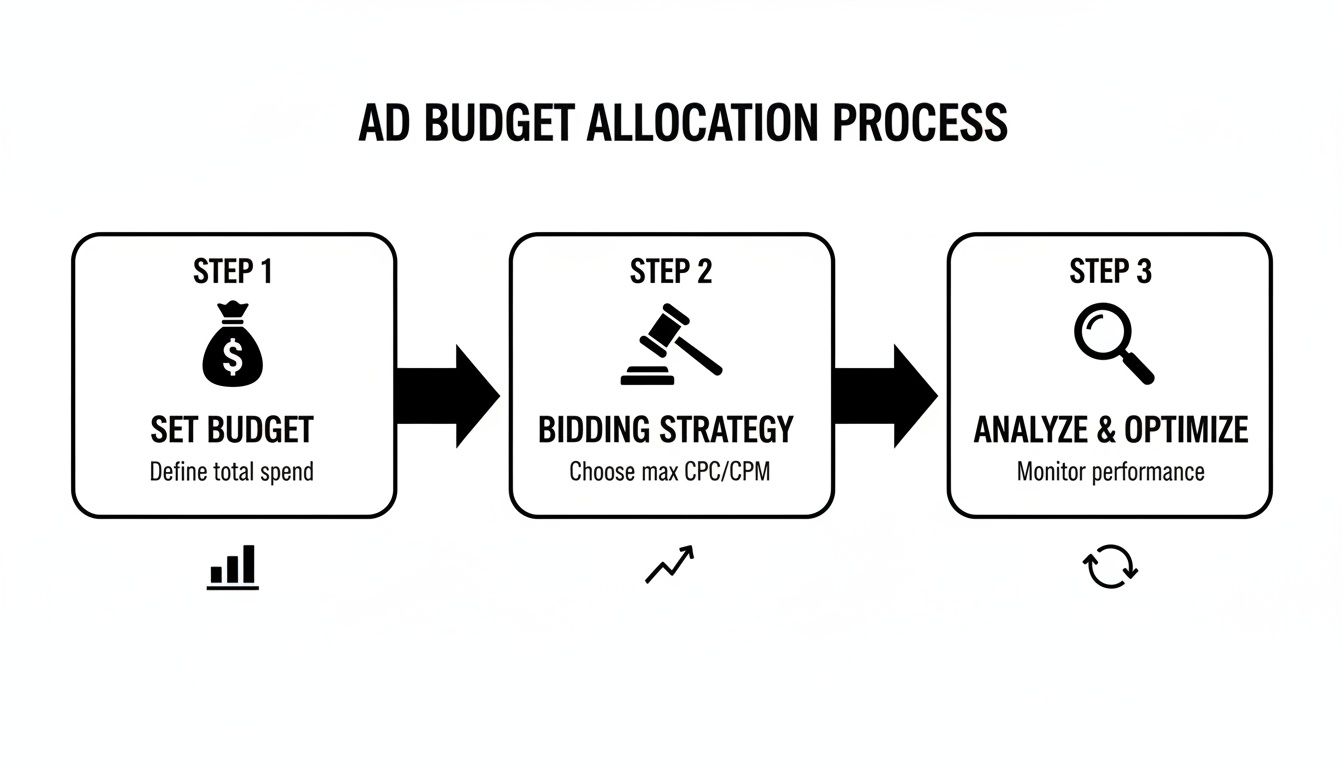
This whole process is a continuous loop. You set your budget, pick a bidding strategy to spend it, and then analyze the results to do it all better the next time.
Making Smart, Data-Driven Adjustments
After that first week, you should have some initial data to work with. Now it’s time to start tweaking.
One of the first places I always look is the search terms report. Are you paying for clicks on totally irrelevant search queries? Add them to your negative keyword list immediately. This is one of the quickest ways to stop wasting money.
From there, look at your ads. Does one ad have a much higher CTR than the others? Pause the loser and try to write a new ad that can beat your current winner. What about keywords? If a keyword is getting tons of clicks but zero conversions, it might be time to pause it or at least lower its bid significantly.
This cycle of monitoring, analyzing, and tweaking never really stops. A successful Google Ads campaign isn't built in a day. It's forged over weeks and months of careful, data-driven optimization.
Got Questions About Google Ads? We've Got Answers.
It's totally normal to have a few questions floating around before you dive headfirst into creating Google Ads. After running countless campaigns, I've heard them all. Let's tackle some of the most common ones I get from business owners so you can get started with confidence.
How Long Until My New Ad Is Live?
You won't have to wait long. Most new ads get reviewed and approved within one business day. Sometimes, if you're in a more sensitive industry or your ad is a bit complex, it might take a little longer for a human reviewer to give it the once-over.
Once it's approved, your ad can start showing up almost immediately. Keep in mind, whether it actually shows up depends on your budget, bidding strategy, and how fierce the competition is for your keywords at that moment.
What Should My Starting Budget Be?
This is the classic "how long is a piece of string?" question. There's no magic number that fits everyone.
A good rule of thumb is to start with a daily budget you're comfortable experimenting with—think of it as R&D money. For most small businesses just starting out, this usually lands somewhere between $10 to $50 per day.
Your initial budget isn't about making a profit right away. It's about buying data. Run your campaign for at least a full week to get a real feel for performance before you even think about tweaking your spend.
What’s a Good Click-Through Rate (CTR) for My Ads?
Everyone asks this, and the honest answer is always, "it depends." A "good" CTR can be wildly different depending on your industry, the keywords you're bidding on, and how crowded the search results are. The average CTR across all industries is around 6%, but that's just a benchmark, not a rule.
Instead of obsessing over a specific number, focus on beating your own score. The real goal is continuous improvement. Are you testing new ad copy? Are you refining your keywords? If your CTR is better this month than it was last month, you're winning.
Is Conversion Tracking Really That Important?
Yes. 100% yes. Running ads without conversion tracking is like driving with a blindfold on. You're spending money on clicks but have absolutely no idea if those clicks are turning into what actually matters—sales, leads, or phone calls.
It’s the only way you can truly know your return on investment (ROI). Even more critically, it feeds Google's algorithm the data it needs to find more people who are likely to convert. Skipping this step is basically telling Google you’re just in it for the clicks, not the results.
Ready to stop guessing with your keywords and quit wasting money on the wrong clicks? Keywordme is built to streamline your Google Ads workflow. Clean up messy search term reports, discover new winning keywords, and get your optimization work done up to ten times faster. Start your free trial today and see for yourself.
.svg)