
How to Build Negative Keyword List Google Ads in 2026
How to Build Negative Keyword List Google Ads in 2026


Meta title: How to Build Negative Keyword List Google Ads
Meta description: Learn how to build negative keyword list Google Ads with a practical system for finding junk queries, choosing match types, and scaling cleanup.
You inherit a Google Ads account, open the Search terms report, and immediately spot the problem. The campaigns aren't just attracting imperfect traffic. They're matching to searches that never had a real chance of turning into revenue.
That's the moment negative keywords stop feeling like admin work and start feeling like account control.
Most wasted spend in inherited accounts comes from the same pattern. Someone focused hard on what to target, then barely defined what to exclude. If you want to learn how to build negative keyword list Google Ads the right way, think less about a one-time cleanup and more about building a repeatable filtering system you can trust every week.
Why Your Google Ads Are Wasting Money
The ugly version of account cleanup usually looks like this: decent ads, sensible bids, solid landing pages, and a mess of irrelevant search queries underneath it all. You'll see searches from people doing research, looking for jobs, wanting free options, or chasing something only loosely related to what the advertiser sells.
That's where negative keywords earn their keep. They tell Google what not to match, which is just as important as choosing the keywords you want.

The leak usually starts in the same place
In inherited accounts, I almost never start by brainstorming negatives from scratch. I start with real query data, because that's where the waste shows up without guesswork. A foundational best practice is to build negative lists from search-term data, since the Search terms report shows the actual queries that triggered ads and helps identify irrelevant traffic to exclude. That same guidance also notes that Google Ads supports broad, phrase, and exact negative match types, which gives you control over how tightly you block junk traffic through shared negative keyword list workflows in Google Ads.
If this problem sounds familiar, Keywordme has a useful breakdown of why Google Ads wastes money on irrelevant clicks and what usually causes it.
Practical rule: If a search term makes you say, “That person was never going to buy,” it belongs in your review queue immediately.
What good negative keyword work actually does
A good negative keyword strategy cleans up traffic quality. A bad one just creates a giant blocklist and hopes for the best.
The difference is intent. You're not trying to block every imperfect search. You're trying to stop repeatable patterns of low-value traffic before they keep draining budget. That's why strong accounts treat negatives like an operating system, not a junk drawer.
Three patterns usually show up first:
- Low-intent modifiers: words like “free,” “jobs,” “training,” or “reviews” when those searches don't fit the offer
- Wrong-category searches: related topics that sound relevant but belong to a different product or service
- Mismatched audience intent: searches from learners, applicants, support seekers, or bargain hunters when the campaign targets buyers
Finding Junk Keywords in Your Search Terms Report
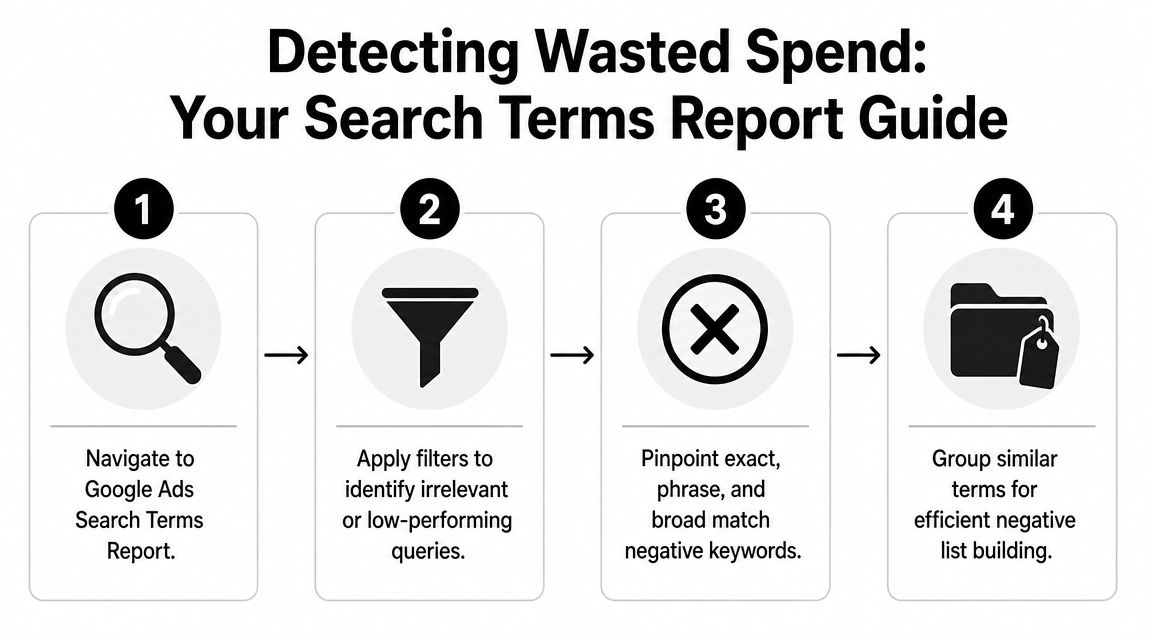
The Search terms report is where the cleanup starts. Not keyword tools. Not guesswork. Not a spreadsheet somebody made six months ago.
What to scan for first
When you open the report, don't read it like a list. Read it like a pattern finder.
Start with queries that are obviously wrong. Then move to searches that look relevant on the surface but show weak intent or poor performance. A practical workflow begins with the Search terms report itself: review queries that are clearly irrelevant or show low commercial intent, then exclude them at the campaign or ad group level. It's the most actionable source because it reflects actual user queries and helps you catch terms with below-average CTR, below-average conversion rate, or above-average cost per conversion. Experienced practitioners also often switch problem terms to phrase match so future close variants are blocked, as explained in this guide to negative keyword workflows from the Search terms report.
If you want a refresher on navigating the report itself, Keywordme has a practical post on the Google Ads Search Terms Report.
Here's the quick triage I use:
Obvious irrelevance first
Queries that clearly don't describe your product, service, or audience go to the top of the list.Low commercial intent second
Terms that suggest education, jobs, definitions, support, or freebies usually need a harder look.Performance outliers third
Some searches look close enough to pass a casual review, but their CTR, conversion rate, or cost per conversion says otherwise.
A visual walkthrough helps if you're training a junior team member:
How to group what you find
Don't add negatives one by one with no structure. As you review queries, group them by pattern.
- Job-seeker terms: employment intent, careers, hiring, intern-style searches
- Research terms: definitions, tutorials, examples, templates, learning intent
- Price mismatch terms: free, cheap, low-cost language that conflicts with the offer
- Wrong brand or category terms: unrelated brands or adjacent products you don't want
The goal isn't to collect random bad searches. It's to identify the repeatable themes behind them.
That's the point where negative keyword work becomes scalable. Once you can label a pattern, you can decide whether it belongs in an ad group, a campaign, or a reusable shared list.
Choosing Your Negative Match Type and Scope
Junior marketers usually make the first expensive mistake. They find a junk term, add it as an exact match negative, and move on. That works for one search. It rarely fixes the pattern.
The better question is this: what exactly are you trying to block, and where should that rule live?
Match type decides how much collateral damage you risk
Google warns that negative keywords must not overlap with regular keywords because the ad may stop showing. That matters even more in larger accounts, because one bad term in a shared negative keyword list can suppress traffic across multiple campaigns. The safer approach is a controlled system with campaign-level, ad-group-level, and shared-list boundaries, as explained in Google Ads Help on negative keywords and overlap risk.
Here's the simplest explanation:
- Exact match negatives are for one specific search you know you don't want.
- Phrase match negatives are for recurring patterns you want to block more broadly.
- Broad match negatives need the most caution because they can shut off more than expected if you choose them carelessly.
Negative keyword match types compared
| Match Type | Symbol | Blocks Ads When... | Example Keyword | Blocks This Search |
|---|---|---|---|---|
| Broad | none | the search contains all the negative keyword terms, depending on how the query is constructed | free trial | query contains that concept across the search |
| Phrase | " " | the search includes the phrase in that order | "free trial" | searches containing that exact phrase |
| Exact | [ ] | the search closely matches the exact negative term | [free trial] | that specific search |
Scope is just as important as match type
A negative keyword can be right and still be placed in the wrong location.
Use ad group negatives when the term only conflicts with a narrow theme. If one ad group targets a specific product subtype, you may need to block adjacent searches that should flow to a different ad group instead.
Use campaign negatives when the whole campaign should avoid that intent. This is common for informational modifiers, support queries, or terms that don't fit the campaign goal.
Use shared lists when the same bad pattern repeats across campaigns. That's where scale comes from, but it's also where mistakes spread fastest.
One bad shared negative can become an account-wide traffic problem. Review shared lists more carefully than anything else.
A safer decision rule
When you're unsure, start narrower.
A good working rule looks like this:
- Start with exact if the issue is isolated.
- Move to phrase if you keep seeing close variants of the same bad intent.
- Reserve broad for very stable, well-understood exclusions.
Most overblocking comes from skipping that progression. Marketers try to be efficient too early, then spend the next week figuring out why traffic disappeared.
Building and Organizing Your Negative Lists
Once you've chosen the term and the right scope, you need to put it somewhere that still makes sense three months from now. That's where list architecture matters.
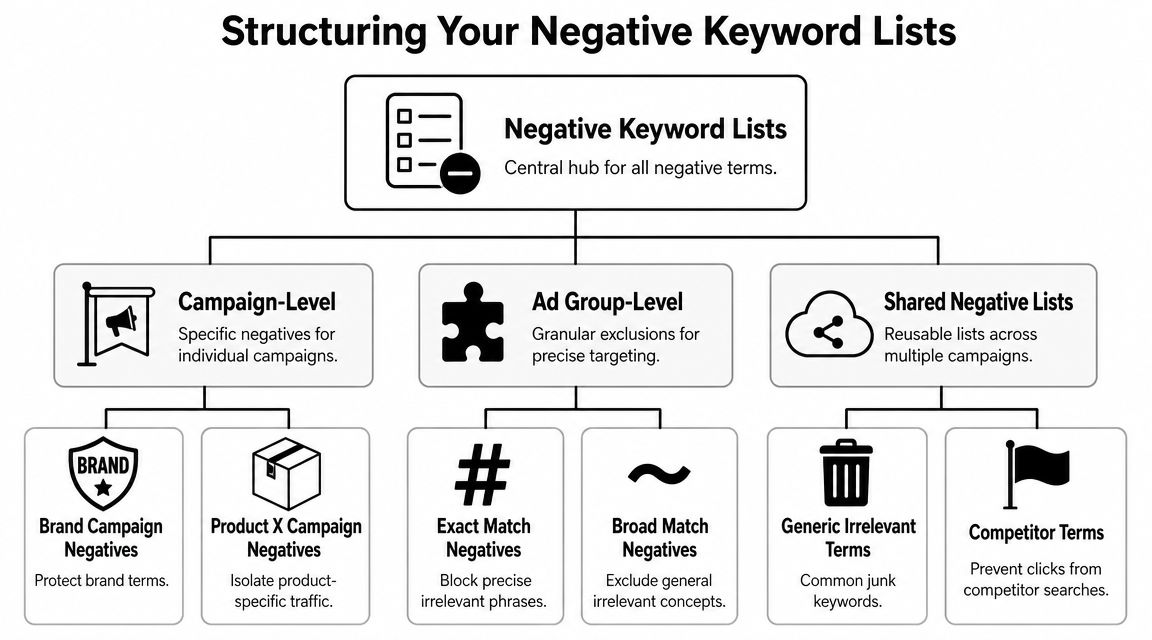
Google Ads negative keyword lists are managed in the Shared Library, and Google's documented workflow is straightforward: add terms one per line, choose a match type, save the list, then apply it to one or more campaigns. A single shared list can be reused across campaigns, which is what makes the setup scalable in larger accounts, as noted in this overview of Google Ads shared negative keyword list management.
Don't build one giant list
The fastest way to make future cleanup painful is to dump every exclusion into one catch-all list called something like “Master Negatives.”
That list becomes impossible to audit. Nobody remembers why terms were added. Testing gets messy. Rollbacks get risky.
A stronger setup uses modular lists. Practitioners commonly separate negatives into lists for competitors, unrelated brands, generic high-volume terms, and your own brand so they can be activated or removed independently as strategy changes. That modular structure supports faster iteration without rebuilding exclusions from scratch, according to this practitioner guidance on modular negative keyword list architecture.
A list structure that holds up
I like a setup that answers one question per list: why does this group of terms exist?
A clean account often includes lists like these:
Competitor terms
Use this when you don't want to pay for searches specifically aimed at other brands.Unrelated brands
Good for traffic that shares language with your category but belongs to another market segment.Low-intent modifiers
Terms like free, jobs, training, support, or definitions when they don't fit the campaign.Brand protection negatives
Useful when you want to keep non-brand campaigns from absorbing branded queries.Generic high-volume clutter
Broad, noisy terms that repeatedly attract traffic without fitting the offer.
Manual versus bulk work
You can add negatives directly from the Search terms report, and for small cleanups that's fine. It's quick, and it keeps you close to the query context.
For bigger inherited accounts, bulk handling wins. You can review patterns in batches, assign match types intentionally, and push recurring themes into shared lists instead of repeating the same action campaign by campaign.
Clean list structure saves more time later than any single cleanup sprint saves today.
Accelerate Your Workflow with Keywordme
Inherited accounts usually break in the same place. The team knows how to spot bad queries, but the cleanup never keeps pace because the work lives across too many tabs.
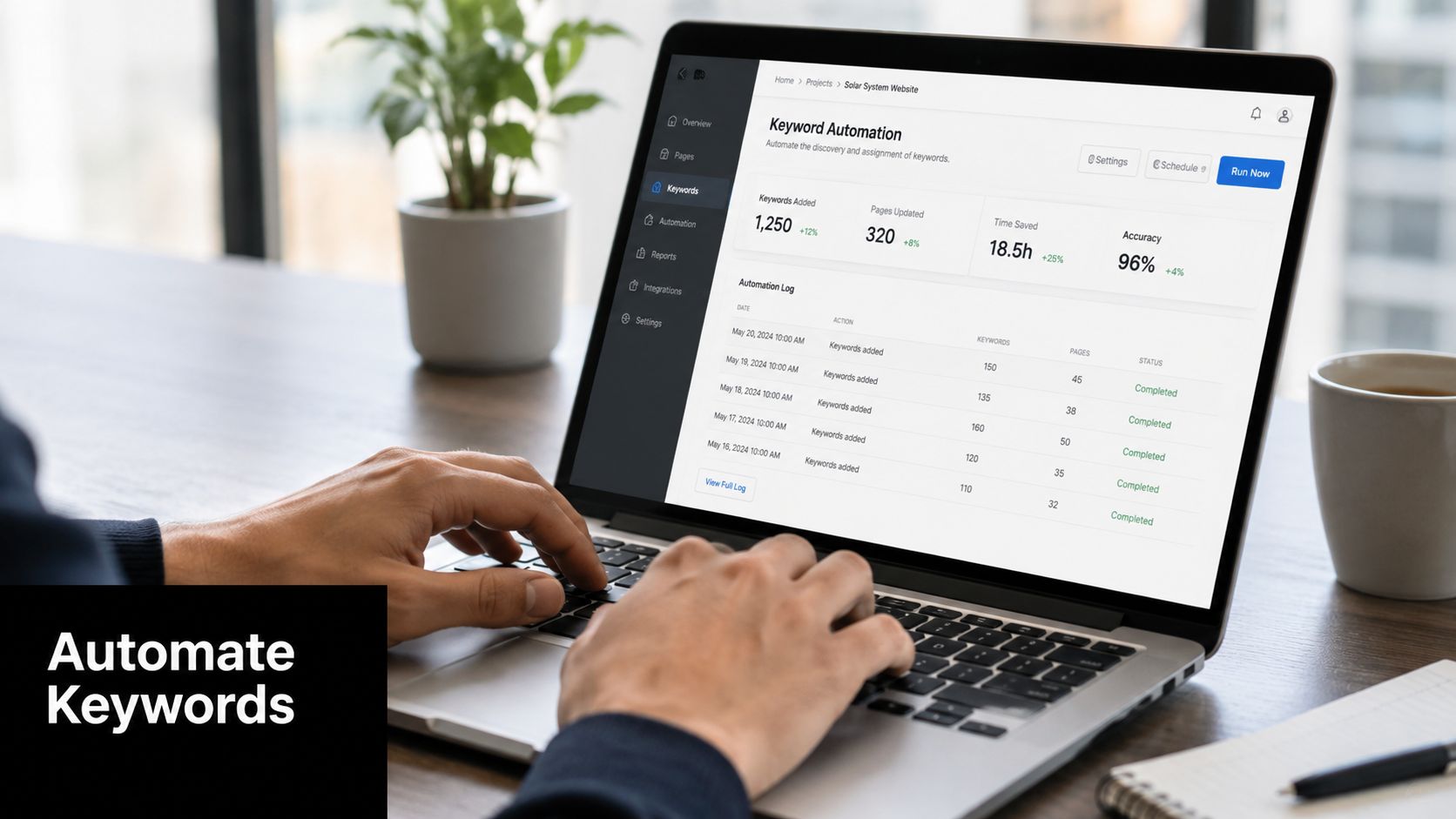
I see it all the time. Someone reviews search terms in Google Ads, copies obvious junk into a spreadsheet, labels match types later, then pastes negatives back into campaigns when they have time. That delay is where quality slips. Terms get missed, match types stay inconsistent, and recurring patterns never make it into the list structure you built earlier.
Keywordme speeds up that part of the job by keeping the cleanup closer to the review itself. With the Keywordme negative keyword workflow for Google Ads, you can work through search terms inside the interface, choose exact, phrase, or broad negatives, and send them into the right destination without the usual copy and paste loop.
That matters more than it sounds.
The gain is not just speed. It is repeatability. If the tool removes friction at the moment you are making exclusion decisions, you are more likely to classify terms properly, route them to the right list, and keep the account aligned with the system instead of running another one-off cleanup. If you are comparing options for reducing manual work inside Google Ads, Keyword Kick's Google Ads integration is another example worth reviewing.
Use the tool the same way you would train a junior PPC manager. Review query batches, make the match type decision once, and place the negative at the right level while the intent is still clear in front of you. That is how faster cleanup turns into better account hygiene, not just a shorter task.
How to Maintain and Audit Your Lists Over Time
Negative keyword management isn't a cleanup project you finish once. It's recurring account hygiene.
The maintenance loop is simple. Review search terms, add exclusions at the right level, promote recurring patterns into shared lists, and audit for conflicts before those negatives start choking off useful traffic.
A maintenance cadence that stays realistic
The right review frequency depends on traffic volume and how fast the account changes. High-volume campaigns need tighter monitoring. Smaller accounts can usually work on a calmer cadence.
What matters most is consistency. A sloppy monthly review is worse than a disciplined routine you keep.
Use this checklist during audits:
Check for positive keyword overlap
If a negative conflicts with a keyword you actively want, visibility can drop in ways that are hard to spot at first.Look for recurring campaign-level exclusions
If the same term keeps getting added in multiple places, it may belong in a shared list.Review modular lists for relevance
Old competitor lists, outdated product names, and temporary exclusions can linger longer than they should.Audit naming and ownership
If nobody knows why a list exists, it needs a clearer name or a cleanup pass.
What “good maintenance” looks like
Google Ads supports reusable shared lists, which means one list can be applied to multiple campaigns instead of rebuilding the same exclusions repeatedly. That shared-list model is efficient, but it also means routine review matters more as the account grows.
A healthy account doesn't just have negatives. It has governance. People know where terms should be added, when a campaign-level block should become a shared rule, and which lists need extra caution before they're applied broadly.
If you treat negative keywords as a living system, inherited accounts get cleaner, campaign intent gets sharper, and future optimizations get easier instead of harder.
Keywordme helps turn negative keyword management into a repeatable workflow instead of a spreadsheet chore. If you want a simpler way to clean search terms, assign match types, and organize exclusions inside Google Ads, take a look at Keywordme.
.svg)