
How to Add Converting Search Terms as Keywords: Maximize ROI
How to Add Converting Search Terms as Keywords: Maximize ROI


SEO Title: How to Add Converting Search Terms as Keywords
Meta Description: Learn how to add converting search terms as keywords, avoid wasteful expansion, tighten ad groups, and automate the process cleanly.
You open the Google Ads Search Terms report expecting clarity and get a mess instead. Some queries look promising. Some are obviously junk. A few have conversions, but not all of them deserve a permanent place in your account.
That's the core problem with how to add converting search terms as keywords. The hard part isn't clicking “add as keyword.” The hard part is deciding what should be promoted, where it should live, what match type it needs, and how to stop it from creating internal overlap the second you add it.
Most accounts don't struggle because opportunity is missing. They struggle because opportunity is buried under noise, broad matching, and too much manual cleanup. The winning searches are usually already in the account data. They just haven't been turned into structure yet.
A disciplined workflow fixes that. You mine the right search terms, promote the right ones, block the wrong ones, and keep the account organized enough that performance can improve instead of getting fragmented.
Your Goldmine of Unseen Opportunities
You pull a search terms report to find growth, then lose an hour sorting through junk queries, close variants, and one-off conversions that should never become permanent keywords. That's the daily reality in Google Ads. The opportunity is real, but so is the mess.
The Search Terms report shows what people typed before clicking. That makes it one of the few places in the account where intent is visible without guesswork. It also exposes a hard truth. A campaign can look healthy at the keyword level while wasting spend on bad matches and hiding profitable queries that still have no proper home in the account.
Good PPC managers treat that report as a build queue, not just a performance view.
A useful search term should lead to an action. Promote it, block it, or leave it alone until it earns more data. Anything else turns weekly search term reviews into repetitive admin work with no structural payoff.
Why this report creates so much value
The value is not in spotting a term that converted once. The value is in finding search behavior that deserves tighter control. That could mean adding a new keyword, splitting a cleaner ad group, or adding a negative to stop future overlap.
That distinction matters because manual keyword mining breaks down fast. Once volume increases, the process gets slow and error-prone. Teams start adding winners into the wrong ad groups, duplicating terms across match types, or skipping negatives because they are trying to clean up too much data too quickly. The result is familiar. More clutter, less control, and wasted hours inside spreadsheets.
If you need a refresher on how the report works before you start mining it for promotions, this guide to the Google Ads Search Terms report covers the mechanics.
What experienced teams look for
Strong account work starts with intent, not activity.
A converting query is only worth adding if it is likely to repeat, fits a clear commercial theme, and can live somewhere in the account without creating internal competition. That means asking practical questions before you click anything:
- Does this term show buying intent or just curiosity?
- Does it belong under an existing ad group, or does it need its own cluster?
- Will adding it create overlap with keywords already in the account?
- Do you also need a negative somewhere else to keep traffic routed cleanly?
That is where the demanding work sits. Google Ads makes it easy to add a keyword. It does not protect you from adding the wrong one, adding it in the wrong place, or repeating the same review work every week.
That gap is exactly why manual search term mining stops scaling. Keywordme exists to automate that workflow, so the profitable queries get promoted cleanly and the account does not get messier every time you optimize it.
Uncovering Hidden Gems in Your Search Terms Report
A useful search term review starts with enough history to catch patterns, not just yesterday's noise. For many accounts, that means pulling a window long enough to show repeat intent and enough volume to judge whether a query deserves promotion.
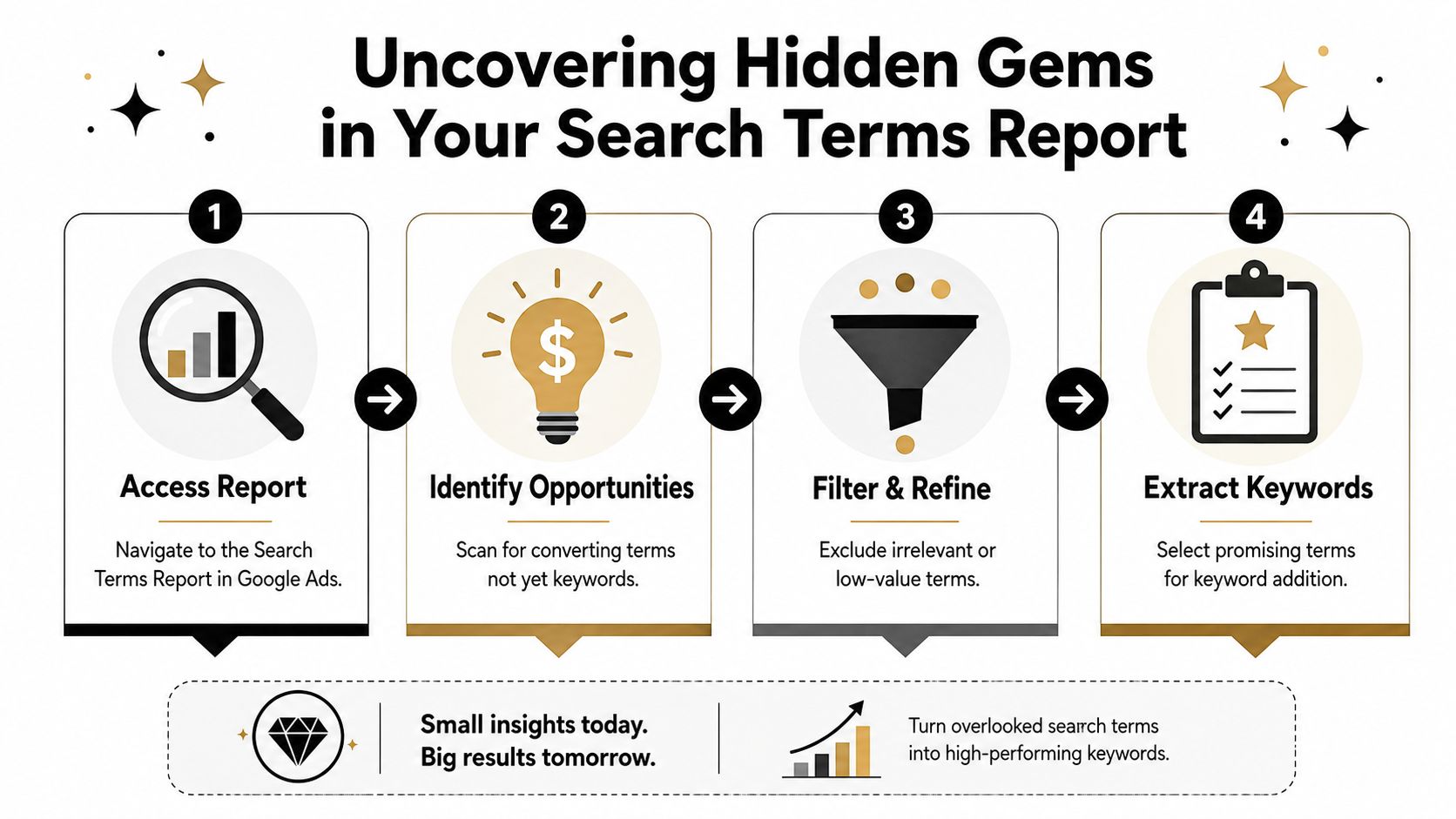
If you need a refresher on where to pull it or how Google structures the view, this guide to the Google Ads Search Terms report covers the mechanics.
Start with the right columns
Do not review the raw report with every metric turned on. That slows the process and hides the terms worth investigating.
Start with a lean view:
- Conversions: The first filter for promotion candidates.
- Clicks: Useful for spotting terms that show promise but have not built enough conversion data yet.
- CTR: A quick signal that the query and ad message line up.
- Cost: The check that keeps an apparent winner from becoming an expensive mistake.
I usually sort by conversions first, then scan cost beside it. A term with strong results at a reasonable cost gets flagged for review. A term with one conversion and ugly spend goes into a separate bucket until there is more evidence.
Read the query like a buyer would
Metrics narrow the list. Wording decides the action.
Search terms with clear product names, service types, locations, and action words usually deserve attention because they reveal intent you can build around. Broad informational phrasing needs more restraint. It may have converted once, but one assisted sale or one cheap lead is not enough to justify adding it and creating more account clutter.
A fast review table helps:
| Signal | What it usually means |
|---|---|
| Specific service or product query | Strong candidate for promotion |
| Clear buyer language | Likely high intent |
| Broad research phrasing | Needs validation before adding |
| Off-topic variation | Better as a negative |
| Mixed-intent phrase | Keep reviewing before action |
Search terms often beat keyword tool ideas because they come from your actual traffic, not a planning database.
Group patterns before you promote anything
The biggest manual mistake here is treating every good query like a one-off win. That is how accounts end up with random additions scattered across ad groups, weak ad relevance, and duplicate coverage.
Group promising terms by intent first. In practice, that usually means separating:
- Bottom-funnel queries: Searchers who know the product or service they want.
- Feature or problem terms: Useful only if the ad copy and landing page can match that angle.
- Local modifiers: Often better split out when location changes buying intent.
- Research terms: Worth monitoring, but not automatic additions.
This step takes discipline, and it is where the manual workflow starts to drag. The report can surface good opportunities, but it does not organize them for you, warn you about overlap, or stop you from promoting the same theme three different ways. That is the primary limitation of doing this by hand. You can find the gems, but turning them into clean account structure takes time and carries plenty of room for error.
Separating Winners from Wasted Clicks
A search term can produce a conversion and still be a bad keyword.
That happens all the time in broad match campaigns. One loosely related query sneaks in, gets a lead, and looks like a winner in the report. Then it gets promoted, spend shifts toward it, and a month later the account is paying for traffic that never should have been scaled.

The job here is qualification, not reward. A term earns promotion only when it proves three things at once: it fits the offer, it reflects real buying intent, and it can produce conversions at a cost the business can live with.
If your account is attracting activity but the traffic quality feels off, this guide on why Google Ads search terms aren't converting is a useful companion before you add anything.
Three filters that keep bad keywords out
Relevance to the offer
Start with fit. The query should map cleanly to the product, service, and landing page you want to sell.
Close enough is usually not enough. If the term pulls in a different use case, a different customer type, or a softer problem than your page addresses, adding it as a keyword usually creates more noise than profit.
Intent quality
Read the phrase like a buyer would. Terms with words that signal booking, pricing, quotes, providers, software, services, or purchase behavior are usually stronger candidates than vague research language.
A converting informational query is still risky. It may have converted because of one good click, a branded assist, or a sales team save, not because the term deserves its own budget lane.
Economics
A keyword has to work financially, not just technically.
Check the conversion quality, cost per conversion, and likely value of the lead or sale. If a term converts at a price that only works once in a while, promoting it can turn a lucky result into a recurring loss.
A simple decision framework
| Search term type | Typical action |
|---|---|
| Clear commercial query with strong offer fit | Add as a keyword |
| Relevant term with mixed or uncertain intent | Keep under review |
| Irrelevant or low-value query | Add as a negative |
| Good query tied to a different offer or page | Hold until it has the right structure |
One conversion is evidence. It is not proof.
Where manual review starts to break down
This is also the point where the standard Google Ads workflow gets slow and error-prone. Reviewing search terms by hand sounds manageable until the account has hundreds or thousands of rows, mixed intent, duplicate variants, and multiple ad groups already competing for nearby queries.
Manual review creates two common problems. Good terms get missed because nobody has time to work through the full report carefully, or weak terms get promoted because the reviewer is chasing visible conversions instead of long-term account efficiency. Both mistakes cost money.
That trade-off matters. A disciplined PPC manager can spot winners manually, but doing it consistently across large accounts takes hours and still leaves room for overlap, misclassification, and expensive false positives. That is why separating winners from wasted clicks cannot stop at “it converted.” The workflow has to be repeatable.
The Art of Adding Keywords and Crafting Ad Groups
A converting query can still become a bad keyword if it gets dropped into the wrong place.
That happens all the time in manual Google Ads workflows. Someone spots a winner in the search terms report, adds it fast, skips the routing work, and leaves the original ad group untouched. A week later, CPCs drift, ad relevance gets weaker, and two parts of the account are eligible for the same search. The query was good. The implementation was sloppy.
Start with ownership
Before adding anything, decide which part of the account should own that query.
Use an existing ad group if the promoted term matches the same intent, the same offer, and the same landing page already in play. Build a new ad group if the wording changes the promise enough that the search deserves different ad copy, a different page, or tighter bidding control.
That decision matters more than the click to "add keyword."
Match type is a control setting
Promoted search terms usually deserve tighter handling than discovery terms.
Exact match works well when the query has clear intent and you want clean reporting on that specific term.
Phrase match makes sense when the intent is stable but close variations are still useful.
Broad match can help in mature accounts with strong negatives, clean structure, and reliable bidding signals, but it also creates the most spillover if the account is messy.
I usually start tighter, then expand only if the structure can support it.
Promotion without negatives creates overlap
If a search term came in through a broader keyword, the job is not finished when you add the new keyword. You also need to stop the old path from stealing that traffic back.
In practice, that often means adding the promoted term as a negative exact match in the source ad group. Sometimes the right move is a different exclusion pattern, depending on how the campaign is built, but the principle stays the same. One query should have a clear home.
Without that cleanup, the account starts bidding against itself. That is where manual keyword mining gets expensive. The work looks done in the interface, but the structure is still leaking efficiency.
Use a repeatable build sequence
A simple workflow keeps this clean:
- Confirm the term belongs in the account. It should match real business intent, not just have a lucky conversion.
- Assign ownership. Choose the ad group or create a new one based on intent, offer, and landing page fit.
- Pick the match type deliberately. Default to exact or phrase unless there is a strong reason to go broader.
- Align the ad and landing page. If the message cannot be made specific, hold the keyword back.
- Add negatives where needed. Protect the new structure from the old one.
If you need the actual interface steps, this step-by-step guide to adding keywords in Google Ads covers the setup.
Keep ad groups tighter than feels convenient
The easiest manual habit is to drop every decent term into a busy ad group and call it organized. That saves five minutes now and creates months of weak relevance signals, muddled reporting, and harder optimization later.
A tighter build works better. Give each page and ad group a clear theme. Add close supporting terms only when they share the same intent and can use the same message. If a promoted query needs its own angle, give it one.
That is also where manual work starts showing its limits. At small scale, a disciplined PPC manager can do this by hand. At volume, keeping ownership, match type, landing page fit, and negatives aligned across hundreds of promoted terms turns into a maintenance problem fast.
Why Manual Keyword Mining Is a Losing Battle
Manual search term mining works. It also eats time, invites mistakes, and gets harder to justify as accounts scale.
The first few rounds feel manageable. Export the report. Sort by conversions. Check cost. Copy promising terms. Add them as keywords. Add negatives. Repeat. Then the account grows, the campaigns multiply, and the process turns into spreadsheet maintenance.

The hidden cost isn't just time
Manual work creates fragile systems. One missed negative can send a promoted term back into the wrong ad group. One sloppy bulk upload can place a keyword in the wrong campaign. One over-eager review session can flood the account with terms that looked good in isolation but don't improve the whole structure.
The cost shows up in three places:
- Human error: Match types, negatives, and destinations get mishandled.
- Slow decision-making: By the time changes are live, the report has already moved on.
- Inconsistent standards: Different people promote terms using different rules.
Smart Bidding changes the equation
The old habit of adding every converting query starts to break down at this point.
In the Smart Bidding era, the more important question isn't whether a query converted once. It's whether the quality of the intent justifies manual expansion. Recent practitioner guidance points out that intent quality matters more than raw conversion count because Google's automation already uses contextual auction signals, which reduces the need for keyword micromanagement, as discussed in this Smart Bidding practitioner guidance.
You don't need to turn every good search term into a keyword. You need to turn the right ones into structure.
What still deserves manual judgment
Automation doesn't replace thinking. It changes where your judgment matters.
Manual review is still valuable for:
- Intent filtering: Deciding which searches reflect the conversions that matter most.
- Structural control: Determining where a promoted term should live.
- Negative strategy: Preventing duplicate routing and wasted spend.
What doesn't scale is doing every click, format change, and keyword transfer by hand forever.
Automate Your Workflow and Scale with Keywordme
The manual version of this job looks the same in almost every account. You review search terms, pick out promising queries, decide on exact or phrase match, place them into the right ad group, then try not to forget the matching negative. It's repetitive work, and repetitive work is where good operators make preventable mistakes.

That's why purpose-built workflow tools exist. Instead of bouncing between reports, spreadsheets, editor windows, and bulk sheets, you can handle search term promotion closer to where the decision happens.
What the automated workflow changes
A practical setup should do four things well:
| Task | Manual approach | Automated approach |
|---|---|---|
| Review search terms | Filter and sort in the native report | Review in a more action-focused workflow |
| Add new keywords | Copy, format, and place manually | Apply chosen match type directly |
| Create negatives | Easy to forget or delay | Handled as part of the action flow |
| Scale across large accounts | Slow and repetitive | Faster and more consistent |
Keywordme is one option built around this exact job. It's a Google Ads management tool with a Chrome plugin workflow for reviewing search terms, adding them as exact, phrase, or broad match keywords, and handling negative keyword creation as part of the same process through its interface on Keywordme.
That matters less because “automation is good” and more because this workflow has a lot of tiny failure points when humans do it repeatedly.
Before and after the switch
Before using a dedicated workflow tool, a lot of teams treat search term mining as a task they dread. It gets postponed. Reviews happen less often than they should. Good queries stay buried because nobody wants to spend the afternoon cleaning formatting and uploading negatives.
After moving the workflow into a dedicated interface, the job becomes shorter and more consistent. You still make the judgment calls. You just stop wasting time on the mechanical parts.
A quick demo makes the difference easier to see:
The real upside
The biggest gain isn't convenience. It's cleaner execution.
You want a system that helps you:
- Promote qualified search terms faster
- Apply the intended match type without extra handling
- Reduce missed negatives
- Keep account structure consistent across campaigns
That's how automation helps with ROI. Not by replacing strategy, but by removing avoidable friction from the work.
FAQs About Converting Search Terms
A few edge cases tend to come up once you start doing this regularly. These are the questions that usually matter after the basic process is already clear.
Frequently Asked Questions
| Question | Answer |
|---|---|
| Should I add every converting search term as a keyword? | No. Some converting queries are still poor fits for your business, too broad, or too expensive to deserve dedicated targeting. Promote terms with strong relevance and clear commercial intent. |
| How often should I review search terms? | Weekly review is common in practice, especially in active accounts. The exact rhythm depends on volume, but the key is consistency and clear promotion rules. |
| What date range should I use when mining for new keywords? | A practical benchmark is roughly the last 90 days because it helps surface recurring intent without overreacting to short-term noise, as noted earlier from Google Ads workflow guidance. |
| Should I use exact match for every promoted term? | Not always. Exact match is often a strong starting point for proven queries, but phrase match can make sense when the core intent is stable and you want controlled expansion. |
| What if the search term converted but doesn't fit my landing page? | Don't add it yet. A keyword without a matching page usually creates weak relevance and disappointing follow-through. Fix the destination first or leave the query under observation. |
| Do I always need a new ad group for a promoted term? | No. Create a new ad group only when the term deserves dedicated messaging, tighter control, or a different landing page. Otherwise, place it into the most relevant existing theme. |
| Why add a negative when I add the new keyword? | Because the original ad group may keep matching that query. Adding a negative, often negative exact in the source ad group, helps route traffic to the new, more relevant keyword structure. |
| Does Smart Bidding make this process less important? | It changes the threshold. You usually need less keyword micromanagement than before, but high-intent search terms still deserve structural promotion when they improve relevance and control. |
Good search term mining isn't about collecting more keywords. It's about building a cleaner account.
If your team is tired of exporting reports, cleaning search terms manually, and fixing overlap after the fact, Keywordme gives you a simpler way to turn promising queries into usable keywords while handling the negative-keyword side of the workflow in the same motion.
.svg)