
Master Google AdWords Optimization: Boost ROI, Cut Spend
Master Google AdWords Optimization: Boost ROI, Cut Spend


Let's be honest—managing Google Ads can feel like you're just lighting cash on fire, especially if you're not keeping a close eye on things. Real Google AdWords optimization isn't a one-and-done task. It’s an ongoing cycle of tweaks and refinements to cut out the waste, dial in your relevance, and actually see a return on your investment (ROI). It's all about making those small, consistent adjustments that add up to big wins down the road.
Your Game Plan for Smarter Google Ads Optimization
Throwing money at Google Ads without a solid strategy is the fastest way to empty your bank account. So, before you adjust another bid or write a single new headline, you need to give your account a proper audit. Think of it as a health checkup for your campaigns. It’s the only way to figure out what's working, what’s completely broken, and where your money is actually going.
A good audit isn’t about getting hypnotized by endless spreadsheets of data. It’s about knowing which key numbers to look at first and understanding the story they're telling. This initial deep dive is the foundation for everything you'll do next.
The First Metrics to Check in Your Audit
Whenever I get my hands on a new account, I have a go-to list of metrics that gives me a quick snapshot of its health. Don't get overwhelmed by the dozens of columns just yet. Start here:
- Click-Through Rate (CTR): This tells you if your ads are grabbing anyone's attention. A low CTR is a huge red flag that your ad copy and keywords are mismatched.
- Cost Per Conversion (CPA): This is your bottom line. How much are you actually paying for a sale or a lead? If this number is higher than what a customer is worth to you, your campaigns are losing money. Simple as that.
- Quality Score: This is Google’s report card for your ads. A high score (aim for a 7/10 or better) means Google sees your ads as relevant, which rewards you with lower costs and better ad positions.
- Search Terms Report: I can't stress this one enough. This is the most important report in your entire account. It shows you the exact phrases people typed into Google that triggered your ads. This is where you'll find both gold mines and money pits.
This whole process can be broken down into three main phases: Diagnose, Metrics, and Wins. It’s a simple but powerful flow.
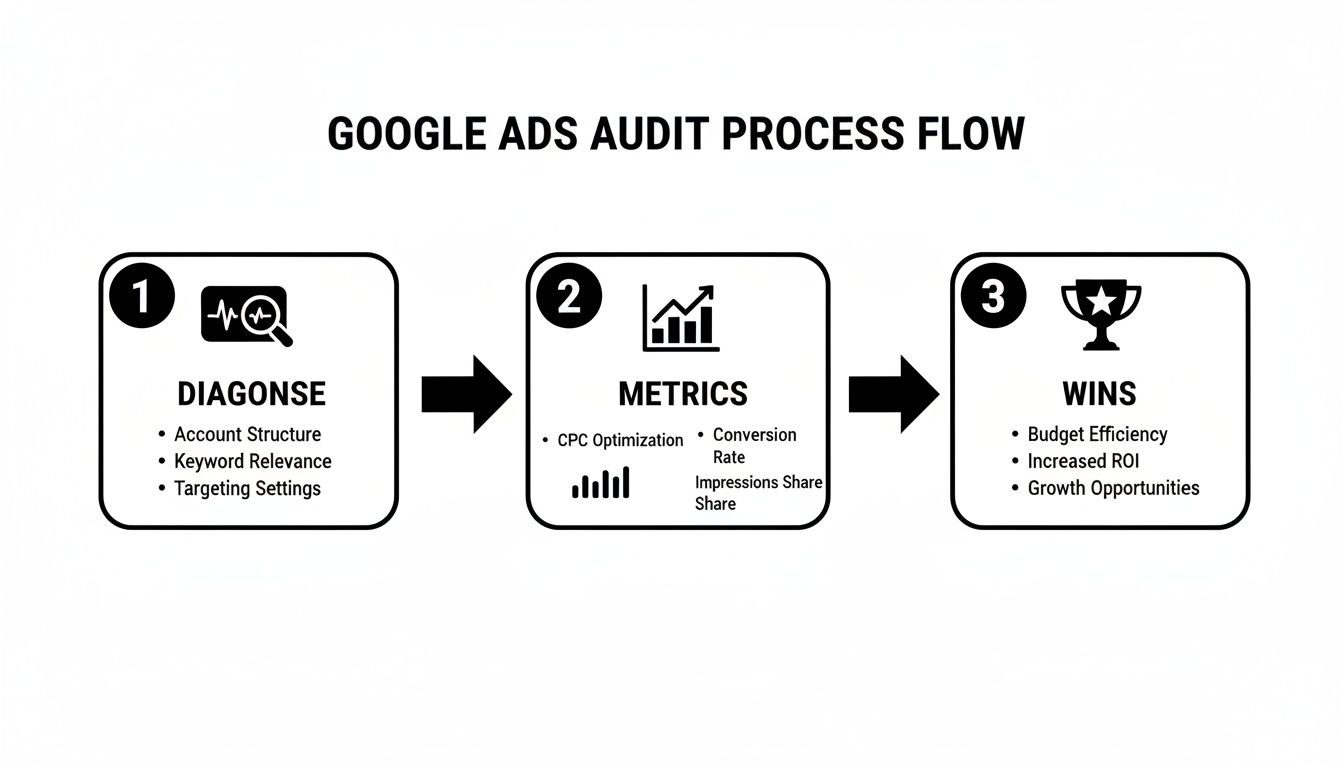
By following this kind of path, you can spot the problems, analyze the performance data that matters, and then roll out some quick fixes to see an immediate improvement.
Finding Quick Wins to Stop Wasted Spend
An audit isn't just a homework assignment; it’s a hunt for opportunities to make an impact right now. Your first pass should be all about plugging the biggest leaks in your budget.
The goal of your first audit isn't to rebuild the entire account from scratch. It's to find the 20% of problems that are causing 80% of your wasted ad spend. Focus on efficiency first, perfection later.
For a perfect real-world example, jump straight into that Search Terms Report. Are you selling a premium subscription service but paying for clicks from people searching for "free accounting software"? Add "free" to your negative keyword list immediately. Are you trying to find new clients but keep getting clicks from people looking for a job? Add words like "jobs," "careers," and "hiring" to your negatives.
Getting these basics right is the first crucial step in your Google AdWords optimization journey. By setting a clear baseline and cutting out the obvious money-wasters, you build a much more stable foundation. From there, you can move on to the more detailed work of refining keywords, crafting better ads, and testing smarter bid strategies. If you’re looking for more on the daily grind of running an account, check out our guide on how to effectively manage AdWords campaigns for long-term success.
Mastering Keywords and Eliminating Wasted Spend
Alright, you've audited your account. Now for the fun part—and the place where most ad budgets go to die: your keywords. This is the engine room of your entire Google Ads operation. Get it right, and you’re golden. Get it wrong, and you’re just lighting money on fire.
The core of Google AdWords optimization isn't about finding more keywords; it's about making the ones you have work harder. This means getting surgical with your match types and aggressively cutting out irrelevant traffic.
Decoding Keyword Match Types
Let's get real about match types. They are your primary tool for controlling who sees your ads. Think of them as a dial for reach vs. relevance. The mistake I see most often? A new advertiser dumps all their keywords into Broad Match, pats themselves on the back, and then wonders why their budget vanished in a week.
Here’s the deal with each type:
Broad Match: This is Google on its loosest leash. It's great for keyword discovery in a tightly controlled, separate campaign, but using it as your primary strategy is incredibly risky. You're giving Google permission to show your ad for all sorts of "related" searches that can be miles away from your actual product.
Phrase Match: This is the workhorse for most healthy accounts. It balances reach and control, showing your ads when a search includes the meaning of your keyword. It’s flexible enough to catch relevant long-tail searches without straying too far.
Exact Match: The sniper rifle. It gives you the most control, showing your ad for searches with the same meaning or intent. This is where you put your proven, high-converting "money" keywords. The trade-off is lower volume, but the quality is usually top-notch.
A well-oiled campaign uses a strategic mix. You might use Exact Match for core terms, Phrase Match to catch the variations, and a very cautious Broad Match campaign to fish for new keyword ideas—but only if you have the budget for it.
To make this easier to visualize, here’s a quick-reference table that breaks down how I approach match type strategy.
Keyword Match Type Strategy at a Glance
| Match Type | Best Used For | Primary Risk | Keywordme Pro-Tip |
|---|---|---|---|
| Broad | Keyword discovery in a separate, low-budget campaign with a Performance Max or tCPA bid strategy. | High budget waste from irrelevant traffic. Can burn through your daily budget fast. | Never use Broad Match in your main campaigns. Isolate it and pair it with a very aggressive negative keyword strategy. |
| Phrase | The core of most search campaigns. Capturing a wide range of relevant searches. | Can still pull in some unrelated searches if the keyword is too general. | Your go-to for most keywords. It's the sweet spot between casting a wide net and maintaining quality. |
| Exact | High-intent "money" keywords that you know convert. Also for branded search terms. | Low search volume. You might miss out on longer, more specific (but still relevant) queries. | If a search term in your report gets 3+ conversions, add it as an Exact Match keyword to its own ad group. |
This table is a great starting point, but the real magic happens when you start analyzing what people are actually searching for.
Mining Gold in Your Search Terms Report
The Search Terms Report is the most important report in your entire Google Ads account. Period. This isn't a list of your keywords; it's a raw, unfiltered list of what real people typed into Google right before your ad appeared.
I tell my clients to live in this report. You’re on two missions here:
First, hunt for junk. These are the clicks you're paying for that have zero chance of converting. If you sell "custom wood tables," you don't want to pay for clicks from someone searching "free table plans" or "table tennis lessons." Every one of these is a leak in your budget.
Second, look for hidden gems. You'll find beautifully specific, long-tail search terms that are converting. These are pure gold. When you find one, you can pull it out and create a new Exact or Phrase match keyword for it, giving you a chance to write hyper-relevant ad copy and bid more precisely.
Building Your Fortress with Negative Keywords
This is how you stop the bleeding. A negative keyword list is your campaign's bouncer—it keeps the wrong crowd out. Every time you find a garbage search term in your report, you need to add it as a negative.
Think about intent. If you sell premium products, words like "cheap," "free," "discount," and "DIY" are your enemies. Add them to a shared negative list immediately.
For a local service business, you'd add the names of all the cities and states you don't serve. The list of potential negatives is endless, and it includes things like:
- free
- cheap
- reviews
- jobs
- pictures
- how to
Manually combing through search terms is a grind, but it’s non-negotiable for Google AdWords optimization. This is frankly where a tool like Keywordme saves an incredible amount of time. It scans your search terms and helps you bulk-add new negatives with a single click. If you're new to the process, this guide on how to add negative keywords is a great place to start.
By actively managing your keywords, mining your search terms, and building a rock-solid negative keyword list, you're forcing every dollar to pull its weight. You stop wasting money on useless clicks and start focusing your budget exclusively on people who are actually looking to buy.
Making Your Ads and Ad Groups Actually Work
Nailing your keyword list is a great start, but let's be real—it's only half the job. Your keywords get you a seat at the auction, but it's your ad copy and account structure that actually convince someone to click. This is where all your hard work finally becomes visible to your potential customers.
The game is all about creating a seamless path from what someone types into Google to the ad they see. When you get that connection right, your Click-Through Rate (CTR) goes up. A high CTR is one of the loudest signals you can send to Google that you know what you're doing.
The Old Way of Structuring Ad Groups is Dead
Not that long ago, everyone swore by Single Keyword Ad Groups (SKAGs). The logic was simple: one keyword per ad group gave you maximum control over your ad copy. And in theory, it worked. But in practice? It created bloated, unmanageable accounts with thousands of ad groups that were a total nightmare to update.
Thankfully, we've moved on. The modern, more practical approach is to use tightly themed ad groups. Think of them as small, hyper-focused buckets of related keywords. So, instead of having separate ad groups for "men's running shoes," "running shoes for men," and "best running shoes for men," you'd just roll them all into a single "Men's Running Shoes" ad group.
This strategy just makes more sense for a few reasons:
- It’s way easier to manage. Would you rather handle a few dozen themed groups or thousands of SKAGs? I know my answer.
- You get cleaner data. Performance data is consolidated, so you can actually see which themes are working instead of trying to patch together insights from a hundred tiny ad groups.
- It plays nice with AI. Google’s automated bidding strategies thrive on data. Themed groups give the algorithm more to work with, leading to better results than the fragmented data from SKAGs.
Writing Ad Copy That Gets the Click
Your ad is basically a three-second sales pitch. You have a couple of headlines and descriptions to convince a searcher that your link is the one worth clicking. No pressure, right?
The secret is simple: relevance. Your ad has to feel like a direct response to their search. If someone is frantically searching for an "emergency plumber in brooklyn," your headline can't just be "Plumbing Services." It needs to be "24/7 Emergency Plumber in Brooklyn." See the difference?
Here are a few tricks I always use to write compelling ads:
- Lead with the keyword. Putting the main keyword in Headline 1 is the fastest way to signal you have what they need.
- Talk about benefits, not just features. "Fast Shipping" is a feature. "Get It By Tomorrow" is a benefit that solves a problem.
- Use real numbers. "Trusted by over 10,000 happy customers" has a lot more weight than "We have many happy customers."
- Add a clear call to action (CTA). Don't be shy. Tell them what to do next: "Shop Now," "Get a Free Quote," or "Download the Guide."
The best ad copy feels like a direct answer to a question the searcher hasn't even consciously asked yet. It anticipates their needs and provides a clear solution, making the click feel like the most natural next step.
Ever since Google rolled out Quality Score way back around 2008, the entire game has been about rewarding advertisers for this kind of relevance. And in 2026, the data proves it. The latest benchmarks show the average CTR for search ads has hit 3.17%, which is a 3.74% increase from last year. For us marketers, this means we have to use every tool in the shed to expand our ad groups with terms that actually convert.
We've seen that smart automation can boost ROAS or cut CPA by 15-25%. This is where a tool like Keywordme really shines. It helps you build negative keyword lists directly from real user search queries with just one click, which is the fastest way to cut out the junk traffic that’s killing your Quality Score. You can see how your own campaigns measure up by checking out the 2026 Google Ads benchmarks.
Don't Sleep on Ad Extensions
Ad extensions are the not-so-secret weapon of top-tier advertisers. I'm talking about the sitelinks, callouts, and structured snippets that appear below your main ad copy. If you're not using them, you're leaving money on the table.
For one, they make your ad bigger. That's more valuable real estate on the search results page, which pushes your competitors down. More importantly, they give users helpful shortcuts and extra info, letting them jump right to the most relevant page on your site. Using extensions is a proven, no-cost way to boost your CTR, often by several percentage points. It’s a no-brainer.
Let Google’s AI Do the Heavy Lifting with Smart Bidding
If there's one non-negotiable rule in Google Ads, it's this: you can't optimize what you don't measure. I know it sounds cliché, but it’s the absolute truth. Without solid conversion data, you're essentially flying blind, throwing money at the wall and hoping something sticks.
Setting up conversion tracking is the single most critical thing you can do for your account. A "conversion" is whatever you define as a win for your business—a sale, a lead form filled out, a phone call. Once you start tracking these, you finally get to see which keywords, ads, and campaigns are actually driving results.
This data is pure gold because it fuels Google's powerful automated bidding, or "Smart Bidding." These aren't just simple if-then rules. We're talking about sophisticated AI that crunches millions of data points in real-time to set the perfect bid for every single auction. That's something no human could ever hope to do.
Choosing the Right Bid Strategy for Your Goals
Think of Smart Bidding as giving the keys to a supercomputer, but you still have to give it the destination. You do that by picking a bid strategy that matches what you're trying to achieve.
Here are the main ones I use day-to-day:
Maximize Conversions: This one's pretty straightforward. You're telling Google, "Get me the most conversions you can within my daily budget." It's a fantastic starting point for new campaigns when you're just trying to get some data flowing and don't have a firm cost-per-lead goal yet. Just watch your budget—it will try to spend it!
Target CPA (Cost Per Acquisition): This is where you start getting strategic. You tell Google exactly what you're willing to pay for a single conversion. If you know a new lead is worth about $100 to your business, you might set a Target CPA of $25 to ensure you stay profitable.
Target ROAS (Return On Ad Spend): For my e-commerce clients, this is everything. Instead of just tracking conversions, it optimizes for conversion value. You're aiming for a specific return for every dollar spent. If you need to make $5 in revenue for every $1 you spend on ads, you’d set your Target ROAS to 500%.
Picking the right one is key. A local plumber is going to live and die by their Target CPA, while an online shoe store will be obsessing over their Target ROAS.
You Have to Feed the Machine
Smart Bidding isn't magic; it's math. And for the math to work, it needs data—lots of it. The machine needs to learn what a good customer looks like. As a general rule of thumb, Google suggests having at least 15 conversions in the last 30 days before trying Target CPA, and you'll want at least 50 conversions in 30 days for Target ROAS.
Don't jump the gun and switch to a value-based strategy like Target ROAS too soon. I've seen it happen. Without enough data, the algorithm gets confused, and your performance will be all over the place. Be patient and let the data build up first.
When you're working with these strategies, you have to know your numbers. It's crucial to accurately calculate your Cost Per Acquisition (CPA) to make sure your business is actually making money. Setting a Target CPA based on a guess is a recipe for disaster. Ground your targets in real-world business metrics to make automation a powerful ally.
Conversion tracking, first introduced way back in 2005, laid the foundation for all of this. Today, over 80% of Google search campaigns use Smart Bidding, and for good reason. Advertisers who switch to strategies like Target ROAS typically see about 14% more conversion value. When you can see that your exact match keyword "women's running shoes" converts at 3.17%, you can confidently tell Google to go find more of those people. This is also where other automation, like using Keywordme to find negative keywords, can give you a 15-25% boost in efficiency by cutting out wasted spend. There's a lot to learn from the power of Google Ads statistics and how they drive modern campaign management.
By linking your Google Ads and Google Analytics accounts, you get an even deeper understanding of what users do after they click. This is how you stop guessing and start building a predictable, data-driven growth engine for your business.
Let's Talk Automation in Modern PPC
Let's be honest: if you're trying to manage every last detail of your Google Ads account by hand, you're fighting a battle you just can't win. Manual optimization has its limits. If you want to scale your campaigns and, frankly, just keep your head above water, you have to lean on automation.
This isn't just about clawing back a few hours in your day (though you absolutely will). It's about making smarter, faster decisions than any single person could. The old days of tweaking a few bids and calling it a day are long gone. Modern Google AdWords optimization is all about machine learning now.
Don't mistake this for a robot takeover. It's about freeing you up. When you let the machines handle the tedious, repetitive tasks, your brain is free to focus on the big picture—strategy, creative angles, and really getting inside your customer's head.
It's More Than Just Smart Bidding
When you hear "Google Ads automation," your mind probably jumps straight to Smart Bidding. And you're not wrong—strategies like Target CPA and Target ROAS are game-changers. But they're only the beginning. True automation means applying that same efficiency to your entire workflow.
Just think about the hours you've sunk into the Search Terms Report. It's a goldmine of data, sure, but it's also a massive time-suck. This is exactly where workflow automation tools can change your life.
Automation in PPC isn't a "set it and forget it" button. It's a strategic partnership. You provide the goals and the creative oversight; the machine executes the tedious work with precision and speed, saving you from copy-paste hell.
Let's say you're running an e-commerce site. A user searches for a product you carry but adds "free shipping" to their query. Without an automated process, that keyword might sit there for days, racking up clicks that are less likely to buy. An automated system can spot that and flag it immediately.
The impact here is huge. It's why over 80% of advertisers now use Smart Bidding. Ever since Google’s 2017 budget update allowed for double the daily spend, advertisers have seen huge wins, with Google even reporting an average 14% jump in conversion value. With the average search CTR hovering around 3.17%, getting this right is critical. You can get the full story of how automation changed digital advertising to see just how far we've come.
Winning Back Your Time with Workflow Automation
This is where a tool like the Keywordme Chrome plugin becomes your best friend. Instead of the old routine—exporting search term reports, opening a spreadsheet, sorting, filtering, and then manually copy-pasting new negatives—you can do it all with a few clicks right inside the Google Ads dashboard.
Here’s what that actually looks like:
- Cleaning Up Junk: You scan your search terms and spot a bunch of irrelevant queries with words like "jobs" or "reviews." Instead of a painful manual process, you just select them all and add them to your negative list in a second.
- Finding New Keywords: You find a search term that's converting like crazy. You can instantly push it to the right ad group as a new Phrase or Exact Match keyword. No more forgetting to add it later.
- Bulk Match Type Changes: Have a list of potential keywords? You can select them all and assign the correct match type at once.
This kind of workflow automation does more than just speed things up; it's a safety net against human error. You're far less likely to accidentally add a great keyword to your negative list or forget about a promising new one. If you want to go deeper, check out our guide on using AI for AdWords optimization.
In the end, it’s a choice. You can keep drowning in spreadsheets, or you can let technology handle the grunt work so you can focus on the one thing it can't do: growing the business.
Your Burning Google Ads Optimization Questions, Answered
Alright, let's get into the nitty-gritty. After you've been in the Google Ads trenches for a while, you start running into the same tricky questions over and over. These are the things that don't always have a textbook answer. So, let's clear the air on some of the most common hangups I see people struggle with.
How Long Does It Really Take To See Results From My Changes?
This is the million-dollar question, isn't it? The honest answer is, it depends on what you're looking for.
You can get some quick wins, for sure. Tweak your ad copy or add a solid list of negative keywords, and you might see your Click-Through Rate (CTR) pop or your Cost Per Click (CPC) drop within a week or two. Those are the easy-to-spot improvements.
But for the big stuff—like a serious jump in your conversion numbers or a healthier Return On Ad Spend (ROAS)—you have to play the long game. This is especially true if you're leaning on automated bidding. You've got to give the system at least 30-60 days to gather data and learn. Think of it like a new employee; it needs some time to find its rhythm before it can really start delivering.
What's a Good Quality Score, and How Do I Stop Mine From Sucking?
If your Quality Score is a 7 out of 10 or higher, you're in a good spot. Anything above that is fantastic. But if you're consistently seeing scores of 6 or below, that’s a red flag telling you something's off.
There's no secret handshake to improving it. It just comes down to nailing the three things Google actually cares about:
- Ad Relevance: Your ad needs to feel like a direct, perfect answer to the search query. The keyword, headline, and ad copy should all be singing the same song.
- Expected Click-Through Rate (CTR): This is Google's guess at how likely people are to click your ad. The more compelling and relevant your ad is, the better this gets. You have to give them a reason to choose you over the other guys on the page.
- Landing Page Experience: Is your landing page a good payoff for the ad click? It needs to be relevant, load fast (especially on mobile), and make it dead simple for the user to do what you want them to do.
Get these three things right, and Google will reward you. It's their way of saying "thanks for not making our users' experience awful," and they'll give you lower costs and better ad positions for it.
Should I Still Bother With Broad Match Keywords?
Yes, but with a huge caveat. In 2026, you can't just set your keywords to Broad Match, cross your fingers, and walk away. That's a surefire way to burn through your budget on junk traffic.
The real power of Broad Match today is for discovery. It’s fantastic at uncovering new, high-converting search terms you would have never thought of yourself.
The only way to do this effectively is to pair Broad Match with a Smart Bidding strategy like Target CPA or Target ROAS. This combo lets you give Google's AI the freedom to explore, but with strict instructions to only go after traffic that's likely to convert.
You also have to be absolutely relentless with your Search Terms Report. Check it weekly, at a minimum. Be aggressive about adding any irrelevant searches to your negative keyword list. This is non-negotiable. It's also where a tool like Keywordme can be a lifesaver by automating a lot of that cleanup.
How Often Should I Be Optimizing My Account?
If you have money running through an account, "set it and forget it" is not a strategy. Optimization is a continuous process, not a one-and-done task.
Here’s a realistic schedule to follow:
- Daily (5-10 min): Pop in for a quick health check. Is the budget pacing okay? Are there any wild, overnight spikes or drops in performance that need immediate attention?
- Weekly (30-60 min): This is your real "work" session. Dive into the Search Terms Report, add new keywords and negatives, and see which ads are winning and which are duds.
- Monthly (1-2 hours): Take a step back and look at the big picture. How are your campaigns tracking against your actual business goals? Is your bidding strategy working? What are you going to test next month?
Ready to stop wasting time in spreadsheets and start optimizing your campaigns up to 10x faster? The Keywordme Chrome plugin streamlines your entire Google Ads keyword workflow, from cleaning junk terms to expanding campaigns with one click. Get your 7-day free trial and see the difference at https://www.keywordme.io.
.svg)