
Google Ads Search Terms Report Takes Too Long? Fix It!
Google Ads Search Terms Report Takes Too Long? Fix It!


Meta title: Google Ads Search Terms Report Takes Too Long?
Meta description: Google Ads search terms report takes too long because the data is limited. Learn faster review workflows, practical fixes, and smarter analysis steps.
You open the Search terms report because you need one thing. Find the junk queries, add negatives, move on.
Then you wait. And wait a bit more. You change the date range, click into another campaign, reload the table, and somehow the whole task turns into a chunk of your afternoon.
If your Google Ads search terms report takes too long, the frustrating part isn't just the lag. It's that the report often feels slow because you're treating it like a full source of truth when it isn't. The workflow breaks down long before the loading spinner appears.
Your Report Is Slow For A Reason
Most advertisers start by blaming the obvious stuff. Browser. Internet connection. Too many tabs open. A clunky laptop. Sometimes those things make the interface feel worse, but they're rarely the actual problem.
The bigger problem is visibility. Google says the Search terms report only shows searches that triggered ads, and the reporting guidance also makes clear it's not a complete universe of queries. On top of that, one industry analysis says advertisers may be missing up to 80% of search terms in what they can review, which changes the question from “why is this report so slow?” to “why am I waiting on an incomplete dataset?” (Google Ads Search terms report help).
That distinction matters because it changes how you work.
Practical rule: If a report is both slow and partial, speeding it up a little won't fix the decision-making problem.
A lot of PPC teams keep trying the same three moves:
- Refresh the report and hope more rows appear
- Expand the date range because maybe the pattern will become clearer
- Review more often as if frequency solves hidden-query coverage
Those moves don't address the core issue. You're still relying on a view Google intentionally condenses.
What this means in practice
When the visible report is incomplete, every review gets harder:
- Negative keyword work gets messier because you're judging query quality from a partial sample
- Optimization priorities drift because visible search terms can pull your attention away from the actual volume mix
- Team time gets wasted because people chase “report speed” instead of fixing the workflow around the report
That's why the best fix usually isn't “make the report load faster.” It's reduce how often your day depends on that report in the first place.
If you've been feeling like search term reviews take too long no matter what you try, you're probably not doing anything wrong. You're just using a tool with built-in blind spots as if it were a full operating system.
Diagnosing the Real Causes of the Lag
The lag usually has more than one cause. Some of it is simple interface friction. Some of it comes from account size and campaign sprawl. But the biggest piece often overlooked is that Google isn't handing you a raw query log. It's showing a heavily filtered view.
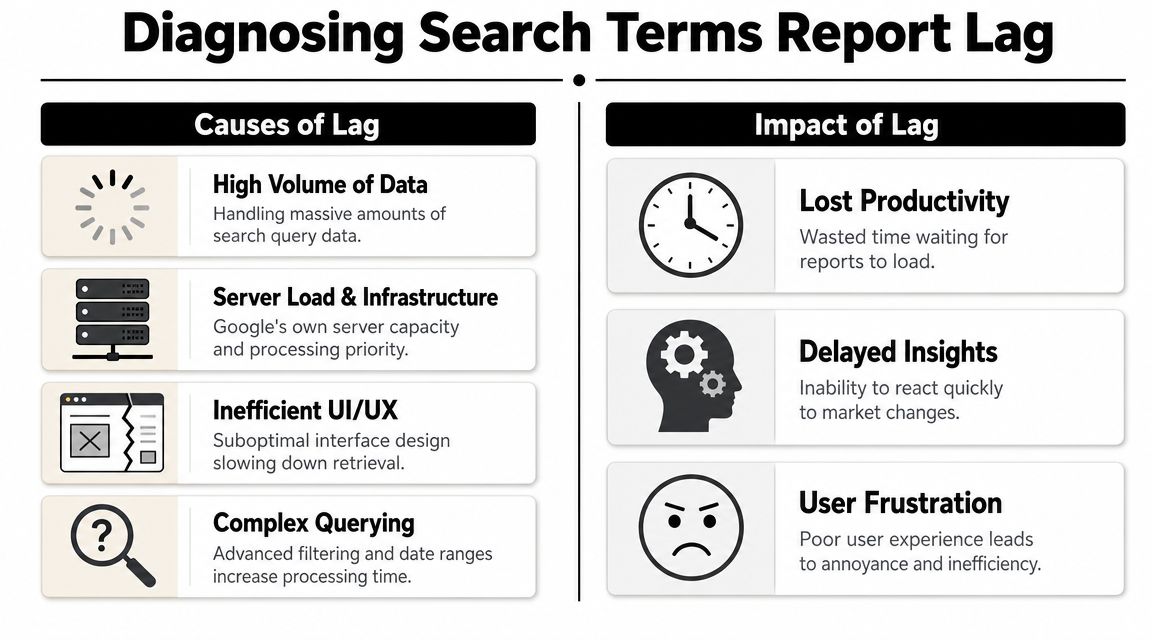
Hidden data creates visible friction
One of the clearest examples comes from missing-query coverage. Independent PPC commentary notes that Google may hide up to 80% of the search terms that trigger ads, and one audit found 2,243 “other search terms” against 1,218 visible impressions, which shows hidden query volume can outweigh what you can inspect (analysis of missing Google Ads search terms).
That has a nasty side effect. The report feels like it should answer your questions, but it can only answer part of them. So teams keep slicing, filtering, and re-checking the same view.
If you want a baseline on how the report is supposed to work before diagnosing account-specific bottlenecks, it helps to review a plain-English breakdown of the Google Ads search terms report.
The causes I see most often
Here's the short version of what usually slows people down:
| Cause | What it looks like in real accounts |
|---|---|
| Large date ranges | The UI has to render more rows, more filters, and more segments |
| Too many campaigns at once | Search terms become harder to isolate by intent, geography, or match-type behavior |
| Messy account structure | Reviews happen at the wrong level, so analysts keep drilling in and back out |
| Hidden-query coverage | You spend longer reviewing because the visible sample isn't enough to make clean decisions |
The first three are normal account-management problems. The last one is structural.
When advertisers say the report is slow, they often mean the process is slow. The load time is only part of it.
Why mature accounts feel worse
Mature accounts usually carry more baggage:
- Legacy ad groups with mixed intent
- Campaigns built by multiple managers over time
- Search, shopping, and PMax activity living side by side
- Repeated manual reviews because nobody trusts a single pass
That's why some teams spend more time “investigating” than optimizing. They aren't just reviewing data. They're trying to reconstruct what happened from a filtered snapshot.
Once you see the report that way, the fix gets clearer. You don't need better patience. You need a tighter review system.
Quick Fixes Inside the Google Ads Interface
Sometimes you don't need a grand workflow redesign. You just need to find the bad term, add the negative, and keep your day moving.
For those moments, the Google Ads interface still gives you a few decent band-aids. They won't solve the underlying visibility problem, but they can make the task less annoying.
Shrink the scope first
The fastest win is almost always to narrow what you're asking the UI to do.
Try this order:
- Cut the date range down to the smallest useful window
- Filter to one campaign before touching anything else
- Drill into one ad group or theme if the campaign is still noisy
- Remove unnecessary segments so the table has less to render
Often, the opposite occurs. They open a broad view, segment it six ways, and then wonder why every click drags.
Save filters you reuse
If you repeatedly review the same campaign clusters, stop rebuilding your filter set every time.
Create saved views around actual work patterns, such as:
- Brand cleanup
- Non-brand negatives
- High-priority lead gen campaigns
- Weekly search query spot checks
That cuts out the repetitive clicking, which is often what people mean when they say a report is taking too long.
For a more tactical walkthrough of this kind of cleanup process, this guide on how to review Google Ads search terms report faster is worth keeping open while you work.
What works and what doesn't
A quick reality check helps here.
Usually works well
- Campaign-level filtering when you know where the problem traffic lives
- Shorter date windows for urgent negative keyword review
- Saved filters for recurring account checks
Usually disappoints
- Opening all campaigns at once
- Segmenting before filtering
- Trying to do strategic analysis inside the same session as emergency cleanup
If the task is urgent, optimize for speed. If the task is strategic, get the data out of the interface.
That split matters. The UI is fine for triage. It's not where I'd want to do serious pattern analysis across a large account.
Smarter Workarounds for Analyzing Data at Scale
Once the account gets big enough, staying inside Google Ads becomes the bottleneck. At that point, the best move is usually to export what you can, clean it elsewhere, and do the thinking in a tool built for sorting and tagging.
That doesn't magically create missing visibility, but it does remove a lot of interface drag.
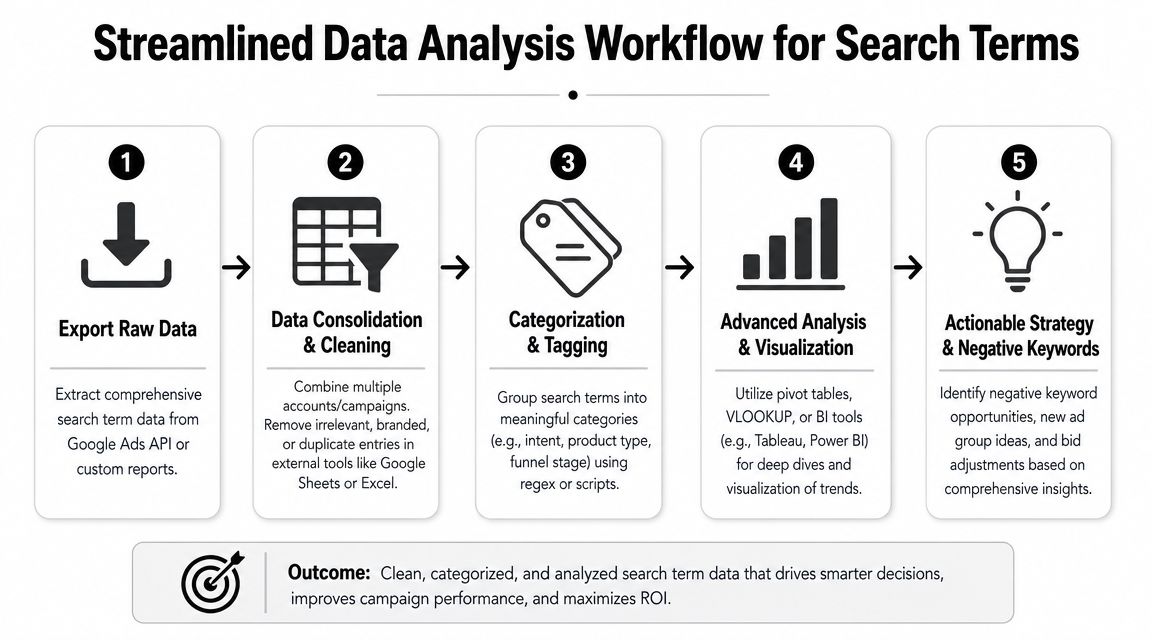
Exports are boring, but they work
Google Sheets and Excel are still useful for search term reviews because they let you do three things quickly:
- Filter aggressively
- Tag patterns in bulk
- Separate analysis from interface speed
A simple exported workflow can look like this:
| Step | Best use |
|---|---|
| Export by campaign group | Keeps files manageable and easier to review |
| Standardize columns | Makes weekly comparisons cleaner |
| Tag obvious negatives | Speeds up repeat reviews |
| Group by intent or theme | Surfaces structural issues, not just single bad terms |
The catch is obvious. Exports create manual overhead. You still have to clean the sheet, merge views, and push actions back into the account.
Scripts help, until they don't
Scripts can ease repetitive checks. They're handy for alerts, recurring exports, and basic categorization logic. But they have limits when the account structure is messy or when campaign types don't expose data the same way.
That's where a lot of teams hit a wall with Performance Max.
According to Google Ads API guidance discussed by developers, Performance Max search terms can't be retrieved in one go. You have to query insights at the campaign level and sometimes make a separate request for each insight. In large PMax setups, that can turn into thousands of requests, which is a big reason “complete” reporting becomes painfully slow at scale (Google Ads API discussion on PMax search term retrieval).
The practical takeaway
So what's the right move?
- Use exports when your main problem is interface friction
- Use scripts when your process is repetitive and rule-based
- Treat the API carefully if you expect it to be a magic fix for PMax visibility
Better analysis usually comes from a better pipeline, not a more heroic review session.
For many teams, the true upgrade isn't a single tool. It's a workflow where the UI is only used for quick checks, while pattern analysis and bulk decisions happen outside it.
The Ultimate Fix A Better Workflow with Automation
At a certain point, trying to “speed up the report” becomes the wrong project.
The better project is building a workflow where your day-to-day negative keyword work doesn't depend on slowly clicking through the Search terms report at all. That's the shift that saves time. Not another browser trick. Not another saved filter. A different operating model.

Stop treating review as a one-off task
The old workflow usually looks like this:
- Open Google Ads
- Wait for the report
- Filter by campaign
- Scan rows manually
- Copy terms somewhere
- Build negatives
- Push changes back into the account
That process is slow even when the report behaves. It also creates room for mistakes. Copy-paste errors, inconsistent match type choices, duplicate negatives, and missed opportunities to promote good queries into new keywords.
A stronger workflow turns search term management into a repeatable system:
- Review by pattern, not by random rows
- Batch actions instead of one-off edits
- Separate cleanup from expansion
- Standardize how negatives are added across campaigns
That's the point where automation starts paying for itself.
What an automated workflow should do
A useful workflow tool should reduce handoffs. Not just show data in another screen.
Look for something that helps you:
- Flag junk queries quickly instead of combing through scattered rows
- Apply negatives in bulk without rebuilding lists manually
- Promote strong search terms into keywords with match type control
- Keep campaign expansion and cleanup in one place
If the software still forces you into spreadsheet gymnastics and copy-paste loops, it hasn't solved the core problem. It has just moved it.
For teams trying to build that kind of system, this article on Google Ads workflow automation lays out the logic behind reducing repetitive search-term tasks.
The mindset shift that actually helps
A lot of PPC managers stay stuck because they think the report is the workflow.
It isn't. The report is one input. Your workflow is the full chain from query review to account action.
That's why the best setups usually have these traits:
| Weak setup | Better setup |
|---|---|
| Manual review starts from scratch | Review starts from saved rules and prior tagging |
| Negatives handled one at a time | Negatives grouped and applied in batches |
| Good queries get noticed randomly | Good queries are intentionally surfaced for expansion |
| Analyst time goes into clicking | Analyst time goes into judgment |
That last line is the one that matters most. Good PPC managers shouldn't spend their best hours waiting on tables to load and cleaning formatting.
A short demo helps make that difference concrete:
What to keep and what to drop
You don't need to throw out everything you already do.
Keep:
- Fast in-platform spot checks
- A habit of regular query review
- Campaign-level judgment from experienced managers
Drop:
- Endless manual copy-paste
- Review sessions that start with no prioritization
- The assumption that more time in the report equals better optimization
The best systems don't make analysts work harder. They make routine account hygiene easier, so humans can focus on decisions.
If your Google Ads search terms report takes too long every week, that's usually your signal to redesign the process, not just tolerate the lag.
Frequently Asked Questions on Report Speed
A few questions come up almost every time this issue gets discussed. Here are the straight answers.
Is it my browser or computer?
Sometimes, a sluggish browser makes the interface feel worse. Too many extensions, memory-heavy tabs, and old cached sessions can all add friction.
But if the same pain shows up repeatedly during search term reviews, the deeper issue is usually workflow design. A cleaner browser session can help. It won't fix a reporting process built around filtering and re-filtering partial data.
Should I expect Google to make this dramatically better?
I wouldn't build your workflow around that hope.
Google has already made clear in its documentation and product behavior that search term visibility is limited by design. So even if parts of the experience improve, the bigger constraint is that you're still not working from a complete query log. That's why long-term efficiency comes from changing the review system, not waiting for a perfect report.
Is a slow report a sign of a healthy large account?
Sometimes, yes. Big accounts produce more complexity. More campaigns, more overlap, more review paths.
But “large account” and “slow process” aren't the same thing. A healthy account can still have a poor review workflow. The sign I watch is whether the team can move from query insight to account action without a pile of manual cleanup in the middle.
When should I stay in the UI and when should I leave it?
Use the UI when you need quick action:
- Spot a bad query
- Check one campaign
- Add a negative now
Leave the UI when the task becomes broader:
- Weekly trend reviews
- Cross-campaign pattern analysis
- Query categorization
- Bulk cleanup and expansion work
That split alone saves a lot of wasted time.
What's the simplest way to know my current process is broken?
Ask yourself three questions:
- Do search term reviews regularly get postponed because they feel too heavy?
- Does your team repeat the same filtering work every week?
- Do good queries and bad queries both require too much manual handling to turn into action?
If the answer is yes to even one of those, your bottleneck probably isn't just report speed. It's the workflow wrapped around it.
Is there any point in reviewing search terms more often?
Yes, if your review method is lean enough.
More frequent reviews help when they're short, focused, and tied to action. They hurt when every session starts from scratch and sends you down the same rabbit hole. Frequency works best after the process is standardized.
If your search term reviews keep eating hours, try Keywordme. It helps turn messy query cleanup, negative keyword handling, and campaign expansion into a faster, cleaner workflow without the usual copy-paste grind.
.svg)