
How to Review Google Ads Search Terms Report Faster
How to Review Google Ads Search Terms Report Faster


SEO Title: Review Google Ads Search Terms Faster
Meta Description: Learn how to review Google Ads search terms report faster with filters, batching, scripts, and Keywordme for cleaner queries now.
The search terms report has a way of turning a simple cleanup task into a weekly time sink. You open Google Ads, tell yourself you'll just check query quality for a few minutes, and then an hour disappears into filtering junk, second-guessing match types, and copying notes into a spreadsheet you probably won't revisit.
Most slow reviews happen for one reason. People treat the report like a reading exercise. They scan line by line, react to whatever looks bad, and keep making isolated decisions with no system behind them.
That's the wrong workflow now.
If you want how to review google ads search terms report faster, the fix isn't “look harder.” It's building a tiered process. Start with the native Google Ads view so the report stops hiding useful context. Then batch your decisions instead of handling one query at a time. After that, move up to pattern detection and automation so you're not repeating the same cleanup work every week.
Done right, search term review stops feeling like admin work. It becomes a fast control loop for cutting junk traffic, promoting good queries, and keeping campaigns from drifting.
Escaping the Search Term Report Black Hole
The worst way to review search terms is the old spreadsheet shuffle. Export the report. Sort by spend. Scroll forever. Add a few negatives. Get distracted by one weird query. Repeat next week.
That approach feels thorough, but it's usually just slow.
A good search term workflow does three things at once. It surfaces waste quickly, highlights terms worth promoting, and gives you enough context to avoid bad decisions. If your process only does the first part, you'll keep cleaning the same account forever without really improving it.
What makes search term review slow
A lot of the drag comes from avoidable habits:
- Reading every line manually: Not every query needs individual attention.
- Reviewing without trigger context: If you can't see which keyword fired the ad, you're guessing.
- Making one-off decisions: Adding negatives one by one is tedious and easy to mess up.
- Ignoring segmentation: A term that looks weak in aggregate can behave differently by device or campaign.
- Treating every review as a fresh start: If you don't document actions or filter reviewed patterns out, you keep re-litigating old decisions.
Practical rule: If your process depends on memory, it won't stay fast for long.
The actual cost isn't just time. Slow reviews let weak queries sit in the account longer than they should. They also bury the useful stuff. Good search terms often get discovered late because the analyst is still knee-deep in cleanup.
The tiered way to work
Think of this like moving through three levels of control.
First, make the native Google Ads interface do more of the heavy lifting. Then apply a triage system so every term falls into a clear action bucket. Finally, use automation or tool support when the account is too large for manual cleanup to stay sane.
That progression matters because organizations often skip straight to “we need better automation” when their real problem is messier basics. If the report view is bad and the decisions are inconsistent, adding more tools just helps you move faster in the wrong direction.
A fast review should feel boring in a good way. Open the report. Spot patterns. Batch the action. Move on.
The Foundation Mastering Native Google Ads Filters
A slow search term review usually starts with a bad view, not a hard decision. If the report is missing the trigger keyword, mixed across campaigns, and cluttered with old rows, even a good analyst gets dragged into manual checking.
Google's own Search terms report documentation points to the controls that matter most for speed: grouped themes, the Match type column, and the Keyword column. That last one is hidden by default, and it is the first thing I turn on because it shows the actual keyword that triggered the ad and cuts out a lot of guesswork (Google Search terms report guidance).

Turn on the columns that remove guesswork
The Keyword column shows whether the problem came from a loose broad match keyword, a mis-grouped ad group, or a query that should never have been eligible in the first place. Without it, people end up judging the search term in isolation and making the wrong fix.
The Match type column gives the second half of the story. It shows how much control the account had over that impression. If a bad query came through broad match, the action is usually different than if it came through exact match.
My default view is simple:
- Keyword: Shows the trigger keyword
- Match type: Shows how close the match was
- Conversions or your primary conversion column: Keeps the review tied to business outcomes
- Cost: Surfaces waste quickly
- Campaign and Ad group: Shows where the structural issue lives
Save that layout as a reusable view. Rebuilding columns every time is a small waste, but it adds up fast across weekly reviews. If you spend a lot of time working inside the UI, it is also common to pair that setup with a tool built around the native workflow, like this native Google Ads optimization extension.
Start with themes, then drill into queries
Google groups search terms into themes and subthemes in the Insights and reports area. Use that grouped view first, then open the raw terms once you know what pattern you are chasing.
That order matters.
Reviewing one row at a time feels thorough, but it is usually the slowest way to find problems. Theme-first review helps you spot repeated intent mismatches, weak modifiers, and recurring irrelevant topics before you get pulled into edge cases. Once the pattern is clear, the single-term checks are faster and more accurate.
Filters that actually save time
A useful filter does one job. It narrows the report to rows that are likely to need action now.
These are the filters I come back to most:
| Review target | Why it matters | Typical action |
|---|---|---|
| High-cost, low-value terms | Waste shows up here first | Add negatives, tighten match types, or inspect the trigger keyword |
| Queries with conversions | Good candidates for promotion | Add as keywords or split into tighter ad groups |
| Terms from one campaign or ad group | Keeps intent consistent during review | Judge terms against that campaign's goal, not account-wide averages |
| Recently active terms | Keeps the report current | Focus on what is affecting spend now |
One warning. Over-filtering is its own time-suck. If you stack too many conditions at the start, you can hide the pattern you needed to catch. Start broad enough to see the shape of the problem. Then narrow the view once you know what you are looking at.
The Triage Method For Batch Actions and Smart Decisions
Fast review comes from decision batching, not faster scrolling.
One analytics framework recommends a short weekly cadence and notes that manual search-term review often takes 30 to 45 minutes per campaign, while segmented analysis by factors like device or time-of-day helps prevent over-pruning because a term can underperform in one segment and convert in another (Google Ads analytics workflow).
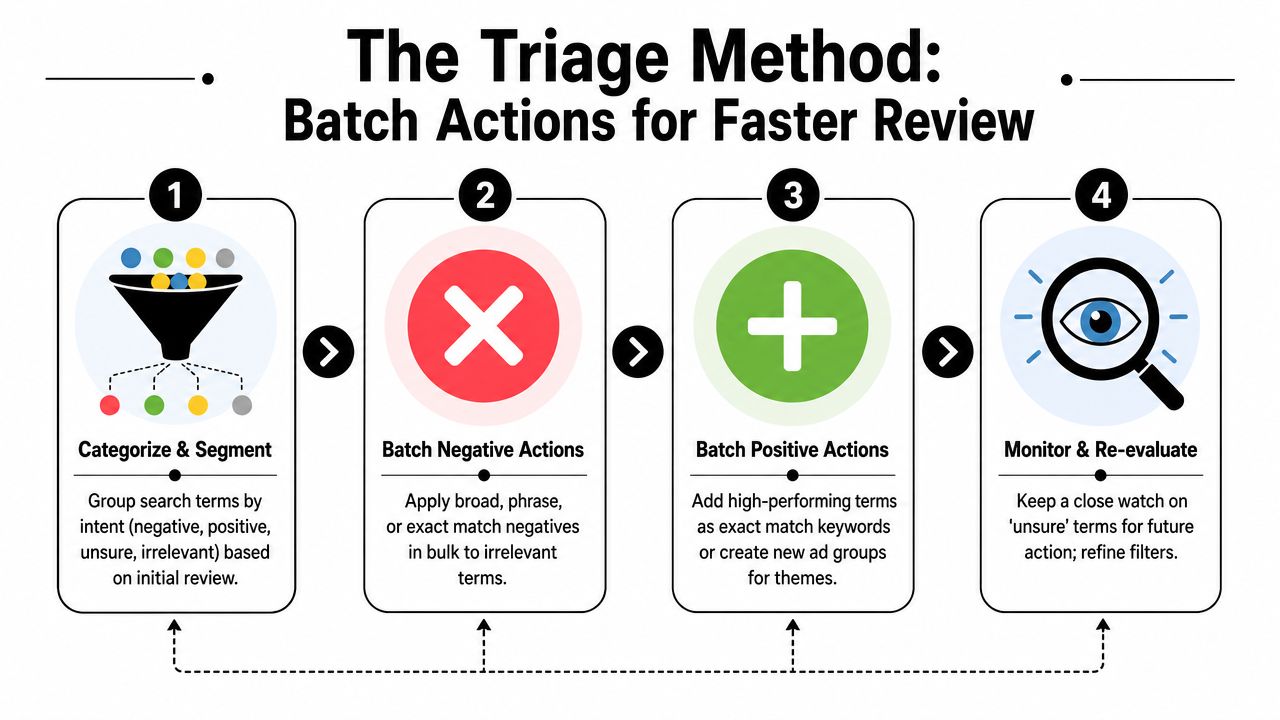
Use three action buckets
Every search term doesn't need a custom debate. It needs a bucket.
I use three:
- Negate
- Promote
- Ignore for now
That's it.
If you can't sort a term into one of those quickly, the issue usually isn't the query. It's that the account structure is muddy, or you're reviewing without enough segment context.
What belongs in each bucket
Negate is for terms that clearly don't match intent, or match the wrong kind of intent. These are the searches that burn budget while pulling the campaign away from your desired traffic.
Promote is for terms that proved they deserve more control. If a query is clearly aligned and producing the kind of result you want, it often deserves its own keyword treatment instead of staying trapped as a search term.
Ignore for now is the bucket people hate, but it matters. Some terms are too early, too mixed, or too segment-dependent to force a move today. Putting them in a watchlist beats making a bad negative decision because you wanted closure.
A fast PPC manager doesn't try to be decisive on every row. They're decisive about when not to act.
Segment before you bulk-apply
New hires frequently move too quickly. They find a term that looks weak in the blended report and block it account-wide. Then someone notices it works on desktop or in a specific campaign.
Before bulk actions, check segments like:
- Device: Mobile behavior can look very different from desktop.
- Campaign: Brand, non-brand, and product-line campaigns shouldn't share the same cleanup logic.
- Ad group: Sometimes the problem is a trigger keyword sitting in the wrong place.
- Match behavior: Loose matching may be the issue, not the search itself.
Here's the shortcut mindset:
| Situation | Fastest smart move |
|---|---|
| Irrelevant query theme repeats across many rows | Add negatives in bulk |
| Strong query shows clear fit | Add it as a keyword and tighten control |
| Mixed results across segments | Hold action and review by segment |
| Same trigger keyword keeps causing drift | Fix or pause the trigger source |
This is the point where search term review stops being a reading task and starts acting like account management.
Beyond Basic Negatives with Google Ads Scripts
Once you've got the UI under control and your triage method is consistent, the next bottleneck becomes obvious. Phrase-by-phrase review doesn't scale well.
The smarter move is pattern recognition.
Google introduced a word-performance view that lets advertisers analyze individual words across search terms, not just full phrases. That matters because one bad word can create many irrelevant queries, and pattern-based review is more efficient than checking every phrase one at a time (word-performance view overview).
Why word-level analysis is faster
A messy account often has recurring intent signals hiding inside dozens or hundreds of search terms. Maybe the issue isn't one phrase. Maybe it's a repeat word that keeps dragging in the wrong audience.
When you review at the word level, you stop asking, “Should I negate this exact query?” and start asking, “What language keeps producing poor-fit traffic?”
That's a better question.
Examples of patterns you might spot qualitatively:
- Research-heavy wording that suggests low buying intent
- Job-seeking language showing up in service campaigns
- Support or customer service wording entering acquisition campaigns
- Educational searches appearing in high-intent commercial ad groups
Where scripts fit
Google Ads Scripts can help surface recurring word patterns across large search term sets. You don't need to be a developer to get value from that idea. The practical use case is simple: run a script that summarizes common words or combinations, then review those outputs for negative themes or new keyword opportunities.
That's especially useful when manual review starts feeling repetitive. If you keep seeing the same weak language in different phrase combinations, scripts help you spot the root pattern sooner.
For a more tactical walkthrough on finding negatives from search term data, this guide on using the search terms report to find negative keywords is a useful next read.
The phrase isn't always the problem. Sometimes one recurring word is doing all the damage.
What scripts do well and where they fail
Scripts are good at surfacing repetition. They are not good at understanding business nuance on their own.
Use scripts when you want to:
- Spot repeated bad-word patterns across campaigns
- Find common modifiers attached to decent terms
- Flag themes for human review before bulk action
Don't use scripts as a blind negative machine. Word-level analysis is powerful, but context still matters. A word can be junk in one campaign and useful in another. Automation should narrow the field, not replace judgment.
The Ultimate Shortcut Automating with Keywordme
At some point, the problem stops being insight and starts being execution. You know what should happen. You just don't want to spend your afternoon copying, formatting, and applying actions one by one inside Google Ads.
That's where workflow tooling earns its keep.

Google's own analysis recommends using the search terms report not only to find waste, but also to move quickly on high-value queries by adding them as keywords and considering bid adjustments, which puts action ahead of endless manual review (Google Ads analysis article).
What a tool should remove from the workflow
A useful search term tool should cut out the awkward parts:
- jumping between report views and spreadsheets
- reformatting negatives
- manually assigning match types
- turning good queries into usable keywords
- repeating the same cleanup motions across campaigns
If a tool doesn't remove those steps, it's just another dashboard.
That's also why broader automation thinking helps here. If you're comparing systems that reduce repetitive work across paid media and related workflows, this roundup of top AI marketing automation tools is worth scanning for context.
Where Keywordme fits
Keywordme is built around the exact bottleneck most PPC teams hit in the search terms report. It works inside the Google Ads workflow and is designed to help users bulk-handle junk queries, build negative keyword lists, expand ad groups with search-term data, and apply match types without relying on the usual export-and-copy routine. If you want the product-specific breakdown, this page on automating Google Ads keyword management shows the mechanics.
That matters because the slowest part of search term review usually isn't deciding. It's applying the decision cleanly at scale.
A practical setup looks like this:
A cleaner execution loop
Review terms in the native report. Group obvious junk. Apply negatives in bulk. Flag good queries for promotion. Push them into the right keyword structure without leaving the workflow.
That's the actual shortcut.
The video below shows the kind of hands-on flow that makes this easier to picture in practice.
The mistake I see most often is teams trying to save time only at the analysis stage. Analysis matters, but execution drag is what really stretches the task. When you remove the mechanical steps, search term review gets lighter fast.
Your High-Speed Search Term Review Routine
A fast routine isn't complicated. It's consistent.
If your account reviews feel random, they'll stay slow. If you use the same sequence every time, the report becomes much easier to control. You stop asking what to do next and start moving through a repeatable set of checks.

The weekly rhythm
Use a short weekly pass for active campaigns. Keep it focused on control, not perfection.
A simple routine:
- Open the native report view: Use your saved columns and filters first.
- Scan themes before rows: Look for repeated intent patterns instead of reading everything.
- Run triage: Negate, promote, or hold.
- Check segments before broad action: Especially when a term looks mixed.
- Document edge cases: If you chose “ignore for now,” note why.
This kind of rhythm works well because it prevents the report from piling up into a bigger mess later.
Review cadence beats review intensity. A smaller, regular cleanup is easier than an occasional deep scrub.
The monthly deeper pass
The monthly pass should be less about row cleanup and more about patterns.
That's the time to ask:
| Monthly review question | Why it matters |
|---|---|
| Which trigger keywords keep causing query drift? | The issue may be structural, not query-level |
| Which search themes deserve dedicated ad groups? | Promotion creates more control |
| Which recurring words signal low-fit traffic? | Word-level patterns can guide broader negatives |
| Which campaigns are hardest to review manually? | Those are prime candidates for more automation |
If you handle paid search across multiple clients or business units, it also helps to study examples of high-converting paid advertising strategy so your search-term decisions stay tied to commercial intent, not just surface-level query cleanup.
The habit that keeps accounts clean
The goal isn't to “finish” the search terms report. You won't. Search behavior keeps changing, match behavior evolves, and campaigns drift if nobody tightens them.
The goal is to keep the account reviewable.
That means:
- building a clean native view
- making decisions in batches
- using word-level pattern spotting when volume grows
- reducing execution friction with the right workflow support
If you do that, the report stops being a black hole. It becomes one of the fastest levers you have for improving account quality.
If you want to make this routine easier to execute inside Google Ads, Keywordme helps handle search-term cleanup, keyword expansion, match type assignment, and negative list building without the usual copy-and-paste workflow.
.svg)