
How to Run a Google Ads PPC Campaign in 2026
How to Run a Google Ads PPC Campaign in 2026


Alphabet reported $237.86 billion in Google advertising revenue for 2024, about 77.2% of Alphabet's $308.4 billion in consolidated revenue. Google Search and other properties generated about $175.8 billion of that ad total. Alphabet's Q4 2024 earnings exhibit also puts the year-over-year lift in Search and other revenue at $23.1 billion, tied to more queries, more mobile use, higher advertiser spending, and better ad delivery.
That pile of money isn't a scoreboard for your account. It's the auction your Google Ads PPC campaign has to win one query at a time. The useful work is deciding which search is worth a bid, and which single outcome the bidder is allowed to buy.
What a Google Ads Campaign Actually Buys
Say you run a neighborhood bakery and you want Saturday cake orders, not random website visits. A Google Ads campaign is the container for that job. It holds a budget, a goal, and the ads Google can enter into an auction when a search or a placement matches your targeting. Every search is its own auction. Ad Rank weighs your bid against how useful the ad and the landing page look in that moment. You pay for the click, or for the outcome the bid strategy is set to chase.
The pieces only need naming once. You'll use them the same way on every account.
- Campaign: the drawer that holds the budget and the bid strategy.
- Ad group: one intent, not a grab bag of offers.
- Keywords: the searches you're willing to match.
- Ads and the landing page: the same promise, written twice.
- Audiences: extra context on top of the query, not a replacement for it.
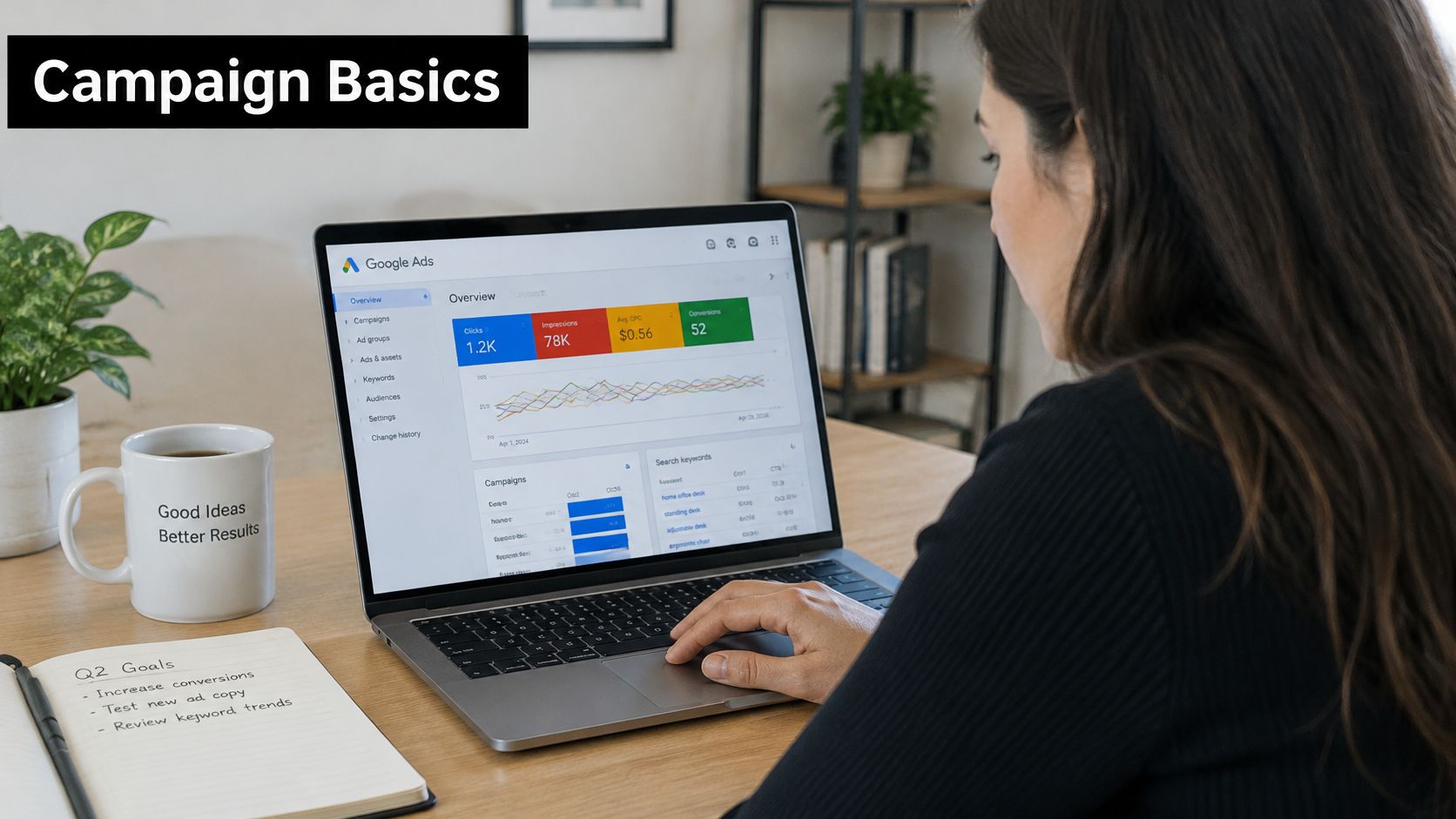
The 2026 shift is ordinary account work, not a new product launch. Smart Bidding spends toward the conversions it can see. Label "anyone who opened the contact page" as the goal, and the system learns that lesson. It keeps finding more of those people, including folks who never order a cake. A clean goal teaches a useful pattern. A sloppy one spends the weekly budget on the wrong crowd.
The path is short. Pick a campaign type that matches how people look for you. Build the structure. Set match and bid rules. Define one conversion worth paying for. Then clean search terms every week so the queries stay honest. Teams selling software can follow the same tie between query and pipeline in turning SaaS search spend into pipeline.
Choose a Campaign Type That Matches Intent
Start with the type that matches how a buyer already behaves. Don't start with the type that has the most inventory.
| Campaign type | Where ads show | Best fit | Start when |
|---|---|---|---|
| Search | Google Search results | Leads and high-intent product queries | You can name the searches a buyer would type |
| Shopping | Shopping results and product placements | Retail catalogs | Product feed, prices, and Merchant Center are clean |
| Performance Max | Search, Shopping, YouTube, Display, Discover, Gmail, Maps | Mixed goals with assets and audience signals | Conversion tracking and values are already trustworthy |
| Display | Sites, apps, and remarketing placements | Awareness or returning visitors | You need reach or a remarketing pool, not cold leads |
| Demand Gen | YouTube, Discover, Gmail | Visual mid-funnel demand | You have images or video and a defined audience |
| Video | YouTube | Awareness or consideration | A video asset is the message, not a leftover |
| App | Google app inventory | Installs or in-app actions | The product is a mobile app |
Search is the default test
Search is the right first campaign for a new lead offer or an ecommerce test, because the query states the intent. Someone typing "emergency plumber near me" or "buy trail running shoes" has already told you the job. You can write an ad and a page that answer that sentence. If you can't name those searches, you don't have a Search campaign yet. You have a guess.
Shopping fits a retailer with a clean product feed and Merchant Center. Titles, prices, and availability are the creative. A feed full of "Shoe" and a stale price will buy the wrong click before your copy ever gets a chance.
When the wider inventory can wait
Performance Max can reach Search, Shopping, YouTube, Display, Discover, Gmail, and Maps from asset groups and audience signals. It also hides most of the queries. Don't hand it the budget until conversion values are already trustworthy. Otherwise it will optimize toward whatever event you happened to tag.
Display and Video buy attention and remarketing. They aren't a first purchase from a cold stranger who never searched. Demand Gen sits in the middle, with visual creative on YouTube, Discover, and Gmail for people who aren't typing a query yet. App campaigns exist to drive installs or in-app actions. If you don't have an app, that row isn't yours.
Practical rule: A local service or a small shop starts with brand and non-brand Search, adds Shopping only if products are the offer, and waits on Performance Max until tracking shows at least a month of real conversions.
A few edges sit under the table, not inside it. A remarketing-only Display campaign makes sense once you already have site visitors worth a second ask. A YouTube awareness flight is a video with a frequency you can live with, not a leftover clip from a brand shoot. A feed-only Shopping campaign is the right build when titles and prices are the message and you don't want extra creative deciding the click. If you're still torn between a query and a banner, the split in search ads versus display ads is the cleaner way to see which click you can explain to a client.
Paste this into the brief. "We start with brand and non-brand Search for named buyer queries, add Shopping only with a clean feed, and we don't fund Performance Max, Display, Video, Demand Gen, or App until the offer and the conversion data match that row."
Stack Campaigns Ad Groups and Keywords
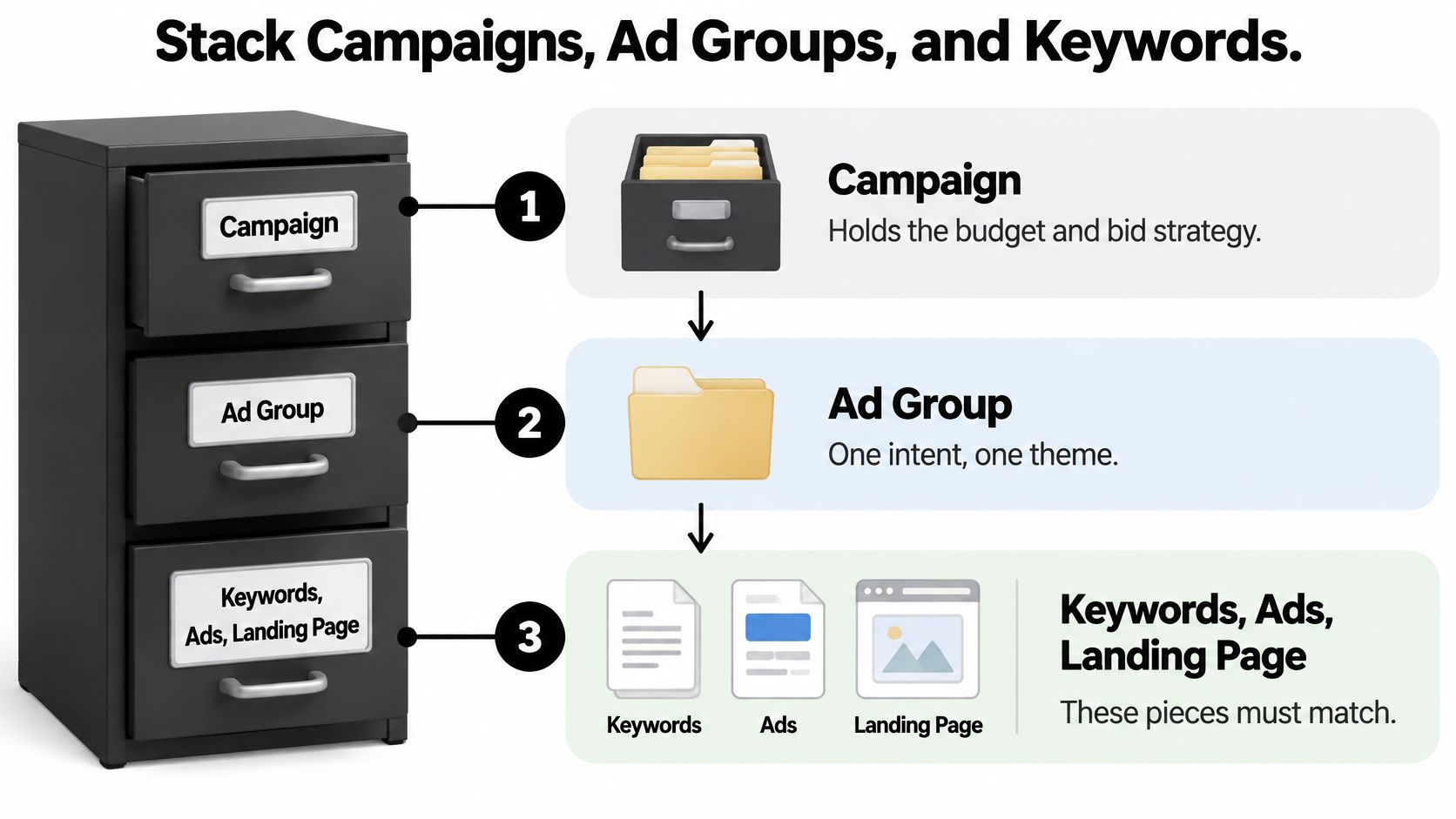
Treat the account like a filing cabinet. The campaign is the drawer, with the budget and the bid strategy. The ad group is the folder for one intent. The keywords, the ads, and the landing page are the papers, and they have to describe the same job. If those papers disagree, the auction still runs. You just pay for a confused click.
A running-shoe shop, filed on purpose
Picture a shop that sells running shoes online and in one city. Give brand queries their own Search campaign, things like the store name. Give non-brand queries a second campaign. Open a third campaign only when a location or a product line needs its own budget. A shared budget that lets broad discovery starve the brand campaign is how a converting query goes dark on a Tuesday.
Inside non-brand, split ad groups by intent. Road running shoes, trail running shoes, and size-or-fit queries. Not one folder called "shoes." Each ad group gets a handful of closely related keywords, two or three responsive search ads that repeat that intent, and a landing page that shows those products. The road page shows road shoes. The trail page shows trail shoes. The size page talks about fit, not a homepage carousel of everything in stock.
What breaks the stack
Three habits wreck this faster than a bad bid.
- One ad group for brand and generic terms: the brand ad starts sounding like a category ad, and the category ad starts bidding like you already own the search.
- A homepage for every ad: the click lands on a menu, and the person has to do the sorting you skipped.
- One budget for every intent: discovery spends the money the brand campaign already knew how to convert.
Name the folders so a teammate can scan them. Search | Non-brand | Running shoes | Exact and phrase beats Campaign 3 final v2. The same naming habit shows up in Google Ads budgeting with Silva Marketing, where structure is what keeps a budget from leaking across intents.
Read a keyword, the headline, and the page headline out loud. If they could belong to different businesses, split the ad group before you add another keyword.
That check takes about five minutes. It saves the week you'd spend wondering why a "good" keyword has a terrible landing page.
Set Up Your First Search Campaign Step by Step
Work through this once, in one sitting, for the first Search campaign. Leave the clever stuff for week two.
- Create the account and lock the basics. Confirm billing, currency, and time zone before launch. Both currency and time zone are painful to change later, and reports get messy if you guess.
- Track one primary action. Install conversion tracking for that action only, then fire a test form submission or a test purchase. If the test doesn't show up, you don't have a campaign yet.
- Create it as Search. Choose the goal, and target only the locations where customers live or buy. For a local area, use presence-only targeting so you aren't paying for people who are merely "interested in" your city.
- Turn off Display network partners. This is a Search campaign. The budget stays with search queries.
- Set a daily budget you can lose for two weeks. Start with Maximize Clicks or manual CPC until conversions arrive. Automation without outcomes just buys cheaper curiosity.
- Build one tight ad group. One intent, two or three responsive search ads that repeat its wording, and sitelinks that point to real pages. Empty sitelinks are decoration.
- Preview on a phone. Check the ad and the landing page together. The page headline should match the keyword a person would type.
- Launch, then stop touching settings. Give it a week of data before you change bids, match types, or the goal.
A budget you can't stand to lose will get paused on day three, right as the auction starts to learn who clicks. Pick a number you can ignore until the first review.
Audit Match Types Before You Add Negatives
Take one keyword, running shoes, and three kinds of queries. "Buy men's road running shoes" is close enough to test in the road ad group. "Running shoes size 10 near me" may deserve its own ad group if local intent converts, because the page has to talk about stock and the store, not just a product grid. "Free running shoes," "running shoe jobs," and "how to clean running shoes" are themes. They aren't customers.
Close variants aren't a typo setting
Positive exact match still allows close variants that share the same meaning. It isn't a lock on one spelling. Google's exact match documentation says early tests found advertisers using mostly exact-match keywords received 3% more exact-match clicks and conversions on average, with most of that coming from queries they hadn't listed. Tighter matching isn't automatically safer. Some of the useful demand was never on the original keyword list.
Phrase match keeps the idea of the phrase while word order and extra words still move around. Broad match is a discovery net. It belongs with conversion-based bidding and a review habit, not as a list you paste and forget. If the account can't yet tell a good query from a bad one, broad match will find both and bill you for the tour.
Negatives don't expand for you
Negatives behave differently, and that's where people get burned. Google's negative keyword rules don't expand to close variants, synonyms, or plurals. You add those yourself. Casing and some misspellings are handled. "Shoe" and "shoes" are not the same exclusion.
| Match | What it does | Use it when | Watch-out |
|---|---|---|---|
| Positive exact | Targets the meaning, including close variants | The intent is proven and should have its own ad | It is not a literal lock on one spelling |
| Positive phrase | Targets searches that include the phrase meaning | You want a theme without every related idea | Word order and extras still vary |
| Positive broad | Reaches related searches beyond the keyword | Smart Bidding and conversion data can judge new queries | It needs search-term reviews or it drifts |
| Negative broad | Blocks a query only if all terms appear, any order | A whole irrelevant theme keeps recurring | It will not catch synonyms or plurals for you |
| Negative phrase | Blocks the terms in that order, extras allowed | A phrase is wrong but nearby wording may be fine | Singulars and plurals may need their own negatives |
| Negative exact | Blocks only those terms in that order with no extras | One query is bad and related queries may be good | The search terms report adds this match by default |
When you add a query from the search terms report, Google's search terms guidance saves it as negative exact by default. One bad search doesn't block the theme. That's usually what you want on the first pass. Change the syntax before you save if you mean a phrase.
The add-or-block test
Sort a query on four checks before you touch the list. Intent says whether a buyer is in the sentence. Conversion quality says whether it reached a sale, a booking, or a qualified lead. Marginal cost says whether the next click is still cheap enough. Landing-page fit says whether the page you already have can answer it.
Promote a proven query into the ad group whose ad and page already match it. Negative a repeated irrelevant theme. Wait when you only have a few clicks and no conversion evidence. Early blanket negatives feel tidy, and they also hide the variant that would have become next month's best ad group. Review queries your negatives already exclude, on a schedule, so a list from last spring doesn't block a new best seller.
Pick One Conversion and Match Bids to the Data
The campaign is allowed to buy one outcome. A purchase with revenue, a booked appointment, or a sales-qualified lead. Pick that before you pick a bid strategy. Calls, email signups, and other micro events stay secondary observations unless they predict revenue. Counting every button click, every duplicate thank-you hit, and every unqualified form as a primary conversion trains the bidder to buy more of them.
A dentist who optimizes to form fills attracts price shoppers and people who wanted directions. A dentist who optimizes to booked appointments teaches the account the visits that pay the staff. More tracked events aren't a better account. They're a noisier teacher.
Fill the gaps without inventing people
Browser limits and privacy rules leave holes in what you can see. Google's conversion modeling guidance says modeling estimates some of those missing conversions from aggregated patterns such as device, time, geography, and historical conversion rates, not from individual fingerprints. Enhanced conversions send hashed first-party data so a web lead that later becomes a sale can still teach bidding, including offline sales that started as a form. Consent has to be in place, and the values have to match what finance believes. A $1 placeholder on every lead will make a bad month look profitable.
Set this up before you argue about targets. The walkthrough in Google Ads conversion tracking is the right companion when the tag, the primary action, and the value still don't agree.
Match the strategy to the history you have
Google's Smart Bidding guidance is blunt about the data. Automated bidding needs conversion tracking on, because it learns from the actions you send it, such as purchases, leads, or sign-ups. Judge it over a longer stretch with at least 30 conversions, typically a month or more. Campaigns on Target ROAS should generally have at least 50 conversions in the evaluation period. Bad tracking doesn't sit in a report. It moves conversion volume, cost per acquisition, and return on ad spend, because the bidder reacts to whatever you fed it.
Turning Target ROAS on is a separate, earlier gate. Google's Target ROAS requirements say Search and Shopping need at least 15 conversions in the previous 30 days at the conversion-tracking level, plus monetary values on the actions you care about. Fifteen lets you switch it on. Fifty is what you wait for before you trust the read.
| Strategy | It chases | Data gate | Main risk |
|---|---|---|---|
| Manual CPC | A max cost per click you set | None beyond a working ad | Slow to react and easy to overbid |
| Maximize Clicks | Traffic inside the budget | A budget and approved ads | Cheap clicks with weak intent |
| Maximize Conversions | Conversion volume | Tracking on; judge after about 30 conversions | Spends toward whatever you labeled a conversion |
| Target CPA | A cost per action | Enough stable conversion history to judge, about 30 in a month or more | A fantasy target starves delivery |
| Maximize Conversion Value | Total conversion value | Monetary values on the actions that matter | Junk values look like revenue |
| Target ROAS | Return on ad spend | At least 15 conversions in 30 days to enable on Search or Shopping, values required; about 50 to evaluate | Brand traffic can fake a healthy return |
Manual CPC or Maximize Clicks fits while purchases aren't visible yet. Maximize Conversions needs tracking on and a judgment after about 30 conversions across a month or more. Target CPA needs that same kind of stable history. Set the target from recent profitable results, not from a number you wish were true. If you need the math behind a return target, AdCrafty's guide to ad profitability is a clear way to separate revenue from a number you can defend.
Don't stack Target CPA on day one. Don't edit the target every two days. Don't mix brand and non-brand under one ROAS goal, because brand searches will make a weak non-brand campaign look healthy.
Run a Weekly Search Term Cleanup
Make this a Friday pass, not a launch checklist you finish once and archive. The account changes every week. Your exclusions should too.
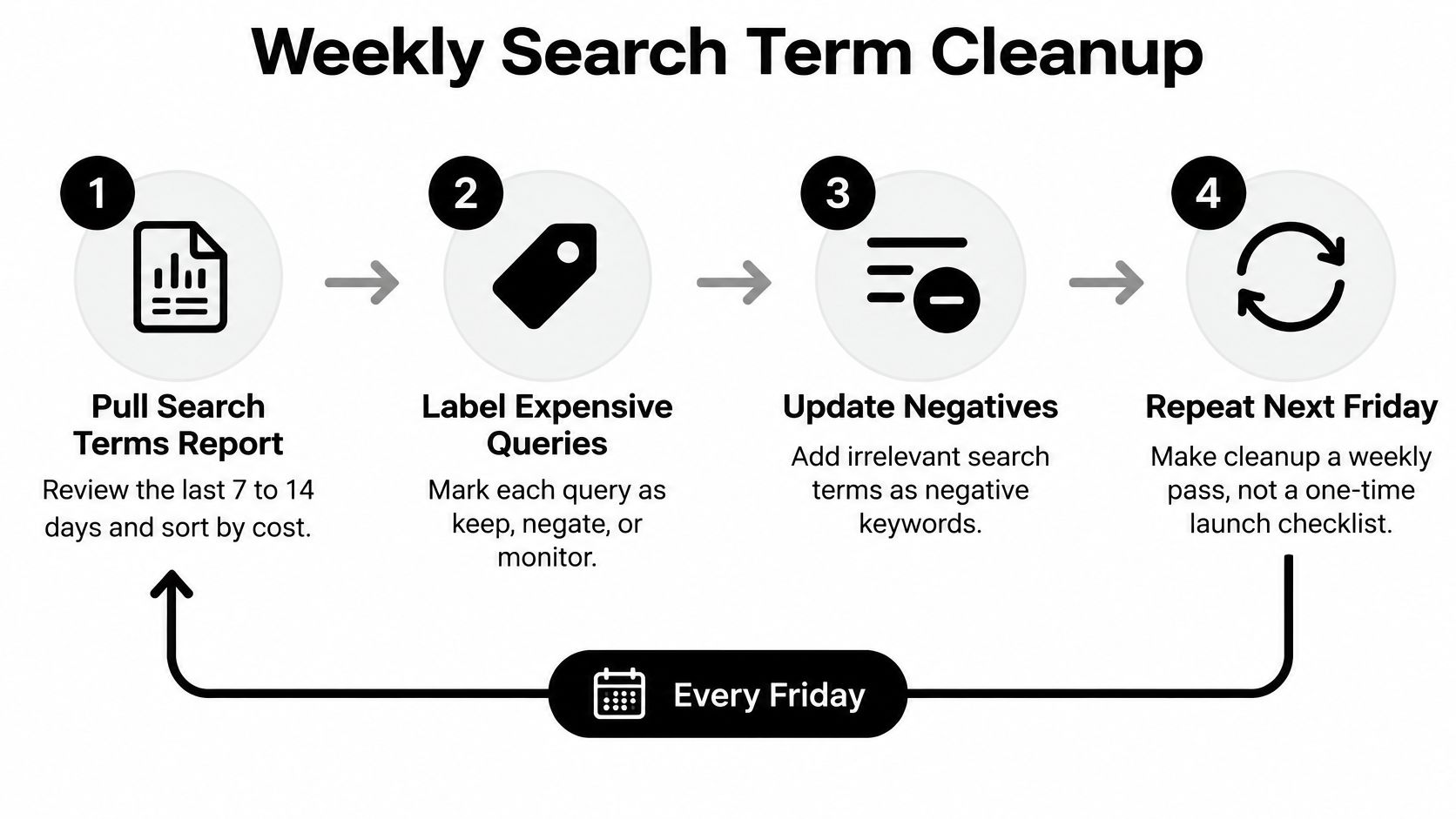
- Pull the search terms report. Use the last 7 to 14 days and sort by cost. The search terms report is the list of real queries, not the keywords you hoped would match.
- Label the expensive queries. Mark each one keep, promote, or exclude. Use intent, and check whether it reached a qualified lead, a booking, or a sale. A cheap irrelevant query can wait. An expensive one can't.
- Write the exclusion to match the evidence. One-off junk goes in as negative exact. A repeated theme becomes negative phrase only after the same idea shows up more than once. One weird search isn't a theme.
- Promote the winner. Move a converting variant into the ad group whose ad and page already match it. Don't leave a proven query inside a folder built for a different shoe.
- Read Quality Score as a clue, not a target. Google's Quality Score help scores it from 1 to 10 at the keyword level, from expected click-through rate, ad relevance, and landing-page experience. Each piece is below average, average, or above average versus other ads on those searches over the prior 90 days. It isn't an auction input. Chasing the displayed number wastes the afternoon. Fix the weak component by lining the ad and the page up with that query.
- Read impression share as coverage, not vanity. It's impressions received divided by estimated eligible impressions. Lost share from budget, on a campaign that already converts, is a money decision. Lost share from rank is a bid, ad, or page decision. Low-quality queries eating eligibility are a negative and structure decision.
When the report is longer than your Friday
Accounts with more queries than a person can format by hand still need the same decisions. Keywordme sits in that pass as one way to apply exact, phrase, or broad choices, build negative lists, and expand ad groups from real search terms in one pass, instead of copying rows between sheets. The judgment stays yours. The formatting doesn't have to.
Stop when a query has little spend and no conversion evidence. Leave it until next Friday. A negative you add out of boredom is a query you may not see again, including the one that would have paid for the week.
Keywordme is a Google Ads workspace for the weekly query pass, from cleaning junk search terms to expanding ad groups and setting exact, phrase, or broad match without a spreadsheet in the middle. If your Google Ads PPC campaign is already paying for one real conversion, the next gain is usually in the queries, not in another bid tweak. Visit Keywordme and run the next search-term cleanup inside the account instead of beside it.
.svg)